RPinney
Topic Starter
Another problem 
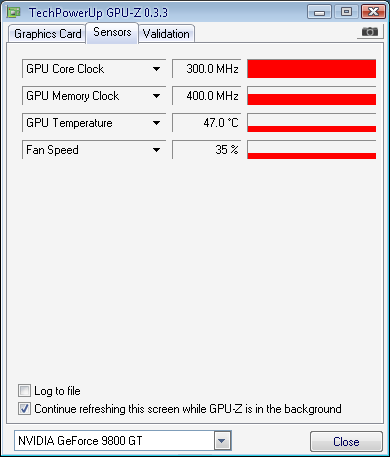
Recently I installed a brand new 9800 GT video card. Well, I thought the performance was okay, but I had expected better. So I decided to download GPU-Z to get a better look. Here's what I saw:
Click to load external image (Posted Image)
300 MHz core clock It's supposed to be 600.
1/2 the performance!!
Also, the memory clock is at 400 MHz when it's supposed to be 1800 MHz
Suggestions?
Here is the power supply:
http://www.newegg.com/Product/Product.aspx…N82E16817182150
If any other information is needed feel free to ask and I will supply.
I should note, when I installed the video card (first time installing one) it was pushed in as far as it would go, but it was not *clicked* into place. AKA it never snapped into place even though I kept jamming it in there, and since it was my first time installing one I figured I better not force it and just assumed that it wasn't supposed to click into place. After I turned on the computer and nothing showed on the screen I went back into my computer and was able to click it into place right away. It worked from then on out but I am thinking this might have had an effect on it…
I have been playing hours of gaming with so-so performance, so I assumed my improper first installation had no effect on it, but maybe that is why it is performing so poorly?
Recently I installed a brand new 9800 GT video card. Well, I thought the performance was okay, but I had expected better. So I decided to download GPU-Z to get a better look. Here's what I saw:
Click to load external image (Posted Image)
300 MHz core clock
It's supposed to be 600. 1/2 the performance!!
Also, the memory clock is at 400 MHz when it's supposed to be 1800 MHz
Suggestions?
Here is the power supply:
http://www.newegg.com/Product/Product.aspx…N82E16817182150
If any other information is needed feel free to ask and I will supply.
I should note, when I installed the video card (first time installing one) it was pushed in as far as it would go, but it was not *clicked* into place. AKA it never snapped into place even though I kept jamming it in there, and since it was my first time installing one I figured I better not force it and just assumed that it wasn't supposed to click into place. After I turned on the computer and nothing showed on the screen I went back into my computer and was able to click it into place right away. It worked from then on out but I am thinking this might have had an effect on it…
I have been playing hours of gaming with so-so performance, so I assumed my improper first installation had no effect on it, but maybe that is why it is performing so poorly?