My ie7 was slow and sluggish and someone said ie7 might have some damaged files and suggested doing a winxp repair. I tried this but after changing the boot order to the cd rom first I can't get it to boot from the cd rom.It says press any key to boot from the cd room but boots then from the hard drive. Any ideas on a slow ie7 other than repairing winxp and if not how do i get it to boot from the cd rom?I have dsl and it only got slow after a virus infection. I posted on the malware forum and did what they sais and got a clean post from them. The computer is still slower than what it was prior to the infection.
Are you using a USB keyboard ?
Thats the thing I have found give problems like that, it's because some systems don't enable USB ports until it's further into the boot cycle, try using a PS2 keyboard if possible and see if that allows you to activate booting from the optical drive.
The simple answer is if your using a USB keyboard then it would be good to try a PS2 keyboard.
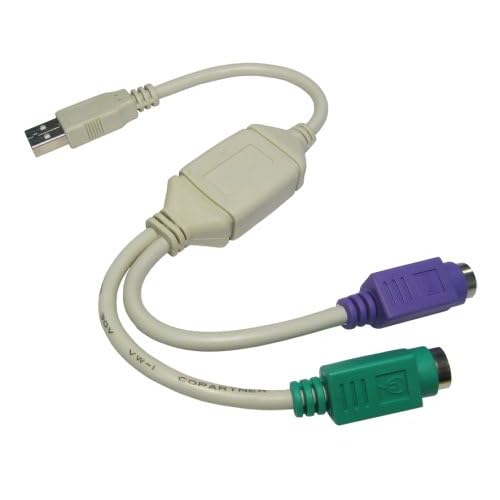
Now PS2 is purely the name given to the type of connection it uses, it is a small round plug, and it goes in the coloured sockets (green and purple) of the motherboard, as opposed to a USB port, here is a pic to help:- 🖼Click to load external image (Posted Image)
Now it may be possible there is a setting in your bios that would allow it to see a USB keyboard sooner, but that means you would need to be OK with entering the bios, if you are then post back the exact make\model board you have then I will try and find a manual for it and tell you what to check\change, but assuming you are using a USB keyboard, if you had access to a PS2 one that would be the fastest way round this, because sometimes boards just wont accept a USB keyboard until it's booted up, so it's always handy to have a cheap PS2 keyboard around for such times as this, they are dirt cheap, hope this helps a bit.
Not sure about entering the bios, I have entered set up alot of times, am usually oretty good if I've got good clear instructions. Also if I had one of those cables the colored ends plug in the back of the computer? Then youir keyboard into the other lone end or the non colored end to back of computer and keyboard into one of colored ends? I know that is probably a stupid ? but I'm not sure and then do you need a different keyboard?
The pic above was the best I could find in a hurry to show the coloured PS2 plugs, forget the rest of that arrangement, it is a PS2 to USB adaptor, so if you have the coloured plugs on the keyboard\mouse you have PS2 connections, if not they are USB, sorry if the pic confused you, but these connect on the rear of the system\board as well.
Once I can find a manual for your board I can see what the options are, and maybe suggest some to check, but I need to know the exact model of the board for this, so if you can tell me this we can go from there, but again a keyboard with the coloured PS2 plug on is the fastest resolution in my experience, bios settings often don't help, and given how cheap a basic keyboard is it's always handy as a back up keyboard for times such as this.
✨ Ask AI
AI can make mistakes. Check the cited posts. Archived advice can be out-of-date
Don't include personal information. Questions and selected public posts go to OpenAI. About Ask AI