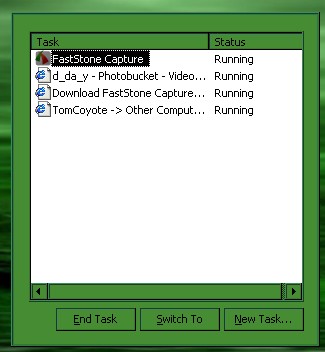
as by the title i am having some trouble with my windows task manager… it is coming up as just more or less a blank screen…. i would put a picture up but at the moment im having a hard time so i just attached it… i dont know if it will work. in the task manager it shows only the end non responsive programs screen and then it wont let me close it with out going into the task bar and closing it there….if any1 can help that would be appreciated. also if i need a hijack this log i will get hijack this and put up the long in wherever it needs to go.
thnx 4 ur help
dday(rich)
Hi,
Sorry to hear of the problem with your task manager.
To get a more usable version of Task manager try this:
1 Move your cursor to the top of the Task manager Box (the grey area immediately above where it says Task and Status)
2 If your cursor is now in the right place it will be above the "line" but still at the top of the task Manager box.
3 Now WITHOUT moving your cursor double left click.
4 If you have got this right a much more useful version will appear.
omg paws i love u soooo much ty sooo much i would have never thought of that…. and to think that it was that simple to… befor trying this i tried moving back my computer with system restore and then i thought that it was spy/malware or a virus but thnx to u i now know its not….ty so much