📎Task_Manager.JPG
Hi,
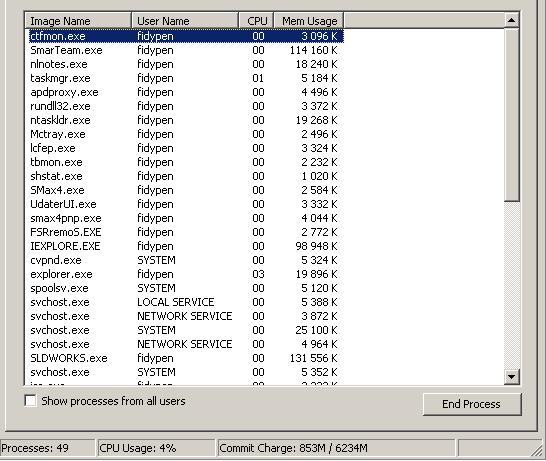
When pressing Ctrl Alt Del and selecting Task manager to view it, the full window does not appear.
The Menu selections and Tabs have dissapeared, so I am only able to view and end tasks, and not
check on my processes, performance or networking. The X to close the window has even dissapeared,
I now have to right click an Icon by my clock and say close.
Is there a way to get this back ?
Dylan…
Just for future reference, that's called the small footprint mode. All that's necessary to reset it is to double click anywhere in the gray border area. You can toggle it in or out of this mode that way.
Hmmm, that is the first thing I thought of but the screen shot looked odd to me - so I verified with a couple machines here, both XPHome and XPP, and when mine are toggled into "Tiny" (not small - ;)) Footprint mode, I don't see the Processes, CPU Usage and Commit Charge status line at the bottom, as seen in the screen shot above. That's why I suggested the Registry hack.
when mine are toggled into "Tiny" (not small - wink.gif) Footprint mode, I don't see the Processes, CPU Usage and Commit Charge status line at the bottom, as seen in the screen shot above
For what it's worth, that's my experience here with two XP Pro machines.
It would be interesting to hear if faxmymail was able to toggle from that screen as posted.
Hmmm, that is the first thing I thought of but the screen shot looked odd to me - so I verified with a couple machines here, both XPHome and XPP, and when mine are toggled into "Tiny" (not small - ;)) Footprint mode, I don't see the Processes, CPU Usage and Commit Charge status line at the bottom, as seen in the screen shot above. That's why I suggested the Registry hack.
Hi,
I did try double clicking in the gray area, but it did not seem to make a difference, and once the window was up, you could not get it down again unless you clicked the small icon next to my clock. The last time this happened to me I ended up Formatting the hard drive… Thank goodness I did not have to do that this time. Thanks for the thought though Wannabe1.
Doug the reg fix from Digerati, did return the Task manager view back to Normal, and the computer is working 100% again, check his response above.
Can anyone tell me why this might have happened ? I suspect AVG to have been the problem, and uninstalled it now.
Can anyone tell me why this might have happened ? I suspect AVG to have been the problem, and uninstalled it now.
I seriously doubt it was AVG. I use that AV program on all my systems (Pro on some, free on others) and have not had a problem with it dinking the registry. If you don't have another AV installed and running real-time, I strongly urge you to reinstall AVG now!
I am not sure there is a known single cause for this but obviously it is not uncommon or there would not be a ready fix published. Perhaps your system locked while Task Manager was open. And sadly, unless you tried it once and it worked, and tried again within minutes, it could have been days or even weeks since the problem developed.
✨ Ask AI
AI can make mistakes. Check the cited posts. Archived advice can be out-of-date
Don't include personal information. Questions and selected public posts go to OpenAI. About Ask AI
 Hi,
When pressing Ctrl Alt Del and selecting Task manager to view it, the full window does not appear.
The Menu selections and Tabs have dissapeared, so I am only able to view and end tasks, and not
check on my processes, performance or networking. The X to close the window has even dissapeared,
I now have to right click an Icon by my clock and say close.
Is there a way to get this back ?
Dylan…
Hi,
When pressing Ctrl Alt Del and selecting Task manager to view it, the full window does not appear.
The Menu selections and Tabs have dissapeared, so I am only able to view and end tasks, and not
check on my processes, performance or networking. The X to close the window has even dissapeared,
I now have to right click an Icon by my clock and say close.
Is there a way to get this back ?
Dylan…