Hi, the ESET results are just alerting to the type of applications they are (installers), not that there is anything wrong with them, so there is nothing to be concerned about there,
So, other than the concern with AVG, are there any outstanding issues?
CatByte Does that mean the machine is clean? Woohoo! thank you ever so much
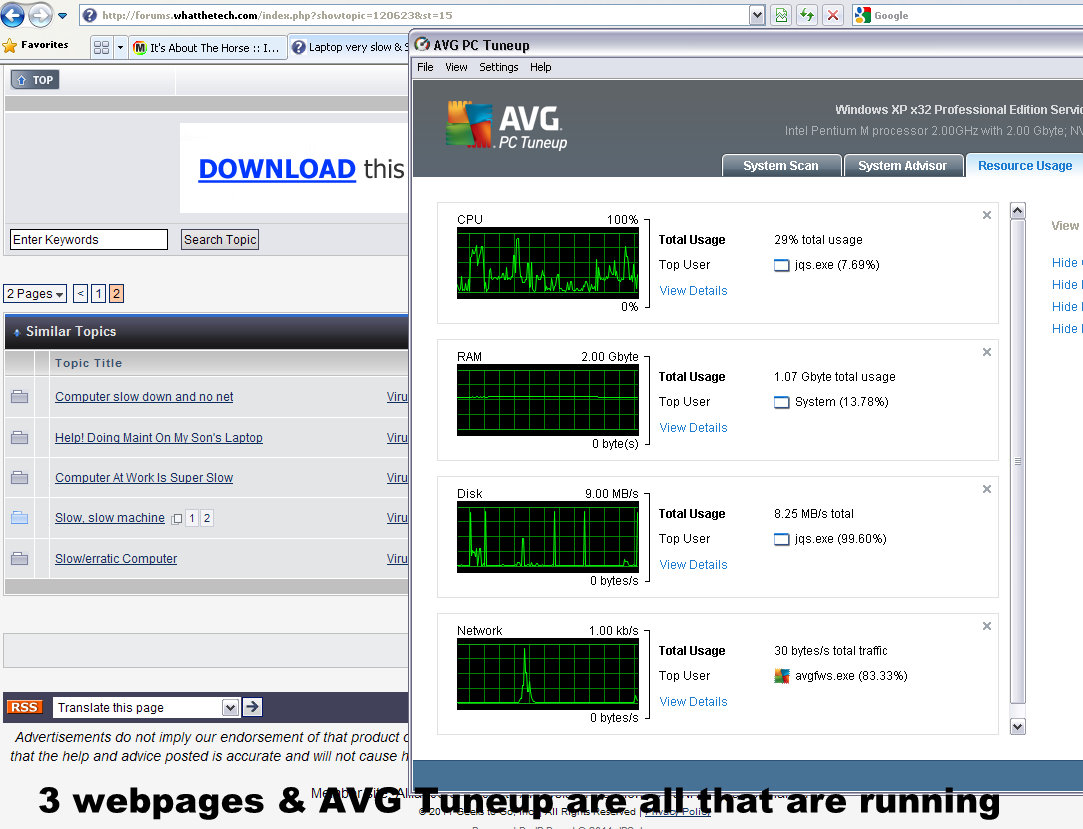
This computer is still slow as. Is this the right place to address these issues? The CPU runs at 100%with hardly anything open. I’ve attached a screen print I just took tonight with hardly anything open.
I suspect the Photoshop & Adobe Premiere Elements which seems to be a memory hog along with the AVG updating & running scans all day. Also some quicktime java (jqs.exe ) seems to spike the Disk every 16secs. I turn it off but next start-up it resumes. So when those 4 things all coincide which is fairly regularly throughout the day, there can be hangs, orphans, freezes, lost commands, a situation where one or all webpages are disconnected from the net & worst of all the Photoshop Premiere won’t work or fails to be able to find it's own files, etc.
I’ll deal with AVG in one of 2 ways either by updating to 2012 version which is supposed to be 50% lighter on resources which might alleviate those problems or by ditching it & installing something else. (The something else also has to deal just as effectively with net banking security & I need to be 100% sure about it before changing over) I know Photoshop hogs everything & am planning to uninstall & reinstall without all the features I don’t use but I’m waiting to hear back if my current unfinished project will be compromised by that procedure. If I could turn off my security software & the net while working with PS I’m sure that would help a lot.
However the general slowness is bugging me. I’m used to a fast computer. I’ve expected a lot from this unit & it has performed well so now that’s slowed down it’s hard to adapt to. Unfortunately I need quicktime & java for other things as well as the Photoshop or I would ditch it. (Somehow quicktime always seems to find it’s way back onto my computer which is a frustrating bother) But I would like to learn how to turn it off when not needed.
I remember a comment about Photoshop made by an enthusiast who said to install PS on the desk top so it gets first dibs at the resources. Is that right or did I understand incorrectly or misinterpret? I have it installed in C:\program files like everything else.
So to summarize:-
I am wondering if there is a way to allocate more oomph to Photoshop even after I streamline the installation.
I would like to learn how to turn off quicktime until I need it.
I’ll deal with AVG.
Please direct me to the right section of this forum if I need to start a new thread.
Cheers & thanks for helping with the malware thing.
Yes, your logs appear to be clean, it certainly seems as though you are having conflicts between the programs you have installed and AVG seems to be one of the main culprits.
Personally, I use Microsoft Security Essentials and have never had a problem, but that is up to you whether you keep it or not.
It will be best if you start a new topic in our software forum and let the expert techs there see if they can tweak the performance of your machine.
Link back to this topic so they can see that you are clean of malware.
in the meantime, we need to do some housekeeping to clean up our tools:
Please do the following:
You can delete the aswMBR log and program from your desktop.
NEXT
Follow these steps to uninstall Combofix
Make sure your security programs are totally disabled.
Click START then RUN
Now copy/paste Combofix /uninstall into the runbox and click OK. Note the space between the ..X and the /U, it needs to be there.
[external image: Posted Image]
NEXT
Clean up with OTL:
Double-click OTL.exe to start the program.
Close all other programs apart from OTL as this step will require a reboot
On the OTL main screen, press the CLEANUP button
Say Yes to the prompt and then allow the program to reboot your computer.
If there are any logs/tools remaining on your desktop > right click and delete them.
NEXT
Below I have included a number of recommendations for how to protect your computer against malware infections.
It is good security practice to change your passwords to all your online accounts on a fairly regular basis, this is especially true after an infection. Refer to this Microsoft article
Strong passwords: How to create and use them Then consider a password keeper, to keep all your passwords safe. KeePass is a small utility that allows you to manage all your passwords.
Keep Windows updated by regularly checking their website at :
http://windowsupdate.microsoft.com/
This will ensure your computer has always the latest security updates available installed on your computer.
Make Internet Explorer more secure
Click Start > Run
Type Inetcpl.cpl & click OK
Click on the Security tab
Click Reset all zones to default level
Make sure the Internet Zone is selected & Click Custom level
In the ActiveX section, set the first two options ("Download signed and unsigned ActiveX controls) to "Prompt", and ("Initialize and Script ActiveX controls not marked as safe") to "Disable".
Next Click OK, then Apply button and then OK to exit the Internet Properties page.
DownloadTFCto your desktop
Close any open windows.
Double click the TFC icon to run the program
TFC will close all open programs itself in order to run,
Click the Start button to begin the process.
Allow TFC to run uninterrupted.
The program should not take long to finish it's job
Once its finished it should automatically reboot your machine,
if it doesn't, manually reboot to ensure a complete clean
It's normal after running TFC cleaner that the PC will be slower to boot the first time.
WOT, Web of Trust, warns you about risky websites that try to scam visitors, deliver malware or send spam. Protect your computer against online threats by using WOT as your front-line layer of protection when browsing or searching in unfamiliar territory. WOT's color-coded icons show you ratings for 21 million websites, helping you avoid the dangerous sites:
Green to go
Yellow for caution
Red to stop
WOT has an addon available for both Firefox and IE
Keep a backup of your important files - Now, more than ever, it's especially important to protect your digital files and memories. This article is full of good information on alternatives for home backup solutions.
ERUNT (Emergency Recovery Utility NT) allows you to keep a complete backup of your registry and restore it when needed. The standard registry backup options that come with Windows back up most of the registry but not all of it. ERUNT however creates a complete backup set, including the Security hive and user related sections. ERUNT is easy to use and since it creates a full backup, there are no options or choices other than to select the location of the backup files. The backup set includes a small executable that will launch the registry restore if needed.
In light of your recent issue, I'm sure you'd like to avoid any future infections. Please take a look at this well written article: PC Safety and Security–What Do I Need?.
**Be very wary with any security software that is advertised in popups or in other ways. They are not only usually of no use, but often have malware in them.
Thank you for your patience, and performing all of the procedures requested.
Please respond one last time so we can consider the thread resolved and close it, thank-you.
I've started the housekeeping process.
CatByte can you please tell me what ‘cleanup’ exactly means with regard to the OTL.exe? I have discovered by bad experience that 'cleanup' can mean I loose all my browsing history & various other files that I find invaluable that most people don’t care about. On previous occasions I have had to pull out various things & copy them to other files so I don’t loose stuff.
What does TFC do?
Also I still have HijackThis & GMER on my desktop. Do I have to uninstall them or just delete?
Re updates, I have automatic updates set on pretty much everything.
Regarding the searchqu that got in, it actually piggy backed in on a download from CNet which amazes me really. I will tell them about it.
Hi
Yes, the clean up will remove all your browsing history (bookmark the sites you need)
the temp file cleaner, clears out all the junk from your temp folders
right click and delete HijackThis & GMER
more and more programs come with adware attached, so be extra careful not to include the sponsor program when installing
Ok that’s all done.
I have a password keeper, I checked out the Microsoft Security Essentials but there is no mention of encryption for secure online banking etc, the avg tuneup program has a temp file cleaner which I run fortnightly( I can tick all the boxes I want cleaned) I try to keep 30wks browsing history because I often have projects that take months to complete & I forget where I hunted for info(I delete those weeks of history manually once the project is done).
Also I image the whole computer ever 2mths using Gentoo onto a 2Tb exHDD. I will do it again tonight because the last 2 images will have the malware in them. I also have various programs set to create restore points so there is always at least 1 being created daily plus normal backups plus the image.
The Adobe PhotoShop forum guys suggested I use an exHDD with eSATA to hold my APS projects from now on to unburben the machine until I can update it. They have given me a list of requisites for the new PC which will happen early next year. Basically just a very beefed up version of this PC which I bought specifically for making movies etc.
So all in all things have resolved successfully. I will read a lot of the threads in the software forum & decide if I should start a new thread re the slowness & tweaking. I will link back to this thread if I do start a new one.
Thanks Catbyte for your patience & help.


 This computer is still slow as. Is this the right place to address these issues? The CPU runs at 100%with hardly anything open. I’ve attached a screen print I just took tonight with hardly anything open.
I suspect the Photoshop & Adobe Premiere Elements which seems to be a memory hog along with the AVG updating & running scans all day. Also some quicktime java (jqs.exe ) seems to spike the Disk every 16secs. I turn it off but next start-up it resumes. So when those 4 things all coincide which is fairly regularly throughout the day, there can be hangs, orphans, freezes, lost commands, a situation where one or all webpages are disconnected from the net & worst of all the Photoshop Premiere won’t work or fails to be able to find it's own files, etc.
I’ll deal with AVG in one of 2 ways either by updating to 2012 version which is supposed to be 50% lighter on resources which might alleviate those problems or by ditching it & installing something else. (The something else also has to deal just as effectively with net banking security & I need to be 100% sure about it before changing over) I know Photoshop hogs everything & am planning to uninstall & reinstall without all the features I don’t use but I’m waiting to hear back if my current unfinished project will be compromised by that procedure. If I could turn off my security software & the net while working with PS I’m sure that would help a lot.
However the general slowness is bugging me. I’m used to a fast computer. I’ve expected a lot from this unit & it has performed well so now that’s slowed down it’s hard to adapt to. Unfortunately I need quicktime & java for other things as well as the Photoshop or I would ditch it. (Somehow quicktime always seems to find it’s way back onto my computer which is a frustrating bother) But I would like to learn how to turn it off when not needed.
I remember a comment about Photoshop made by an enthusiast who said to install PS on the desk top so it gets first dibs at the resources. Is that right or did I understand incorrectly or misinterpret? I have it installed in C:\program files like everything else.
So to summarize:-
I am wondering if there is a way to allocate more oomph to Photoshop even after I streamline the installation.
I would like to learn how to turn off quicktime until I need it.
I’ll deal with AVG.
Please direct me to the right section of this forum if I need to start a new thread.
Cheers & thanks for helping with the malware thing.
This computer is still slow as. Is this the right place to address these issues? The CPU runs at 100%with hardly anything open. I’ve attached a screen print I just took tonight with hardly anything open.
I suspect the Photoshop & Adobe Premiere Elements which seems to be a memory hog along with the AVG updating & running scans all day. Also some quicktime java (jqs.exe ) seems to spike the Disk every 16secs. I turn it off but next start-up it resumes. So when those 4 things all coincide which is fairly regularly throughout the day, there can be hangs, orphans, freezes, lost commands, a situation where one or all webpages are disconnected from the net & worst of all the Photoshop Premiere won’t work or fails to be able to find it's own files, etc.
I’ll deal with AVG in one of 2 ways either by updating to 2012 version which is supposed to be 50% lighter on resources which might alleviate those problems or by ditching it & installing something else. (The something else also has to deal just as effectively with net banking security & I need to be 100% sure about it before changing over) I know Photoshop hogs everything & am planning to uninstall & reinstall without all the features I don’t use but I’m waiting to hear back if my current unfinished project will be compromised by that procedure. If I could turn off my security software & the net while working with PS I’m sure that would help a lot.
However the general slowness is bugging me. I’m used to a fast computer. I’ve expected a lot from this unit & it has performed well so now that’s slowed down it’s hard to adapt to. Unfortunately I need quicktime & java for other things as well as the Photoshop or I would ditch it. (Somehow quicktime always seems to find it’s way back onto my computer which is a frustrating bother) But I would like to learn how to turn it off when not needed.
I remember a comment about Photoshop made by an enthusiast who said to install PS on the desk top so it gets first dibs at the resources. Is that right or did I understand incorrectly or misinterpret? I have it installed in C:\program files like everything else.
So to summarize:-
I am wondering if there is a way to allocate more oomph to Photoshop even after I streamline the installation.
I would like to learn how to turn off quicktime until I need it.
I’ll deal with AVG.
Please direct me to the right section of this forum if I need to start a new thread.
Cheers & thanks for helping with the malware thing.