This is a read-only archive. No new posts or registrations. Privacy Page
Software

Help With A Laptop.

4 min read

This thread's last reply is from . Advice, software, and links below may be out of date — treat specific steps and download links with caution.

Looking for the outcome? Ask AI

Hi My Compaq V2000 will not start up properly. It turns on and says: We apologize for the inconvenience. (etc.) Then says to start in Safe mode or start normally. With either option it starts the start up process then goes to a blue screen with some codes on it. However I don't have enough time to look at them because it restarts. Then I have to redo the process and it does the same thing. Its been awhile since I was on it and can't remember what I did last. Any help appreciated.
Hi and welcome to What The Tech!

Let's see if your hard drive is dead.

First, you need to determine what brand hard drive you have. Unless you happen to know that information, the easiest way to find out is simply to look at the drive itself, and the manufacturer's name will be on a label on the top of the drive. To do this, turn off your computer, unplug it from the wall and wait an hour. Then open the case and you should have a clear view of the hard drive. The manufacturer will be either:
  • Hitachi (or IBM for older Hitachi drives
  • Maxtor
  • Samsung
  • Seagate
  • Western Digital
There are a couple of more minor manufacturers, but those are the "big-5" with over a 90% market share.

Once you know who made the drive, close the case and plug the system back into the wall.

Now, go to the manufacturer's web site. Under Downloads or Support, etc., you will find the manufacturer's hard drive diagnostics. You should find two versions, one that creates a bootable floppy, the other that creates a bootable CD. Pick one or the other, whichever is more convenient. Then create the bootable disk following the manufacturer's instructions, boot from the disk, and run the diagnostics - there are usually two of them, a Quick one and a much longer Complete one. Run the Quick one first, and if there are no errors, run the Complete one. It isn't necessary to run the Complete one if the Quick one shows errors.

Post what you discover.

If you decide to download the CD version, that will be an iso file. To burn an .iso file, you need to use something like Nero, and do an image burn. If you do a regular burn the CD won't work. Alternatively, you can grab a free .iso burner here:

http://isorecorder.alexfeinman.com/isorecorder.htm

Watch the versions, v1 is for doing the burn on an XP SP1 system, v2 for XP SP2 and SP3. After you download the file, right click on it, and choose Install from the context menu. That will install the .iso burner. You may need to reboot.

After that, navigate to the .iso file, right click on it and there will be a new context menu item called something like "Copy file to CD". Use that, and it will correctly burn the .iso file for you.

Please let us know.

Regards,
John.
Thanks for the reply. I have done what you said. The hard drive is Fujitsu. I went to there site and downloaded the windows diagnostic tool V1. However I dont know how to get the computer to recognize the disk before windows boots up. And im not sure if i burned the CD right because I couldn't get it to work like you said. I can't even find it on my computer. I managed to get to the BIOS and found a Hard Drive test there and ran it. It stopped after just a few seconds And said Test Status: #1- 07 Fail.
Hi,

The hard drive is Fujitsu.
…
And im not sure if i burned the CD right because I couldn't get it to work like you said. I can't even find it on my computer.

Just checked it out and it looks like you can just double-click on the file that you downloaded to start the diagnostics tool. Please give that a try.

It stopped after just a few seconds And said Test Status: #1- 07 Fail.

This may mean that your hard drive is failing..

Please let us know.

Regards,
John.
I'm currently on a different computer so I can't check that hard drive without the CD. I did however find out how to boot the disc drive before everything else. But that didn't work I think I burned the disc wrong.
Like I said, the file you downloaded is an executable so it should not actually be burned to a disc but just double-clicked.
Hi,

Sorry for the late reply. I must have missed the notification.

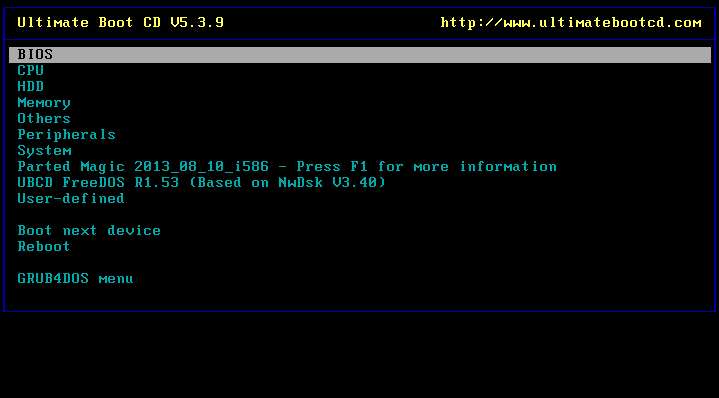
Please download Ultimate Boot CD from here:
http://www.oldergeeks.com/downloads/category.php?id=49

Then right-click on the downloaded .iso file and choose 'Copy Disk Image' to burn it to a CD with ISOrecorder.

After doing that put it in the broke computer and start it. Now you should get a screen like this:
http://www.ultimatebootcd.com/graphics/screenshot.gif

Browse to 'Hard Disk Tools' and then 'Fujistu'.

Please let me know if it finds anything.

Regards,
John.

Ask AI

AI can make mistakes. Check the cited posts. Archived advice can be out-of-date

Don't include personal information. Questions and selected public posts go to OpenAI. About Ask AI