This is a read-only archive. No new posts or registrations. Privacy Page
Spyware / Malware / Virus Removal

[Resolved] Start up programes show Bad Image warning

3 min read

This thread's last reply is from . Advice, software, and links below may be out of date — treat specific steps and download links with caution.

Looking for the outcome? Ask AI

Hi,

For 2 weeks now I have been plagued by malaware that I can't remove. On staring my Win XP PC, I get several messages relating to my start up programmes (iTunes etc.), saying that the specific exe file is a "Bad Image" with the following conclusion:

DLL C:\WINDOWS\system32\mswsock.dll is not a valid Windows image

This seemed to be triggered by a Windows update (but that may just be coincidence).

I'm running MS OneCare antivirus, which will not start, and I have no internet access. Some other programmes won't start either.

I have tried several system restores which work untill rebooted and I am back to square one. Spybot Search and Destroy, and Adaware haven't helped.

Please find my Hijack This & Malwarebytes logs below:

Logfile of HijackThis v1.99.1
Scan saved at 20:07:08, on 26/07/2008
Platform: Windows XP SP3 (WinNT 5.01.2600)
MSIE: Internet Explorer v7.00 (7.00.6000.16674)

Running processes:
C:\WINDOWS\System32\smss.exe
C:\WINDOWS\system32\winlogon.exe
C:\WINDOWS\system32\services.exe
C:\WINDOWS\system32\lsass.exe
C:\WINDOWS\system32\svchost.exe
C:\Program Files\Microsoft Windows OneCare Live\Antivirus\MsMpEng.exe
C:\WINDOWS\System32\svchost.exe
C:\Program Files\Lavasoft\Ad-Aware\aawservice.exe
C:\WINDOWS\Explorer.EXE
C:\WINDOWS\system32\spoolsv.exe
C:\windows\system\hpsysdrv.exe
C:\WINDOWS\system32\hkcmd.exe
C:\HP\KBD\KBD.EXE
C:\Program Files\ScanSoft\OmniPageSE\opware32.exe
C:\WINDOWS\ALCXMNTR.EXE
C:\WINDOWS\system32\igfxtray.exe
C:\Program Files\D-Link\DSL-200\dslstat.exe
C:\Program Files\D-Link\DSL-200\dslagent.exe
C:\WINDOWS\VM_STI.EXE
C:\Program Files\Java\jre1.6.0_05\bin\jusched.exe
C:\WINDOWS\Samsung\ComSMMgr\ssmmgr.exe
C:\Program Files\iTunes\iTunesHelper.exe
C:\Program Files\Microsoft Windows OneCare Live\winssnotify.exe
C:\Program Files\Common Files\Real\Update_OB\realsched.exe
C:\Program Files\MSN Messenger\MsnMsgr.Exe
C:\WINDOWS\system32\ctfmon.exe
C:\Program Files\Adobe\Acrobat 6.0\Distillr\acrotray.exe
C:\Program Files\Sony Handheld\USBSwt.exe
C:\Program Files\Microsoft Windows OneCare Live\OcHealthMon.exe
C:\WINDOWS\System32\svchost.exe
C:\Program Files\Microsoft Windows OneCare Live\winss.exe
C:\Program Files\iPod\bin\iPodService.exe
C:\Program Files\Hijackthis\HijackThis.exe

R0 - HKCU\Software\Microsoft\Internet Explorer\Main,Start Page = http://www.stevewhyman.com/
R1 - HKLM\Software\Microsoft\Internet Explorer\Main,Default_Page_URL = http://go.microsoft.com/fwlink/?LinkId=69157
R1 - HKLM\Software\Microsoft\Internet Explorer\Main,Default_Search_URL = http://go.microsoft.com/fwlink/?LinkId=54896
R1 - HKLM\Software\Microsoft\Internet Explorer\Main,Search Page = http://go.microsoft.com/fwlink/?LinkId=54896
R0 - HKLM\Software\Microsoft\Internet Explorer\Main,Start Page = http://go.microsoft.com/fwlink/?LinkId=69157
R1 - HKCU\Software\Microsoft\Internet Explorer\Main,Window Title = Microsoft Internet Explorer
O2 - BHO: AcroIEHlprObj Class - {06849E9F-C8D7-4D59-B87D-784B7D6BE0B3} - C:\Program Files\Adobe\Acrobat 6.0\Acrobat\ActiveX\AcroIEHelper.dll
O2 - BHO: (no name) - {53707962-6F74-2D53-2644-206D7942484F} - C:\PROGRA~1\SPYBOT~1\SDHelper.dll (file missing)
O2 - BHO: SSVHelper Class - {761497BB-D6F0-462C-B6EB-D4DAF1D92D43} - C:\Program Files\Java\jre1.6.0_05\bin\ssv.dll
O2 - BHO: (no name) - {7E853D72-626A-48EC-A868-BA8D5E23E045} - (no file)
O2 - BHO: Windows Live Sign-in Helper - {9030D464-4C02-4ABF-8ECC-5164760863C6} - C:\Program Files\Common Files\Microsoft Shared\Windows Live\WindowsLiveLogin.dll
O2 - BHO: AcroIEToolbarHelper Class - {AE7CD045-E861-484f-8273-0445EE161910} - C:\Program Files\Adobe\Acrobat 6.0\Acrobat\AcroIEFavClient.dll
O3 - Toolbar: (no name) - {0BF43445-2F28-4351-9252-17FE6E806AA0} - (no file)
O3 - Toolbar: Adobe PDF - {47833539-D0C5-4125-9FA8-0819E2EAAC93} - C:\Program Files\Adobe\Acrobat 6.0\Acrobat\AcroIEFavClient.dll
O4 - HKLM\..\Run: [hpsysdrv] c:\windows\system\hpsysdrv.exe
O4 - HKLM\..\Run: [HotKeysCmds] C:\WINDOWS\system32\hkcmd.exe
O4 - HKLM\..\Run: [KBD] C:\HP\KBD\KBD.EXE
O4 - HKLM\..\Run: [NvCplDaemon] RUNDLL32.EXE NvQTwk,NvCplDaemon initialize
O4 - HKLM\..\Run: [PS2] C:\WINDOWS\system32\ps2.exe
O4 - HKLM\..\Run: [Omnipage] C:\Program Files\ScanSoft\OmniPageSE\opware32.exe
O4 - HKLM\..\Run: [AlcxMonitor] ALCXMNTR.EXE
O4 - HKLM\..\Run: [IgfxTray] C:\WINDOWS\system32\igfxtray.exe
O4 - HKLM\..\Run: [DSLSTATEXE] C:\Program Files\D-Link\DSL-200\dslstat.exe icon
O4 - HKLM\..\Run: [DSLAGENTEXE] C:\Program Files\D-Link\DSL-200\dslagent.exe
O4 - HKLM\..\Run: [BigDogPath] C:\WINDOWS\VM_STI.EXE VIMICRO USB PC Camera
O4 - HKLM\..\Run: [SunJavaUpdateSched] "C:\Program Files\Java\jre1.6.0_05\bin\jusched.exe"
O4 - HKLM\..\Run: [Samsung Common SM] "C:\WINDOWS\Samsung\ComSMMgr\ssmmgr.exe" /autorun
O4 - HKLM\..\Run: [4oD] "C:\Program Files\Kontiki\KHost.exe" -all
O4 - HKLM\..\Run: [QuickTime Task] "C:\Program Files\QuickTime\QTTask.exe" -atboottime
O4 - HKLM\..\Run: [iTunesHelper] "C:\Program Files\iTunes\iTunesHelper.exe"
O4 - HKLM\..\Run: [OneCareUI] "C:\Program Files\Microsoft Windows OneCare Live\winssnotify.exe"
O4 - HKLM\..\Run: [TkBellExe] "C:\Program Files\Common Files\Real\Update_OB\realsched.exe" -osboot
O4 - HKCU\..\Run: [NVIEW] rundll32.exe nview.dll,nViewLoadHook
O4 - HKCU\..\Run: [MsnMsgr] "C:\Program Files\MSN Messenger\MsnMsgr.Exe" /background
O4 - HKCU\..\Run: [kdx] C:\Program Files\Kontiki\KHost.exe -all
O4 - HKCU\..\Run: [ctfmon.exe] C:\WINDOWS\system32\ctfmon.exe
O4 - Global Startup: Acrobat Assistant.lnk = C:\Program Files\Adobe\Acrobat 6.0\Distillr\acrotray.exe
O4 - Global Startup: Adobe Gamma Loader.exe.lnk = C:\Program Files\Common Files\Adobe\Calibration\Adobe Gamma Loader.exe
O4 - Global Startup: Adobe Gamma Loader.lnk = C:\Program Files\Common Files\Adobe\Calibration\Adobe Gamma Loader.exe
O4 - Global Startup: SonyPDA USB Switcher.lnk = C:\Program Files\Sony Handheld\USBSwt.exe
O6 - HKCU\Software\Policies\Microsoft\Internet Explorer\Control Panel present
O8 - Extra context menu item: E&xport to Microsoft Excel - res://C:\MSOFFICE\OFFICE11\EXCEL.EXE/3000
O9 - Extra button: (no name) - {08B0E5C0-4FCB-11CF-AAA5-00401C608501} - C:\Program Files\Java\jre1.6.0_05\bin\ssv.dll
O9 - Extra 'Tools' menuitem: Sun Java Console - {08B0E5C0-4FCB-11CF-AAA5-00401C608501} - C:\Program Files\Java\jre1.6.0_05\bin\ssv.dll
O9 - Extra button: Research - {92780B25-18CC-41C8-B9BE-3C9C571A8263} - C:\MSOFFICE\OFFICE11\REFIEBAR.DLL
O9 - Extra button: (no name) - {e2e2dd38-d088-4134-82b7-f2ba38496583} - %windir%\Network Diagnostic\xpnetdiag.exe (file missing)
O9 - Extra 'Tools' menuitem: @xpsp3res.dll,-20001 - {e2e2dd38-d088-4134-82b7-f2ba38496583} - %windir%\Network Diagnostic\xpnetdiag.exe (file missing)
O9 - Extra button: Messenger - {FB5F1910-F110-11d2-BB9E-00C04F795683} - C:\Program Files\Messenger\msmsgs.exe
O9 - Extra 'Tools' menuitem: Windows Messenger - {FB5F1910-F110-11d2-BB9E-00C04F795683} - C:\Program Files\Messenger\msmsgs.exe
O11 - Options group: [INTERNATIONAL] International*
O12 - Plugin for .spop: C:\Program Files\Internet Explorer\Plugins\NPDocBox.dll
O14 - IERESET.INF: START_PAGE_URL=http://bt.yahoo.com
O16 - DPF: {2917297F-F02B-4B9D-81DF-494B6333150B} (Minesweeper Flags Class) - http://messenger.zone.msn.com/binary/MineS…er.cab31267.cab
O16 - DPF: {6414512B-B978-451D-A0D8-FCFDF33E833C} (WUWebControl Class) - http://update.microsoft.com/windowsupdate/…b?1138655613406
O16 - DPF: {8E0D4DE5-3180-4024-A327-4DFAD1796A8D} (MessengerStatsClient Class) - http://messenger.zone.msn.com/binary/Messe…nt.cab31267.cab
O18 - Protocol: livecall - {828030A1-22C1-4009-854F-8E305202313F} - C:\PROGRA~1\MSNMES~1\MSGRAP~1.DLL
O18 - Protocol: msnim - {828030A1-22C1-4009-854F-8E305202313F} - C:\PROGRA~1\MSNMES~1\MSGRAP~1.DLL
O20 - Winlogon Notify: dimsntfy - %SystemRoot%\System32\dimsntfy.dll (file missing)
O20 - Winlogon Notify: igfxcui - C:\WINDOWS\SYSTEM32\igfxsrvc.dll
O20 - Winlogon Notify: WgaLogon - C:\WINDOWS\SYSTEM32\WgaLogon.dll
O23 - Service: Lavasoft Ad-Aware Service (aawservice) - Lavasoft - C:\Program Files\Lavasoft\Ad-Aware\aawservice.exe
O23 - Service: Apple Mobile Device - Apple, Inc. - C:\Program Files\Common Files\Apple\Mobile Device Support\bin\AppleMobileDeviceService.exe
O23 - Service: Symantec Password Validation (ccPwdSvc) - Symantec Corporation - C:\Program Files\Common Files\Symantec Shared\ccPwdSvc.exe
O23 - Service: dlcf_device - Unknown owner - C:\WINDOWS\system32\dlcfcoms.exe (file missing)
O23 - Service: Google Updater Service (gusvc) - Google - C:\Program Files\Google\Common\Google Updater\GoogleUpdaterService.exe
O23 - Service: InstallDriver Table Manager (IDriverT) - Macrovision Corporation - C:\Program Files\Common Files\InstallShield\Driver\1150\Intel 32\IDriverT.exe
O23 - Service: iPod Service - Apple Inc. - C:\Program Files\iPod\bin\iPodService.exe
O23 - Service: KService - Kontiki Inc. - C:\Program Files\Kontiki\KService.exe
O23 - Service: NVIDIA Driver Helper Service (NVSvc) - NVIDIA Corporation - C:\WINDOWS\System32\nvsvc32.exe

Malwarebytes' Anti-Malware 1.23
Database version: 985
Windows 5.1.2600 Service Pack 3

19:43:54 26/07/2008
mbam-log-7-26-2008 (19-43-54).txt

Scan type: Quick Scan
Objects scanned: 46986
Time elapsed: 12 minute(s), 45 second(s)

Memory Processes Infected: 0
Memory Modules Infected: 0
Registry Keys Infected: 1
Registry Values Infected: 0
Registry Data Items Infected: 0
Folders Infected: 0
Files Infected: 3

Memory Processes Infected:
(No malicious items detected)

Memory Modules Infected:
(No malicious items detected)

Registry Keys Infected:
HKEY_LOCAL_MACHINE\SOFTWARE\Microsoft\Software Notifier (Rogue.Multiple) -> Quarantined and deleted successfully.

Registry Values Infected:
(No malicious items detected)

Registry Data Items Infected:
(No malicious items detected)

Folders Infected:
(No malicious items detected)

Files Infected:
C:\WINDOWS\system32\blackster.scr (Trojan.Agent) -> Quarantined and deleted successfully.
C:\systemtemp.exe (Trojan.Agent) -> Quarantined and deleted successfully.
C:\winampe.exe (Trojan.Agent) -> Quarantined and deleted successfully.

_________________________________
Welcome to the Forums.

The fixes we will use are specific to your problems and should only be used for this issue on this machine.

Please only use this topic to reply to. Do not start another thread.
If any other issues arise let me know.
The process is not instant. Please continue to review my answers until I tell you your machine is clear. Absence of symptoms does not mean that everything is clear. So lets do this to the end!

  • Save and quit any work your doing before beginning the fix.
  • All hijackthis logs I ask for should be done in normal mode ( not safe mode)
  • These logs should be done last after you have followed my instructions in the previous post.
  • Do the best you can to follow my instructions in the order given


Please if you decide to seek help at another forum let us know. There is a shortage of helpers and tying 2 of us up is a waste of time.
If you have any questions about any advice given here please STOP and ask!


___________________________________
Nothing looks suspicous in your log.
But let's do a few things that need to be done for security and also look a bit deeper.


______________________________
RUN HJT

HJT
Run hijackthis and choose scan only and place a check by the following lines if present.
Close all other windows and browsers except HJT before clicking on Fix Checked

O2 - BHO: (no name) - {FDD3B846-8D59-4ffb-8758-209B6AD74ACC} - (no file)
O16 - DPF: {A7EA8AD2-287F-11D3-B120-006008C39542} (CBSTIEPrint Class) - http://offers.e-centives.com/cif/download/bin/actxcab.cab

Close that.


_________________________________________________
Please download JavaRa and unzip it to your desktop.

  • Double-click on JavaRa.exe to start the program.
  • Click on Remove Older Versions to remove the older versions of Java installed on your computer.
  • Click Yes when prompted. When JavaRa is done, a notice will appear that a logfile has been produced. Click OK.
  • A logfile will pop up. Please save it to a convenient location.

Then download and install Java Runtime Environment (JRE) 6 Update 7.


_______________________________________________
Ewido security suite is outdated by a while now.
It has been taken over by AVG anti malware.
I suggest going into add/remove programs and uninstalling it.

I would like you to install in it's place .

You do have Malwarebytes anti Malware installed. This is an excellent replacement for Ewido. :thumbup:


__________________________
Deckard's System Scanner
Download Deckard's System Scanner (DSS) to your Desktop. Note: You must be logged onto an account with administrator privileges.
  • Close all applications and windows.
  • Double-click on dss.exe to run it, and follow the prompts.
  • When the scan is complete, two text files will open - main.txt <- this one will be maximized and extra.txt<-this one will be minimized
  • Copy (Ctrl+A then Ctrl+C) and paste (Ctrl+V) the contents of main.txt and the extra.txt to your post. in your reply

__________________________


* Download FixIEDef.exe by ShadowPuterDude to your Desktop.
* Double-click FixIEDef.exe

WARNING: FixIEDef will kill all copies of Internet Explorer and Explorer that are running. The icons and Start Menu on your Desktop will not be visible while FixIEDef is running. This is necessary to remove parts of the infection that would otherwise not be removed. FixIEDef will re-start Explorer at the end of the removal process

FixIEDef will return everything to normal; when it has finished the removal process

* Click Exit once FixIEDef displays the All Finished message
* Post the log it creates back here. (You will find it on your desktop)


_______________________________________________
mswsock.dll error…

On my WIndows XP Pro system, I found a second 'backup' copy of this dll in the C:\Windows\ServicePackFiles\i386 folder.
The bad copy should be in the C:\Windows\System32 folder

. So simply rename the file in System32 to mswsock.dll.old , so it will remain in the folder but not operate.
Then copy the mswsock.dll from the i386 folder mentioned above to the C:/windows/System32 folder.
I will explain how to do this if you need help doing this.

Here's what I want you to do carefully.
Navigate to c:/windows/system32/mswsock.dll..
Right click that file and choose rename.
Rename it to mswsock.dll.old

Now navigate to
C:\Windows\ServicePackFiles\i386 folder\mswsock.dll

Right click that file and choose copy.

Now go back to the system32 folder and right click in a blank area and choose paste.

Let me know how that went


_________________________
In your next reply I would like to see:
  • The report from Deckards system scanner
  • The report from FixIEDef
Hello bob4,

Thanks for the reply. It's great to have someone on my side.

I have completed the tasks you have set with the following results.

HJT - Neither of those lines where there!

Replacing mswsock.dll file - (after a couple of reboots)This has stopped the "Bad Image" warning pop ups, but I still don't have internet connection or antivirus, and the startup programmes are notably slower.

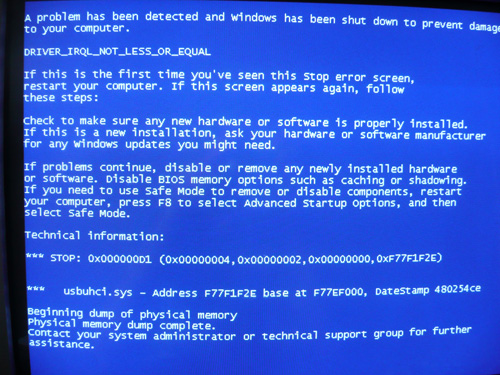
One other issue I have been having since I first posted, is a blue screen error when booting up. After a hard reset the PC boots up Ok, but I have attached an image of the error for your reference.

All logs below.

JavaRa Log:


JavaRa 1.10 Removal Log.

Report follows after line.

————————————

The JavaRa removal process was started on Tue Jul 29 21:41:52 2008

Found and removed: C:\Program Files\Java\jre1.5.0_06

Found and removed: C:\Program Files\Java\jre1.6.0_01

Found and removed: C:\Program Files\Java\jre1.6.0_02

Found and removed: C:\Program Files\Java\jre1.6.0_03

Found and removed: C:\Program Files\Common Files\Java\Update\Base Images\jre1.5.0.b64

Found and removed: SOFTWARE\Classes\JavaWebStart.isInstalled.1.5.0.0

Found and removed: SOFTWARE\JavaSoft\Java Runtime Environment\1.5

Found and removed: SOFTWARE\Microsoft\Windows\CurrentVersion\Installer\Folders\C:\Program Files\Common Files\Java\Update\Base Images\jre1.5.0.b64\

Found and removed: SOFTWARE\Microsoft\Windows\CurrentVersion\Installer\Folders\C:\Program Files\Common Files\Java\Update\Base Images\jre1.6.0.b105\patch-jre1.6.0_01.b06\

Found and removed: SOFTWARE\Microsoft\Windows\CurrentVersion\Installer\Folders\C:\Program Files\Common Files\Java\Update\Base Images\jre1.6.0.b105\patch-jre1.6.0_03.b05\

Found and removed: SOFTWARE\Microsoft\Windows\CurrentVersion\Installer\Folders\C:\Program Files\Common Files\Java\Update\Base Images\jre1.6.0.b105\patch-jre1.6.0_05.b13\

Found and removed: SOFTWARE\Microsoft\Windows\CurrentVersion\SharedDlls\C:\Program Files\Common Files\Java\Update\Base Images\jre1.5.0.b64\core1.zip

Found and removed: SOFTWARE\Microsoft\Windows\CurrentVersion\SharedDlls\C:\Program Files\Common Files\Java\Update\Base Images\jre1.5.0.b64\core2.zip

Found and removed: SOFTWARE\Microsoft\Windows\CurrentVersion\SharedDlls\C:\Program Files\Common Files\Java\Update\Base Images\jre1.5.0.b64\core3.zip

Found and removed: SOFTWARE\JavaSoft\Java Plug-in\1.6.0_01

Found and removed: SOFTWARE\JavaSoft\Java Plug-in\1.6.0_02

Found and removed: SOFTWARE\JavaSoft\Java Plug-in\1.6.0_03

Found and removed: SOFTWARE\JavaSoft\Java Plug-in\1.6.0_05

Found and removed: SOFTWARE\JavaSoft\Java Runtime Environment\1.6.0_01

Found and removed: SOFTWARE\JavaSoft\Java Runtime Environment\1.6.0_02

Found and removed: SOFTWARE\JavaSoft\Java Runtime Environment\1.6.0_03

Found and removed: SOFTWARE\JavaSoft\Java Runtime Environment\1.6.0_05

Found and removed: SOFTWARE\JavaSoft\Java Web Start\1.0.1

Found and removed: SOFTWARE\JavaSoft\Java Web Start\1.0.1_02

Found and removed: SOFTWARE\JavaSoft\Java Web Start\1.0.1_03

Found and removed: SOFTWARE\JavaSoft\Java Web Start\1.0.1_04

Found and removed: SOFTWARE\JavaSoft\Java Web Start\1.2

Found and removed: SOFTWARE\JavaSoft\Java Web Start\1.2.0_01

Found and removed: SOFTWARE\JavaSoft\Java Web Start\1.6.0_01

Found and removed: SOFTWARE\JavaSoft\Java Web Start\1.6.0_02

Found and removed: SOFTWARE\JavaSoft\Java Web Start\1.6.0_03

Found and removed: SOFTWARE\JavaSoft\Java Web Start\1.6.0_05

Found and removed: Software\JavaSoft\Java2D\1.5.0_06

Found and removed: Software\JavaSoft\Java2D\1.6.0_01

Found and removed: Software\JavaSoft\Java2D\1.6.0_02

Found and removed: Software\JavaSoft\Java2D\1.6.0_03

Found and removed: Software\JavaSoft\Java2D\1.6.0_05

Found and removed: Software\JavaSoft\Java Runtime Environment\1.6.0_01

Found and removed: Software\JavaSoft\Java Runtime Environment\1.6.0_02

Found and removed: Software\JavaSoft\Java Runtime Environment\1.6.0_03

Found and removed: Software\JavaSoft\Java Runtime Environment\1.6.0_05

Found and removed: SOFTWARE\Classes\CLSID\{CAFEEFAC-0015-0000-0006-ABCDEFFEDCBA}

Found and removed: SOFTWARE\JavaSoft\Java Plug-in\1.5.0_06

Found and removed: SOFTWARE\Classes\JavaPlugin.150_06

Found and removed: SOFTWARE\JavaSoft\Java Runtime Environment\1.5.0_06

Found and removed: SOFTWARE\Microsoft\Code Store Database\Distribution Units\{CAFEEFAC-0015-0000-0006-ABCDEFFEDCBA}

Found and removed: SOFTWARE\Microsoft\Windows\CurrentVersion\Uninstall\{3248F0A8-6813-11D6-A77B-00B0D0150060}

Found and removed: SOFTWARE\Classes\CLSID\{CAFEEFAC-0016-0000-0001-ABCDEFFEDCBA}

Found and removed: SOFTWARE\Classes\CLSID\{CAFEEFAC-0016-0000-0002-ABCDEFFEDCBA}

Found and removed: SOFTWARE\Classes\CLSID\{CAFEEFAC-0016-0000-0003-ABCDEFFEDCBA}

Found and removed: SOFTWARE\Classes\CLSID\{CAFEEFAC-0016-0000-0005-ABCDEFFEDCBA}

Found and removed: SOFTWARE\Classes\CLSID\{CAFEEFAC-0016-0000-0001-ABCDEFFEDCBB}

Found and removed: SOFTWARE\Classes\CLSID\{CAFEEFAC-0016-0000-0002-ABCDEFFEDCBB}

Found and removed: SOFTWARE\Classes\CLSID\{CAFEEFAC-0016-0000-0003-ABCDEFFEDCBB}

Found and removed: SOFTWARE\Classes\CLSID\{CAFEEFAC-0016-0000-0005-ABCDEFFEDCBB}

Found and removed: SOFTWARE\Classes\CLSID\{CAFEEFAC-0016-0000-0001-ABCDEFFEDCBC}

Found and removed: SOFTWARE\Classes\CLSID\{CAFEEFAC-0016-0000-0002-ABCDEFFEDCBC}

Found and removed: SOFTWARE\Classes\CLSID\{CAFEEFAC-0016-0000-0003-ABCDEFFEDCBC}

Found and removed: SOFTWARE\Classes\CLSID\{CAFEEFAC-0016-0000-0005-ABCDEFFEDCBC}

Found and removed: SOFTWARE\Classes\JavaPlugin.160_01

Found and removed: SOFTWARE\Classes\JavaPlugin.160_02

Found and removed: SOFTWARE\Classes\JavaPlugin.160_03

Found and removed: SOFTWARE\Classes\JavaPlugin.160_05

Found and removed: SOFTWARE\Microsoft\Code Store Database\Distribution Units\{CAFEEFAC-0016-0000-0001-ABCDEFFEDCBA}

Found and removed: SOFTWARE\Microsoft\Code Store Database\Distribution Units\{CAFEEFAC-0016-0000-0002-ABCDEFFEDCBA}

Found and removed: SOFTWARE\Microsoft\Code Store Database\Distribution Units\{CAFEEFAC-0016-0000-0003-ABCDEFFEDCBA}

Found and removed: SOFTWARE\Microsoft\Code Store Database\Distribution Units\{CAFEEFAC-0016-0000-0005-ABCDEFFEDCBA}

Found and removed: SOFTWARE\Microsoft\Windows\CurrentVersion\Uninstall\{3248F0A8-6813-11D6-A77B-00B0D0160010}

Found and removed: SOFTWARE\Microsoft\Windows\CurrentVersion\Uninstall\{3248F0A8-6813-11D6-A77B-00B0D0160020}

Found and removed: SOFTWARE\Microsoft\Windows\CurrentVersion\Uninstall\{3248F0A8-6813-11D6-A77B-00B0D0160030}

Found and removed: SOFTWARE\Microsoft\Windows\CurrentVersion\Uninstall\{3248F0A8-6813-11D6-A77B-00B0D0160050}

Found and removed: SOFTWARE\Microsoft\Windows\CurrentVersion\Installer\UserData\S-1-5-18\Products\8A0F842331866D117AB7000B0D510006

Found and removed: SOFTWARE\Microsoft\Windows\CurrentVersion\Installer\UserData\S-1-5-18\Products\8A0F842331866D117AB7000B0D610001

Found and removed: SOFTWARE\Microsoft\Windows\CurrentVersion\Installer\UserData\S-1-5-18\Products\8A0F842331866D117AB7000B0D610002

Found and removed: SOFTWARE\Microsoft\Windows\CurrentVersion\Installer\UserData\S-1-5-18\Products\8A0F842331866D117AB7000B0D610003

Found and removed: SOFTWARE\Microsoft\Windows\CurrentVersion\Installer\UserData\S-1-5-18\Products\8A0F842331866D117AB7000B0D610005

Found and removed: SOFTWARE\Classes\Installer\Products\8A0F842331866D117AB7000B0D510006

Found and removed: SOFTWARE\Classes\Installer\Products\8A0F842331866D117AB7000B0D610001

Found and removed: SOFTWARE\Classes\Installer\Products\8A0F842331866D117AB7000B0D610002

Found and removed: SOFTWARE\Classes\Installer\Products\8A0F842331866D117AB7000B0D610003

Found and removed: SOFTWARE\Classes\Installer\Products\8A0F842331866D117AB7000B0D610005

Found and removed: SOFTWARE\Microsoft\Windows\CurrentVersion\Installer\UserData\S-1-5-18\Components\23B06123E6D18D74FA6711404FCAC1B8

————————————

Finished reporting.

Deckard's Main Log

Deckard's System Scanner v20071014.68
Run by [removed] on 2008-07-29 21:59:59
Computer is in Normal Mode.
——————————————————————————–

– System Restore ————————————————————–

Successfully created a Deckard's System Scanner Restore Point.


– Last 5 Restore Point(s) –
8: 2008-07-29 21:00:08 UTC - RP605 - Deckard's System Scanner Restore Point
7: 2008-07-29 20:52:30 UTC - RP604 - Installed Java™ 6 Update 7
6: 2008-07-29 06:59:32 UTC - RP603 - System Checkpoint
5: 2008-07-26 10:50:56 UTC - RP602 - Software Distribution Service 3.0
4: 2008-07-26 09:31:53 UTC - RP601 - Installed Ad-Aware


– First Restore Point –
1: 2008-07-25 22:50:58 UTC - RP598 - Installed Ad-Aware


Backed up registry hives.
Performed disk cleanup.


– HijackThis (run as Owner.exe) ———————————————–

Unable to find log (file not found); running clone.
– HijackThis Clone ————————————————————


Emulating logfile of Trend Micro HijackThis v2.0.2
Scan saved at 2008-07-29 22:01:57
Platform: Windows XP Service Pack 3 (5.01.2600)
MSIE: Internet Explorer (7.00.6000.16674)
Boot mode: Normal

Running processes:
C:\WINDOWS\system32\smss.exe
C:\WINDOWS\system32\winlogon.exe
C:\WINDOWS\system32\services.exe
C:\WINDOWS\system32\lsass.exe
C:\WINDOWS\system32\svchost.exe
C:\Program Files\Microsoft Windows OneCare Live\Antivirus\MsMpEng.exe
C:\WINDOWS\system32\svchost.exe
C:\Program Files\Lavasoft\Ad-Aware\aawservice.exe
C:\WINDOWS\system32\spoolsv.exe
C:\Program Files\Microsoft Windows OneCare Live\OcHealthMon.exe
C:\WINDOWS\system32\svchost.exe
C:\Program Files\Microsoft Windows OneCare Live\winss.exe
C:\WINDOWS\explorer.exe
C:\WINDOWS\system\hpsysdrv.exe
C:\WINDOWS\system32\hkcmd.exe
C:\hp\KBD\kbd.exe
C:\Program Files\ScanSoft\OmniPageSE\opware32.exe
C:\WINDOWS\ALCXMNTR.EXE
C:\WINDOWS\system32\igfxtray.exe
C:\Program Files\D-Link\DSL-200\DslStat.exe
C:\Program Files\D-Link\DSL-200\dslagent.exe
C:\WINDOWS\Vm_sti.exe
C:\Program Files\Java\jre1.6.0_05\bin\jusched.exe
C:\WINDOWS\Samsung\ComSMMgr\SSMMgr.exe
C:\Program Files\iTunes\iTunesHelper.exe
C:\Program Files\Common Files\Real\Update_OB\realsched.exe
C:\Program Files\MSN Messenger\msnmsgr.exe
C:\WINDOWS\system32\ctfmon.exe
C:\Program Files\Adobe\Acrobat 6.0\Distillr\acrotray.exe
C:\Program Files\Sony Handheld\USBSwt.exe
C:\Program Files\iPod\bin\iPodService.exe
C:\WINDOWS\system32\msiexec.exe
C:\Documents and Settings\Owner\Desktop\dss.exe

R1 - HKCU\Software\Microsoft\Internet Explorer\SearchURL,(Default) = http://home.microsoft.com/access/autosearch.asp?p=%s
R1 - HKCU\Software\Microsoft\Internet Connection Wizard,ShellNext = iexplore
R1 - HKCU\Software\Microsoft\Internet Explorer\Main,Window Title = Microsoft Internet Explorer
R1 - HKLM\Software\Microsoft\Internet Explorer\Search,Default_Search_URL = http://www.microsoft.com/isapi/redir.dll?p…amp;ar=iesearch
O2 - BHO: AcroIEHlprObj Class - {06849E9F-C8D7-4D59-B87D-784B7D6BE0B3} - C:\Program Files\Adobe\Acrobat 6.0\Acrobat\ActiveX\AcroIEHelper.dll
O2 - BHO: (no name) - {53707962-6F74-2D53-2644-206D7942484F} - C:\PROGRA~1\SPYBOT~1\SDHelper.dll (file missing)
O2 - BHO: SSVHelper Class - {761497BB-D6F0-462C-B6EB-D4DAF1D92D43} - C:\Program Files\Java\jre1.6.0_07\bin\ssv.dll
O2 - BHO: (no name) - {7E853D72-626A-48EC-A868-BA8D5E23E045} - (no file)
O2 - BHO: Windows Live Sign-in Helper - {9030D464-4C02-4ABF-8ECC-5164760863C6} - C:\Program Files\Common Files\Microsoft Shared\Windows Live\WindowsLiveLogin.dll
O2 - BHO: AcroIEToolbarHelper Class - {AE7CD045-E861-484f-8273-0445EE161910} - C:\Program Files\Adobe\Acrobat 6.0\Acrobat\AcroIEFavClient.dll
O3 - Toolbar: (no name) - {0BF43445-2F28-4351-9252-17FE6E806AA0} - (no file)
O3 - Toolbar: Adobe PDF - {47833539-D0C5-4125-9FA8-0819E2EAAC93} - C:\Program Files\Adobe\Acrobat 6.0\Acrobat\AcroIEFavClient.dll
O4 - HKLM\..\Run: [hpsysdrv] c:\windows\system\hpsysdrv.exe
O4 - HKLM\..\Run: [HotKeysCmds] C:\WINDOWS\system32\hkcmd.exe
O4 - HKLM\..\Run: [KBD] C:\HP\KBD\KBD.EXE
O4 - HKLM\..\Run: [NvCplDaemon] RUNDLL32.EXE NvQTwk,NvCplDaemon initialize
O4 - HKLM\..\Run: [PS2] C:\WINDOWS\system32\ps2.exe
O4 - HKLM\..\Run: [Omnipage] C:\Program Files\ScanSoft\OmniPageSE\opware32.exe
O4 - HKLM\..\Run: [AlcxMonitor] ALCXMNTR.EXE
O4 - HKLM\..\Run: [IgfxTray] C:\WINDOWS\system32\igfxtray.exe
O4 - HKLM\..\Run: [DSLSTATEXE] C:\Program Files\D-Link\DSL-200\dslstat.exe icon
O4 - HKLM\..\Run: [DSLAGENTEXE] C:\Program Files\D-Link\DSL-200\dslagent.exe
O4 - HKLM\..\Run: [BigDogPath] C:\WINDOWS\VM_STI.EXE VIMICRO USB PC Camera
O4 - HKLM\..\Run: [SunJavaUpdateSched] "C:\Program Files\Java\jre1.6.0_07\bin\jusched.exe"
O4 - HKLM\..\Run: [Samsung Common SM] "C:\WINDOWS\Samsung\ComSMMgr\ssmmgr.exe" /autorun
O4 - HKLM\..\Run: [4oD] "C:\Program Files\Kontiki\KHost.exe" -all
O4 - HKLM\..\Run: [QuickTime Task] "C:\Program Files\QuickTime\QTTask.exe" -atboottime
O4 - HKLM\..\Run: [iTunesHelper] "C:\Program Files\iTunes\iTunesHelper.exe"
O4 - HKLM\..\Run: [OneCareUI] "C:\Program Files\Microsoft Windows OneCare Live\winssnotify.exe"
O4 - HKLM\..\Run: [TkBellExe] "C:\Program Files\Common Files\Real\Update_OB\realsched.exe" -osboot
O4 - HKLM\..\Run: [KernelFaultCheck] %systemroot%\system32\dumprep 0 -k
O4 - HKCU\..\Run: [NVIEW] rundll32.exe nview.dll,nViewLoadHook
O4 - HKCU\..\Run: [MsnMsgr] "C:\Program Files\MSN Messenger\MsnMsgr.Exe" /background
O4 - HKCU\..\Run: [kdx] C:\Program Files\Kontiki\KHost.exe -all
O4 - HKCU\..\Run: [ctfmon.exe] C:\WINDOWS\system32\ctfmon.exe
O4 - HKUS\S-1-5-19\..\Run: [CTFMON.EXE] C:\WINDOWS\System32\CTFMON.EXE (User 'LOCAL SERVICE')
O4 - HKUS\S-1-5-20\..\Run: [CTFMON.EXE] C:\WINDOWS\System32\CTFMON.EXE (User 'NETWORK SERVICE')
O4 - HKUS\S-1-5-18\..\Run: [NVIEW] rundll32.exe nview.dll,nViewLoadHook (User 'SYSTEM')
O4 - HKUS\S-1-5-18\..\Run: [Norton SystemWorks] "C:\Program Files\Norton SystemWorks\cfgwiz.exe" /GUID {05858CFD-5CC4-4ceb-AAAF-CF00BF39736A} /MODE CfgWiz (User 'SYSTEM')
O4 - HKUS\S-1-5-18\..\Run: [Picasa Media Detector] C:\Program Files\Picasa2\PicasaMediaDetector.exe (User 'SYSTEM')
O4 - HKUS\.DEFAULT\..\Run: [NVIEW] rundll32.exe nview.dll,nViewLoadHook (User 'Default user')
O4 - HKUS\.DEFAULT\..\Run: [Norton SystemWorks] "C:\Program Files\Norton SystemWorks\cfgwiz.exe" /GUID {05858CFD-5CC4-4ceb-AAAF-CF00BF39736A} /MODE CfgWiz (User 'Default user')
O4 - HKUS\.DEFAULT\..\Run: [Picasa Media Detector] C:\Program Files\Picasa2\PicasaMediaDetector.exe (User 'Default user')
O4 - Global Startup: Acrobat Assistant.lnk = C:\Program Files\Adobe\Acrobat 6.0\Distillr\acrotray.exe
O4 - Global Startup: Adobe Gamma Loader.exe.lnk = C:\Program Files\Common Files\Adobe\Calibration\Adobe Gamma Loader.exe
O4 - Global Startup: Adobe Gamma Loader.lnk = C:\Program Files\Common Files\Adobe\Calibration\Adobe Gamma Loader.exe
O4 - Global Startup: SonyPDA USB Switcher.lnk = ?
O8 - Extra context menu item: E&xport; to Microsoft Excel - res://C:\MSOFFICE\OFFICE11\EXCEL.EXE/3000
O9 - Extra button: (no name) - {08B0E5C0-4FCB-11CF-AAA5-00401C608501} - C:\Program Files\Java\jre1.6.0_07\bin\ssv.dll
O9 - Extra 'Tools' menuitem: Sun Java Console - {08B0E5C0-4FCB-11CF-AAA5-00401C608501} - C:\Program Files\Java\jre1.6.0_07\bin\ssv.dll
O9 - Extra button: Research - {92780B25-18CC-41C8-B9BE-3C9C571A8263} - (file missing)
O9 - Extra button: (no name) - {e2e2dd38-d088-4134-82b7-f2ba38496583} - C:\WINDOWS\network diagnostic\xpnetdiag.exe
O9 - Extra 'Tools' menuitem: @xpsp3res.dll,-20001 - {e2e2dd38-d088-4134-82b7-f2ba38496583} - C:\WINDOWS\network diagnostic\xpnetdiag.exe
O9 - Extra button: Messenger - {FB5F1910-F110-11d2-BB9E-00C04F795683} - C:\Program Files\Messenger\msmsgs.exe
O9 - Extra 'Tools' menuitem: Windows Messenger - {FB5F1910-F110-11d2-BB9E-00C04F795683} - C:\Program Files\Messenger\msmsgs.exe
O16 - DPF: {2917297F-F02B-4B9D-81DF-494B6333150B} (Minesweeper Flags Class) - http://messenger.zone.msn.com/binary/MineS…er.cab31267.cab
O16 - DPF: {6414512B-B978-451D-A0D8-FCFDF33E833C} (WUWebControl Class) - http://update.microsoft.com/windowsupdate/…b?1138655613406
O16 - DPF: {8E0D4DE5-3180-4024-A327-4DFAD1796A8D} (MessengerStatsClient Class) - http://messenger.zone.msn.com/binary/Messe…nt.cab31267.cab
O16 - DPF: {D27CDB6E-AE6D-11CF-96B8-444553540000} (Shockwave Flash Object) - http://download.macromedia.com/pub/shockwa…ash/swflash.cab
O18 - Protocol: livecall - {828030A1-22C1-4009-854F-8E305202313F} - C:\Program Files\MSN Messenger\msgrapp.8.1.0178.00.dll
O18 - Protocol: ms-itss - {0A9007C0-4076-11D3-8789-0000F8105754} - C:\Program Files\Common Files\Microsoft Shared\Information Retrieval\msitss.dll
O18 - Protocol: msnim - {828030A1-22C1-4009-854F-8E305202313F} - C:\Program Files\MSN Messenger\msgrapp.8.1.0178.00.dll
O18 - Protocol: mso-offdap - {3D9F03FA-7A94-11D3-BE81-0050048385D1} - C:\Program Files\Common Files\Microsoft Shared\Web Components\10\OWC10.DLL
O18 - Protocol: mso-offdap11 - {32505114-5902-49B2-880A-1F7738E5A384} - C:\Program Files\Common Files\Microsoft Shared\Web Components\11\OWC11.DLL
O18 - Filter: text/xml - {807553E5-5146-11D5-A672-00B0D022E945} - C:\Program Files\Common Files\Microsoft Shared\OFFICE11\MSOXMLMF.DLL
O23 - Service: Lavasoft Ad-Aware Service (aawservice) - Lavasoft - C:\Program Files\Lavasoft\Ad-Aware\aawservice.exe
O23 - Service: Apple Mobile Device - Apple, Inc. - C:\Program Files\Common Files\Apple\Mobile Device Support\bin\AppleMobileDeviceService.exe
O23 - Service: Symantec Password Validation (ccPwdSvc) - Symantec Corporation - C:\Program Files\Common Files\Symantec Shared\CCPWDSVC.EXE
O23 - Service: dlcf_device - Unknown owner - C:\WINDOWS\system32\dlcfcoms.exe -service
O23 - Service: Google Updater Service (gusvc) - Google - C:\Program Files\Google\Common\Google Updater\GoogleUpdaterService.exe
O23 - Service: InstallDriver Table Manager (IDriverT) - Macrovision Corporation - C:\Program Files\Common Files\InstallShield\Driver\1150\Intel 32\IDriverT.exe
O23 - Service: iPod Service - Apple Inc. - C:\Program Files\iPod\bin\iPodService.exe
O23 - Service: KService - Kontiki Inc. - C:\Program Files\Kontiki\KService.exe
O23 - Service: NVIDIA Driver Helper Service (NVSvc) - NVIDIA Corporation - C:\WINDOWS\system32\nvsvc32.exe


–
End of file - 9504 bytes

– File Associations ———————————————————–

.bat - ZebSpeech.exe - DefaultIcon - C:\Program Files\ZebSpeech 2.0.0\ZebSpeechIcon.ico,0
.bat - ZebSpeech.exe - shell\open\command - "C:\Program Files\ZebSpeech 2.0.0\\\\\\\ZebSpeech.exe" %1
.bat - ZebSpeech.exe - shell\edit\command - unable to read value
.cpl - cplfile - shell\cplopen\command - rundll32.exe shell32.dll,Control_RunDLL "%1",%*
.cpl - cplfile - shell\runas\command - rundll32.exe shell32.dll,Control_RunDLLAsUser "%1",%*
.ini - ZebSpeech.exe - DefaultIcon - C:\Program Files\ZebSpeech 2.0.0\ZebSpeechIcon.ico,0
.ini - ZebSpeech.exe - shell\open\command - "C:\Program Files\ZebSpeech 2.0.0\\\\\\\ZebSpeech.exe" %1
.reg - regfile - shell\open\command - regedit.exe "%1" %*
.scr - scrfile - shell\open\command - "%1" %*
.txt - ZebSpeech.exe - DefaultIcon - C:\Program Files\ZebSpeech 2.0.0\ZebSpeechIcon.ico,0
.txt - ZebSpeech.exe - shell\open\command - "C:\Program Files\ZebSpeech 2.0.0\\\\\\\ZebSpeech.exe" %1


– Drivers: 0-Boot, 1-System, 2-Auto, 3-Demand, 4-Disabled ———————

R1 crlscsi - c:\windows\system32\drivers\crlscsi.sys

Attachments:

______________________________
RUN HJT

HJT
Run hijackthis and choose scan only and place a check by the following lines if present.
Close all other windows and browsers except HJT before clicking on Fix Checked


O2 - BHO: (no name) - {7E853D72-626A-48EC-A868-BA8D5E23E045} - (no file)
O3 - Toolbar: (no name) - {0BF43445-2F28-4351-9252-17FE6E806AA0} - (no file)
O4 - HKLM\..\Run: [AlcxMonitor] ALCXMNTR.EXE


_________________________________
Click start > Run > in the empty edit box copy&paste this line :

"%userprofile%\desktop\dss.exe" /daft

Read the disclaimer and click OK.
  • Click on the Scan button.
  • Place a checkmark next to the following entries in case they appear:

.bat
.cmd
.inf
.ini
.reg
.txt
.vbs
  • Click the Fix button.
  • Re-scan and save a logfile. By default, it will save as daft.txt
  • I'll need that log later.
If everything is ok again, it should display the "all associations ok message"

Post back with the contents of daft.txt.

Close that.


______________________________


Ok now lets try getting your internet back up.


I don't know what you've tried so far but let's start at the begining.
If any of these works along the way stop there.

Right click my computer and choose:

properties/hardware\device manager /

Look under network adaptors/modems depending on your connection.
double click that connection and make sure it says it's working.
If theres a yellow exclamation point by either of them the drivers may need replacing..
Let me know.


___________________________________

open control panel /network connections.
Right click the connection you use and choose repair.

Let me know .


_____________________________
downloadWinsockfix from here

http://www.softpedia.com/get/Tweak/Network…inSockFix.shtml

Close every other program, then open winsockxpfix and click reg backup. Save the reg backup somewhere.

Once that is done, click the fix button of winsockxpfix


Tell me if this helps.


________________________________

If all else fails :

Please download this network troubleshooting tool from

http://castlecops.com/downloads-file-472.html

Then you need to extract the file, and double click on the mynetwork.exe file.
A black dos box will open up. Do not close this. Type in 'n' if it asks you if you want to include the dns cache.
Click 'y' if it asks if you want to open this with notepad. A notepad window should now open. Paste the contents of the notepad file here.

_________________________
In your next reply I would like to see:
  • A new HJT log
  • Network troubleshooting tool if you had to use it.
  • If we still do not have internet connection what was the last thing you did just before you lost connection?
  • Post back with the contents of daft.txt.
Ok, so here we go….

HJT - All three items fixed.

Daft - Didn't get the all associations OK message (see log below)

DAFT Log saved on 2008-07-30 22:27:07
———————————————————————–
.cpl - cplfile - shell\cplopen\command - rundll32.exe shell32.dll,Control_RunDLL "%1",%*
.cpl - cplfile - shell\runas\command - rundll32.exe shell32.dll,Control_RunDLLAsUser "%1",%*
.scr - scrfile - shell\open\command - "%1" %*

Internet[/b

I am using a wireless connection to a ADSL modem router. The offending PC has both a USB device and a PCi wireless card (USB is a stronger signal). Both will show as connected when he machine is rebooted, but when I choose to repair them I get the error "The following action cannot be completed - Connection to the wireless network".

I am connected to the same router with the laptop I'm using to make this post.

Winsockfix didn't have any impact on the problem.

I'm not sure that the "My Network Info" scan worked (see log below)

The PC was working fine until I let MS OneCare perform a windows update! I questioned this with the OneCare Support, but they only suggested that I look at their forum. I couldn't find anything relating to this specific error message that worked for me.

My Network Info


Windows IP Configuration

An internal error occurred: The request is not supported.


Please contact Microsoft Product Support Services for further help.


Additional information: Unable to query host name.

No ARP Entries Found

Route Table

Active Connections

Proto Local Address Foreign Address State PID

Active Connections

Proto Local Address Foreign Address State

Active Connections

Proto Local Address Foreign Address State PID
Interface Statistics

Received Sent

Bytes 0 0
Unicast packets 0 0
Non-unicast packets 0 0
Discards 0 0
Errors 0 0
Unknown protocols 0

IPv4 Statistics

Packets Received = 0
Received Header Errors = 0
Received Address Errors = 0
Datagrams Forwarded = 0
Unknown Protocols Received = 0
Received Packets Discarded = 0
Received Packets Delivered = 0
Output Requests = 0
Routing Discards = 0
Discarded Output Packets = 0
Output Packet No Route = 0
Reassembly Required = 0
Reassembly Successful = 0
Reassembly Failures = 0
Datagrams Successfully Fragmented = 0
Datagrams Failing Fragmentation = 0
Fragments Created = 0

ICMPv4 Statistics

Received Sent
Messages 0 0
Errors 0 0
Destination Unreachable 0 0
Time Exceeded 0 0
Parameter Problems 0 0
Source Quenches 0 0
Redirects 0 0
Echos 0 0
Echo Replies 0 0
Timestamps 0 0
Timestamp Replies 0 0
Address Masks 0 0
Address Mask Replies 0 0


HiJack This Log


Logfile of HijackThis v1.99.1
Scan saved at 23:20:34, on 30/07/2008
Platform: Windows XP SP3 (WinNT 5.01.2600)
MSIE: Internet Explorer v7.00 (7.00.6000.16674)

Running processes:
C:\WINDOWS\System32\smss.exe
C:\WINDOWS\system32\winlogon.exe
C:\WINDOWS\system32\services.exe
C:\WINDOWS\system32\lsass.exe
C:\WINDOWS\system32\svchost.exe
C:\Program Files\Microsoft Windows OneCare Live\Antivirus\MsMpEng.exe
C:\WINDOWS\System32\svchost.exe
C:\Program Files\Lavasoft\Ad-Aware\aawservice.exe
C:\WINDOWS\system32\spoolsv.exe
C:\WINDOWS\Explorer.EXE
C:\windows\system\hpsysdrv.exe
C:\Program Files\Microsoft Windows OneCare Live\OcHealthMon.exe
C:\WINDOWS\System32\svchost.exe
C:\Program Files\Microsoft Windows OneCare Live\winss.exe
C:\WINDOWS\system32\hkcmd.exe
C:\HP\KBD\KBD.EXE
C:\Program Files\ScanSoft\OmniPageSE\opware32.exe
C:\WINDOWS\system32\igfxtray.exe
C:\Program Files\D-Link\DSL-200\dslstat.exe
C:\Program Files\D-Link\DSL-200\dslagent.exe
C:\WINDOWS\VM_STI.EXE
C:\Program Files\Java\jre1.6.0_07\bin\jusched.exe
C:\WINDOWS\Samsung\ComSMMgr\ssmmgr.exe
C:\Program Files\iTunes\iTunesHelper.exe
C:\Program Files\Common Files\Real\Update_OB\realsched.exe
C:\Program Files\MSN Messenger\MsnMsgr.Exe
C:\WINDOWS\system32\ctfmon.exe
C:\Program Files\Adobe\Acrobat 6.0\Distillr\acrotray.exe
C:\Program Files\Sony Handheld\USBSwt.exe
C:\Program Files\iPod\bin\iPodService.exe
C:\Program Files\Hijackthis\HijackThis.exe

R1 - HKCU\Software\Microsoft\Internet Explorer\Main,Window Title = Microsoft Internet Explorer
O2 - BHO: AcroIEHlprObj Class - {06849E9F-C8D7-4D59-B87D-784B7D6BE0B3} - C:\Program Files\Adobe\Acrobat 6.0\Acrobat\ActiveX\AcroIEHelper.dll
O2 - BHO: (no name) - {53707962-6F74-2D53-2644-206D7942484F} - C:\PROGRA~1\SPYBOT~1\SDHelper.dll (file missing)
O2 - BHO: SSVHelper Class - {761497BB-D6F0-462C-B6EB-D4DAF1D92D43} - C:\Program Files\Java\jre1.6.0_07\bin\ssv.dll
O2 - BHO: Windows Live Sign-in Helper - {9030D464-4C02-4ABF-8ECC-5164760863C6} - C:\Program Files\Common Files\Microsoft Shared\Windows Live\WindowsLiveLogin.dll
O2 - BHO: AcroIEToolbarHelper Class - {AE7CD045-E861-484f-8273-0445EE161910} - C:\Program Files\Adobe\Acrobat 6.0\Acrobat\AcroIEFavClient.dll
O3 - Toolbar: Adobe PDF - {47833539-D0C5-4125-9FA8-0819E2EAAC93} - C:\Program Files\Adobe\Acrobat 6.0\Acrobat\AcroIEFavClient.dll
O4 - HKLM\..\Run: [hpsysdrv] c:\windows\system\hpsysdrv.exe
O4 - HKLM\..\Run: [HotKeysCmds] C:\WINDOWS\system32\hkcmd.exe
O4 - HKLM\..\Run: [KBD] C:\HP\KBD\KBD.EXE
O4 - HKLM\..\Run: [NvCplDaemon] RUNDLL32.EXE NvQTwk,NvCplDaemon initialize
O4 - HKLM\..\Run: [PS2] C:\WINDOWS\system32\ps2.exe
O4 - HKLM\..\Run: [Omnipage] C:\Program Files\ScanSoft\OmniPageSE\opware32.exe
O4 - HKLM\..\Run: [IgfxTray] C:\WINDOWS\system32\igfxtray.exe
O4 - HKLM\..\Run: [DSLSTATEXE] C:\Program Files\D-Link\DSL-200\dslstat.exe icon
O4 - HKLM\..\Run: [DSLAGENTEXE] C:\Program Files\D-Link\DSL-200\dslagent.exe
O4 - HKLM\..\Run: [BigDogPath] C:\WINDOWS\VM_STI.EXE VIMICRO USB PC Camera
O4 - HKLM\..\Run: [SunJavaUpdateSched] "C:\Program Files\Java\jre1.6.0_07\bin\jusched.exe"
O4 - HKLM\..\Run: [Samsung Common SM] "C:\WINDOWS\Samsung\ComSMMgr\ssmmgr.exe" /autorun
O4 - HKLM\..\Run: [4oD] "C:\Program Files\Kontiki\KHost.exe" -all
O4 - HKLM\..\Run: [QuickTime Task] "C:\Program Files\QuickTime\QTTask.exe" -atboottime
O4 - HKLM\..\Run: [iTunesHelper] "C:\Program Files\iTunes\iTunesHelper.exe"
O4 - HKLM\..\Run: [OneCareUI] "C:\Program Files\Microsoft Windows OneCare Live\winssnotify.exe"
O4 - HKLM\..\Run: [TkBellExe] "C:\Program Files\Common Files\Real\Update_OB\realsched.exe" -osboot
O4 - HKCU\..\Run: [NVIEW] rundll32.exe nview.dll,nViewLoadHook
O4 - HKCU\..\Run: [MsnMsgr] "C:\Program Files\MSN Messenger\MsnMsgr.Exe" /background
O4 - HKCU\..\Run: [kdx] C:\Program Files\Kontiki\KHost.exe -all
O4 - HKCU\..\Run: [ctfmon.exe] C:\WINDOWS\system32\ctfmon.exe
O4 - Global Startup: Acrobat Assistant.lnk = C:\Program Files\Adobe\Acrobat 6.0\Distillr\acrotray.exe
O4 - Global Startup: Adobe Gamma Loader.exe.lnk = C:\Program Files\Common Files\Adobe\Calibration\Adobe Gamma Loader.exe
O4 - Global Startup: Adobe Gamma Loader.lnk = C:\Program Files\Common Files\Adobe\Calibration\Adobe Gamma Loader.exe
O4 - Global Startup: SonyPDA USB Switcher.lnk = C:\Program Files\Sony Handheld\USBSwt.exe
O6 - HKCU\Software\Policies\Microsoft\Internet Explorer\Control Panel present
O8 - Extra context menu item: E&xport to Microsoft Excel - res://C:\MSOFFICE\OFFICE11\EXCEL.EXE/3000
O9 - Extra button: (no name) - {08B0E5C0-4FCB-11CF-AAA5-00401C608501} - C:\Program Files\Java\jre1.6.0_07\bin\ssv.dll
O9 - Extra 'Tools' menuitem: Sun Java Console - {08B0E5C0-4FCB-11CF-AAA5-00401C608501} - C:\Program Files\Java\jre1.6.0_07\bin\ssv.dll
O9 - Extra button: Research - {92780B25-18CC-41C8-B9BE-3C9C571A8263} - C:\MSOFFICE\OFFICE11\REFIEBAR.DLL
O9 - Extra button: (no name) - {e2e2dd38-d088-4134-82b7-f2ba38496583} - %windir%\Network Diagnostic\xpnetdiag.exe (file missing)
O9 - Extra 'Tools' menuitem: @xpsp3res.dll,-20001 - {e2e2dd38-d088-4134-82b7-f2ba38496583} - %windir%\Network Diagnostic\xpnetdiag.exe (file missing)
O9 - Extra button: Messenger - {FB5F1910-F110-11d2-BB9E-00C04F795683} - C:\Program Files\Messenger\msmsgs.exe
O9 - Extra 'Tools' menuitem: Windows Messenger - {FB5F1910-F110-11d2-BB9E-00C04F795683} - C:\Program Files\Messenger\msmsgs.exe
O11 - Options group: [INTERNATIONAL] International*
O12 - Plugin for .spop: C:\Program Files\Internet Explorer\Plugins\NPDocBox.dll
O14 - IERESET.INF: START_PAGE_URL=http://bt.yahoo.com
O16 - DPF: {2917297F-F02B-4B9D-81DF-494B6333150B} (Minesweeper Flags Class) - http://messenger.zone.msn.com/binary/MineS…er.cab31267.cab
O16 - DPF: {6414512B-B978-451D-A0D8-FCFDF33E833C} (WUWebControl Class) - http://update.microsoft.com/windowsupdate/…b?1138655613406
O16 - DPF: {8E0D4DE5-3180-4024-A327-4DFAD1796A8D} (MessengerStatsClient Class) - http://messenger.zone.msn.com/binary/Messe…nt.cab31267.cab
O18 - Protocol: livecall - {828030A1-22C1-4009-854F-8E305202313F} - C:\PROGRA~1\MSNMES~1\MSGRAP~1.DLL
O18 - Protocol: msnim - {828030A1-22C1-4009-854F-8E305202313F} - C:\PROGRA~1\MSNMES~1\MSGRAP~1.DLL
O20 - Winlogon Notify: dimsntfy - %SystemRoot%\System32\dimsntfy.dll (file missing)
O20 - Winlogon Notify: igfxcui - C:\WINDOWS\SYSTEM32\igfxsrvc.dll
O20 - Winlogon Notify: WgaLogon - C:\WINDOWS\SYSTEM32\WgaLogon.dll
O23 - Service: Lavasoft Ad-Aware Service (aawservice) - Lavasoft - C:\Program Files\Lavasoft\Ad-Aware\aawservice.exe
O23 - Service: Apple Mobile Device - Apple, Inc. - C:\Program Files\Common Files\Apple\Mobile Device Support\bin\AppleMobileDeviceService.exe
O23 - Service: Symantec Password Validation (ccPwdSvc) - Symantec Corporation - C:\Program Files\Common Files\Symantec Shared\ccPwdSvc.exe
O23 - Service: dlcf_device - Unknown owner - C:\WINDOWS\system32\dlcfcoms.exe (file missing)
O23 - Service: Google Updater Service (gusvc) - Google - C:\Program Files\Google\Common\Google Updater\GoogleUpdaterService.exe
O23 - Service: InstallDriver Table Manager (IDriverT) - Macrovision Corporation - C:\Program Files\Common Files\InstallShield\Driver\1150\Intel 32\IDriverT.exe
O23 - Service: iPod Service - Apple Inc. - C:\Program Files\iPod\bin\iPodService.exe
O23 - Service: KService - Kontiki Inc. - C:\Program Files\Kontiki\KService.exe
O23 - Service: NVIDIA Driver Helper Service (NVSvc) - NVIDIA Corporation - C:\WINDOWS\System32\nvsvc32.exe
Let's do the Daft scan again.

Click start > Run > in the empty edit box copy&paste this line :

"%userprofile%\desktop\dss.exe" /daft

Read the disclaimer and click OK.
  • Click on the Scan button.
  • Place a checkmark next to the following entries in case they appear:

.scr
.cpl
  • Click the Fix button.
  • Re-scan and save a logfile. By default, it will save as daft.txt
  • I'll need that log later.
If everything is ok again, it should display the "all associations ok message"

Post back with the contents of daft.txt.


___________________________________________


I am not very Familiar with Windows live one Care.
Let me do some research for a bit and see if I can come up with an answer for you.
I will post back as soon as I have an answer for you.


_____________________________________–
Please post back the Daft .txt file for me.
Seeings One care is giving you some issues, Disable the firewall and see if you can connect to the internet. You can disable the firewall like this: 1. Open Windows OneCare by double-clicking its icon in the notification area of the taskbar. 2. On the left side of the window, under Other Tasks, click View or Change Settings 3. In the Windows Live OneCare Settings dialog box, click the Firewall tab. 4. Move the Security Level slider all the way down to the Off position. 5. Click Apply Try connecting to the internet. Let me know.
Hi Bob4, My apologies for the late reply. I have been a away for few days. DAFT Log saved on 2008-08-04 20:28:40 ———————————————————————– All associations okay! No improvements noted by me! Just as from the start Live OneCare won't start up. If I go to control panel / Windows Fire Wall I get the error: "Windows Firewall settings cannot be displayed because the associated services is not running. Do you want to start the Windows Firewall/Internet Connection Sharing (ICS) service?" after selecting "Yes" "Windows cannot start the windows Firewall/Internet Connection Sharing (ICS) service." Security Center reports Firewall, Auto updates, and Virus protection are "on". Any help?
Let's see if this will get windows live Once care up and running.


1. Click Start, >> Run,

type in cmd, and then press ENTER.

Type the following commands in the order presented, and then press ENTER after each command:
net stop onecaremp

net start onecaremp

exit


2. See if you can start the program now and connect to the net.


________________________________
If not I would recommend uninstalling it for now anyway until we can get this machine back on the net. This will /should rule out any issues it's having.
To uninstall go to add/remove programs and uninstall Windows live One care from there.

If this does not work, you can use the Windows Live OneCare Uninstaller OneCare Cleanup instead.

Once this is done check to see if you can connect to the internet. If so we need to get an anti virus back on this machine right away.

You can try windows live Once care again if you wish. :pullhair:
If you would rather I will post a couple of good free antivirus programs and firewalls both.
Just choose 1 of each.

Anti Virus Programs

Avast

Avira AntiVir Personal Edition Classic


____________________________
Never run 2 firewalls together. They will interfere with each other.
So just download and install one!

Firewalls
Comodo If choosing this one be sure to UNCHECK install ask tool bar during installation,

Sunbelt Personal Firewall

Online armor Firewall


__________________________________________


Let me know how your getting on.
OK, so I have -

  • Stopped and started OneCare using the command prompt
  • Uninstalled OneCare
  • Used the uninstall tool
  • Tried to repair wireless nework connection

The only change is that the PC boots up a little quicker, but I guess that's because OneCare is removed from the startups.

Thanks again with your help (and patience) on this one. I would have given up on this a week ago without you :smack: .
Hello again Hoffer,
Have you tried a wired connection to this computer to rule out a wireless problem with either the router of the computer itself ?
Certainly worth a try.
At this point I want to clean up what we have done and I will send you to another forum here where someone much better at networking will help you. Please mention this thread and that we cleared you of malware. The link will be on the bottom of this thread.


Great news ! [external image: Posted Image]

Your log now appears to be clean.

Lets do a few things to tidy up.
Please do these in the order I suggest!


___________________________________
Delete the follwing files.

Iedfix.exe

Dekards system scanner.

JavaRA.zip


______________________________

Download and install CCleaner from here


If you use either the Firefox or Mozilla browsers, the box to uncheck for Cookies is on the Applications tab, under Firefox/Mozilla.

  • Set Cookie Retention.
  • Click on the Options block on the left, then choose Cookies.
    Under the Cookies to delete pane, highlight any cookies you would like to retain permanently (those companies or sites with which you regularly visit or do business), and click the right arrow > to move them to the Cookies to keep pane.

  • Reset Temp File Removal for Regular Use.
  • Click on the Options block on the left. Select the Advanced button.
    Check "Only delete files in Windows Temp folders older than 48 hours".


    Now run the program and click on Run Cleaner
    ( Do not use the Registry function to clean anything with this program. Having anything auto clean your regisrty is risky).


    ___________________________________
    Please create a 'clean' System Restore Point:
    The reason for doing this is in case you need system restore you don't put back all we just took out.
    Right click My Computer
    Then Propeties then system restore
    Place a check mark by turn off system restore
    Click APPLY
    Windows will give you a warning click yes
    REBOOT

    Now go right back to the same place and unchecksystem restore
    Click APPLYand OK


    A few things to help with possible threats

    These are optional . But will help protect you further.
    ___________________________________

    SpywareBlaster

    Install SpywareBlaster

    SpywareBlaster will add a large list of programs and sites to your Internet Explorer settings that will protect you from accidentally running or downloading known malicious programs.
    After the installation, click Download Latest Protection Updates. When it finishes, click Enable All Protection.


    ______________________________
    SiteHound

    http://www.firetrust.com/firetrustsitehound.html

    This tool bar will help protect you from.

    Over 4,000 fake bank and credit sites.
    Tens of thousands of pornographic
    and adult sites.
    The never ending fake phishing sites.
    Malicious sites, which can infect you
    with spyware and adware if you visit
    them.
    Sites to download software which
    may infect your computer with
    spyware, a virus or adware


    ___________________________________
    Download and Install a HOSTS File
    A Hosts file is a plain text file which prevents your computer from connecting to malware and spyware sites by redirecting the connection request to 127.0.0.1, which is your local address. If you use a proxy server, or if you are on AOL, be sure to read the special instructions.
    You can download the MVPS Hosts File and see a HOSTS file tutorial here :
    This website also contains useful tips, and links to other resources and utilities.


    ___________________________________
    Make your Internet Explorer more secure
    1. From within Internet Explorer click on the Tools menu and then click on Options.
    2. Click on the Security tab
    3. Click the Internet icon so it becomes highlighted.
    4. Click on Default Level and click Ok
    5. Click on the Custom Level button.

    Change the Download signed ActiveX controls to Prompt
    Change the Download unsigned ActiveX controls to Disable
    Change the Initialise and script ActiveX controls not marked as safe to Disable
    Change the Installation of desktop items to Prompt
    Change the Launching programs and files in an IFRAME to Prompt
    Change the Navigate sub-frames across different domains to Prompt

    When all these settings have been made, click on the OK button.
    If it prompts you as to whether or not you want to save the settings, press the Yes button.

    6. Next press the Apply button and then the OK to exit the Internet Properties page.


    Here's a site with great advise on how to AVOID malware. Much easier to do than removing it.


    ___________________________________

    http://forums.whatthetech.com/Networking_f128.html << Networking forums.


    Safe and Happy Surfing. :)
Since this issue appears to be resolved … this Topic has been closed. Glad we could be of assistance. If you're the topic starter, and need this topic reopened, please contact a staff member with the address of the thread. Everyone else please begin a New Topic.

Ask AI

AI can make mistakes. Check the cited posts. Archived advice can be out-of-date

Don't include personal information. Questions and selected public posts go to OpenAI. About Ask AI