1. Do I make a rescue disk every time I back up
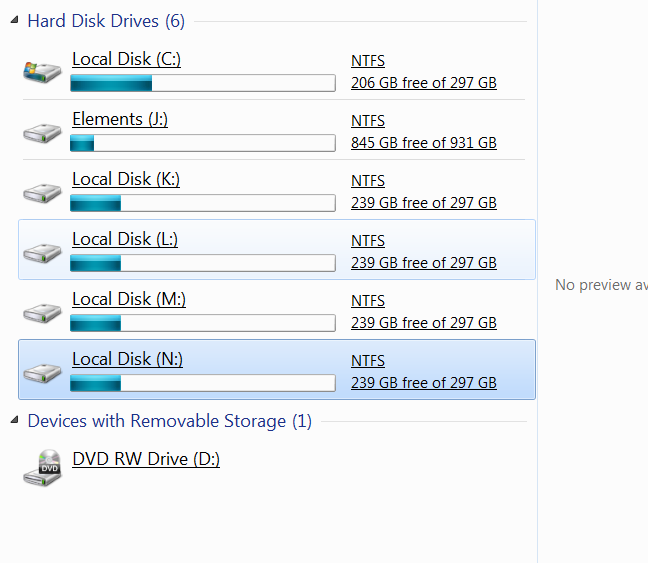
2. I have many drives on this computer when I actually only have 2📎hard_drives.PNG
3. Are you supposed to empty the trash? Because I thought I remember Lee saying if you need it, it is always in the trash.
4. How come when I try to open files in the J drive many of them will tell me access denied.
5. Do you deal with email
6. Do you deal with programs are in the wrong places or do I talk to the forum that did the cleanup that caused that.
With all due respect, I was reading some of this discussion or thread and I am not sure what you want to accomplish.
I believe one person told you that once you back up your system, you can always retrieve all of it or parts of it.
Why would you want to separate parts?
It would be esy to take a picture of everything then if you wanted to get something back, you can from the "image" you have taken of the system.
I used Macrium and it does a good job. I only suggested Acronis because you have a WD hard drive. Either one will do.
You know, you can back up anything you want to your hard drive. Back up is not necessarily an image!
What the forum is saying is that a "picture or image" of your system is vital in case you have a disaster, hard drive crash, virus etc.
Think about it and let us know what you want to do
What I meant about separate parts would be if my Microsoft Office got corrupt, could I go back to the image of system and retrieve just that program?
Right now access protection was left enabled but in the event that you need to recover and file from the other accounts,
when exploring your reflect image, select the partition deemed
Make sure Enable Access to Restricted Folders *IS* checked and press ok
The above is from post #124 and post #110 says the opposite, just a bit confusing.
I think the "denied access" were the ones before I put in usersname\patty
By the email question it was: when I am on a website and want to send a link to someone, it automatically goes to windows live mail, which I don't use. Is there any way for it to default to yahoo mail?
1. In my picture folder I also have the names and icons of my whole desktop. If I just delete them, it deletes the ones FROM the desktop
2. In my music folder I have some pictures
3. Do you have to do a rescue disk each time you do a backup
4. I want to keep backing up pictures and excel separately also and I did it on a DVD. Now when I back them up again, do I have to use 2 disks again, cannot reuse these? It is a shame a flash drive isn't safe. I just bought a 16gb one for pics because you can just continue to put on.
5. So I leave those extra hard drives alone. Sometimes there are only 2 there, maybe after I reboot.
So, I think those are all the questions.
Right now access protection was left disabled but in the event that you need to recover and file from the other accounts, Sorry
when exploring your reflect image, select the partition deemed
Make sure Enable Access to Restricted Folders *IS* checked and press ok
The above is from post #124 and post #110 says the opposite, just a bit confusing.
I think the "denied access" were the ones before I put in usersname\patty More details please
By the email question it was: when I am on a website and want to send a link to someone, it automatically goes to windows live mail, which I don't use. Is there any way for it to default to yahoo mail?
I recommend instead of directly clicking on that email address, right click on it there shown be an option that says Copy Email or some variant of that. You would then log into your email client {yahoo}
Start a new email and post that email in the to: Column.
1. In my picture folder I also have the names and icons of my whole desktop. If I just delete them, it deletes the ones FROM the desktop I do not understand, could you explain?
2. In my music folder I have some pictures Copy those to the folders you used when you biurned your DVD's the first time.
3. Do you have to do a rescue disk each time you do a backup You mean do you need a new disk each time. Yes
4. I want to keep backing up pictures and excel separately also and I did it on a DVD. Now when I back them up again, do I have to use 2 disks again, cannot reuse these? It is a shame a flash drive isn't safe. I just bought a 16gb one for pics because you can just continue to put on. Instead of buring a dvd, you can copy all of your pictures and excel document to the flash drive.
make a folder named Pictures and one named Excel and copy the respective files to those folders
5. So I leave those extra hard drives alone. Sometimes there are only 2 there, maybe after I reboot. Yes, for now.
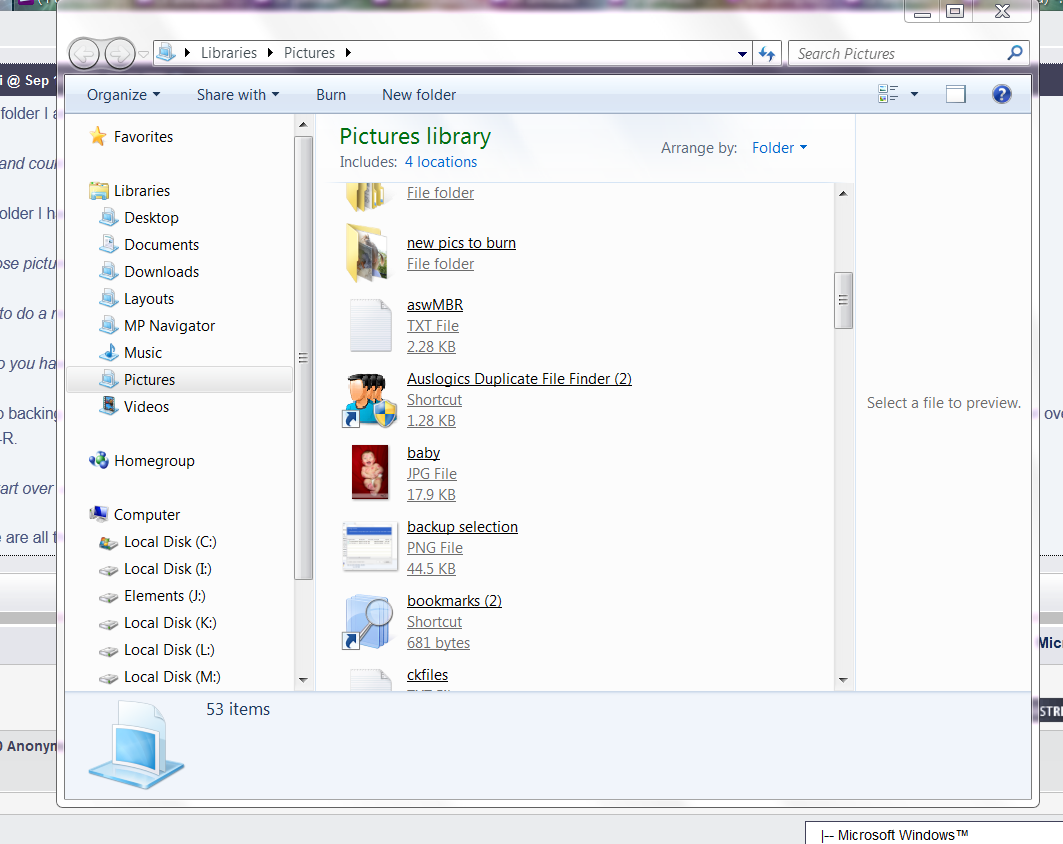
📎desktop_in_pictures.PNG This is my Pictures Folder and it has my desktop icons (which the shot is) in there Cannot get rid of them without getting rid of the icons on my actual desktop.
So every week I have to make a new rescue disk and then a reflect backup?? I've never heard of all that before. Oh well, will do.
1. In my picture folder I also have the names and icons of my whole desktop. If I just delete them, it deletes the ones FROM the desktop I do not understand, could you explain?
2. In my music folder I have some pictures Copy those to the folders you used when you biurned your DVD's the first time.
3. Do you have to do a rescue disk each time you do a backup You mean do you need a new disk each time. Yes
4. I want to keep backing up pictures and excel separately also and I did it on a DVD. Now when I back them up again, do I have to use 2 disks again, cannot reuse these? It is a shame a flash drive isn't safe. I just bought a 16gb one for pics because you can just continue to put on. Instead of buring a dvd, you can copy all of your pictures and excel document to the flash drive.
make a folder named Pictures and one named Excel and copy the respective files to those folders
5. So I leave those extra hard drives alone. Sometimes there are only 2 there, maybe after I reboot. Yes, for now.
So, I think those are all the questions.
Updated post.
The way the images folder works is that it is a library.
it will list images stored in common areas all in one place.
I meant tdo you have to make a restore/rescue disk everyweek along with the reflect image?
Are the flash drives reliable enuf to store pics?
I still don't understand when I do or don't Enable Access to Restricted Folders *
Somehow, maybe through cleaning out malware and the other critters, those icons accidently got in that folder. The only place I had my dessktop icons were on my desktop. Now I just see they popped up there. I guess they aren't hurting anything. If I delete on, the one on the actual desktop gets deleted too. You can't just right click and delete.
I just like a really clean and organized computer, but it is not worth risking all you guys have done
You do not have to create a restore disk each time.
EDIT: The only time you would need to create a new restore disk is if you lost the first on you created.
Always make sure Enable Access to Restricted Folders *is* checked.
Also you have two of the same library showing at once.
One library is named Desktop and the other is named Pictures.
These appear to be identical libraries so the action taken in one are taken in the others.
I don't know how to explain this. When I go to my pictures folder I see 4 locations. "pictures"' ; "look over these carefully", which I used to have a file like that"; "desktop", which is all my desktop icons and then "backups" which is empty. I have never had desktop in my picture folders before, but I guess it is okay. All I did is go to my picture folder and take a picture of the desktop icons in there.The library desktop is in the pictures library. Is there supposed to be a separate library for desktop?
I think I will make another rescue disk if I can ever find windows 2010., so I am sure that is on the rescue disk, or doesn't it need to be?
Now when I am doing this image backup, is it backing up the program and my data??? For 9 hours its got to be doing something extraordinary.
It backs up every single file contained on the hard drive.
Your Library structure is not proper (this may not be your fault)
Instead on using the library shortcuts tr this:
Go to C:\Users\Patty\Pictures
to Access the pictures
Got to C:\Users\Patty\Desktop
as well as you said some are stored there as well
from there you should be able to delete pictures from there WITHOUT removing them from the desktop as well.
In fact I would recommend NOT using the shortcuts again and asking for help on this issue as I do not know how to correct this without being able to do it myself.
Unfortunately, I cannot provide that kind of help via forums rules.
Still having this problem?
This topic is from the What the Tech archive and can't take new replies. Geeks to Go is an active, free help community run by volunteers. Post your question there and a person, not a bot, will work through it with you.
 You may post them all at once if you wish.