The greater majority of what ESET found was in Qoobox which are just back ups of what Combofix removed, there harmless where there and will deal with that when where done.
This should remove the rest of it
Open OTL.exe
Copy/paste the following text written inside of the code box into the Custom Scans/Fixes box located at the bottom of OTL
OTL by OldTimer - Version 3.2.31.0 log created on 01072012_092838
Files\Folders moved on Reboot…
C:\Documents and Settings\Dean Nicholson\Local Settings\Temporary Internet Files\Content.IE5\JTJIRD5J\ads[3].htm moved successfully.
C:\Documents and Settings\Dean Nicholson\Local Settings\Temporary Internet Files\Content.IE5\CC442NPK\ads[7].htm moved successfully.
C:\Documents and Settings\Dean Nicholson\Local Settings\Temporary Internet Files\Content.IE5\CC442NPK\index[3].htm moved successfully.
C:\Documents and Settings\Dean Nicholson\Local Settings\Temporary Internet Files\Content.IE5\9ZVNU042\ads[4].htm moved successfully.
C:\Documents and Settings\Dean Nicholson\Local Settings\Temporary Internet Files\Content.IE5\9ZVNU042\iframe[1].htm moved successfully.
This is what I would suggest , you have Malwarebytes installed, you can upgrade to the Pro version, the cost is minimal, I believe around $20 or so, its not a yearly fee, you get a keycode and the program is yours, the pro version offers a protection module, what this will do is if you ever wander into a bad site by accident, you will get a page not found error and a pop up from Malwarebytes saying they prevented a potential malicious site from opening, I have this on all my computers , but the choice is totally up to you.
Take care my friend
Click START then RUN
Now type Combofix /uninstall in the runbox and click OK. Note the space between the X and the /, it needs to be there.
Open OTL and click on Clean Up and it will remove programs we used to clean your system along with there backups, any programs that where not removed you can just drag to the trash.
Malwarebytes is the free version and yours to keep and will not be removed
How did I get infected in the first place ?
Read these links and find out how to prevent getting infected again.
Tutorial for System Restore <– Do this first to prevent yourself from being reinfected.
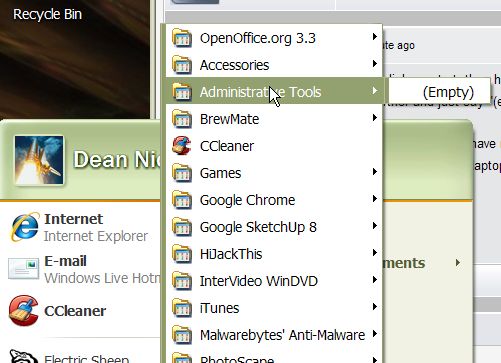
Final request: Start -> All Programs …the list of programs is there, but they all show as (empty). Can you advise on how to re-populate this list?
THANK YOU again for all your help!
Dean, as you use different programs they will populate on that list, you can right click on the start menu and look around for an option to change the amount of programs to add, is this what you mean ?
No, if I click on start, then hover over All Programs, the programs list opens; then, when I hover over most of the actual programs (including Accessories, Games. iTunes, Thinkvantage, and Windows Live) they open further and just say "(empty)". I think some setting just needs reset, but for the life of me I can't find it.
Also now, it appears I have no sound. I ran through all the settings, the volume levels are all up, no mute buttons are checked, and when on a site, say, YouTube, the volume level is all the way up, and so is the speaker output on my laptop. No sound at all! Any clue?
EDIT: I uploaded a pic of the empty slot because I'm having a hard time describing what's going on.
EDIT part deux: Skype audio and video works, but sound is not working on any website.
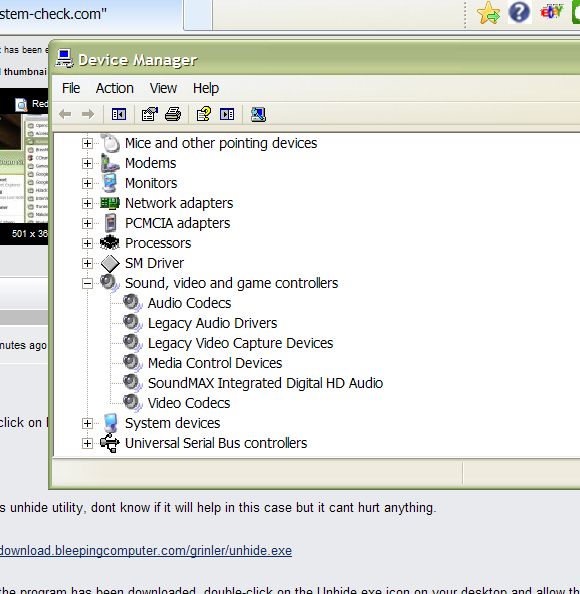
Right click on My Computer and then click on Properties > Then Device Manager and look under sound, does it look ok or is there a yellow splat or red x ?
Try this unhide utility, dont know if it will help in this case but it cant hurt anything.
Once the program has been downloaded, double-click on the Unhide.exe icon on your desktop and allow the program to run. This program will remove the +H, or hidden, attribute from all the files on your hard drives. If there are any files that were purposely hidden by you, you will need to hide them again after this tool is run.
I ran Unhide earlier, right after I noticed the empty spots. I downloaded it again and tried again. Didn't fix it.
Everything looks ok under device manager, no yellow splat or red x:
The malware you had was some of the worst that has come along in quite awhile, it may have done some damage to your system along the way. Doing a System Repair may be a good option, doing it before while you where still infected most likely would have left the malware intact, but doing it now may be a good move, post to the above link, link them to this thread so they can see what we have done and left them guide you through the process.

 How is everything ?