Here is the Kapersky log file:
——————————————————————————–
KASPERSKY ONLINE SCANNER 7.0: scan report
Monday, September 6, 2010
Operating system: Microsoft Windows XP Professional Service Pack 2 (build 2600)
Kaspersky Online Scanner version: 7.0.26.13
Last database update: Monday, September 06, 2010 21:10:42
Records in database: 4200731
——————————————————————————–
Scan settings:
scan using the following database: extended
Scan archives: yes
Scan e-mail databases: yes
Scan area - My Computer:
A:\
C:\
D:\
E:\
F:\
Scan statistics:
Objects scanned: 63518
Threats found: 1
Infected objects found: 2
Suspicious objects found: 0
Scan duration: 01:14:24
File name / Threat / Threats count
C:\Documents and Settings\Jerry B Goode\My Documents\Vstplugins\Apps\vstdev_steinway_full-813a71.exe Infected: Trojan-Clicker.Win32.VBiframe.cqn 2
Selected area has been scanned.
——————————————————————————————————————————————————————————–
And here is the OTI log:
OTL logfile created on: 9/6/2010 11:13:09 PM - Run 1
OTL by OldTimer - Version 3.2.11.0 Folder = C:\Documents and Settings\Jerry B Goode\Desktop
Windows XP Professional Edition Service Pack 2 (Version = 5.1.2600) - Type = NTWorkstation
Internet Explorer (Version = 8.0.6001.18702)
Locale: 00000409 | Country: United States | Language: ENU | Date Format: M/d/yyyy
990.00 Mb Total Physical Memory | 703.00 Mb Available Physical Memory | 71.00% Memory free
2.00 Gb Paging File | 2.00 Gb Available in Paging File | 86.00% Paging File free
Paging file location(s): C:\pagefile.sys 1488 2976 [binary data]
%SystemDrive% = C: | %SystemRoot% = C:\WINDOWS | %ProgramFiles% = C:\Program Files
Drive C: | 232.88 Gb Total Space | 177.97 Gb Free Space | 76.42% Space Free | Partition Type: NTFS
D: Drive not present or media not loaded
E: Drive not present or media not loaded
Drive F: | 298.10 Gb Total Space | 275.48 Gb Free Space | 92.41% Space Free | Partition Type: NTFS
G: Drive not present or media not loaded
H: Drive not present or media not loaded
I: Drive not present or media not loaded
Computer Name: DAW
Current User Name: Jerry B Goode
Logged in as Administrator.
Current Boot Mode: Normal
Scan Mode: Current user
Company Name Whitelist: On
Skip Microsoft Files: On
File Age = 90 Days
Output = Standard
Quick Scan
========== Processes (SafeList) ==========
PRC - [2010/09/06 23:11:59 | 000,574,976 | —- | M] (OldTimer Tools) – C:\Documents and Settings\Jerry B Goode\Desktop\OTL.exe
PRC - [2010/05/30 09:17:30 | 000,249,856 | —- | M] (MediaCodec.Org) – C:\Program Files\Essentials Codec Pack\WECPUpdate.exe
PRC - [2007/11/30 18:47:52 | 001,949,696 | —- | M] (Airlink101) – C:\Program Files\WlanMon.exe
PRC - [2007/01/19 12:49:04 | 000,049,152 | —- | M] (Wireless Service) – C:\Program Files\ANI\ANIWZCS2 Service\WZCSLDR2.exe
PRC - [2006/02/17 11:39:02 | 000,139,264 | —- | M] () – C:\Program Files\NVIDIA Corporation\NetworkAccessManager\bin\nSvcAppFlt.exe
PRC - [2006/02/17 11:35:58 | 000,127,035 | —- | M] (NVIDIA Corporation) – C:\Program Files\NVIDIA Corporation\NetworkAccessManager\bin\nSvcIp.exe
PRC - [2006/02/17 11:35:42 | 000,061,503 | —- | M] (NVIDIA) – C:\Program Files\NVIDIA Corporation\NetworkAccessManager\bin\nSvcLog.exe
PRC - [2006/02/17 11:17:08 | 000,020,543 | —- | M] (Apache Software Foundation) – C:\Program Files\NVIDIA Corporation\NetworkAccessManager\Apache Group\Apache2\bin\Apache.exe
PRC - [2005/09/28 17:06:30 | 000,094,208 | —- | M] () – C:\Program Files\M-Audio MA_CMIDI\MA_CMIDI_Inst.exe
PRC - [2004/08/04 08:00:00 | 001,032,192 | —- | M] (Microsoft Corporation) – C:\WINDOWS\explorer.exe
PRC - [2004/08/04 08:00:00 | 000,019,456 | —- | M] (Microsoft Corporation) – C:\WINDOWS\system32\tcpsvcs.exe
========== Modules (SafeList) ==========
MOD - [2010/09/06 23:11:59 | 000,574,976 | —- | M] (OldTimer Tools) – C:\Documents and Settings\Jerry B Goode\Desktop\OTL.exe
MOD - [2004/08/04 08:00:00 | 001,050,624 | —- | M] (Microsoft Corporation) – C:\WINDOWS\WinSxS\x86_Microsoft.Windows.Common-Controls_6595b64144ccf1df_6.0.2600.2180_x-ww_a84f1ff9\comctl32.dll
MOD - [2004/08/04 08:00:00 | 000,102,400 | —- | M] (Microsoft Corporation) – C:\WINDOWS\system32\msscript.ocx
========== Win32 Services (SafeList) ==========
SRV - File not found [Disabled | Stopped] – C:\WINDOWS\System32\hidserv.dll – (HidServ)
SRV - [2007/01/19 12:49:26 | 000,049,152 | —- | M] (Wireless Service) [Auto | Stopped] – C:\Program Files\ANI\ANIWZCS2 Service\ANIWZCSdS.exe – (ANIWZCSdService)
SRV - [2006/02/17 11:39:02 | 000,139,264 | —- | M] () [Auto | Running] – C:\Program Files\NVIDIA Corporation\NetworkAccessManager\bin\nSvcAppFlt.exe – (ForceWare Intelligent Application Manager (IAM)) ForceWare Intelligent Application Manager (IAM)
SRV - [2006/02/17 11:35:58 | 000,127,035 | —- | M] (NVIDIA Corporation) [Auto | Running] – C:\Program Files\NVIDIA Corporation\NetworkAccessManager\bin\nSvcIp.exe – (nSvcIp)
SRV - [2006/02/17 11:35:42 | 000,061,503 | —- | M] (NVIDIA) [Auto | Running] – C:\Program Files\NVIDIA Corporation\NetworkAccessManager\bin\nSvcLog.exe – (nSvcLog)
SRV - [2006/02/17 11:17:08 | 000,020,543 | —- | M] (Apache Software Foundation) [Auto | Running] – C:\Program Files\NVIDIA Corporation\NetworkAccessManager\Apache Group\Apache2\bin\apache.exe – (ForcewareWebInterface)
SRV - [2005/09/28 17:06:30 | 000,094,208 | —- | M] () [Auto | Running] – C:\Program Files\M-Audio MA_CMIDI\MA_CMIDI_Inst.exe – (MA_CMIDI_InstallerService)
SRV - [2004/08/04 08:00:00 | 000,086,016 | —- | M] (Microsoft Corporation) [On_Demand | Stopped] – C:\WINDOWS\system32\p2pgasvc.dll – (p2pgasvc)
SRV - [2004/08/04 08:00:00 | 000,035,328 | —- | M] (Microsoft Corporation) [Auto | Running] – C:\WINDOWS\system32\iprip.dll – (Iprip)
SRV - [2004/08/04 08:00:00 | 000,019,456 | —- | M] (Microsoft Corporation) [Auto | Running] – C:\WINDOWS\system32\tcpsvcs.exe – (SimpTcp)
========== Driver Services (SafeList) ==========
DRV - File not found [Kernel | On_Demand | Stopped] – C:\X71we0vc.exe\catchme.sys – (catchme)
DRV - File not found [Kernel | System | Stopped] – C:\WINDOWS\System32\drivers\brdoxkqm.sys – (brdoxkqm)
DRV - [2010/02/11 08:01:43 | 000,226,880 | —- | M] (Microsoft Corporation) [Kernel | System | Running] – C:\WINDOWS\system32\drivers\tcpip6.sys – (Tcpip6)
DRV - [2008/06/19 17:24:30 | 000,028,544 | —- | M] (Panda Security, S.L.) [File_System | Boot | Running] – C:\WINDOWS\system32\drivers\pavboot.sys – (pavboot)
DRV - [2007/11/16 12:56:26 | 000,550,272 | —- | M] (Ralink Technology, Corp.) [Kernel | On_Demand | Running] – C:\WINDOWS\system32\drivers\rt2870.sys – (rt2870)
DRV - [2007/05/12 17:39:32 | 000,028,195 | —- | M] (Alpha Networks Inc.) [Kernel | Auto | Running] – C:\WINDOWS\system32\ANIO.sys – (ANIO)
DRV - [2007/04/09 08:27:07 | 000,031,548 | —- | M] (PowerISO Computing, Inc.) [Kernel | System | Running] – C:\WINDOWS\System32\drivers\scdemu.sys – (SCDEmu)
DRV - [2006/02/16 22:28:32 | 000,013,056 | R— | M] (NVIDIA Corporation) [Kernel | On_Demand | Running] – C:\WINDOWS\system32\drivers\nvnetbus.sys – (nvnetbus)
DRV - [2006/02/16 22:28:30 | 000,034,176 | R— | M] (NVIDIA Corporation) [Kernel | On_Demand | Stopped] – C:\WINDOWS\system32\drivers\NVENETFD.sys – (NVENETFD)
DRV - [2006/01/27 15:04:18 | 000,081,408 | —- | M] (NVIDIA Corporation) [Kernel | Boot | Running] – C:\WINDOWS\system32\DRIVERS\nvraid.sys – (nvraid) NVIDIA nForce™
DRV - [2006/01/27 02:04:16 | 000,099,584 | R— | M] (NVIDIA Corporation) [Kernel | Boot | Running] – C:\WINDOWS\system32\DRIVERS\nvatabus.sys – (nvatabus)
DRV - [2006/01/27 02:04:16 | 000,099,584 | R— | M] (NVIDIA Corporation) [Kernel | Boot | Running] – C:\WINDOWS\system32\DRIVERS\nvata.sys – (nvata)
DRV - [2006/01/24 06:15:00 | 003,535,520 | —- | M] (NVIDIA Corporation) [Kernel | On_Demand | Running] – C:\WINDOWS\system32\drivers\nv4_mini.sys – (nv)
DRV - [2005/10/05 05:21:10 | 000,141,312 | R— | M] (Analog Devices, Inc.) [Kernel | On_Demand | Running] – C:\WINDOWS\system32\drivers\ADIHdAud.sys – (ADIHdAudAddService)
DRV - [2005/08/17 09:47:48 | 000,073,696 | —- | M] (MCCI) [Kernel | On_Demand | Stopped] – C:\WINDOWS\system32\drivers\sscdserd.sys – (sscdserd) SAMSUNG CDMA Modem Diagnostic Serial Port (WDM)
DRV - [2005/08/17 09:46:26 | 000,093,872 | —- | M] (MCCI) [Kernel | On_Demand | Stopped] – C:\WINDOWS\system32\drivers\sscdmdm.sys – (sscdmdm)
DRV - [2005/08/17 09:46:20 | 000,008,272 | —- | M] (MCCI) [Kernel | On_Demand | Stopped] – C:\WINDOWS\system32\drivers\sscdmdfl.sys – (sscdmdfl)
DRV - [2005/08/17 09:45:00 | 000,058,352 | —- | M] (MCCI) [Kernel | On_Demand | Stopped] – C:\WINDOWS\system32\drivers\sscdbus.sys – (sscdbus) SAMSUNG USB Composite Device driver (WDM)
DRV - [2005/08/11 01:49:28 | 000,393,088 | R— | M] (Sensaura) [Kernel | On_Demand | Running] – C:\WINDOWS\system32\drivers\senfilt.sys – (SenFiltService)
DRV - [2005/06/14 14:44:00 | 000,021,888 | —- | M] (M-Audio) [Kernel | On_Demand | Running] – C:\WINDOWS\system32\drivers\ma_cmidi.sys – (MA_CMIDI)
DRV - [2005/03/09 16:53:00 | 000,036,352 | —- | M] (Advanced Micro Devices) [Kernel | System | Running] – C:\WINDOWS\system32\drivers\AmdK8.sys – (AmdK8)
DRV - [2004/10/27 16:21:36 | 000,138,240 | —- | M] (Windows ® Server 2003 DDK provider) [Kernel | On_Demand | Running] – C:\WINDOWS\system32\drivers\Hdaudbus.sys – (HDAudBus)
DRV - [2004/10/27 16:21:30 | 000,145,920 | —- | M] (Windows ® Server 2003 DDK provider) [Kernel | On_Demand | Stopped] – C:\WINDOWS\system32\drivers\Hdaudio.sys – (HdAudAddService)
DRV - [2004/09/10 12:28:46 | 000,291,456 | —- | M] (Midiman/M-Audio) [Kernel | On_Demand | Running] – C:\WINDOWS\system32\drivers\delta.sys – (DELTA) Service for Delta Driver (WDM)
DRV - [2004/08/12 22:56:20 | 000,005,810 | R— | M] () [Kernel | On_Demand | Running] – C:\WINDOWS\system32\drivers\ASACPI.sys – (MTsensor)
DRV - [2004/08/04 00:07:56 | 000,059,264 | —- | M] (Microsoft Corporation) [Kernel | On_Demand | Stopped] – C:\WINDOWS\system32\drivers\USBAUDIO.sys – (usbaudio) USB Audio Driver (WDM)
DRV - [2004/08/03 19:08:22 | 000,010,624 | —- | M] (Microsoft Corporation) [Kernel | On_Demand | Running] – C:\WINDOWS\system32\drivers\gameenum.sys – (gameenum)
DRV - [2002/10/11 18:08:30 | 000,065,632 | —- | M] (PACE Anti-Piracy, Inc.) [Kernel | Boot | Running] – C:\WINDOWS\System32\drivers\tpkd.sys – (TPkd)
DRV - [2001/08/17 10:00:04 | 000,002,944 | —- | M] (Microsoft Corporation) [Kernel | On_Demand | Running] – C:\WINDOWS\system32\drivers\msmpu401.sys – (ms_mpu401)
DRV - [2000/06/16 17:12:00 | 000,017,784 | —- | M] (Syncrosoft Hard- und Software GmbH) [Kernel | Auto | Running] – C:\WINDOWS\System32\drivers\NSynas32.sys – (Nsynas32)
========== Standard Registry (SafeList) ==========
========== Internet Explorer ==========
IE - HKCU\SOFTWARE\Microsoft\Internet Explorer\Main,Start Page = http://www.yahoo.com/
IE - HKCU\..\URLSearchHook: {EF99BD32-C1FB-11D2-892F-0090271D4F88} - C:\Program Files\Yahoo!\Companion\Installs\cpn\yt.dll (Yahoo! Inc.)
IE - HKCU\Software\Microsoft\Windows\CurrentVersion\Internet Settings: "ProxyEnable" = 0
========== FireFox ==========
FF - prefs.js..browser.startup.homepage: "
http://yahoo.com"
FF - prefs.js..extensions.enabledItems: {CAFEEFAC-0016-0000-0021-ABCDEFFEDCBA}:6.0.21
FF - prefs.js..extensions.enabledItems: [removed]:1.0
FF - HKLM\software\mozilla\Mozilla Firefox 3.6.8\extensions\\Components: C:\Program Files\Mozilla Firefox\components [2010/08/17 21:23:47 | 000,000,000 | —D | M]
FF - HKLM\software\mozilla\Mozilla Firefox 3.6.8\extensions\\Plugins: C:\Program Files\Mozilla Firefox\plugins [2010/09/06 19:20:29 | 000,000,000 | —D | M]
[2009/12/19 17:54:19 | 000,000,000 | —D | M] – C:\Documents and Settings\Jerry B Goode\Application Data\Mozilla\Extensions
[2010/09/06 19:20:52 | 000,000,000 | —D | M] – C:\Documents and Settings\Jerry B Goode\Application Data\Mozilla\Firefox\Profiles\pubqxsy0.default\extensions
[2010/08/18 14:31:02 | 000,000,000 | —D | M] (Microsoft .NET Framework Assistant) – C:\Documents and Settings\Jerry B Goode\Application Data\Mozilla\Firefox\Profiles\pubqxsy0.default\extensions\{20a82645-c095-46ed-80e3-08825760534b}
[2010/09/06 19:20:52 | 000,000,000 | —D | M] – C:\Program Files\Mozilla Firefox\extensions
[2010/09/06 19:20:31 | 000,000,000 | —D | M] (Java Console) – C:\Program Files\Mozilla Firefox\extensions\{CAFEEFAC-0016-0000-0021-ABCDEFFEDCBA}
[2010/09/06 19:20:19 | 000,423,656 | —- | M] (Sun Microsystems, Inc.) – C:\Program Files\Mozilla Firefox\plugins\npdeployJava1.dll
O1 HOSTS File: ([2010/08/28 11:34:54 | 000,000,027 | —- | M]) - C:\WINDOWS\system32\drivers\etc\hosts
O1 - Hosts: 127.0.0.1 localhost
O2 - BHO: (&Yahoo! Toolbar Helper) - {02478D38-C3F9-4efb-9B51-7695ECA05670} - C:\Program Files\Yahoo!\Companion\Installs\cpn\yt.dll (Yahoo! Inc.)
O2 - BHO: (Spybot-S&D IE Protection) - {53707962-6F74-2D53-2644-206D7942484F} - C:\Program Files\Spybot - Search & Destroy\SDHelper.dll (Safer Networking Limited)
O2 - BHO: (SingleInstance Class) - {FDAD4DA1-61A2-4FD8-9C17-86F7AC245081} - C:\Program Files\Yahoo!\Companion\Installs\cpn\YTSingleInstance.dll (Yahoo! Inc)
O3 - HKLM\..\Toolbar: (Yahoo! Toolbar) - {EF99BD32-C1FB-11D2-892F-0090271D4F88} - C:\Program Files\Yahoo!\Companion\Installs\cpn\yt.dll (Yahoo! Inc.)
O3 - HKCU\..\Toolbar\WebBrowser: (Yahoo! Toolbar) - {EF99BD32-C1FB-11D2-892F-0090271D4F88} - C:\Program Files\Yahoo!\Companion\Installs\cpn\yt.dll (Yahoo! Inc.)
O4 - HKLM..\Run: [Airlink101 Airlink101 WLAN Monitor] C:\Program Files\WlanMon.exe (Airlink101)
O4 - HKLM..\Run: [ANIWZCS2Service] C:\Program Files\ANI\ANIWZCS2 Service\WZCSLDR2.exe (Wireless Service)
O4 - HKLM..\Run: [NvCplDaemon] C:\WINDOWS\System32\NvCpl.DLL (NVIDIA Corporation)
O6 - HKLM\Software\Policies\Microsoft\Internet Explorer\Restrictions present
O6 - HKLM\SOFTWARE\Microsoft\Windows\CurrentVersion\policies\Explorer: HonorAutoRunSetting = 1
O6 - HKLM\SOFTWARE\Microsoft\Windows\CurrentVersion\policies\Explorer: NoDriveAutoRun = 67108863
O6 - HKLM\SOFTWARE\Microsoft\Windows\CurrentVersion\policies\Explorer: NoDriveTypeAutoRun = 323
O6 - HKLM\SOFTWARE\Microsoft\Windows\CurrentVersion\policies\Explorer: NoDrives = 0
O7 - HKCU\Software\Policies\Microsoft\Internet Explorer\Control Panel present
O7 - HKCU\SOFTWARE\Microsoft\Windows\CurrentVersion\policies\Explorer: NoDriveTypeAutoRun = 323
O7 - HKCU\SOFTWARE\Microsoft\Windows\CurrentVersion\policies\Explorer: NoDriveAutoRun = 67108863
O7 - HKCU\SOFTWARE\Microsoft\Windows\CurrentVersion\policies\Explorer: NoDrives = 0
O9 - Extra 'Tools' menuitem : Spybot - Search & Destroy Configuration - {DFB852A3-47F8-48C4-A200-58CAB36FD2A2} - C:\Program Files\Spybot - Search & Destroy\SDHelper.dll (Safer Networking Limited)
O10 - NameSpace_Catalog5\Catalog_Entries\000000000004 [] - C:\WINDOWS\system32\nwprovau.dll (Microsoft Corporation)
O16 - DPF: {2D8ED06D-3C30-438B-96AE-4D110FDC1FB8}
http://acs.pandasoftware.com/activescan/cabs/as2stubie.cab (ActiveScan 2.0 Installer Class)
O16 - DPF: {5ED80217-570B-4DA9-BF44-BE107C0EC166}
http://cdn.scan.onecare.live.com/resource/…lscbase5483.cab (Windows Live Safety Center Base Module)
O16 - DPF: {8AD9C840-044E-11D1-B3E9-00805F499D93}
http://java.sun.com/update/1.6.0/jinstall-…indows-i586.cab (Java Plug-in 1.6.0_21)
O16 - DPF: {8FFBE65D-2C9C-4669-84BD-5829DC0B603C}
http://fpdownload.macromedia.com/get/flash…r/ultrashim.cab (Reg Error: Key error.)
O16 - DPF: {CAFEEFAC-0016-0000-0021-ABCDEFFEDCBA}
http://java.sun.com/update/1.6.0/jinstall-…indows-i586.cab (Java Plug-in 1.6.0_21)
O16 - DPF: {CAFEEFAC-FFFF-FFFF-FFFF-ABCDEFFEDCBA}
http://java.sun.com/update/1.6.0/jinstall-…indows-i586.cab (Java Plug-in 1.6.0_21)
O16 - DPF: {D27CDB6E-AE6D-11CF-96B8-444553540000} http://fpdownload.macromedia.com/pub/shock…ash/swflash.cab (Shockwave Flash Object)
O17 - HKLM\System\CCS\Services\Tcpip\Parameters: DhcpNameServer = 192.168.2.1 [removed] [removed]
O20 - HKLM Winlogon: Shell - (Explorer.exe) - C:\WINDOWS\explorer.exe (Microsoft Corporation)
O24 - Desktop WallPaper: C:\Documents and Settings\Jerry B Goode\Local Settings\Application Data\Microsoft\Wallpaper1.bmp
O24 - Desktop BackupWallPaper: C:\Documents and Settings\Jerry B Goode\Local Settings\Application Data\Microsoft\Wallpaper1.bmp
O32 - HKLM CDRom: AutoRun - 1
O32 - AutoRun File - [2007/02/16 20:22:36 | 000,000,000 | —- | M] () - C:\AUTOEXEC.BAT – [ NTFS ]
O34 - HKLM BootExecute: (autocheck autochk *) - File not found
O35 - HKLM\..comfile [open] – "%1" %*
O35 - HKLM\..exefile [open] – "%1" %*
O37 - HKLM\…com [@ = ComFile] – "%1" %*
O37 - HKLM\…exe [@ = exefile] – "%1" %*
========== Files/Folders - Created Within 90 Days ==========
[2010/09/06 23:11:58 | 000,574,976 | —- | C] (OldTimer Tools) – C:\Documents and Settings\Jerry B Goode\Desktop\OTL.exe
[2010/09/06 19:25:39 | 000,000,000 | —D | C] – C:\WINDOWS\Sun
[2010/09/06 19:20:45 | 000,000,000 | —D | C] – C:\Documents and Settings\All Users\Application Data\Sun
[2010/09/06 19:20:45 | 000,000,000 | —D | C] – C:\Program Files\Common Files\Java
[2010/09/06 19:20:16 | 000,000,000 | —D | C] – C:\Program Files\Java
[2010/09/06 19:19:56 | 000,000,000 | —D | C] – C:\Documents and Settings\Jerry B Goode\Application Data\Sun
[2010/09/06 18:54:29 | 000,000,000 | —D | C] – C:\Documents and Settings\Jerry B Goode\Desktop\ANTIVIRUS STUFF
[2010/09/05 12:00:23 | 000,000,000 | —D | C] – C:\Documents and Settings\Jerry B Goode\Application Data\Malwarebytes
[2010/09/05 12:00:16 | 000,038,224 | —- | C] (Malwarebytes Corporation) – C:\WINDOWS\System32\drivers\mbamswissarmy.sys
[2010/09/05 12:00:15 | 000,020,952 | —- | C] (Malwarebytes Corporation) – C:\WINDOWS\System32\drivers\mbam.sys
[2010/09/05 12:00:15 | 000,000,000 | —D | C] – C:\Program Files\Malwarebytes' Anti-Malware
[2010/09/05 12:00:15 | 000,000,000 | —D | C] – C:\Documents and Settings\All Users\Application Data\Malwarebytes
[2010/09/01 08:39:39 | 000,000,000 | -HSD | C] – C:\RECYCLER
[2010/08/28 11:40:03 | 000,000,000 | —D | C] – C:\WINDOWS\temp
[2010/08/28 11:29:58 | 000,000,000 | RHSD | C] – C:\cmdcons
[2010/08/28 11:28:03 | 000,212,480 | —- | C] (SteelWerX) – C:\WINDOWS\SWXCACLS.exe
[2010/08/28 11:28:03 | 000,161,792 | —- | C] (SteelWerX) – C:\WINDOWS\SWREG.exe
[2010/08/28 11:28:03 | 000,136,704 | —- | C] (SteelWerX) – C:\WINDOWS\SWSC.exe
[2010/08/28 11:28:03 | 000,031,232 | —- | C] (NirSoft) – C:\WINDOWS\NIRCMD.exe
[2010/08/28 11:27:59 | 000,000,000 | —D | C] – C:\WINDOWS\ERDNT
[2010/08/28 11:27:43 | 000,000,000 | —D | C] – C:\Qoobox
[2010/08/25 10:54:17 | 000,000,000 | —D | C] – C:\rsit
[2010/08/23 13:09:42 | 000,000,000 | —D | C] – C:\Program Files\Essentials Codec Pack
[2010/08/11 15:34:23 | 000,000,000 | —D | C] – C:\Documents and Settings\Jerry B Goode\Desktop\New Ideas
[2010/08/01 14:23:26 | 000,000,000 | —D | C] – C:\Documents and Settings\Jerry B Goode\Desktop\Tunodemo
[2010/08/01 11:29:29 | 000,000,000 | —D | C] – C:\Documents and Settings\Jerry B Goode\Desktop\Tabs
[2007/11/30 18:47:52 | 001,949,696 | —- | C] (Airlink101) – C:\Program Files\WlanMon.exe
[2006/02/20 19:22:38 | 000,024,576 | —- | C] (Alpha Networks Inc.) – C:\Program Files\NetProp.dll
[2005/01/14 11:23:42 | 000,024,576 | —- | C] (Alpha Networks Inc.) – C:\Program Files\CtrlSrv.exe
[4 C:\WINDOWS\*.tmp files -> C:\WINDOWS\*.tmp -> ]
[1 C:\WINDOWS\System32\*.tmp files -> C:\WINDOWS\System32\*.tmp -> ]
========== Files - Modified Within 90 Days ==========
[2010/09/06 23:11:59 | 000,574,976 | —- | M] (OldTimer Tools) – C:\Documents and Settings\Jerry B Goode\Desktop\OTL.exe
[2010/09/06 19:12:55 | 000,000,364 | —- | M] () – C:\WINDOWS\tasks\Windows Codec Update Service.job
[2010/09/06 18:54:18 | 000,003,284 | —- | M] () – C:\WINDOWS\System32\ANIWZCS{193B2312-036E-4213-8634-F94F5AB85662}
[2010/09/06 04:08:00 | 000,000,276 | —- | M] () – C:\WINDOWS\tasks\Disk Cleanup.job
[2010/09/05 12:59:38 | 009,961,472 | —- | M] () – C:\Documents and Settings\Jerry B Goode\ntuser.dat
[2010/09/05 12:18:48 | 000,000,014 | —- | M] () – C:\WINDOWS\System32\ANIWZCSUSERNAME{193B2312-036E-4213-8634-F94F5AB85662}
[2010/09/05 12:18:42 | 000,043,531 | —- | M] () – C:\WINDOWS\System32\nvapps.xml
[2010/09/05 12:18:42 | 000,000,007 | —- | M] () – C:\WINDOWS\System32\ANIWZCSUSERNAME
[2010/09/05 12:18:39 | 000,013,646 | —- | M] () – C:\WINDOWS\System32\wpa.dbl
[2010/09/05 12:10:39 | 000,000,006 | -H– | M] () – C:\WINDOWS\tasks\SA.DAT
[2010/09/05 12:10:38 | 000,002,048 | –S- | M] () – C:\WINDOWS\bootstat.dat
[2010/09/05 12:09:57 | 000,000,178 | -HS- | M] () – C:\Documents and Settings\Jerry B Goode\ntuser.ini
[2010/09/05 12:09:52 | 003,787,050 | -H– | M] () – C:\Documents and Settings\Jerry B Goode\Local Settings\Application Data\IconCache.db
[2010/09/05 12:00:18 | 000,000,696 | —- | M] () – C:\Documents and Settings\All Users\Desktop\Malwarebytes' Anti-Malware.lnk
[2010/08/28 11:35:02 | 000,000,253 | —- | M] () – C:\WINDOWS\system.ini
[2010/08/28 11:34:54 | 000,000,027 | —- | M] () – C:\WINDOWS\System32\drivers\etc\hosts
[2010/08/28 11:30:01 | 000,000,293 | RHS- | M] () – C:\boot.ini
[2010/08/25 11:02:51 | 000,000,000 | —- | M] () – C:\Documents and Settings\Jerry B Goode\Desktop\settings.dat
[2010/08/23 13:09:46 | 000,000,829 | —- | M] () – C:\Documents and Settings\Jerry B Goode\Desktop\Media Player Classic.lnk
[2010/08/23 13:04:46 | 000,000,049 | —- | M] () – C:\WINDOWS\NeroDigital.ini
[2010/08/19 16:52:36 | 000,000,505 | —- | M] () – C:\WINDOWS\win.ini
[2010/08/15 19:01:04 | 000,014,856 | —- | M] () – C:\Documents and Settings\Jerry B Goode\Local Settings\Application Data\GDIPFONTCACHEV1.DAT
[2010/08/07 03:17:00 | 000,101,440 | —- | M] () – C:\WINDOWS\System32\FNTCACHE.DAT
[2010/08/07 03:01:17 | 000,001,355 | —- | M] () – C:\WINDOWS\imsins.BAK
[2010/08/06 17:22:54 | 000,488,244 | —- | M] () – C:\WINDOWS\System32\PerfStringBackup.INI
[2010/08/06 17:22:54 | 000,432,356 | —- | M] () – C:\WINDOWS\System32\perfh009.dat
[2010/08/06 17:22:54 | 000,067,312 | —- | M] () – C:\WINDOWS\System32\perfc009.dat
[2010/08/01 15:26:22 | 000,177,152 | —- | M] () – C:\Documents and Settings\Jerry B Goode\Local Settings\Application Data\DCBC2A71-70D8-4DAN-EHR8-E0D61DEA3FDF.ini
[2010/08/01 14:07:29 | 000,000,790 | -HS- | M] () – C:\EVP73.Key
[4 C:\WINDOWS\*.tmp files -> C:\WINDOWS\*.tmp -> ]
[1 C:\WINDOWS\System32\*.tmp files -> C:\WINDOWS\System32\*.tmp -> ]
========== Files Created - No Company Name ==========
[2010/09/05 12:00:18 | 000,000,696 | —- | C] () – C:\Documents and Settings\All Users\Desktop\Malwarebytes' Anti-Malware.lnk
[2010/08/28 11:30:01 | 000,000,223 | —- | C] () – C:\Boot.bak
[2010/08/28 11:29:59 | 000,260,272 | —- | C] () – C:\cmldr
[2010/08/28 11:28:03 | 000,256,512 | —- | C] () – C:\WINDOWS\PEV.exe
[2010/08/28 11:28:03 | 000,098,816 | —- | C] () – C:\WINDOWS\sed.exe
[2010/08/28 11:28:03 | 000,080,412 | —- | C] () – C:\WINDOWS\grep.exe
[2010/08/28 11:28:03 | 000,077,312 | —- | C] () – C:\WINDOWS\MBR.exe
[2010/08/28 11:28:03 | 000,068,096 | —- | C] () – C:\WINDOWS\zip.exe
[2010/08/25 11:02:51 | 000,000,000 | —- | C] () – C:\Documents and Settings\Jerry B Goode\Desktop\settings.dat
[2010/08/23 13:09:59 | 000,000,364 | —- | C] () – C:\WINDOWS\tasks\Windows Codec Update Service.job
[2010/08/23 13:09:46 | 000,000,829 | —- | C] () – C:\Documents and Settings\Jerry B Goode\Desktop\Media Player Classic.lnk
[2010/08/21 19:24:00 | 009,961,472 | —- | C] () – C:\Documents and Settings\Jerry B Goode\ntuser.dat
[2009/11/01 21:34:39 | 000,178,176 | —- | C] () – C:\WINDOWS\System32\unrar.dll
[2009/01/17 14:22:32 | 000,245,760 | —- | C] () – C:\WINDOWS\System32\WlanApp.dll
[2009/01/17 14:22:32 | 000,049,152 | —- | C] () – C:\WINDOWS\System32\JJAKEn.dll
[2008/01/02 11:28:34 | 002,549,054 | —- | C] () – C:\Program Files\ANIWZCS2.exe
[2007/11/29 18:51:36 | 001,176,337 | —- | C] () – C:\Program Files\ANIO.exe
[2007/11/10 12:33:35 | 000,000,754 | —- | C] () – C:\WINDOWS\WORDPAD.INI
[2007/11/10 00:27:12 | 000,163,840 | —- | C] () – C:\WINDOWS\System32\ArtFfct.dll
[2007/11/09 23:30:24 | 016,371,712 | —- | C] () – C:\WINDOWS\System32\AbsynthIAC.dll
[2007/11/07 22:47:03 | 000,905,290 | —- | C] () – C:\WINDOWS\System32\libmmd.dll
[2007/10/25 05:50:42 | 000,581,632 | —- | C] () – C:\Program Files\Wizard.exe
[2007/10/22 13:49:13 | 000,000,016 | —- | C] () – C:\WINDOWS\System32\msvcsv60.dll
[2007/03/11 17:22:54 | 000,003,346 | -H– | C] () – C:\WINDOWS\System32\v115C4B93B98139.dll
[2007/03/11 17:22:54 | 000,003,346 | -H– | C] () – C:\WINDOWS\System32\v115C4B93B98134.dll
[2007/02/27 11:50:08 | 000,000,049 | —- | C] () – C:\WINDOWS\NeroDigital.ini
[2007/02/17 18:14:13 | 000,177,152 | —- | C] () – C:\Documents and Settings\Jerry B Goode\Local Settings\Application Data\DCBC2A71-70D8-4DAN-EHR8-E0D61DEA3FDF.ini
[2007/02/17 00:04:39 | 000,091,648 | —- | C] () – C:\WINDOWS\System32\Mros416.dll
[2007/02/16 20:38:51 | 000,021,694 | —- | C] () – C:\WINDOWS\Ascd_log.ini
[2007/02/16 20:38:37 | 000,021,373 | —- | C] () – C:\WINDOWS\Ascd_tmp.ini
[2007/02/16 20:38:37 | 000,005,810 | R— | C] () – C:\WINDOWS\System32\drivers\ASACPI.sys
[2007/02/16 20:38:26 | 000,005,824 | —- | C] () – C:\WINDOWS\System32\drivers\ASUSHWIO.SYS
[2006/01/24 06:15:00 | 001,662,976 | —- | C] () – C:\WINDOWS\System32\nvwdmcpl.dll
[2006/01/24 06:15:00 | 001,466,368 | —- | C] () – C:\WINDOWS\System32\nview.dll
[2006/01/24 06:15:00 | 001,019,904 | —- | C] () – C:\WINDOWS\System32\nvwimg.dll
[2006/01/24 06:15:00 | 000,573,440 | —- | C] () – C:\WINDOWS\System32\nvhwvid.dll
[2006/01/24 06:15:00 | 000,466,944 | —- | C] () – C:\WINDOWS\System32\nvshell.dll
[2006/01/24 06:15:00 | 000,286,720 | —- | C] () – C:\WINDOWS\System32\nvnt4cpl.dll
[2006/01/24 06:15:00 | 000,106,496 | —- | C] () – C:\WINDOWS\System32\nvapi.dll
========== LOP Check ==========
[2009/08/08 11:14:16 | 000,000,000 | —D | M] – C:\Documents and Settings\All Users\Application Data\PC Drivers HeadQuarters
[2007/12/22 01:27:26 | 000,000,000 | —D | M] – C:\Documents and Settings\Jerry B Goode\Application Data\123 Free Solitaire
[2007/02/17 00:06:06 | 000,000,000 | —D | M] – C:\Documents and Settings\Jerry B Goode\Application Data\Steinberg
[2007/11/10 01:03:31 | 000,000,000 | —D | M] – C:\Documents and Settings\Jerry B Goode\Application Data\Waves Audio
[2010/09/06 04:08:00 | 000,000,276 | —- | M] () – C:\WINDOWS\Tasks\Disk Cleanup.job
[2009/04/29 20:24:00 | 000,000,260 | —- | M] () – C:\WINDOWS\Tasks\WGASetup.job
[2010/09/06 19:12:55 | 000,000,364 | —- | M] () – C:\WINDOWS\Tasks\Windows Codec Update Service.job
========== Purity Check ==========
< End of report >

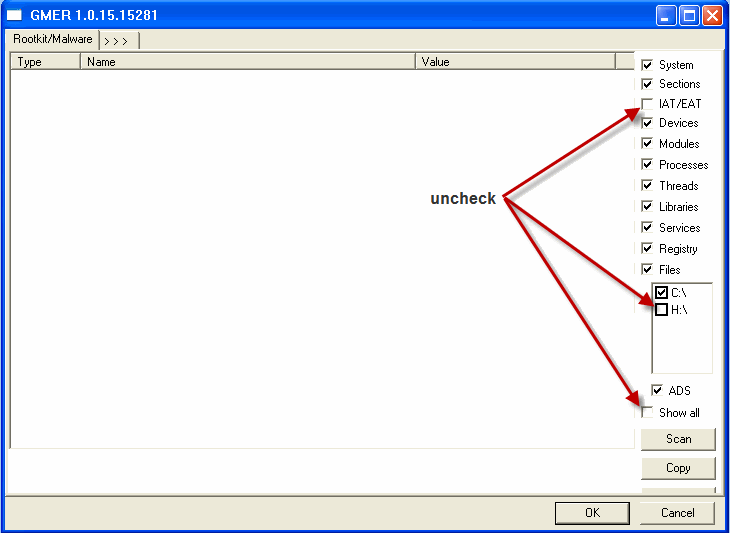
 Let's see how the GMER goes.