Spyware / Malware / Virus Removal
Second computer with Win32.PornPopUp
15 min read
LDTate
mediaklepto
OK then, just finished up with Spybot. It found a whole one entry; a tracking cooking from Doubleclick, which is a typical find.
Thanks so much for your help, once again! It's been invaluable! I'll let you know if anything reappears after a couple of days, just like with the other computer!

LDTate
mediaklepto
Oh boy…I just booted up both computers, and reran Spybot on both of them. I'm sorry to report one computer - the first one we worked on - is again showing the Win32.PornPopUp entry. I have it open right now, so here's what I can tell you about it:
Win32.PornPopUp - 4 entries - Browser
Tracking Cookie (Chrome: Chrome) - Cookie
.adbrite.com/ [Apache]
Tracking Cookie (Chrome: Chrome) - Cookie
.adbrite.com/ [vsd]
Tracking Cookie (Chrome: Chrome) - Cookie
.adbrite.com/ [rb]
Tracking Cookie (Chrome: Chrome) - Cookie
.adbrite.com/ [srh]
I'm going to leave Spybot open and await your reply, to see if you get back to me tonight, before I go ahead and try and remove it, in case there's something else I should do. Hopefully we can get this cleared up, and I can do something to protect the other computer too. Here's a new DDS log from this computer:
DDS (Ver_10-03-17.01) - NTFSx86
Run by [removed] at 21:00:38.82 on Sat 06/19/2010
Internet Explorer: 7.0.5730.13
Microsoft Windows XP Home Edition 5.1.2600.3.1252.1.1033.18.1014.261 [GMT -4:00]
AV: avast! antivirus 4.8.1368 [VPS 100619-1] *On-access scanning enabled* (Updated) {7591DB91-41F0-48A3-B128-1A293FD8233D}
============== Running Processes ===============
C:\WINDOWS\system32\svchost -k DcomLaunch
svchost.exe
C:\WINDOWS\System32\svchost.exe -k netsvcs
svchost.exe
svchost.exe
C:\Program Files\Alwil Software\Avast4\aswUpdSv.exe
C:\Program Files\Alwil Software\Avast4\ashServ.exe
C:\WINDOWS\Explorer.EXE
C:\Program Files\Intel\Intel Matrix Storage Manager\iaanotif.exe
C:\WINDOWS\system32\igfxtray.exe
C:\WINDOWS\system32\igfxpers.exe
C:\WINDOWS\RTHDCPL.EXE
C:\Program Files\Synaptics\SynTP\SynTPEnh.exe
C:\PROGRA~1\LAUNCH~1\LManager.exe
C:\WINDOWS\system32\igfxsrvc.exe
C:\Program Files\Google\Google Desktop Search\GoogleDesktop.exe
C:\Program Files\Carbonite\CarbonitePreinstaller.exe
C:\Program Files\Nero\Nero8\InCD\NBHGui.exe
C:\Program Files\Nero\Nero8\InCD\InCD.exe
C:\WINDOWS\WebCam\M3000\M3000Mnt.exe
C:\Program Files\Prolific\EZ-DUB Finder\OneBtn.exe
C:\PROGRA~1\ALWILS~1\Avast4\ashDisp.exe
C:\Program Files\Common Files\Java\Java Update\jusched.exe
C:\Program Files\MSN Toolbar\Platform\4.0.0379.0\mswinext.exe
C:\Program Files\Common Files\Nero\Lib\NMIndexStoreSvr.exe
C:\Program Files\SUPERAntiSpyware\SUPERAntiSpyware.exe
C:\Program Files\Spybot - Search & Destroy\TeaTimer.exe
C:\WINDOWS\system32\ctfmon.exe
C:\Program Files\Acer\Acer VCM\AcerVCM.exe
C:\WINDOWS\system32\spoolsv.exe
C:\WINDOWS\system32\igfxext.exe
svchost.exe
C:\Program Files\Intel\Intel Matrix Storage Manager\IAANTMon.exe
C:\Program Files\Nero\Nero8\InCD\InCDsrv.exe
C:\Program Files\Java\jre6\bin\jqs.exe
C:\Program Files\Common Files\LightScribe\LSSrvc.exe
C:\Program Files\Nero\Nero8\InCD\NBHRegInCDSrv.exe
C:\WINDOWS\system32\IoctlSvc.exe
C:\Program Files\Acer\Acer VCM\RS_Service.exe
C:\Program Files\Microsoft\Search Enhancement Pack\SeaPort\SeaPort.exe
C:\WINDOWS\system32\svchost.exe -k imgsvc
C:\Program Files\Common Files\Microsoft Shared\Windows Live\WLIDSVC.EXE
C:\Program Files\Common Files\Microsoft Shared\Windows Live\WLIDSvcM.exe
C:\Program Files\Alwil Software\Avast4\ashMaiSv.exe
C:\Program Files\Alwil Software\Avast4\ashWebSv.exe
C:\Program Files\Common Files\Nero\Lib\NMIndexingService.exe
C:\Program Files\Spybot - Search & Destroy\SpybotSD.exe
C:\Documents and Settings\Family02\Local Settings\Application Data\Google\Chrome\Application\chrome.exe
C:\Documents and Settings\Family02\Desktop\dds.scr
============== Pseudo HJT Report ===============
uStart Page = https://www.google.com/accounts/ServiceLogi…mp;ltmplcache=2
mStart Page = hxxp://homepage.acer.com/rdr.aspx?b=ACAW&l=0409&s=0&o=xph&d=0909&m=aspire_one
uInternet Connection Wizard,ShellNext = hxxp://homepage.acer.com/rdr.aspx?b=ACAW&l=0409&s=0&o=xph&d=0909&m=aspire_one
BHO: Adobe PDF Link Helper: {18df081c-e8ad-4283-a596-fa578c2ebdc3} - c:\program files\common files\adobe\acrobat\activex\AcroIEHelperShim.dll
BHO: Spybot-S&D IE Protection: {53707962-6f74-2d53-2644-206d7942484f} - c:\progra~1\spybot~1\SDHelper.dll
BHO: {5C255C8A-E604-49b4-9D64-90988571CECB} - No File
BHO: Search Helper: {6ebf7485-159f-4bff-a14f-b9e3aac4465b} - c:\program files\microsoft\search enhancement pack\search helper\SEPsearchhelperie.dll
BHO: Windows Live ID Sign-in Helper: {9030d464-4c02-4abf-8ecc-5164760863c6} - c:\program files\common files\microsoft shared\windows live\WindowsLiveLogin.dll
BHO: MSN Toolbar BHO: {d2ce3e00-f94a-4740-988e-03dc2f38c34f} - c:\program files\msn toolbar\platform\4.0.0379.0\npwinext.dll
BHO: Java™ Plug-In 2 SSV Helper: {dbc80044-a445-435b-bc74-9c25c1c588a9} - c:\program files\java\jre6\bin\jp2ssv.dll
BHO: JQSIEStartDetectorImpl Class: {e7e6f031-17ce-4c07-bc86-eabfe594f69c} - c:\program files\java\jre6\lib\deploy\jqs\ie\jqs_plugin.dll
TB: MSN Toolbar: {8dcb7100-df86-4384-8842-8fa844297b3f} - c:\program files\msn toolbar\platform\4.0.0379.0\npwinext.dll
uRun: [IndxStoreSvr_{79662E04-7C6C-4d9f-84C7-88D8A56B10AA}] "c:\program files\common files\nero\lib\NMIndexStoreSvr.exe" ASO-616B5711-6DAE-4795-A05F-39A1E5104020
uRun: [Google Update] "c:\documents and settings\family02\local settings\application data\google\update\GoogleUpdate.exe" /c
uRun: [SUPERAntiSpyware] c:\program files\superantispyware\SUPERAntiSpyware.exe
uRun: [SpybotSD TeaTimer] c:\program files\spybot - search & destroy\TeaTimer.exe
uRun: [ctfmon.exe] c:\windows\system32\ctfmon.exe
mRun: [IAAnotif] c:\program files\intel\intel matrix storage manager\iaanotif.exe
mRun: [IgfxTray] c:\windows\system32\igfxtray.exe
mRun: [HotKeysCmds] c:\windows\system32\hkcmd.exe
mRun: [Persistence] c:\windows\system32\igfxpers.exe
mRun: [RTHDCPL] RTHDCPL.EXE
mRun: [AzMixerSel] c:\program files\realtek\audio\drivers\AzMixerSel.exe
mRun: [SynTPEnh] c:\program files\synaptics\syntp\SynTPEnh.exe
mRun: [LManager] c:\progra~1\launch~1\LManager.exe
mRun: [Google Desktop Search] "c:\program files\google\google desktop search\GoogleDesktop.exe" /startup
mRun: [Adobe Reader Speed Launcher] "c:\program files\adobe\reader 9.0\reader\Reader_sl.exe"
mRun: [CarboniteSetupLite] "c:\program files\carbonite\CarbonitePreinstaller.exe" /preinstalled
mRun: [IMJPMIG8.1] "c:\windows\ime\imjp8_1\IMJPMIG.EXE" /Spoil /RemAdvDef /Migration32
mRun: [MSPY2002] c:\windows\system32\ime\pintlgnt\ImScInst.exe /SYNC
mRun: [PHIME2002ASync] c:\windows\system32\ime\tintlgnt\TINTSETP.EXE /SYNC
mRun: [PHIME2002A] c:\windows\system32\ime\tintlgnt\TINTSETP.EXE /IMEName
mRun: [M3000Mnt] Rundll32.exe M3000Rmv.dll ,WinMainRmv /StartStillMnt
mRun: [NeroFilterCheck] c:\program files\common files\nero\lib\NeroCheck.exe
mRun: [SecurDisc] c:\program files\nero\nero8\incd\NBHGui.exe
mRun: [InCD] c:\program files\nero\nero8\incd\InCD.exe
mRun: [Prolific2571_OneButton] c:\program files\prolific\ez-dub finder\OneBtn.exe
mRun: [avast!] c:\progra~1\alwils~1\avast4\ashDisp.exe
mRun: [SunJavaUpdateSched] "c:\program files\common files\java\java update\jusched.exe"
mRun: [MSN Toolbar] "c:\program files\msn toolbar\platform\4.0.0379.0\mswinext.exe"
mRun: [Microsoft Default Manager] "c:\program files\microsoft\search enhancement pack\default manager\DefMgr.exe" -resume
StartupFolder: c:\docume~1\alluse~1\startm~1\programs\startup\acervc~1.lnk - c:\program files\acer\acer vcm\AcerVCM.exe
IE: E&xport to Microsoft Excel - c:\progra~1\micros~2\office12\EXCEL.EXE/3000
IE: Google Sidewiki… - c:\program files\google\google toolbar\component\GoogleToolbarDynamic_mui_en_96D6FF0C6D236BF8.dll/cmsidewiki.html
IE: {e2e2dd38-d088-4134-82b7-f2ba38496583} - %windir%\Network Diagnostic\xpnetdiag.exe
IE: {FB5F1910-F110-11d2-BB9E-00C04F795683} - c:\program files\messenger\msmsgs.exe
IE: {219C3416-8CB2-491a-A3C7-D9FCDDC9D600} - {5F7B1267-94A9-47F5-98DB-E99415F33AEC} - c:\program files\windows live\writer\WriterBrowserExtension.dll
IE: {2670000A-7350-4f3c-8081-5663EE0C6C49} - {48E73304-E1D6-4330-914C-F5F514E3486C} - c:\progra~1\micros~2\office12\ONBttnIE.dll
IE: {92780B25-18CC-41C8-B9BE-3C9C571A8263} - {FF059E31-CC5A-4E2E-BF3B-96E929D65503} - c:\progra~1\micros~2\office12\REFIEBAR.DLL
IE: {DFB852A3-47F8-48C4-A200-58CAB36FD2A2} - {53707962-6F74-2D53-2644-206D7942484F} - c:\progra~1\spybot~1\SDHelper.dll
DPF: {40F576AD-8680-4F9E-9490-99D069CD665F} - hxxp://srtest-cdn.systemrequirementslab.com.s3.amazonaws.com/bin/sysreqlabdetect.cab
DPF: {54B52E52-8000-4413-BD67-FC7FE24B59F2} - hxxp://simcity.ea.com/update/EARTPX.cab
DPF: {8100D56A-5661-482C-BEE8-AFECE305D968} - hxxp://upload.facebook.com/controls/2009.07.28_v5.5.8.1/FacebookPhotoUploader55.cab
DPF: {8AD9C840-044E-11D1-B3E9-00805F499D93} - hxxp://java.sun.com/update/1.6.0/jinstall-1_6_0_20-windows-i586.cab
DPF: {BC18E6DF-BE57-4580-93E8-F228F9A133AA} - hxxp://simcity.ea.com/exchange/lots/teleport/MaxisSimCity4LotTeleX.cab
DPF: {C36661D7-3590-45B1-80B5-520839E94DAD} - hxxp://simcity.ea.com/update/MaxisSimCity4PatcherX.cab
DPF: {CAFEEFAC-0016-0000-0020-ABCDEFFEDCBA} - hxxp://java.sun.com/update/1.6.0/jinstall-1_6_0_20-windows-i586.cab
DPF: {CAFEEFAC-FFFF-FFFF-FFFF-ABCDEFFEDCBA} - hxxp://java.sun.com/update/1.6.0/jinstall-1_6_0_20-windows-i586.cab
DPF: {E2883E8F-472F-4FB0-9522-AC9BF37916A7} - hxxp://platformdl.adobe.com/NOS/getPlusPlus/1.6/gp.cab
Handler: skype4com - {FFC8B962-9B40-4DFF-9458-1830C7DD7F5D} - c:\program files\acer\acer vcm\Skype4COM.dll
Notify: !SASWinLogon - c:\program files\superantispyware\SASWINLO.dll
Notify: igfxcui - igfxdev.dll
SSODL: WPDShServiceObj - {AAA288BA-9A4C-45B0-95D7-94D524869DB5} - c:\windows\system32\WPDShServiceObj.dll
SEH: SABShellExecuteHook Class: {5ae067d3-9afb-48e0-853a-ebb7f4a000da} - c:\program files\superantispyware\SASSEH.DLL
mASetup: {10880D85-AAD9-4558-ABDC-2AB1552D831F} - "c:\program files\common files\lightscribe\LSRunOnce.exe"
============= SERVICES / DRIVERS ===============
R1 aswSP;avast! Self Protection;c:\windows\system32\drivers\aswSP.sys [2009-12-29 114768]
R1 mfehidk;McAfee Inc. mfehidk;c:\windows\system32\drivers\mfehidk.sys [2009-3-12 214664]
R1 SASDIFSV;SASDIFSV;c:\program files\superantispyware\sasdifsv.sys [2010-2-17 12872]
R1 SASKUTIL;SASKUTIL;c:\program files\superantispyware\SASKUTIL.SYS [2010-2-17 66632]
R2 aswFsBlk;aswFsBlk;c:\windows\system32\drivers\aswFsBlk.sys [2009-12-29 20560]
R2 avast! Antivirus;avast! Antivirus;c:\program files\alwil software\avast4\ashServ.exe [2009-12-29 138680]
R2 NeroRegInCDSrv;Nero Registry InCD Service;c:\program files\nero\nero8\incd\NBHRegInCDSrv.exe [2008-7-10 53032]
R2 RS_Service;Raw Socket Service;c:\program files\acer\acer vcm\RS_Service.exe [2009-3-12 237568]
R3 avast! Mail Scanner;avast! Mail Scanner;c:\program files\alwil software\avast4\ashMaiSv.exe [2009-12-29 254040]
R3 avast! Web Scanner;avast! Web Scanner;c:\program files\alwil software\avast4\ashWebSv.exe [2009-12-29 352920]
R3 L1c;NDIS Miniport Driver for Atheros AR8131/AR8132 PCI-E Ethernet Controller;c:\windows\system32\drivers\l1c51x86.sys [2009-3-3 38912]
R3 M3000Srv;WebCam Driver;c:\windows\system32\drivers\M3000KNT.sys [2009-6-4 145408]
R3 SASENUM;SASENUM;c:\program files\superantispyware\SASENUM.SYS [2010-2-17 12872]
S2 gupdate;Google Update Service (gupdate);c:\program files\google\update\GoogleUpdate.exe [2010-2-14 135664]
S3 Ambfilt;Ambfilt;c:\windows\system32\drivers\Ambfilt.sys [2009-3-12 1684736]
S3 GoogleDesktopManager-080708-050100;Google Desktop Manager 5.7.808.7150;c:\program files\google\google desktop search\GoogleDesktop.exe [2009-3-12 24064]
S3 mfeavfk;McAfee Inc. mfeavfk;c:\windows\system32\drivers\mfeavfk.sys [2009-3-12 79816]
S3 mfebopk;McAfee Inc. mfebopk;c:\windows\system32\drivers\mfebopk.sys [2009-3-12 35272]
S3 mferkdk;McAfee Inc. mferkdk;c:\windows\system32\drivers\mferkdk.sys [2009-3-12 34248]
S3 mfesmfk;McAfee Inc. mfesmfk;c:\windows\system32\drivers\mfesmfk.sys [2009-3-12 40552]
S3 npggsvc;nProtect GameGuard Service;c:\windows\system32\gamemon.des -service –> c:\windows\system32\GameMon.des -service [?]
S3 RSUSBSTOR;RTS5121.Sys Realtek USB Card Reader;c:\windows\system32\drivers\rts5121.sys –> c:\windows\system32\drivers\RTS5121.sys [?]
S3 Rts516xIR;Realtek IR Driver;c:\windows\system32\drivers\rts516xir.sys –> c:\windows\system32\drivers\Rts516xIR.sys [?]
=============== Created Last 30 ================
2010-06-19 17:27:30 0 d-s—w- C:\ComboFix
2010-06-19 16:55:29 0 d-sha-r- C:\cmdcons
==================== Find3M ====================
2010-06-16 16:44:17 45 —-a-w- c:\documents and settings\family02\jagex_runescape_preferences.dat
2010-06-16 16:44:17 41 —-a-w- c:\documents and settings\family02\jagex__preferences3.dat
2010-06-16 16:22:24 87 —-a-w- c:\documents and settings\family02\jagex_runescape_preferences2.dat
2010-05-04 17:20:39 832512 —-a-w- c:\windows\system32\wininet.dll
2010-05-04 17:20:34 78336 —-a-w- c:\windows\system32\ieencode.dll
2010-05-04 17:20:32 17408 —-a-w- c:\windows\system32\corpol.dll
2010-05-02 05:22:50 1851264 —-a-w- c:\windows\system32\win32k.sys
2010-04-20 05:30:08 285696 —-a-w- c:\windows\system32\atmfd.dll
2010-04-12 22:29:19 411368 —-a-w- c:\windows\system32\deployJava1.dll
2009-03-12 05:16:13 32768 –sha-w- c:\windows\system32\config\systemprofile\local settings\application data\microsoft\feeds cache\index.dat
2009-09-09 08:35:01 32768 –sha-w- c:\windows\system32\config\systemprofile\local settings\history\history.ie5\mshist012009090920090910\index.dat
============= FINISH: 21:01:14.29 ===============

Win32.PornPopUp - 4 entries - Browser
Tracking Cookie (Chrome: Chrome) - Cookie
.adbrite.com/ [Apache]
Tracking Cookie (Chrome: Chrome) - Cookie
.adbrite.com/ [vsd]
Tracking Cookie (Chrome: Chrome) - Cookie
.adbrite.com/ [rb]
Tracking Cookie (Chrome: Chrome) - Cookie
.adbrite.com/ [srh]
I'm going to leave Spybot open and await your reply, to see if you get back to me tonight, before I go ahead and try and remove it, in case there's something else I should do. Hopefully we can get this cleared up, and I can do something to protect the other computer too. Here's a new DDS log from this computer:
DDS (Ver_10-03-17.01) - NTFSx86
Run by [removed] at 21:00:38.82 on Sat 06/19/2010
Internet Explorer: 7.0.5730.13
Microsoft Windows XP Home Edition 5.1.2600.3.1252.1.1033.18.1014.261 [GMT -4:00]
AV: avast! antivirus 4.8.1368 [VPS 100619-1] *On-access scanning enabled* (Updated) {7591DB91-41F0-48A3-B128-1A293FD8233D}
============== Running Processes ===============
C:\WINDOWS\system32\svchost -k DcomLaunch
svchost.exe
C:\WINDOWS\System32\svchost.exe -k netsvcs
svchost.exe
svchost.exe
C:\Program Files\Alwil Software\Avast4\aswUpdSv.exe
C:\Program Files\Alwil Software\Avast4\ashServ.exe
C:\WINDOWS\Explorer.EXE
C:\Program Files\Intel\Intel Matrix Storage Manager\iaanotif.exe
C:\WINDOWS\system32\igfxtray.exe
C:\WINDOWS\system32\igfxpers.exe
C:\WINDOWS\RTHDCPL.EXE
C:\Program Files\Synaptics\SynTP\SynTPEnh.exe
C:\PROGRA~1\LAUNCH~1\LManager.exe
C:\WINDOWS\system32\igfxsrvc.exe
C:\Program Files\Google\Google Desktop Search\GoogleDesktop.exe
C:\Program Files\Carbonite\CarbonitePreinstaller.exe
C:\Program Files\Nero\Nero8\InCD\NBHGui.exe
C:\Program Files\Nero\Nero8\InCD\InCD.exe
C:\WINDOWS\WebCam\M3000\M3000Mnt.exe
C:\Program Files\Prolific\EZ-DUB Finder\OneBtn.exe
C:\PROGRA~1\ALWILS~1\Avast4\ashDisp.exe
C:\Program Files\Common Files\Java\Java Update\jusched.exe
C:\Program Files\MSN Toolbar\Platform\4.0.0379.0\mswinext.exe
C:\Program Files\Common Files\Nero\Lib\NMIndexStoreSvr.exe
C:\Program Files\SUPERAntiSpyware\SUPERAntiSpyware.exe
C:\Program Files\Spybot - Search & Destroy\TeaTimer.exe
C:\WINDOWS\system32\ctfmon.exe
C:\Program Files\Acer\Acer VCM\AcerVCM.exe
C:\WINDOWS\system32\spoolsv.exe
C:\WINDOWS\system32\igfxext.exe
svchost.exe
C:\Program Files\Intel\Intel Matrix Storage Manager\IAANTMon.exe
C:\Program Files\Nero\Nero8\InCD\InCDsrv.exe
C:\Program Files\Java\jre6\bin\jqs.exe
C:\Program Files\Common Files\LightScribe\LSSrvc.exe
C:\Program Files\Nero\Nero8\InCD\NBHRegInCDSrv.exe
C:\WINDOWS\system32\IoctlSvc.exe
C:\Program Files\Acer\Acer VCM\RS_Service.exe
C:\Program Files\Microsoft\Search Enhancement Pack\SeaPort\SeaPort.exe
C:\WINDOWS\system32\svchost.exe -k imgsvc
C:\Program Files\Common Files\Microsoft Shared\Windows Live\WLIDSVC.EXE
C:\Program Files\Common Files\Microsoft Shared\Windows Live\WLIDSvcM.exe
C:\Program Files\Alwil Software\Avast4\ashMaiSv.exe
C:\Program Files\Alwil Software\Avast4\ashWebSv.exe
C:\Program Files\Common Files\Nero\Lib\NMIndexingService.exe
C:\Program Files\Spybot - Search & Destroy\SpybotSD.exe
C:\Documents and Settings\Family02\Local Settings\Application Data\Google\Chrome\Application\chrome.exe
C:\Documents and Settings\Family02\Desktop\dds.scr
============== Pseudo HJT Report ===============
uStart Page = https://www.google.com/accounts/ServiceLogi…mp;ltmplcache=2
mStart Page = hxxp://homepage.acer.com/rdr.aspx?b=ACAW&l=0409&s=0&o=xph&d=0909&m=aspire_one
uInternet Connection Wizard,ShellNext = hxxp://homepage.acer.com/rdr.aspx?b=ACAW&l=0409&s=0&o=xph&d=0909&m=aspire_one
BHO: Adobe PDF Link Helper: {18df081c-e8ad-4283-a596-fa578c2ebdc3} - c:\program files\common files\adobe\acrobat\activex\AcroIEHelperShim.dll
BHO: Spybot-S&D IE Protection: {53707962-6f74-2d53-2644-206d7942484f} - c:\progra~1\spybot~1\SDHelper.dll
BHO: {5C255C8A-E604-49b4-9D64-90988571CECB} - No File
BHO: Search Helper: {6ebf7485-159f-4bff-a14f-b9e3aac4465b} - c:\program files\microsoft\search enhancement pack\search helper\SEPsearchhelperie.dll
BHO: Windows Live ID Sign-in Helper: {9030d464-4c02-4abf-8ecc-5164760863c6} - c:\program files\common files\microsoft shared\windows live\WindowsLiveLogin.dll
BHO: MSN Toolbar BHO: {d2ce3e00-f94a-4740-988e-03dc2f38c34f} - c:\program files\msn toolbar\platform\4.0.0379.0\npwinext.dll
BHO: Java™ Plug-In 2 SSV Helper: {dbc80044-a445-435b-bc74-9c25c1c588a9} - c:\program files\java\jre6\bin\jp2ssv.dll
BHO: JQSIEStartDetectorImpl Class: {e7e6f031-17ce-4c07-bc86-eabfe594f69c} - c:\program files\java\jre6\lib\deploy\jqs\ie\jqs_plugin.dll
TB: MSN Toolbar: {8dcb7100-df86-4384-8842-8fa844297b3f} - c:\program files\msn toolbar\platform\4.0.0379.0\npwinext.dll
uRun: [IndxStoreSvr_{79662E04-7C6C-4d9f-84C7-88D8A56B10AA}] "c:\program files\common files\nero\lib\NMIndexStoreSvr.exe" ASO-616B5711-6DAE-4795-A05F-39A1E5104020
uRun: [Google Update] "c:\documents and settings\family02\local settings\application data\google\update\GoogleUpdate.exe" /c
uRun: [SUPERAntiSpyware] c:\program files\superantispyware\SUPERAntiSpyware.exe
uRun: [SpybotSD TeaTimer] c:\program files\spybot - search & destroy\TeaTimer.exe
uRun: [ctfmon.exe] c:\windows\system32\ctfmon.exe
mRun: [IAAnotif] c:\program files\intel\intel matrix storage manager\iaanotif.exe
mRun: [IgfxTray] c:\windows\system32\igfxtray.exe
mRun: [HotKeysCmds] c:\windows\system32\hkcmd.exe
mRun: [Persistence] c:\windows\system32\igfxpers.exe
mRun: [RTHDCPL] RTHDCPL.EXE
mRun: [AzMixerSel] c:\program files\realtek\audio\drivers\AzMixerSel.exe
mRun: [SynTPEnh] c:\program files\synaptics\syntp\SynTPEnh.exe
mRun: [LManager] c:\progra~1\launch~1\LManager.exe
mRun: [Google Desktop Search] "c:\program files\google\google desktop search\GoogleDesktop.exe" /startup
mRun: [Adobe Reader Speed Launcher] "c:\program files\adobe\reader 9.0\reader\Reader_sl.exe"
mRun: [CarboniteSetupLite] "c:\program files\carbonite\CarbonitePreinstaller.exe" /preinstalled
mRun: [IMJPMIG8.1] "c:\windows\ime\imjp8_1\IMJPMIG.EXE" /Spoil /RemAdvDef /Migration32
mRun: [MSPY2002] c:\windows\system32\ime\pintlgnt\ImScInst.exe /SYNC
mRun: [PHIME2002ASync] c:\windows\system32\ime\tintlgnt\TINTSETP.EXE /SYNC
mRun: [PHIME2002A] c:\windows\system32\ime\tintlgnt\TINTSETP.EXE /IMEName
mRun: [M3000Mnt] Rundll32.exe M3000Rmv.dll ,WinMainRmv /StartStillMnt
mRun: [NeroFilterCheck] c:\program files\common files\nero\lib\NeroCheck.exe
mRun: [SecurDisc] c:\program files\nero\nero8\incd\NBHGui.exe
mRun: [InCD] c:\program files\nero\nero8\incd\InCD.exe
mRun: [Prolific2571_OneButton] c:\program files\prolific\ez-dub finder\OneBtn.exe
mRun: [avast!] c:\progra~1\alwils~1\avast4\ashDisp.exe
mRun: [SunJavaUpdateSched] "c:\program files\common files\java\java update\jusched.exe"
mRun: [MSN Toolbar] "c:\program files\msn toolbar\platform\4.0.0379.0\mswinext.exe"
mRun: [Microsoft Default Manager] "c:\program files\microsoft\search enhancement pack\default manager\DefMgr.exe" -resume
StartupFolder: c:\docume~1\alluse~1\startm~1\programs\startup\acervc~1.lnk - c:\program files\acer\acer vcm\AcerVCM.exe
IE: E&xport to Microsoft Excel - c:\progra~1\micros~2\office12\EXCEL.EXE/3000
IE: Google Sidewiki… - c:\program files\google\google toolbar\component\GoogleToolbarDynamic_mui_en_96D6FF0C6D236BF8.dll/cmsidewiki.html
IE: {e2e2dd38-d088-4134-82b7-f2ba38496583} - %windir%\Network Diagnostic\xpnetdiag.exe
IE: {FB5F1910-F110-11d2-BB9E-00C04F795683} - c:\program files\messenger\msmsgs.exe
IE: {219C3416-8CB2-491a-A3C7-D9FCDDC9D600} - {5F7B1267-94A9-47F5-98DB-E99415F33AEC} - c:\program files\windows live\writer\WriterBrowserExtension.dll
IE: {2670000A-7350-4f3c-8081-5663EE0C6C49} - {48E73304-E1D6-4330-914C-F5F514E3486C} - c:\progra~1\micros~2\office12\ONBttnIE.dll
IE: {92780B25-18CC-41C8-B9BE-3C9C571A8263} - {FF059E31-CC5A-4E2E-BF3B-96E929D65503} - c:\progra~1\micros~2\office12\REFIEBAR.DLL
IE: {DFB852A3-47F8-48C4-A200-58CAB36FD2A2} - {53707962-6F74-2D53-2644-206D7942484F} - c:\progra~1\spybot~1\SDHelper.dll
DPF: {40F576AD-8680-4F9E-9490-99D069CD665F} - hxxp://srtest-cdn.systemrequirementslab.com.s3.amazonaws.com/bin/sysreqlabdetect.cab
DPF: {54B52E52-8000-4413-BD67-FC7FE24B59F2} - hxxp://simcity.ea.com/update/EARTPX.cab
DPF: {8100D56A-5661-482C-BEE8-AFECE305D968} - hxxp://upload.facebook.com/controls/2009.07.28_v5.5.8.1/FacebookPhotoUploader55.cab
DPF: {8AD9C840-044E-11D1-B3E9-00805F499D93} - hxxp://java.sun.com/update/1.6.0/jinstall-1_6_0_20-windows-i586.cab
DPF: {BC18E6DF-BE57-4580-93E8-F228F9A133AA} - hxxp://simcity.ea.com/exchange/lots/teleport/MaxisSimCity4LotTeleX.cab
DPF: {C36661D7-3590-45B1-80B5-520839E94DAD} - hxxp://simcity.ea.com/update/MaxisSimCity4PatcherX.cab
DPF: {CAFEEFAC-0016-0000-0020-ABCDEFFEDCBA} - hxxp://java.sun.com/update/1.6.0/jinstall-1_6_0_20-windows-i586.cab
DPF: {CAFEEFAC-FFFF-FFFF-FFFF-ABCDEFFEDCBA} - hxxp://java.sun.com/update/1.6.0/jinstall-1_6_0_20-windows-i586.cab
DPF: {E2883E8F-472F-4FB0-9522-AC9BF37916A7} - hxxp://platformdl.adobe.com/NOS/getPlusPlus/1.6/gp.cab
Handler: skype4com - {FFC8B962-9B40-4DFF-9458-1830C7DD7F5D} - c:\program files\acer\acer vcm\Skype4COM.dll
Notify: !SASWinLogon - c:\program files\superantispyware\SASWINLO.dll
Notify: igfxcui - igfxdev.dll
SSODL: WPDShServiceObj - {AAA288BA-9A4C-45B0-95D7-94D524869DB5} - c:\windows\system32\WPDShServiceObj.dll
SEH: SABShellExecuteHook Class: {5ae067d3-9afb-48e0-853a-ebb7f4a000da} - c:\program files\superantispyware\SASSEH.DLL
mASetup: {10880D85-AAD9-4558-ABDC-2AB1552D831F} - "c:\program files\common files\lightscribe\LSRunOnce.exe"
============= SERVICES / DRIVERS ===============
R1 aswSP;avast! Self Protection;c:\windows\system32\drivers\aswSP.sys [2009-12-29 114768]
R1 mfehidk;McAfee Inc. mfehidk;c:\windows\system32\drivers\mfehidk.sys [2009-3-12 214664]
R1 SASDIFSV;SASDIFSV;c:\program files\superantispyware\sasdifsv.sys [2010-2-17 12872]
R1 SASKUTIL;SASKUTIL;c:\program files\superantispyware\SASKUTIL.SYS [2010-2-17 66632]
R2 aswFsBlk;aswFsBlk;c:\windows\system32\drivers\aswFsBlk.sys [2009-12-29 20560]
R2 avast! Antivirus;avast! Antivirus;c:\program files\alwil software\avast4\ashServ.exe [2009-12-29 138680]
R2 NeroRegInCDSrv;Nero Registry InCD Service;c:\program files\nero\nero8\incd\NBHRegInCDSrv.exe [2008-7-10 53032]
R2 RS_Service;Raw Socket Service;c:\program files\acer\acer vcm\RS_Service.exe [2009-3-12 237568]
R3 avast! Mail Scanner;avast! Mail Scanner;c:\program files\alwil software\avast4\ashMaiSv.exe [2009-12-29 254040]
R3 avast! Web Scanner;avast! Web Scanner;c:\program files\alwil software\avast4\ashWebSv.exe [2009-12-29 352920]
R3 L1c;NDIS Miniport Driver for Atheros AR8131/AR8132 PCI-E Ethernet Controller;c:\windows\system32\drivers\l1c51x86.sys [2009-3-3 38912]
R3 M3000Srv;WebCam Driver;c:\windows\system32\drivers\M3000KNT.sys [2009-6-4 145408]
R3 SASENUM;SASENUM;c:\program files\superantispyware\SASENUM.SYS [2010-2-17 12872]
S2 gupdate;Google Update Service (gupdate);c:\program files\google\update\GoogleUpdate.exe [2010-2-14 135664]
S3 Ambfilt;Ambfilt;c:\windows\system32\drivers\Ambfilt.sys [2009-3-12 1684736]
S3 GoogleDesktopManager-080708-050100;Google Desktop Manager 5.7.808.7150;c:\program files\google\google desktop search\GoogleDesktop.exe [2009-3-12 24064]
S3 mfeavfk;McAfee Inc. mfeavfk;c:\windows\system32\drivers\mfeavfk.sys [2009-3-12 79816]
S3 mfebopk;McAfee Inc. mfebopk;c:\windows\system32\drivers\mfebopk.sys [2009-3-12 35272]
S3 mferkdk;McAfee Inc. mferkdk;c:\windows\system32\drivers\mferkdk.sys [2009-3-12 34248]
S3 mfesmfk;McAfee Inc. mfesmfk;c:\windows\system32\drivers\mfesmfk.sys [2009-3-12 40552]
S3 npggsvc;nProtect GameGuard Service;c:\windows\system32\gamemon.des -service –> c:\windows\system32\GameMon.des -service [?]
S3 RSUSBSTOR;RTS5121.Sys Realtek USB Card Reader;c:\windows\system32\drivers\rts5121.sys –> c:\windows\system32\drivers\RTS5121.sys [?]
S3 Rts516xIR;Realtek IR Driver;c:\windows\system32\drivers\rts516xir.sys –> c:\windows\system32\drivers\Rts516xIR.sys [?]
=============== Created Last 30 ================
2010-06-19 17:27:30 0 d-s—w- C:\ComboFix
2010-06-19 16:55:29 0 d-sha-r- C:\cmdcons
==================== Find3M ====================
2010-06-16 16:44:17 45 —-a-w- c:\documents and settings\family02\jagex_runescape_preferences.dat
2010-06-16 16:44:17 41 —-a-w- c:\documents and settings\family02\jagex__preferences3.dat
2010-06-16 16:22:24 87 —-a-w- c:\documents and settings\family02\jagex_runescape_preferences2.dat
2010-05-04 17:20:39 832512 —-a-w- c:\windows\system32\wininet.dll
2010-05-04 17:20:34 78336 —-a-w- c:\windows\system32\ieencode.dll
2010-05-04 17:20:32 17408 —-a-w- c:\windows\system32\corpol.dll
2010-05-02 05:22:50 1851264 —-a-w- c:\windows\system32\win32k.sys
2010-04-20 05:30:08 285696 —-a-w- c:\windows\system32\atmfd.dll
2010-04-12 22:29:19 411368 —-a-w- c:\windows\system32\deployJava1.dll
2009-03-12 05:16:13 32768 –sha-w- c:\windows\system32\config\systemprofile\local settings\application data\microsoft\feeds cache\index.dat
2009-09-09 08:35:01 32768 –sha-w- c:\windows\system32\config\systemprofile\local settings\history\history.ie5\mshist012009090920090910\index.dat
============= FINISH: 21:01:14.29 ===============
LDTate
You will always get cookies whenever you use the internet.
Where does it show Win32.PornPopUp located?
Is it a SpyBot leftover?
Download HijackThis .
Where does it show Win32.PornPopUp located?
Is it a SpyBot leftover?
Download HijackThis .
- Save HijackThis.exe to your desktop.
- Doubleclick on the HijackThis.exe icon on your desktop.
- By default it will install to C:\Program Files\Trend Micro\HijackThis .
- Click on Install.
- It will create a HijackThis icon on the desktop.
- Once installed, it will launch Hijackthis.
- Click on the Do a system scan and save a logfile button. It will scan and the log should open in notepad.
- Click on "Edit > Select All" then click on "Edit > Copy" to copy the entire contents of the log.
- DO NOT use the AnalyseThis button, its findings are dangerous if misinterpreted.
- DO NOT have Hijackthis fix anything yet. Most of what it finds will be harmless or even required.
mediaklepto
Oh, I assure you I'm well aware of that.
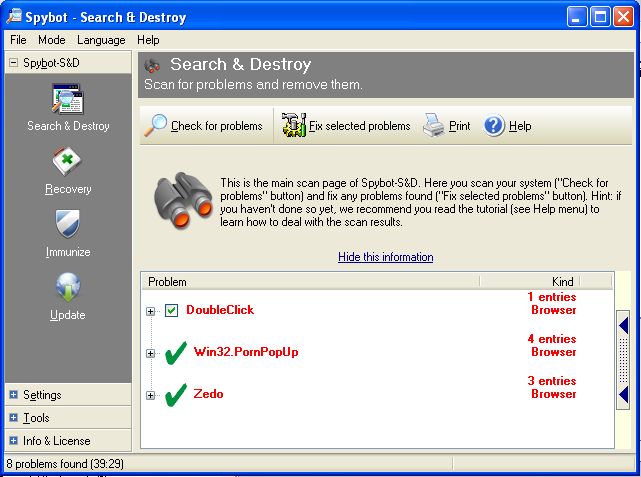
I'm almost constantly seeing Zedo, Doubleclick, and a few others show up on the Spybot scans every time I do them. What bothers me is that I had never seen the Win32.PornPopUp entries until just the other day (either yesterday or the day before), and after scanning and removing all threats with Spybot, I restarted - did absolutely nothing but open Spybot again - and it found another entry for it.
Um…I'm not entirely sure I understand what you mean by where it shows it located…I ran a scan immediately after startup and an attempt at updating Spybot (which yielded no new updates), and it showed up in the results. Is there something else you mean, and somewhere else I should look?
Also, should I run HiJackThis with Spybot open, should I go ahead and fix the issues with Spybot then run, or just close Spybot and run?
LDTate
Don't fix anything yet. Run HJT and post the scan results.should I run HiJackThis with Spybot open, should I go ahead and fix the issues with Spybot then run, or just close Spybot and run?
mediaklepto
All right then…I left Spybot open with all of its lovelies in it and ran HJT. Here's the log:
Logfile of Trend Micro HijackThis v2.0.4
Scan saved at 9:24:37 PM, on 6/19/2010
Platform: Windows XP SP3 (WinNT 5.01.2600)
MSIE: Internet Explorer v7.00 (7.00.6000.17055)
Boot mode: Normal
Running processes:
C:\WINDOWS\System32\smss.exe
C:\WINDOWS\system32\winlogon.exe
C:\WINDOWS\system32\services.exe
C:\WINDOWS\system32\lsass.exe
C:\WINDOWS\system32\svchost.exe
C:\WINDOWS\System32\svchost.exe
C:\Program Files\Alwil Software\Avast4\aswUpdSv.exe
C:\Program Files\Alwil Software\Avast4\ashServ.exe
C:\WINDOWS\Explorer.EXE
C:\Program Files\Intel\Intel Matrix Storage Manager\iaanotif.exe
C:\WINDOWS\system32\igfxtray.exe
C:\WINDOWS\system32\hkcmd.exe
C:\WINDOWS\system32\igfxpers.exe
C:\WINDOWS\RTHDCPL.EXE
C:\Program Files\Synaptics\SynTP\SynTPEnh.exe
C:\PROGRA~1\LAUNCH~1\LManager.exe
C:\WINDOWS\system32\igfxsrvc.exe
C:\Program Files\Google\Google Desktop Search\GoogleDesktop.exe
C:\Program Files\Carbonite\CarbonitePreinstaller.exe
C:\Program Files\Nero\Nero8\InCD\NBHGui.exe
C:\Program Files\Nero\Nero8\InCD\InCD.exe
C:\WINDOWS\WebCam\M3000\M3000Mnt.exe
C:\Program Files\Prolific\EZ-DUB Finder\OneBtn.exe
C:\PROGRA~1\ALWILS~1\Avast4\ashDisp.exe
C:\Program Files\Common Files\Java\Java Update\jusched.exe
C:\Program Files\MSN Toolbar\Platform\4.0.0379.0\mswinext.exe
C:\Program Files\Common Files\Nero\Lib\NMIndexStoreSvr.exe
C:\Program Files\SUPERAntiSpyware\SUPERAntiSpyware.exe
C:\Program Files\Spybot - Search & Destroy\TeaTimer.exe
C:\WINDOWS\system32\ctfmon.exe
C:\Program Files\Acer\Acer VCM\AcerVCM.exe
C:\WINDOWS\system32\spoolsv.exe
C:\WINDOWS\system32\igfxext.exe
C:\Program Files\Intel\Intel Matrix Storage Manager\IAANTMon.exe
C:\Program Files\Nero\Nero8\InCD\InCDsrv.exe
C:\Program Files\Java\jre6\bin\jqs.exe
C:\Program Files\Common Files\LightScribe\LSSrvc.exe
C:\Program Files\Nero\Nero8\InCD\NBHRegInCDSrv.exe
C:\WINDOWS\system32\IoctlSvc.exe
C:\Program Files\Acer\Acer VCM\RS_Service.exe
C:\Program Files\Microsoft\Search Enhancement Pack\SeaPort\SeaPort.exe
C:\WINDOWS\system32\svchost.exe
C:\Program Files\Common Files\Microsoft Shared\Windows Live\WLIDSVC.EXE
C:\Program Files\Common Files\Microsoft Shared\Windows Live\WLIDSvcM.exe
C:\Program Files\Alwil Software\Avast4\ashMaiSv.exe
C:\Program Files\Alwil Software\Avast4\ashWebSv.exe
C:\Program Files\Common Files\Nero\Lib\NMIndexingService.exe
C:\Program Files\Spybot - Search & Destroy\SpybotSD.exe
C:\Documents and Settings\Family02\Local Settings\Application Data\Google\Chrome\Application\chrome.exe
C:\Documents and Settings\Family02\Desktop\HiJackThis.exe
R0 - HKCU\Software\Microsoft\Internet Explorer\Main,Start Page = https://www.google.com/accounts/ServiceLogi…mp;ltmplcache=2
R1 - HKLM\Software\Microsoft\Internet Explorer\Main,Default_Page_URL = http://go.microsoft.com/fwlink/?LinkId=69157
R1 - HKLM\Software\Microsoft\Internet Explorer\Main,Default_Search_URL = http://go.microsoft.com/fwlink/?LinkId=54896
R1 - HKLM\Software\Microsoft\Internet Explorer\Main,Search Page = http://go.microsoft.com/fwlink/?LinkId=54896
R0 - HKLM\Software\Microsoft\Internet Explorer\Main,Start Page = http://homepage.acer.com/rdr.aspx?b=ACAW&a…mp;m=aspire_one
R1 - HKCU\Software\Microsoft\Internet Connection Wizard,ShellNext = http://homepage.acer.com/rdr.aspx?b=ACAW&a…mp;m=aspire_one
O2 - BHO: AcroIEHelperStub - {18DF081C-E8AD-4283-A596-FA578C2EBDC3} - C:\Program Files\Common Files\Adobe\Acrobat\ActiveX\AcroIEHelperShim.dll
O2 - BHO: Spybot-S&D IE Protection - {53707962-6F74-2D53-2644-206D7942484F} - C:\PROGRA~1\SPYBOT~1\SDHelper.dll
O2 - BHO: (no name) - {5C255C8A-E604-49b4-9D64-90988571CECB} - (no file)
O2 - BHO: Search Helper - {6EBF7485-159F-4bff-A14F-B9E3AAC4465B} - C:\Program Files\Microsoft\Search Enhancement Pack\Search Helper\SEPsearchhelperie.dll
O2 - BHO: Windows Live ID Sign-in Helper - {9030D464-4C02-4ABF-8ECC-5164760863C6} - C:\Program Files\Common Files\Microsoft Shared\Windows Live\WindowsLiveLogin.dll
O2 - BHO: MSN Toolbar BHO - {d2ce3e00-f94a-4740-988e-03dc2f38c34f} - C:\Program Files\MSN Toolbar\Platform\4.0.0379.0\npwinext.dll
O2 - BHO: Java™ Plug-In 2 SSV Helper - {DBC80044-A445-435b-BC74-9C25C1C588A9} - C:\Program Files\Java\jre6\bin\jp2ssv.dll
O2 - BHO: JQSIEStartDetectorImpl - {E7E6F031-17CE-4C07-BC86-EABFE594F69C} - C:\Program Files\Java\jre6\lib\deploy\jqs\ie\jqs_plugin.dll
O3 - Toolbar: MSN Toolbar - {8dcb7100-df86-4384-8842-8fa844297b3f} - C:\Program Files\MSN Toolbar\Platform\4.0.0379.0\npwinext.dll
O4 - HKLM\..\Run: [IAAnotif] C:\Program Files\Intel\Intel Matrix Storage Manager\iaanotif.exe
O4 - HKLM\..\Run: [IgfxTray] C:\WINDOWS\system32\igfxtray.exe
O4 - HKLM\..\Run: [HotKeysCmds] C:\WINDOWS\system32\hkcmd.exe
O4 - HKLM\..\Run: [Persistence] C:\WINDOWS\system32\igfxpers.exe
O4 - HKLM\..\Run: [RTHDCPL] RTHDCPL.EXE
O4 - HKLM\..\Run: [AzMixerSel] C:\Program Files\Realtek\Audio\Drivers\AzMixerSel.exe
O4 - HKLM\..\Run: [SynTPEnh] C:\Program Files\Synaptics\SynTP\SynTPEnh.exe
O4 - HKLM\..\Run: [LManager] C:\PROGRA~1\LAUNCH~1\LManager.exe
O4 - HKLM\..\Run: [Google Desktop Search] "C:\Program Files\Google\Google Desktop Search\GoogleDesktop.exe" /startup
O4 - HKLM\..\Run: [Adobe Reader Speed Launcher] "C:\Program Files\Adobe\Reader 9.0\Reader\Reader_sl.exe"
O4 - HKLM\..\Run: [CarboniteSetupLite] "C:\Program Files\Carbonite\CarbonitePreinstaller.exe" /preinstalled
O4 - HKLM\..\Run: [IMJPMIG8.1] "C:\WINDOWS\IME\imjp8_1\IMJPMIG.EXE" /Spoil /RemAdvDef /Migration32
O4 - HKLM\..\Run: [MSPY2002] C:\WINDOWS\system32\IME\PINTLGNT\ImScInst.exe /SYNC
O4 - HKLM\..\Run: [PHIME2002ASync] C:\WINDOWS\system32\IME\TINTLGNT\TINTSETP.EXE /SYNC
O4 - HKLM\..\Run: [PHIME2002A] C:\WINDOWS\system32\IME\TINTLGNT\TINTSETP.EXE /IMEName
O4 - HKLM\..\Run: [M3000Mnt] Rundll32.exe M3000Rmv.dll ,WinMainRmv /StartStillMnt
O4 - HKLM\..\Run: [NeroFilterCheck] C:\Program Files\Common Files\Nero\Lib\NeroCheck.exe
O4 - HKLM\..\Run: [SecurDisc] C:\Program Files\Nero\Nero8\InCD\NBHGui.exe
O4 - HKLM\..\Run: [InCD] C:\Program Files\Nero\Nero8\InCD\InCD.exe
O4 - HKLM\..\Run: [Prolific2571_OneButton] C:\Program Files\Prolific\EZ-DUB Finder\OneBtn.exe
O4 - HKLM\..\Run: [avast!] C:\PROGRA~1\ALWILS~1\Avast4\ashDisp.exe
O4 - HKLM\..\Run: [SunJavaUpdateSched] "C:\Program Files\Common Files\Java\Java Update\jusched.exe"
O4 - HKLM\..\Run: [MSN Toolbar] "C:\Program Files\MSN Toolbar\Platform\4.0.0379.0\mswinext.exe"
O4 - HKLM\..\Run: [Microsoft Default Manager] "C:\Program Files\Microsoft\Search Enhancement Pack\Default Manager\DefMgr.exe" -resume
O4 - HKCU\..\Run: [IndxStoreSvr_{79662E04-7C6C-4d9f-84C7-88D8A56B10AA}] "C:\Program Files\Common Files\Nero\Lib\NMIndexStoreSvr.exe" ASO-616B5711-6DAE-4795-A05F-39A1E5104020
O4 - HKCU\..\Run: [Google Update] "C:\Documents and Settings\Family02\Local Settings\Application Data\Google\Update\GoogleUpdate.exe" /c
O4 - HKCU\..\Run: [SUPERAntiSpyware] C:\Program Files\SUPERAntiSpyware\SUPERAntiSpyware.exe
O4 - HKCU\..\Run: [SpybotSD TeaTimer] C:\Program Files\Spybot - Search & Destroy\TeaTimer.exe
O4 - HKCU\..\Run: [ctfmon.exe] C:\WINDOWS\system32\ctfmon.exe
O4 - Global Startup: Acer VCM.lnk = ?
O8 - Extra context menu item: E&xport to Microsoft Excel - res://C:\PROGRA~1\MICROS~2\Office12\EXCEL.EXE/3000
O8 - Extra context menu item: Google Sidewiki… - res://C:\Program Files\Google\Google Toolbar\Component\GoogleToolbarDynamic_mui_en_96D6FF0C6D236BF8.dll/cmsidewiki.html
O9 - Extra button: Blog This - {219C3416-8CB2-491a-A3C7-D9FCDDC9D600} - C:\Program Files\Windows Live\Writer\WriterBrowserExtension.dll
O9 - Extra 'Tools' menuitem: &Blog This in Windows Live Writer - {219C3416-8CB2-491a-A3C7-D9FCDDC9D600} - C:\Program Files\Windows Live\Writer\WriterBrowserExtension.dll
O9 - Extra button: Send to OneNote - {2670000A-7350-4f3c-8081-5663EE0C6C49} - C:\PROGRA~1\MICROS~2\Office12\ONBttnIE.dll
O9 - Extra 'Tools' menuitem: S&end to OneNote - {2670000A-7350-4f3c-8081-5663EE0C6C49} - C:\PROGRA~1\MICROS~2\Office12\ONBttnIE.dll
O9 - Extra button: Research - {92780B25-18CC-41C8-B9BE-3C9C571A8263} - C:\PROGRA~1\MICROS~2\Office12\REFIEBAR.DLL
O9 - Extra button: (no name) - {DFB852A3-47F8-48C4-A200-58CAB36FD2A2} - C:\PROGRA~1\SPYBOT~1\SDHelper.dll
O9 - Extra 'Tools' menuitem: Spybot - Search & Destroy Configuration - {DFB852A3-47F8-48C4-A200-58CAB36FD2A2} - C:\PROGRA~1\SPYBOT~1\SDHelper.dll
O9 - Extra button: (no name) - {e2e2dd38-d088-4134-82b7-f2ba38496583} - C:\WINDOWS\Network Diagnostic\xpnetdiag.exe
O9 - Extra 'Tools' menuitem: @xpsp3res.dll,-20001 - {e2e2dd38-d088-4134-82b7-f2ba38496583} - C:\WINDOWS\Network Diagnostic\xpnetdiag.exe
O9 - Extra button: Messenger - {FB5F1910-F110-11d2-BB9E-00C04F795683} - C:\Program Files\Messenger\msmsgs.exe
O9 - Extra 'Tools' menuitem: Windows Messenger - {FB5F1910-F110-11d2-BB9E-00C04F795683} - C:\Program Files\Messenger\msmsgs.exe
O16 - DPF: {40F576AD-8680-4F9E-9490-99D069CD665F} (System Requirements Lab Class) - http://srtest-cdn.systemrequirementslab.co…eqlabdetect.cab
O16 - DPF: {54B52E52-8000-4413-BD67-FC7FE24B59F2} (EARTPatchX Class) - http://simcity.ea.com/update/EARTPX.cab
O16 - DPF: {8100D56A-5661-482C-BEE8-AFECE305D968} (Facebook Photo Uploader 5 Control) - http://upload.facebook.com/controls/2009.0…oUploader55.cab
O16 - DPF: {BC18E6DF-BE57-4580-93E8-F228F9A133AA} (MaxisSimCity4LotTeleX Control) - http://simcity.ea.com/exchange/lots/telepo…ty4LotTeleX.cab
O16 - DPF: {C36661D7-3590-45B1-80B5-520839E94DAD} (MaxisSimCity4PatcherX Control) - http://simcity.ea.com/update/MaxisSimCity4PatcherX.cab
O16 - DPF: {E2883E8F-472F-4FB0-9522-AC9BF37916A7} - http://platformdl.adobe.com/NOS/getPlusPlus/1.6/gp.cab
O18 - Protocol: skype4com - {FFC8B962-9B40-4DFF-9458-1830C7DD7F5D} - C:\Program Files\Acer\Acer VCM\Skype4COM.dll
O20 - Winlogon Notify: !SASWinLogon - C:\Program Files\SUPERAntiSpyware\SASWINLO.dll
O22 - SharedTaskScheduler: Browseui preloader - {438755C2-A8BA-11D1-B96B-00A0C90312E1} - C:\WINDOWS\system32\browseui.dll
O22 - SharedTaskScheduler: Component Categories cache daemon - {8C7461EF-2B13-11d2-BE35-3078302C2030} - C:\WINDOWS\system32\browseui.dll
O23 - Service: avast! iAVS4 Control Service (aswUpdSv) - ALWIL Software - C:\Program Files\Alwil Software\Avast4\aswUpdSv.exe
O23 - Service: avast! Antivirus - ALWIL Software - C:\Program Files\Alwil Software\Avast4\ashServ.exe
O23 - Service: avast! Mail Scanner - ALWIL Software - C:\Program Files\Alwil Software\Avast4\ashMaiSv.exe
O23 - Service: avast! Web Scanner - ALWIL Software - C:\Program Files\Alwil Software\Avast4\ashWebSv.exe
O23 - Service: Google Desktop Manager 5.7.808.7150 (GoogleDesktopManager-080708-050100) - Google - C:\Program Files\Google\Google Desktop Search\GoogleDesktop.exe
O23 - Service: Google Update Service (gupdate) (gupdate) - Google Inc. - C:\Program Files\Google\Update\GoogleUpdate.exe
O23 - Service: Intel® Matrix Storage Event Monitor (IAANTMON) - Intel Corporation - C:\Program Files\Intel\Intel Matrix Storage Manager\IAANTMon.exe
O23 - Service: InCD Helper (InCDsrv) - Nero AG - C:\Program Files\Nero\Nero8\InCD\InCDsrv.exe
O23 - Service: Java Quick Starter (JavaQuickStarterService) - Sun Microsystems, Inc. - C:\Program Files\Java\jre6\bin\jqs.exe
O23 - Service: LightScribeService Direct Disc Labeling Service (LightScribeService) - Hewlett-Packard Company - C:\Program Files\Common Files\LightScribe\LSSrvc.exe
O23 - Service: Nero Registry InCD Service (NeroRegInCDSrv) - Nero AG - C:\Program Files\Nero\Nero8\InCD\NBHRegInCDSrv.exe
O23 - Service: NMIndexingService - Nero AG - C:\Program Files\Common Files\Nero\Lib\NMIndexingService.exe
O23 - Service: nProtect GameGuard Service (npggsvc) - Unknown owner - C:\WINDOWS\system32\GameMon.des.exe (file missing)
O23 - Service: PLFlash DeviceIoControl Service - Prolific Technology Inc. - C:\WINDOWS\system32\IoctlSvc.exe
O23 - Service: Raw Socket Service (RS_Service) - Acer Incorporated - C:\Program Files\Acer\Acer VCM\RS_Service.exe
–
End of file - 12360 bytes
LDTate
I don't see anything bad.
Use Spybot and fix what it found.
mediaklepto
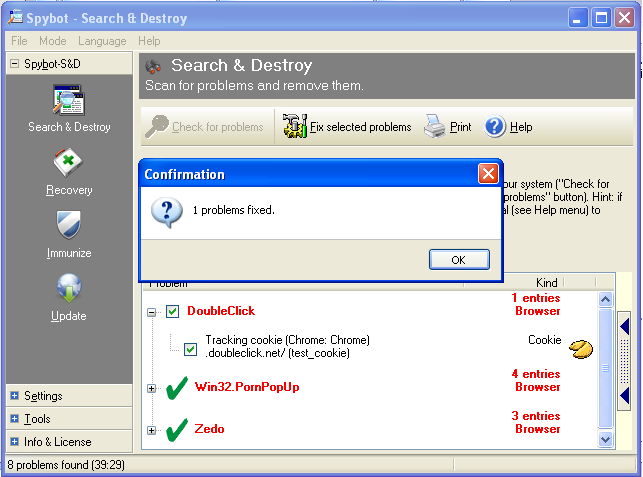
All right, I just went ahead and told Spybot to fix what it had found. I'm not sure when this started happening, or if it's even an issue…But sometimes when I tell Spybot to fix what it's found, instead of fixing them all - or even any of them - it will tell me that "# problems were fixed", but the entries will not develop the green check marks that signify they've been taken care of. If I keep telling it to fix, sometimes they will, but other times - like right now - they won't. I've attached two screenshots so you can see what I mean. I hope that's all right.
Any ideas?
Also, something I noticed about Spybots immunization…All it ever seems to list under protected is 17 files in Explorer, while listing thousands of files in all under categories under unprotected. I've no idea what immunization should actually do, so if you can offer me some explanation, I'd be most appreciative.
LDTate
Have you clicked the little plus box to get more info?
It might show where it's finding them.
mediaklepto
In my second screenshot, I think you can see the entry's tab is open, and it notes that it's a .doubleclick.net [test_cookie] found in (Chrome: Chrome), if that's what you mean…
No matter how many times I tell it to remove, it just keeps saying "1 problems fixed" and never checks it off, while the others have apparently been removed.
Also, any suggestions on if I've done something wrong, or if something is going wrong, with Spybot's immunization?
LDTate
I was reffering to the other ones.
For cookies I'd use ATF Cleaner.
Please download ATF Cleaner by Atribune.
Download - ATF Cleaner»
Double-click ATF-Cleaner.exe to run the program.
Under Main choose: Select All
Click the Empty Selected button.
If you use Firefox browserClick Firefox at the top and choose: Select All
Click the Empty Selected button.
NOTE: If you would like to keep your saved passwords, please click No at the prompt.
If you use Opera browserClick Opera at the top and choose: Select All
Click the Empty Selected button.
NOTE: If you would like to keep your saved passwords, please click No at the prompt.
Click Exit on the Main menu to close the program.
It's normal after running ATF cleaner that the PC will be slower to boot the first time or two.
mediaklepto
Ahh, the other entries there…They were all listed as being located in Chrome, and all as tracking cookies.
Will ATF Cleaner take care of the cookies in Chrome, or does it only handle Explorer, Firefox, and Opera? Would TFC be a better bet?
LDTate
Chrome should have an option to delete cookies.
With IE.
Click Tools > Internet Options > click the Delete Cookies button.
I don't know if Chrome is the same
Edit:
http://www.aboutcookies.org/Default.aspx?page=1
Google Chrome
Click on the "Tools" menu and select "Options".
Click the "Under the Bonnet" tab and locate the "Privacy" section, and choose the "Content settings" button.
Click the "Cookie settings" tab and choose your preferred settings.
Google Chrome allows all cookies by default, but you can restrict the behaviour of first-party and third-party cookies or even block them completely.
Click on the Close button when you've finished.
Still having this problem?
This topic is from the What the Tech archive and can't take new replies. Geeks to Go is an active, free help community run by volunteers. Post your question there and a person, not a bot, will work through it with you.
Please don't run the tools or fix scripts from this topic on your computer. Malware fixes are written for one computer at one point in time and can do damage on another. Ask for help with your own computer instead.