Ads on websites I visit daily and my yahoo and google search results redirect to ads sites
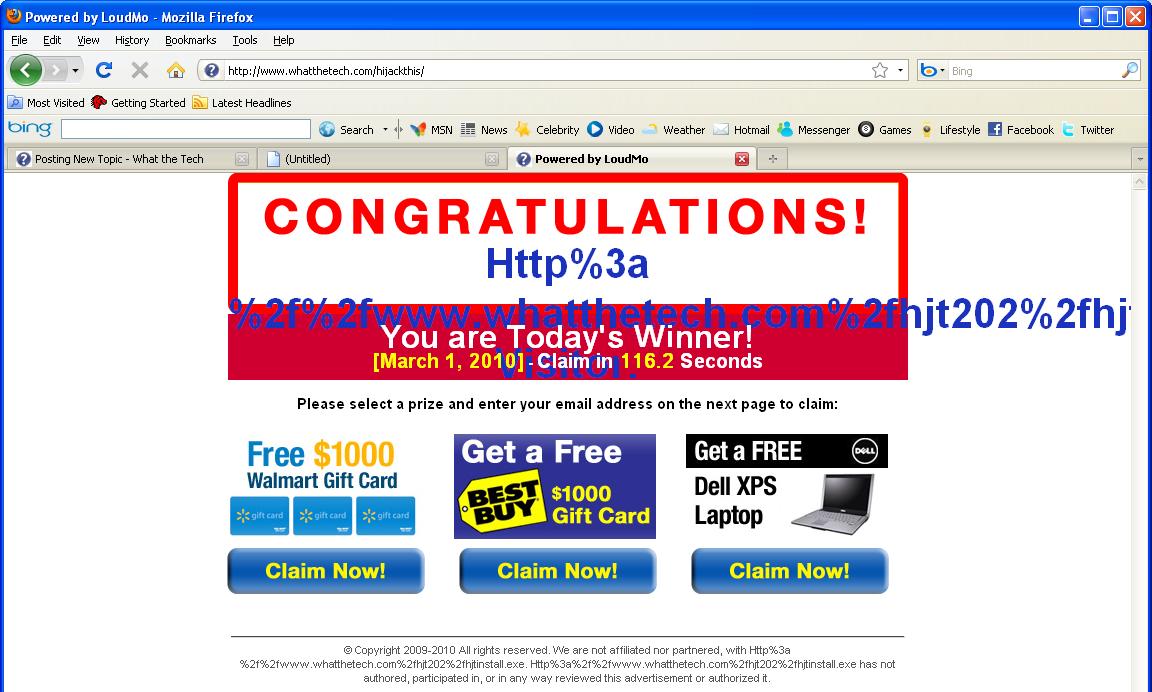
attached is Hijacthis log. Also a snapshot of how ads appear.
Logfile of Trend Micro HijackThis v2.0.2
Scan saved at 8:25:33 PM, on 3/1/2010
Platform: Windows XP SP3 (WinNT 5.01.2600)
MSIE: Internet Explorer v8.00 (8.00.6001.18702)
Boot mode: Normal
I'm Conspire, I'll be glad to help you with your computer problems.
Please observe these rules while we work:
Read the entire procedure
It is important to perform ALL actions in sequence.
If you don't know, stop and ask! Don't keep going on.
Please reply to this thread. Do not start a new topic.
Stick with me till you're given the all clear.
Remember, absence of symptoms does not mean the infection is all gone.
Don't attempt to clean your computer with any tools other than the ones I ask you to use during the cleanup process.
Please be advised, as I am still in training, all my replies to you will be checked for accuracy by one of our experts to ensure that I am giving you the best possible advise.
This may cause a delay, but I will do my best to keep it as short as possible.
Please bear with me, I will post back to you as soon as I can.
IMPORTANT NOTE : Please do not delete anything unless instructed to.
You have ( uTorrent ), a P2P/file sharing programs installed on your computer. P2P applications like it are the largest source of malware we see. You'll be doing yourself a favor by removing it.
References for the risk of these programs can be found in these links:
http://www.microsoft.com/windows/ie/commun…protection.mspx
http://www.internetworldstats.com/articles…cles/art053.htm
See Clean/Infected P2P Programs here
I would recommend that you uninstall it, however that choice is up to you. If you choose to remove these programs, you can do so via Control Panel >> Add or Remove Programs.
If you wish to keep it, please do not use it until your computer is cleaned.
Please re-open HijackThis and click on Do a system scan only. Check the boxes next to all the entries listed below.(If exist) O2 - BHO: flvdirect - {90892d09-0d57-109b-0ccc-bef614c4e01c} - C:\WINDOWS\system32\5OQBFp–Dch_1.dll
Note : Do not worry if you are unable to find any of these entries, continue with the ones that you discovered. Now close all windows other than HijackThis, then click Fix checked. Close HijackThis.
Double click on the icon to run it. Make sure all other windows are closed and to let it run uninterrupted.
When the window appears, underneath Output at the top change it to Minimal Output.
Check the boxes beside LOP Check and Purity Check.
Click the Run Scan button. Do not change any settings unless otherwise told to do so. The scan wont take long.
When the scan completes, it will open two notepad windows. OTL.Txt and Extras.Txt.
Note:These logs can be located in the OTL. folder on you C:\ drive if they fail to open automatically.
Please copy (Edit->Select All, Edit->Copy) the contents of these files, one at a time, and post it with your next reply. You may need two posts to fit them both in.
In the right panel, you will see several boxes that have been checked. Uncheck the following …
Sections
IAT/EAT
Drives/Partition other than Systemdrive (typically C:\)
Show All (don't miss this one)
Then click the Scan button & wait for it to finish.
Once done click on the [Save..] button, and in the File name area, type in "Gmer.txt" or it will save as a .log file which cannot be uploaded to your post.
Save it where you can easily find it, such as your desktop, and attach it in your reply.
**Caution**
Rootkit scans often produce false positives. Do NOT take any action on any "<— ROOKIT" entries
Malwarebytes' Anti-Malware
Download Malwarebytes' Anti-Malware here and save to your desktop.
Double-click mbam-setup.exe and follow the prompts to install the program. (Note to Vista users, please right-click and select Run as Administrator.)
At the end, be sure a checkmark is placed next to:
Update Malwarebytes' Anti-Malware
Launch Malwarebytes' Anti-Malware
Then click Finish.
If an update is found, it will download and install the latest version.
Once the program has loaded, select Perform full scan, then click Scan.
When the scan is complete, click OK, then Show Results to view the results.
Be sure that everything is checked, and click Remove Selected.
When completed, a log will open in Notepad. Please copy and paste the log back into your next reply
Note:
The log can also be found here: C:\Documents and Settings\Username\Application Data\Malwarebytes\Malwarebytes' Anti-Malware\Logs\mbam-log-date (time).txt
Or via the Logs tab when Malwarebytes' Anti-Malware is started.
Note: If MBAM encounters a file that is difficult to remove, you will be presented with 1 of 2 prompts.
Click OK to either and let MBAM proceed with the disinfection process.
If asked to restart the computer, please do so. Failure to reboot will prevent MBAM from removing all the malware.
Go to My Computer-> Tools-> Folder Options-> View tab:
Under the Hidden files and folders heading:
Select- Show hidden files and folders.
Uncheck- Hide protected operating system files (recommended) option.
Also, make sure there is no checkmark beside Hide file extensions for known file types.
Click OK. (Remember to Hide files and folders once done)
Please go to one of the below sites to scan the following files: jotti.org Kaspersky Virus File Scanner Virus Total
click on Browse, and upload the following file for analysis: C:\WINDOWS\System32\s0_091.exe
C:\WINDOWS\System32\5OQBFp–Dch_1.dll
C:\WINDOWS\System32\BASSMOD.dll
C:\WINDOWS\System32\e1000msg.dll
Then click Submit. Allow the file to be scanned, and then please copy and paste the results here for me to see.
If it says already scanned – click "reanalyze now"
Please post the results in your next reply.
Please download GooredFix from one of the locations below and save it to your Desktop Download Mirror #1 Download Mirror #2
Ensure all Firefox windows are closed.
To run the tool, double-click it (XP), or right-click and select Run As Administrator (Vista).
When prompted to run the scan, click Yes.
GooredFix will check for infections, and then a log will appear. Please post the contents of that log in your next reply (it can also be found on your desktop, called GooredFix.txt).


 Thanks
![[external image: Posted Image]](http://i266.photobucket.com/albums/ii277/sUBs_/Gmer_initScan.gif)