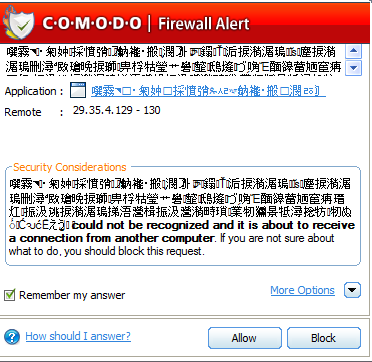
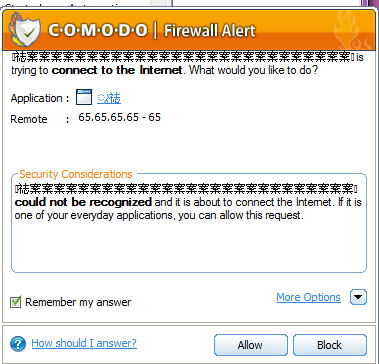
No I'm not with AT&T - I'm with Bigpond in Australia.
I'll try the right click next time.
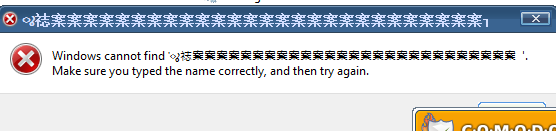
When I click on the application to get more info, Windows can never find the application on my system, so I block the request since I'm assuming that it would find a genuine application.
I can be checking email - like just now (but I blocked it before coming into this forum).
It has happened this morning when I'm connected to an AS/400 computer in the UK through a VPN but it can occur when I'm not connected as well.
I haven't found any one thing that triggers it.
Should I delete winservices.exe still?
and complete your previous instructions? I have upgraded Java and Adobe.
Regards,
Karen
I stopped the SCM_Service (since there wasn't the option to disable) and so far so good.
So after all this Netgear are trying to contact me in Chinese!
I'll let you know if I get any more Chinese connections.
THANK YOU VERY MUCH FOR YOUR HELP!
I'll make a donation. All the guys and gals who help on here are doing an amazing job - especially since you are all volunteers!
Regards,
Karen
Lets clean up all the tools we used, then I'll jeep the thread open a couple of days, just to make sure.
You can delete the DDS and GMER folders from your desktop.
NEXT
Follow these steps to uninstall Combofix
Click START then RUN
Now type Combofix /u in the runbox and click OK. Note the space between the ..X and the /U, it needs to be there.
[external image: Posted Image]
NEXT
Below I have included a number of recommendations for how to protect your computer against malware infections.
It is good security practice to change your passwords to all your online accounts on a fairly regular basis. Refer to this Microsoft article
Strong passwords: How to create and use them Then consider a password keeper, to keep all your passwords safe.
Keep Windows updated by regularly checking their website at :
http://windowsupdate.microsoft.com/
This will ensure your computer has always the latest security updates available installed on your computer.
Make Internet Explorer more secure
Click Start > Run
Type Inetcpl.cpl & click OK
Click on the Security tab
Click Reset all zones to default level
Make sure the Internet Zone is selected & Click Custom level
In the ActiveX section, set the first two options ("Download signed and unsigned ActiveX controls) to "Prompt", and ("Initialize and Script ActiveX controls not marked as safe") to "Disable".
Next Click OK, then Apply button and then OK to exit the Internet Properties page.
ATF Cleaner - Cleans temporary files from IE and Windows, empties the recycle bin and more. Great tool to help speed up your computer and knock out those nasties that like to reside in the temp folders.
WOT, Web of Trust, warns you about risky websites that try to scam visitors, deliver malware or send spam. Protect your computer against online threats by using WOT as your front-line layer of protection when browsing or searching in unfamiliar territory. WOT's color-coded icons show you ratings for 21 million websites, helping you avoid the dangerous sites:
Green to go
Yellow for caution
Red to stop
WOT has an addon available for both Firefox and IE
For Firefox, I highly recommend this add-on to keep your PC even more secure.
NoScript - for blocking ads and other potential website attacks
Keep a backup of your important files - Now, more than ever, it's especially important to protect your digital files and memories. This article is full of good information on alternatives for home backup solutions.
ERUNT (Emergency Recovery Utility NT) allows you to keep a complete backup of your registry and restore it when needed. The standard registry backup options that come with Windows back up most of the registry but not all of it. ERUNT however creates a complete backup set, including the Security hive and user related sections. ERUNT is easy to use and since it creates a full backup, there are no options or choices other than to select the location of the backup files. The backup set includes a small executable that will launch the registry restore if needed.
In light of your recent issue, I'm sure you'd like to avoid any future infections. Please take a look at these well written articles: Think Prevention. PC Safety and Security–What Do I Need?.
**Be very wary with any security software that is advertised in popups or in other ways. They are not only usually of no use, but often have malware in them.
Thank you for your patience, and performing all of the procedures requested.
Signed on this morning and had lots of messages come up - them checked SRM_services and I hadn't set it NOT to start up when I turn on the PC . So I've stopped it and disabled it from starting up and they've gone again
Thanks again.
Regards,
Karen
It hasn't solved it
Just started up firefox to check on some info and the pop ups started up again. I checked SCM_Service and it's disabled.
I've attached screen prints.
Regards,
Karen
Hi
The ip addresses are legit
[removed]
Network Information Center
Columbus
OH
[removed]
AT&T Internet Services
Richardson
TX
Let me look into this a little more and see if we can figure out what these requests really are.
Well, unfortunately there doesn't seem to be an answer to this readily available.
There is no malware on your machine.
The IP addresses are legitimate, the Chinese symbols may only be related to the product on your computer where the manufacturer uses the Chinese language.
However, my suggestion is to join the Comodo forum and post your issue there, it may not be related to Comodo but it may be something they are familiar with.
Due to inactivity this topic will be closed.
If you need help please start a new thread.
Still having this problem?
This topic is from the What the Tech archive and can't take new replies. Geeks to Go is an active, free help community run by volunteers. Post your question there and a person, not a bot, will work through it with you.
Please don't run the tools or fix scripts from this topic on your computer. Malware fixes are written for one computer at one point in time and can do damage on another. Ask for help with your own computer instead.

 Thanks again.
Regards,
Karen
 Just started up firefox to check on some info and the pop ups started up again. I checked SCM_Service and it's disabled.
I've attached screen prints.
Regards,
Karen