This is a read-only archive. No new posts or registrations. Privacy Page
Spyware / Malware / Virus Removal

[Resolved] comp.gone mad

47 min read

This thread's last reply is from . Advice, software, and links below may be out of date — treat specific steps and download links with caution.

Looking for the outcome? Ask AI

Hi ed-e-dee

Sorry about all the trouble you are having. Kaspersky does that sometimes.


Use this one instead. If you have problems with this one come back as soon as you can.


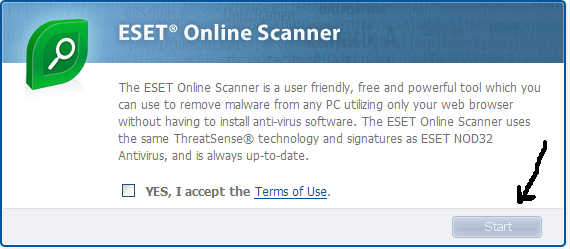
Go here to run an online scannner from ESET:
http://www.eset.eu/online-scanner

(Note: You must use Internet Explorer for this scan.)

  • Tick the box next to YES, I accept the Terms of Use.
  • Click Start
  • When asked, allow the activex control to install
  • Disable your Antivirus software. You can usually do this with its Notfication Tray icon near the clock
  • Click Start
  • Make sure that the option "Remove found threats" is Unchecked, and the option "Scan unwanted applications" is Checked.
  • Click Scan.
  • Wait for the scan to finish.
  • Re-enable your Antivirus software.
  • A logfile is created and located at C:\Program Files\EsetOnlineScanner\log.txt. We will need this later.
Please post back with the ESET log and a new HJT log.
Hi oldman

I think I got something to work with this damb thing here goes.
I do hope this is what you want,,,,,It does'nt mean a thing to me so I don't know if its right or wrong.


Full Scan: completed 2009-03-27 13:59 (events: 20, objects: 392650, time: 00:35:45)
2009-03-27 00:42 Task started
2009-03-27 00:43 Detected: http://www.viruslist.com/en/advisories/33981 c:\program files\winamp\winamp.exe
2009-03-27 00:44 Detected: http://www.viruslist.com/en/advisories/34254 c:\program files\itunes\itunes.exe
2009-03-27 00:50 Detected: Trojan.Win32.Vapsup.sbv c:\System Volume Information\_restore{EFFDDD54-A6B8-4EF4-8459-8BD48D5D4584}\RP165\A0020851.dll
2009-03-27 00:50 Untreated: Trojan.Win32.Vapsup.sbv c:\System Volume Information\_restore{EFFDDD54-A6B8-4EF4-8459-8BD48D5D4584}\RP165\A0020851.dll Postponed
2009-03-27 01:12 Task stopped
2009-03-27 13:23 Task started
2009-03-27 13:26 Detected: http://www.viruslist.com/en/advisories/33901 c:\program files\Adobe\Reader 8.0\Reader\optional\Annots.api
2009-03-27 13:29 Detected: http://www.viruslist.com/en/advisories/25952 c:\program files\Common Files\ACD Systems\PlugIns\ID_PSP.apl
2009-03-27 13:37 Detected: http://www.viruslist.com/en/advisories/32991 c:\program files\Java\jre1.6.0_06\bin\java.exe
2009-03-27 13:37 Detected: http://www.viruslist.com/en/advisories/32991 c:\program files\Java\jre1.6.0_07\bin\java.exe
2009-03-27 13:43 Detected: http://www.viruslist.com/en/advisories/33981 c:\program files\winamp\winamp.exe
2009-03-27 13:58 Detected: http://www.viruslist.com/en/advisories/34012 c:\WINDOWS\system32\Macromed\Flash\Flash9f.ocx
2009-03-27 13:58 Detected: http://www.viruslist.com/en/advisories/34012 c:\WINDOWS\system32\Macromed\Flash\NPSWF32.dll
2009-03-27 13:58 Detected: http://www.viruslist.com/en/advisories/19218 c:\WINDOWS\system32\Macromed\Shockwave 10\SwOnce.dll
2009-03-27 13:59 Detected: http://www.viruslist.com/en/advisories/23655 c:\WINDOWS\WinSxS\x86_Microsoft.MSXML2_6bd6b9abf345378f_4.20.9841.0_x-ww_18171213\msxml4.dll
2009-03-27 13:59 Detected: http://www.viruslist.com/en/advisories/23655 c:\WINDOWS\WinSxS\x86_Microsoft.MSXML2_6bd6b9abf345378f_4.20.9818.0_x-ww_8ff50c5d\msxml4.dll
2009-03-27 13:59 Detected: http://www.viruslist.com/en/advisories/23655 c:\WINDOWS\WinSxS\x86_Microsoft.MSXML2_6bd6b9abf345378f_4.1.0.0_x-ww_b319d8da\msxml4.dll
2009-03-27 13:59 Detected: http://www.viruslist.com/en/advisories/23655 c:\WINDOWS\WinSxS\x86_Microsoft.MSXML2_6bd6b9abf345378f_4.20.9848.0_x-ww_1b897e9a\msxml4.dll
2009-03-27 13:59 Task completed


Logfile of Trend Micro HijackThis v2.0.2
Scan saved at 14:15, on 2009-03-27
Platform: Windows XP SP3 (WinNT 5.01.2600)
MSIE: Internet Explorer v8.00 (8.00.6001.18372)
Boot mode: Normal

Running processes:
C:\WINDOWS\System32\smss.exe
C:\WINDOWS\system32\winlogon.exe
C:\WINDOWS\system32\services.exe
C:\WINDOWS\system32\lsass.exe
C:\WINDOWS\system32\Ati2evxx.exe
C:\WINDOWS\system32\svchost.exe
C:\WINDOWS\System32\svchost.exe
C:\WINDOWS\system32\Ati2evxx.exe
C:\WINDOWS\system32\spoolsv.exe
C:\WINDOWS\system32\WgaTray.exe
C:\WINDOWS\Explorer.EXE
C:\Program Files\Common Files\Apple\Mobile Device Support\bin\AppleMobileDeviceService.exe
C:\Program Files\Portrait Displays\HP My Display\DTSRVC.exe
C:\Program Files\Windows Live\Family Safety\fsssvc.exe
C:\WINDOWS\System32\svchost.exe
C:\WINDOWS\System32\Fast.exe
C:\Program Files\Java\jre6\bin\jqs.exe
C:\Program Files\Maxtor\Maxtor Backup\MaxBackServiceInt.exe
C:\Program Files\HP\HP Software Update\HPWuSchd2.exe
C:\WINDOWS\vsnpstd.exe
C:\Program Files\QuickTime\QTTask.exe
C:\Program Files\TrustDefender\TrustDefender\TDWatchdog.exe
C:\Program Files\iTunes\iTunesHelper.exe
C:\Program Files\Windows Live\Family Safety\fsui.exe
C:\Program Files\Java\jre6\bin\jusched.exe
C:\Program Files\A4Tech\Keyboard\Ikeymain.exe
C:\Program Files\ATI Technologies\ATI HYDRAVISION\HydraDM.exe
C:\Program Files\ATI Technologies\ATI HYDRAVISION\HydraMD.exe
C:\Program Files\Windows Live\Messenger\msnmsgr.exe
C:\Program Files\Windows Media Player\WMPNSCFG.exe
C:\Program Files\Common Files\Microsoft Shared\VS7DEBUG\MDM.EXE
C:\Program Files\Maxtor\OneTouch\Utils\SyncServices.exe
C:\WINDOWS\system32\HPZipm12.exe
C:\Program Files\WinZip\WZQKPICK.EXE
C:\Program Files\Microsoft\Search Enhancement Pack\SeaPort\SeaPort.exe
C:\WINDOWS\system32\svchost.exe
C:\Program Files\TrustDefender\TrustDefender\TrustDefender.exe
C:\Program Files\Windows Live\Contacts\wlcomm.exe
C:\Program Files\iPod\bin\iPodService.exe
C:\WINDOWS\system32\wuauclt.exe
C:\Program Files\internet explorer\iexplore.exe
C:\Program Files\Trend Micro\HijackThis\HijackThis.exe

R0 - HKCU\Software\Microsoft\Internet Explorer\Main,Start Page = http://ninemsn.com.au/
R1 - HKLM\Software\Microsoft\Internet Explorer\Main,Default_Page_URL = http://go.microsoft.com/fwlink/?LinkId=69157
R1 - HKLM\Software\Microsoft\Internet Explorer\Main,Default_Search_URL = http://go.microsoft.com/fwlink/?LinkId=54896
R1 - HKLM\Software\Microsoft\Internet Explorer\Main,Search Page = http://go.microsoft.com/fwlink/?LinkId=54896
R0 - HKLM\Software\Microsoft\Internet Explorer\Main,Start Page = http://go.microsoft.com/fwlink/?LinkId=69157
R0 - HKCU\Software\Microsoft\Internet Explorer\Main,Local Page =
R0 - HKLM\Software\Microsoft\Internet Explorer\Main,Local Page =
R0 - HKCU\Software\Microsoft\Internet Explorer\Toolbar,LinksFolderName =
O2 - BHO: Windows Live Family Safety Browser Helper - {4f3ed5cd-0726-42a9-87f5-d13f3d2976ac} - C:\Program Files\Windows Live\Family Safety\fssbho.dll
O2 - BHO: IEVkbdBHO - {59273AB4-E7D3-40F9-A1A8-6FA9CCA1862C} - C:\Program Files\Kaspersky Lab\Kaspersky Internet Security 2009\ievkbd.dll
O2 - BHO: Search Helper - {6EBF7485-159F-4bff-A14F-B9E3AAC4465B} - C:\Program Files\Microsoft\Search Enhancement Pack\Search Helper\SearchHelper.dll
O2 - BHO: Windows Live Sign-in Helper - {9030D464-4C02-4ABF-8ECC-5164760863C6} - C:\Program Files\Common Files\Microsoft Shared\Windows Live\WindowsLiveLogin.dll
O2 - BHO: Google Toolbar Helper - {AA58ED58-01DD-4d91-8333-CF10577473F7} - C:\Program Files\Google\Google Toolbar\GoogleToolbar.dll
O2 - BHO: Google Dictionary Compression sdch - {C84D72FE-E17D-4195-BB24-76C02E2E7C4E} - C:\Program Files\Google\Google Toolbar\Component\fastsearch_219B3E1547538286.dll
O2 - BHO: Java™ Plug-In 2 SSV Helper - {DBC80044-A445-435b-BC74-9C25C1C588A9} - C:\Program Files\Java\jre6\bin\jp2ssv.dll
O2 - BHO: Windows Live Toolbar Helper - {E15A8DC0-8516-42A1-81EA-DC94EC1ACF10} - C:\Program Files\Windows Live\Toolbar\wltcore.dll
O2 - BHO: JQSIEStartDetectorImpl - {E7E6F031-17CE-4C07-BC86-EABFE594F69C} - C:\Program Files\Java\jre6\lib\deploy\jqs\ie\jqs_plugin.dll
O4 - HKLM\..\Run: [PCTVOICE] pctspk.exe
O4 - HKLM\..\Run: [HP Software Update] C:\Program Files\HP\HP Software Update\HPWuSchd2.exe
O4 - HKLM\..\Run: [TrustDefenderWD] "C:\Program Files\TrustDefender\TrustDefender\WinUserAppLauncher.exe"
O4 - HKLM\..\Run: [snpstd] C:\WINDOWS\vsnpstd.exe
O4 - HKLM\..\Run: [QuickTime Task] "C:\Program Files\QuickTime\QTTask.exe" -atboottime
O4 - HKLM\..\Run: [iTunesHelper] "C:\Program Files\iTunes\iTunesHelper.exe"
O4 - HKLM\..\Run: [fssui] "C:\Program Files\Windows Live\Family Safety\fsui.exe" -autorun
O4 - HKLM\..\Run: [SunJavaUpdateSched] "C:\Program Files\Java\jre6\bin\jusched.exe"
O4 - HKLM\..\Run: [iKeyWorks] C:\Program Files\A4Tech\Keyboard\Ikeymain.exe
O4 - HKLM\..\Run: [HydraVisionDesktopManager] C:\Program Files\ATI Technologies\ATI HYDRAVISION\HydraDM.exe
O4 - HKLM\..\Run: [HydraVisionViewport] C:\Program Files\ATI Technologies\ATI HYDRAVISION\HydraMD.exe
O4 - HKLM\..\Run: [AVP] "C:\Program Files\Kaspersky Lab\Kaspersky Internet Security 2009\avp.exe"
O4 - HKCU\..\Run: [msnmsgr] "C:\Program Files\Windows Live\Messenger\msnmsgr.exe" /background
O4 - HKCU\..\Run: [WMPNSCFG] C:\Program Files\Windows Media Player\WMPNSCFG.exe
O4 - HKUS\S-1-5-18\..\Run: [DWQueuedReporting] "C:\PROGRA~1\COMMON~1\MICROS~1\DW\dwtrig20.exe" -t (User 'SYSTEM')
O4 - HKUS\.DEFAULT\..\Run: [DWQueuedReporting] "C:\PROGRA~1\COMMON~1\MICROS~1\DW\dwtrig20.exe" -t (User 'Default user')
O4 - Global Startup: WinZip Quick Pick.lnk = C:\Program Files\WinZip\WZQKPICK.EXE
O8 - Extra context menu item: Add to Banner Ad Blocker - C:\Program Files\Kaspersky Lab\Kaspersky Internet Security 2009\ie_banner_deny.htm
O9 - Extra button: Web traffic protection statistics - {1F460357-8A94-4D71-9CA3-AA4ACF32ED8E} - C:\Program Files\Kaspersky Lab\Kaspersky Internet Security 2009\SCIEPlgn.dll
O9 - Extra button: Blog This - {219C3416-8CB2-491a-A3C7-D9FCDDC9D600} - C:\Program Files\Windows Live\Writer\WriterBrowserExtension.dll
O9 - Extra 'Tools' menuitem: &Blog This in Windows Live Writer - {219C3416-8CB2-491a-A3C7-D9FCDDC9D600} - C:\Program Files\Windows Live\Writer\WriterBrowserExtension.dll
O9 - Extra button: Research - {92780B25-18CC-41C8-B9BE-3C9C571A8263} - C:\PROGRA~1\MICROS~3\OFFICE11\REFIEBAR.DLL
O9 - Extra button: (no name) - {e2e2dd38-d088-4134-82b7-f2ba38496583} - C:\WINDOWS\Network Diagnostic\xpnetdiag.exe
O9 - Extra 'Tools' menuitem: @xpsp3res.dll,-20001 - {e2e2dd38-d088-4134-82b7-f2ba38496583} - C:\WINDOWS\Network Diagnostic\xpnetdiag.exe
O9 - Extra button: @C:\Program Files\Messenger\Msgslang.dll,-61144 - {FB5F1910-F110-11d2-BB9E-00C04F795683} - C:\Program Files\Messenger\msmsgs.exe
O9 - Extra 'Tools' menuitem: @C:\Program Files\Messenger\Msgslang.dll,-61144 - {FB5F1910-F110-11d2-BB9E-00C04F795683} - C:\Program Files\Messenger\msmsgs.exe
O10 - Unknown file in Winsock LSP: c:\windows\system32\nwprovau.dll
O16 - DPF: {11260943-421B-11D0-8EAC-0000C07D88CF} - http://www.ipix.com/download/ipixx.cab
O16 - DPF: {5ED80217-570B-4DA9-BF44-BE107C0EC166} (Windows Live Safety Center Base Module) - http://cdn.scan.onecare.live.com/resource/…lscbase6662.cab
O16 - DPF: {644E432F-49D3-41A1-8DD5-E099162EEEC5} - http://security.symantec.com/sscv6/SharedC…n/bin/cabsa.cab
O16 - DPF: {6B75345B-AA36-438A-BBE6-4078B4C6984D} (HpProductDetection Class) - http://h20270.www2.hp.com/ediags/gmn2/inst…ctDetection.cab
O16 - DPF: {6F15128C-E66A-490C-B848-5000B5ABEEAC} (HP Download Manager) - https://h20436.www2.hp.com/ediags/dex/secure/HPDEXAXO.cab
O16 - DPF: {73ECB3AA-4717-450C-A2AB-D00DAD9EE203} - http://h20270.www2.hp.com/ediags/gmn2/inst…ctDetection.cab
O16 - DPF: {A9F8D9EC-3D0A-4A60-BD82-FBD64BAD370D} (DDRevision Class) - http://h20264.www2.hp.com/ediags/dd/instal…nosticsxp2k.cab
O16 - DPF: {C1FDEE68-98D5-4F42-A4DD-D0BECF5077EB} - http://tools.ebayimg.com/eps/wl/activex/eB…l_v1-0-27-0.cab
O23 - Service: Apple Mobile Device - Apple Inc. - C:\Program Files\Common Files\Apple\Mobile Device Support\bin\AppleMobileDeviceService.exe
O23 - Service: Ati HotKey Poller - ATI Technologies Inc. - C:\WINDOWS\system32\Ati2evxx.exe
O23 - Service: ATI Smart - Unknown owner - C:\WINDOWS\system32\ati2sgag.exe
O23 - Service: Kaspersky Internet Security (AVP) - Kaspersky Lab - C:\Program Files\Kaspersky Lab\Kaspersky Internet Security 2009\avp.exe
O23 - Service: Portrait Displays Display Tune Service (DTSRVC) - Unknown owner - C:\Program Files\Portrait Displays\HP My Display\DTSRVC.exe
O23 - Service: InstallDriver Table Manager (IDriverT) - Macrovision Corporation - C:\Program Files\Common Files\InstallShield\Driver\1150\Intel 32\IDriverT.exe
O23 - Service: iPod Service - Apple Inc. - C:\Program Files\iPod\bin\iPodService.exe
O23 - Service: Java Quick Starter (JavaQuickStarterService) - Sun Microsystems, Inc. - C:\Program Files\Java\jre6\bin\jqs.exe
O23 - Service: MaxBackServiceInt - Unknown owner - C:\Program Files\Maxtor\Maxtor Backup\MaxBackServiceInt.exe
O23 - Service: MaxSyncService (NTService1) - - C:\Program Files\Maxtor\OneTouch\Utils\SyncServices.exe
O23 - Service: Pml Driver HPZ12 - HP - C:\WINDOWS\system32\HPZipm12.exe
O23 - Service: PsExec (PSEXESVC) - Unknown owner - C:\WINDOWS\PSEXESVC.EXE (file missing)
O23 - Service: TrustDefender - Symbiotic Technologies Pty Ltd - C:\Program Files\TrustDefender\TrustDefender\TrustDefender.exe

–
End of file - 9704 bytes
Hi ed-e-dee,

I see you've changed antivirus programs.

That looks more like the ESET SysInspecter than the ESET online scan.

After you Tick the box next to YES, I accept the Terms of Use., click the Start button and follow the rest of the instructions as posted earlier. It will take awhile for the files to download and the scan to start, so be patient. :)

📎eset.PNG

Thanks
Hi oldman. That scan report came from Kaspersky, I don't think I had changer antivirus program . I could have as I had stuffed around so much with Kaspersky. Eset won't load ,I get IEXPLORE.EXE Application The instruction at "0x074e0068" Tried to download a fix for IEXPLORE.EXE with out much success.
Hi ed-e-dee It does look like you have installed Kaspersky. It may be the trial version though, It doesn't look like it found any malware. How's the computer?
Hi oldman Its slow ,much slower using IE then Firefox. I still get connection problems. Internet Explorer cannet display the webpage. What you can try Diagnose Connection Problem or more info. Now this will happen often when I go back a page or open a web page in the text, When I click on to Diagnose tab nothing happens it won't open. I'm not experience enough to know what should be on here andwhat I should get rid of I know there is a lot garbage on my computer and I feel that I did not do the tasks well enough for you to get the full picture of my machine If my system is clean then I have a problem else where " right " and could that be within Internet Explorer , this was why I went to Firefox even then I was getting time out error so I don't know I really appreciate your help and time that you have given to me.
Hello oldman960 Not sure when I got IE8, could have been late last year. could this be my problem and should I scrap it and put in IE7.
Hi oldman960.


At this stage everything seems to be going well , I have not used computer much this morning ,I'll have to give it a couple of days

just to see if I get connection problems or time out errors , we will see

I hope there is something in this scan for you to pickup and advise me to get rid of

Thank you


Logfile of Trend Micro HijackThis v2.0.2
Scan saved at 13:35, on 2009-03-28
Platform: Windows XP SP3 (WinNT 5.01.2600)
MSIE: Internet Explorer v7.00 (7.00.6000.16735)
Boot mode: Normal

Running processes:
C:\WINDOWS\System32\smss.exe
C:\WINDOWS\system32\winlogon.exe
C:\WINDOWS\system32\services.exe
C:\WINDOWS\system32\lsass.exe
C:\WINDOWS\system32\Ati2evxx.exe
C:\WINDOWS\system32\svchost.exe
C:\WINDOWS\System32\svchost.exe
C:\WINDOWS\system32\Ati2evxx.exe
C:\WINDOWS\system32\spoolsv.exe
C:\WINDOWS\system32\WgaTray.exe
C:\WINDOWS\Explorer.EXE
C:\Program Files\Common Files\Apple\Mobile Device Support\bin\AppleMobileDeviceService.exe
C:\Program Files\Portrait Displays\HP My Display\DTSRVC.exe
C:\Program Files\Windows Live\Family Safety\fsssvc.exe
C:\WINDOWS\System32\svchost.exe
C:\WINDOWS\System32\Fast.exe
C:\Program Files\Java\jre6\bin\jqs.exe
C:\Program Files\Maxtor\Maxtor Backup\MaxBackServiceInt.exe
C:\Program Files\HP\HP Software Update\HPWuSchd2.exe
C:\WINDOWS\vsnpstd.exe
C:\Program Files\TrustDefender\TrustDefender\TDWatchdog.exe
C:\Program Files\QuickTime\QTTask.exe
C:\Program Files\iTunes\iTunesHelper.exe
C:\Program Files\Windows Live\Family Safety\fsui.exe
C:\Program Files\Java\jre6\bin\jusched.exe
C:\Program Files\Common Files\Microsoft Shared\VS7DEBUG\MDM.EXE
C:\Program Files\A4Tech\Keyboard\Ikeymain.exe
C:\Program Files\Maxtor\OneTouch\Utils\SyncServices.exe
C:\Program Files\ATI Technologies\ATI HYDRAVISION\HydraDM.exe
C:\WINDOWS\system32\HPZipm12.exe
C:\Program Files\ATI Technologies\ATI HYDRAVISION\HydraMD.exe
C:\Program Files\Windows Live\Messenger\msnmsgr.exe
C:\Program Files\Microsoft\Search Enhancement Pack\SeaPort\SeaPort.exe
C:\Program Files\Windows Media Player\WMPNSCFG.exe
C:\WINDOWS\system32\svchost.exe
C:\Program Files\TrustDefender\TrustDefender\TrustDefender.exe
C:\Program Files\WinZip\WZQKPICK.EXE
C:\Program Files\iPod\bin\iPodService.exe
C:\Program Files\Windows Live\Contacts\wlcomm.exe
C:\WINDOWS\system32\wuauclt.exe
C:\Program Files\Internet Explorer\iexplore.exe
C:\WINDOWS\system32\wuauclt.exe
C:\Program Files\Trend Micro\HijackThis\HijackThis.exe

R0 - HKCU\Software\Microsoft\Internet Explorer\Main,Start Page = http://ninemsn.com.au/
R1 - HKLM\Software\Microsoft\Internet Explorer\Main,Default_Page_URL = http://go.microsoft.com/fwlink/?LinkId=69157
R1 - HKLM\Software\Microsoft\Internet Explorer\Main,Default_Search_URL = http://go.microsoft.com/fwlink/?LinkId=54896
R1 - HKLM\Software\Microsoft\Internet Explorer\Main,Search Page = http://go.microsoft.com/fwlink/?LinkId=54896
R0 - HKLM\Software\Microsoft\Internet Explorer\Main,Start Page = http://go.microsoft.com/fwlink/?LinkId=69157
R0 - HKCU\Software\Microsoft\Internet Explorer\Main,Local Page =
R0 - HKCU\Software\Microsoft\Internet Explorer\Toolbar,LinksFolderName =
O2 - BHO: Windows Live Family Safety Browser Helper - {4f3ed5cd-0726-42a9-87f5-d13f3d2976ac} - C:\Program Files\Windows Live\Family Safety\fssbho.dll
O2 - BHO: IEVkbdBHO - {59273AB4-E7D3-40F9-A1A8-6FA9CCA1862C} - C:\Program Files\Kaspersky Lab\Kaspersky Internet Security 2009\ievkbd.dll
O2 - BHO: Search Helper - {6EBF7485-159F-4bff-A14F-B9E3AAC4465B} - C:\Program Files\Microsoft\Search Enhancement Pack\Search Helper\SearchHelper.dll
O2 - BHO: Windows Live Sign-in Helper - {9030D464-4C02-4ABF-8ECC-5164760863C6} - C:\Program Files\Common Files\Microsoft Shared\Windows Live\WindowsLiveLogin.dll
O2 - BHO: Java™ Plug-In 2 SSV Helper - {DBC80044-A445-435b-BC74-9C25C1C588A9} - C:\Program Files\Java\jre6\bin\jp2ssv.dll
O2 - BHO: Windows Live Toolbar Helper - {E15A8DC0-8516-42A1-81EA-DC94EC1ACF10} - C:\Program Files\Windows Live\Toolbar\wltcore.dll
O2 - BHO: JQSIEStartDetectorImpl - {E7E6F031-17CE-4C07-BC86-EABFE594F69C} - C:\Program Files\Java\jre6\lib\deploy\jqs\ie\jqs_plugin.dll
O4 - HKLM\..\Run: [PCTVOICE] pctspk.exe
O4 - HKLM\..\Run: [HP Software Update] C:\Program Files\HP\HP Software Update\HPWuSchd2.exe
O4 - HKLM\..\Run: [TrustDefenderWD] "C:\Program Files\TrustDefender\TrustDefender\WinUserAppLauncher.exe"
O4 - HKLM\..\Run: [snpstd] C:\WINDOWS\vsnpstd.exe
O4 - HKLM\..\Run: [QuickTime Task] "C:\Program Files\QuickTime\QTTask.exe" -atboottime
O4 - HKLM\..\Run: [iTunesHelper] "C:\Program Files\iTunes\iTunesHelper.exe"
O4 - HKLM\..\Run: [fssui] "C:\Program Files\Windows Live\Family Safety\fsui.exe" -autorun
O4 - HKLM\..\Run: [SunJavaUpdateSched] "C:\Program Files\Java\jre6\bin\jusched.exe"
O4 - HKLM\..\Run: [iKeyWorks] C:\Program Files\A4Tech\Keyboard\Ikeymain.exe
O4 - HKLM\..\Run: [HydraVisionDesktopManager] C:\Program Files\ATI Technologies\ATI HYDRAVISION\HydraDM.exe
O4 - HKLM\..\Run: [HydraVisionViewport] C:\Program Files\ATI Technologies\ATI HYDRAVISION\HydraMD.exe
O4 - HKLM\..\Run: [AVP] "C:\Program Files\Kaspersky Lab\Kaspersky Internet Security 2009\avp.exe"
O4 - HKCU\..\Run: [msnmsgr] "C:\Program Files\Windows Live\Messenger\msnmsgr.exe" /background
O4 - HKCU\..\Run: [WMPNSCFG] C:\Program Files\Windows Media Player\WMPNSCFG.exe
O4 - HKUS\S-1-5-18\..\Run: [DWQueuedReporting] "C:\PROGRA~1\COMMON~1\MICROS~1\DW\dwtrig20.exe" -t (User 'SYSTEM')
O4 - HKUS\.DEFAULT\..\Run: [DWQueuedReporting] "C:\PROGRA~1\COMMON~1\MICROS~1\DW\dwtrig20.exe" -t (User 'Default user')
O4 - Global Startup: WinZip Quick Pick.lnk = C:\Program Files\WinZip\WZQKPICK.EXE
O8 - Extra context menu item: Add to Banner Ad Blocker - C:\Program Files\Kaspersky Lab\Kaspersky Internet Security 2009\ie_banner_deny.htm
O9 - Extra button: Web traffic protection statistics - {1F460357-8A94-4D71-9CA3-AA4ACF32ED8E} - C:\Program Files\Kaspersky Lab\Kaspersky Internet Security 2009\SCIEPlgn.dll
O9 - Extra button: Blog This - {219C3416-8CB2-491a-A3C7-D9FCDDC9D600} - C:\Program Files\Windows Live\Writer\WriterBrowserExtension.dll
O9 - Extra 'Tools' menuitem: &Blog This in Windows Live Writer - {219C3416-8CB2-491a-A3C7-D9FCDDC9D600} - C:\Program Files\Windows Live\Writer\WriterBrowserExtension.dll
O9 - Extra button: Research - {92780B25-18CC-41C8-B9BE-3C9C571A8263} - C:\PROGRA~1\MICROS~3\OFFICE11\REFIEBAR.DLL
O9 - Extra button: (no name) - {e2e2dd38-d088-4134-82b7-f2ba38496583} - C:\WINDOWS\Network Diagnostic\xpnetdiag.exe
O9 - Extra 'Tools' menuitem: @xpsp3res.dll,-20001 - {e2e2dd38-d088-4134-82b7-f2ba38496583} - C:\WINDOWS\Network Diagnostic\xpnetdiag.exe
O9 - Extra button: @C:\Program Files\Messenger\Msgslang.dll,-61144 - {FB5F1910-F110-11d2-BB9E-00C04F795683} - C:\Program Files\Messenger\msmsgs.exe
O9 - Extra 'Tools' menuitem: @C:\Program Files\Messenger\Msgslang.dll,-61144 - {FB5F1910-F110-11d2-BB9E-00C04F795683} - C:\Program Files\Messenger\msmsgs.exe
O10 - Unknown file in Winsock LSP: c:\windows\system32\nwprovau.dll
O16 - DPF: {11260943-421B-11D0-8EAC-0000C07D88CF} - http://www.ipix.com/download/ipixx.cab
O16 - DPF: {5ED80217-570B-4DA9-BF44-BE107C0EC166} (Windows Live Safety Center Base Module) - http://cdn.scan.onecare.live.com/resource/…lscbase6662.cab
O16 - DPF: {644E432F-49D3-41A1-8DD5-E099162EEEC5} - http://security.symantec.com/sscv6/SharedC…n/bin/cabsa.cab
O16 - DPF: {6B75345B-AA36-438A-BBE6-4078B4C6984D} (HpProductDetection Class) - http://h20270.www2.hp.com/ediags/gmn2/inst…ctDetection.cab
O16 - DPF: {6F15128C-E66A-490C-B848-5000B5ABEEAC} (HP Download Manager) - https://h20436.www2.hp.com/ediags/dex/secure/HPDEXAXO.cab
O16 - DPF: {73ECB3AA-4717-450C-A2AB-D00DAD9EE203} - http://h20270.www2.hp.com/ediags/gmn2/inst…ctDetection.cab
O16 - DPF: {A9F8D9EC-3D0A-4A60-BD82-FBD64BAD370D} (DDRevision Class) - http://h20264.www2.hp.com/ediags/dd/instal…nosticsxp2k.cab
O16 - DPF: {C1FDEE68-98D5-4F42-A4DD-D0BECF5077EB} - http://tools.ebayimg.com/eps/wl/activex/eB…l_v1-0-27-0.cab
O23 - Service: Apple Mobile Device - Apple Inc. - C:\Program Files\Common Files\Apple\Mobile Device Support\bin\AppleMobileDeviceService.exe
O23 - Service: Ati HotKey Poller - ATI Technologies Inc. - C:\WINDOWS\system32\Ati2evxx.exe
O23 - Service: ATI Smart - Unknown owner - C:\WINDOWS\system32\ati2sgag.exe
O23 - Service: Kaspersky Internet Security (AVP) - Kaspersky Lab - C:\Program Files\Kaspersky Lab\Kaspersky Internet Security 2009\avp.exe
O23 - Service: Portrait Displays Display Tune Service (DTSRVC) - Unknown owner - C:\Program Files\Portrait Displays\HP My Display\DTSRVC.exe
O23 - Service: InstallDriver Table Manager (IDriverT) - Macrovision Corporation - C:\Program Files\Common Files\InstallShield\Driver\1150\Intel 32\IDriverT.exe
O23 - Service: iPod Service - Apple Inc. - C:\Program Files\iPod\bin\iPodService.exe
O23 - Service: Java Quick Starter (JavaQuickStarterService) - Sun Microsystems, Inc. - C:\Program Files\Java\jre6\bin\jqs.exe
O23 - Service: MaxBackServiceInt - Unknown owner - C:\Program Files\Maxtor\Maxtor Backup\MaxBackServiceInt.exe
O23 - Service: MaxSyncService (NTService1) - - C:\Program Files\Maxtor\OneTouch\Utils\SyncServices.exe
O23 - Service: Pml Driver HPZ12 - HP - C:\WINDOWS\system32\HPZipm12.exe
O23 - Service: PsExec (PSEXESVC) - Unknown owner - C:\WINDOWS\PSEXESVC.EXE (file missing)
O23 - Service: TrustDefender - Symbiotic Technologies Pty Ltd - C:\Program Files\TrustDefender\TrustDefender\TrustDefender.exe

–
End of file - 9318 bytes
Hi

That log looks good. Your other logs looked good also.

I won't give you my usuall prevention speech at this time. We'll tidy up a bit and I'll give you a link to the windows forum. They can better advise you on the performance issues that you are having.

I will keep this thread open so you can come back to it when finished with the Windows guys. We'll have a look at your security and finish up then.


From your desktop please delete

user.zip
ditto.bat


Click the Start button, click Run. Copy and paste the following line into the run box and click OK
Combofix /u


Link to the window forum HERE
Link to internet/browsers forum HERE


Give them a link to this thread so they can see what we have done. Let me know when you get done there and we will finish.


Thanks
G/day oldman960.

Each time I see your name I think it is my son he calls me oldman but I tell him I'm only 64 and there are older men then me LOL.

Well combofizx /u did not work kept saying that ComboFix is not on this comp. Downloaded a new Combofix and still cbf \u would not run
so I ran a full Combofix scan would that be ok.

With the 2 links you gave what do I do with then …..


ComboFix 09-03-26.03 - Owner 2009-03-28 16:31:17.6 - NTFSx86
Microsoft Windows XP Professional 5.1.2600.3.1252.1.1033.18.1023.550 [GMT 11:00]
Running from: c:\documents and settings\[removed]\My Documents\ComboFix.exe
* Created a new restore point
.

((((((((((((((((((((((((( Files Created from 2009-02-28 to 2009-03-28 )))))))))))))))))))))))))))))))
.

2009-03-27 08:27 . 2009-03-27 08:27 644 –a—— c:\windows\system32\%LocalXml%
2009-03-24 12:30 . 2009-03-24 12:34 d——– C:\Combo-Fix
2009-03-24 12:28 . 2009-03-24 12:28 128 –a—— c:\windows\system32\perf.dat
2009-03-22 18:50 . 2009-03-22 18:50 d——– C:\Inetpub
2009-03-22 08:18 . 2009-03-22 08:18 0 –a—— c:\documents and settings\Owner\Application Data\TrustDefender.dll
2009-03-19 19:54 . 2009-03-19 19:54 d——– C:\System Utilities
2009-03-17 19:47 . 2007-06-17 01:00 14,336 –a—— c:\windows\system32\drivers\Amps2prt.sys
2009-03-17 19:47 . 2007-02-10 23:55 13,824 –a—— c:\windows\system32\drivers\Amusbprt.sys
2009-03-17 19:47 . 2006-04-11 13:56 10,240 –a—— c:\windows\system32\drivers\Arfumx86.sys
2009-03-17 19:47 . 2007-01-24 17:46 8,704 –a—— c:\windows\system32\drivers\Amfilter.sys
2009-03-03 11:45 . 2009-03-16 21:24 d——– c:\program files\Eusing Free Registry Cleaner

.
(((((((((((((((((((((((((((((((((((((((( Find3M Report ))))))))))))))))))))))))))))))))))))))))))))))))))))
.
2009-03-28 03:02 ——— d—–w c:\program files\SpywareBlaster
2009-03-28 02:49 ——— d—–w c:\program files\Kaspersky Lab
2009-03-27 20:41 ——— d—–w c:\program files\Google
2009-03-26 13:15 ——— d—–w c:\documents and settings\All Users\Application Data\Kaspersky Lab Setup Files
2009-03-26 11:23 ——— d—–w c:\program files\Spybot - Search & Destroy
2009-03-26 11:23 ——— d—–w c:\documents and settings\All Users\Application Data\Spybot - Search & Destroy
2009-03-26 11:05 ——— d—–w c:\program files\Optus Internet Security Suite
2009-03-26 11:02 ——— d—–w c:\documents and settings\All Users\Application Data\F-Secure
2009-03-26 09:42 410,984 -c–a-w c:\windows\system32\deploytk.dll
2009-03-26 09:37 ——— d—a-w c:\documents and settings\All Users\Application Data\TEMP
2009-03-22 21:12 ——— d—–w c:\documents and settings\All Users\Application Data\WinZip
2009-03-21 09:44 ——— d—–w c:\program files\A4Tech
2009-03-21 09:38 ——— d—–w c:\documents and settings\Owner\Application Data\SUPERAntiSpyware.com
2009-03-18 05:43 ——— d–h–w c:\program files\InstallShield Installation Information
2009-03-18 05:43 ——— d—–w c:\program files\ATI Technologies
2009-03-02 10:03 ——— d—–w c:\documents and settings\All Users\Application Data\fssg
2009-02-28 07:31 ——— d—–w c:\program files\Microsoft Silverlight
2009-02-26 11:04 ——— d—–w c:\program files\Kaspersky Anti Virus 6.0.2.621
2009-02-26 07:36 ——— dc—-w c:\program files\Common Files\WindowsLiveInstaller
2009-02-26 07:36 ——— d—–w c:\program files\Winamp
2009-02-26 07:36 ——— d—–w c:\program files\Java
2009-02-26 07:36 ——— d—–w c:\program files\FinePixViewer
2009-02-26 07:36 ——— d—–w c:\program files\DVD Wizard Pro
2009-02-26 07:36 ——— d—–w c:\program files\DivX
2009-02-26 07:36 ——— d—–w c:\program files\Common Files\Vbox
2009-02-26 07:36 ——— d—–w c:\program files\Common Files\Ahead
2009-02-26 07:36 ——— d—–w c:\program files\Apple Software Update
2009-02-26 07:36 ——— d—–w c:\program files\Acoustica Spin It Again
2009-02-25 00:16 ——— d—–w c:\program files\SUPERAntiSpyware
2009-02-23 12:51 ——— d—–w c:\program files\Acoustica Shared Effects
2009-02-21 21:22 ——— d—–w c:\program files\Windows Live
2009-02-16 11:11 ——— d—–w c:\documents and settings\All Users\Application Data\Office Genuine Advantage
2009-02-12 10:58 ——— d—–w c:\documents and settings\All Users\Application Data\DriverCure
2009-02-12 07:55 ——— d—–w c:\program files\NCH Software
2009-02-12 07:55 ——— d—–w c:\program files\AGI
2009-02-12 07:55 ——— d—–w c:\program files\7-Zip
2009-02-12 07:55 ——— d—–w c:\documents and settings\Owner\Application Data\Uniblue
2009-02-12 07:55 ——— d—–w c:\documents and settings\Owner\Application Data\BitTorrent
2009-02-12 06:12 ——— d—–w c:\documents and settings\Administrator\Application Data\Sonic
2009-02-09 11:13 1,846,784 —-a-w c:\windows\system32\win32k.sys
2009-02-06 08:03 307,576 -c–a-w c:\windows\WLXPGSS.SCR
2009-02-06 07:52 49,504 —-a-w c:\windows\system32\sirenacm.dll
2009-02-05 00:38 ——— d—–w c:\documents and settings\All Users\Application Data\NCH Swift Sound
2009-02-03 05:55 ——— d—–w c:\program files\Common Files\xing shared
2009-02-03 05:55 ——— d—–w c:\program files\Common Files\Real
2009-02-03 05:54 ——— d—–w c:\program files\Real
2009-02-03 05:41 ——— d—–w c:\program files\AskBarDis
2009-02-03 05:40 ——— d—–w c:\documents and settings\Owner\Application Data\Foxit
2009-02-03 05:00 ——— d—–w c:\documents and settings\Owner\Application Data\DriverCure
2009-02-03 04:59 ——— d—–w c:\documents and settings\All Users\Application Data\ParetoLogic
2009-02-03 01:37 ——— d—–w c:\program files\iTunes
2009-02-03 01:37 ——— d—–w c:\program files\iPod
2009-02-03 01:37 ——— d—–w c:\program files\Common Files\Apple
2009-02-03 01:37 ——— d—–w c:\documents and settings\All Users\Application Data\{3276BE95_AF08_429F_A64F_CA64CB79BCF6}
2009-02-03 01:31 ——— d—–w c:\program files\QuickTime
2009-02-01 12:49 ——— d—–w c:\program files\KYE
2009-02-01 12:49 ——— d—–w c:\program files\Common Files\snpstd
2009-01-31 05:42 8 -c–a-w c:\documents and settings\Owner\Application Data\usb.dat
2009-01-31 03:49 ——— d—–w c:\program files\MP3 Player Utilities
2009-01-29 22:47 ——— d—–w c:\program files\Microsoft Office Outlook Connector
2009-01-29 22:47 ——— d—–w c:\program files\Microsoft
2009-01-29 22:46 ——— d—–w c:\program files\Microsoft Sync Framework
2009-01-29 22:43 ——— d—–w c:\program files\Windows Live SkyDrive
2009-01-29 22:33 ——— d—–w c:\program files\Common Files\Windows Live
2009-01-29 07:37 ——— d—–w c:\program files\MSBuild
2009-01-29 07:36 ——— d—–w c:\program files\Reference Assemblies
2009-01-05 22:33 3,751,995 -c–a-w c:\windows\system32\GPhotos.scr
2008-12-31 06:04 691,560 -c–a-w c:\windows\system32\OGACheckControl.dll
2008-12-31 06:04 528,744 -c–a-w c:\windows\system32\OGAVerify.exe
2008-12-31 06:04 502,120 -c–a-w c:\windows\system32\OGAAddin.dll
2008-12-12 03:47 190 -c–a-w c:\documents and settings\Owner\Fix.reg
2008-05-19 06:18 32,768 -csha-w c:\windows\system32\config\systemprofile\Local Settings\History\History.IE5\MSHist012008051920080520\index.dat
2008-05-19 06:19 32,768 -csha-w c:\windows\system32\config\systemprofile\Local Settings\Temporary Internet Files\Content.IE5\index.dat
.

((((((((((((((((((((((((((((((((((((( Reg Loading Points ))))))))))))))))))))))))))))))))))))))))))))))))))
.
.
*Note* empty entries & legit default entries are not shown
REGEDIT4

[HKEY_CURRENT_USER\SOFTWARE\Microsoft\Windows\CurrentVersion\Run]
"msnmsgr"="c:\program files\Windows Live\Messenger\msnmsgr.exe" [2009-02-06 3885408]
"WMPNSCFG"="c:\program files\Windows Media Player\WMPNSCFG.exe" [2006-10-18 204288]

[HKEY_LOCAL_MACHINE\SOFTWARE\Microsoft\Windows\CurrentVersion\Run]
"HP Software Update"="c:\program files\HP\HP Software Update\HPWuSchd2.exe" [2007-05-08 54840]
"TrustDefenderWD"="c:\program files\TrustDefender\TrustDefender\WinUserAppLauncher.exe" [2009-03-21 15528]
"snpstd"="c:\windows\vsnpstd.exe" [2004-06-10 286720]
"QuickTime Task"="c:\program files\QuickTime\QTTask.exe" [2009-01-05 413696]
"iTunesHelper"="c:\program files\iTunes\iTunesHelper.exe" [2009-01-06 290088]
"fssui"="c:\program files\Windows Live\Family Safety\fsui.exe" [2009-02-06 454000]
"SunJavaUpdateSched"="c:\program files\Java\jre6\bin\jusched.exe" [2009-03-26 148888]
"iKeyWorks"="c:\program files\A4Tech\Keyboard\Ikeymain.exe" [2007-06-25 65536]
"HydraVisionDesktopManager"="c:\program files\ATI Technologies\ATI HYDRAVISION\HydraDM.exe" [2003-09-15 270336]
"HydraVisionViewport"="c:\program files\ATI Technologies\ATI HYDRAVISION\HydraMD.exe" [2003-09-15 364544]
"PCTVOICE"="pctspk.exe" [2001-08-17 c:\windows\system32\pctspk.exe]

[HKEY_USERS\.DEFAULT\Software\Microsoft\Windows\CurrentVersion\Run]
"DWQueuedReporting"="c:\progra~1\COMMON~1\MICROS~1\DW\dwtrig20.exe" [2007-02-26 437160]

c:\documents and settings\All Users\Start Menu\Programs\Startup\
WinZip Quick Pick.lnk - c:\program files\WinZip\WZQKPICK.EXE [2009-01-14 525664]

[HKEY_LOCAL_MACHINE\software\microsoft\windows\currentversion\policies\system]
"SynchronousMachineGroupPolicy"= 0 (0x0)
"SynchronousUserGroupPolicy"= 0 (0x0)

[HKEY_LOCAL_MACHINE\system\currentcontrolset\control\session manager]
BootExecute REG_MULTI_SZ \0

[HKEY_LOCAL_MACHINE\software\microsoft\shared tools\msconfig\startupreg\UpdateManager]
—–c— 2003-08-19 02:01 110592 c:\program files\Common Files\Sonic\Update Manager\sgtray.exe

[HKLM\~\services\sharedaccess\parameters\firewallpolicy\standardprofile\AuthorizedApplications\List]
"%windir%\\Network Diagnostic\\xpnetdiag.exe"=
"%windir%\\system32\\sessmgr.exe"=
"c:\\Program Files\\HP\\Digital Imaging\\bin\\hpqtra08.exe"=
"c:\\Program Files\\HP\\Digital Imaging\\bin\\hpqste08.exe"=
"c:\\Program Files\\HP\\Digital Imaging\\bin\\hpofxm08.exe"=
"c:\\Program Files\\HP\\Digital Imaging\\bin\\hposfx08.exe"=
"c:\\Program Files\\HP\\Digital Imaging\\bin\\hposid01.exe"=
"c:\\Program Files\\HP\\Digital Imaging\\bin\\hpqscnvw.exe"=
"c:\\Program Files\\HP\\Digital Imaging\\bin\\hpqkygrp.exe"=
"c:\\Program Files\\HP\\Digital Imaging\\bin\\hpqCopy.exe"=
"c:\\Program Files\\HP\\Digital Imaging\\bin\\hpfccopy.exe"=
"c:\\Program Files\\HP\\Digital Imaging\\bin\\hpzwiz01.exe"=
"c:\\Program Files\\HP\\Digital Imaging\\Unload\\HpqPhUnl.exe"=
"c:\\Program Files\\HP\\Digital Imaging\\Unload\\HpqDIA.exe"=
"c:\\Program Files\\HP\\Digital Imaging\\bin\\hpoews01.exe"=
"c:\\Program Files\\HP\\Digital Imaging\\bin\\hpqnrs08.exe"=
"c:\\Program Files\\iTunes\\iTunes.exe"=
"c:\\Program Files\\Windows Live\\Messenger\\msnmsgr.exe"=
"c:\\Program Files\\Windows Live\\Sync\\WindowsLiveSync.exe"=
"c:\\kav\\kav7.0\\english\\setup.exe"=
"c:\\Program Files\\TrustDefender\\TrustDefender\\TrustDefender.exe"=

R1 TRIXX;TRIXX;c:\program files\TRIXX\TRIXXDriver.sys [2005-08-16 15360]
R2 fssfltr;FssFltr;c:\windows\system32\drivers\fssfltr_tdi.sys [2009-01-30 55136]
R2 fsssvc;Windows Live Family Safety;c:\program files\Windows Live\Family Safety\fsssvc.exe [2009-02-06 533360]
R2 SeaPort;SeaPort;c:\program files\Microsoft\Search Enhancement Pack\SeaPort\SeaPort.exe [2008-12-04 226656]
S2 BT848;WinFast TV2000 XP WDM Video Capture;c:\windows\system32\drivers\wf2kvcap.sys [2005-12-15 75925]
S2 tv2ktunr;WinFast TV2000 XP WDM TVTuner;c:\windows\system32\drivers\wf2ktunr.sys [2005-12-15 36423]
S2 Tv2kXbar;WinFast TV2000 XP WDM Crossbar;c:\windows\system32\drivers\wf2kXbar.sys [2005-12-15 10005]
S3 Amps2prt;A4Tech PS/2 Port Mouse Driver;c:\windows\system32\drivers\Amps2prt.sys [2009-03-17 14336]
S3 FwHookDrv;FwHookDrv;c:\program files\TrustDefender\TrustDefender\FwHookDrv.sys [2008-07-30 9896]
S3 SIS163u;SiS 163 usb Wireless LAN Adapter Driver;c:\windows\system32\drivers\sis163u.sys [2006-01-18 167424]
S4 TrustDefender;TrustDefender;c:\program files\TrustDefender\TrustDefender\TrustDefender.exe [2008-07-30 1683624]
.
Contents of the 'Scheduled Tasks' folder

2009-03-23 c:\windows\Tasks\AppleSoftwareUpdate.job
- c:\program files\Apple Software Update\SoftwareUpdate.exe [2008-07-30 13:34]

2009-03-28 c:\windows\Tasks\OGADaily.job
- c:\windows\system32\OGAVerify.exe [2008-12-31 17:04]

2009-03-28 c:\windows\Tasks\OGALogon.job
- c:\windows\system32\OGAVerify.exe [2008-12-31 17:04]

2009-03-28 c:\windows\Tasks\User_Feed_Synchronization-{BD0500D5-94D0-49A9-A55F-C28465FABBC6}.job
- c:\windows\system32\msfeedssync.exe [2007-08-13 18:36]
.
.
——- Supplementary Scan ——-
.
uStart Page = hxxp://ninemsn.com.au/
DPF: Microsoft XML Parser for Java - file://c:\windows\Java\classes\xmldso.cab
DPF: {C1FDEE68-98D5-4F42-A4DD-D0BECF5077EB} - hxxp://tools.ebayimg.com/eps/wl/activex/eBay_Enhanced_Picture_Control_v1-0-27-0.cab
FF - ProfilePath - c:\documents and settings\Owner\Application Data\Mozilla\Firefox\Profiles\99z819kb.default\
FF - prefs.js: browser.search.defaulturl -
FF - prefs.js: browser.search.selectedEngine -
FF - prefs.js: browser.startup.homepage - hxxp://ninemsn.com.au/|http://rover.ebay.com/rover/1/710-47297-17704-0/4?mfe=startTab&mpre=http%3A%2F%2Fwww.ebay.co.uk%2F
FF - component: c:\documents and settings\Owner\Application Data\Mozilla\Firefox\Profiles\99z819kb.default\extensions\{62760FD6-B943-48C9-AB09-F99C6FE96088}\platform\WINNT\components\EbayAccessService.dll
FF - component: c:\documents and settings\Owner\Application Data\Mozilla\Firefox\Profiles\99z819kb.default\extensions\{62760FD6-B943-48C9-AB09-F99C6FE96088}\platform\WINNT\components\EbayFormSubmitObserver.dll
FF - plugin: c:\program files\Google\Picasa3\npPicasa2.dll
FF - plugin: c:\program files\Google\Picasa3\npPicasa3.dll
FF - plugin: c:\program files\Microsoft\Office Live\npOLW.dll
FF - plugin: c:\program files\Mozilla Firefox\plugins\npOGAPlugin.dll
FF - plugin: c:\program files\Windows Live\Photo Gallery\NPWLPG.dll

—- FIREFOX POLICIES —-


.
.
——- File Associations ——-
.
regfile\shell\edit\command=%SystemRoot%\system32\NOTEPAD.EXE %1
.

**************************************************************************

catchme 0.3.1367 W2K/XP/Vista - rootkit/stealth malware detector by Gmer, http://www.gmer.net
Rootkit scan 2009-03-28 16:32:41
Windows 5.1.2600 Service Pack 3 NTFS

scanning hidden processes …

scanning hidden autostart entries …

scanning hidden files …

scan completed successfully
hidden files: 0

**************************************************************************
.
——————— LOCKED REGISTRY KEYS ———————

[HKEY_USERS\S-1-5-21-1214440339-413027322-839522115-1003\Software\Microsoft\SystemCertificates\AddressBook*]
@Allowed: (Read) (RestrictedCode)

[HKEY_LOCAL_MACHINE\System\ControlSet001\Control\ContentIndex\Language\Nbliu*]
"Locale"=dword:00000000
"WBreakerClass"="{369647e0-17b0-11ce-9950-00aa004bbb1f}"
.
——————— DLLs Loaded Under Running Processes ———————

- - - - - - - > 'winlogon.exe'(556)
c:\windows\system32\Ati2evxx.dll
.
Completion time: 2009-03-28 16:34:12
ComboFix-quarantined-files.txt 2009-03-28 05:34:10
ComboFix2.txt 2009-03-26 08:56:53

Pre-Run: 136,721,399,808 bytes free
Post-Run: 136,876,462,080 bytes free

318 — E O F — 2009-03-19 22:22:17

Hi ed-e-dee,

Each time I see your name I think it is my son he calls me oldman

My son "gave" the name years ago. I guess they're all alike. :D

Everything looks good.

We'll use this little utility to clean up the tools.

[*]Download OTCleanIt to your desktop

[*]Doble click it to run it

[*]A list of tool components used in the Cleanup of malware will be downloaded.

[*]If your Firewall or Real Time protection attempts to block OTCleanUp to reach the Internet, please allow the application to do so.

[*]Click Yes to beging the Cleanup process and remove these components, including this application.

[*]You will be asked to reboot the machine to finish the Cleanup process. If you are asked to reboot the machine choose Yes.


This will do some clean up tasks and delete some of the tools you have downloaded plus itself. OtCleanit will also be removed.

Ask AI

AI can make mistakes. Check the cited posts. Archived advice can be out-of-date

Don't include personal information. Questions and selected public posts go to OpenAI. About Ask AI