I forgot you were using Outlook, that would be the 7th provider, so that's ok. Avast seems to be running.
reset your DNS server and flush your DNS cache.
I suggest you print out these instructions for easy reference:
Go to Start > Control Panel, and choose Network Connections.
Right click on your default connection, usually Local Area Connection for cable and DSL or Dial-up Connection if you are using Dial-up, and choose Properties.
Double-click on the Internet Protocol (TCP/IP) item.
Write down the settings in case you should need to change them back.
Select the radio button that says "Obtain DNS servers automatically".
Click OK twice to get out of the properties screen and restart your computer.
If not prompted to reboot go ahead and reboot manually.
Here's something I just discovered this morning. When you told me to use Internet Explorer to download stuff, I used Internet Explorer. However, I use Firefox as my default browser. This morning I found that Explorer is up to speed – i.e., not sluggish, while Firefox continues to be slow. So, everything except Firefox and Outlook (when I have a Firefox browser open, it seems) if back to speed. I believe that at some point over the last few days, we uninstalled Firefox and reinstalled it. Should I try that again in addition to what your current message suggests I do?
Thanks!
Hi Maryanna_C
The DNS is probably OK if IE is working. You can skip that if you wish.
Try Outlook without Firefox open.
It may be a problem with FF, so try a clean install and let me know.
Thanks
Hi oldman960 –
Sorry to take so long getting back – with Internet Explorer and my other programs running up to speed, I was actually getting some work done! What a concept. I uninstalled Firefox and reinstalled it, but the problem persists. I went to Tools, and uninstalled a Google toolbar that was indicated as being incompatible with Firefox, but it remained slow – although the time it took to load a news item from the Yahoo home page took 2 minutes instead of the nearly 3 it's been taking.
So, I don't know what to do next. I liked Firefox – bookmarks and stuff are all saved there.
Suggestions?
Even though you don't seem to be having redirects we'll have a look with this tool
Please download GooredFix and save it to your Desktop. Double-click Goored.exe to run it. Select 1. Find Goored (no fix) by typing 1 and pressing Enter. A log will open, please post the contents of that log in your next reply (it can also be found on your desktop, called GooredLog.txt). Note:Do not run Option #2 yet.
Then let's try FF without addons. You may have picked a bad one. If this doesn't work I do have a tweak that may do the trick.
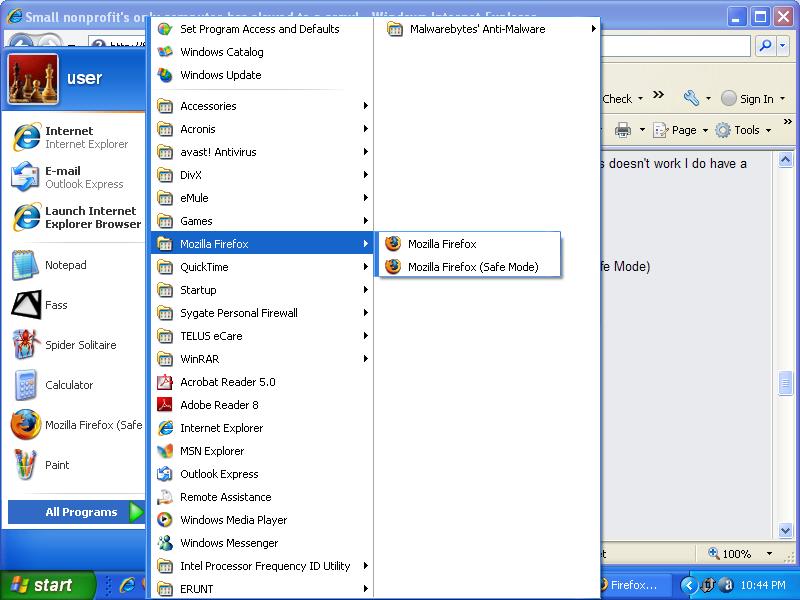
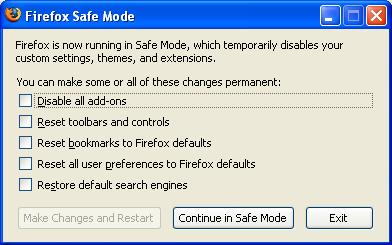
To disable all of Firefox's add-ons,
you have to open the browser in its Safe Mode (not Windows' Safe Mode)
I opened Firefox in safe mode, but I didn't have an option to disable all add-ons. I went to Tools and manually disabled all the add-ons. I'm going to shut down the browsers and start it up. I'll let you know how it goes.
I restarted my computer – Firefox is no faster. It took over 2 1/2 minutes to load a news story on Yahoo. Looks like the page is loaded, but you can't navigate and it really isn't loaded – keeps going from the cursor pointer to the hourglass and back several times.
Thanks!
Let's clean up the tools that we used. We can get them again if we need them. Just don't want anything to get out of quarintine.
Open the AVZ4 program, go to File > Standard scripts > Check #6 "Delete all drivers and reg keys"
Press OK/Enter
From your desktop, please delete
any notepads/logs that we created
Rooter.exe
GooredFix
Click the Start button, click Run. Copy and paste the following line into the run box and click OK Combofix /u
Open OTMoveIt3 then click the Clean Up button. You may get prompted by your firewall that OTMoveIt wants to contact the internet - allow this. A cleanup.txt will be downloaded, a message dialog will ask you if you want to proceed with the cleanup process, click Yes. This will do some clean up tasks and delete some of the tools you have downloaded plus itself.
I suggest you keep MBAM. Keep MBAM updated and use it regularly.
We can try to tweak FF.
Open FireFox
1.Type “about:config” into the address bar and hit return. Scroll down and look for the following entries:
network.http.pipelining
network.http.proxy.pipelining
network.http.pipelining.maxrequests
2. Alter the entries as follows:
Set “network.http.pipelining” to “true”
Set “network.http.proxy.pipelining” to “true”
Set “network.http.pipelining.maxrequests” to some number like 30. This means it will make 30 requests at once.
3. Lastly right-click anywhere and select New-> Integer. Name it “nglayout.initialpaint.delay” and set its value to “0". This value is the amount of time the browser waits before it acts on information it receives.
Give that a try and let me know if FF has improved.
Finally, out of total exxasperation, I uninstalled FF, then went to the FF website and installed an earlier version (I'd been using the latest version). Pages now load with great speed and nothing slows down. I still have some folders on my desktop from the cleanup we've been doing:
avzrZip and avzr (I did what you told me to do that avzr)
setupeng
Norton_Removal_Tool
ERUNT and erunt-setup
ATF cleaner
ddd
Malewarebytes' Anti-Maleware
Avast
Should I remove those? Can I reinstall my Norton Anti-virus software now? Do you think I should try updating to the newest FF version – or just sticking with the previous version. I'd been using an updated version for a while – now my toolbars look like they did months ago.
That's why I asked about the version. I'm using an older one and there doesn't seem to be a problem. I don't know why FF just won't work for you. The last update for FF2.X just came out and the next is an update to the newest. Maybe try updating through the program.
Regarding the folders.
avzrZip and avzr (I did what you told me to do that avzr)-delete
setupeng-Avast install files, hang on to them, just in cace N360 doesn't play nice. If no problems, they can be deleted from your desktop.
Norton_Removal_Tool-same as above
ERUNT and erunt-setup-Erunt set up files can be deleted from the desktop
ATF cleaner- keep and use
ddd-DDS? if so delete
Malewarebytes' Anti-Maleware-if it's just the setup files you can delete them, but keep the program and use it
Avast-I'm not sure what you mean. If it's a blue "a" icon it should go when you uninstall avast.
Go ahead and uninstall Avast via add/remove programs. It usually goes away peacefully. That's one of the reasons I like to use it in a pinch. Then install N360.
Please post back and let me know how things are going and if all is fine, we'll finish up.
Hi oldman960 –
Thanks – the only things funky about Firefox now are that (1) when I try to open an attachment in a Yahoo email, Firefox does not open the attachment, but instead bounces me back out to the main Yahoo home page (I can open the attachments if I use Internet Explorer, and (2) in Yahoo mail, the page looks a little odd – some text runs across pictures (this is the same when I use Internet Explorer).
I haven't yet updated Firefox, so I'm still using the older version. I will update now and let you know how that goes.
Thanks!
Hi Maryanna_C,
Have you installed N360 yet?
Can you post a screenshot of what you are seeing, the words across the pictures?
Thanks
Still having this problem?
This topic is from the What the Tech archive and can't take new replies. Geeks to Go is an active, free help community run by volunteers. Post your question there and a person, not a bot, will work through it with you.
Please don't run the tools or fix scripts from this topic on your computer. Malware fixes are written for one computer at one point in time and can do damage on another. Ask for help with your own computer instead.

 I uninstalled Firefox and reinstalled it, but the problem persists. I went to Tools, and uninstalled a Google toolbar that was indicated as being incompatible with Firefox, but it remained slow – although the time it took to load a news item from the Yahoo home page took 2 minutes instead of the nearly 3 it's been taking.
So, I don't know what to do next. I liked Firefox – bookmarks and stuff are all saved there.
Suggestions?