This is a read-only archive. No new posts or registrations. Privacy Page
Software

Win XP Getting Low Memory Messages

37 min read

This thread's last reply is from . Advice, software, and links below may be out of date — treat specific steps and download links with caution.

Looking for the outcome? Ask AI

Hmmm, I don't see the attachment. Trying again… Oh oh.. error message at the bottom of the page. " Attachments Manage Current Attachments (0) Attachment space used 0bytes of 500K Upload failed. You are not permitted to upload this type of file"
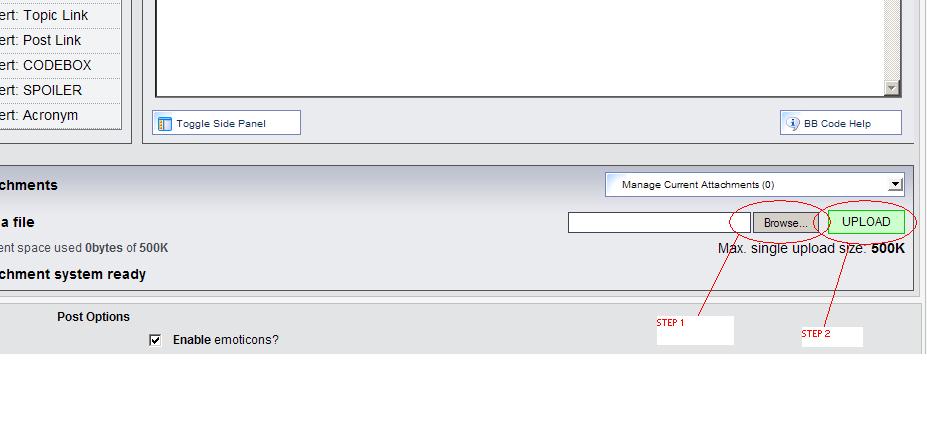
I didn't get an attachment on that post. :) I see your virtual memory settings are not at recommended settings which is a good chance what is causing your low virtual memory errors. I'd like to do one thing at a time though, and we will get back to those settings later. Please try to get that file attached on your next post. Review the attached graphic for help on attaching the file. You will have to click "browse", find the file you want to attach (the .LOG file) and then click "Upload."

Attachments:

I didn't get an attachment on that post. :)

I see your virtual memory settings are not at recommended settings which is a good chance what is causing your low virtual memory errors. I'd like to do one thing at a time though, and we will get back to those settings later.

Please try to get that file attached on your next post.

Review the attached graphic for help on attaching the file. You will have to click "browse", find the file you want to attach (the .LOG file) and then click "Upload."


The file was too big. I fixed it. Eheheh. I zipped it. :D

Hmmm, I don't see the attachment. Trying again…

Oh oh.. error message at the bottom of the page.

" Attachments Manage Current Attachments (0)

Attachment space used 0bytes of 500K

Upload failed. You are not permitted to upload this type of file"


Really? You can't upload a .LOG file? Hmm.. I'll have to ask around about that one.

Geeze, talk about making things hard.

Right click the .LOG file, and send to -> compressed zip folder. If you get a warning asking if you want to designate "Compressed (Zipper) folders" to handle .ZIP files, answer NO.

You will now see a .ZIP file with the same name as the .LOG file.. Please upload that file.

Hmmm, I don't see the attachment. Trying again…

Oh oh.. error message at the bottom of the page.

" Attachments Manage Current Attachments (0)

Attachment space used 0bytes of 500K

Upload failed. You are not permitted to upload this type of file"


Really? You can't upload a .LOG file? Hmm.. I'll have to ask around about that one.

Geeze, talk about making things hard.

Right click the .LOG file, and send to -> compressed zip folder. If you get a warning asking if you want to designate "Compressed (Zipper) folders" to handle .ZIP files, answer NO.

You will now see a .ZIP file with the same name as the .LOG file.. Please upload that file.


Hello???? Look above!!! ROTFLOL!
There is no file in there that has a file extension .log. They are all text files with no file extensions.
Yes, I guess I should walk away from the computer for a little while between posts. :) Good job. You're doing well. I have looked through that .log you sent and there are a few things I want to research but I don't see any significant problems off the bat, especially not as they pertain to all those Avira entries found in the malware thread. Go to control panel -> security center and look at the anti-virus section. Click the little down arrows and expand the anti-virus portion. Tell me what is listed in there. See the picture for an example.

Attachments:

:smack: Lol.. Please look at the picture I attached earlier and look at the little down arrows I circled in RED. Please click those and expand the anti-virus section. Now, list what is in that section. :) I am headed off to bed for now.. I'll have to get back with you tomorrow. Thanks for your hard work and diligence. You're doing well.

:smack: Lol.. Please look at the picture I attached earlier and look at the little down arrows I circled in RED. Please click those and expand the anti-virus section. Now, list what is in that section. :)

I am headed off to bed for now.. I'll have to get back with you tomorrow. Thanks for your hard work and diligence. You're doing well.


It says:

Windows found more than one antivirus program on this computer and at least one reports that it is currently up to date and virus scanning is on. Antivirus software helps protect your computer against viruses and other security threats. :P
Ok.. Sorry it took me so long to get back with you. I've been very busy today.

Are you ready to start fixing a few things? :)

First things first, follow my instructions in my original post to get back to your virtual memory settings. Under paging file size for current drive, select System Managed, and click Set. Click, OK, until you are prompted to reboot the computer and select YES to reboot now.

Now, lets remove that residual Trend Micro driver.

I was orignally going to have you use regedit to remove the faulty driver, but to be honest, I'm afraid to let you get into regedit when there is another way this can hopefully be done. :unsure:

Open My Computer, navigate to Local Disk (C: usually), Windows\System32\Drivers and find the tmcomm.sys file. Right-click the tmcomm.sys file and click Rename. Rename the tmcomm.sys file to tmcomm.bak. Reboot your PC.

Now, click Start, click Run, type cmd and press ENTER. At the command prompt type the following two commands:
  • set devmgr_show_nonpresent_devices=1 (Press ENTER)
  • start devmgmt.msc (Press ENTER)

When the device manager opens, click View, and click Show Hidden Devices.

In the Device Manager window expand the "Non-Plug and Play drivers" section and right-click tmcomm.sys and click uninstall. Confirm you want to delete the device, and reboot if prompted. If the device is not listed then we have already accomplished our mission. Close device manager and the command prompt window and move onto the next set of instructions.

If you run into any problem with the instructions above, such as being denied access to rename the tmcomm.sys file, continue on with the rest of the instructions below and then post back here and let me know so we can do something different.

Now, lets clean up the multiple anti-virus entries.

  • Click here: Avira Personal Download
  • Download the avira installation file and save it to your desktop.
  • Go into control panel -> Add/Remove programs and uninstall Avira from your computer. Reboot your PC afterwards.
  • When your computer reboots, please click and download the .zip file I have attached to this message.
  • Open the .zip file and run (Double-click) the wmirepo.bat file. Please enter Y when warned about stopping the win management service.
  • When you see the message that the process is finished, please reboot your computer.
  • When your computer is rebooted, go into control panel -> Security center and expand the anti-virus section. See what is listed there now. Does it say no anti-virus software has been detected? If it does, continue on, otherwise stop and come back to the forum.
  • Run the downloaded avira installation file on your desktop and reinstall Avira. Reboot your PC.
  • When your computer restarts, please verify that Security center shows only one anti-virus program listed.

Now, as previously suggested in your malware thread, you need to turn on automatic updates to help keep yourself protected. Go into control panel -> Automatic updates and select Automatic (Recommended) and click OK.

If you made it this far, give yourself a pat on the back and come back here for more instructions. :)

Contents of the wmirepo.bat file:
@echo off
echo Please answer 'Y'es if warned about dependent services and asked if you want to continue.
net stop winmgmt
rename %systemroot%\system32\wbem\repository %systemroot%\system32\wbem\repository.bak
net start winmgmt
echo Process finished.  Please reboot your computer.
pause


Attachments:

Experiencing a lot of small problems, here, mainly all files have their extensions gone (probably hidden), java is messed up and my son uses the yahoo browser which won't allow him to turn pages or view anything with java.

I was on earlier this AM with MSIE and saw this message at the bottom of a page when trying to go from one page to the next, which the computer would not do. java script:updtiming(currindex+1) There seemed to be something after it but I couldn't view it.

Sorry I have been away and not responding. Lots going on.

I turned on automatic updates and have done this so far.

First things first, follow my instructions in my original post to get back to your virtual memory settings. Under paging file size for current drive, select System Managed, and click Set. Click, OK, until you are prompted to reboot the computer and select YES to reboot now.


I am working on the rest of it right now.
The security center is still reporting that more than one anti-virus program is installed and running and that at least oneof them is updated. Could this be SpyBot?

The security center is still reporting that more than one anti-virus program is installed and running and that at least oneof them is updated. Could this be SpyBot?


Hi CoolCat

Lets find out.

http://screen317.changelog.fr/SecurityCheck.zip

Download the file from the link above. Unzip it.
Open the folder and double-click on securitycheck Bat.file.
A black DOS screen will open, press any key to continue.

Please don't do anything else while the tool is running.
When it is finished, it will open a notepad message, copy the
text and paste the message in a new post here.

Regards Abydos

Ask AI

AI can make mistakes. Check the cited posts. Archived advice can be out-of-date

Don't include personal information. Questions and selected public posts go to OpenAI. About Ask AI