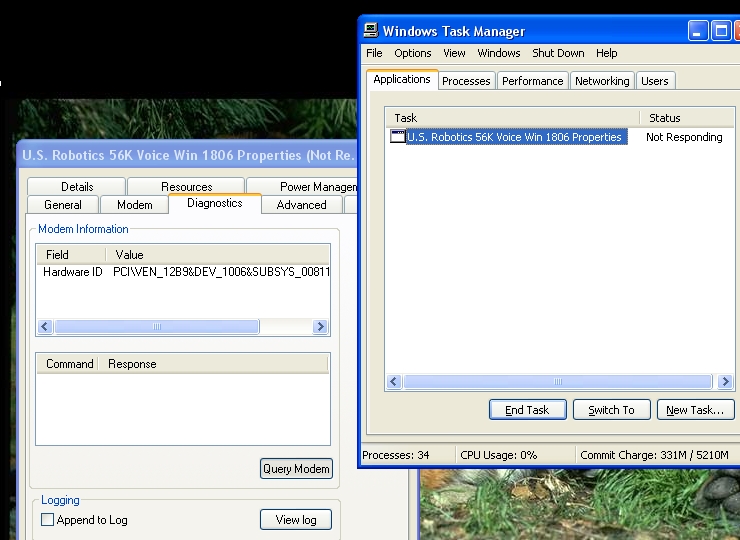
Hi! As the title says I have the following problem:
-After disonnecting from the internet, tray icon (showing open connection) remains.
-After pressing the "Turn off" button, I get message that Connection Tray is not respoding.
-I press "End now"
-Shuting down continues until it comes to the screen with "Saving your settings" and then everything freezes.
-I can only restart it by pressing restart button on computer case or holding down the power on/off button.
Last few weeks I was having trouble with Virtumonde. Guys from Safer Networking Forums helped me and here is the link to my topic there (maybe it will be usefull) : http://forums.spybot.info/showthread.php?t=42682
Hi Mareb,
Can you post a screenshot of this problem?
Can you expand on what you mean by after you disconnect from the internet? Are you turning the internet off by disabling it after you have used it?
Thanks,
'Bob
Can you expand on what you mean by after you disconnect from the internet? Are you turning the internet off by disabling it after you have used it?
Thanks,
'Bob
How do I take a screenshot?
I am using dial-up, so I disconnect by pressing right mouse button amd selecting "Disconnect" option from context menu. The tray icon then remains (that's not normal) and if I bring up Task manager it says that Connection tary is not responding.
This doesn't happen every time I use Internet so it hard to say if the probelm is fixed or not.
Maybe it has something to do with ComboFix. My computer is a month old and this issue appeared aprox. 10 days ago.
Please do NOT ever run ComboFix without expert guidance. ComboFix is a really powerful tool and can cause your PC to become unbootable if improperly used.
Hello Mareb. Does the screen at shutdown look something like this?
[external image: Posted Image]
If yes, then please right-click on the small computer icon in the system tray when your computer is active and set Status. On the following Window, press the Properties button. Uncheck the box that says Show icon in notification area when connected. Click OK and restart your computer. The instructions might differ slightly so try to search for the setting if my instructions are inaccurate.
Does the problem still persist? Let us know the results though.
I haven't degraded from Vista to xp
I apologize to all of you for being slow on replying to post but I can't make it faster.
Also, I'm trying to capture that screenshot but yesterday everthing worked fine.
Hi everyone!
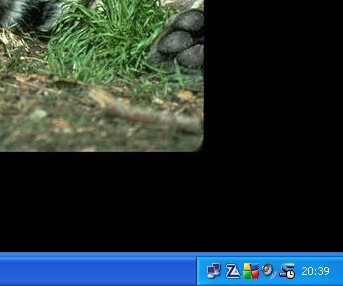
Ok, this is how the tray looks like after closing Firefox and disconnecting from internet:
📎Slika1.jpg
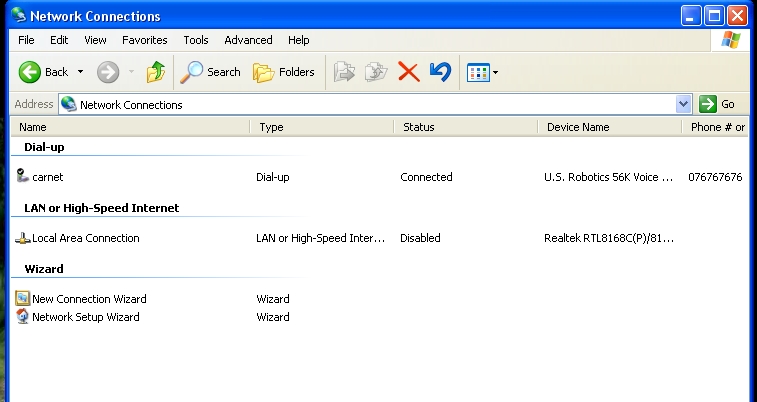
This is how it looks like from Control panel. Pressing Disconnect or Status from context menu does nothing:
📎Slika4.jpg
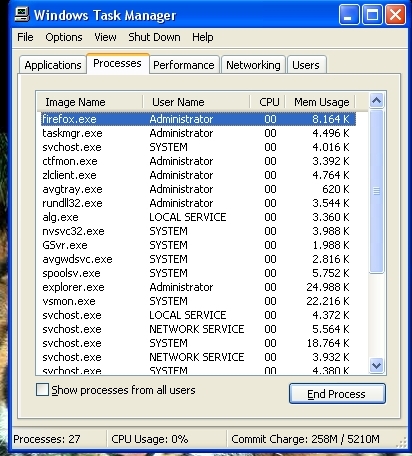
If I try to run Firefox, firefox.exe appeares in Task manager but nothing else happens.
📎Slika2.jpg
When I try to shut down, the same window as Mohit put into his post, pops up.
What confuses me the most is the fact that for a few days this issue did not appear. And every time I just do a little browsing through the internet.
Could it be a hardware issue?
Hi mareb,
Sorry to hear of the problems you are experiencing.
Its some time since I had to deal with a dial up connection so please be patient with me!
Analysing your posts it looks to me that you are connecting from Croatia and somewhere near Zagreb… using a 56K modem
If this is roughly correct then please try this:
When you wish to disconnect from the Internet (that is to say terminate your dial up session) then
1 Open Network Connections
2 Select carnet Dial Up and click on "disconnect"
Just for the moment leave the icon in the system tray alone…
See how you go
Regards
paws
Sometimes it works. Here are two screenshots when it didn't.
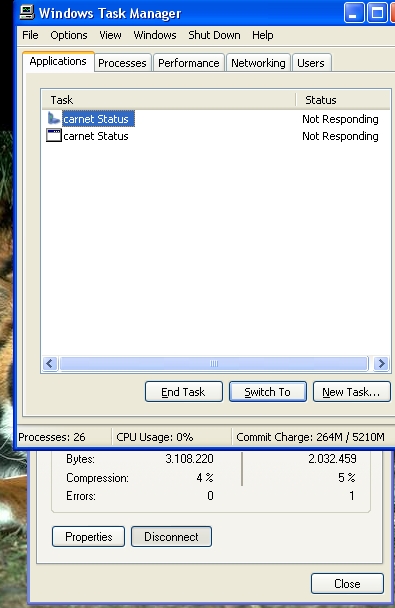
After I pressed disconnect in the context menu, nothing happened so I opened task manager:
📎slika6.jpg
I pressed End now for both app. and something strange emerged in tray:
📎slika7.jpg
This right AVG icon should not be there. It is only active when a scan is running. In fact, this AVG icon somehow replaced the one that shows status of my printer (SSMMgr.exe -> Samsung printer). Printer status icon is visible on the very first screenshot I posted (it is a big S with a clock)
Hi!
I reinstalled modem driver but that did nor help. So I disabled antivirus and firewall and during these few days, everything is working fine. Can I turn them back on?
✨ Ask AI
AI can make mistakes. Check the cited posts. Archived advice can be out-of-date
Don't include personal information. Questions and selected public posts go to OpenAI. About Ask AI





 Also, I'm trying to capture that screenshot but yesterday everthing worked fine.