Refer to my thread at: Visit My Website I had been trapped in a BSOD loop at start up which was resolved with help from
JPShortstuff over the last several days. JP recommended I start a new thread here
for my lingering issues.
I still have a problem with intermittant BSOD (tech info 0x0000007f) when surfing.
The BSOD occurs very shortly after clicking on any type of video link.
Windows media will load, the video will start, then BSOD occurs usually within
a minute.
I do not have problems with BSOD (yet!) while using my stock or currency trading
platforms which are web-based java applets, and which I leave unattended while
at work for 8 hours.
If possible, follow this guide from Geeks To Go about how to download MemTest86+ and burn it to a CD.
Then, reboot your computer and make it boot from the CD (we can help if you're not too sure how; just ask), and run at least one pass - and report the results.
Sorry about the wording, but it's a hard process to explain when you're not at the physical computer.
The first thing I'd like you to do is install VLC Media Player. Take all defaults when installing so it will become the default program for video files. Once installed, try some of the video links that have been causing BSODs and see what happens.
If they work then the problem is with Windows Media Player and we can focus on getting it fixed. If not then it's a basic XP problem.
Hi Ztruker,
I downloaded VLC and the problem appeared to be resolved.
Then I hit a playbutton on a website imbeded video screen and
immediately got a BSOD.
On reboot, the next vid I tried launching in VLC resulted in immediate
BSOD.
Come to think of it, I believe I started getting BSOD's after updating
Media Player, but at the same time I had also installed a new HP
printer and software, and also updated AVG Anti-Virus software.
Did you try running memtest86 as Raktor suggested? Worth a try.
Hmmm, something else you can try. This will help determine if something is interfering with the video playback somehow (possibly).
Click on Start then Run, type msconfig and press Enter.
Click on the Startup tab then the Disable All button.
See if the problem is resolved.
If yes then use msconfig to enable several items at a time till you find the culprit.
If no, start msconfig and click on the Services tab.
Check the Hide All Microsoft Services box then click the Disable All button.
Again, see if it's resolved.
If yes then use msconfig to enable services till you find the culprit.
Once you've found the culprit, uninstall it or find out how to eliminate it from your system. Simply disabling it in msconfig is a temporary fix at best. Enable everything else you disabled.
It would be a good idea to record what is enabled in the Startup tab and Services tab before you do anything so you will know what should be enabled when you're done.
I don't know if this will find anything or not, but it's worth a try.
Hi Ztruker
Did both msconfig routines, but still get BSOB with each.
Tech info was 0x0000000a rather than 0x000000f7 this time.
Downloaded memtest86 which showed 0 errors after the
comlpetion of 3 passes.
Also ran Spybot S&D which found nothing.
Okay, it's time to determine if this is hardware or software. The easiest way to do this is do a parallel install of Windows XP. That will allow you to chose which one you want to use when you boot your computer. If everything works from the new install of XP then it eliminates hardware as a concern. Then you need to decide if you want to continue trying to fix the problem or just copy your personal data to the new install then remove the old one.
An alternative would be to use a different hard drive (remove the existing one) and install XP then (Clean install, with format). Then if no problems, mount your other drive as a slave and copy your data over then use the old drive for backup.
Read the tutorial, but it keeps referring to windows xpprofessional (pro) and
windows xpprofessional (pro) CD.
My system is windows xp home edition, as is my CD.
My assumption is that I either need to install xp professional, or try something
else. Or will my xp home edition do the job?
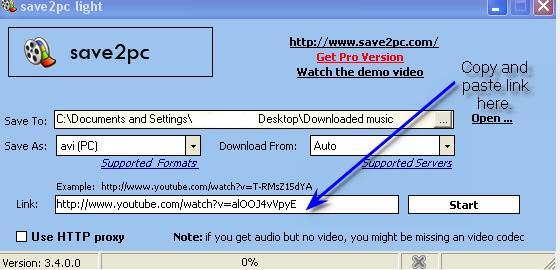
This post will not solve your problem, but you could try it to see if you can play your video's successfully.
Features (youtube downloader)
Simply paste the URL of a video into the program, press Start, and the AVI, MPEG or FLV file will be downloaded into the selected folder. You dont need any players to play flash video just play it on the default media player .
- Easy to use
- Download from Youtube
- Download from Google Video
- Save youtube video as an AVI file
- Save youtube video as an MPEG file
- Save youtube video as an FLV file
save2pc is a completly FREE Software. It contains absolutely NO ADWARE, NO SPYWARE, NO REGISTRATION, NO POPUPS, NO MALWARE or other unwanted software.
Sorry Guys,
Christmas shopping has sort of got in the way right now.
Parallel install has been unsuccesful so far - will try again.
I get error message when I try to install from CD.
Will post again when I have retried.
Happy New Year All,
Haven't re-tried doing a parallel install yet.
Instead I updated my Graphics/video driver, which didn't make
a noticible difference, but the next BSOD had "sound driver"
somewhere in the message that flashed, so next I updated
my sound driver.
Now I am getting BSOB every few hours rather than minutes.
I'm going to update the rest of my drivers over the next few days
and see if that eliminates my BSOD problem before I attempt
another parallel install.
Will report back with results
builder4580
✨ Ask AI
AI can make mistakes. Check the cited posts. Archived advice can be out-of-date
Don't include personal information. Questions and selected public posts go to OpenAI. About Ask AI