Just wanted to check if I could get some help on this awesome forum. My HP TouchSmart PC started to be laggy and I started to look up whats wrong with it. In task manager i don't see too much CPU usage(25% or so) or additional number of tasks.. I also keep getting out of memory messages all the time. After 5 minutes of normal functioning, I hear noise and then it slows down.
I had initially posted this in the Malware Forum- but after testing they recommended that this is not malware related and to post here. Trying my luck here!
Read your other thread and noted the bad blocks detected on the HDD + the amount of free storage space being very low, I will post some more info on the latter shortly but for now can you do the following for us;
Download then run Speccy (free) and post the resultant url for us, details here, this will provide us with information about your computer hardware + any software that you have installed that may explain the present issue/s.
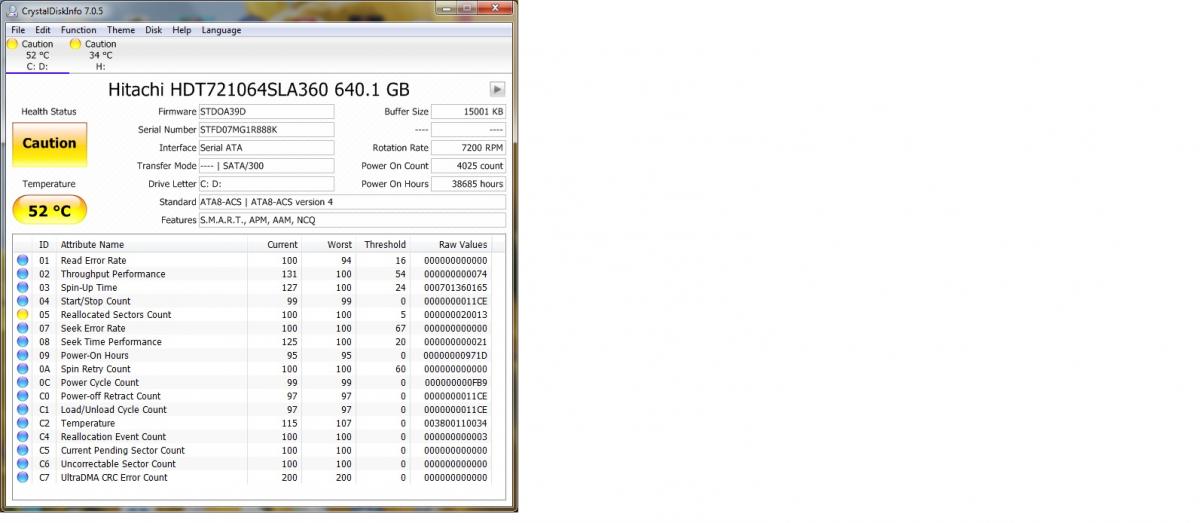
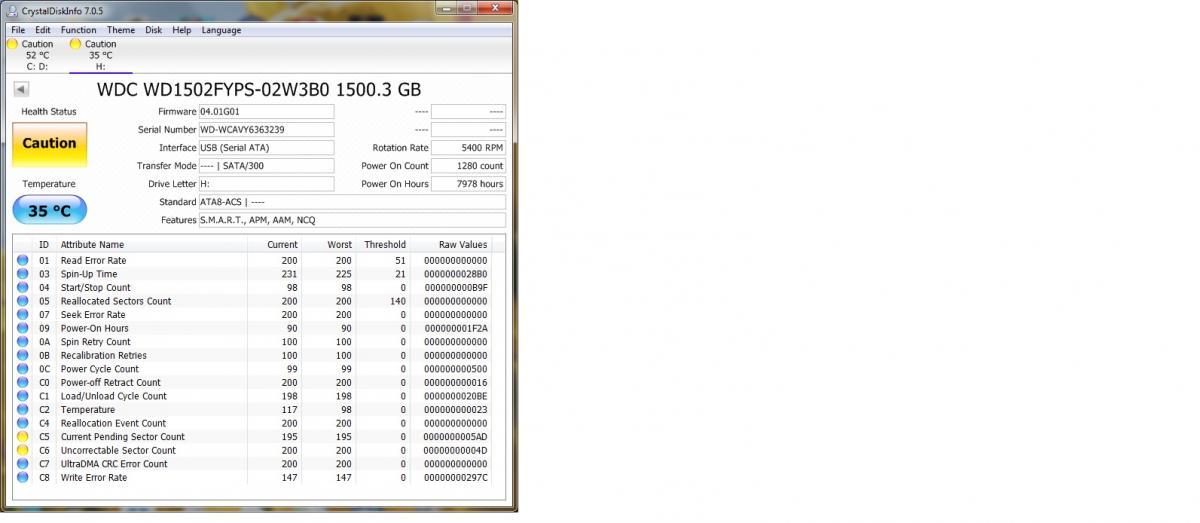
Check the HDD with CrystalDiskInfo 7.0.0 Standard Edition which you can download fromhereonce done grab a screenshot (possibly two) of the results and attach to your next reply for us.
To capture and post a screenshot;
Click on the ALT key + PRT SCR key..its on the top row..right hand side..now click on start…all programs…accessories…paint….left click in the white area …press CTRL + V…click on file…click on save…save it to your desktop…name it something related to the screen your capturing… BE SURE TO SAVE IT AS A .JPG …otherwise it may be to big to upload… then after typing in any response you have… click on browse…desktop…find the screenshot..select it and click on the upload button…then on the lower left…after it says upload successful…click on add reply like you normally would.
Screenshot instructions are provided to assist those that may read this topic but are not yet aware of the “how to”.
There are multiple issues showing in your Speccy report and screenshots
CPU
AMD Athlon II X2 235: 57 °C
Regor 45nm Technology
RAM
4.00GB Dual-Channel DDR3 @ 531MHz (7-7-7-20)
Motherboard
PEGATRON CORPORATION JESSE ( CPU 1): 66 °C
596GB Hitachi HDT721064SLA360 SATA Disk Device (SATA): 52 °C
Voltage
+3.3V: 3.296 V
CPU CORE: 0.976 V
VIN2: 2.384 V
VIN3: 2.493 V
+5V: 5.297 V
+12V: 10.384 V
VIN6: 2.192 V
VSB3V: 3.328 V
CMOS BATTERY: 3.328 V
S.M.A.R.T
Status: Warning
Temperature: 52 °C
Temperature Range: Warning (50 °C to 55 °C)
Partition 1
Partition ID: Disk #0, Partition #1
Disk Letter: C:
File System: NTFS
Volume Serial Number: 348745DD
Size: 583 GB
Used Space: 559 GB (95%)
Free Space: 23.8 GB (5%
Your external HDD which I strongly suggest that you disconnect and store safely for now.
WD Ext HDD 1021 USB Device
Manufacturer: Western Digital
Business Unit/Brand: Enthusiast/WD Raptor X
RPM/Buffer Size or Attribute: 5400 RPM with 32 MB cache
Interface: USB
Capacity: 1397 GB
Real size: 1,500,299,395,072 bytes
RAID Type: None
S.M.A.R.T
S.M.A.R.T not supported
Partition 0
Partition ID: Disk #2, Partition #0
Disk Letter: H:
File System: NTFS
Volume Serial Number: 8CCE0127
Size: 1397 GB
Used Space: 1397 GB (99%)
Free Space: 8.39 MB (1%)
Your computer is overheating and the issue will be being aggravated by the fact that you are so low on free storage space on the HDD and a low power reading on the +12V rail of the power supply to the MB, how low free storage space can cause problems is explained in my canned text below.
The overheating problem could originally stem from a bad power supply but your HDD will also be generating more heat as it is being overworked which in turns puts a drain on the power supply and the minimal cooling system that your computer chassis has.
Please note that in order to avoid data corruption and/or mechanical HDD failure for you must always have a minimum of 20 to 25% of the HDDs or partitions overall storage capacity available as free space where Windows is installed and between 10 and 15% of a HDDs overall storage capacity available as free space if there is data only on it, the free space allows for information to be copied to and from the drive efficiently particularily important for Windows file swapping and the installation of OS and AV updates.
Not having the above can render a computer inoperable if the HDD concerned has the OS on it due to the MBR (Master Boot Record) becoming damaged/corrupt, please see information hereand here
Also noted was the presence of the two below;
Antivirus
Antivirus: Enabled
Display Name: Malwarebytes
Virus Signature Database: Up to date
If MBAM is the Pro version then all good.
McAfee Security Scan Component Host Service
The McAfee software I would uninstall, you most likely did not know it was there and have had it foisted on you by Adobe or Java.
Is there anything else I can do to take care of the issues that you mentioned?
Backing up your data is your first concern as it is a case of "when" and not "if" your HDD fails if you do not, the HDD may already be damaged but while still accessible you should try to back up all of your personal data such as documents, pictures, music and videos, once done and checked you should look to free up around 140GB of storage space on the C: drive asap.
Please note that programs, exe files and dlls should not be backed up, they will not work as they should.
I will work on the backup for sure. Do you have any suggestions for backups? Software etc?
But as far as the other issues which you indicated, is there anything which can be done?
"Your computer is overheating and the issue will be being aggravated by the fact that you are so low on free storage space on the HDD and a low power reading on the +12V rail of the power supply to the MB, how low free storage space can cause problems is explained in my canned text below."
The most effective way of backing up your data would be to an external USB HDD or HDD in a USB enclosure or adaptor.
But as far as the other issues which you indicated, is there anything which can be done?
The overheating could be the result of your HDD being overworked but if never done cleaning out the inside of the computer with canned compressed air should help.
Post the the exact model name or number for the HP TouchSmart PC and we can look for a suitable cleaning guide.
Regarding the power supply voltages, we can look at this info once we have the exact model name or number for the HP TouchSmart PC.
Not a difficult computer to clean the fans on, a couple of links to help you here (note how the different types of screw are kept separate) and here
Please note that it is important that you do not let the cooling fans spin freely when cleaning with canned compressed air, hold them still with something like a Q tip.
Just a cautionary note - if you do use canned compressed air do not upend the can as it is possible for fluid to be emitted.
Another Touchsmart 300 owner with similar problems to yours in a thread almost 5 years old here
RE the voltages, as I suspected the computer does use a notebook type power supply and so may show different voltages to that of a full ATX type power supply, that said if your computer and charger are a few years old it could be time for a new power supply, never purchase a cheap generic replacement either, they are most often both unreliable and unstable, please try cleaning out the dust from the inside of the case, leaving off the cover over the HDD, testing for a couple of hrs then run Speccy again and post the new url for us please.
You are welcome btw
NB: A replacement power supply costs the equivalent of $71.38 so lets hope that freeing up the storage space and cleaning out the dust to drop all of the temps resolves the issue/s.
sorry for the delay in response–i realized I did not have the tools for opening and cleaning my PC. So I got them and and about to start now! Will keep you updated
✨ Ask AI
AI can make mistakes. Check the cited posts. Archived advice can be out-of-date
Don't include personal information. Questions and selected public posts go to OpenAI. About Ask AI