Top
Sorry for the SNAFU this morning. I did a registry restore and should be in better shape!
41 min read
Sorry for the SNAFU this morning. I did a registry restore and should be in better shape!
Here is the log from SystemLook
SystemLook 30.07.11 by jpshortstuff
Log created at 10:30 on 30/07/2016 by Bud Parker
Administrator - Elevation successful
========== folderfind ==========
Searching for "Ronzafind"
C:\Users\Bud Parker\AppData\Roaming\Ronzafind d—— [18:14 26/07/2016]
========== filefind ==========
Searching for "Ronzafind"
No files found.
========== regfind ==========
Searching for "Ronzafind"
[HKEY_CURRENT_USER\Software\Microsoft\Windows\CurrentVersion\Explorer\TypedPaths]
"url1"="C:\Users\Bud Parker\AppData\Roaming\Ronzafind"
[HKEY_LOCAL_MACHINE\SOFTWARE\Microsoft\Windows\Windows Error Reporting\Debug]
"StoreLocation"="C:\ProgramData\Microsoft\Windows\WER\ReportArchive\AppCrash_Ronzafind.exe_1685ced56bd577e9963a53ff94cdebbe23ab7c_0406d662"
[HKEY_LOCAL_MACHINE\SYSTEM\ControlSet001\services\Ronzafind]
[HKEY_LOCAL_MACHINE\SYSTEM\ControlSet001\services\Ronzafind]
"ImagePath"="C:\Users\Bud Parker\AppData\Roaming\Ronzafind\Ronzafind.exe olbXgpnzyP/q/cJaoSzH4ks20/gtM/4xfwvL8jEEDT8="
[HKEY_LOCAL_MACHINE\SYSTEM\ControlSet001\services\Ronzafind]
"DisplayName"="Ronzafind Service"
[HKEY_LOCAL_MACHINE\SYSTEM\ControlSet002\services\Ronzafind]
[HKEY_LOCAL_MACHINE\SYSTEM\ControlSet002\services\Ronzafind]
"ImagePath"="C:\Users\Bud Parker\AppData\Roaming\Ronzafind\Ronzafind.exe olbXgpnzyP/q/cJaoSzH4ks20/gtM/4xfwvL8jEEDT8="
[HKEY_LOCAL_MACHINE\SYSTEM\ControlSet002\services\Ronzafind]
"DisplayName"="Ronzafind Service"
[HKEY_LOCAL_MACHINE\SYSTEM\CurrentControlSet\services\Ronzafind]
[HKEY_LOCAL_MACHINE\SYSTEM\CurrentControlSet\services\Ronzafind]
"ImagePath"="C:\Users\Bud Parker\AppData\Roaming\Ronzafind\Ronzafind.exe olbXgpnzyP/q/cJaoSzH4ks20/gtM/4xfwvL8jEEDT8="
[HKEY_LOCAL_MACHINE\SYSTEM\CurrentControlSet\services\Ronzafind]
"DisplayName"="Ronzafind Service"
[HKEY_USERS\.DEFAULT\Software\Microsoft\Windows\Windows Error Reporting\Debug]
"StoreLocation"="C:\ProgramData\Microsoft\Windows\WER\ReportQueue\AppCrash_Ronzafind.exe_1685ced56bd577e9963a53ff94cdebbe23ab7c_061ed00b"
[HKEY_USERS\S-1-5-21-2712942507-1312882600-3786330889-1001\Software\Microsoft\Windows\CurrentVersion\Explorer\TypedPaths]
"url1"="C:\Users\Bud Parker\AppData\Roaming\Ronzafind"
[HKEY_USERS\S-1-5-18\Software\Microsoft\Windows\Windows Error Reporting\Debug]
"StoreLocation"="C:\ProgramData\Microsoft\Windows\WER\ReportQueue\AppCrash_Ronzafind.exe_1685ced56bd577e9963a53ff94cdebbe23ab7c_061ed00b"
-= EOF =-

Great,
Now plug this into SystemLook
SystemLook 30.07.11 by jpshortstuff
Log created at 11:02 on 30/07/2016 by Bud Parker
Administrator - Elevation successful
========== folderfind ==========
Searching for "Lamzap"
C:\FRST\Quarantine\C\ProgramData\Lamzap d—— [19:29 28/07/2016]
C:\ProgramData\Lamzap d—— [19:31 29/07/2016]
C:\Users\All Users\Lamzap d—— [19:31 29/07/2016]
Searching for "Lamzaps"
C:\FRST\Quarantine\C\ProgramData\Lamzaps d—— [19:29 28/07/2016]
========== filefind ==========
Searching for "Lamzap"
No files found.
Searching for "Lamzaps"
No files found.
========== regfind ==========
Searching for "Lamzap"
[HKEY_CURRENT_USER\Environment]
"SNF"="C:\ProgramData\Lamzaps\snp.sc"
[HKEY_CURRENT_USER\Software\Greatis\Regrun2\Black\Files\C:PROGRAMDATALAMZAP]
[HKEY_CURRENT_USER\Software\Greatis\Regrun2\Black\Files\C:PROGRAMDATALAMZAP]
@="C:\PROGRAMDATA\LAMZAP\"
[HKEY_CURRENT_USER\Software\Greatis\Regrun2\Black\Files\C:PROGRAMDATALAMZAPDONTIP.DLL]
[HKEY_CURRENT_USER\Software\Greatis\Regrun2\Black\Files\C:PROGRAMDATALAMZAPDONTIP.DLL]
@="C:\PROGRAMDATA\LAMZAP\DONTIP.DLL"
[HKEY_CURRENT_USER\Software\Greatis\Regrun2\Black\Files\C:PROGRAMDATALAMZAPGREENTIP.DLL]
[HKEY_CURRENT_USER\Software\Greatis\Regrun2\Black\Files\C:PROGRAMDATALAMZAPGREENTIP.DLL]
@="C:\PROGRAMDATA\LAMZAP\GREENTIP.DLL"
[HKEY_CURRENT_USER\Software\Greatis\Regrun2\Black\Files\C:PROGRAMDATALAMZAPJOBQUOTOUCH.DLL]
[HKEY_CURRENT_USER\Software\Greatis\Regrun2\Black\Files\C:PROGRAMDATALAMZAPJOBQUOTOUCH.DLL]
@="C:\PROGRAMDATA\LAMZAP\JOBQUOTOUCH.DLL"
[HKEY_CURRENT_USER\Software\Greatis\Regrun2\Black\Files\C:PROGRAMDATALAMZAPLAMZAP.EXE]
[HKEY_CURRENT_USER\Software\Greatis\Regrun2\Black\Files\C:PROGRAMDATALAMZAPLAMZAP.EXE]
@="C:\PROGRAMDATA\LAMZAP\LAMZAP.EXE"
[HKEY_CURRENT_USER\Software\Greatis\Regrun2\Black\Files\C:PROGRAMDATALAMZAPMED-LAX.DLL]
[HKEY_CURRENT_USER\Software\Greatis\Regrun2\Black\Files\C:PROGRAMDATALAMZAPMED-LAX.DLL]
@="C:\PROGRAMDATA\LAMZAP\MED-LAX.DLL"
[HKEY_CURRENT_USER\Software\Microsoft\Windows\CurrentVersion\Applets\Paint\Recent File List]
"File3"="C:\Users\Bud Parker\Desktop\Lamzap photo.png"
[HKEY_CURRENT_USER\Software\Microsoft\Windows\CurrentVersion\Applets\Paint\Recent File List]
"File4"="C:\Users\Bud Parker\Desktop\Lamzap photo.jpg"
[HKEY_CURRENT_USER\Software\Classes\Local Settings\Software\Microsoft\Windows\Shell\MuiCache]
"C:\ProgramData\Lamzap\Lamzap.exe"="Lamzap"
[HKEY_LOCAL_MACHINE\SOFTWARE\Microsoft\Windows NT\CurrentVersion\Image File Execution Options\Lamzap.exe]
[HKEY_LOCAL_MACHINE\SOFTWARE\Microsoft\Windows NT\CurrentVersion\Windows]
"AppInit_DLLs"="C:\ProgramData\Lamzap\SilIng.dll"
[HKEY_LOCAL_MACHINE\SOFTWARE\Wow6432Node\Microsoft\Tracing\Lamzap_RASAPI32]
[HKEY_LOCAL_MACHINE\SOFTWARE\Wow6432Node\Microsoft\Tracing\Lamzap_RASMANCS]
[HKEY_LOCAL_MACHINE\SOFTWARE\Wow6432Node\Microsoft\Windows\CurrentVersion\RunOnce\ApprovedByRegRun2\AntiRepl\0]
"Target"="\??\C:\PROGRAMDATA\LAMZAPS"
[HKEY_LOCAL_MACHINE\SOFTWARE\Wow6432Node\Microsoft\Windows\CurrentVersion\RunOnce\ApprovedByRegRun2\AntiRepl\13]
"Target"="\??\C:\PROGRAMDATA\LAMZAPS"
[HKEY_LOCAL_MACHINE\SOFTWARE\Wow6432Node\Microsoft\Windows\CurrentVersion\RunOnce\ApprovedByRegRun2\AntiRepl\14]
"Target"="\??\C:\PROGRAMDATA\LAMZAPS"
[HKEY_LOCAL_MACHINE\SOFTWARE\Wow6432Node\Microsoft\Windows\CurrentVersion\RunOnce\ApprovedByRegRun2\AntiRepl\15]
"Target"="C:\PROGRAMDATA\LAMZAP"
[HKEY_LOCAL_MACHINE\SOFTWARE\Wow6432Node\Microsoft\Windows NT\CurrentVersion\SilentProcessExit\Lamzap.exe]
[HKEY_LOCAL_MACHINE\SOFTWARE\Wow6432Node\Microsoft\Windows NT\CurrentVersion\SilentProcessExit\Lamzap.exe]
"MonitorProcess"="C:\ProgramData\Windows Monitor\Monitor.exe %i deviceId=e5295532-cfef-2cfc-b916-e5ddde5765fe channelId=3 distributer=APSFClickMeIn processName=Lamzap.exe statsAddress=http://stats.ijnewhb.com/StatisticsService.svc/V1/JSON/LogEvent"
[HKEY_LOCAL_MACHINE\SOFTWARE\Wow6432Node\Microsoft\Windows NT\CurrentVersion\Windows]
"AppInit_DLLs"="C:\ProgramData\Lamzap\Funity.dll"
[HKEY_LOCAL_MACHINE\SOFTWARE\Wow6432Node\Microsoft\Windows NT\CurrentVersion\Image File Execution Options\Lamzap.exe]
[HKEY_LOCAL_MACHINE\SOFTWARE\Wow6432Node\mtLamzap]
[HKEY_LOCAL_MACHINE\SYSTEM\ControlSet002\services\Lamzap]
[HKEY_LOCAL_MACHINE\SYSTEM\ControlSet002\services\Lamzap]
"ImagePath"="C:\ProgramData\\Lamzap\\Lamzap.exe shuz -f "C:\ProgramData\\Lamzap\\Lamzap.dat" -l -a"
[HKEY_LOCAL_MACHINE\SYSTEM\ControlSet002\services\Lamzap]
"DisplayName"="Lamzap"
[HKEY_USERS\S-1-5-21-2712942507-1312882600-3786330889-1001\Environment]
"SNF"="C:\ProgramData\Lamzaps\snp.sc"
[HKEY_USERS\S-1-5-21-2712942507-1312882600-3786330889-1001\Software\Greatis\Regrun2\Black\Files\C:PROGRAMDATALAMZAP]
[HKEY_USERS\S-1-5-21-2712942507-1312882600-3786330889-1001\Software\Greatis\Regrun2\Black\Files\C:PROGRAMDATALAMZAP]
@="C:\PROGRAMDATA\LAMZAP\"
[HKEY_USERS\S-1-5-21-2712942507-1312882600-3786330889-1001\Software\Greatis\Regrun2\Black\Files\C:PROGRAMDATALAMZAPDONTIP.DLL]
[HKEY_USERS\S-1-5-21-2712942507-1312882600-3786330889-1001\Software\Greatis\Regrun2\Black\Files\C:PROGRAMDATALAMZAPDONTIP.DLL]
@="C:\PROGRAMDATA\LAMZAP\DONTIP.DLL"
[HKEY_USERS\S-1-5-21-2712942507-1312882600-3786330889-1001\Software\Greatis\Regrun2\Black\Files\C:PROGRAMDATALAMZAPGREENTIP.DLL]
[HKEY_USERS\S-1-5-21-2712942507-1312882600-3786330889-1001\Software\Greatis\Regrun2\Black\Files\C:PROGRAMDATALAMZAPGREENTIP.DLL]
@="C:\PROGRAMDATA\LAMZAP\GREENTIP.DLL"
[HKEY_USERS\S-1-5-21-2712942507-1312882600-3786330889-1001\Software\Greatis\Regrun2\Black\Files\C:PROGRAMDATALAMZAPJOBQUOTOUCH.DLL]
[HKEY_USERS\S-1-5-21-2712942507-1312882600-3786330889-1001\Software\Greatis\Regrun2\Black\Files\C:PROGRAMDATALAMZAPJOBQUOTOUCH.DLL]
@="C:\PROGRAMDATA\LAMZAP\JOBQUOTOUCH.DLL"
[HKEY_USERS\S-1-5-21-2712942507-1312882600-3786330889-1001\Software\Greatis\Regrun2\Black\Files\C:PROGRAMDATALAMZAPLAMZAP.EXE]
[HKEY_USERS\S-1-5-21-2712942507-1312882600-3786330889-1001\Software\Greatis\Regrun2\Black\Files\C:PROGRAMDATALAMZAPLAMZAP.EXE]
@="C:\PROGRAMDATA\LAMZAP\LAMZAP.EXE"
[HKEY_USERS\S-1-5-21-2712942507-1312882600-3786330889-1001\Software\Greatis\Regrun2\Black\Files\C:PROGRAMDATALAMZAPMED-LAX.DLL]
[HKEY_USERS\S-1-5-21-2712942507-1312882600-3786330889-1001\Software\Greatis\Regrun2\Black\Files\C:PROGRAMDATALAMZAPMED-LAX.DLL]
@="C:\PROGRAMDATA\LAMZAP\MED-LAX.DLL"
[HKEY_USERS\S-1-5-21-2712942507-1312882600-3786330889-1001\Software\Microsoft\Windows\CurrentVersion\Applets\Paint\Recent File List]
"File3"="C:\Users\Bud Parker\Desktop\Lamzap photo.png"
[HKEY_USERS\S-1-5-21-2712942507-1312882600-3786330889-1001\Software\Microsoft\Windows\CurrentVersion\Applets\Paint\Recent File List]
"File4"="C:\Users\Bud Parker\Desktop\Lamzap photo.jpg"
[HKEY_USERS\S-1-5-21-2712942507-1312882600-3786330889-1001\Software\Classes\Local Settings\Software\Microsoft\Windows\Shell\MuiCache]
"C:\ProgramData\Lamzap\Lamzap.exe"="Lamzap"
[HKEY_USERS\S-1-5-21-2712942507-1312882600-3786330889-1001_Classes\Local Settings\Software\Microsoft\Windows\Shell\MuiCache]
"C:\ProgramData\Lamzap\Lamzap.exe"="Lamzap"
Searching for "Lamzaps"
[HKEY_CURRENT_USER\Environment]
"SNF"="C:\ProgramData\Lamzaps\snp.sc"
[HKEY_LOCAL_MACHINE\SOFTWARE\Wow6432Node\Microsoft\Windows\CurrentVersion\RunOnce\ApprovedByRegRun2\AntiRepl\0]
"Target"="\??\C:\PROGRAMDATA\LAMZAPS"
[HKEY_LOCAL_MACHINE\SOFTWARE\Wow6432Node\Microsoft\Windows\CurrentVersion\RunOnce\ApprovedByRegRun2\AntiRepl\13]
"Target"="\??\C:\PROGRAMDATA\LAMZAPS"
[HKEY_LOCAL_MACHINE\SOFTWARE\Wow6432Node\Microsoft\Windows\CurrentVersion\RunOnce\ApprovedByRegRun2\AntiRepl\14]
"Target"="\??\C:\PROGRAMDATA\LAMZAPS"
[HKEY_USERS\S-1-5-21-2712942507-1312882600-3786330889-1001\Environment]
"SNF"="C:\ProgramData\Lamzaps\snp.sc"
-= EOF =-
OK, we are going to attack this a differently, its going to take me some time to work up a fix, we are going to make some changes to your registry, I am not interested in what ever else you use, but download and run this one to back up your registry so if the fix causes any issues you can restore it
Be back soon
REGEDIT4[HKEY_CURRENT_USER\Software\Microsoft\Windows\CurrentVersion\Explorer\TypedPaths]"url1"=""[HKEY_LOCAL_MACHINE\SOFTWARE\Microsoft\Windows\Windows Error Reporting\Debug]"StoreLocation"=""[-HKEY_LOCAL_MACHINE\SYSTEM\ControlSet001\services\Ronzafind][-HKEY_LOCAL_MACHINE\SYSTEM\ControlSet001\services\Ronzafind][-HKEY_LOCAL_MACHINE\SYSTEM\ControlSet001\services\Ronzafind][-HKEY_LOCAL_MACHINE\SYSTEM\ControlSet002\services\Ronzafind][-HKEY_LOCAL_MACHINE\SYSTEM\ControlSet002\services\Ronzafind][-HKEY_LOCAL_MACHINE\SYSTEM\ControlSet002\services\Ronzafind][-HKEY_LOCAL_MACHINE\SYSTEM\CurrentControlSet\services\Ronzafind][-HKEY_LOCAL_MACHINE\SYSTEM\CurrentControlSet\services\Ronzafind][-HKEY_LOCAL_MACHINE\SYSTEM\CurrentControlSet\services\Ronzafind][HKEY_USERS\.DEFAULT\Software\Microsoft\Windows\Windows Error Reporting\Debug]"StoreLocation"=""[HKEY_USERS\S-1-5-21-2712942507-1312882600-3786330889-1001\Software\Microsoft\Windows\CurrentVersion\Explorer\TypedPaths]"url1"=""[HKEY_USERS\S-1-5-18\Software\Microsoft\Windows\Windows Error Reporting\Debug]"StoreLocation"=""[HKEY_CURRENT_USER\Environment]"SNF"=""[HKEY_LOCAL_MACHINE\SOFTWARE\Wow6432Node\Microsoft\Windows\CurrentVersion\RunOnce\ApprovedByRegRun2\AntiRepl\0]"Target"=""[HKEY_LOCAL_MACHINE\SOFTWARE\Wow6432Node\Microsoft\Windows\CurrentVersion\RunOnce\ApprovedByRegRun2\AntiRepl\13]"Target"=""[HKEY_LOCAL_MACHINE\SOFTWARE\Wow6432Node\Microsoft\Windows\CurrentVersion\RunOnce\ApprovedByRegRun2\AntiRepl\14]"Target"=""[HKEY_USERS\S-1-5-21-2712942507-1312882600-3786330889-1001\Environment]"SNF"=""[HKEY_CURRENT_USER\Environment]"SNF"=""[-HKEY_CURRENT_USER\Software\Greatis\Regrun2\Black\Files\C:PROGRAMDATALAMZAP][-HKEY_CURRENT_USER\Software\Greatis\Regrun2\Black\Files\C:PROGRAMDATALAMZAPDONTIP.DLL][-HKEY_CURRENT_USER\Software\Greatis\Regrun2\Black\Files\C:PROGRAMDATALAMZAPGREENTIP.DLL][-HKEY_CURRENT_USER\Software\Greatis\Regrun2\Black\Files\C:PROGRAMDATALAMZAPJOBQUOTOUCH.DLL][-HKEY_CURRENT_USER\Software\Greatis\Regrun2\Black\Files\C:PROGRAMDATALAMZAPLAMZAP.EXE][-HKEY_CURRENT_USER\Software\Greatis\Regrun2\Black\Files\C:PROGRAMDATALAMZAPMED-LAX.DLL][HKEY_CURRENT_USER\Software\Microsoft\Windows\CurrentVersion\Applets\Paint\Recent File List]"File3"=""[HKEY_CURRENT_USER\Software\Microsoft\Windows\CurrentVersion\Applets\Paint\Recent File List]"File4"=""[HKEY_CURRENT_USER\Software\Classes\Local Settings\Software\Microsoft\Windows\Shell\MuiCache]"C:\ProgramData\Lamzap\Lamzap.exe"="Lamzap"=-[-HKEY_LOCAL_MACHINE\SOFTWARE\Microsoft\Windows NT\CurrentVersion\Image File Execution Options\Lamzap.exe][HKEY_LOCAL_MACHINE\SOFTWARE\Microsoft\Windows NT\CurrentVersion\Windows]"AppInit_DLLs"=""[-HKEY_LOCAL_MACHINE\SOFTWARE\Wow6432Node\Microsoft\Tracing\Lamzap_RASAPI32][-HKEY_LOCAL_MACHINE\SOFTWARE\Wow6432Node\Microsoft\Tracing\Lamzap_RASMANCS][HKEY_LOCAL_MACHINE\SOFTWARE\Wow6432Node\Microsoft\Windows\CurrentVersion\RunOnce\ApprovedByRegRun2\AntiRepl\0]"Target"=""[HKEY_LOCAL_MACHINE\SOFTWARE\Wow6432Node\Microsoft\Windows\CurrentVersion\RunOnce\ApprovedByRegRun2\AntiRepl\13]"Target"=""[HKEY_LOCAL_MACHINE\SOFTWARE\Wow6432Node\Microsoft\Windows\CurrentVersion\RunOnce\ApprovedByRegRun2\AntiRepl\14]"Target"=""[HKEY_LOCAL_MACHINE\SOFTWARE\Wow6432Node\Microsoft\Windows\CurrentVersion\RunOnce\ApprovedByRegRun2\AntiRepl\15]"Target"=""[-HKEY_LOCAL_MACHINE\SOFTWARE\Wow6432Node\Microsoft\Windows NT\CurrentVersion\SilentProcessExit\Lamzap.exe][HKEY_LOCAL_MACHINE\SOFTWARE\Wow6432Node\Microsoft\Windows NT\CurrentVersion\Windows]"AppInit_DLLs"=""[-HKEY_LOCAL_MACHINE\SOFTWARE\Wow6432Node\Microsoft\Windows NT\CurrentVersion\Image File Execution Options\Lamzap.exe][-HKEY_LOCAL_MACHINE\SOFTWARE\Wow6432Node\mtLamzap][-HKEY_LOCAL_MACHINE\SYSTEM\ControlSet002\services\Lamzap][HKEY_USERS\S-1-5-21-2712942507-1312882600-3786330889-1001\Environment]"SNF"=""[-HKEY_USERS\S-1-5-21-2712942507-1312882600-3786330889-1001\Software\Greatis\Regrun2\Black\Files\C:PROGRAMDATALAMZAP][-HKEY_USERS\S-1-5-21-2712942507-1312882600-3786330889-1001\Software\Greatis\Regrun2\Black\Files\C:PROGRAMDATALAMZAPDONTIP.DLL][-HKEY_USERS\S-1-5-21-2712942507-1312882600-3786330889-1001\Software\Greatis\Regrun2\Black\Files\C:PROGRAMDATALAMZAPGREENTIP.DLL][-HKEY_USERS\S-1-5-21-2712942507-1312882600-3786330889-1001\Software\Greatis\Regrun2\Black\Files\C:PROGRAMDATALAMZAPJOBQUOTOUCH.DLL][-HKEY_USERS\S-1-5-21-2712942507-1312882600-3786330889-1001\Software\Greatis\Regrun2\Black\Files\C:PROGRAMDATALAMZAPLAMZAP.EXE][-HKEY_USERS\S-1-5-21-2712942507-1312882600-3786330889-1001\Software\Greatis\Regrun2\Black\Files\C:PROGRAMDATALAMZAPMED-LAX.DLL][HKEY_USERS\S-1-5-21-2712942507-1312882600-3786330889-1001\Software\Microsoft\Windows\CurrentVersion\Applets\Paint\Recent File List]"File3"=""[HKEY_USERS\S-1-5-21-2712942507-1312882600-3786330889-1001\Software\Microsoft\Windows\CurrentVersion\Applets\Paint\Recent File List]"File4"=""[HKEY_USERS\S-1-5-21-2712942507-1312882600-3786330889-1001\Software\Classes\Local Settings\Software\Microsoft\Windows\Shell\MuiCache]"C:\ProgramData\Lamzap\Lamzap.exe"="Lamzap"=-[HKEY_USERS\S-1-5-21-2712942507-1312882600-3786330889-1001_Classes\Local Settings\Software\Microsoft\Windows\Shell\MuiCache]"C:\ProgramData\Lamzap\Lamzap.exe"="Lamzap"=-
1. Lamzap not found in Task Manager under Processes or Services. Ronzafind listed in Services but I could not stop it.
2. Ronzafind listed in "Services" but the option "Stop" is ghosted out and will not allow me to stop it.
3. Task Scheduler. When I ran it an error window appeared which said, "Task PvrSchedule Task: The task image is corrupt or has been tampered with." There is an selection block titled OK. When I click it the same error window pops up again. I can't "X" out of that error window either.
4. I saved the registry file with the program you told me to, also a program I use. I should have two copies of the registry I am now running if we need to go back.
5. I saved both files using Notepad and titled them correctly. I will now run FRST64 and will run the Fixlog…
By the way, let me say "Thank You" for all your help.
Fix result of Farbar Recovery Scan Tool (x64) Version: 27-07-2016
Ran by [removed] (2016-07-30 13:30:06) Run:2
Running from C:\Users\[removed]\Desktop
[removed]
Boot Mode: Normal
==============================================
fixlist content:
*****************
C:\ProgramData\Lamzaps
C:\ProgramData\Lamzap
C:\Users\All Users\Lamzap
c:\users\Bud Parker\AppData\Roaming\Ronzafind
C:\FRST\Quarantine\C\ProgramData\Lamzap
C:\FRST\Quarantine\C\ProgramData\Lamzaps
*****************
"C:\ProgramData\Lamzaps" => not found.
C:\ProgramData\Lamzap => moved successfully
"C:\Users\All Users\Lamzap" => not found.
c:\users\Bud Parker\AppData\Roaming\Ronzafind => moved successfully
C:\FRST\Quarantine\C\ProgramData\Lamzap => moved successfully
C:\FRST\Quarantine\C\ProgramData\Lamzaps => moved successfully
==== End of Fixlog 13:30:06 ====
And you ran the reg fix with no problems ?? Any sign of Lamzap ?
Here is the fix log again.
Fix result of Farbar Recovery Scan Tool (x64) Version: 27-07-2016
Ran by [removed] (2016-07-30 13:53:10) Run:3
Running from C:\Users\[removed]\Desktop
[removed]
Boot Mode: Normal
==============================================
fixlist content:
*****************
C:\ProgramData\Lamzaps
C:\ProgramData\Lamzap
C:\Users\All Users\Lamzap
c:\users\Bud Parker\AppData\Roaming\Ronzafind
C:\FRST\Quarantine\C\ProgramData\Lamzap
C:\FRST\Quarantine\C\ProgramData\Lamzaps
*****************
C:\ProgramData\Lamzaps => moved successfully
"C:\ProgramData\Lamzap" folder move:
Could not move "C:\ProgramData\Lamzap" => Scheduled to move on reboot.
"C:\Users\All Users\Lamzap" folder move:
Could not move "C:\Users\All Users\Lamzap" => Scheduled to move on reboot.
c:\users\Bud Parker\AppData\Roaming\Ronzafind => moved successfully
"C:\FRST\Quarantine\C\ProgramData\Lamzap" => not found.
C:\FRST\Quarantine\C\ProgramData\Lamzaps => moved successfully
Result of scheduled files to move (Boot Mode: Normal) (Date&Time: 2016-07-30 13:58:27)
"C:\ProgramData\Lamzap" => Could not move
"C:\Users\All Users\Lamzap" => Could not move
==== End of Fixlog 13:58:32 ====
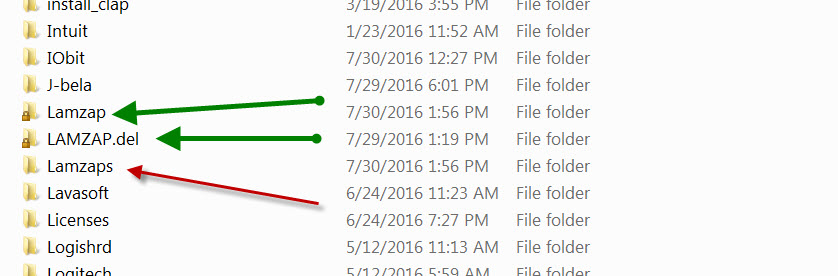
Also, see photo of directory…
The first Lamzap directory is what we just fixed. The other one with green arrow was done previously.
Lamzaps reappeared. I will open it and post another picture.
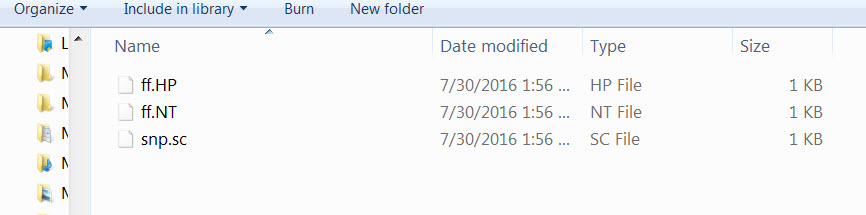
This is the contents of Lamzaps directory. I think this is what posts to the browser to force it to their search page. I'll try it and see.
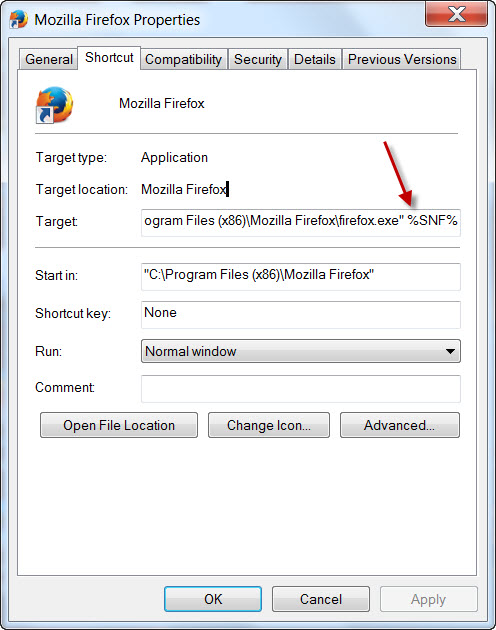
When the %SNF% is appended to the end of the Shortcut address it takes you to the hijacked search page. This photo is the properties of the Firefox shortcut on my desktop.Browser.jpg
Not sure what those files are ???
Open up FRST, besure to checkmark Additions and run a new Scan and post both new logs please
AI can make mistakes. Check the cited posts. Archived advice can be out-of-date
Don't include personal information. Questions and selected public posts go to OpenAI. About Ask AI