This is a read-only archive. No new posts or registrations. Privacy Page
Spyware / Malware / Virus Removal

This PC is blocking aswMBR and is very slow [Solved]

13 min read

This thread's last reply is from . Advice, software, and links below may be out of date — treat specific steps and download links with caution.

Looking for the outcome? Ask AI

Hi Ken545,


Sorry about the delay, I had to go to my grand-daughter's birthday party.


So far it looks good. Much quicker to boot now.


A search of the registry shows entries for Pokki and Spotify:


Pokki registry entries:
 
value data:
C:\Users\Valda\AppData\Local\Pokki\Engine\HostAppService.exe
in
HKEY_CURRENT_USER\Software\Microsoft\Windows NT\CurrentVersion\AppCompatFlags\Compatibility Assistant\Store
 
%ALLUSERSPROFILE%\Pokki\Pokki Start Menu.lnk
in
HKEY_LOCAL_MACHINE\SOFTWARE\Microsoft\Windows\CurrentVersion\Explorer\TBDEn
 
C:\Windows\system32\rundll32.exe "%LOCALAPPDATA%\Pokki\Engine\Launcher.dll",RunLaunchPlatform
in
HKEY_USERS\S-1-5-21-974442171-2668444937-4057906661-1001\Software\Microsoft\Windows\CurrentVersion\Run
 
"%LOCALAPPDATA%\Pokki\Engine\HostAppService.exe",6
Pokki Start Menu
Pokki
%LOCALAPPDATA%\Pokki\Uninstall.exe
and
http://www.pokki.com
all in
HKEY_USERS\S-1-5-21-974442171-2668444937-4057906661-1001\Software\Microsoft\Windows\CurrentVersion\Uninstall\Pokki
 
Pokki Start Menu
and
%LOCALAPPDATA%\Pokki
in
HKEY_USERS\S-1-5-21-974442171-2668444937-4057906661-1001\Software\Pokki
 
value name:
C:\Users\Valda\AppData\Local\Pokki\Engine\HostAppService.exe
and
C:\Users\Valda\AppData\Local\Pokki\Engine\HostAppService.exe
in
HKEY_USERS\S-1-5-21-974442171-2668444937-4057906661-1002\Software\Microsoft\Windows NT\CurrentVersion\AppCompatFlags\Compatibility Assistant\Store
 
 
Spotify registry entries:
 
value name: Spotify.mp3
in
HKEY_CLASSES_ROOT\.mp3\OpenWithProgids
 
value name: Spotify.mp3
in
HKEY_CURRENT_USER\Software\Classes\.mp3\OpenWithProgids
 
value data:
Spotify.exe
and
C:\Program Files (x86)\Spotify
in
HKEY_CURRENT_USER\Software\Microsoft\Internet Explorer\Low Rights\DragDrop\{5C0D11B8-C5F6-4be3-AD2C-2B1A3EB94AB6}
 
value data:
Spotify.exe
and
C:\Program Files (x86)\Spotify
in
HKEY_CURRENT_USER\Software\Microsoft\Internet Explorer\Low Rights\ElevationPolicy\{5C0D11B8-C5F6-4be3-AD2C-2B1A3EB94AB6}
 
value data:
{2}.\\?\bthenum#{61118058-486c-4bb0-b4b8-ace4dcadec44}_localmfg&0000#{6994ad04-93ef-11d0-a3cc-00a0c9223196}\topology/00010001|\Device\HarddiskVolume4\Program Files (x86)\Spotify\spotify.exe%b{00000000-0000-0000-0000-000000000000}
in
HKEY_CURRENT_USER\Software\Microsoft\Internet Explorer\LowRegistry\Audio\PolicyConfig\PropertyStore\c83def83_0
 
value name:
C:\Program Files (x86)\Spotify\spotify.exe
and
C:\Program Files (x86)\Spotify\SpotifyLauncher.exe
in
HKEY_CURRENT_USER\Software\Microsoft\Windows NT\CurrentVersion\AppCompatFlags\Compatibility Assistant\Store
 
Value data:
%ALLUSERSPROFILE%\Microsoft\Windows\Start Menu\Programs\spotify.lnk
in
HKEY_LOCAL_MACHINE\SOFTWARE\Microsoft\Windows\CurrentVersion\Explorer\TBDEn
 
Value name:
Spotify.mp3
in
HKEY_USERS\S-1-5-21-974442171-2668444937-4057906661-1002\Software\Classes\.mp3\OpenWithProgids
 
value data:
Spotify.exe
and
C:\Program Files (x86)\Spotify
in
HKEY_USERS\S-1-5-21-974442171-2668444937-4057906661-1002\Software\Microsoft\Internet Explorer\Low Rights\DragDrop\{5C0D11B8-C5F6-4be3-AD2C-2B1A3EB94AB6}
 
value data:
Spotify.exe
and
C:\Program Files (x86)\Spotify
in
HKEY_USERS\S-1-5-21-974442171-2668444937-4057906661-1002\Software\Microsoft\Internet Explorer\Low Rights\ElevationPolicy\{5C0D11B8-C5F6-4be3-AD2C-2B1A3EB94AB6}
 
value data:
{2}.\\?\bthenum#{61118058-486c-4bb0-b4b8-ace4dcadec44}_localmfg&0000#{6994ad04-93ef-11d0-a3cc-00a0c9223196}\topology/00010001|\Device\HarddiskVolume4\Program Files (x86)\Spotify\spotify.exe%b{00000000-0000-0000-0000-000000000000}
in
HKEY_USERS\S-1-5-21-974442171-2668444937-4057906661-1002\Software\Microsoft\Internet Explorer\LowRegistry\Audio\PolicyConfig\PropertyStore\c83def83_0
 
value name:
C:\Program Files (x86)\Spotify\spotify.exe
and
C:\Program Files (x86)\Spotify\SpotifyLauncher.exe
in
HKEY_USERS\S-1-5-21-974442171-2668444937-4057906661-1002\Software\Microsoft\Windows NT\CurrentVersion\AppCompatFlags\Compatibility Assistant\Store
 
value name:
Spotify.mp3
in
HKEY_USERS\S-1-5-21-974442171-2668444937-4057906661-1002_Classes\.mp3\OpenWithProgids
 
 
Are these a problem?
 
Where to from here?

This should get most of it


Backup the Registry:
 
Modifying the Registry can create unforeseen problems, so it always wise to create a backup before doing so.
 
  •  
  • Please download the installer for Registry Backup from here or here and save to your desktop.
  • Right-click on tweaking.com_registry_backup_setup.exe and select Run as Administrator >> Follow the prompts for a default installation
  • Ensure the option Open "Tweaking.com - Registry Backup"  When Install Completes is selected >> Next >  >> Finish
  • Once the GUI(graphical user interface) has appeared/loaded:-
 
[external image: TCRB-1.jpg]
 
  •  
  • Click on Backup Now >> once the process is complete the below will be displayed in the GUI:-
 
[external image: TBRB-2.jpg]
 
  •  
  • Close Tweaking.com - Registry Backup
 
Note: There will now be a folder at the root of the Hard-Drive named C:\RegBackup, do not delete this as it is the actual backup just created.
 
A tutorial for Registry Backup explaining the various features be viewed HERE


REGEDIT4
 
[-HKEY_LOCAL_MACHINE\Software\Spotify]
 
[-HKEY_CURRENT_USER\Software\Spotify]
 
[-HKEY_LOCAL_MACHINE\Software\Pokki]
 
[-HKEY_CURRENT_USER\Software\Pokki] 


Copy the entire contents inside the Quote box and Paste it into Notepad ( this will only work with Notepad ) name the file Regfix.reg and in the drop down box, save it as All Files. Save it to your desktop. Then Rightclick on the Regfix.reg file and click on Merge, when it asks you to merge with the Registry, say yes.
 
If you saved the file correctly it should look like this [external image: reg.jpg]

After you run the reg fix in my previous post, reboot your system and then run this program, it looks like you will need the 64bit version


Download and Run SystemLook
 
Please download SystemLook from one of the links below and save it to your Desktop.
Download Mirror #1
Download Mirror #2
64 Bit Version
 
  •  
  • Double-click SystemLook.exe to run it.
  • Copy the content of the following codebox into the main textfield:
:folderfind
Pokki
Spotify
:filefind
Pokki
Spotify
:regfind
Pokki
Spotify
  • Click the Look button to start the scan.
  • When finished, a notepad window will open with the results of the scan. Please post this log in your next reply.
Note: The log can also be found on your Desktop entitled SystemLook.txt


Hi Ken545,


Great party for my grand-daughter's 13th and a good night's sleep to boot; now for the 400km drive home this morning to tend the mini-goats.


Have done as you asked and here is the SystemLook log:


SystemLook 30.07.11 by jpshortstuff
Log created at 07:08 on 24/04/2016 by Valda
Administrator - Elevation successful
 
========== folderfind ==========
 
Searching for "Pokki"
C:\Users\Default\AppData\Local\Pokki d—— [18:34 25/07/2014]
C:\Users\Public\Pokki d—— [06:45 30/05/2015]
C:\Windows.old\Users\Default\AppData\Local\Pokki d—— [18:34 25/07/2014]
C:\Windows.old\Users\Public\Pokki d—— [03:12 07/11/2014]
C:\Windows.old\Users\UpdatusUser\AppData\Local\Pokki d—— [02:48 20/09/2014]
C:\Windows.old\Users\Valda\AppData\Local\Pokki d—— [03:07 07/11/2014]
C:\Windows.old\Users\Valda_2\AppData\Local\Pokki d—— [04:35 10/02/2015]
 
Searching for "Spotify"
C:\Windows.old\Users\Valda\AppData\Local\Spotify d—— [07:28 19/02/2015]
C:\Windows.old\Users\Valda\AppData\Roaming\Spotify d—— [07:27 19/02/2015]
 
========== filefind ==========
 
Searching for "Pokki"
No files found.
 
Searching for "Spotify"
No files found.
 
========== regfind ==========
 
Searching for "Pokki"
[HKEY_LOCAL_MACHINE\SOFTWARE\Microsoft\Windows\CurrentVersion\Explorer\TBDEn]
"SBOEM3"="%ALLUSERSPROFILE%\Pokki\Pokki Start Menu.lnk"
[HKEY_USERS\S-1-5-21-974442171-2668444937-4057906661-1001\Software\Microsoft\Windows\CurrentVersion\Run]
"Pokki"="C:\Windows\system32\rundll32.exe "%LOCALAPPDATA%\Pokki\Engine\Launcher.dll",RunLaunchPlatform"
[HKEY_USERS\S-1-5-21-974442171-2668444937-4057906661-1001\Software\Microsoft\Windows\CurrentVersion\Uninstall\Pokki]
[HKEY_USERS\S-1-5-21-974442171-2668444937-4057906661-1001\Software\Microsoft\Windows\CurrentVersion\Uninstall\Pokki]
"DisplayName"="Pokki Start Menu"
[HKEY_USERS\S-1-5-21-974442171-2668444937-4057906661-1001\Software\Microsoft\Windows\CurrentVersion\Uninstall\Pokki]
"DisplayIcon"=""%LOCALAPPDATA%\Pokki\Engine\HostAppService.exe",6"
[HKEY_USERS\S-1-5-21-974442171-2668444937-4057906661-1001\Software\Microsoft\Windows\CurrentVersion\Uninstall\Pokki]
"Publisher"="Pokki"
[HKEY_USERS\S-1-5-21-974442171-2668444937-4057906661-1001\Software\Microsoft\Windows\CurrentVersion\Uninstall\Pokki]
"URLInfoAbout"="http://www.pokki.com"
[HKEY_USERS\S-1-5-21-974442171-2668444937-4057906661-1001\Software\Microsoft\Windows\CurrentVersion\Uninstall\Pokki]
"UninstallString"="%LOCALAPPDATA%\Pokki\Uninstall.exe"
[HKEY_USERS\S-1-5-21-974442171-2668444937-4057906661-1001\Software\Pokki]
[HKEY_USERS\S-1-5-21-974442171-2668444937-4057906661-1001\Software\Pokki]
"DisplayName"="Pokki Start Menu"
[HKEY_USERS\S-1-5-21-974442171-2668444937-4057906661-1001\Software\Pokki]
"InstallDir"="%LOCALAPPDATA%\Pokki"
 
Searching for "Spotify"
[HKEY_CURRENT_USER\Software\Microsoft\Internet Explorer\Low Rights\DragDrop\{5C0D11B8-C5F6-4be3-AD2C-2B1A3EB94AB6}]
"AppPath"="C:\Program Files (x86)\Spotify"
[HKEY_CURRENT_USER\Software\Microsoft\Internet Explorer\Low Rights\DragDrop\{5C0D11B8-C5F6-4be3-AD2C-2B1A3EB94AB6}]
"AppName"="Spotify.exe"
[HKEY_CURRENT_USER\Software\Microsoft\Internet Explorer\Low Rights\ElevationPolicy\{5C0D11B8-C5F6-4be3-AD2C-2B1A3EB94AB6}]
"AppPath"="C:\Program Files (x86)\Spotify"
[HKEY_CURRENT_USER\Software\Microsoft\Internet Explorer\Low Rights\ElevationPolicy\{5C0D11B8-C5F6-4be3-AD2C-2B1A3EB94AB6}]
"AppName"="Spotify.exe"
[HKEY_CURRENT_USER\Software\Microsoft\Internet Explorer\LowRegistry\Audio\PolicyConfig\PropertyStore\c83def83_0]
@="{2}.\\?\bthenum#{61118058-486c-4bb0-b4b8-ace4dcadec44}_localmfg&0000#{6994ad04-93ef-11d0-a3cc-00a0c9223196}\topology/00010001|\Device\HarddiskVolume4\Program Files (x86)\Spotify\spotify.exe%b{00000000-0000-0000-0000-000000000000}"
[HKEY_LOCAL_MACHINE\SOFTWARE\Microsoft\Windows\CurrentVersion\Explorer\TBDEn]
"SBOEM4"="%ALLUSERSPROFILE%\Microsoft\Windows\Start Menu\Programs\spotify.lnk"
[HKEY_USERS\S-1-5-21-974442171-2668444937-4057906661-1002\Software\Microsoft\Internet Explorer\Low Rights\DragDrop\{5C0D11B8-C5F6-4be3-AD2C-2B1A3EB94AB6}]
"AppPath"="C:\Program Files (x86)\Spotify"
[HKEY_USERS\S-1-5-21-974442171-2668444937-4057906661-1002\Software\Microsoft\Internet Explorer\Low Rights\DragDrop\{5C0D11B8-C5F6-4be3-AD2C-2B1A3EB94AB6}]
"AppName"="Spotify.exe"
[HKEY_USERS\S-1-5-21-974442171-2668444937-4057906661-1002\Software\Microsoft\Internet Explorer\Low Rights\ElevationPolicy\{5C0D11B8-C5F6-4be3-AD2C-2B1A3EB94AB6}]
"AppPath"="C:\Program Files (x86)\Spotify"
[HKEY_USERS\S-1-5-21-974442171-2668444937-4057906661-1002\Software\Microsoft\Internet Explorer\Low Rights\ElevationPolicy\{5C0D11B8-C5F6-4be3-AD2C-2B1A3EB94AB6}]
"AppName"="Spotify.exe"
[HKEY_USERS\S-1-5-21-974442171-2668444937-4057906661-1002\Software\Microsoft\Internet Explorer\LowRegistry\Audio\PolicyConfig\PropertyStore\c83def83_0]
@="{2}.\\?\bthenum#{61118058-486c-4bb0-b4b8-ace4dcadec44}_localmfg&0000#{6994ad04-93ef-11d0-a3cc-00a0c9223196}\topology/00010001|\Device\HarddiskVolume4\Program Files (x86)\Spotify\spotify.exe%b{00000000-0000-0000-0000-000000000000}"
 
-= EOF =-
 
 
How are we looking now?

Before you run the fix be sure to make a registry backup using Tweeking 


REGEDIT4
 
[HKEY_LOCAL_MACHINE\SOFTWARE\Microsoft\Windows\CurrentVersion\Explorer\TBDEn]
"SBOEM3"=""
 
[HKEY_USERS\S-1-5-21-974442171-2668444937-4057906661-1001\Software\Microsoft\Windows\CurrentVersion\Run]
"Pokki"=-
 
[-HKEY_USERS\S-1-5-21-974442171-2668444937-4057906661-1001\Software\Microsoft\Windows\CurrentVersion\Uninstall\Pokki]
 
 
[-HKEY_USERS\S-1-5-21-974442171-2668444937-4057906661-1001\Software\Pokki]
 
[HKEY_CURRENT_USER\Software\Microsoft\Internet Explorer\Low Rights\DragDrop\{5C0D11B8-C5F6-4be3-AD2C-2B1A3EB94AB6}]
"AppPath"=""
 
[HKEY_CURRENT_USER\Software\Microsoft\Internet Explorer\Low Rights\DragDrop\{5C0D11B8-C5F6-4be3-AD2C-2B1A3EB94AB6}]
"AppName"=""
 
[HKEY_CURRENT_USER\Software\Microsoft\Internet Explorer\Low Rights\ElevationPolicy\{5C0D11B8-C5F6-4be3-AD2C-2B1A3EB94AB6}]
"AppPath"=""
 
[HKEY_CURRENT_USER\Software\Microsoft\Internet Explorer\Low Rights\ElevationPolicy\{5C0D11B8-C5F6-4be3-AD2C-2B1A3EB94AB6}]
"AppName"=""
 
[HKEY_CURRENT_USER\Software\Microsoft\Internet Explorer\LowRegistry\Audio\PolicyConfig\PropertyStore\c83def83_0]
@=-
 
[HKEY_LOCAL_MACHINE\SOFTWARE\Microsoft\Windows\CurrentVersion\Explorer\TBDEn]
"SBOEM4"=""
 
[HKEY_USERS\S-1-5-21-974442171-2668444937-4057906661-1002\Software\Microsoft\Internet Explorer\Low Rights\DragDrop\{5C0D11B8-C5F6-4be3-AD2C-2B1A3EB94AB6}]
"AppPath"=""
 
[HKEY_USERS\S-1-5-21-974442171-2668444937-4057906661-1002\Software\Microsoft\Internet Explorer\Low Rights\DragDrop\{5C0D11B8-C5F6-4be3-AD2C-2B1A3EB94AB6}]
"AppName"=""
 
[HKEY_USERS\S-1-5-21-974442171-2668444937-4057906661-1002\Software\Microsoft\Internet Explorer\Low Rights\ElevationPolicy\{5C0D11B8-C5F6-4be3-AD2C-2B1A3EB94AB6}]
"AppPath"=""
 
[HKEY_USERS\S-1-5-21-974442171-2668444937-4057906661-1002\Software\Microsoft\Internet Explorer\Low Rights\ElevationPolicy\{5C0D11B8-C5F6-4be3-AD2C-2B1A3EB94AB6}]
"AppName"=""
 
[HKEY_USERS\S-1-5-21-974442171-2668444937-4057906661-1002\Software\Microsoft\Internet Explorer\LowRegistry\Audio\PolicyConfig\PropertyStore\c83def83_0]
@=-


Copy the entire contents inside the Quote box and Paste it into Notepad ( this will only work with Notepad ) name the file Regfix.reg and in the drop down box, save it as All Files. Save it to your desktop. Then Rightclick on the Regfix.reg file and click on Merge, when it asks you to merge with the Registry, say yes.
 
If you saved the file correctly it should look like this [external image: reg.jpg]


Open notepad , Go to Start –> All Programs –> Accessories –> Notepad.
Please copy the entire contents Inside of the code box below beginning with START and ending with END
(To do this highlight the contents of the box, right click on it and select copy. Right-click in the open notepad and select Paste).
Name the file Fixlist.txt , Save it to your desktop where you have FRST/FRST64 or the fix wont work. Right Click on FRST/FRST64 and select RUN AS ADMINISTRATOR Then click on >FIX< (Not Scan) It won't take long, after your computer reboots you will find a FIXLOG.TXT on your desktop, post it please
 
Start
CloseProcesses:
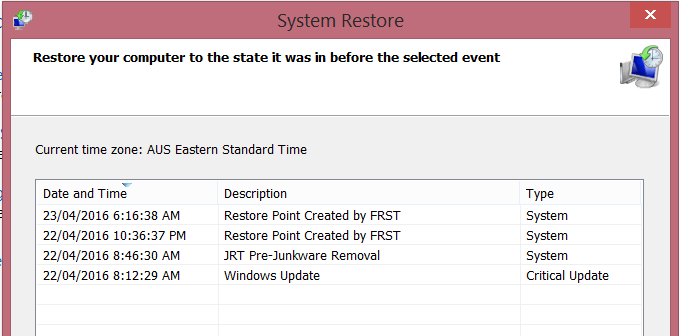
CreateRestorePoint: 
C:\Users\Default\AppData\Local\Pokki 
C:\Users\Public\Pokki 
C:\Windows.old\Users\Default\AppData\Local\Pokki 
C:\Windows.old\Users\Public\Pokki 
C:\Windows.old\Users\UpdatusUser\AppData\Local\Pokki 
C:\Windows.old\Users\Valda\AppData\Local\Pokki 
C:\Windows.old\Users\Valda_2\AppData\Local\Pokki 
C:\Windows.old\Users\Valda\AppData\Local\Spotify 
C:\Windows.old\Users\Valda\AppData\Roaming\Spotify 
EmptyTemp:
End
 
NOTICE: This script was written specifically for this user, for use on that particular machine. Running this on another machine may cause damage to your operating system

Hi Ken545,


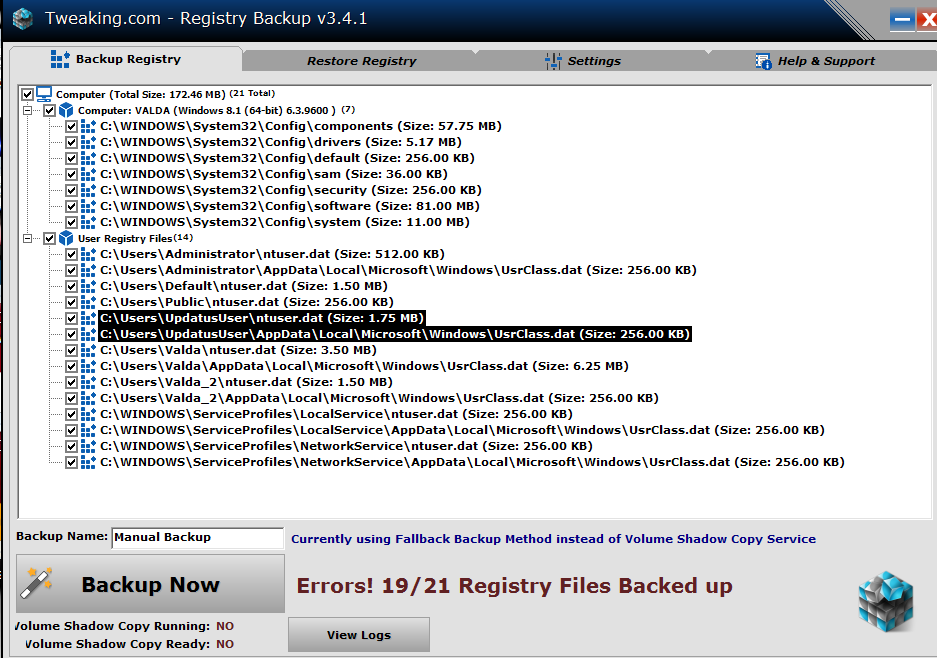
Ran TCRB as administrator and got 19/21 files error; ran it again just by opening it with same result.


See attached screen snip.


Is it OK to go ahead with the fix or should I do something else first to get a complete registry backup?


Attachments:

Open Trweeking and see if you still have the first backup you made, not sure if this program overwrites and older back up or if it keeps two.  Let me know as I dont have this on my system

Hi Ken545,


Looks like I may have messed up. There are four backups all from this morning. The original one has been deleted.


What do you advise now?

Ask AI

AI can make mistakes. Check the cited posts. Archived advice can be out-of-date

Don't include personal information. Questions and selected public posts go to OpenAI. About Ask AI