Microsoft Security Bulletin MS16-001 - Critical
Cumulative Security Update for Internet Explorer (3124903)
- https://technet.microsoft.com/library/security/MS16-001
Critical - Remote Code Execution - Requires restart - Microsoft Windows, Internet Explorer
- https://support.microsoft.com/en-us/kb/3124903
Last Review: 01/12/2016 18:35:00 - Rev: 1.0
Applies to:
Internet Explorer 11
Internet Explorer 10
Windows Internet Explorer 9
Windows Internet Explorer 8
Windows Internet Explorer 7
Microsoft Security Bulletin MS16-002 - Critical
Cumulative Security Update for Microsoft Edge (3124904)
- https://technet.microsoft.com/library/security/MS16-002
Critical - Remote Code Execution - Requires restart - Microsoft Windows, Microsoft Edge
Microsoft Security Bulletin MS16-003 - Critical
Cumulative Security Update for JScript and VBScript to Address Remote Code Execution (3125540)
- https://technet.microsoft.com/library/security/MS16-003
Critical - Remote Code Execution - May require restart - Microsoft Windows
Microsoft Security Bulletin MS16-004 - Critical
Security Update for Microsoft Office to Address Remote Code Execution (3124585)
- https://technet.microsoft.com/library/security/MS16-004
Critical - Remote Code Execution - May require restart - Microsoft Office, Visual Basic
Microsoft Security Bulletin MS16-005 - Critical
Security Update for Windows Kernel-Mode Drivers to Address Remote Code Execution (3124584)
- https://technet.microsoft.com/library/security/MS16-005
Critical - Remote Code Execution - Requires restart - Microsoft Windows
Microsoft Security Bulletin MS16-006 - Critical
Security Update for Silverlight to Address Remote Code Execution (3126036)
- https://technet.microsoft.com/library/security/MS16-006
Critical - Remote Code Execution - Does not require a restart - Microsoft Silverlight
Microsoft Security Bulletin MS16-007 - Important
Security Update for Microsoft Windows to Address Remote Code Execution (3124901)
- https://technet.microsoft.com/library/security/MS16-007
Important - Remote Code Execution - Requires restart - Microsoft Windows
Microsoft Security Bulletin MS16-008 - Important
Security Update for Windows Kernel to Address Elevation of Privilege (3124605)
- https://technet.microsoft.com/library/security/MS16-008
Important - Elevation of Privilege - Requires restart - Microsoft Windows
Microsoft Security Bulletin MS16-010 - Important
Security Update in Microsoft Exchange Server to Address Spoofing (3124557)
- https://technet.microsoft.com/library/security/MS16-010
Important - Spoofing - May require restart - Microsoft Exchange Server
___
MS: Only the Latest Version of Windows Will Support New CPU Generations
- http://tech.slashdot.org/story/16/01/16/1245231/microsoft-only-the-latest-version-of-windows-will-support-new-cpu-generations
Jan 16, 2016 - "… news from Microsoft about how the company will support Windows now and in the future*. The company says PCs built with Intel's Skylake chip, and other new architectures in the future, will require the latest version of Windows for support. This doesn't take effect right away; Windows 7 and 8.1 will be supported on older chips until their planned end-of-life dates, in 2020 and 2023 respectively. They'll also be supported on a list of current Skylake devices for the next 18 months. After that, only the latest version of Windows will support integration** between the operating system and new CPU features. "For example, Windows 10 will be the only supported Windows platform on Intel's upcoming 'Kaby Lake' silicon, Qualcomm's upcoming '8996' silicon, and AMD's upcoming 'Bristol Ridge' silicon…"
Deadline for obsolete IE's and Win8
- http://windowssecrets.com/patch-watch/a-deadline-for-obsolete-ies-and-windows-8/
Jan 14, 2016 - "With the start of a new year, Microsoft is cleaning house of “obsolete” operating systems and browsers. If you’re still on Windows 8.0, you need to update to Win8.1 to be fully supported. And for true browser protection, you need to be using the most current releases of Internet Explorer…
MS16-001 (3124275), MS16-003 (3124624)
… reducing the number of versions Microsoft needs to support is a good thing. For example, keeping secure a browser that has multiple editions in multiple languages, for multiple operating systems is a tall order, even for Microsoft. Sending out monthly fixes for fewer versions should mean more reliable updates.
With that in mind, this month’s cumulative IE update, KB 3124903, is the -last- for IE 7 and 8. According to a Microsoft product lifecycle FAQ*, “Beginning Jan. 12, 2016, only the most current version of Internet Explorer available for a supported operating system will receive technical support and security updates.” Going forward, on desktop Windows, IE 9 will be the -only- supported version on Vista systems; IE 11 is the -only- supported version on Win7 and Win8.1.
Along with the operating system and your malware software, the browser is the most important app to keep up to date with the latest security fixes. If you remain on IE 7 or 8, your risk of infection will rise rapidly. Keep in mind that Internet Explorer is deeply tied into Windows. So even if you don’t use IE as your default browser, it’s important to keep it current. (After you install this month’s cumulative update, you’ll be -nagged- that your browser is out of date and you need to upgrade — in most cases to IE 11.)"
* https://support.microsoft.com/en-us/lifecycle#gp/Microsoft-Internet-Explorer
___
Update that supports Azerbaijani Manat and Georgian Lari currency symbols in Windows Re-released?
- https://support.microsoft.com/en-us/kb/3102429
Last Review: 01/19/2016 19:40:00 - Rev: 7.0
Win10 - check your 'System Protection' setting …
- https://isc.sans.edu/diary.html?storyid=20675
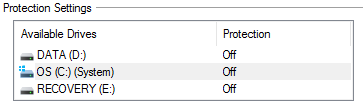
2016-01-31 - "… Many of you (may have) upgraded to Windows 10 and it would be a good idea to verify your settings to make sure 'System Protection' is enabled:
> https://isc.sans.edu/diaryimages/images/win10_protection_off.PNG
Here is how to check and if necessary, 'enable' System Protection:
Select [Win10 Start] -> Settings -> About -> System info -> System Protection -> Configure
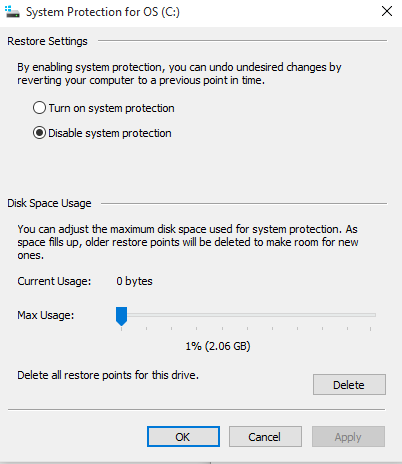
Select 'Turn on system protection' to -enable- System Restore and some disk space (i.e. 10 GB):
> https://isc.sans.edu/diaryimages/images/win10_protection_off_default.PNG
Over the years, 'System Protection' has been in many cases a useful tool especially when installing failed patches or applications to be able to go back to an earlier and stable version."
MS - renewed push to force users onto Win10
- http://www.infoworld.com/article/3028897/microsoft-windows/microsoft-signals-renewed-push-to-force-users-onto-windows-10.html
Feb 2, 2016 - "A cryptic post from Microsoft seems to indicate that Redmond has stepped up its push to upgrade Windows 7 and Windows 8.1 users by moving Windows 10 to 'recommended status'. According to ZDNet's Mary Jo Foley*, about 5 p.m. ET on Monday, Microsoft dropped a small bombshell:
' As we shared in late October on the Windows Blog, we are committed to making it easy for our Windows 7 and Windows 8.1 customers to upgrade to Windows 10. We updated the upgrade experience today to help our customers…'. Shortly after, Microsoft maven Paul Thurrott** confirmed the message. Apparently this is Microsoft's version of an official announcement… Until we actually see a "recommended" Windows 10 update in-the-wild, it's hard to say what Microsoft will do… your best bet is to download and run Josh Mayfield's GWX Control Panel[1]. That'll clean out the Get Windows X subsystem, reset the registry entries, and keep the hidden scheduled tasks from firing."
1] http://ultimateoutsider.com/downloads/
Version: 1.7.2.0
Jan 24, 2016
-or-
> http://ultimateoutsider.com/downloads/GWX_control_panel.exe
MS pushes Win10 as a 'recommended' update …
* http://www.zdnet.com/article/microsoft-starts-pushing-windows-10-as-a-recommended-update/
Feb 1, 2016 - "… On February 1, Microsoft started making good on the promised push… Microsoft is not changing its policy of downloading part of the Windows 10 code 'proactively' to users' machines to make upgrading faster. The company is continuing to do that, in spite of complaints by many. However, unless users make the final decision to hit upgrade, Windows 10 will not completely install and replace their existing Windows versions. The "recommended" push will be a phased one, the spokesperson said, for Windows 7 and 8.1 consumers who have Automatic Updates turned on. For users who have chosen the "Give me recommended updates the same way I receive important updates" setting turned on, the automatic update process will kick off… for the record: Windows 10 is -not- a required update for Windows 7 and 8.1 users. It is now 'recommended'. Users who do not want it can just say no."
> http://www.zdnet.com/article/how-to-block-windows-10-upgrades-on-your-business-network-and-at-home-too/
** https://www.thurrott.com/windows/windows-10/64324/windows-10-becomes-a-recommended-update-on-windows-7-and-8-1
Feb 1, 2016 - "… the change from “optional” to “recommended” is somewhat controversial, since Windows Update is considered a -trusted- source for updates. That is, it will probably cause the Windows 10 upgrade to automatically start on many PCs because most users configure Windows Update to automatically install recommended updates… 'You will be assimilated'."
___
Compatibility update for upgrading Windows 7
- https://support.microsoft.com/en-us/kb/2952664
Last Review: 02/02/2016 20:42:00 - Rev: 17.0 - "This update helps Microsoft make improvements to the current operating system in order to ease the upgrade experience to the latest version of Windows…"
Applies to:
Windows 7 SP1
Updated capabilities to upgrade Windows 8.1 and Windows 7
- https://support.microsoft.com/en-us/kb/3123862
Last Review: 02/03/2016 18:05:00 - Rev: 1.0
Applies to:
Windows 8.1 Enterprise
Windows 8.1 Pro
Windows 8.1
Windows 7 SP1
Compatibility update for Windows 8.1 and Windows 8
- https://support.microsoft.com/en-us/kb/2976978
Last Review: 02/02/2016 20:43:00 - Rev: 20.0
Applies to:
Windows 8.1 Enterprise
Windows 8.1
Windows 8.1 Pro
Windows 8 Enterprise
Windows 8
Windows 8 Pro
Compatibility update for Windows 7 RTM
- https://support.microsoft.com/en-us/kb/2977759
Last Review: 02/02/2016 20:42:00 - Rev: 16.0
Applies to:
Windows 7 Enterprise
Windows 7 Home Premium
Windows 7 Home Basic
Windows 7 Professional
Windows 7 Starter
Windows 7 Ultimate
Win10 - Device Guard and Applocker
- http://blogs.msmvps.com/bradley/2016/02/06/not-so-fast-some-of-us-need-emet/
Feb 6, 2016 - "… security enhancements are key… the key features they are pointing out here* – Device Guard and Applocker are -not- available on the Pro or Home skus. They are -only- available on the Enterprise sku…"
Can't disable Windows Store in Win10 Pro through Group Policy
* https://support.microsoft.com/en-us/kb/3135657
Last Review: 01/29/2016 19:47:00 - Rev: 4.0 - "On a computer that's running Windows 10 Pro, you upgrade to version 1511 of Windows 10. After the upgrade, you notice that the following Group Policy settings to disable Windows Store are not applied, and you cannot disable Windows Store:
Computer Configuration>Administrative Templates>Windows Components>Store>Turn off the Store application
User Configuration>Administrative Templates>Windows Components>Store>Turn off the Store
Cause: This behavior is by design. In Windows 10 version 1511, these policies are applicable to users of the Enterprise and Education editions only…"
Applies to:
Win10 Version 1511