This is a read-only archive. No new posts or registrations. Privacy Page
Hardware

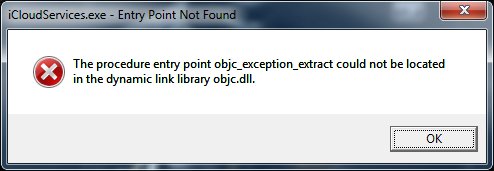
The procedure entry point objc_exception_extract could not be located

7 min read

This thread's last reply is from . Advice, software, and links below may be out of date — treat specific steps and download links with caution.

Looking for the outcome? Ask AI

Hi there,


A friend recommended me to you guys as you helped him out with a spyware issue a while back


He said he wasn't sure if you could help with this but if not you definitely could point me in the right direction.


A couple of months ago I was installing FL Studio 11 onto my machine and at the same time had plugged my iphone in for updates.


They were both installing updates at the same time when 'Bam'… a power-cut happened and desktop PC and screens went blank.


Since then My PC has been having major issues starting up, and once booted the screens freeze for a minute or so before finally she starts to kick in.


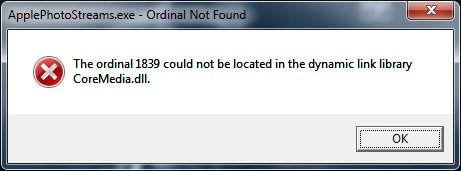
Then I get 2 messages appear (please see attachments).


i have searched but to no avail on how to fix any of the issues… I mean it may be as simple as 'get a new hard drive'. but I have so much stuff and the PC is less than 2 years old, i was hoping this would not be the case.


I hope you can help


Quest

Hi questy49 and welcome to the WTT forums

:welcome:


Make sure before you do anything that your back ups contain everything that is important to you on your computer, and that you have at least one copy of them, verified and kept safe offsite on removable media.

( hopefully you will not need to use them but it's always better to be on the safe side!


A power cut whilst performing updates can cause serious problems…. but let's try a simple fix first that might just do the trick for you.


You don't provide any details of your operating system or computer so I cannot provide detailed step by step instructions, however it would be a good first step to set your computer's settings (Registry etc) back to a point of time before the problem started.


To do this  try using a System Restore Point created a week or so before the problem started


Here's a couple of links to a set of instructions that will give you a good start:


http://windows.microsoft.com/en-gb/windows-vista/turn-back-time-on-your-pc-undo-system-changes-with-system-restore


http://windows.microsoft.com/en-GB/windows7/products/features/system-restore


Post back and let us know how you get on.


regards

paws

Hi Paws,


Thanks for replying.  I run Windows 7 Pro Service Pack 1.


I looked at the System Restore (it was the first thing i tried), but unfortunately there was no restore point, only dates after the incident happened (this was around 2 months ago so I'm a little late in my post).


I've had another look just in case, but no luck sadly :-(


Cheers

Questy

Hi questy, OK all understood,

Before we go too far please advise if you have run chkdsk with the r switch and also sfc /scannow.


If you haven.t run them then please do so ( you will need to run them from a command prompt with elevated privileges)

The command for chkdsk is

chkdsk /r


If you need a detailed step by step then post back and I'll provide it.

Regards

paws

Hi Paws


Sorry for late response, I'm in the UK and get on my machine for a couple of an evening so slow process.


Check disk run, and still getting the error message on reboot


What is sfc /scannow.  I'll run that anyway.


Cheers

Q

Hi Paws, sorry, not been around the last few days.


Will run SFC again tonight, but PC running a lot better since the last time!


Will post the result later.


Q

Ok questy,


all understood.

The fact that your system restore is not operating correctly, and that a power cut, shut down your machine suddenly and without the usual shut down procedure, coupled with the fact that you were installing a new application and simultaneously updating another application ( never a good move) and now the results from sfc indicate that your whole system has been compromised, and critical system files have been damaged or destroyed.


Before going into a reinstall of your operating system (which ultimately may be the quickest method of repair) it would be worthwhile considering uninstalling all your "Apple software" rebooting and see if the problem has gone….

make sure you are 100% happy with your back ups before you proceed further.

Regards

paws

Ok Paws,


Apple items were not able to unistall, so tried to reinstall and get the same message.


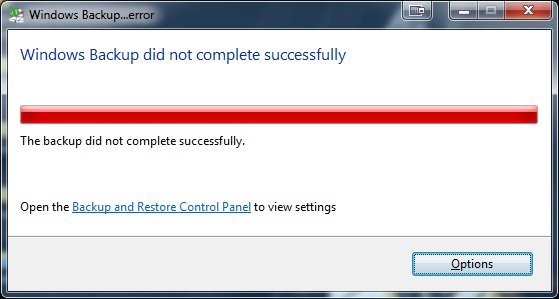
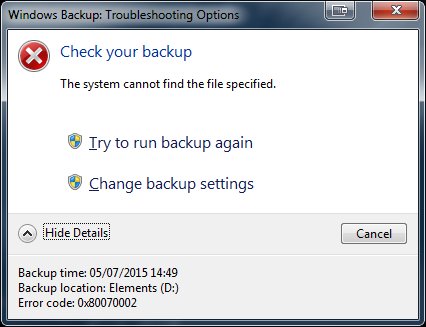
Went to do the backup and at 61% (whilst creating the C: it think)  I got the messages attached.


I'm not 100% certain is the whole back up has been completed:


Cheers

Q

Hi questy, this is not looking good but I guess you know that!


Rather than use Windows back up, try copying all your important stuff to an external (usb) hard drive… if this succeeds OK, then make an extra copy and then you can proceed.

Don't forget all your product serial codes, ( including that for Windows itself)… executables for applications you have downloaded and at least your wired and wireless network drivers if applicable


It might be worth while trying to uninstall the Apple stuff whilst booted into safe mode.as this can sometimes do the trick

Regards

paws

Hi Paws


Guess what, I went into safe mode as you suggested, tried to delete the Apple programs,  and it was a no go… BUT…


A popup saying Windows Installer Service could not be accessed (something along those lines).


Anyway, followed some instructions on how to get it "accessible".


Uninstalled all the apple products and now the error messages on reboot have vanished  :adios:


So, that's one thing down.  The PC itself is still really slow at booting, can you suggest next steps… or even repeat the previous ones?


Cheers


Q

Hi questy,


That's good news, well done on clearing the error messages


I'm still concerned that sfc is showing some errors that can't be fixed…. here's what I'd be inclined to consider doing.


1 Make sure you have plenty of free space on your C: drive…. if it's anything below 25% as a minimum then you need to address that.


2 Make sure you have done a good disc cleanup by removing all junk files, temps etc


3 Do a defrag on your C: drive and then reboot.


4 go into Control panel and check ( via Programs and Features or Add and remove,) that you are not running any unnecessary programmes, or stuff you used once upon a time but not recently. uninstall anything you don't use. Reboot after the uninstall


5 Check your system tray for icons…. many programmers seem to think that its vital that at every boot their own application is running (and taking up resources) when often times you are not even using them!

then each application may want to "connect to its own servers" to update itself….. several applications alll doing this at the same time can make the computer very very unresponsive  for a long time!


6 The only thing I like to see running in my system tray is my anti virus/protections.


7 Stay away from Registry boosters, Cleaners, Optimizers ( they are not generally recommended and can sometimes do more harm than good to your system)


8 Only have one anti virus programme running resident in memory…. if you have more than one then its likely they could conflict and reduce your level of security, not improve it. So uninstall a second one if found.. and run the dedicated uninstall tool for the programme concerned. You can do an Internet search for the uninstall tool…e.g. Norton uninstall tool or McAfee uninstall tool etc., and make sure you only download the one from the maker of the anti virus concerned i.e. Norton (Symantec), McAfee etc., ( there asre rogue ones around that sail under false colours)


9.  there is a good "Windows All in One Repair tool" available from www.tweaking.com… be sure to follow all the instructions!


10 Some folks often have all sorts of stuff plugged into their computer…. make sure that nothing is plugged in whilst you are doing these tests other than stuff you need…. power cord, Video cord, mouse and keyboard..empty all CD/DVD trays, memory card external slots, USB connections etc., and no phones, sat navs or anything else plugged in.


11 Do several reboots after this lot and let us know how you get on.


12 Finally boot into safe mode with networking and do a test… does it run any better? be very careful as your anti virus/protections will not be providing you with full or sometimes any protection whilst operating in safe mode, so if on the net visit only bbc.co.uk and do not click on any external links and no surfing!


13 If still no joy then it would be worth visiting our virus and Spyware removal forum

http://forums.whatthetech.com/index.php?showtopic=106388


and post your logs there… if you do this then please include a link to this topic so the malware removal expert know what has been going on.


Regards

paws

Thanks Paws.


I've been away for a few days,  I will get onto this as soon as poss.  I have done a virus scan and there is no viruses, but will follow all the other steps.


Cheers

Q

Ask AI

AI can make mistakes. Check the cited posts. Archived advice can be out-of-date

Don't include personal information. Questions and selected public posts go to OpenAI. About Ask AI