This is a read-only archive. No new posts or registrations. Privacy Page
Spyware / Malware / Virus Removal

Virus: White Smoke Toolbar (aka WhiteSmoke) [Solved]

41 min read

This thread's last reply is from . Advice, software, and links below may be out of date — treat specific steps and download links with caution.

Looking for the outcome? Ask AI

Hello fbfbfb,

Re: Option 1: Hide Update Downloads
It appears that this has resolved the problem.

Question: Has this completely resolved the problem, or has this simply hidden the problem while allowing it to continue to exist?

Next>
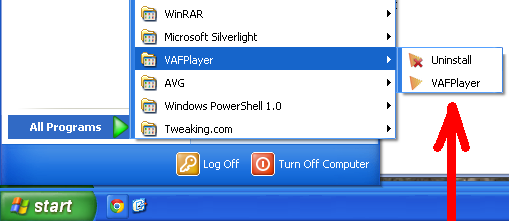
This application was added [not by me] when the virus appeared.

It is found at:
C:\Program Files\Tuguu SL\VAFPlayer\
📎VAFPlayer.PNG

I have tried to uninstall it, both by using the uninstall as seen above:
Start > All Programs > VAFPlayer > Uninstall
and by
Start > Control Panel > Add or Remove Programs

Both of these attempts have failed.
Below I will add my latest Hijack this [attempting to be proactive] in case this will be valuable
=============================================================================

Logfile of Trend Micro HijackThis v2.0.4
Scan saved at 8:20:30 PM, on 6/3/2013
Platform: Windows XP SP3 (WinNT 5.01.2600)
MSIE: Internet Explorer v8.00 (8.00.6001.18702)
Boot mode: Normal

Running processes:
C:\WINDOWS\System32\smss.exe
C:\PROGRA~1\AVG\AVG2013\avgrsx.exe
C:\Program Files\AVG\AVG2013\avgcsrvx.exe
C:\WINDOWS\system32\winlogon.exe
C:\WINDOWS\system32\services.exe
C:\WINDOWS\system32\lsass.exe
C:\WINDOWS\system32\Ati2evxx.exe
C:\WINDOWS\system32\svchost.exe
C:\WINDOWS\System32\svchost.exe
C:\WINDOWS\system32\spoolsv.exe
C:\WINDOWS\system32\Ati2evxx.exe
C:\WINDOWS\Explorer.EXE
C:\WINDOWS\RTHDCPL.EXE
C:\Program Files\EaseUS\EaseUS Partition Master 9.2.1 Home Edition\bin\EpmNews.exe
C:\WINDOWS\system32\MSTMON_S.EXE
C:\Program Files\ATI Technologies\ATI.ACE\Core-Static\MOM.exe
C:\Program Files\Common Files\Java\Java Update\jusched.exe
C:\Program Files\AVG\AVG2013\avgui.exe
C:\Program Files\AVG SafeGuard toolbar\vprot.exe
C:\WINDOWS\system32\ctfmon.exe
C:\Program Files\Kodak\Kodak EasyShare software\bin\EasyShare.exe
C:\Program Files\Kodak\KODAK Software Updater\7288971\Program\Kodak Software Updater.exe
C:\Program Files\AVG\AVG2013\avgidsagent.exe
C:\Program Files\Windows Desktop Search\WindowsSearch.exe
C:\Program Files\AVG\AVG2013\avgwdsvc.exe
C:\Program Files\Java\jre7\bin\jqs.exe
C:\Program Files\ATI Technologies\ATI.ACE\Core-Static\ccc.exe
C:\Program Files\Common Files\Microsoft Shared\VS7DEBUG\MDM.EXE
C:\Program Files\Common Files\AVG Secure Search\vToolbarUpdater\15.2.0\ToolbarUpdater.exe
C:\Program Files\AVG\AVG2013\avgnsx.exe
C:\Program Files\AVG\AVG2013\avgemcx.exe
C:\WINDOWS\system32\SearchIndexer.exe
C:\WINDOWS\System32\svchost.exe
C:\WINDOWS\system32\SNDVOL32.EXE
C:\Program Files\Java\jre7\bin\javaw.exe
C:\Program Files\Java\jre7\bin\java.exe
C:\Program Files\Google\Chrome\Application\chrome.exe
C:\WINDOWS\system32\SearchProtocolHost.exe
E:\My Documents\Downloads\HiJackThis.exe

R1 - HKLM\Software\Microsoft\Internet Explorer\Main,Default_Page_URL = http://go.microsoft.com/fwlink/?LinkId=69157
R1 - HKLM\Software\Microsoft\Internet Explorer\Main,Default_Search_URL = http://go.microsoft.com/fwlink/?LinkId=54896
R1 - HKLM\Software\Microsoft\Internet Explorer\Main,Search Page = http://go.microsoft.com/fwlink/?LinkId=54896
O2 - BHO: AcroIEHelperStub - {18DF081C-E8AD-4283-A596-FA578C2EBDC3} - C:\Program Files\Common Files\Adobe\Acrobat\ActiveX\AcroIEHelperShim.dll
O2 - BHO: Java™ Plug-In SSV Helper - {761497BB-D6F0-462C-B6EB-D4DAF1D92D43} - C:\Program Files\Java\jre7\bin\ssv.dll
O2 - BHO: (no name) - {95B7759C-8C7F-4BF1-B163-73684A933233} - (no file)
O2 - BHO: Java™ Plug-In 2 SSV Helper - {DBC80044-A445-435b-BC74-9C25C1C588A9} - C:\Program Files\Java\jre7\bin\jp2ssv.dll
O3 - Toolbar: (no name) - {95B7759C-8C7F-4BF1-B163-73684A933233} - (no file)
O4 - HKLM\..\Run: [RTHDCPL] RTHDCPL.EXE
O4 - HKLM\..\Run: [StartCCC] "C:\Program Files\ATI Technologies\ATI.ACE\Core-Static\CLIStart.exe" MSRun
O4 - HKLM\..\Run: [EaseUS EPM tray] C:\Program Files\EaseUS\EaseUS Partition Master 9.2.1 Home Edition\bin\EpmNews.exe
O4 - HKLM\..\Run: [KONICA MINOLTA magicolor 2400W STD] C:\WINDOWS\system32\MSTMON_S.EXE STARTUP
O4 - HKLM\..\Run: [Adobe ARM] "C:\Program Files\Common Files\Adobe\ARM\1.0\AdobeARM.exe"
O4 - HKLM\..\Run: [SunJavaUpdateSched] "C:\Program Files\Common Files\Java\Java Update\jusched.exe"
O4 - HKLM\..\Run: [QuickTime Task] "C:\Program Files\QuickTime\qttask.exe" -atboottime
O4 - HKLM\..\Run: [AVG_UI] "C:\Program Files\AVG\AVG2013\avgui.exe" /TRAYONLY
O4 - HKLM\..\Run: [vProt] "C:\Program Files\AVG SafeGuard toolbar\vprot.exe"
O4 - HKCU\..\Run: [ctfmon.exe] C:\WINDOWS\system32\ctfmon.exe
O4 - HKCU\..\Run: [Washer] C:\Program Files\Washer\washer.exe /1
O4 - Global Startup: Kodak EasyShare software.lnk = C:\Program Files\Kodak\Kodak EasyShare software\bin\EasyShare.exe
O4 - Global Startup: Kodak software updater.lnk = C:\Program Files\Kodak\KODAK Software Updater\7288971\Program\Kodak Software Updater.exe
O4 - Global Startup: Windows Search.lnk = C:\Program Files\Windows Desktop Search\WindowsSearch.exe
O8 - Extra context menu item: E&xport to Microsoft Excel - res://C:\PROGRA~1\MICROS~2\OFFICE11\EXCEL.EXE/3000
O9 - Extra button: Research - {92780B25-18CC-41C8-B9BE-3C9C571A8263} - C:\PROGRA~1\MICROS~2\OFFICE11\REFIEBAR.DLL
O9 - Extra button: (no name) - {e2e2dd38-d088-4134-82b7-f2ba38496583} - C:\WINDOWS\Network Diagnostic\xpnetdiag.exe
O9 - Extra 'Tools' menuitem: @xpsp3res.dll,-20001 - {e2e2dd38-d088-4134-82b7-f2ba38496583} - C:\WINDOWS\Network Diagnostic\xpnetdiag.exe
O9 - Extra button: Messenger - {FB5F1910-F110-11d2-BB9E-00C04F795683} - C:\Program Files\Messenger\msmsgs.exe
O9 - Extra 'Tools' menuitem: Windows Messenger - {FB5F1910-F110-11d2-BB9E-00C04F795683} - C:\Program Files\Messenger\msmsgs.exe
O18 - Protocol: viprotocol - {B658800C-F66E-4EF3-AB85-6C0C227862A9} - C:\Program Files\Common Files\AVG Secure Search\ViProtocolInstaller\15.2.0\ViProtocol.dll
O22 - SharedTaskScheduler: Browseui preloader - {438755C2-A8BA-11D1-B96B-00A0C90312E1} - C:\WINDOWS\System32\browseui.dll
O22 - SharedTaskScheduler: Component Categories cache daemon - {8C7461EF-2B13-11d2-BE35-3078302C2030} - C:\WINDOWS\System32\browseui.dll
O23 - Service: Adobe Flash Player Update Service (AdobeFlashPlayerUpdateSvc) - Adobe Systems Incorporated - C:\WINDOWS\system32\Macromed\Flash\FlashPlayerUpdateService.exe
O23 - Service: Ati HotKey Poller - ATI Technologies Inc. - C:\WINDOWS\system32\Ati2evxx.exe
O23 - Service: AVGIDSAgent - AVG Technologies CZ, s.r.o. - C:\Program Files\AVG\AVG2013\avgidsagent.exe
O23 - Service: AVG WatchDog (avgwd) - AVG Technologies CZ, s.r.o. - C:\Program Files\AVG\AVG2013\avgwdsvc.exe
O23 - Service: Google Update Service (gupdate) (gupdate) - Google Inc. - C:\Program Files\Google\Update\GoogleUpdate.exe
O23 - Service: Google Update Service (gupdatem) (gupdatem) - Google Inc. - C:\Program Files\Google\Update\GoogleUpdate.exe
O23 - Service: Java Quick Starter (JavaQuickStarterService) - Oracle Corporation - C:\Program Files\Java\jre7\bin\jqs.exe
O23 - Service: Kodak Camera Connection Software (KodakCCS) - Eastman Kodak Company - C:\WINDOWS\system32\drivers\KodakCCS.exe
O23 - Service: Mozilla Maintenance Service (MozillaMaintenance) - Mozilla Foundation - C:\Program Files\Mozilla Maintenance Service\maintenanceservice.exe
O23 - Service: vToolbarUpdater15.2.0 - Unknown owner - C:\Program Files\Common Files\AVG Secure Search\vToolbarUpdater\15.2.0\ToolbarUpdater.exe

–
End of file - 6834 bytes

Hello, peteinmaine.

I’m glad you have found some respite from the annoying updates. Hiding the updates is only a temporary solution, until such time that Microsoft is able to issue a permanent resolve. As I had previously mentioned to you, countless others are experiencing your frustration and, at this time, Microsoft does not have a fix for this problem.

I have personally experienced your same issue. After trying everything without any success, I decided to live with the annoyance. One day, like magic, the problem disappeared on its own. I don’t know why or how, perhaps it was stuck, perhaps new updates forced it on its way. . . . Hopefully, you will experience this as well.

We will deal with uninstalling VAFPlayer, but first I need the following DDS information:
  • Go to Start > Run > copy/paste the following into the Run box and click OK:

%temp%\Attach.txt

  • A text file should open. Please attach that file to your next reply.
Hello, peteinmaine.

The attach.txt report may have been deleted during our attempts to resolve your system issues.

Please run DDS again and post both reports in your next reply: dds.txt and attach.txt.

Scan your system with DDS

Please download DDS from HERE. Click Save File. The file will save to your default location.
  • Disable any script blocking protection. (How to Temporarily Disable Security Programs: Anti-virus/Anti-spyware/Firewall)
  • Double click dds.com > Click Run.
  • At the next prompt, ensure check marks appear next to dds.com and attach.txt > Click Start to begin the scan. When done, click OK to close the DDS window.
  • Two reports will automatically open: dds.txt and Attach.txt. These reports are also saved to your desktop.
Please copy and paste the scan results of DDS.txt.

Please attach the second file: Attach.txt.

To attach a file, do the following:
  • Under the reply panel is the Attachments Panel.
  • Browse for the attachment file you want to upload, then click the green Upload button.
  • Once it has uploaded, click the Manage Current Attachments drop down box.
  • Click on [external image: Posted Image] to insert the attachment into your post.
Hello fbfbfb,

DDS.txt to follow : attach.txt is attached
=============================================================================
DDS (Ver_2012-11-20.01) - NTFS_x86
Internet Explorer: 8.0.6001.18702 BrowserJavaVersion: 10.21.2
Run by [removed] at 21:09:27 on 2013-06-10
Microsoft Windows XP Professional 5.1.2600.3.1252.1.1033.18.2047.703 [GMT -4:00]
.
AV: AVG AntiVirus Free Edition 2013 *Enabled/Updated* {17DDD097-36FF-435F-9E1B-52D74245D6BF}
.
============== Running Processes ================
.
C:\WINDOWS\system32\Ati2evxx.exe
C:\WINDOWS\system32\spoolsv.exe
C:\WINDOWS\system32\Ati2evxx.exe
C:\WINDOWS\Explorer.EXE
C:\WINDOWS\RTHDCPL.EXE
C:\Program Files\EaseUS\EaseUS Partition Master 9.2.1 Home Edition\bin\EpmNews.exe
C:\Program Files\ATI Technologies\ATI.ACE\Core-Static\MOM.exe
C:\WINDOWS\system32\MSTMON_S.EXE
C:\Program Files\Common Files\Java\Java Update\jusched.exe
C:\Program Files\AVG SafeGuard toolbar\vprot.exe
C:\WINDOWS\system32\ctfmon.exe
C:\Program Files\ATI Technologies\ATI.ACE\Core-Static\ccc.exe
C:\Program Files\Kodak\Kodak EasyShare software\bin\EasyShare.exe
C:\Program Files\Kodak\KODAK Software Updater\7288971\Program\Kodak Software Updater.exe
C:\Program Files\Windows Desktop Search\WindowsSearch.exe
C:\Program Files\Java\jre7\bin\jqs.exe
C:\Program Files\Common Files\Microsoft Shared\VS7DEBUG\MDM.EXE
C:\Program Files\Common Files\AVG Secure Search\vToolbarUpdater\15.2.0\ToolbarUpdater.exe
C:\WINDOWS\system32\SearchIndexer.exe
C:\WINDOWS\System32\alg.exe
C:\WINDOWS\system32\SNDVOL32.EXE
C:\Program Files\Google\Chrome\Application\chrome.exe
C:\WINDOWS\system32\NOTEPAD.EXE
C:\WINDOWS\system32\wbem\wmiprvse.exe
C:\WINDOWS\system32\svchost.exe -k DcomLaunch
C:\WINDOWS\system32\svchost.exe -k rpcss
C:\WINDOWS\System32\svchost.exe -k netsvcs
C:\WINDOWS\System32\svchost.exe -k NetworkService
C:\WINDOWS\system32\svchost.exe -k LocalService
C:\WINDOWS\System32\svchost.exe -k imgsvc
.
============== Pseudo HJT Report ===============
.
uStart Page = hxxp://www.google.com
mStart Page = hxxp://www.google.com
BHO: Adobe PDF Link Helper: {18DF081C-E8AD-4283-A596-FA578C2EBDC3} - c:\program files\common files\adobe\acrobat\activex\AcroIEHelperShim.dll
BHO: Java™ Plug-In SSV Helper: {761497BB-D6F0-462C-B6EB-D4DAF1D92D43} - c:\program files\java\jre7\bin\ssv.dll
BHO: {95B7759C-8C7F-4BF1-B163-73684A933233} -
BHO: Java™ Plug-In 2 SSV Helper: {DBC80044-A445-435b-BC74-9C25C1C588A9} - c:\program files\java\jre7\bin\jp2ssv.dll
EB: {32683183-48a0-441b-a342-7c2a440a9478} -
uRun: [ctfmon.exe] c:\windows\system32\ctfmon.exe
uRun: [Washer] c:\program files\washer\washer.exe /1
mRun: [RTHDCPL] RTHDCPL.EXE
mRun: [StartCCC] "c:\program files\ati technologies\ati.ace\core-static\CLIStart.exe" MSRun
mRun: [EaseUS EPM tray] c:\program files\easeus\easeus partition master 9.2.1 home edition\bin\EpmNews.exe
mRun: [KONICA MINOLTA magicolor 2400W STD] c:\windows\system32\MSTMON_S.EXE STARTUP
mRun: [Adobe ARM] "c:\program files\common files\adobe\arm\1.0\AdobeARM.exe"
mRun: [SunJavaUpdateSched] "c:\program files\common files\java\java update\jusched.exe"
mRun: [QuickTime Task] "c:\program files\quicktime\qttask.exe" -atboottime
mRun: [AVG_UI] "c:\program files\avg\avg2013\avgui.exe" /TRAYONLY
mRun: [vProt] "c:\program files\avg safeguard toolbar\vprot.exe"
StartupFolder: c:\docume~1\alluse~1\startm~1\programs\startup\kodake~1.lnk - c:\program files\kodak\kodak easyshare software\bin\EasyShare.exe
StartupFolder: c:\docume~1\alluse~1\startm~1\programs\startup\kodaks~1.lnk - c:\program files\kodak\kodak software updater\7288971\program\Kodak Software Updater.exe
StartupFolder: c:\docume~1\alluse~1\startm~1\programs\startup\window~1.lnk - c:\program files\windows desktop search\WindowsSearch.exe
uPolicies-Explorer: NoDriveTypeAutoRun = dword:323
uPolicies-Explorer: NoDriveAutoRun = dword:67108863
uPolicies-Explorer: NoDrives = dword:0
mPolicies-Explorer: NoDriveAutoRun = dword:67108863
mPolicies-Explorer: NoDriveTypeAutoRun = dword:323
mPolicies-Explorer: NoDrives = dword:0
mPolicies-Windows\System: Allow-LogonScript-NetbiosDisabled = dword:1
mPolicies-Explorer: NoDriveTypeAutoRun = dword:323
mPolicies-Explorer: NoDriveAutoRun = dword:67108863
IE: E&xport to Microsoft Excel - c:\progra~1\micros~2\office11\EXCEL.EXE/3000
IE: {92780B25-18CC-41C8-B9BE-3C9C571A8263} - {FF059E31-CC5A-4E2E-BF3B-96E929D65503}
IE: {e2e2dd38-d088-4134-82b7-f2ba38496583} - %windir%\Network Diagnostic\xpnetdiag.exe
IE: {FB5F1910-F110-11d2-BB9E-00C04F795683} - c:\program files\messenger\msmsgs.exe
DPF: Microsoft XML Parser for Java - file://c:\windows\java\classes\xmldso.cab
DPF: {41564D57-9980-0010-8000-00AA00389B71} - hxxp://download.microsoft.com/download/0/A/9/0A9F8B32-9F8C-4D74-A130-E4CAB36EB01F/wmvadvd.cab
DPF: {6414512B-B978-451D-A0D8-FCFDF33E833C} - hxxp://windowsupdate.microsoft.com/windowsupdate/v6/V5Controls/en/x86/client/wuweb_site.cab?1358997859234
TCP: NameServer = 192.168.1.1 209.18.47.61 209.18.47.62
TCP: Interfaces\{AB62BAA6-55AC-4A79-AEAB-B2300EAE6EFA} : DHCPNameServer = 192.168.1.1 [removed] [removed]
Handler: viprotocol - {B658800C-F66E-4EF3-AB85-6C0C227862A9} - c:\program files\common files\avg secure search\viprotocolinstaller\15.2.0\ViProtocol.dll
Notify: AtiExtEvent - Ati2evxx.dll
SEH: Windows Desktop Search Namespace Manager - {56F9679E-7826-4C84-81F3-532071A8BCC5} - c:\program files\windows desktop search\MSNLNamespaceMgr.dll
mASetup: {8A69D345-D564-463c-AFF1-A69D9E530F96} - "c:\program files\google\chrome\application\27.0.1453.110\installer\chrmstp.exe" –configure-user-settings –verbose-logging –system-level –multi-install –chrome
.
================= FIREFOX ===================
.
FF - ProfilePath - c:\documents and settings\pete\application data\mozilla\firefox\profiles\noiovjdh.default\
FF - prefs.js: browser.startup.homepage - hxxp://www.yahoo.com/?fr=fptb-yff18|https://www.facebook.com/
FF - plugin: c:\program files\adobe\reader 11.0\reader\air\nppdf32.dll
FF - plugin: c:\program files\common files\avg secure search\sitesafetyinstaller\15.2.0\npsitesafety.dll
FF - plugin: c:\program files\google\update\1.3.21.145\npGoogleUpdate3.dll
FF - plugin: c:\program files\java\jre7\bin\plugin2\npjp2.dll
FF - plugin: c:\program files\microsoft silverlight\5.1.20125.0\npctrlui.dll
FF - plugin: c:\windows\system32\macromed\flash\NPSWF32_11_7_700_202.dll
.
============= SERVICES / DRIVERS ===============
.
R0 AVGIDSHX;AVGIDSHX;c:\windows\system32\drivers\avgidshx.sys [2013-2-8 60216]
R0 Avglogx;AVG Logging Driver;c:\windows\system32\drivers\avglogx.sys [2013-2-8 245048]
R0 Avgmfx86;AVG Mini-Filter Resident Anti-Virus Shield;c:\windows\system32\drivers\avgmfx86.sys [2013-2-8 96568]
R0 Avgrkx86;AVG Anti-Rootkit Driver;c:\windows\system32\drivers\avgrkx86.sys [2013-2-8 39224]
R1 AVGIDSDriver;AVGIDSDriver;c:\windows\system32\drivers\avgidsdriverx.sys [2013-3-29 208184]
R1 AVGIDSShim;AVGIDSShim;c:\windows\system32\drivers\avgidsshimx.sys [2013-3-1 22328]
R1 Avgldx86;AVG AVI Loader Driver;c:\windows\system32\drivers\avgldx86.sys [2013-2-8 170808]
R1 Avgtdix;AVG TDI Driver;c:\windows\system32\drivers\avgtdix.sys [2013-3-21 182072]
R1 avgtp;avgtp;c:\windows\system32\drivers\avgtpx86.sys [2013-5-19 37664]
R2 AVGIDSAgent;AVGIDSAgent;c:\program files\avg\avg2013\avgidsagent.exe [2013-5-14 4937264]
R2 avgwd;AVG WatchDog;c:\program files\avg\avg2013\avgwdsvc.exe [2013-4-18 283136]
R2 vToolbarUpdater15.2.0;vToolbarUpdater15.2.0;c:\program files\common files\avg secure search\vtoolbarupdater\15.2.0\ToolbarUpdater.exe [2013-5-19 1015984]
R3 AtiHDAudioService;ATI Function Driver for HD Audio Service;c:\windows\system32\drivers\AtihdXP3.sys [2013-1-23 103040]
S2 clr_optimization_v4.0.30319_32;Microsoft .NET Framework NGEN v4.0.30319_X86;c:\windows\microsoft.net\framework\v4.0.30319\mscorsvw.exe [2010-3-18 130384]
S2 MLPTDR_Q;MLPTDR_Q;c:\windows\system32\MLPTDR_Q.SYS [2004-11-18 18848]
S3 Ambfilt;Ambfilt;c:\windows\system32\drivers\Ambfilt.sys [2013-1-23 1691480]
S3 epmntdrv;epmntdrv;c:\windows\system32\epmntdrv.sys [2013-1-26 13896]
S3 EuGdiDrv;EuGdiDrv;c:\windows\system32\EuGdiDrv.sys [2013-1-26 9160]
S3 WPFFontCache_v0400;Windows Presentation Foundation Font Cache 4.0.0.0;c:\windows\microsoft.net\framework\v4.0.30319\wpf\WPFFontCache_v0400.exe [2010-3-18 753504]
.
=============== File Associations ===============
.
ShellExec: EasyShare.exe: Preview="c:\program files\kodak\kodak easyshare software\bin\EasyShare.exe"
.
=============== Created Last 30 ================
.
2013-06-02 22:34:24 27648 -c–a-w- c:\windows\system32\dllcache\xrxftplt.exe
2013-06-02 22:34:24 23040 -c–a-w- c:\windows\system32\dllcache\xrxwbtmp.dll
2013-06-02 22:34:24 18944 -c–a-w- c:\windows\system32\dllcache\xrxscnui.dll
2013-06-02 22:34:24 116224 -c–a-w- c:\windows\system32\dllcache\xrxwiadr.dll
2013-06-02 22:34:23 4608 -c–a-w- c:\windows\system32\dllcache\xrxflnch.exe
2013-06-02 22:34:10 99865 -c–a-w- c:\windows\system32\dllcache\xlog.exe
2013-06-02 22:34:07 16970 -c–a-w- c:\windows\system32\dllcache\xem336n5.sys
2013-06-02 22:34:06 19455 -c–a-w- c:\windows\system32\dllcache\wvchntxx.sys
2013-06-02 22:34:03 19200 -c–a-w- c:\windows\system32\dllcache\wstcodec.sys
2013-06-02 22:34:02 12063 -c–a-w- c:\windows\system32\dllcache\wsiintxx.sys
2013-06-02 22:34:01 8192 -c–a-w- c:\windows\system32\dllcache\wshirda.dll
2013-06-02 22:32:59 60032 -c–a-w- c:\windows\system32\dllcache\usbaudio.sys
2013-06-02 22:31:56 24660 -c–a-w- c:\windows\system32\dllcache\spxupchk.dll
2013-06-02 22:30:47 11136 -c–a-w- c:\windows\system32\dllcache\slip.sys
2013-06-02 22:29:59 65664 -c–a-w- c:\windows\system32\dllcache\s3legacy.sys
2013-06-02 22:28:59 121344 -c–a-w- c:\windows\system32\dllcache\phvfwext.dll
2013-06-02 22:27:39 103296 -c–a-w- c:\windows\system32\dllcache\mtxvideo.sys
2013-06-02 22:27:32 5504 -c–a-w- c:\windows\system32\dllcache\mstee.sys
2013-06-02 22:27:31 49024 -c–a-w- c:\windows\system32\dllcache\mstape.sys
2013-06-02 22:27:29 12416 -c–a-w- c:\windows\system32\dllcache\msriffwv.sys
2013-06-02 22:27:25 2944 -c–a-w- c:\windows\system32\dllcache\msmpu401.sys
2013-06-02 22:27:23 22016 -c–a-w- c:\windows\system32\dllcache\msircomm.sys
2013-06-02 22:27:14 35200 -c–a-w- c:\windows\system32\dllcache\msgame.sys
2013-06-02 22:27:13 6016 -c–a-w- c:\windows\system32\dllcache\msfsio.sys
2013-06-02 22:27:12 51200 -c–a-w- c:\windows\system32\dllcache\msdv.sys
2013-06-02 22:27:08 17280 -c–a-w- c:\windows\system32\dllcache\mraid35x.sys
2013-06-02 22:27:03 15232 -c–a-w- c:\windows\system32\dllcache\mpe.sys
2013-06-02 22:27:00 16128 -c–a-w- c:\windows\system32\dllcache\modemcsa.sys
2013-06-02 22:25:58 48640 -c–a-w- c:\windows\system32\dllcache\kdsui.dll
2013-06-02 22:25:58 253952 -c–a-w- c:\windows\system32\dllcache\kdsusd.dll
2013-06-02 22:25:32 8192 -c–a-w- c:\windows\system32\dllcache\kbdkor.dll
2013-06-02 22:25:31 8704 -c–a-w- c:\windows\system32\dllcache\kbdjpn.dll
2013-06-02 22:24:18 6144 -c–a-w- c:\windows\system32\dllcache\kbd106.dll
2013-06-02 22:24:18 6144 -c–a-w- c:\windows\system32\dllcache\kbd101c.dll
2013-06-02 22:24:18 6144 -c–a-w- c:\windows\system32\dllcache\kbd101b.dll
2013-06-02 22:24:18 5632 -c–a-w- c:\windows\system32\dllcache\kbd103.dll
2013-06-02 22:24:02 26624 -c–a-w- c:\windows\system32\dllcache\irstusb.sys
2013-06-02 22:24:01 28160 -c–a-w- c:\windows\system32\dllcache\irmon.dll
2013-06-02 22:24:01 23552 -c–a-w- c:\windows\system32\dllcache\irmk7.sys
2013-06-02 22:24:01 18688 -c–a-w- c:\windows\system32\dllcache\irsir.sys
2013-06-02 22:24:00 151552 -c–a-w- c:\windows\system32\dllcache\irftp.exe
2013-06-02 22:22:49 73279 -c–a-w- c:\windows\system32\dllcache\hsf_spkp.sys
2013-06-02 22:21:59 22090 -c–a-w- c:\windows\system32\dllcache\fem556n5.sys
2013-06-02 22:20:59 86016 -c–a-w- c:\windows\system32\dllcache\dc240usd.dll
2013-06-02 22:18:28 13824 -c–a-w- c:\windows\system32\dllcache\bulltlp3.sys
2013-06-02 22:17:31 11776 -c–a-w- c:\windows\system32\dllcache\bdasup.sys
2013-06-02 22:16:59 97354 -c–a-w- c:\windows\system32\dllcache\aspndis3.sys
2013-06-02 22:15:03 46112 -c–a-w- c:\windows\system32\dllcache\adptsf50.sys
2013-06-02 22:15:03 101888 -c–a-w- c:\windows\system32\dllcache\adpu160m.sys
2013-05-31 10:09:45 ——– d—–w- c:\program files\Tweaking.com
2013-05-25 12:44:08 262552 —-a-w- c:\program files\mozilla firefox\browser\components\browsercomps.dll
2013-05-23 10:10:54 ——– d—–w- c:\documents and settings\pete\application data\ElevatedDiagnostics
2013-05-19 23:56:01 ——– d—–w- c:\documents and settings\pete\application data\AVG2013
2013-05-19 23:54:16 ——– d—–w- c:\documents and settings\pete\local settings\application data\AVG SafeGuard toolbar
2013-05-19 23:53:57 ——– d—–w- c:\documents and settings\all users\application data\AVG SafeGuard toolbar
2013-05-19 23:53:53 ——– d—–w- c:\documents and settings\pete\application data\AVG SafeGuard toolbar
2013-05-19 23:53:49 37664 —-a-w- c:\windows\system32\drivers\avgtpx86.sys
2013-05-19 23:53:46 ——– d—–w- c:\program files\common files\AVG Secure Search
2013-05-19 23:53:44 ——– d—–w- c:\program files\AVG SafeGuard toolbar
2013-05-19 23:52:29 ——– d—–w- c:\documents and settings\all users\application data\AVG2013
2013-05-19 23:50:45 ——– d—–w- c:\documents and settings\pete\local settings\application data\MFAData
2013-05-19 23:50:45 ——– d—–w- c:\documents and settings\pete\local settings\application data\Avg2013
2013-05-19 23:50:45 ——– d—–w- c:\documents and settings\all users\application data\MFAData
2013-05-13 22:51:56 ——– d—–w- c:\windows\SxsCaPendDel
.
==================== Find3M ====================
.
2013-05-14 23:35:28 71048 —-a-w- c:\windows\system32\FlashPlayerCPLApp.cpl
2013-05-14 23:35:28 692104 —-a-w- c:\windows\system32\FlashPlayerApp.exe
2013-04-16 22:17:15 920064 —-a-w- c:\windows\system32\wininet.dll
2013-04-16 22:17:14 43520 ——w- c:\windows\system32\licmgr10.dll
2013-04-16 22:17:14 1469440 ——w- c:\windows\system32\inetcpl.cpl
2013-04-12 23:28:55 385024 ——w- c:\windows\system32\html.iec
2013-04-10 01:31:19 1876352 —-a-w- c:\windows\system32\win32k.sys
2013-04-04 09:35:08 94112 —-a-w- c:\windows\system32\WindowsAccessBridge.dll
2013-03-29 06:53:48 208184 —-a-w- c:\windows\system32\drivers\avgidsdriverx.sys
2013-03-24 11:24:31 1409 —-a-w- c:\windows\QTFont.for
2013-03-21 07:08:24 182072 —-a-w- c:\windows\system32\drivers\avgtdix.sys
.
============= FINISH: 21:09:36.15 ===============


=============================================================================
📎attach.txt
Hello, peteinmaine. Thank you for the DDS logs. There are a few programs we need to uninstall.

I see that you have Frostwire 5.5.6 installed on your computer. Frostwire is a P2P (Peer to Peer) program. We do not pass judgment on file-sharing, however we must inform you that engaging in this activity and having this kind of software installed on your system will always make you more susceptible to malware infections. Even if you are using a P2P program that is deemed safe, it is only the program that is safe. Any files that you receive using a "safe" P2P program may be infected with malware. The malware writers use P2P file-sharing as a major conduit to spread infected files. You can uninstall Frostwire via your Control Panel.

We also need to uninstall Internet Explorer Toolbar 4.7 by SweetPacks and Updater By SweetPacks 2.0.0.566. Sweetpacks may come bundled with potentially unwanted third party software. It has the ability to modify your default browser settings and cause slow downs.

To delete these programs, please do the following;
  • Click Start > Control Panel > Add or Remove Programs. A list of currently installed programs will be displayed.
  • Scroll down the list and locate the following program. Click on it once to highlight it. > Click on the Remove button.

Frostwire 5.5.6

  • Locate and remove the next two programs in the same way:

Internet Explorer Toolbar 4.7 by SweetPacks
Updater By SweetPacks 2.0.0.566

  • If you are prompted to re-boot your computer to complete the uninstall, please do so.
Uninstall Toolbar from Browsers

If the Sweetpacks toolbar still appears in your browser, continue as follows:

Firefox
  • Open Firefox.
  • Click Tools > Add-ons.
  • In the Add-ons window, (left side), click Extensions.
  • Highlight the toolbar you wish to remove, and select Remove.
  • Restart your browser.
Internet Explorer
  • Open Internet Explorer.
  • Click Tools > Manage Add-ons.
  • In the Manage Add-ons window, under Add-on Types (found on left side) highlight Toolbars and Extensions.
  • Under the Show: drop-down menu (found on left side) make sure All add-ons is selected.
  • Highlight the toolbars you wish to remove, and select Disable.
  • The Disable add-on window may pop up to warn you that related services and add-ons will also be disabled. Click Disable.
  • Click Close to dismiss the add-ons window.
Reset Your Home Page and Default Search Engine

Removing the toolbars may have changed your browser settings (homepage, default search engines). If so, please follow the instructions found HERE.


Please let me know how your computer is running and if there are any other issues we need to address.
Hello fbfbfb,

Frostwire 5.5.6 - Deleted
Internet Explorer Toolbar 4.7 by SweetPacks - Deleted
Updater By SweetPacks 2.0.0.566 - Deleted

Resetting my Home Page and Default Search Engine was not necessary.

The machine seems to be running well. :thumbup:
Currently I see no other issues.

Just for kicks [even though you didn't ask for it], here is my HJT log: Do YOU see any other issues?
=============================================================================

Logfile of Trend Micro HijackThis v2.0.4
Scan saved at 5:13:44 PM, on 6/13/2013
Platform: Windows XP SP3 (WinNT 5.01.2600)
MSIE: Internet Explorer v8.00 (8.00.6001.18702)
Boot mode: Normal

Running processes:
C:\WINDOWS\System32\smss.exe
C:\PROGRA~1\AVG\AVG2013\avgrsx.exe
C:\Program Files\AVG\AVG2013\avgcsrvx.exe
C:\WINDOWS\system32\winlogon.exe
C:\WINDOWS\system32\services.exe
C:\WINDOWS\system32\lsass.exe
C:\WINDOWS\system32\Ati2evxx.exe
C:\WINDOWS\system32\svchost.exe
C:\WINDOWS\System32\svchost.exe
C:\WINDOWS\system32\spoolsv.exe
C:\WINDOWS\system32\Ati2evxx.exe
C:\WINDOWS\Explorer.EXE
C:\WINDOWS\RTHDCPL.EXE
C:\Program Files\EaseUS\EaseUS Partition Master 9.2.1 Home Edition\bin\EpmNews.exe
C:\WINDOWS\system32\MSTMON_S.EXE
C:\Program Files\Common Files\Java\Java Update\jusched.exe
C:\Program Files\AVG\AVG2013\avgui.exe
C:\Program Files\ATI Technologies\ATI.ACE\Core-Static\MOM.exe
C:\Program Files\AVG SafeGuard toolbar\vprot.exe
C:\WINDOWS\system32\ctfmon.exe
C:\Program Files\Kodak\Kodak EasyShare software\bin\EasyShare.exe
C:\Program Files\Kodak\KODAK Software Updater\7288971\Program\Kodak Software Updater.exe
C:\Program Files\Windows Desktop Search\WindowsSearch.exe
C:\Program Files\ATI Technologies\ATI.ACE\Core-Static\ccc.exe
C:\Program Files\AVG\AVG2013\avgidsagent.exe
C:\Program Files\AVG\AVG2013\avgwdsvc.exe
C:\Program Files\Java\jre7\bin\jqs.exe
C:\Program Files\Common Files\Microsoft Shared\VS7DEBUG\MDM.EXE
C:\Program Files\Common Files\AVG Secure Search\vToolbarUpdater\15.2.0\ToolbarUpdater.exe
C:\Program Files\AVG\AVG2013\avgnsx.exe
C:\Program Files\AVG\AVG2013\avgemcx.exe
C:\WINDOWS\system32\SearchIndexer.exe
C:\WINDOWS\System32\svchost.exe
C:\WINDOWS\system32\SNDVOL32.EXE
C:\Program Files\Google\Chrome\Application\chrome.exe
C:\WINDOWS\system32\SearchProtocolHost.exe
E:\My Documents\Downloads\HiJackThis.exe
C:\Program Files\Google\Chrome\Application\chrome.exe

R1 - HKLM\Software\Microsoft\Internet Explorer\Main,Default_Page_URL = http://go.microsoft.com/fwlink/?LinkId=69157
R1 - HKLM\Software\Microsoft\Internet Explorer\Main,Default_Search_URL = http://go.microsoft.com/fwlink/?LinkId=54896
R1 - HKLM\Software\Microsoft\Internet Explorer\Main,Search Page = http://go.microsoft.com/fwlink/?LinkId=54896
O2 - BHO: AcroIEHelperStub - {18DF081C-E8AD-4283-A596-FA578C2EBDC3} - C:\Program Files\Common Files\Adobe\Acrobat\ActiveX\AcroIEHelperShim.dll
O2 - BHO: Java™ Plug-In SSV Helper - {761497BB-D6F0-462C-B6EB-D4DAF1D92D43} - C:\Program Files\Java\jre7\bin\ssv.dll
O2 - BHO: (no name) - {95B7759C-8C7F-4BF1-B163-73684A933233} - (no file)
O2 - BHO: Java™ Plug-In 2 SSV Helper - {DBC80044-A445-435b-BC74-9C25C1C588A9} - C:\Program Files\Java\jre7\bin\jp2ssv.dll
O3 - Toolbar: (no name) - {95B7759C-8C7F-4BF1-B163-73684A933233} - (no file)
O4 - HKLM\..\Run: [RTHDCPL] RTHDCPL.EXE
O4 - HKLM\..\Run: [StartCCC] "C:\Program Files\ATI Technologies\ATI.ACE\Core-Static\CLIStart.exe" MSRun
O4 - HKLM\..\Run: [EaseUS EPM tray] C:\Program Files\EaseUS\EaseUS Partition Master 9.2.1 Home Edition\bin\EpmNews.exe
O4 - HKLM\..\Run: [KONICA MINOLTA magicolor 2400W STD] C:\WINDOWS\system32\MSTMON_S.EXE STARTUP
O4 - HKLM\..\Run: [Adobe ARM] "C:\Program Files\Common Files\Adobe\ARM\1.0\AdobeARM.exe"
O4 - HKLM\..\Run: [SunJavaUpdateSched] "C:\Program Files\Common Files\Java\Java Update\jusched.exe"
O4 - HKLM\..\Run: [QuickTime Task] "C:\Program Files\QuickTime\qttask.exe" -atboottime
O4 - HKLM\..\Run: [AVG_UI] "C:\Program Files\AVG\AVG2013\avgui.exe" /TRAYONLY
O4 - HKLM\..\Run: [vProt] "C:\Program Files\AVG SafeGuard toolbar\vprot.exe"
O4 - HKCU\..\Run: [ctfmon.exe] C:\WINDOWS\system32\ctfmon.exe
O4 - HKCU\..\Run: [Washer] C:\Program Files\Washer\washer.exe /1
O4 - Global Startup: Kodak EasyShare software.lnk = C:\Program Files\Kodak\Kodak EasyShare software\bin\EasyShare.exe
O4 - Global Startup: Kodak software updater.lnk = C:\Program Files\Kodak\KODAK Software Updater\7288971\Program\Kodak Software Updater.exe
O4 - Global Startup: Windows Search.lnk = C:\Program Files\Windows Desktop Search\WindowsSearch.exe
O8 - Extra context menu item: E&xport to Microsoft Excel - res://C:\PROGRA~1\MICROS~2\OFFICE11\EXCEL.EXE/3000
O9 - Extra button: Research - {92780B25-18CC-41C8-B9BE-3C9C571A8263} - C:\PROGRA~1\MICROS~2\OFFICE11\REFIEBAR.DLL
O9 - Extra button: (no name) - {e2e2dd38-d088-4134-82b7-f2ba38496583} - C:\WINDOWS\Network Diagnostic\xpnetdiag.exe
O9 - Extra 'Tools' menuitem: @xpsp3res.dll,-20001 - {e2e2dd38-d088-4134-82b7-f2ba38496583} - C:\WINDOWS\Network Diagnostic\xpnetdiag.exe
O9 - Extra button: Messenger - {FB5F1910-F110-11d2-BB9E-00C04F795683} - C:\Program Files\Messenger\msmsgs.exe
O9 - Extra 'Tools' menuitem: Windows Messenger - {FB5F1910-F110-11d2-BB9E-00C04F795683} - C:\Program Files\Messenger\msmsgs.exe
O18 - Protocol: viprotocol - {B658800C-F66E-4EF3-AB85-6C0C227862A9} - C:\Program Files\Common Files\AVG Secure Search\ViProtocolInstaller\15.2.0\ViProtocol.dll
O22 - SharedTaskScheduler: Browseui preloader - {438755C2-A8BA-11D1-B96B-00A0C90312E1} - C:\WINDOWS\System32\browseui.dll
O22 - SharedTaskScheduler: Component Categories cache daemon - {8C7461EF-2B13-11d2-BE35-3078302C2030} - C:\WINDOWS\System32\browseui.dll
O23 - Service: Adobe Flash Player Update Service (AdobeFlashPlayerUpdateSvc) - Adobe Systems Incorporated - C:\WINDOWS\system32\Macromed\Flash\FlashPlayerUpdateService.exe
O23 - Service: Ati HotKey Poller - ATI Technologies Inc. - C:\WINDOWS\system32\Ati2evxx.exe
O23 - Service: AVGIDSAgent - AVG Technologies CZ, s.r.o. - C:\Program Files\AVG\AVG2013\avgidsagent.exe
O23 - Service: AVG WatchDog (avgwd) - AVG Technologies CZ, s.r.o. - C:\Program Files\AVG\AVG2013\avgwdsvc.exe
O23 - Service: Google Update Service (gupdate) (gupdate) - Google Inc. - C:\Program Files\Google\Update\GoogleUpdate.exe
O23 - Service: Google Update Service (gupdatem) (gupdatem) - Google Inc. - C:\Program Files\Google\Update\GoogleUpdate.exe
O23 - Service: Java Quick Starter (JavaQuickStarterService) - Oracle Corporation - C:\Program Files\Java\jre7\bin\jqs.exe
O23 - Service: Kodak Camera Connection Software (KodakCCS) - Eastman Kodak Company - C:\WINDOWS\system32\drivers\KodakCCS.exe
O23 - Service: Mozilla Maintenance Service (MozillaMaintenance) - Mozilla Foundation - C:\Program Files\Mozilla Maintenance Service\maintenanceservice.exe
O23 - Service: vToolbarUpdater15.2.0 - Unknown owner - C:\Program Files\Common Files\AVG Secure Search\vToolbarUpdater\15.2.0\ToolbarUpdater.exe

–
End of file - 6752 bytes
Hello, peteinmaine.

Glad to hear your system is running well. Your HJT log looks fine. To ensure that no infections have resurfaced during the cleaning of your machine, please run the following scans.

1. Malwarebytes Anti-Malware

Please download Malwarebytes from Here or Here.
  • Double-click mbam-setup.exe and follow the prompts to install the program.
  • At the end, be sure a checkmark is placed next to Update Malwarebytes' Anti-Malware and Launch Malwarebytes' Anti-Malware, then click Finish.
  • If an update is found, it will download and install the latest version.
  • Once the program has loaded, select Perform quick scan, then click Scan
.[external image: Posted Image]
  • When the scan is complete, click OK, then Show Results to view the results.
  • Be sure that everything is checked, and click Remove Selected .
  • When completed, a log will open in Notepad. Please save it to a convenient location and post the results.

Note: If you receive a notice that some of the items couldn't be removed, that they have been added to the delete on reboot list, please reboot.

Post the report please.

2. ESET Online Scanner

Note:

  • Disable any antivirus program and antispyware programs to avoid conflicts.
  • Run Ese with Internet Explorer, but if using Mozilla Firefox you will need to download esetsmartinstaller_enu.exe when prompted, then double click on it to install.
  • Please do not surf the internet while your security programs are disabled.
  • Let the scan run uninterrupted to avoid a stall.
  • Remember to enable your security programs when the scan has finished.
Run ESET Online Scanner from HERE.
  • Click the green ESET Online Scanner button.
  • Read the End User License Agreement and check the box YES, I accept the Terms of Use.
  • Click on the Start button next to it.
  • If prompted, allow the Add-On/Active X to install.
Under Computer scan settings:
  • Do not check Remove found threats
  • Check Scan Archives.
  • Click Advanced settings and select the following:

  • Scan potentially unwanted applications
  • Scan for potentially unsafe applications
  • Enable Anti-Stealth technology

  • Click Start. ESET will download updates, install itself, and begin scanning your computer. Please be patient as this scan could take up to a few hours to complete.
  • Wait for the scan to finish. When the scan completes, click List of found threats.
  • Click Export and save the file to your desktop using a unique name, such as ESETScan.
  • Copy and paste the contents of this report in your next reply.
  • Click the Back button.
  • Click the Finish button.
Hello fbfbfb,


Malwarebytes Anti-Malware Log & ESETScan.txt to follow:
=============================================================================
mbam-log-2013-06-14 (19-40-45).txt ==================================================

Malwarebytes Anti-Malware 1.75.0.1300
www.malwarebytes.org

Database version: v2013.06.14.08

Windows XP Service Pack 3 x86 NTFS
Internet Explorer 8.0.6001.18702
pete :: NPH [administrator]

6/14/2013 7:40:45 PM
mbam-log-2013-06-14 (19-40-45).txt

Scan type: Quick scan
Scan options enabled: Memory | Startup | Registry | File System | Heuristics/Extra | Heuristics/Shuriken | PUP | PUM
Scan options disabled: P2P
Objects scanned: 193986
Time elapsed: 5 minute(s), 25 second(s)

Memory Processes Detected: 0
(No malicious items detected)

Memory Modules Detected: 0
(No malicious items detected)

Registry Keys Detected: 0
(No malicious items detected)

Registry Values Detected: 0
(No malicious items detected)

Registry Data Items Detected: 0
(No malicious items detected)

Folders Detected: 0
(No malicious items detected)

Files Detected: 2
E:\My Documents\Downloads\FlashPlayer_V.107404113c.exe (PUP.DomaIQ) -> Quarantined and deleted successfully.
E:\My Documents\Downloads\winrar.exe (Adware.DomaIQ) -> Quarantined and deleted successfully.

(end)


=============================================================================
ESETScan.txt ==================================================================

C:\Documents and Settings\pete\.frostwire5\updates\frostwire-5.5.6.windows.exe multiple threats
C:\Program Files\Mozilla Firefox\components\sprotector.js Win32/Conduit.SearchProtect.A application
C:\System Volume Information\_restore{75F719D9-0093-4176-AD16-87345C19DA35}\RP107\A0045092.exe probably a variant of MSIL/DomaIQ.A application
C:\System Volume Information\_restore{75F719D9-0093-4176-AD16-87345C19DA35}\RP111\A0046804.exe multiple threats
C:\System Volume Information\_restore{75F719D9-0093-4176-AD16-87345C19DA35}\RP114\A0048101.exe multiple threats
C:\System Volume Information\_restore{75F719D9-0093-4176-AD16-87345C19DA35}\RP115\A0048264.dll a variant of Win32/Conduit.SearchProtect.C application
C:\System Volume Information\_restore{75F719D9-0093-4176-AD16-87345C19DA35}\RP115\A0048265.exe a variant of Win32/Conduit.SearchProtect.B application
C:\System Volume Information\_restore{75F719D9-0093-4176-AD16-87345C19DA35}\RP115\A0048267.dll a variant of Win32/Conduit.SearchProtect.C application
C:\System Volume Information\_restore{75F719D9-0093-4176-AD16-87345C19DA35}\RP115\A0048268.dll a variant of Win32/Conduit.SearchProtect.C application
C:\System Volume Information\_restore{75F719D9-0093-4176-AD16-87345C19DA35}\RP115\A0048271.dll probably a variant of Win32/Conduit.SearchProtect.C application
C:\System Volume Information\_restore{75F719D9-0093-4176-AD16-87345C19DA35}\RP115\A0048272.exe multiple threats
C:\System Volume Information\_restore{75F719D9-0093-4176-AD16-87345C19DA35}\RP115\A0048275.exe a variant of Win32/Toolbar.CrossRider.C application
C:\System Volume Information\_restore{75F719D9-0093-4176-AD16-87345C19DA35}\RP115\A0048279.dll a variant of Win32/Conduit.SearchProtect.C application
C:\System Volume Information\_restore{75F719D9-0093-4176-AD16-87345C19DA35}\RP115\A0048280.exe a variant of Win32/Conduit.SearchProtect.B application
C:\System Volume Information\_restore{75F719D9-0093-4176-AD16-87345C19DA35}\RP115\A0048282.dll a variant of Win32/Conduit.SearchProtect.C application
C:\System Volume Information\_restore{75F719D9-0093-4176-AD16-87345C19DA35}\RP115\A0048283.dll a variant of Win32/Conduit.SearchProtect.C application
C:\System Volume Information\_restore{75F719D9-0093-4176-AD16-87345C19DA35}\RP115\A0048286.dll probably a variant of Win32/Conduit.SearchProtect.C application
C:\System Volume Information\_restore{75F719D9-0093-4176-AD16-87345C19DA35}\RP115\A0048287.exe Win32/Conduit.SearchProtect.A application
C:\System Volume Information\_restore{75F719D9-0093-4176-AD16-87345C19DA35}\RP115\A0048334.exe probably a variant of MSIL/DomaIQ.A application
C:\System Volume Information\_restore{75F719D9-0093-4176-AD16-87345C19DA35}\RP187\A0060244.exe multiple threats
C:\System Volume Information\_restore{75F719D9-0093-4176-AD16-87345C19DA35}\RP187\A0060302.dll Win32/OpenCandy application
E:\My Documents\ApnStub.exe a variant of Win32/Bundled.Toolbar.Ask application
E:\My Documents\Downloads\cbsidlm-cbsi5_3_0_96-FVD_Suite-ORG-10870878.exe probably a variant of Win32/CNETInstaller.A application
E:\My Documents\Downloads\cbsidlm-tr1_10a-YouTube_FLV_to_AVI_Suite_Enterprise-SEO-10663362.exe Win32/DownloadAdmin.G application
E:\My Documents\Downloads\MP3 Rocket Bug Fiix _ v6.3.5__mp3rocket.exe a variant of Win32/Bundled.Toolbar.Ask.C application
E:\My Documents\Downloads\setup.exe Win32/InstallMonetizer.AF application
E:\My Documents\Downloads\Utilities\FreeVideoToMP3Converter V3.5.8 [5.0.21.1201].exe Win32/OpenCandy application
E:\My Documents\Downloads\Utilities\frostwire-5.5.3.windows.exe multiple threats
E:\My Documents\Downloads\Utilities\FrostWire.exe Win32/DomaIQ.L application
E:\My Documents\Downloads\Utilities\mp3rocket.exe a variant of Win32/Bundled.Toolbar.Ask.C application
F:\!!!-Backup Utilities\P2P\Frostwire-4.21.1.windows.exe multiple threats
F:\!!!-Backup Utilities\Video Burn\CDBurnerXP 4.3.8.2474__MajorGeeks__cdbxp_setup_4.3.8.2474.exe Win32/OpenCandy application
F:\!!!CDR Backup-Disk\Utilities\Trojan repair applications\l2mfix.exe Win32/Shutdown.NAA application
Hello, peteinmaine.

Thank you for your logs. There are several files we need to remove. Please run the following fix.

  • Please download OTL to your desktop from HERE or HERE.
  • Close all other applications and windows so that you have nothing open.
  • Double click on the [external image: Posted Image]icon on your desktop.
  • Under Output, click Minimal Output to select it.
  • Copy and paste the following text written inside of the quote box into the Custom Scans/Fixes box.
  • Then click the Run Fix button at the top.
:OTL

:Files
C:\Documents and Settings\pete\.frostwire5\updates\frostwire-5.5.6.windows.exe
C:\Program Files\Mozilla Firefox\components\sprotector.js
E:\My Documents\ApnStub.exe
E:\My Documents\Downloads\cbsidlm-cbsi5_3_0_96-FVD_Suite-ORG-10870878.exe
E:\My Documents\Downloads\cbsidlm-tr1_10a-YouTube_FLV_to_AVI_Suite_Enterprise-SEO-10663362.exe
E:\My Documents\Downloads\MP3 Rocket Bug Fiix _ v6.3.5__mp3rocket.exe
E:\My Documents\Downloads\setup.exe
E:\My Documents\Downloads\Utilities\FreeVideoToMP3Converter V3.5.8 [5.0.21.1201].exe
E:\My Documents\Downloads\Utilities\frostwire-5.5.3.windows.exe
E:\My Documents\Downloads\Utilities\FrostWire.exe
E:\My Documents\Downloads\Utilities\mp3rocket.exe
F:\!!!-Backup Utilities\P2P\Frostwire-4.21.1.windows.exe
F:\!!!-Backup Utilities\Video Burn\CDBurnerXP 4.3.8.2474__MajorGeeks__cdbxp_setup_4.3.8.2474.exe
F:\!!!CDR Backup-Disk\Utilities\Trojan repair applications\l2mfix.exe 

:Commands
[CLEARALLRESTOREPOINTS]
[emptytemp]
  • Let the program run unhindered; it will reboot when it is done. If it does not, please reboot your system.
  • Post the new log in your next reply.
Hello fbfbfb,

OTL run successfully
Log file to follow:
=============================================================================

All processes killed
========== OTL ==========
========== FILES ==========
C:\Documents and Settings\pete\.frostwire5\updates\frostwire-5.5.6.windows.exe moved successfully.
C:\Program Files\Mozilla Firefox\components\sprotector.js moved successfully.
E:\My Documents\ApnStub.exe moved successfully.
E:\My Documents\Downloads\cbsidlm-cbsi5_3_0_96-FVD_Suite-ORG-10870878.exe moved successfully.
E:\My Documents\Downloads\cbsidlm-tr1_10a-YouTube_FLV_to_AVI_Suite_Enterprise-SEO-10663362.exe moved successfully.
E:\My Documents\Downloads\MP3 Rocket Bug Fiix _ v6.3.5__mp3rocket.exe moved successfully.
E:\My Documents\Downloads\setup.exe moved successfully.
E:\My Documents\Downloads\Utilities\FreeVideoToMP3Converter V3.5.8 [5.0.21.1201].exe moved successfully.
E:\My Documents\Downloads\Utilities\frostwire-5.5.3.windows.exe moved successfully.
E:\My Documents\Downloads\Utilities\FrostWire.exe moved successfully.
E:\My Documents\Downloads\Utilities\mp3rocket.exe moved successfully.
F:\!!!-Backup Utilities\P2P\Frostwire-4.21.1.windows.exe moved successfully.
F:\!!!-Backup Utilities\Video Burn\CDBurnerXP 4.3.8.2474__MajorGeeks__cdbxp_setup_4.3.8.2474.exe moved successfully.
F:\!!!CDR Backup-Disk\Utilities\Trojan repair applications\l2mfix.exe moved successfully.
========== COMMANDS ==========
Restore point Set: OTL Restore Point

[EMPTYTEMP]

User: All Users

User: Default User
->Temp folder emptied: 0 bytes
->Temporary Internet Files folder emptied: 67 bytes

User: LocalService
->Temp folder emptied: 0 bytes
->Temporary Internet Files folder emptied: 33177 bytes

User: NetworkService
->Temp folder emptied: 0 bytes
->Temporary Internet Files folder emptied: 33170 bytes

User: pete
->Temp folder emptied: 4325339 bytes
->Temporary Internet Files folder emptied: 14081867 bytes
->FireFox cache emptied: 19585559 bytes
->Google Chrome cache emptied: 435947889 bytes
->Flash cache emptied: 523 bytes

%systemdrive% .tmp files removed: 0 bytes
%systemroot% .tmp files removed: 1138364 bytes
%systemroot%\System32 .tmp files removed: 2577 bytes
%systemroot%\System32\dllcache .tmp files removed: 0 bytes
%systemroot%\System32\drivers .tmp files removed: 0 bytes
Windows Temp folder emptied: 78847 bytes
%systemroot%\system32\config\systemprofile\Local Settings\Temp folder emptied: 377945550 bytes
%systemroot%\system32\config\systemprofile\Local Settings\Temporary Internet Files folder emptied: 33728 bytes
RecycleBin emptied: 18175467 bytes

Total Files Cleaned = 831.00 mb


OTL by OldTimer - Version 3.2.69.0 log created on 06182013_172033

Files\Folders moved on Reboot…
C:\Documents and Settings\pete\Local Settings\Temp\IadHide5.dll moved successfully.

PendingFileRenameOperations files…

Registry entries deleted on Reboot…
Hello, peteinmaine.

Nice, clean log. Please run DDS one more time and send me a fresh log. In your next reply, let me know if all of your issues have now been resolved. We will then conclude this thread with some important housekeeping tasks.
Hello, peteinmaine.

Have you had a chance to run DDS for me? It would be great to give it a final look-over and move toward closing this thread. Thanks.
Hello fbfbfb,

Sorry for slacking off.

Here is my DDS and the Attach.txt
=============================================================================
DDS (Ver_2012-11-20.01) - NTFS_x86
Internet Explorer: 8.0.6001.18702 BrowserJavaVersion: 10.21.2
Run by [removed] at 17:43:21 on 2013-06-22
Microsoft Windows XP Professional 5.1.2600.3.1252.1.1033.18.2047.1440 [GMT -4:00]
.
AV: AVG AntiVirus Free Edition 2013 *Enabled/Updated* {17DDD097-36FF-435F-9E1B-52D74245D6BF}
.
============== Running Processes ================
.
C:\WINDOWS\system32\Ati2evxx.exe
C:\WINDOWS\system32\spoolsv.exe
C:\WINDOWS\system32\Ati2evxx.exe
C:\WINDOWS\Explorer.EXE
C:\WINDOWS\RTHDCPL.EXE
C:\Program Files\ATI Technologies\ATI.ACE\Core-Static\MOM.exe
C:\Program Files\EaseUS\EaseUS Partition Master 9.2.1 Home Edition\bin\EpmNews.exe
C:\WINDOWS\system32\MSTMON_S.EXE
C:\Program Files\Common Files\Java\Java Update\jusched.exe
C:\Program Files\ATI Technologies\ATI.ACE\Core-Static\ccc.exe
C:\Program Files\AVG SafeGuard toolbar\vprot.exe
C:\WINDOWS\system32\ctfmon.exe
C:\Program Files\Kodak\Kodak EasyShare software\bin\EasyShare.exe
C:\Program Files\Kodak\KODAK Software Updater\7288971\Program\Kodak Software Updater.exe
C:\Program Files\Windows Desktop Search\WindowsSearch.exe
C:\Program Files\Java\jre7\bin\jqs.exe
C:\Program Files\Common Files\Microsoft Shared\VS7DEBUG\MDM.EXE
C:\Program Files\Common Files\AVG Secure Search\vToolbarUpdater\15.2.0\ToolbarUpdater.exe
C:\WINDOWS\system32\SearchIndexer.exe
C:\WINDOWS\System32\alg.exe
C:\WINDOWS\system32\SNDVOL32.EXE
C:\WINDOWS\system32\wbem\wmiprvse.exe
C:\WINDOWS\system32\svchost.exe -k DcomLaunch
C:\WINDOWS\system32\svchost.exe -k rpcss
C:\WINDOWS\System32\svchost.exe -k netsvcs
C:\WINDOWS\System32\svchost.exe -k NetworkService
C:\WINDOWS\system32\svchost.exe -k LocalService
C:\WINDOWS\System32\svchost.exe -k imgsvc
.
============== Pseudo HJT Report ===============
.
uStart Page = hxxp://www.google.com
mStart Page = hxxp://www.google.com
BHO: Adobe PDF Link Helper: {18DF081C-E8AD-4283-A596-FA578C2EBDC3} - c:\program files\common files\adobe\acrobat\activex\AcroIEHelperShim.dll
BHO: Java™ Plug-In SSV Helper: {761497BB-D6F0-462C-B6EB-D4DAF1D92D43} - c:\program files\java\jre7\bin\ssv.dll
BHO: {95B7759C-8C7F-4BF1-B163-73684A933233} -
BHO: Java™ Plug-In 2 SSV Helper: {DBC80044-A445-435b-BC74-9C25C1C588A9} - c:\program files\java\jre7\bin\jp2ssv.dll
EB: {32683183-48a0-441b-a342-7c2a440a9478} -
uRun: [ctfmon.exe] c:\windows\system32\ctfmon.exe
uRun: [Washer] c:\program files\washer\washer.exe /1
mRun: [RTHDCPL] RTHDCPL.EXE
mRun: [StartCCC] "c:\program files\ati technologies\ati.ace\core-static\CLIStart.exe" MSRun
mRun: [EaseUS EPM tray] c:\program files\easeus\easeus partition master 9.2.1 home edition\bin\EpmNews.exe
mRun: [KONICA MINOLTA magicolor 2400W STD] c:\windows\system32\MSTMON_S.EXE STARTUP
mRun: [Adobe ARM] "c:\program files\common files\adobe\arm\1.0\AdobeARM.exe"
mRun: [SunJavaUpdateSched] "c:\program files\common files\java\java update\jusched.exe"
mRun: [QuickTime Task] "c:\program files\quicktime\qttask.exe" -atboottime
mRun: [AVG_UI] "c:\program files\avg\avg2013\avgui.exe" /TRAYONLY
mRun: [vProt] "c:\program files\avg safeguard toolbar\vprot.exe"
StartupFolder: c:\docume~1\alluse~1\startm~1\programs\startup\kodake~1.lnk - c:\program files\kodak\kodak easyshare software\bin\EasyShare.exe
StartupFolder: c:\docume~1\alluse~1\startm~1\programs\startup\kodaks~1.lnk - c:\program files\kodak\kodak software updater\7288971\program\Kodak Software Updater.exe
StartupFolder: c:\docume~1\alluse~1\startm~1\programs\startup\window~1.lnk - c:\program files\windows desktop search\WindowsSearch.exe
uPolicies-Explorer: NoDriveTypeAutoRun = dword:323
uPolicies-Explorer: NoDriveAutoRun = dword:67108863
uPolicies-Explorer: NoDrives = dword:0
mPolicies-Explorer: NoDriveAutoRun = dword:67108863
mPolicies-Explorer: NoDriveTypeAutoRun = dword:323
mPolicies-Explorer: NoDrives = dword:0
mPolicies-Windows\System: Allow-LogonScript-NetbiosDisabled = dword:1
mPolicies-Explorer: NoDriveTypeAutoRun = dword:323
mPolicies-Explorer: NoDriveAutoRun = dword:67108863
IE: E&xport to Microsoft Excel - c:\progra~1\micros~2\office11\EXCEL.EXE/3000
IE: {92780B25-18CC-41C8-B9BE-3C9C571A8263} - {FF059E31-CC5A-4E2E-BF3B-96E929D65503}
IE: {e2e2dd38-d088-4134-82b7-f2ba38496583} - %windir%\Network Diagnostic\xpnetdiag.exe
IE: {FB5F1910-F110-11d2-BB9E-00C04F795683} - c:\program files\messenger\msmsgs.exe
DPF: Microsoft XML Parser for Java - file://c:\windows\java\classes\xmldso.cab
DPF: {41564D57-9980-0010-8000-00AA00389B71} - hxxp://download.microsoft.com/download/0/A/9/0A9F8B32-9F8C-4D74-A130-E4CAB36EB01F/wmvadvd.cab
DPF: {6414512B-B978-451D-A0D8-FCFDF33E833C} - hxxp://windowsupdate.microsoft.com/windowsupdate/v6/V5Controls/en/x86/client/wuweb_site.cab?1358997859234
TCP: NameServer = 192.168.1.1 209.18.47.61 209.18.47.62
TCP: Interfaces\{AB62BAA6-55AC-4A79-AEAB-B2300EAE6EFA} : DHCPNameServer = 192.168.1.1 [removed] [removed]
Handler: viprotocol - {B658800C-F66E-4EF3-AB85-6C0C227862A9} - c:\program files\common files\avg secure search\viprotocolinstaller\15.2.0\ViProtocol.dll
Notify: AtiExtEvent - Ati2evxx.dll
SEH: Windows Desktop Search Namespace Manager - {56F9679E-7826-4C84-81F3-532071A8BCC5} - c:\program files\windows desktop search\MSNLNamespaceMgr.dll
mASetup: {8A69D345-D564-463c-AFF1-A69D9E530F96} - "c:\program files\google\chrome\application\27.0.1453.116\installer\chrmstp.exe" –configure-user-settings –verbose-logging –system-level –multi-install –chrome
.
================= FIREFOX ===================
.
FF - ProfilePath - c:\documents and settings\pete\application data\mozilla\firefox\profiles\noiovjdh.default\
FF - prefs.js: browser.startup.homepage - hxxp://www.yahoo.com/?fr=fptb-yff18|https://www.facebook.com/
FF - plugin: c:\program files\adobe\reader 11.0\reader\air\nppdf32.dll
FF - plugin: c:\program files\common files\avg secure search\sitesafetyinstaller\15.2.0\npsitesafety.dll
FF - plugin: c:\program files\google\update\1.3.21.145\npGoogleUpdate3.dll
FF - plugin: c:\program files\java\jre7\bin\plugin2\npjp2.dll
FF - plugin: c:\program files\microsoft silverlight\5.1.20125.0\npctrlui.dll
FF - plugin: c:\windows\system32\macromed\flash\NPSWF32_11_7_700_224.dll
.
============= SERVICES / DRIVERS ===============
.
R0 AVGIDSHX;AVGIDSHX;c:\windows\system32\drivers\avgidshx.sys [2013-2-8 60216]
R0 Avglogx;AVG Logging Driver;c:\windows\system32\drivers\avglogx.sys [2013-2-8 245048]
R0 Avgmfx86;AVG Mini-Filter Resident Anti-Virus Shield;c:\windows\system32\drivers\avgmfx86.sys [2013-2-8 96568]
R0 Avgrkx86;AVG Anti-Rootkit Driver;c:\windows\system32\drivers\avgrkx86.sys [2013-2-8 39224]
R1 AVGIDSDriver;AVGIDSDriver;c:\windows\system32\drivers\avgidsdriverx.sys [2013-3-29 208184]
R1 AVGIDSShim;AVGIDSShim;c:\windows\system32\drivers\avgidsshimx.sys [2013-3-1 22328]
R1 Avgldx86;AVG AVI Loader Driver;c:\windows\system32\drivers\avgldx86.sys [2013-2-8 170808]
R1 Avgtdix;AVG TDI Driver;c:\windows\system32\drivers\avgtdix.sys [2013-3-21 182072]
R1 avgtp;avgtp;c:\windows\system32\drivers\avgtpx86.sys [2013-5-19 37664]
R2 AVGIDSAgent;AVGIDSAgent;c:\program files\avg\avg2013\avgidsagent.exe [2013-5-14 4937264]
R2 avgwd;AVG WatchDog;c:\program files\avg\avg2013\avgwdsvc.exe [2013-4-18 283136]
R2 vToolbarUpdater15.2.0;vToolbarUpdater15.2.0;c:\program files\common files\avg secure search\vtoolbarupdater\15.2.0\ToolbarUpdater.exe [2013-5-19 1015984]
R3 AtiHDAudioService;ATI Function Driver for HD Audio Service;c:\windows\system32\drivers\AtihdXP3.sys [2013-1-23 103040]
S2 clr_optimization_v4.0.30319_32;Microsoft .NET Framework NGEN v4.0.30319_X86;c:\windows\microsoft.net\framework\v4.0.30319\mscorsvw.exe [2010-3-18 130384]
S2 MLPTDR_Q;MLPTDR_Q;c:\windows\system32\MLPTDR_Q.SYS [2004-11-18 18848]
S3 Ambfilt;Ambfilt;c:\windows\system32\drivers\Ambfilt.sys [2013-1-23 1691480]
S3 epmntdrv;epmntdrv;c:\windows\system32\epmntdrv.sys [2013-1-26 13896]
S3 EuGdiDrv;EuGdiDrv;c:\windows\system32\EuGdiDrv.sys [2013-1-26 9160]
S3 WPFFontCache_v0400;Windows Presentation Foundation Font Cache 4.0.0.0;c:\windows\microsoft.net\framework\v4.0.30319\wpf\WPFFontCache_v0400.exe [2010-3-18 753504]
.
=============== File Associations ===============
.
ShellExec: EasyShare.exe: Preview="c:\program files\kodak\kodak easyshare software\bin\EasyShare.exe"
.
=============== Created Last 30 ================
.
2013-06-15 20:58:43 ——– d—–w- c:\program files\ESET
2013-06-14 23:39:32 ——– d—–w- c:\documents and settings\pete\application data\Malwarebytes
2013-06-14 23:38:57 ——– d—–w- c:\documents and settings\all users\application data\Malwarebytes
2013-06-14 23:38:56 22856 —-a-w- c:\windows\system32\drivers\mbam.sys
2013-06-14 23:38:56 ——– d—–w- c:\program files\Malwarebytes' Anti-Malware
2013-06-02 22:34:24 27648 -c–a-w- c:\windows\system32\dllcache\xrxftplt.exe
2013-06-02 22:34:24 23040 -c–a-w- c:\windows\system32\dllcache\xrxwbtmp.dll
2013-06-02 22:34:24 18944 -c–a-w- c:\windows\system32\dllcache\xrxscnui.dll
2013-06-02 22:34:24 116224 -c–a-w- c:\windows\system32\dllcache\xrxwiadr.dll
2013-06-02 22:34:23 4608 -c–a-w- c:\windows\system32\dllcache\xrxflnch.exe
2013-06-02 22:34:10 99865 -c–a-w- c:\windows\system32\dllcache\xlog.exe
2013-06-02 22:34:07 16970 -c–a-w- c:\windows\system32\dllcache\xem336n5.sys
2013-06-02 22:34:06 19455 -c–a-w- c:\windows\system32\dllcache\wvchntxx.sys
2013-06-02 22:34:03 19200 -c–a-w- c:\windows\system32\dllcache\wstcodec.sys
2013-06-02 22:34:02 12063 -c–a-w- c:\windows\system32\dllcache\wsiintxx.sys
2013-06-02 22:34:01 8192 -c–a-w- c:\windows\system32\dllcache\wshirda.dll
2013-06-02 22:32:59 60032 -c–a-w- c:\windows\system32\dllcache\usbaudio.sys
2013-06-02 22:31:56 24660 -c–a-w- c:\windows\system32\dllcache\spxupchk.dll
2013-06-02 22:30:47 11136 -c–a-w- c:\windows\system32\dllcache\slip.sys
2013-06-02 22:29:59 65664 -c–a-w- c:\windows\system32\dllcache\s3legacy.sys
2013-06-02 22:28:59 121344 -c–a-w- c:\windows\system32\dllcache\phvfwext.dll
2013-06-02 22:27:39 103296 -c–a-w- c:\windows\system32\dllcache\mtxvideo.sys
2013-06-02 22:27:32 5504 -c–a-w- c:\windows\system32\dllcache\mstee.sys
2013-06-02 22:27:31 49024 -c–a-w- c:\windows\system32\dllcache\mstape.sys
2013-06-02 22:27:29 12416 -c–a-w- c:\windows\system32\dllcache\msriffwv.sys
2013-06-02 22:27:25 2944 -c–a-w- c:\windows\system32\dllcache\msmpu401.sys
2013-06-02 22:27:23 22016 -c–a-w- c:\windows\system32\dllcache\msircomm.sys
2013-06-02 22:27:14 35200 -c–a-w- c:\windows\system32\dllcache\msgame.sys
2013-06-02 22:27:13 6016 -c–a-w- c:\windows\system32\dllcache\msfsio.sys
2013-06-02 22:27:12 51200 -c–a-w- c:\windows\system32\dllcache\msdv.sys
2013-06-02 22:27:08 17280 -c–a-w- c:\windows\system32\dllcache\mraid35x.sys
2013-06-02 22:27:03 15232 -c–a-w- c:\windows\system32\dllcache\mpe.sys
2013-06-02 22:27:00 16128 -c–a-w- c:\windows\system32\dllcache\modemcsa.sys
2013-06-02 22:25:58 48640 -c–a-w- c:\windows\system32\dllcache\kdsui.dll
2013-06-02 22:25:58 253952 -c–a-w- c:\windows\system32\dllcache\kdsusd.dll
2013-06-02 22:25:32 8192 -c–a-w- c:\windows\system32\dllcache\kbdkor.dll
2013-06-02 22:25:31 8704 -c–a-w- c:\windows\system32\dllcache\kbdjpn.dll
2013-06-02 22:24:18 6144 -c–a-w- c:\windows\system32\dllcache\kbd106.dll
2013-06-02 22:24:18 6144 -c–a-w- c:\windows\system32\dllcache\kbd101c.dll
2013-06-02 22:24:18 6144 -c–a-w- c:\windows\system32\dllcache\kbd101b.dll
2013-06-02 22:24:18 5632 -c–a-w- c:\windows\system32\dllcache\kbd103.dll
2013-06-02 22:24:02 26624 -c–a-w- c:\windows\system32\dllcache\irstusb.sys
2013-06-02 22:24:01 28160 -c–a-w- c:\windows\system32\dllcache\irmon.dll
2013-06-02 22:24:01 23552 -c–a-w- c:\windows\system32\dllcache\irmk7.sys
2013-06-02 22:24:01 18688 -c–a-w- c:\windows\system32\dllcache\irsir.sys
2013-06-02 22:24:00 151552 -c–a-w- c:\windows\system32\dllcache\irftp.exe
2013-06-02 22:22:49 73279 -c–a-w- c:\windows\system32\dllcache\hsf_spkp.sys
2013-06-02 22:21:59 22090 -c–a-w- c:\windows\system32\dllcache\fem556n5.sys
2013-06-02 22:20:59 86016 -c–a-w- c:\windows\system32\dllcache\dc240usd.dll
2013-06-02 22:18:28 13824 -c–a-w- c:\windows\system32\dllcache\bulltlp3.sys
2013-06-02 22:17:31 11776 -c–a-w- c:\windows\system32\dllcache\bdasup.sys
2013-06-02 22:16:59 97354 -c–a-w- c:\windows\system32\dllcache\aspndis3.sys
2013-06-02 22:15:03 46112 -c–a-w- c:\windows\system32\dllcache\adptsf50.sys
2013-06-02 22:15:03 101888 -c–a-w- c:\windows\system32\dllcache\adpu160m.sys
2013-05-31 10:09:45 ——– d—–w- c:\program files\Tweaking.com
2013-05-25 12:44:08 262552 —-a-w- c:\program files\mozilla firefox\browser\components\browsercomps.dll
.
==================== Find3M ====================
.
2013-06-12 20:35:32 71048 —-a-w- c:\windows\system32\FlashPlayerCPLApp.cpl
2013-06-12 20:35:32 692104 —-a-w- c:\windows\system32\FlashPlayerApp.exe
2013-05-19 23:53:32 37664 —-a-w- c:\windows\system32\drivers\avgtpx86.sys
2013-05-07 22:30:06 920064 —-a-w- c:\windows\system32\wininet.dll
2013-05-07 22:30:05 43520 ——w- c:\windows\system32\licmgr10.dll
2013-05-07 22:30:05 1469440 ——w- c:\windows\system32\inetcpl.cpl
2013-05-07 21:53:29 385024 ——w- c:\windows\system32\html.iec
2013-05-03 01:30:20 2149888 —-a-w- c:\windows\system32\ntoskrnl.exe
2013-05-03 00:38:17 2028544 —-a-w- c:\windows\system32\ntkrnlpa.exe
2013-04-10 01:31:19 1876352 —-a-w- c:\windows\system32\win32k.sys
2013-04-04 09:35:08 94112 —-a-w- c:\windows\system32\WindowsAccessBridge.dll
2013-03-29 06:53:48 208184 —-a-w- c:\windows\system32\drivers\avgidsdriverx.sys
.
============= FINISH: 17:43:56.06 ===============

=============================================================================
📎attach.txt
Hello, peteinmaine.

Thank you for the DDS log. This report is clean, and it appears that all issues have now been resolved. Please work through these final steps to ensure that unnecessary programs and files have been removed, and your system is up-to-date.

Uninstall Combofix.
  • Click Start > Run command. This will open up the Run dialog box
    In the Open field type combofix /uninstall. Please note that there is a space between combofix and /uninstall.
  • Click OK. The Open File security warning will appear asking if you are sure you want to run ComboFix. Please click the Run button to start the program. This will uninstall Combofix and anything associated with it.
  • When ComboFix has finished uninstalling, delete the ComboFix.exe program from your computer.
CleanUp with OTL
  • Double-click OTL.exe to run it.
  • Close all other programs apart from OTL as this step will require a reboot.
  • On the OTL main screen, click on the CleanUp! button.
  • Click Yes to begin the Cleanup process, and then allow the program to reboot your computer.
  • After the reboot, delete any tools we used from your desktop.
Tool Removal

You no longer need the following tools. Please delete these tools and any logs from your machine: HJT, DDS, aswMBR, Security Check, JRT, AdwCleaner, TFC, and ESET. You can keep Malwarebytes for future use if you choose.

To uninstall ESET Online Scanner, please do the following:
  • Click Start and select Control Panel.
  • Click the Uninstall a Program option found under the Programs category.
  • Select the ESET Online Scanner.
  • Click Remove.
  • A restart may be required to complete uninstallation.
Update Java

To improve your software's performance or stability, please update Java to the latest version > Version 7 Update 25.
  • Click Start > Control Panel.
  • Click on the Java icon (coffee cup symbol) > Update > Update Now.
  • Follow the prompts to install the latest version of Java.
Turn On Automatic Updates

You can stay up to date with the latest critical and security updates by using Automatic Updates. To turn on Automatic Updates:
  • Click Start > Control Panel > Automatic Updates. The Automatic Updates window will open.
  • Click Automatic (recommended) and select a day and time for the updates to be installed.

Note: Your computer must be turned on at the scheduled time for updates to be installed. However, Windows recognizes when you are online and uses your internet connection to find updates that apply to your computer, and notifies you when the updates are downloaded. You can install the updates as soon as they are finished downloading.

Update Anti-Virus Software

New variants of malware are increasing daily making your computer very susceptible to attacks without updated protection. Check for any updates to your AVG antivirus software. You can perform updates using the Check for Updates option within the menu that opens by mousing over the AVG icon located in the system tray and right clicking the button.

Recommended Reading

To help you maintain a clean and healthy system, the following informative articles may be of interest to you:

The Dangers of P2P File Sharing HERE
How to Prevent Malware by Miekiemoes HERE
So How Did I Get Infected In the First Place? By Tony Klein HERE
Simple and easy ways to keep your computer safe and secure on the Internet by Lawrence Abrams HERE
Create Strong Passwords by Microsoft HERE
PC Safety and Security – What do I need to do? by Glaswegian HERE

Please respond to this thread one last time, so we can consider the problem solved and close this topic.

Wishing you always a safe browsing experience, peteinmaine.
~fbfbfb

Ask AI

AI can make mistakes. Check the cited posts. Archived advice can be out-of-date

Don't include personal information. Questions and selected public posts go to OpenAI. About Ask AI