Spyware / Malware / Virus Removal
The specified service does not exist as an installed service [Solved]
71 min read
patndoris
I'm glad you are ok with the bad weather you had. I don't envy you the dig-out. A foot of wet snow, ugh! I hope you have a snow blower! I'm glad you had the supplies necessary weather the power outage. Here, I'd be looking for someone to go stay with. We don't have any of those I run on all electricity - so a power outage and I'm out of luck!
Take the time you need with the scan. It can take many hours.
———————————-
As for the XP laptop, for the sake of simplicity, we'll just continue with it right here in this thread after we finish the Vista machine (which should be very quickly now unless ESET turns up something I'm not expecting.) Is the XP machine exhibiting any symptoms or is McAfee just alerting you to the infection?
vistabug
patndoris - the ESET scan was completely clean. Does that mean we are finished with the Vistabug?
patndoris
The following will implement some cleanup procedures as well as reset System Restore points:
If there are any remaining tools or logs on your desktop you can right-click and delete them.
=============
Great job! Your logs appear to be malware free and you do not appear to be experiencing any malware related problems.
Please follow these simple steps in order to keep your computer malware free and secure:
Use and Update your AntiVirus Software
It is very important that your computer has an anti-virus software running on your machine. This alone can save you a lot of trouble with malware in the future. It is imperitive that you update your Antivirus software at least once a week (Even more if you wish). If you do not update your antivirus software then it will not be able to catch any of the new variants that may come out.
Use a Firewall
I can not stress how important it is that you use a Firewall on your computer. Without a firewall your computer is succeptible to being hacked and taken over. I am very serious about this. Simply using a Firewall in its default configuration can lower your risk greatly.
Use only one antivirus and one firewall on your machine
Having more than one anti-virus program and one firewall on your machine, even if only one is running, can cause conflicts and slowdowns in the performance of the machine.
If you need more information on free anti-virus or firewall options please let me know and I will give you some recommendations.
Make your Internet Explorer more secure
This can be done by following these simple instructions:
1. From within Internet Explorer click on the Tools menu and then click on Options.
2. Click once on the Security tab
3. Click once on the Internet icon so it becomes highlighted.
4. Click once on the Custom Level button.
5. Change the Download signed ActiveX controls to Prompt
6. Change the Download unsigned ActiveX controls to Disable
7. Change the Initialize and script ActiveX controls not marked as safe to Disable
8. Change the Installation of desktop items to Prompt
9. Change the Launching programs and files in an IFRAME to Prompt
10. Change the Navigate sub-frames across different domains to Prompt
11. When all these settings have been made, click on the OK button.
12. If it prompts you as to whether or not you want to save the settings, press the Yes button.
13. Next press the Apply button and then the OK to exit the Internet Properties page.
Keep your Java, Adobe Reader and Adobe Flash Up to Date
Older versions of these programs can contain security vulnerabilities. It is very important to keep them updated.
Update and Run Malwarebytes Anti-Malware
Scan your computer with this program on a regular basis just as you would an antivirus software making sure you update definitions each time you scan.
To simplify making sure you have the latest version of many of your security programs and applications, you may want to consider:
Secunia's Personal Software Inspector (PSI). It is a free utility that scans your computer for installed applications and checks to see if they have the latest security patches and updates. If it finds any applications with possible security issues, links and/or instructions are provided for the necessariy updates.
Filehippo's Update Checker. It is free utilitiy that scan your computer for installed software, checks the versions and then sends this information to see if there are any newer releases. Available software updates are displayed and you can decide which ones to download and install. Among many other types of programs, they includes a number of the Anti-Spyware, Firewall/Security and Anti-Virus programs that have been recommended (though not all of them). Note: Definition files should be updated from within the programs themselves. The Update Checker look for newer versions of the software program, not definition files.
I would suggest you read:
Tony Klein's excellent article: How I got Infected in the First Place
PC Safety and Security–What Do I Need?
How to Prevent Malware
=============================
Now, we can move on the to the XP laptop if you'd like to right here. I'll post the instructions for it in the next post.
- Click the Windows Key + R to open the Run box.
- Now type Combofix /uninstall in the runbox and click OK. Note the space between the X and the U, it needs to be there.
- [external image: Posted Image]
If there are any remaining tools or logs on your desktop you can right-click and delete them.
=============
Great job! Your logs appear to be malware free and you do not appear to be experiencing any malware related problems.
Please follow these simple steps in order to keep your computer malware free and secure:
Use and Update your AntiVirus Software
It is very important that your computer has an anti-virus software running on your machine. This alone can save you a lot of trouble with malware in the future. It is imperitive that you update your Antivirus software at least once a week (Even more if you wish). If you do not update your antivirus software then it will not be able to catch any of the new variants that may come out.
Use a Firewall
I can not stress how important it is that you use a Firewall on your computer. Without a firewall your computer is succeptible to being hacked and taken over. I am very serious about this. Simply using a Firewall in its default configuration can lower your risk greatly.
Use only one antivirus and one firewall on your machine
Having more than one anti-virus program and one firewall on your machine, even if only one is running, can cause conflicts and slowdowns in the performance of the machine.
If you need more information on free anti-virus or firewall options please let me know and I will give you some recommendations.
Make your Internet Explorer more secure
This can be done by following these simple instructions:
1. From within Internet Explorer click on the Tools menu and then click on Options.
2. Click once on the Security tab
3. Click once on the Internet icon so it becomes highlighted.
4. Click once on the Custom Level button.
5. Change the Download signed ActiveX controls to Prompt
6. Change the Download unsigned ActiveX controls to Disable
7. Change the Initialize and script ActiveX controls not marked as safe to Disable
8. Change the Installation of desktop items to Prompt
9. Change the Launching programs and files in an IFRAME to Prompt
10. Change the Navigate sub-frames across different domains to Prompt
11. When all these settings have been made, click on the OK button.
12. If it prompts you as to whether or not you want to save the settings, press the Yes button.
13. Next press the Apply button and then the OK to exit the Internet Properties page.
Keep your Java, Adobe Reader and Adobe Flash Up to Date
Older versions of these programs can contain security vulnerabilities. It is very important to keep them updated.
Update and Run Malwarebytes Anti-Malware
Scan your computer with this program on a regular basis just as you would an antivirus software making sure you update definitions each time you scan.
To simplify making sure you have the latest version of many of your security programs and applications, you may want to consider:
Secunia's Personal Software Inspector (PSI). It is a free utility that scans your computer for installed applications and checks to see if they have the latest security patches and updates. If it finds any applications with possible security issues, links and/or instructions are provided for the necessariy updates.
Filehippo's Update Checker. It is free utilitiy that scan your computer for installed software, checks the versions and then sends this information to see if there are any newer releases. Available software updates are displayed and you can decide which ones to download and install. Among many other types of programs, they includes a number of the Anti-Spyware, Firewall/Security and Anti-Virus programs that have been recommended (though not all of them). Note: Definition files should be updated from within the programs themselves. The Update Checker look for newer versions of the software program, not definition files.
I would suggest you read:
Tony Klein's excellent article: How I got Infected in the First Place
PC Safety and Security–What Do I Need?
How to Prevent Malware
=============================
Now, we can move on the to the XP laptop if you'd like to right here. I'll post the instructions for it in the next post.
patndoris
For the XP computer where McAfee gave you the cl.dll warning please do the following so we can get a look at what's going on. Also, can you tell me if you've experienced any issues beyond the warning on the machine?: It's quite possible McAfee removed the threat and just notified you of it's removal - so I just need to know if you've experienced any unusual symptoms on the machine since the notification. These diagnostic logs will let me see if there appears to be anything odd remaining. If not, we'll do a couple of routine scans to look for remnants anyway just to be safe. If there does appear to be malware, we'll just tackle it head-on.
Download and Run DDS by sUBs
We need to see some information about what is happening in your machine. Please perform the following scan:
Information on A/V control HERE
Please read carefully and follow these steps. There is a difference between what you see in one of the images below and what I need you to do.
We are only creating a log - I do NOT want you to "cure" or try to fix anything in this step. It is very important that you don't choose Cure when presented with that option.
Download and Run DDS by sUBs
We need to see some information about what is happening in your machine. Please perform the following scan:
- Download DDS by sUBs from one of the following links. Save it to your desktop.
- DDS.com
- DDS.pif
- Double click on the DDS icon, allow it to run.
- A small box will open, with an explaination about the tool. No input is needed, the scan is running.
- Notepad will open with the results.
- Follow the instructions that pop up for posting the results.
- Close the program window, and delete the program from your desktop.
Information on A/V control HERE
Please read carefully and follow these steps. There is a difference between what you see in one of the images below and what I need you to do.
We are only creating a log - I do NOT want you to "cure" or try to fix anything in this step. It is very important that you don't choose Cure when presented with that option.
- Download TDSSKiller and save it to your Desktop.
- Extract its contents to your desktop.
- Once extracted, open the TDSSKiller folder and doubleclick on TDSSKiller.exe to run the application, then on Start Scan.
Click to load external image (Posted Image)
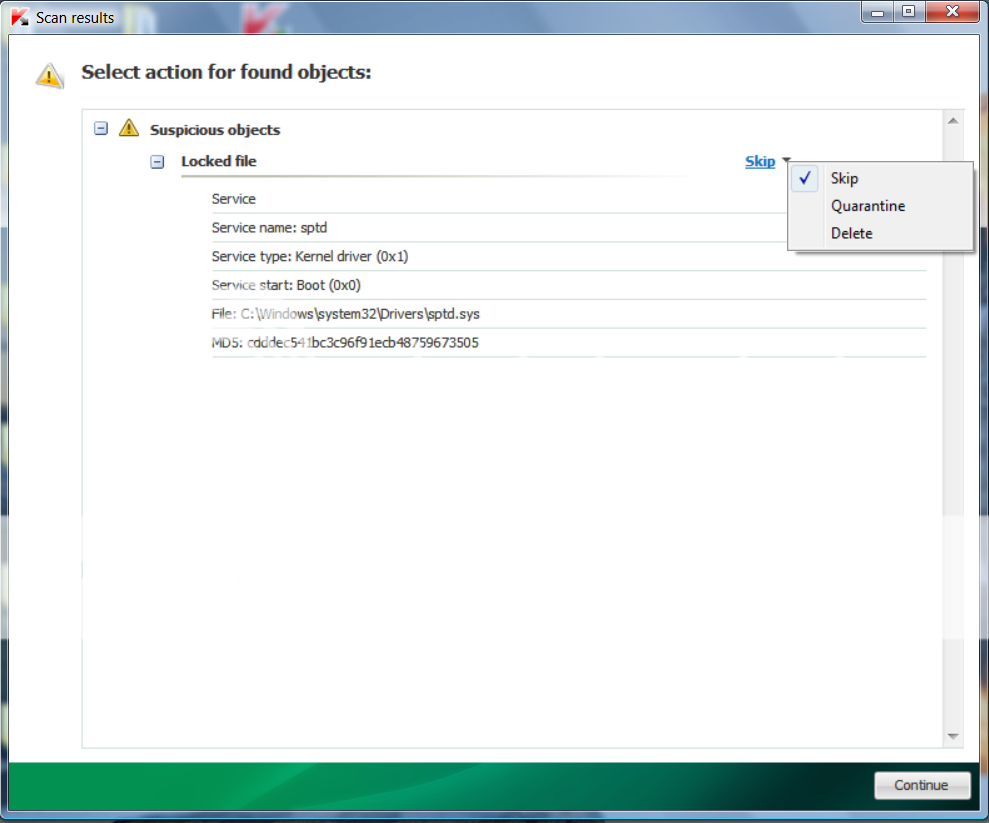
- If an infected file is detected, the default action will be Cure but I want you to choose SKIP instead , click on Continue.
Click to load external image (Posted Image)
- If a suspicious file is detected, the default action will be Skip, click on Continue.
Click to load external image (Posted Image)
- It may ask you to reboot the computer to complete the process. Click on Reboot Now.
Click to load external image (Posted Image)
- If no reboot is require, click on Report. A log file should appear. Please copy and paste the contents of that file here.
- If a reboot is required, the report can also be found in your root directory, (usually C:\ folder) in the form of "TDSSKiller.[Version]_[Date]_[Time]_log.txt". Please copy and paste the contents of that file here.
vistabug
patndoris - here are some details for the XP laptop and the problem.
DELL laptop Windows XP Professional version 2002 Service pack 3 .99 GB of RAM
Periodically wake up the laptop and the Microsoft Paint application is up. Nothing on the drawing surface.
Mcafee subscription finds 2 issues
Keygen-VMWare Potentially unwanted program - may be part of ClamWin
cl.dll
Location c:\windoes\system32\cl.dll
Threats detected: Generic dx!ir (Trojan)
I have tried to delete this without success.
I saw your directions in your prior post - I will get started on them this evening. vistabug
vistabug
patndoris
See the dds scan results below:
DDS (Ver_2012-11-20.01) - NTFS_x86
Internet Explorer: 7.0.6000.17117
Run by [removed] at 22:25:15 on 2013-02-27
Microsoft Windows XP Professional 5.1.2600.3.1252.1.1033.18.1015.461 [GMT -5:00]
.
AV: McAfee Anti-Virus and Anti-Spyware *Enabled/Updated* {84B5EE75-6421-4CDE-A33A-DD43BA9FAD83}
FW: McAfee Firewall *Enabled*
.
============== Running Processes ================
.
C:\Program Files\Windows Defender\MsMpEng.exe
C:\WINDOWS\system32\GtDetectSc.exe
C:\WINDOWS\System32\wltrysvc.exe
C:\WINDOWS\System32\bcmwltry.exe
C:\WINDOWS\system32\spoolsv.exe
C:\WINDOWS\System32\SCardSvr.exe
C:\WINDOWS\system32\DRIVERS\CDANTSRV.EXE
C:\WINDOWS\system32\cisvc.exe
C:\WINDOWS\system32\inetsrv\inetinfo.exe
C:\Program Files\Common Files\Mcafee\McSvcHost\McSvHost.exe
C:\Program Files\Common Files\Microsoft Shared\VS7DEBUG\MDM.EXE
C:\WINDOWS\system32\mfevtps.exe
C:\Program Files\Dell\NICCONFIGSVC\NICCONFIGSVC.exe
C:\WINDOWS\system32\wdfmgr.exe
C:\Program Files\VMware\VMware Workstation\vmware-authd.exe
C:\WINDOWS\system32\vmnat.exe
C:\Program Files\Common Files\McAfee\SystemCore\mcshield.exe
C:\WINDOWS\system32\wuauclt.exe
C:\Program Files\Common Files\McAfee\SystemCore\mfefire.exe
C:\WINDOWS\system32\vmnetdhcp.exe
C:\WINDOWS\system32\wbem\wmiprvse.exe
C:\WINDOWS\Explorer.EXE
C:\WINDOWS\system32\rundll32.exe
C:\WINDOWS\System32\alg.exe
C:\Program Files\Apoint\Apoint.exe
C:\WINDOWS\system32\WLTRAY.exe
C:\Program Files\Dell\QuickSet\quickset.exe
C:\Program Files\Apoint\Apntex.exe
C:\Program Files\McAfee.com\Agent\mcagent.exe
C:\WINDOWS\system32\ctfmon.exe
C:\Program Files\WIDCOMM\Bluetooth Software\BTTray.exe
C:\Sun\SDK\jdk\bin\javaw.exe
C:\Program Files\McAfee\VirusScan\mcods.exe
C:\WINDOWS\system32\wbem\wmiprvse.exe
C:\WINDOWS\System32\svchost.exe -k netsvcs
C:\WINDOWS\system32\svchost.exe -k NetworkService
C:\WINDOWS\system32\svchost.exe -k LocalService
C:\WINDOWS\system32\svchost.exe -k imgsvc
C:\WINDOWS\System32\svchost.exe -k HTTPFilter
.
============== Pseudo HJT Report ===============
.
uStart Page = hxxp://www.google.com/
uProxyOverride =
uSearchURL,(Default) = hxxp://search.yahoo.com/search?fr=mcafee&p=%s%s
uURLSearchHooks: McAfee SiteAdvisor Toolbar: {0EBBBE48-BAD4-4B4C-8E5A-516ABECAE064} - c:\program files\mcafee\siteadvisor\McIEPlg.dll
BHO: AcroIEHlprObj Class: {06849E9F-C8D7-4D59-B87D-784B7D6BE0B3} - c:\program files\adobe\acrobat 7.0\activex\AcroIEHelper.dll
BHO: McAfee Phishing Filter: {27B4851A-3207-45A2-B947-BE8AFE6163AB} -
BHO: WsftpBrowserHelper Class: {601ED020-FB6C-11D3-87D8-0050DA59922B} - c:\program files\ws_ftp pro\wsbho2k0.dll
BHO: scriptproxy: {7DB2D5A0-7241-4E79-B68D-6309F01C5231} - c:\program files\common files\mcafee\systemcore\ScriptSn.20121213140659.dll
BHO: McAfee SiteAdvisor BHO: {B164E929-A1B6-4A06-B104-2CD0E90A88FF} - c:\program files\mcafee\siteadvisor\McIEPlg.dll
BHO: Java™ Plug-In 2 SSV Helper: {DBC80044-A445-435b-BC74-9C25C1C588A9} -
BHO: : {F5A46408-44B7-4146-BF9B-F1DEEC34D4D7} -
TB: McAfee SiteAdvisor Toolbar: {0EBBBE48-BAD4-4B4C-8E5A-516ABECAE064} - c:\program files\mcafee\siteadvisor\McIEPlg.dll
uRun: [googletalk] "c:\program files\google\google talk\googletalk.exe" /autostart
uRun: [ctfmon.exe] c:\windows\system32\ctfmon.exe
mRun: [Apoint] c:\program files\apoint\Apoint.exe
mRun: [Dell Wireless Manager UI] c:\windows\system32\WLTRAY
mRun: [Dell QuickSet] c:\program files\dell\quickset\quickset.exe
mRun: [ClamWin] "c:\program files\clamwin\bin\ClamTray.exe" –logon
mRun: [mcui_exe] "c:\program files\mcafee.com\agent\mcagent.exe" /runkey
mRun: [UserFaultCheck] c:\windows\system32\dumprep 0 -u
dRun: [DWQueuedReporting] "c:\progra~1\common~1\micros~1\dw\dwtrig20.exe" -t
StartupFolder: c:\docume~1\itsadmin\startm~1\programs\startup\adobeg~1.lnk - c:\program files\common files\adobe\calibration\Adobe Gamma Loader.exe
StartupFolder: c:\docume~1\itsadmin\startm~1\programs\startup\sdktra~1.lnk - c:\sun\sdk\jdk\bin\javaw.exe
StartupFolder: c:\docume~1\alluse~1\startm~1\programs\startup\bttray.lnk - c:\program files\widcomm\bluetooth software\BTTray.exe
StartupFolder: c:\docume~1\alluse~1\startm~1\programs\startup\vpncli~1.lnk - c:\windows\installer\{176130bc-99a1-41fe-a78b-56045e33ad70}\Icon3E5562ED7.ico
uPolicies-Explorer: NoDriveTypeAutoRun = dword:323
uPolicies-Explorer: NoSMConfigurePrograms = dword:1
uPolicies-Explorer: NoDriveAutoRun = dword:67108863
uPolicies-Explorer: NoDrives = dword:0
mPolicies-Explorer: NoDriveAutoRun = dword:67108863
mPolicies-Explorer: NoDriveTypeAutoRun = dword:323
mPolicies-Explorer: NoDrives = dword:0
mPolicies-Windows\System: Allow-LogonScript-NetbiosDisabled = dword:1
mPolicies-Explorer: NoDriveTypeAutoRun = dword:145
mPolicies-Explorer: NoDriveAutoRun = dword:67108863
IE: E&xport to Microsoft Excel - c:\progra~1\micros~4\office11\EXCEL.EXE/3000
IE: Edit with &XML Spy - c:\program files\altova\xmlspy\spy.htm
IE: Send To &Bluetooth - c:\program files\widcomm\bluetooth software\btsendto_ie_ctx.htm
IE: {92780B25-18CC-41C8-B9BE-3C9C571A8263} - {FF059E31-CC5A-4E2E-BF3B-96E929D65503}
IE: {CCA281CA-C863-46ef-9331-5C8D4460577F} - c:\program files\widcomm\bluetooth software\btsendto_ie.htm
IE: {e2e2dd38-d088-4134-82b7-f2ba38496583} - %windir%\Network Diagnostic\xpnetdiag.exe
IE: {FB5F1910-F110-11d2-BB9E-00C04F795683} - c:\program files\messenger\msmsgs.exe
TCP: NameServer = 192.168.1.1
TCP: Interfaces\{405AFE05-89D4-4C6D-A9A4-6482567A51BB} : DHCPNameServer = 192.168.1.1
Filter: application/x-mfe-ipt - {3EF5086B-5478-4598-A054-786C45D75692} - c:\program files\mcafee\msc\McSnIePl.dll
Handler: dssrequest - {5513F07E-936B-4E52-9B00-067394E91CC5} - c:\program files\mcafee\siteadvisor\McIEPlg.dll
Handler: sacore - {5513F07E-936B-4E52-9B00-067394E91CC5} - c:\program files\mcafee\siteadvisor\McIEPlg.dll
Handler: skype4com - {FFC8B962-9B40-4DFF-9458-1830C7DD7F5D} - c:\program files\common files\skype\Skype4COM.dll
Handler: widimg - {EE7C2AFF-5742-44FF-BD0E-E521B0D3C3BA} - c:\windows\system32\btxppanel.dll
Notify: igfxcui - igfxsrvc.dll
SEH: Microsoft AntiMalware ShellExecuteHook - {091EB208-39DD-417D-A5DD-7E2C2D8FB9CB} - c:\program files\windows defender\MpShHook.dll
Hosts: 169.254.192.172 HP000D9D04C0AC
Hosts: 10.250.207.11 CGI-Tibco
Hosts: 10.47.11.232 JH-WebService
Hosts: 0.0.0.0 localhost
.
================= FIREFOX ===================
.
FF - ProfilePath - c:\documents and settings\itsadmin\application data\mozilla\firefox\profiles\d1bw9tda.default\
FF - prefs.js: browser.search.selectedEngine - Bing
FF - prefs.js: browser.startup.homepage - hxxp://www.google.com/ig?hl=en
FF - prefs.js: keyword.URL - hxxp://search.yahoo.com/search?fr=mcafee&p=
FF - plugin: c:\progra~1\mcafee\msc\npMcSnFFPl.dll
FF - plugin: c:\program files\mcafee\siteadvisor\NPMcFFPlg32.dll
FF - plugin: c:\program files\mozilla firefox\plugins\npatgpc.dll
FF - ExtSQL: !HIDDEN! 2010-09-18 03:00; {20a82645-c095-46ed-80e3-08825760534b}; c:\windows\microsoft.net\framework\v3.5\windows presentation foundation\DotNetAssistantExtension
.
—- FIREFOX POLICIES —-
FF - user.js: yahoo.homepage.dontask - true
============= SERVICES / DRIVERS ===============
.
R0 gdrrswlf;gdrrswlf;c:\windows\system32\drivers\gdrrswlf.sys [2004-8-4 23424]
R0 mfehidk;McAfee Inc. mfehidk;c:\windows\system32\drivers\mfehidk.sys [2010-10-13 565416]
R1 mfetdi2k;McAfee Inc. mfetdi2k;c:\windows\system32\drivers\mfetdi2k.sys [2011-3-23 91200]
R3 cfwids;McAfee Inc. cfwids;c:\windows\system32\drivers\cfwids.sys [2011-3-23 60480]
R3 GTIPCI21;GTIPCI21;c:\windows\system32\drivers\gtipci21.sys [2004-5-3 80384]
R3 hpusbfd;Hewlett-Packard USB Filter Class;c:\windows\system32\drivers\hpusbfd.sys [2011-4-2 7552]
R3 mfeavfk;McAfee Inc. mfeavfk;c:\windows\system32\drivers\mfeavfk.sys [2011-3-23 234824]
R3 mfefirek;McAfee Inc. mfefirek;c:\windows\system32\drivers\mfefirek.sys [2011-3-23 362640]
R3 mfendiskmp;mfendiskmp;c:\windows\system32\drivers\mfendisk.sys [2013-1-29 84464]
S3 Airgo3P;Wireless-G Notebook Adapter with SRX400 Driver;c:\windows\system32\drivers\Lssrx42.sys [2006-6-26 780288]
S3 GTFFBUS;GT FF BUS;c:\windows\system32\drivers\gtffbus.sys [2006-9-20 16128]
S3 GTMNDISIRPXP;GT M 3G+ IRP NDIS;c:\windows\system32\drivers\Gtm51Irp.sys [2006-9-20 113408]
S3 GTUQBUS;GT UQ BUS;c:\windows\system32\drivers\gtuqbus.sys [2006-9-20 34560]
S3 HipShieldK;McAfee Inc. HipShieldK;c:\windows\system32\drivers\HipShieldK.sys [2012-12-21 146872]
S3 mfebopk;McAfee Inc. mfebopk;c:\windows\system32\drivers\mfebopk.sys [2011-3-23 65488]
S3 mfendisk;McAfee Core NDIS Intermediate Filter;c:\windows\system32\drivers\mfendisk.sys [2013-1-29 84464]
S3 mferkdet;McAfee Inc. mferkdet;c:\windows\system32\drivers\mferkdet.sys [2011-3-23 92192]
S3 vsdatant;vsdatant;c:\windows\system32\vsdatant.sys [2005-1-26 280344]
.
=============== File Associations ===============
.
FileExt: .txt: TextPad.txt="c:\program files\textpad 4\TextPad.exe" -s
.
=============== Created Last 30 ================
.
2013-02-26 06:47:46 6954968 —-a-w- c:\documents and settings\all users\application data\microsoft\windows defender\definition updates\{783a5ed1-9b89-47d7-8b22-dab83646e420}\mpengine.dll
2013-02-22 22:37:13 ——– d—–w- c:\documents and settings\all users\application data\Cingular
2013-01-29 16:32:47 84464 —-a-w- c:\windows\system32\drivers\mfendisk.sys
.
==================== Find3M ====================
.
2013-01-26 03:55:44 552448 ——w- c:\windows\system32\oleaut32.dll
2013-01-17 06:28:58 232336 ——w- c:\windows\system32\MpSigStub.exe
2013-01-07 01:16:02 2193024 —-a-w- c:\windows\system32\ntoskrnl.exe
2013-01-07 00:36:58 2069760 —-a-w- c:\windows\system32\ntkrnlpa.exe
2013-01-04 01:20:00 1867264 —-a-w- c:\windows\system32\win32k.sys
2013-01-02 06:49:10 148992 —-a-w- c:\windows\system32\mpg2splt.ax
2013-01-02 06:49:10 1292288 —-a-w- c:\windows\system32\quartz.dll
2012-12-26 20:43:21 832512 —-a-w- c:\windows\system32\wininet.dll
2012-12-26 20:43:21 1830912 —-a-w- c:\windows\system32\inetcpl.cpl
2012-12-26 20:43:20 78336 —-a-w- c:\windows\system32\ieencode.dll
2012-12-26 20:43:20 17408 —-a-w- c:\windows\system32\corpol.dll
2012-12-26 15:12:06 60480 —-a-w- c:\windows\system32\drivers\cfwids.sys
2012-12-26 15:09:06 171976 —-a-w- c:\windows\system32\mfevtps.exe
2012-12-26 15:08:44 91200 —-a-w- c:\windows\system32\drivers\mfetdi2k.sys
2012-12-26 15:08:06 9648 —-a-w- c:\windows\system32\drivers\mfeclnk.sys
2012-12-26 15:07:54 92192 —-a-w- c:\windows\system32\drivers\mferkdet.sys
2012-12-26 15:06:54 565416 —-a-w- c:\windows\system32\drivers\mfehidk.sys
2012-12-26 15:05:52 362640 —-a-w- c:\windows\system32\drivers\mfefirek.sys
2012-12-26 15:05:22 65488 —-a-w- c:\windows\system32\drivers\mfebopk.sys
2012-12-26 15:05:02 234824 —-a-w- c:\windows\system32\drivers\mfeavfk.sys
2012-12-26 15:04:34 132976 —-a-w- c:\windows\system32\drivers\mfeapfk.sys
2012-12-16 12:23:59 290560 —-a-w- c:\windows\system32\atmfd.dll
.
============= FINISH: 22:36:03.06 ===============
vistabug
patndoris - see part 2 of dds scan. Can't figure out how to attach the zip archive - wait - i did figure out how to attach the zip archive - see below
patndoris
You do have a couple other files I can't find information on. That doesn't mean they are malicious, just that I can't find information either way. Since McAfee is reporting an infection, let's go ahead and run Combofix. If it doesn't remove the infected file, we can remove it manually with this tool.
Download and Install Combofix
Download ComboFix from one of the following locations:
Link 1
Link 2
VERY IMPORTANT !!! Save ComboFix.exe to your Desktop
* IMPORTANT - Disable your AntiVirus and AntiSpyware applications, usually via a right click on the System Tray icon. They may otherwise interfere with our tools. If you have difficulty properly disabling your protective programs, refer to this link here
[external image: Posted Image]
[external image: Posted Image]
Notes:
1. 1. Do not mouse-click anywhere on the screen while it is running. That may cause it to stall. In fact, I suggest you do not do anything else on the computer while Combofix is running as it can cause it to stall. It may appear at times that it isn't doing anything but it is. Just let it run. It may also reboot the machine as a part of what it is doing and that is not unusual. (If your computer requires a login then you WILL need to fill in the login/password for it to continue. If your computer does not have a login then it will continue on it's own..) Then, just sit tight until it finishes. Sometimes it takes 10 minutes, sometimes it takes an hour. Just be patient until the log pops up. If it takes more than an hour and doesn't appear to be doing antying, you can stop it and come back and let me know.
2. Do not "re-run" Combofix. If you have a problem, reply back for further instructions.
Please make sure you include the combo fix log in your next reply as well as describe how your computer is running now
If you have a problem launching programs after running Combofix, please do not panic! Simply reboot the computer and all should be fine.
Download and Install Combofix
Download ComboFix from one of the following locations:
Link 1
Link 2
VERY IMPORTANT !!! Save ComboFix.exe to your Desktop
* IMPORTANT - Disable your AntiVirus and AntiSpyware applications, usually via a right click on the System Tray icon. They may otherwise interfere with our tools. If you have difficulty properly disabling your protective programs, refer to this link here
- Double click on ComboFix.exe & follow the prompts.
- Follow the prompts to allow ComboFix to download and install the Microsoft Windows Recovery Console, and when prompted, agree to the End-User License Agreement to install the Microsoft Windows Recovery Console.
[external image: Posted Image]
- Once the Microsoft Windows Recovery Console is installed using ComboFix, you should see the following message:
[external image: Posted Image]
- Click on Yes, to continue scanning for malware.
Notes:
1. 1. Do not mouse-click anywhere on the screen while it is running. That may cause it to stall. In fact, I suggest you do not do anything else on the computer while Combofix is running as it can cause it to stall. It may appear at times that it isn't doing anything but it is. Just let it run. It may also reboot the machine as a part of what it is doing and that is not unusual. (If your computer requires a login then you WILL need to fill in the login/password for it to continue. If your computer does not have a login then it will continue on it's own..) Then, just sit tight until it finishes. Sometimes it takes 10 minutes, sometimes it takes an hour. Just be patient until the log pops up. If it takes more than an hour and doesn't appear to be doing antying, you can stop it and come back and let me know.
2. Do not "re-run" Combofix. If you have a problem, reply back for further instructions.
Please make sure you include the combo fix log in your next reply as well as describe how your computer is running now
If you have a problem launching programs after running Combofix, please do not panic! Simply reboot the computer and all should be fine.
vistabug
patndoris - I attached the scan results from the KASPERSKY system scan……
23:59:47.0078 2312 TDSS rootkit removing tool 2.8.16.0 Feb 11 2013 18:50:42
23:59:47.0656 2312 ============================================================
23:59:47.0656 2312 Current date / time: 2013/02/28 23:59:47.0656
23:59:47.0656 2312 SystemInfo:
23:59:47.0656 2312
23:59:47.0656 2312 OS Version: 5.1.2600 ServicePack: 3.0
23:59:47.0656 2312 Product type: Workstation
23:59:47.0656 2312 ComputerName: DELLD6108
23:59:47.0656 2312 UserName: ITSADMIN
23:59:47.0656 2312 Windows directory: C:\WINDOWS
23:59:47.0656 2312 System windows directory: C:\WINDOWS
23:59:47.0656 2312 Processor architecture: Intel x86
23:59:47.0656 2312 Number of processors: 1
23:59:47.0656 2312 Page size: 0x1000
23:59:47.0656 2312 Boot type: Normal boot
23:59:47.0656 2312 ============================================================
23:59:50.0484 2312 Drive \Device\Harddisk0\DR0 - Size: 0x950A60000 (37.26 Gb), SectorSize: 0x200, Cylinders: 0x1300, SectorsPerTrack: 0x3F, TracksPerCylinder: 0xFF, Type 'K0', Flags 0x00000054
23:59:50.0484 2312 Drive \Device\Harddisk1\DR5 - Size: 0xF0E00000 (3.76 Gb), SectorSize: 0x200, Cylinders: 0x1EB, SectorsPerTrack: 0x3F, TracksPerCylinder: 0xFF, Type 'W'
23:59:50.0500 2312 ============================================================
23:59:50.0500 2312 \Device\Harddisk0\DR0:
23:59:50.0500 2312 MBR partitions:
23:59:50.0500 2312 \Device\Harddisk0\DR0\Partition1: MBR, Type 0x7, StartLBA 0x1F608, BlocksNum 0x4A61E37
23:59:50.0500 2312 \Device\Harddisk1\DR5:
23:59:50.0500 2312 MBR partitions:
23:59:50.0500 2312 \Device\Harddisk1\DR5\Partition1: MBR, Type 0xB, StartLBA 0x3F, BlocksNum 0x786FC1
23:59:50.0500 2312 ============================================================
23:59:50.0531 2312 C: <-> \Device\Harddisk0\DR0\Partition1
23:59:50.0546 2312 ============================================================
23:59:50.0546 2312 Initialize success
23:59:50.0546 2312 ============================================================
00:00:06.0859 3692 ============================================================
00:00:06.0859 3692 Scan started
00:00:06.0859 3692 Mode: Manual;
00:00:06.0859 3692 ============================================================
00:00:07.0312 3692 ================ Scan system memory ========================
00:00:07.0312 3692 System memory - ok
00:00:07.0312 3692 ================ Scan services =============================
00:00:07.0453 3692 Abiosdsk - ok
00:00:07.0453 3692 abp480n5 - ok
00:00:07.0500 3692 [ 8FD99680A539792A30E97944FDAECF17 ] ACPI C:\WINDOWS\system32\DRIVERS\ACPI.sys
00:00:07.0515 3692 ACPI - ok
00:00:07.0562 3692 [ 9859C0F6936E723E4892D7141B1327D5 ] ACPIEC C:\WINDOWS\system32\drivers\ACPIEC.sys
00:00:07.0562 3692 ACPIEC - ok
00:00:07.0625 3692 [ C1EB9968EC89FBA5F3A264E2E57923AB ] Adobe LM Service C:\Program Files\Common Files\Adobe Systems Shared\Service\Adobelmsvc.exe
00:00:07.0640 3692 Adobe LM Service - ok
00:00:07.0640 3692 adpu160m - ok
00:00:07.0671 3692 [ 8BED39E3C35D6A489438B8141717A557 ] aec C:\WINDOWS\system32\drivers\aec.sys
00:00:07.0687 3692 aec - ok
00:00:07.0734 3692 [ 1E44BC1E83D8FD2305F8D452DB109CF9 ] AFD C:\WINDOWS\System32\drivers\afd.sys
00:00:07.0750 3692 AFD - ok
00:00:07.0750 3692 Aha154x - ok
00:00:07.0765 3692 aic78u2 - ok
00:00:07.0781 3692 aic78xx - ok
00:00:07.0859 3692 [ 9BDE71796E82966C0D13ED5C67C1ED59 ] Airgo3P C:\WINDOWS\system32\DRIVERS\Lssrx42.sys
00:00:07.0875 3692 Airgo3P - ok
00:00:07.0921 3692 [ A9A3DAA780CA6C9671A19D52456705B4 ] Alerter C:\WINDOWS\system32\alrsvc.dll
00:00:07.0921 3692 Alerter - ok
00:00:07.0953 3692 [ 8C515081584A38AA007909CD02020B3D ] ALG C:\WINDOWS\System32\alg.exe
00:00:07.0953 3692 ALG - ok
00:00:07.0968 3692 AliIde - ok
00:00:07.0984 3692 amsint - ok
00:00:08.0015 3692 [ AEB775A2BAE0F392BA6ADC0BB706233A ] ApfiltrService C:\WINDOWS\system32\DRIVERS\Apfiltr.sys
00:00:08.0015 3692 ApfiltrService - ok
00:00:08.0062 3692 [ EC94E05B76D033B74394E7B2175103CF ] APPDRV C:\WINDOWS\SYSTEM32\DRIVERS\APPDRV.SYS
00:00:08.0062 3692 APPDRV - ok
00:00:08.0125 3692 [ D8849F77C0B66226335A59D26CB4EDC6 ] AppMgmt C:\WINDOWS\System32\appmgmts.dll
00:00:08.0125 3692 AppMgmt - ok
00:00:08.0140 3692 asc - ok
00:00:08.0156 3692 asc3350p - ok
00:00:08.0171 3692 asc3550 - ok
00:00:08.0328 3692 [ 0E5E4957549056E2BF2C49F4F6B601AD ] aspnet_state C:\WINDOWS\Microsoft.NET\Framework\v2.0.50727\aspnet_state.exe
00:00:08.0328 3692 aspnet_state - ok
00:00:08.0375 3692 [ B153AFFAC761E7F5FCFA822B9C4E97BC ] AsyncMac C:\WINDOWS\system32\DRIVERS\asyncmac.sys
00:00:08.0375 3692 AsyncMac - ok
00:00:08.0406 3692 [ 9F3A2F5AA6875C72BF062C712CFA2674 ] atapi C:\WINDOWS\system32\DRIVERS\atapi.sys
00:00:08.0406 3692 atapi - ok
00:00:08.0421 3692 Atdisk - ok
00:00:08.0468 3692 [ 9916C1225104BA14794209CFA8012159 ] Atmarpc C:\WINDOWS\system32\DRIVERS\atmarpc.sys
00:00:08.0468 3692 Atmarpc - ok
00:00:08.0515 3692 [ DEF7A7882BEC100FE0B2CE2549188F9D ] AudioSrv C:\WINDOWS\System32\audiosrv.dll
00:00:08.0515 3692 AudioSrv - ok
00:00:08.0546 3692 [ D9F724AA26C010A217C97606B160ED68 ] audstub C:\WINDOWS\system32\DRIVERS\audstub.sys
00:00:08.0546 3692 audstub - ok
00:00:08.0609 3692 [ 2ACF06176B9D011567D7F25B83DDD066 ] b57w2k C:\WINDOWS\system32\DRIVERS\b57xp32.sys
00:00:08.0609 3692 b57w2k - ok
00:00:08.0671 3692 [ C3AB2D6954C7B5103770832A3A6A591B ] BCM43XX C:\WINDOWS\system32\DRIVERS\bcmwl5.sys
00:00:08.0687 3692 BCM43XX - ok
00:00:08.0734 3692 [ DA1F27D85E0D1525F6621372E7B685E9 ] Beep C:\WINDOWS\system32\drivers\Beep.sys
00:00:08.0734 3692 Beep - ok
00:00:08.0843 3692 [ 574738F61FCA2935F5265DC4E5691314 ] BITS C:\WINDOWS\system32\qmgr.dll
00:00:08.0859 3692 BITS - ok
00:00:08.0921 3692 [ CFD4E51402DA9838B5A04AE680AF54A0 ] Browser C:\WINDOWS\System32\browser.dll
00:00:08.0921 3692 Browser - ok
00:00:08.0953 3692 [ BE063C2F24EA4791CCA0D65C37DF560F ] btaudio C:\WINDOWS\system32\drivers\btaudio.sys
00:00:08.0953 3692 btaudio - ok
00:00:08.0984 3692 [ A93B669F1C436EADE043626604C61FF8 ] BTDriver C:\WINDOWS\system32\DRIVERS\btport.sys
00:00:08.0984 3692 BTDriver - ok
00:00:09.0031 3692 [ 385A692F339A38B0A9A97FC920F9BB4A ] BTKRNL C:\WINDOWS\system32\drivers\btkrnl.sys
00:00:09.0046 3692 BTKRNL - ok
00:00:09.0078 3692 [ BF6D902E8B66358DDD306A8039645922 ] BTSERIAL C:\WINDOWS\system32\drivers\btserial.sys
00:00:09.0078 3692 BTSERIAL - ok
00:00:09.0109 3692 [ 11D0B9C204C845A396F83A03DB23207D ] BTSLBCSP C:\WINDOWS\system32\drivers\btslbcsp.sys
00:00:09.0125 3692 BTSLBCSP - ok
00:00:09.0171 3692 [ C79FCD09083E3421A91DE6F2109C01C9 ] btwdins C:\Program Files\WIDCOMM\Bluetooth Software\bin\btwdins.exe
00:00:09.0187 3692 btwdins - ok
00:00:09.0218 3692 [ EB05312C61CC67278665EACFE5CE0204 ] BTWDNDIS C:\WINDOWS\system32\DRIVERS\btwdndis.sys
00:00:09.0218 3692 BTWDNDIS - ok
00:00:09.0265 3692 [ 7A05DB978554A3869092C378966273C3 ] btwhid C:\WINDOWS\system32\DRIVERS\btwhid.sys
00:00:09.0265 3692 btwhid - ok
00:00:09.0312 3692 [ CC343C47C63E3072A5DA87FB0D437CD8 ] BTWUSB C:\WINDOWS\system32\Drivers\btwusb.sys
00:00:09.0312 3692 BTWUSB - ok
00:00:09.0375 3692 [ 2423D6259DD63A6F1FFD3D3684B941E5 ] C-Dilla C:\WINDOWS\system32\drivers\CDANT.SYS
00:00:09.0375 3692 C-Dilla - ok
00:00:09.0406 3692 [ 0D532571E7B3E34F862DAD759C02EF9E ] C-DillaSrv C:\WINDOWS\system32\DRIVERS\CDANTSRV.EXE
00:00:09.0406 3692 C-DillaSrv - ok
00:00:09.0421 3692 catchme - ok
00:00:09.0453 3692 [ 90A673FC8E12A79AFBED2576F6A7AAF9 ] cbidf2k C:\WINDOWS\system32\drivers\cbidf2k.sys
00:00:09.0453 3692 cbidf2k - ok
00:00:09.0468 3692 cd20xrnt - ok
00:00:09.0484 3692 [ C1B486A7658353D33A10CC15211A873B ] Cdaudio C:\WINDOWS\system32\drivers\Cdaudio.sys
00:00:09.0484 3692 Cdaudio - ok
00:00:09.0531 3692 [ C885B02847F5D2FD45A24E219ED93B32 ] Cdfs C:\WINDOWS\system32\drivers\Cdfs.sys
00:00:09.0531 3692 Cdfs - ok
00:00:09.0562 3692 [ 1F4260CC5B42272D71F79E570A27A4FE ] Cdrom C:\WINDOWS\system32\DRIVERS\cdrom.sys
00:00:09.0562 3692 Cdrom - ok
00:00:09.0625 3692 [ 57479E5BF0B7B97112354E5ECA8EEFB1 ] cfwids C:\WINDOWS\system32\drivers\cfwids.sys
00:00:09.0625 3692 cfwids - ok
00:00:09.0640 3692 Changer - ok
00:00:09.0687 3692 [ 1CFE720EB8D93A7158A4EBC3AB178BDE ] CiSvc C:\WINDOWS\system32\cisvc.exe
00:00:09.0687 3692 CiSvc - ok
00:00:09.0718 3692 [ 34CBE729F38138217F9C80212A2A0C82 ] ClipSrv C:\WINDOWS\system32\clipsrv.exe
00:00:09.0718 3692 ClipSrv - ok
00:00:09.0750 3692 [ D87ACAED61E417BBA546CED5E7E36D9C ] clr_optimization_v2.0.50727_32 C:\WINDOWS\Microsoft.NET\Framework\v2.0.50727\mscorsvw.exe
00:00:09.0765 3692 clr_optimization_v2.0.50727_32 - ok
00:00:09.0781 3692 [ 0F6C187D38D98F8DF904589A5F94D411 ] CmBatt C:\WINDOWS\system32\DRIVERS\CmBatt.sys
00:00:09.0781 3692 CmBatt - ok
00:00:09.0796 3692 CmdIde - ok
00:00:09.0812 3692 [ 6E4C9F21F0FAE8940661144F41B13203 ] Compbatt C:\WINDOWS\system32\DRIVERS\compbatt.sys
00:00:09.0812 3692 Compbatt - ok
00:00:09.0828 3692 COMSysApp - ok
00:00:09.0859 3692 Cpqarray - ok
00:00:09.0875 3692 [ 3D4E199942E29207970E04315D02AD3B ] CryptSvc C:\WINDOWS\System32\cryptsvc.dll
00:00:09.0875 3692 CryptSvc - ok
00:00:09.0937 3692 [ 5C706C06C1279952D2CC1A609CA948BF ] CVirtA C:\WINDOWS\system32\DRIVERS\CVirtA.sys
00:00:09.0937 3692 CVirtA - ok
00:00:10.0062 3692 [ C64D9A84723E874BF5168D7BF420F85D ] CVPND C:\Program Files\Cisco Systems\VPN Client\cvpnd.exe
00:00:10.0078 3692 CVPND - ok
00:00:10.0156 3692 [ 03516F6D3B8C91C919DE622196A84BCE ] CVPNDRVA C:\WINDOWS\system32\Drivers\CVPNDRVA.sys
00:00:10.0156 3692 CVPNDRVA - ok
00:00:10.0171 3692 dac2w2k - ok
00:00:10.0171 3692 dac960nt - ok
00:00:10.0234 3692 [ 6B27A5C03DFB94B4245739065431322C ] DcomLaunch C:\WINDOWS\system32\rpcss.dll
00:00:10.0250 3692 DcomLaunch - ok
00:00:10.0265 3692 [ 5E38D7684A49CACFB752B046357E0589 ] Dhcp C:\WINDOWS\System32\dhcpcsvc.dll
00:00:10.0265 3692 Dhcp - ok
00:00:10.0296 3692 [ 044452051F3E02E7963599FC8F4F3E25 ] Disk C:\WINDOWS\system32\DRIVERS\disk.sys
00:00:10.0296 3692 Disk - ok
00:00:10.0312 3692 dmadmin - ok
00:00:10.0484 3692 [ D992FE1274BDE0F84AD826ACAE022A41 ] dmboot C:\WINDOWS\system32\drivers\dmboot.sys
00:00:10.0500 3692 dmboot - ok
00:00:10.0546 3692 [ 7C824CF7BBDE77D95C08005717A95F6F ] dmio C:\WINDOWS\system32\drivers\dmio.sys
00:00:10.0546 3692 dmio - ok
00:00:10.0609 3692 [ E9317282A63CA4D188C0DF5E09C6AC5F ] dmload C:\WINDOWS\system32\drivers\dmload.sys
00:00:10.0609 3692 dmload - ok
00:00:10.0656 3692 [ 57EDEC2E5F59F0335E92F35184BC8631 ] dmserver C:\WINDOWS\System32\dmserver.dll
00:00:10.0656 3692 dmserver - ok
00:00:10.0687 3692 [ 8A208DFCF89792A484E76C40E5F50B45 ] DMusic C:\WINDOWS\system32\drivers\DMusic.sys
00:00:10.0687 3692 DMusic - ok
00:00:10.0734 3692 [ 8101650993B2F79118D2BF24402C390D ] DNE C:\WINDOWS\system32\DRIVERS\dne2000.sys
00:00:10.0734 3692 DNE - ok
00:00:10.0781 3692 [ 5F7E24FA9EAB896051FFB87F840730D2 ] Dnscache C:\WINDOWS\System32\dnsrslvr.dll
00:00:10.0781 3692 Dnscache - ok
00:00:10.0843 3692 [ 0F0F6E687E5E15579EF4DA8DD6945814 ] Dot3svc C:\WINDOWS\System32\dot3svc.dll
00:00:10.0843 3692 Dot3svc - ok
00:00:10.0859 3692 dpti2o - ok
00:00:10.0906 3692 [ 8F5FCFF8E8848AFAC920905FBD9D33C8 ] drmkaud C:\WINDOWS\system32\drivers\drmkaud.sys
00:00:10.0906 3692 drmkaud - ok
00:00:10.0953 3692 [ 2187855A7703ADEF0CEF9EE4285182CC ] EapHost C:\WINDOWS\System32\eapsvc.dll
00:00:10.0953 3692 EapHost - ok
00:00:10.0984 3692 [ BC93B4A066477954555966D77FEC9ECB ] ERSvc C:\WINDOWS\System32\ersvc.dll
00:00:10.0984 3692 ERSvc - ok
00:00:11.0031 3692 [ 65DF52F5B8B6E9BBD183505225C37315 ] Eventlog C:\WINDOWS\system32\services.exe
00:00:11.0046 3692 Eventlog - ok
00:00:11.0093 3692 [ D4991D98F2DB73C60D042F1AEF79EFAE ] EventSystem C:\WINDOWS\system32\es.dll
00:00:11.0093 3692 EventSystem - ok
00:00:11.0140 3692 [ 38D332A6D56AF32635675F132548343E ] Fastfat C:\WINDOWS\system32\drivers\Fastfat.sys
00:00:11.0156 3692 Fastfat - ok
00:00:11.0218 3692 [ 99BC0B50F511924348BE19C7C7313BBF ] FastUserSwitchingCompatibility C:\WINDOWS\System32\shsvcs.dll
00:00:11.0218 3692 FastUserSwitchingCompatibility - ok
00:00:11.0250 3692 [ 92CDD60B6730B9F50F6A1A0C1F8CDC81 ] Fdc C:\WINDOWS\system32\drivers\Fdc.sys
00:00:11.0250 3692 Fdc - ok
00:00:11.0281 3692 [ D45926117EB9FA946A6AF572FBE1CAA3 ] Fips C:\WINDOWS\system32\drivers\Fips.sys
00:00:11.0281 3692 Fips - ok
00:00:11.0296 3692 [ 9D27E7B80BFCDF1CDD9B555862D5E7F0 ] Flpydisk C:\WINDOWS\system32\drivers\Flpydisk.sys
00:00:11.0296 3692 Flpydisk - ok
00:00:11.0312 3692 [ B2CF4B0786F8212CB92ED2B50C6DB6B0 ] FltMgr C:\WINDOWS\system32\drivers\fltmgr.sys
00:00:11.0328 3692 FltMgr - ok
00:00:11.0406 3692 [ 8BA7C024070F2B7FDD98ED8A4BA41789 ] FontCache3.0.0.0 c:\WINDOWS\Microsoft.NET\Framework\v3.0\WPF\PresentationFontCache.exe
00:00:11.0406 3692 FontCache3.0.0.0 - ok
00:00:11.0437 3692 [ 3E1E2BD4F39B0E2B7DC4F4D2BCC2779A ] Fs_Rec C:\WINDOWS\system32\drivers\Fs_Rec.sys
00:00:11.0437 3692 Fs_Rec - ok
00:00:11.0468 3692 [ 6AC26732762483366C3969C9E4D2259D ] Ftdisk C:\WINDOWS\system32\DRIVERS\ftdisk.sys
00:00:11.0468 3692 Ftdisk - ok
00:00:11.0562 3692 [ B23C09415A98114E23561AF5F650C5A6 ] ftpqueue C:\Program Files\WS_FTP Pro\ftpsched.exe
00:00:11.0562 3692 ftpqueue - ok
00:00:11.0609 3692 [ D052C6EF4CB0AEB530A2CB964022D0D7 ] gdrrswlf C:\WINDOWS\system32\drivers\gdrrswlf.sys
00:00:11.0609 3692 Suspicious file (Forged): C:\WINDOWS\system32\drivers\gdrrswlf.sys. Real md5: D052C6EF4CB0AEB530A2CB964022D0D7, Fake md5: CCBBB4FC6F90F4928490872438EE47EE
00:00:11.0609 3692 gdrrswlf ( ForgedFile.Multi.Generic ) - warning
00:00:11.0609 3692 gdrrswlf - detected ForgedFile.Multi.Generic (1)
00:00:11.0640 3692 [ 0A02C63C8B144BD8C86B103DEE7C86A2 ] Gpc C:\WINDOWS\system32\DRIVERS\msgpc.sys
00:00:11.0640 3692 Gpc - ok
00:00:11.0703 3692 [ EFBCDA4FD8DD1DACCC4ED4F97AC09DE7 ] GtDetectSc C:\WINDOWS\system32\GtDetectSc.exe
00:00:11.0703 3692 GtDetectSc - ok
00:00:11.0718 3692 [ 2552B9493312BA391D67E10EF9849F7D ] GTFFBUS C:\WINDOWS\system32\DRIVERS\gtffbus.sys
00:00:11.0718 3692 GTFFBUS - ok
00:00:11.0765 3692 [ 7D074058804AD398F93CA0A08AF83FF2 ] GTIPCI21 C:\WINDOWS\system32\DRIVERS\gtipci21.sys
00:00:11.0765 3692 GTIPCI21 - ok
00:00:11.0796 3692 [ 7A08D01C7648C72282A14BA0BEF26562 ] GTMNDISIRPXP C:\WINDOWS\system32\DRIVERS\Gtm51Irp.sys
00:00:11.0796 3692 GTMNDISIRPXP - ok
00:00:11.0828 3692 [ C2990953D2309025B2E1561D99AFB6C2 ] GTPTSER C:\WINDOWS\system32\DRIVERS\gtptser.sys
00:00:11.0828 3692 GTPTSER - ok
00:00:11.0859 3692 [ 0F85495D61E5D14BE09898E6FA4CB886 ] GTUQBUS C:\WINDOWS\system32\DRIVERS\gtuqbus.sys
00:00:11.0859 3692 GTUQBUS - ok
00:00:11.0906 3692 [ 9D4BFF527040EDF5DCC8707EE610F535 ] hcmon C:\WINDOWS\system32\Drivers\hcmon.sys
00:00:11.0906 3692 hcmon - ok
00:00:11.0984 3692 [ 4FCCA060DFE0C51A09DD5C3843888BCD ] helpsvc C:\WINDOWS\PCHealth\HelpCtr\Binaries\pchsvc.dll
00:00:11.0984 3692 helpsvc - ok
00:00:12.0031 3692 [ DEB04DA35CC871B6D309B77E1443C796 ] HidServ C:\WINDOWS\System32\hidserv.dll
00:00:12.0031 3692 HidServ - ok
00:00:12.0078 3692 [ CCF82C5EC8A7326C3066DE870C06DAF1 ] HidUsb C:\WINDOWS\system32\DRIVERS\hidusb.sys
00:00:12.0078 3692 HidUsb - ok
00:00:12.0140 3692 [ D61E53E3FEC0C92BC8DD3969FAD63F87 ] HipShieldK C:\WINDOWS\system32\drivers\HipShieldK.sys
00:00:12.0140 3692 HipShieldK - ok
00:00:12.0203 3692 [ 8878BD685E490239777BFE51320B88E9 ] hkmsvc C:\WINDOWS\System32\kmsvc.dll
00:00:12.0203 3692 hkmsvc - ok
00:00:12.0343 3692 hpdj00 - ok
00:00:12.0343 3692 hpdj01 - ok
00:00:12.0359 3692 hpdj02 - ok
00:00:12.0375 3692 hpn - ok
00:00:12.0421 3692 [ FEA040582BE5DB58A8FAFE3948736526 ] hpusbfd C:\WINDOWS\system32\DRIVERS\hpusbfd.sys
00:00:12.0421 3692 hpusbfd - ok
00:00:12.0468 3692 [ 140BA850417896B6B3322048DE280368 ] HSFHWICH C:\WINDOWS\system32\DRIVERS\HSFHWICH.sys
00:00:12.0484 3692 HSFHWICH - ok
00:00:12.0546 3692 [ B2DFC168D6F7512FAEA085253C5A37AD ] HSF_DP C:\WINDOWS\system32\DRIVERS\HSF_DP.sys
00:00:12.0562 3692 HSF_DP - ok
00:00:12.0640 3692 [ F80A415EF82CD06FFAF0D971528EAD38 ] HTTP C:\WINDOWS\system32\Drivers\HTTP.sys
00:00:12.0656 3692 HTTP - ok
00:00:12.0703 3692 [ 6100A808600F44D999CEBDEF8841C7A3 ] HTTPFilter C:\WINDOWS\System32\w3ssl.dll
00:00:12.0703 3692 HTTPFilter - ok
00:00:12.0718 3692 i2omgmt - ok
00:00:12.0734 3692 i2omp - ok
00:00:12.0750 3692 [ 4A0B06AA8943C1E332520F7440C0AA30 ] i8042prt C:\WINDOWS\system32\DRIVERS\i8042prt.sys
00:00:12.0750 3692 i8042prt - ok
00:00:12.0796 3692 [ 510A5E1CB84E82D4E89DFF3D96752048 ] ialm C:\WINDOWS\system32\DRIVERS\ialmnt5.sys
00:00:12.0812 3692 ialm - ok
00:00:12.0843 3692 [ 710E9133C89A666D6FDCA3EF88ECE15C ] idisw2km C:\WINDOWS\system32\DRIVERS\idisw2km.sys
00:00:12.0843 3692 idisw2km - ok
00:00:13.0187 3692 [ C01AC32DC5C03076CFB852CB5DA5229C ] idsvc C:\WINDOWS\Microsoft.NET\Framework\v3.0\Windows Communication Foundation\infocard.exe
00:00:13.0203 3692 idsvc - ok
00:00:13.0281 3692 [ DB3C22745C0DA4666F3BE31F1AF36B2F ] IISADMIN C:\WINDOWS\system32\inetsrv\inetinfo.exe
00:00:13.0281 3692 IISADMIN - ok
00:00:13.0312 3692 [ 083A052659F5310DD8B6A6CB05EDCF8E ] Imapi C:\WINDOWS\system32\DRIVERS\imapi.sys
00:00:13.0312 3692 Imapi - ok
00:00:13.0390 3692 [ 30DEAF54A9755BB8546168CFE8A6B5E1 ] ImapiService C:\WINDOWS\system32\imapi.exe
00:00:13.0390 3692 ImapiService - ok
00:00:13.0421 3692 ini910u - ok
00:00:13.0484 3692 [ B5466A9250342A7AA0CD1FBA13420678 ] IntelIde C:\WINDOWS\system32\DRIVERS\intelide.sys
00:00:13.0484 3692 IntelIde - ok
00:00:13.0500 3692 [ 8C953733D8F36EB2133F5BB58808B66B ] intelppm C:\WINDOWS\system32\DRIVERS\intelppm.sys
00:00:13.0500 3692 intelppm - ok
00:00:13.0531 3692 [ 3BB22519A194418D5FEC05D800A19AD0 ] Ip6Fw C:\WINDOWS\system32\drivers\ip6fw.sys
00:00:13.0531 3692 Ip6Fw - ok
00:00:13.0562 3692 [ 731F22BA402EE4B62748ADAF6363C182 ] IpFilterDriver C:\WINDOWS\system32\DRIVERS\ipfltdrv.sys
00:00:13.0562 3692 IpFilterDriver - ok
00:00:13.0593 3692 [ B87AB476DCF76E72010632B5550955F5 ] IpInIp C:\WINDOWS\system32\DRIVERS\ipinip.sys
00:00:13.0593 3692 IpInIp - ok
00:00:13.0625 3692 [ CC748EA12C6EFFDE940EE98098BF96BB ] IpNat C:\WINDOWS\system32\DRIVERS\ipnat.sys
00:00:13.0625 3692 IpNat - ok
00:00:13.0640 3692 [ 23C74D75E36E7158768DD63D92789A91 ] IPSec C:\WINDOWS\system32\DRIVERS\ipsec.sys
00:00:13.0640 3692 IPSec - ok
00:00:13.0671 3692 [ C93C9FF7B04D772627A3646D89F7BF89 ] IRENUM C:\WINDOWS\system32\DRIVERS\irenum.sys
00:00:13.0671 3692 IRENUM - ok
00:00:13.0703 3692 [ 05A299EC56E52649B1CF2FC52D20F2D7 ] isapnp C:\WINDOWS\system32\DRIVERS\isapnp.sys
00:00:13.0703 3692 isapnp - ok
00:00:13.0734 3692 [ 463C1EC80CD17420A542B7F36A36F128 ] Kbdclass C:\WINDOWS\system32\DRIVERS\kbdclass.sys
00:00:13.0734 3692 Kbdclass - ok
00:00:13.0750 3692 [ 9EF487A186DEA361AA06913A75B3FA99 ] kbdhid C:\WINDOWS\system32\DRIVERS\kbdhid.sys
00:00:13.0750 3692 kbdhid - ok
00:00:13.0796 3692 [ BF9F10F0BEF9E4BE73F00C40F8F1DE76 ] kbstuff C:\WINDOWS\system32\DRIVERS\kbstuff5.sys
00:00:13.0796 3692 kbstuff - ok
00:00:13.0828 3692 [ 692BCF44383D056AED41B045A323D378 ] kmixer C:\WINDOWS\system32\drivers\kmixer.sys
00:00:13.0843 3692 kmixer - ok
00:00:13.0906 3692 [ B467646C54CC746128904E1654C750C1 ] KSecDD C:\WINDOWS\system32\drivers\KSecDD.sys
00:00:13.0906 3692 KSecDD - ok
00:00:13.0984 3692 [ 3A7C3CBE5D96B8AE96CE81F0B22FB527 ] lanmanserver C:\WINDOWS\System32\srvsvc.dll
00:00:13.0984 3692 lanmanserver - ok
00:00:14.0046 3692 [ A8888A5327621856C0CEC4E385F69309 ] lanmanworkstation C:\WINDOWS\System32\wkssvc.dll
00:00:14.0062 3692 lanmanworkstation - ok
00:00:14.0078 3692 lbrtfdc - ok
00:00:14.0109 3692 [ A7DB739AE99A796D91580147E919CC59 ] LmHosts C:\WINDOWS\System32\lmhsvc.dll
00:00:14.0109 3692 LmHosts - ok
00:00:14.0203 3692 [ ECAB006AC6136F1307E140B633CDB8C2 ] McAfee SiteAdvisor Service C:\Program Files\Common Files\Mcafee\McSvcHost\McSvHost.exe
00:00:14.0203 3692 McAfee SiteAdvisor Service - ok
00:00:14.0234 3692 [ ECAB006AC6136F1307E140B633CDB8C2 ] McMPFSvc C:\Program Files\Common Files\Mcafee\McSvcHost\McSvHost.exe
00:00:14.0234 3692 McMPFSvc - ok
00:00:14.0265 3692 [ ECAB006AC6136F1307E140B633CDB8C2 ] mcmscsvc C:\Program Files\Common Files\Mcafee\McSvcHost\McSvHost.exe
00:00:14.0265 3692 mcmscsvc - ok
00:00:14.0296 3692 [ ECAB006AC6136F1307E140B633CDB8C2 ] McNaiAnn C:\Program Files\Common Files\Mcafee\McSvcHost\McSvHost.exe
00:00:14.0296 3692 McNaiAnn - ok
00:00:14.0328 3692 [ ECAB006AC6136F1307E140B633CDB8C2 ] McNASvc C:\Program Files\Common Files\Mcafee\McSvcHost\McSvHost.exe
00:00:14.0328 3692 McNASvc - ok
00:00:14.0421 3692 [ C7DA06C9A9AEEFBE37AAC281EA6385D5 ] McODS C:\Program Files\McAfee\VirusScan\mcods.exe
00:00:14.0421 3692 McODS - ok
00:00:14.0453 3692 [ ECAB006AC6136F1307E140B633CDB8C2 ] McProxy C:\Program Files\Common Files\Mcafee\McSvcHost\McSvHost.exe
00:00:14.0453 3692 McProxy - ok
00:00:14.0546 3692 [ FDDE814145D01A986A10FE1EA5959B9F ] McShield C:\Program Files\Common Files\McAfee\SystemCore\\mcshield.exe
00:00:14.0546 3692 McShield - ok
00:00:14.0609 3692 [ 11F714F85530A2BD134074DC30E99FCA ] MDM C:\Program Files\Common Files\Microsoft Shared\VS7DEBUG\MDM.EXE
00:00:14.0609 3692 MDM - ok
00:00:14.0656 3692 [ 3C318B9CD391371BED62126581EE9961 ] mdmxsdk C:\WINDOWS\system32\DRIVERS\mdmxsdk.sys
00:00:14.0656 3692 mdmxsdk - ok
00:00:14.0703 3692 [ 986B1FF5814366D71E0AC5755C88F2D3 ] Messenger C:\WINDOWS\System32\msgsvc.dll
00:00:14.0703 3692 Messenger - ok
00:00:14.0765 3692 [ 449C611308F52932C85468BA0E91B4A7 ] mfeapfk C:\WINDOWS\system32\drivers\mfeapfk.sys
00:00:14.0765 3692 mfeapfk - ok
00:00:14.0796 3692 [ 080C59E365B358551B819836658FDE42 ] mfeavfk C:\WINDOWS\system32\drivers\mfeavfk.sys
00:00:14.0812 3692 mfeavfk - ok
00:00:14.0812 3692 mfeavfk01 - ok
00:00:14.0843 3692 [ 0DBCB0C95196B3D12D550426DB683867 ] mfebopk C:\WINDOWS\system32\drivers\mfebopk.sys
00:00:14.0859 3692 mfebopk - ok
00:00:14.0890 3692 [ D3AA7664DE86FDB2125F48D393A486B3 ] mfefire C:\Program Files\Common Files\McAfee\SystemCore\\mfefire.exe
00:00:14.0890 3692 mfefire - ok
00:00:14.0921 3692 [ 8776B9E3DC1F2B0F6BA7CDC66F51B201 ] mfefirek C:\WINDOWS\system32\drivers\mfefirek.sys
00:00:14.0937 3692 mfefirek - ok
00:00:14.0984 3692 [ 5702E118D70A9EE95B6A5D9230076EFC ] mfehidk C:\WINDOWS\system32\drivers\mfehidk.sys
00:00:14.0984 3692 mfehidk - ok
00:00:15.0015 3692 [ D2F6535E5977DECF0EAED651CFAEC3F0 ] mfendisk C:\WINDOWS\system32\DRIVERS\mfendisk.sys
00:00:15.0015 3692 mfendisk - ok
00:00:15.0046 3692 [ D2F6535E5977DECF0EAED651CFAEC3F0 ] mfendiskmp C:\WINDOWS\system32\DRIVERS\mfendisk.sys
00:00:15.0046 3692 mfendiskmp - ok
00:00:15.0062 3692 [ FAD22AA17DA864C3B56E24603E0F067F ] mferkdet C:\WINDOWS\system32\drivers\mferkdet.sys
00:00:15.0078 3692 mferkdet - ok
00:00:15.0109 3692 [ A3062192D95688A1AA8FBEE2AA9986AC ] mfetdi2k C:\WINDOWS\system32\drivers\mfetdi2k.sys
00:00:15.0109 3692 mfetdi2k - ok
00:00:15.0187 3692 [ AB2D7F16A9745C41297752AB07C98F46 ] mfevtp C:\WINDOWS\system32\mfevtps.exe
00:00:15.0187 3692 mfevtp - ok
00:00:15.0234 3692 [ 4AE068242760A1FB6E1A44BF4E16AFA6 ] mnmdd C:\WINDOWS\system32\drivers\mnmdd.sys
00:00:15.0234 3692 mnmdd - ok
00:00:15.0281 3692 [ D18F1F0C101D06A1C1ADF26EED16FCDD ] mnmsrvc C:\WINDOWS\system32\mnmsrvc.exe
00:00:15.0281 3692 mnmsrvc - ok
00:00:15.0328 3692 [ DFCBAD3CEC1C5F964962AE10E0BCC8E1 ] Modem C:\WINDOWS\system32\drivers\Modem.sys
00:00:15.0343 3692 Modem - ok
00:00:15.0359 3692 [ 35C9E97194C8CFB8430125F8DBC34D04 ] Mouclass C:\WINDOWS\system32\DRIVERS\mouclass.sys
00:00:15.0359 3692 Mouclass - ok
00:00:15.0390 3692 [ B1C303E17FB9D46E87A98E4BA6769685 ] mouhid C:\WINDOWS\system32\DRIVERS\mouhid.sys
00:00:15.0390 3692 mouhid - ok
00:00:15.0421 3692 [ A80B9A0BAD1B73637DBCBBA7DF72D3FD ] MountMgr C:\WINDOWS\system32\drivers\MountMgr.sys
00:00:15.0437 3692 MountMgr - ok
00:00:15.0500 3692 [ 8BE15F71DE6FF33FC56DCDE7B2B9EFE8 ] MozillaMaintenance C:\Program Files\Mozilla Maintenance Service\maintenanceservice.exe
00:00:15.0500 3692 MozillaMaintenance - ok
00:00:15.0515 3692 mraid35x - ok
00:00:15.0546 3692 [ 11D42BB6206F33FBB3BA0288D3EF81BD ] MRxDAV C:\WINDOWS\system32\DRIVERS\mrxdav.sys
00:00:15.0546 3692 MRxDAV - ok
00:00:15.0640 3692 [ 7D304A5EB4344EBEEAB53A2FE3FFB9F0 ] MRxSmb C:\WINDOWS\system32\DRIVERS\mrxsmb.sys
00:00:15.0640 3692 MRxSmb - ok
00:00:15.0687 3692 [ A137F1470499A205ABBB9AAFB3B6F2B1 ] MSDTC C:\WINDOWS\system32\msdtc.exe
00:00:15.0687 3692 MSDTC - ok
00:00:15.0718 3692 [ C941EA2454BA8350021D774DAF0F1027 ] Msfs C:\WINDOWS\system32\drivers\Msfs.sys
00:00:15.0718 3692 Msfs - ok
00:00:15.0734 3692 MSIServer - ok
00:00:15.0765 3692 [ ECAB006AC6136F1307E140B633CDB8C2 ] MSK80Service C:\Program Files\Common Files\Mcafee\McSvcHost\McSvHost.exe
00:00:15.0765 3692 MSK80Service - ok
00:00:15.0796 3692 [ D1575E71568F4D9E14CA56B7B0453BF1 ] MSKSSRV C:\WINDOWS\system32\drivers\MSKSSRV.sys
00:00:15.0796 3692 MSKSSRV - ok
00:00:15.0812 3692 [ 325BB26842FC7CCC1FCCE2C457317F3E ] MSPCLOCK C:\WINDOWS\system32\drivers\MSPCLOCK.sys
00:00:15.0828 3692 MSPCLOCK - ok
00:00:15.0843 3692 [ BAD59648BA099DA4A17680B39730CB3D ] MSPQM C:\WINDOWS\system32\drivers\MSPQM.sys
00:00:15.0843 3692 MSPQM - ok
00:00:15.0890 3692 [ AF5F4F3F14A8EA2C26DE30F7A1E17136 ] mssmbios C:\WINDOWS\system32\DRIVERS\mssmbios.sys
00:00:15.0890 3692 mssmbios - ok
00:00:15.0953 3692 [ DE6A75F5C270E756C5508D94B6CF68F5 ] Mup C:\WINDOWS\system32\drivers\Mup.sys
00:00:15.0953 3692 Mup - ok
00:00:16.0078 3692 [ 0102140028FAD045756796E1C685D695 ] napagent C:\WINDOWS\System32\qagentrt.dll
00:00:16.0078 3692 napagent - ok
00:00:16.0140 3692 [ 1DF7F42665C94B825322FAE71721130D ] NDIS C:\WINDOWS\system32\drivers\NDIS.sys
00:00:16.0140 3692 NDIS - ok
00:00:16.0203 3692 [ 0109C4F3850DFBAB279542515386AE22 ] NdisTapi C:\WINDOWS\system32\DRIVERS\ndistapi.sys
00:00:16.0203 3692 NdisTapi - ok
00:00:16.0234 3692 [ F927A4434C5028758A842943EF1A3849 ] Ndisuio C:\WINDOWS\system32\DRIVERS\ndisuio.sys
00:00:16.0234 3692 Ndisuio - ok
00:00:16.0250 3692 [ EDC1531A49C80614B2CFDA43CA8659AB ] NdisWan C:\WINDOWS\system32\DRIVERS\ndiswan.sys
00:00:16.0265 3692 NdisWan - ok
00:00:16.0312 3692 [ 9282BD12DFB069D3889EB3FCC1000A9B ] NDProxy C:\WINDOWS\system32\drivers\NDProxy.sys
00:00:16.0312 3692 NDProxy - ok
00:00:16.0343 3692 [ 5D81CF9A2F1A3A756B66CF684911CDF0 ] NetBIOS C:\WINDOWS\system32\DRIVERS\netbios.sys
00:00:16.0343 3692 NetBIOS - ok
00:00:16.0375 3692 [ 74B2B2F5BEA5E9A3DC021D685551BD3D ] NetBT C:\WINDOWS\system32\DRIVERS\netbt.sys
00:00:16.0375 3692 NetBT - ok
00:00:16.0437 3692 [ B857BA82860D7FF85AE29B095645563B ] NetDDE C:\WINDOWS\system32\netdde.exe
00:00:16.0437 3692 NetDDE - ok
00:00:16.0468 3692 [ B857BA82860D7FF85AE29B095645563B ] NetDDEdsdm C:\WINDOWS\system32\netdde.exe
00:00:16.0468 3692 NetDDEdsdm - ok
00:00:16.0500 3692 [ BF2466B3E18E970D8A976FB95FC1CA85 ] Netlogon C:\WINDOWS\system32\lsass.exe
00:00:16.0515 3692 Netlogon - ok
00:00:16.0562 3692 [ 13E67B55B3ABD7BF3FE7AAE5A0F9A9DE ] Netman C:\WINDOWS\System32\netman.dll
00:00:16.0562 3692 Netman - ok
00:00:16.0625 3692 [ D34612C5D02D026535B3095D620626AE ] NetTcpPortSharing C:\WINDOWS\Microsoft.NET\Framework\v3.0\Windows Communication Foundation\SMSvcHost.exe
00:00:16.0625 3692 NetTcpPortSharing - ok
00:00:16.0687 3692 [ AD33BB7AE6D0D1CBEB253B9E5A719388 ] NICCONFIGSVC C:\Program Files\Dell\NICCONFIGSVC\NICCONFIGSVC.exe
00:00:16.0703 3692 NICCONFIGSVC - ok
00:00:16.0750 3692 [ 943337D786A56729263071623BBB9DE5 ] Nla C:\WINDOWS\System32\mswsock.dll
00:00:16.0765 3692 Nla - ok
00:00:16.0796 3692 [ 3182D64AE053D6FB034F44B6DEF8034A ] Npfs C:\WINDOWS\system32\drivers\Npfs.sys
00:00:16.0796 3692 Npfs - ok
00:00:16.0843 3692 [ 78A08DD6A8D65E697C18E1DB01C5CDCA ] Ntfs C:\WINDOWS\system32\drivers\Ntfs.sys
00:00:16.0859 3692 Ntfs - ok
00:00:16.0875 3692 [ BF2466B3E18E970D8A976FB95FC1CA85 ] NtLmSsp C:\WINDOWS\system32\lsass.exe
00:00:16.0875 3692 NtLmSsp - ok
00:00:16.0984 3692 [ 156F64A3345BD23C600655FB4D10BC08 ] NtmsSvc C:\WINDOWS\system32\ntmssvc.dll
00:00:17.0000 3692 NtmsSvc - ok
00:00:17.0031 3692 [ 73C1E1F395918BC2C6DD67AF7591A3AD ] Null C:\WINDOWS\system32\drivers\Null.sys
00:00:17.0031 3692 Null - ok
00:00:17.0093 3692 [ B305F3FAD35083837EF46A0BBCE2FC57 ] NwlnkFlt C:\WINDOWS\system32\DRIVERS\nwlnkflt.sys
00:00:17.0093 3692 NwlnkFlt - ok
00:00:17.0109 3692 [ C99B3415198D1AAB7227F2C88FD664B9 ] NwlnkFwd C:\WINDOWS\system32\DRIVERS\nwlnkfwd.sys
00:00:17.0109 3692 NwlnkFwd - ok
00:00:17.0187 3692 [ 7A56CF3E3F12E8AF599963B16F50FB6A ] ose C:\Program Files\Common Files\Microsoft Shared\Source Engine\OSE.EXE
00:00:17.0187 3692 ose - ok
00:00:17.0218 3692 [ 5575FAF8F97CE5E713D108C2A58D7C7C ] Parport C:\WINDOWS\system32\DRIVERS\parport.sys
00:00:17.0234 3692 Parport - ok
00:00:17.0250 3692 [ BEB3BA25197665D82EC7065B724171C6 ] PartMgr C:\WINDOWS\system32\drivers\PartMgr.sys
00:00:17.0250 3692 PartMgr - ok
00:00:17.0296 3692 [ 70E98B3FD8E963A6A46A2E6247E0BEA1 ] ParVdm C:\WINDOWS\system32\drivers\ParVdm.sys
00:00:17.0296 3692 ParVdm - ok
00:00:17.0312 3692 [ A219903CCF74233761D92BEF471A07B1 ] PCI C:\WINDOWS\system32\DRIVERS\pci.sys
00:00:17.0312 3692 PCI - ok
00:00:17.0328 3692 PCIDump - ok
00:00:17.0359 3692 [ CCF5F451BB1A5A2A522A76E670000FF0 ] PCIIde C:\WINDOWS\system32\DRIVERS\pciide.sys
00:00:17.0359 3692 PCIIde - ok
00:00:17.0406 3692 [ 9E89EF60E9EE05E3F2EEF2DA7397F1C1 ] Pcmcia C:\WINDOWS\system32\DRIVERS\pcmcia.sys
00:00:17.0406 3692 Pcmcia - ok
00:00:17.0437 3692 [ A12BCC5D39C14A2D08DF68EBB00AEA0D ] PCTINDIS5 C:\WINDOWS\system32\PCTINDIS5.SYS
00:00:17.0453 3692 PCTINDIS5 - ok
00:00:17.0468 3692 PDCOMP - ok
00:00:17.0468 3692 PDFRAME - ok
00:00:17.0484 3692 PDRELI - ok
00:00:17.0500 3692 PDRFRAME - ok
00:00:17.0515 3692 perc2 - ok
00:00:17.0531 3692 perc2hib - ok
00:00:17.0578 3692 [ 65DF52F5B8B6E9BBD183505225C37315 ] PlugPlay C:\WINDOWS\system32\services.exe
00:00:17.0593 3692 PlugPlay - ok
00:00:17.0625 3692 [ 901C43516504CBE582E4C4193E00876A ] Pml Driver HPZ12 C:\WINDOWS\system32\HPZipm12.exe
00:00:17.0625 3692 Pml Driver HPZ12 - ok
00:00:17.0656 3692 [ BF2466B3E18E970D8A976FB95FC1CA85 ] PolicyAgent C:\WINDOWS\system32\lsass.exe
00:00:17.0656 3692 PolicyAgent - ok
00:00:17.0687 3692 [ EFEEC01B1D3CF84F16DDD24D9D9D8F99 ] PptpMiniport C:\WINDOWS\system32\DRIVERS\raspptp.sys
00:00:17.0687 3692 PptpMiniport - ok
00:00:17.0703 3692 [ BF2466B3E18E970D8A976FB95FC1CA85 ] ProtectedStorage C:\WINDOWS\system32\lsass.exe
00:00:17.0703 3692 ProtectedStorage - ok
00:00:17.0718 3692 [ 09298EC810B07E5D582CB3A3F9255424 ] PSched C:\WINDOWS\system32\DRIVERS\psched.sys
00:00:17.0718 3692 PSched - ok
00:00:17.0750 3692 [ 80D317BD1C3DBC5D4FE7B1678C60CADD ] Ptilink C:\WINDOWS\system32\DRIVERS\ptilink.sys
00:00:17.0750 3692 Ptilink - ok
00:00:17.0765 3692 ql1080 - ok
00:00:17.0781 3692 Ql10wnt - ok
00:00:17.0781 3692 ql12160 - ok
00:00:17.0796 3692 ql1240 - ok
00:00:17.0796 3692 ql1280 - ok
00:00:17.0812 3692 [ FE0D99D6F31E4FAD8159F690D68DED9C ] RasAcd C:\WINDOWS\system32\DRIVERS\rasacd.sys
00:00:17.0812 3692 RasAcd - ok
00:00:17.0859 3692 [ AD188BE7BDF94E8DF4CA0A55C00A5073 ] RasAuto C:\WINDOWS\System32\rasauto.dll
00:00:17.0875 3692 RasAuto - ok
00:00:17.0906 3692 [ 11B4A627BC9614B885C4969BFA5FF8A6 ] Rasl2tp C:\WINDOWS\system32\DRIVERS\rasl2tp.sys
00:00:17.0906 3692 Rasl2tp - ok
00:00:17.0953 3692 [ 76A9A3CBEADD68CC57CDA5E1D7448235 ] RasMan C:\WINDOWS\System32\rasmans.dll
00:00:17.0953 3692 RasMan - ok
00:00:17.0984 3692 [ 5BC962F2654137C9909C3D4603587DEE ] RasPppoe C:\WINDOWS\system32\DRIVERS\raspppoe.sys
00:00:17.0984 3692 RasPppoe - ok
00:00:17.0984 3692 [ FDBB1D60066FCFBB7452FD8F9829B242 ] Raspti C:\WINDOWS\system32\DRIVERS\raspti.sys
00:00:18.0000 3692 Raspti - ok
00:00:18.0015 3692 [ 7AD224AD1A1437FE28D89CF22B17780A ] Rdbss C:\WINDOWS\system32\DRIVERS\rdbss.sys
00:00:18.0015 3692 Rdbss - ok
00:00:18.0031 3692 [ 4912D5B403614CE99C28420F75353332 ] RDPCDD C:\WINDOWS\system32\DRIVERS\RDPCDD.sys
00:00:18.0031 3692 RDPCDD - ok
00:00:18.0062 3692 [ 15CABD0F7C00C47C70124907916AF3F1 ] rdpdr C:\WINDOWS\system32\DRIVERS\rdpdr.sys
00:00:18.0062 3692 rdpdr - ok
00:00:18.0140 3692 [ 43AF5212BD8FB5BA6EED9754358BD8F7 ] RDPWD C:\WINDOWS\system32\drivers\RDPWD.sys
00:00:18.0140 3692 RDPWD - ok
00:00:18.0187 3692 [ 3C37BF86641BDA977C3BF8A840F3B7FA ] RDSessMgr C:\WINDOWS\system32\sessmgr.exe
00:00:18.0187 3692 RDSessMgr - ok
00:00:18.0218 3692 [ F828DD7E1419B6653894A8F97A0094C5 ] redbook C:\WINDOWS\system32\DRIVERS\redbook.sys
00:00:18.0234 3692 redbook - ok
00:00:18.0296 3692 [ 7E699FF5F59B5D9DE5390E3C34C67CF5 ] RemoteAccess C:\WINDOWS\System32\mprdim.dll
00:00:18.0296 3692 RemoteAccess - ok
00:00:18.0328 3692 [ 5B19B557B0C188210A56A6B699D90B8F ] RemoteRegistry C:\WINDOWS\system32\regsvc.dll
00:00:18.0343 3692 RemoteRegistry - ok
00:00:18.0375 3692 [ B177927EDFB8FB8DA62EE1DFBCEFDE54 ] RimSerPort C:\WINDOWS\system32\DRIVERS\RimSerial.sys
00:00:18.0375 3692 RimSerPort - ok
00:00:18.0421 3692 [ D8B0B4ADE32574B2D9C5CC34DC0DBBE7 ] ROOTMODEM C:\WINDOWS\system32\Drivers\RootMdm.sys
00:00:18.0421 3692 ROOTMODEM - ok
00:00:18.0484 3692 [ AAED593F84AFA419BBAE8572AF87CF6A ] RpcLocator C:\WINDOWS\system32\locator.exe
00:00:18.0484 3692 RpcLocator - ok
00:00:18.0531 3692 [ 6B27A5C03DFB94B4245739065431322C ] RpcSs C:\WINDOWS\System32\rpcss.dll
00:00:18.0546 3692 RpcSs - ok
00:00:18.0578 3692 [ 471B3F9741D762ABE75E9DEEA4787E47 ] RSVP C:\WINDOWS\system32\rsvp.exe
00:00:18.0593 3692 RSVP - ok
00:00:18.0625 3692 [ BF2466B3E18E970D8A976FB95FC1CA85 ] SamSs C:\WINDOWS\system32\lsass.exe
00:00:18.0625 3692 SamSs - ok
00:00:18.0656 3692 [ 86D007E7A654B9A71D1D7D856B104353 ] SCardSvr C:\WINDOWS\System32\SCardSvr.exe
00:00:18.0656 3692 SCardSvr - ok
00:00:18.0796 3692 SCCGIBridgeMonitor - ok
00:00:18.0828 3692 SCExporterService - ok
00:00:18.0875 3692 [ 0A9A7365A1CA4319AA7C1D6CD8E4EAFA ] Schedule C:\WINDOWS\system32\schedsvc.dll
00:00:18.0875 3692 Schedule - ok
00:00:18.0906 3692 [ 90A3935D05B494A5A39D37E71F09A677 ] Secdrv C:\WINDOWS\system32\DRIVERS\secdrv.sys
00:00:18.0906 3692 Secdrv - ok
00:00:18.0937 3692 [ CBE612E2BB6A10E3563336191EDA1250 ] seclogon C:\WINDOWS\System32\seclogon.dll
00:00:18.0937 3692 seclogon - ok
00:00:18.0968 3692 [ 7FDD5D0684ECA8C1F68B4D99D124DCD0 ] SENS C:\WINDOWS\system32\sens.dll
00:00:18.0968 3692 SENS - ok
00:00:18.0984 3692 [ 0F29512CCD6BEAD730039FB4BD2C85CE ] serenum C:\WINDOWS\system32\DRIVERS\serenum.sys
00:00:19.0000 3692 serenum - ok
00:00:19.0015 3692 [ CCA207A8896D4C6A0C9CE29A4AE411A7 ] Serial C:\WINDOWS\system32\DRIVERS\serial.sys
00:00:19.0015 3692 Serial - ok
00:00:19.0062 3692 [ 8E6B8C671615D126FDC553D1E2DE5562 ] Sfloppy C:\WINDOWS\system32\drivers\Sfloppy.sys
00:00:19.0062 3692 Sfloppy - ok
00:00:19.0125 3692 [ 83F41D0D89645D7235C051AB1D9523AC ] SharedAccess C:\WINDOWS\System32\ipnathlp.dll
00:00:19.0125 3692 SharedAccess - ok
00:00:19.0156 3692 [ 99BC0B50F511924348BE19C7C7313BBF ] ShellHWDetection C:\WINDOWS\System32\shsvcs.dll
00:00:19.0171 3692 ShellHWDetection - ok
00:00:19.0187 3692 Simbad - ok
00:00:19.0234 3692 [ A4FAB5F7818A69DA6E740943CB8F7CA9 ] SkypeUpdate C:\Program Files\Skype\Updater\Updater.exe
00:00:19.0234 3692 SkypeUpdate - ok
00:00:19.0281 3692 [ DB3C22745C0DA4666F3BE31F1AF36B2F ] SMTPSVC C:\WINDOWS\system32\inetsrv\inetinfo.exe
00:00:19.0281 3692 SMTPSVC - ok
00:00:19.0296 3692 Sparrow - ok
00:00:19.0312 3692 [ AB8B92451ECB048A4D1DE7C3FFCB4A9F ] splitter C:\WINDOWS\system32\drivers\splitter.sys
00:00:19.0312 3692 splitter - ok
00:00:19.0375 3692 [ 60784F891563FB1B767F70117FC2428F ] Spooler C:\WINDOWS\system32\spoolsv.exe
00:00:19.0375 3692 Spooler - ok
00:00:19.0421 3692 [ 76BB022C2FB6902FD5BDD4F78FC13A5D ] sr C:\WINDOWS\system32\DRIVERS\sr.sys
00:00:19.0421 3692 sr - ok
00:00:19.0468 3692 [ 3805DF0AC4296A34BA4BF93B346CC378 ] srservice C:\WINDOWS\system32\srsvc.dll
00:00:19.0468 3692 srservice - ok
00:00:19.0546 3692 [ 47DDFC2F003F7F9F0592C6874962A2E7 ] Srv C:\WINDOWS\system32\DRIVERS\srv.sys
00:00:19.0562 3692 Srv - ok
00:00:19.0578 3692 [ 0A5679B3714EDAB99E357057EE88FCA6 ] SSDPSRV C:\WINDOWS\System32\ssdpsrv.dll
00:00:19.0578 3692 SSDPSRV - ok
00:00:19.0640 3692 [ 19FCEC67AAFFAB07BA358860A602CB4A ] STAC97 C:\WINDOWS\system32\drivers\STAC97.sys
00:00:19.0640 3692 STAC97 - ok
00:00:19.0703 3692 [ A9573045BAA16EAB9B1085205B82F1ED ] StillCam C:\WINDOWS\system32\DRIVERS\serscan.sys
00:00:19.0703 3692 StillCam - ok
00:00:19.0750 3692 [ 8BAD69CBAC032D4BBACFCE0306174C30 ] stisvc C:\WINDOWS\system32\wiaservc.dll
00:00:19.0750 3692 stisvc - ok
00:00:19.0796 3692 [ 3941D127AEF12E93ADDF6FE6EE027E0F ] swenum C:\WINDOWS\system32\DRIVERS\swenum.sys
00:00:19.0796 3692 swenum - ok
00:00:19.0828 3692 [ 8CE882BCC6CF8A62F2B2323D95CB3D01 ] swmidi C:\WINDOWS\system32\drivers\swmidi.sys
00:00:19.0828 3692 swmidi - ok
00:00:19.0843 3692 SwPrv - ok
00:00:19.0859 3692 symc810 - ok
00:00:19.0875 3692 symc8xx - ok
00:00:19.0890 3692 sym_hi - ok
00:00:19.0906 3692 sym_u3 - ok
00:00:19.0937 3692 [ 8B83F3ED0F1688B4958F77CD6D2BF290 ] sysaudio C:\WINDOWS\system32\drivers\sysaudio.sys
00:00:19.0937 3692 sysaudio - ok
00:00:19.0984 3692 [ C7ABBC59B43274B1109DF6B24D617051 ] SysmonLog C:\WINDOWS\system32\smlogsvc.exe
00:00:20.0000 3692 SysmonLog - ok
00:00:20.0046 3692 [ 3CB78C17BB664637787C9A1C98F79C38 ] TapiSrv C:\WINDOWS\System32\tapisrv.dll
00:00:20.0062 3692 TapiSrv - ok
00:00:20.0125 3692 [ 9AEFA14BD6B182D61E3119FA5F436D3D ] Tcpip C:\WINDOWS\system32\DRIVERS\tcpip.sys
00:00:20.0125 3692 Tcpip - ok
00:00:20.0171 3692 [ 6471A66807F5E104E4885F5B67349397 ] TDPIPE C:\WINDOWS\system32\drivers\TDPIPE.sys
00:00:20.0171 3692 TDPIPE - ok
00:00:20.0203 3692 [ C56B6D0402371CF3700EB322EF3AAF61 ] TDTCP C:\WINDOWS\system32\drivers\TDTCP.sys
00:00:20.0203 3692 TDTCP - ok
00:00:20.0234 3692 [ 88155247177638048422893737429D9E ] TermDD C:\WINDOWS\system32\DRIVERS\termdd.sys
00:00:20.0234 3692 TermDD - ok
00:00:20.0281 3692 [ FF3477C03BE7201C294C35F684B3479F ] TermService C:\WINDOWS\System32\termsrv.dll
00:00:20.0296 3692 TermService - ok
00:00:20.0328 3692 [ 99BC0B50F511924348BE19C7C7313BBF ] Themes C:\WINDOWS\System32\shsvcs.dll
00:00:20.0328 3692 Themes - ok
00:00:20.0390 3692 [ DB7205804759FF62C34E3EFD8A4CC76A ] TlntSvr C:\WINDOWS\system32\tlntsvr.exe
00:00:20.0406 3692 TlntSvr - ok
00:00:20.0421 3692 TosIde - ok
00:00:20.0453 3692 [ 55BCA12F7F523D35CA3CB833C725F54E ] TrkWks C:\WINDOWS\system32\trkwks.dll
00:00:20.0468 3692 TrkWks - ok
00:00:20.0515 3692 [ 5787B80C2E3C5E2F56C2A233D91FA2C9 ] Udfs C:\WINDOWS\system32\drivers\Udfs.sys
00:00:20.0531 3692 Udfs - ok
00:00:20.0531 3692 UIUSys - ok
00:00:20.0546 3692 ultra - ok
00:00:20.0609 3692 [ AB0A7CA90D9E3D6A193905DC1715DED0 ] UMWdf C:\WINDOWS\system32\wdfmgr.exe
00:00:20.0609 3692 UMWdf - ok
00:00:20.0656 3692 [ 402DDC88356B1BAC0EE3DD1580C76A31 ] Update C:\WINDOWS\system32\DRIVERS\update.sys
00:00:20.0671 3692 Update - ok
00:00:20.0750 3692 [ 1EBAFEB9A3FBDC41B8D9C7F0F687AD91 ] upnphost C:\WINDOWS\System32\upnphost.dll
00:00:20.0750 3692 upnphost - ok
00:00:20.0796 3692 [ 05365FB38FCA1E98F7A566AAAF5D1815 ] UPS C:\WINDOWS\System32\ups.exe
00:00:20.0796 3692 UPS - ok
00:00:20.0859 3692 [ E919708DB44ED8543A7C017953148330 ] usbaudio C:\WINDOWS\system32\drivers\usbaudio.sys
00:00:20.0859 3692 usbaudio - ok
00:00:20.0890 3692 [ 173F317CE0DB8E21322E71B7E60A27E8 ] usbccgp C:\WINDOWS\system32\DRIVERS\usbccgp.sys
00:00:20.0890 3692 usbccgp - ok
00:00:20.0921 3692 [ 65DCF09D0E37D4C6B11B5B0B76D470A7 ] usbehci C:\WINDOWS\system32\DRIVERS\usbehci.sys
00:00:20.0921 3692 usbehci - ok
00:00:20.0937 3692 [ 1AB3CDDE553B6E064D2E754EFE20285C ] usbhub C:\WINDOWS\system32\DRIVERS\usbhub.sys
00:00:20.0953 3692 usbhub - ok
00:00:20.0968 3692 [ 0DAECCE65366EA32B162F85F07C6753B ] usbohci C:\WINDOWS\system32\DRIVERS\usbohci.sys
00:00:20.0968 3692 usbohci - ok
00:00:21.0000 3692 [ A0B8CF9DEB1184FBDD20784A58FA75D4 ] usbscan C:\WINDOWS\system32\DRIVERS\usbscan.sys
00:00:21.0000 3692 usbscan - ok
00:00:21.0031 3692 [ A32426D9B14A089EAA1D922E0C5801A9 ] USBSTOR C:\WINDOWS\system32\DRIVERS\USBSTOR.SYS
00:00:21.0046 3692 USBSTOR - ok
00:00:21.0062 3692 [ 26496F9DEE2D787FC3E61AD54821FFE6 ] usbuhci C:\WINDOWS\system32\DRIVERS\usbuhci.sys
00:00:21.0062 3692 usbuhci - ok
00:00:21.0093 3692 [ 0D3A8FAFCEACD8B7625CD549757A7DF1 ] VgaSave C:\WINDOWS\System32\drivers\vga.sys
00:00:21.0093 3692 VgaSave - ok
00:00:21.0109 3692 ViaIde - ok
00:00:21.0171 3692 [ 3046DB9FE1423469AB016B6CF304DA2A ] VMAuthdService C:\Program Files\VMware\VMware Workstation\vmware-authd.exe
00:00:21.0171 3692 VMAuthdService - ok
00:00:21.0203 3692 [ FDFD74AB4D0F27B5D062C2A39CBB6D54 ] VMnetAdapter C:\WINDOWS\system32\DRIVERS\vmnetadapter.sys
00:00:21.0218 3692 VMnetAdapter - ok
00:00:21.0250 3692 [ 4EC4340134AACA930291A062A151CB2F ] VMnetBridge C:\WINDOWS\system32\DRIVERS\vmnetbridge.sys
00:00:21.0250 3692 VMnetBridge - ok
00:00:21.0281 3692 [ ADB334C0F30B48DEF9FF6555ABA78809 ] VMnetDHCP C:\WINDOWS\system32\vmnetdhcp.exe
00:00:21.0281 3692 VMnetDHCP - ok
00:00:21.0312 3692 [ 4F8C0447012C550C4C6A6A0E27190FD4 ] VMnetuserif C:\WINDOWS\system32\drivers\vmnetuserif.sys
00:00:21.0312 3692 VMnetuserif - ok
00:00:21.0328 3692 [ 2ED0BD037A7357045CCEE0CF39C25FA4 ] VMparport C:\WINDOWS\system32\Drivers\VMparport.sys
00:00:21.0328 3692 VMparport - ok
00:00:21.0359 3692 [ 4BD6BD4AA4A1CDE612CB5254E62CA718 ] vmusb C:\WINDOWS\system32\Drivers\vmusb.sys
00:00:21.0359 3692 vmusb - ok
00:00:21.0406 3692 [ FC0A9CFE8C4DBD0A595B9854130DC87E ] VMware NAT Service C:\WINDOWS\system32\vmnat.exe
00:00:21.0406 3692 VMware NAT Service - ok
00:00:21.0437 3692 [ 868724102E6A3431836C681CCBC951E7 ] vmx86 C:\WINDOWS\system32\Drivers\vmx86.sys
00:00:21.0437 3692 vmx86 - ok
00:00:21.0468 3692 [ 4C8FCB5CC53AAB716D810740FE59D025 ] VolSnap C:\WINDOWS\system32\drivers\VolSnap.sys
00:00:21.0468 3692 VolSnap - ok
00:00:21.0546 3692 [ 27B3DD12A19EEC50220DF15B64913DDA ] vsdatant C:\WINDOWS\system32\vsdatant.sys
00:00:21.0562 3692 vsdatant - ok
00:00:21.0687 3692 [ 7A9DB3A67C333BF0BD42E42B8596854B ] VSS C:\WINDOWS\System32\vssvc.exe
00:00:21.0687 3692 VSS - ok
00:00:21.0734 3692 [ 54AF4B1D5459500EF0937F6D33B1914F ] W32Time C:\WINDOWS\system32\w32time.dll
00:00:21.0734 3692 W32Time - ok
00:00:21.0765 3692 [ DB3C22745C0DA4666F3BE31F1AF36B2F ] W3SVC C:\WINDOWS\system32\inetsrv\inetinfo.exe
00:00:21.0765 3692 W3SVC - ok
00:00:21.0781 3692 [ E20B95BAEDB550F32DD489265C1DA1F6 ] Wanarp C:\WINDOWS\system32\DRIVERS\wanarp.sys
00:00:21.0781 3692 Wanarp - ok
00:00:21.0796 3692 WDICA - ok
00:00:21.0828 3692 [ 6768ACF64B18196494413695F0C3A00F ] wdmaud C:\WINDOWS\system32\drivers\wdmaud.sys
00:00:21.0828 3692 wdmaud - ok
00:00:21.0859 3692 [ 77A354E28153AD2D5E120A5A8687BC06 ] WebClient C:\WINDOWS\System32\webclnt.dll
00:00:21.0875 3692 WebClient - ok
00:00:21.0937 3692 [ 2DC7C0B6175A0A8ED84A4F70199C93B5 ] winachsf C:\WINDOWS\system32\DRIVERS\HSF_CNXT.sys
00:00:21.0953 3692 winachsf - ok
00:00:22.0000 3692 [ F45DD1E1365D857DD08BC23563370D0E ] WinDefend C:\Program Files\Windows Defender\MsMpEng.exe
00:00:22.0000 3692 WinDefend - ok
00:00:22.0093 3692 [ 2D0E4ED081963804CCC196A0929275B5 ] winmgmt C:\WINDOWS\system32\wbem\WMIsvc.dll
00:00:22.0093 3692 winmgmt - ok
00:00:22.0125 3692 wltrysvc - ok
00:00:22.0187 3692 [ 20263DAFD033D30F151BB87568386769 ] WmcCds c:\program files\windows media connect\mswmccds.exe
00:00:22.0203 3692 WmcCds - ok
00:00:22.0218 3692 [ 1DD015A69235DCFAE18B5F98FB50BE23 ] WmcCdsLs C:\Program Files\Windows Media Connect\mswmcls.exe
00:00:22.0218 3692 WmcCdsLs - ok
00:00:22.0281 3692 [ 140EF97B64F560FD78643CAE2CDAD838 ] WmdmPmSN C:\WINDOWS\system32\MsPMSNSv.dll
00:00:22.0296 3692 WmdmPmSN - ok
00:00:22.0343 3692 [ E76F8807070ED04E7408A86D6D3A6137 ] Wmi C:\WINDOWS\System32\advapi32.dll
00:00:22.0359 3692 Wmi - ok
00:00:22.0406 3692 [ E0673F1106E62A68D2257E376079F821 ] WmiApSrv C:\WINDOWS\system32\wbem\wmiapsrv.exe
00:00:22.0406 3692 WmiApSrv - ok
00:00:22.0437 3692 [ 6ABE6E225ADB5A751622A9CC3BC19CE8 ] WS2IFSL C:\WINDOWS\System32\drivers\ws2ifsl.sys
00:00:22.0453 3692 WS2IFSL - ok
00:00:22.0484 3692 [ 7C278E6408D1DCE642230C0585A854D5 ] wscsvc C:\WINDOWS\system32\wscsvc.dll
00:00:22.0500 3692 wscsvc - ok
00:00:22.0515 3692 [ 35321FB577CDC98CE3EB3A3EB9E4610A ] wuauserv C:\WINDOWS\system32\wuauserv.dll
00:00:22.0515 3692 wuauserv - ok
00:00:22.0593 3692 [ 81DC3F549F44B1C1FFF022DEC9ECF30B ] WZCSVC C:\WINDOWS\System32\wzcsvc.dll
00:00:22.0593 3692 WZCSVC - ok
00:00:22.0687 3692 [ 295D21F14C335B53CB8154E5B1F892B9 ] xmlprov C:\WINDOWS\System32\xmlprov.dll
00:00:22.0703 3692 xmlprov - ok
00:00:22.0750 3692 ================ Scan global ===============================
00:00:22.0812 3692 [ 42F1F4C0AFB08410E5F02D4B13EBB623 ] C:\WINDOWS\system32\basesrv.dll
00:00:22.0875 3692 [ 8C7DCA4B158BF16894120786A7A5F366 ] C:\WINDOWS\system32\winsrv.dll
00:00:22.0906 3692 [ 8C7DCA4B158BF16894120786A7A5F366 ] C:\WINDOWS\system32\winsrv.dll
00:00:22.0921 3692 [ 65DF52F5B8B6E9BBD183505225C37315 ] C:\WINDOWS\system32\services.exe
00:00:22.0937 3692 [Global] - ok
00:00:22.0937 3692 ================ Scan MBR ==================================
00:00:22.0968 3692 [ 8F558EB6672622401DA993E1E865C861 ] \Device\Harddisk0\DR0
00:00:23.0218 3692 \Device\Harddisk0\DR0 - ok
00:00:23.0234 3692 [ 739B36F7A373FC81121D831231B6D311 ] \Device\Harddisk1\DR5
00:00:25.0875 3692 \Device\Harddisk1\DR5 - ok
00:00:25.0875 3692 ================ Scan VBR ==================================
00:00:25.0875 3692 [ E100BAF0E2427259BE599440A4C1C20B ] \Device\Harddisk0\DR0\Partition1
00:00:25.0875 3692 \Device\Harddisk0\DR0\Partition1 - ok
00:00:25.0890 3692 [ 578B0754353E99EB9D5978B120ADA14F ] \Device\Harddisk1\DR5\Partition1
00:00:25.0890 3692 \Device\Harddisk1\DR5\Partition1 - ok
00:00:25.0890 3692 ============================================================
00:00:25.0890 3692 Scan finished
00:00:25.0890 3692 ============================================================
00:00:25.0906 10860 Detected object count: 1
00:00:25.0906 10860 Actual detected object count: 1
00:00:39.0968 10860 gdrrswlf ( ForgedFile.Multi.Generic ) - skipped by user
00:00:39.0968 10860 gdrrswlf ( ForgedFile.Multi.Generic ) - User select action: Skip
vistabug
patndoris - got a late start. Ran combofix after disabling McAfee. . Got pretty far along then blue screen and reboot. I will try again in the morning and send you the results.
patndoris
Vistabug,
We do not support the use of illegal Pirated/Warez/Cracked software.
It appears you may have a keygen for VMWare on your machine based on what McAfee found, and based on the TDSKiller report. You'll need to either remove that file yourself or allow me to remove it as a part of our Combofix routine in order to continue. If it was installed as a part of ClamWin antivirus I strongly suggest you just remove that as you have McAfee and having 2 antivirus programs can cause conflicts even if only one is running. Keygens and cracks are a large source of malware. Do you agree to that?
Helping a person who insists on using such software, could be construed in the eyes of the law to be aiding and abetting a crime.
I see the following in your logs:
c:\windows\system32\drivers\gdrrswlf.sys
I must ask that you remove all cracked programs or obtain a valid licensed copy. In this case, I can remove the file as a part of our Combofix script if you can't remove the file yourself. It doesn't appear you are using VMWare extensively on the machine and it's odd that McAfee is reporting it as VMWare Keygen and also part of ClamWin. It's also possibly a false positive but either way it's something I need for you to agree that we can remove to continue on as it is a keygen file and we MUST remove it.
vistabug
patndoris - see attached combofix log - I will deal with the VMWARE issue this evening.
ComboFix 13-02-26.01 - ITSADMIN 03/01/2013 9:07.3.1 - x86
Microsoft Windows XP Professional 5.1.2600.3.1252.1.1033.18.1015.503 [GMT -5:00]
Running from: c:\documents and settings\[removed]\Desktop\ComboFix.exe
AV: McAfee Anti-Virus and Anti-Spyware *Disabled/Updated* {84B5EE75-6421-4CDE-A33A-DD43BA9FAD83}
FW: McAfee Firewall *Enabled* {94894B63-8C7F-4050-BDA4-813CA00DA3E8}
.
.
((((((((((((((((((((((((((((((((((((((( Other Deletions )))))))))))))))))))))))))))))))))))))))))))))))))
.
.
c:\documents and settings\ITSADMIN\atwbxdet.tmp
c:\documents and settings\ITSADMIN\g2mdlhlpx.exe
c:\documents and settings\ITSADMIN\WINDOWS
c:\windows\system32\drivers\duruofpt.sys
c:\windows\system32\setb3.tmp
c:\windows\system32\URTTemp
c:\windows\system32\URTTemp\fusion.dll
c:\windows\system32\URTTemp\mscoree.dll
c:\windows\system32\URTTemp\mscoree.dll.local
c:\windows\system32\URTTemp\mscorsn.dll
c:\windows\system32\URTTemp\mscorwks.dll
c:\windows\system32\URTTemp\msvcr71.dll
.
.
((((((((((((((((((((((((( Files Created from 2013-02-01 to 2013-03-01 )))))))))))))))))))))))))))))))
.
.
2013-02-28 07:33 . 2013-02-28 07:33 60872 —-a-w- c:\documents and settings\All Users\Application Data\Microsoft\Windows Defender\Definition Updates\{783A5ED1-9B89-47D7-8B22-DAB83646E420}\offreg.dll
2013-02-26 06:47 . 2013-02-08 00:45 6954968 —-a-w- c:\documents and settings\All Users\Application Data\Microsoft\Windows Defender\Definition Updates\{783A5ED1-9B89-47D7-8B22-DAB83646E420}\mpengine.dll
2013-02-22 22:37 . 2013-02-22 22:37 ——– d—–w- c:\documents and settings\All Users\Application Data\Cingular
.
.
.
(((((((((((((((((((((((((((((((((((((((( Find3M Report ))))))))))))))))))))))))))))))))))))))))))))))))))))
.
2013-02-08 00:45 . 2008-12-02 03:17 6954968 —-a-w- c:\documents and settings\All Users\Application Data\Microsoft\Windows Defender\Definition Updates\Backup\mpengine.dll
2013-01-26 03:55 . 2004-08-04 12:00 552448 ——w- c:\windows\system32\oleaut32.dll
2013-01-17 06:28 . 2009-10-03 04:42 232336 ——w- c:\windows\system32\MpSigStub.exe
2013-01-07 01:16 . 2004-08-04 12:00 2193024 —-a-w- c:\windows\system32\ntoskrnl.exe
2013-01-07 00:36 . 2004-08-03 22:59 2069760 —-a-w- c:\windows\system32\ntkrnlpa.exe
2013-01-04 01:20 . 2004-08-04 12:00 1867264 —-a-w- c:\windows\system32\win32k.sys
2013-01-02 06:49 . 2004-08-04 12:00 148992 —-a-w- c:\windows\system32\mpg2splt.ax
2013-01-02 06:49 . 2004-08-04 12:00 1292288 —-a-w- c:\windows\system32\quartz.dll
2012-12-26 20:43 . 2004-08-04 12:00 832512 —-a-w- c:\windows\system32\wininet.dll
2012-12-26 20:43 . 2004-08-04 12:00 1830912 —-a-w- c:\windows\system32\inetcpl.cpl
2012-12-26 20:43 . 2004-08-04 12:00 78336 —-a-w- c:\windows\system32\ieencode.dll
2012-12-26 20:43 . 2004-08-04 12:00 17408 —-a-w- c:\windows\system32\corpol.dll
2012-12-26 15:12 . 2011-03-23 23:35 60480 —-a-w- c:\windows\system32\drivers\cfwids.sys
2012-12-26 15:09 . 2011-03-23 23:02 171976 —-a-w- c:\windows\system32\mfevtps.exe
2012-12-26 15:08 . 2011-03-23 23:35 91200 —-a-w- c:\windows\system32\drivers\mfetdi2k.sys
2012-12-26 15:08 . 2011-03-23 23:35 9648 —-a-w- c:\windows\system32\drivers\mfeclnk.sys
2012-12-26 15:07 . 2011-03-23 23:35 92192 —-a-w- c:\windows\system32\drivers\mferkdet.sys
2012-12-26 15:06 . 2010-10-14 03:28 565416 —-a-w- c:\windows\system32\drivers\mfehidk.sys
2012-12-26 15:06 . 2013-01-29 16:32 84464 —-a-w- c:\windows\system32\drivers\mfendisk.sys
2012-12-26 15:05 . 2011-03-23 23:35 362640 —-a-w- c:\windows\system32\drivers\mfefirek.sys
2012-12-26 15:05 . 2011-03-23 23:35 65488 —-a-w- c:\windows\system32\drivers\mfebopk.sys
2012-12-26 15:05 . 2011-03-23 23:35 234824 —-a-w- c:\windows\system32\drivers\mfeavfk.sys
2012-12-26 15:04 . 2010-10-14 03:28 132976 —-a-w- c:\windows\system32\drivers\mfeapfk.sys
2012-12-16 12:23 . 2004-08-04 12:00 290560 —-a-w- c:\windows\system32\atmfd.dll
2006-04-12 13:26 . 2006-04-12 13:26 28672 -c–a-w- c:\program files\mozilla firefox\plugins\atgpcdec.dll
2006-11-14 18:18 . 2006-04-12 13:26 92743 -c–a-w- c:\program files\mozilla firefox\plugins\atgpcext.dll
2012-12-13 14:32 . 2012-12-13 14:32 261600 —-a-w- c:\program files\mozilla firefox\components\browsercomps.dll
2011-04-14 19:01 . 2011-03-23 23:35 24376 —-a-w- c:\program files\mozilla firefox\components\Scriptff.dll
.
.
((((((((((((((((((((((((((((((((((((( Reg Loading Points ))))))))))))))))))))))))))))))))))))))))))))))))))
.
.
*Note* empty entries & legit default entries are not shown
REGEDIT4
.
[HKEY_CURRENT_USER\SOFTWARE\Microsoft\Windows\CurrentVersion\Run]
"googletalk"="c:\program files\Google\Google Talk\googletalk.exe" [2007-01-01 3739648]
.
[HKEY_LOCAL_MACHINE\SOFTWARE\Microsoft\Windows\CurrentVersion\Run]
"Dell Wireless Manager UI"="c:\windows\system32\WLTRAY" [X]
"Apoint"="c:\program files\Apoint\Apoint.exe" [2004-09-13 155648]
"Dell QuickSet"="c:\program files\Dell\QuickSet\quickset.exe" [2004-11-10 598016]
"ClamWin"="c:\program files\ClamWin\bin\ClamTray.exe" [2008-11-09 86016]
"mcui_exe"="c:\program files\McAfee.com\Agent\mcagent.exe" [2013-01-14 1278064]
.
[HKEY_USERS\.DEFAULT\Software\Microsoft\Windows\CurrentVersion\Run]
"DWQueuedReporting"="c:\progra~1\COMMON~1\MICROS~1\DW\dwtrig20.exe" [2007-03-22 39264]
.
c:\documents and settings\ITSADMIN\Start Menu\Programs\Startup\
Adobe Gamma.lnk - c:\program files\Common Files\Adobe\Calibration\Adobe Gamma Loader.exe [2005-3-16 113664]
SDK Tray Menu.lnk - c:\sun\SDK\jdk\bin\javaw.exe [2007-7-18 135168]
.
c:\documents and settings\All Users\Start Menu\Programs\Startup\
BTTray.lnk - c:\program files\WIDCOMM\Bluetooth Software\BTTray.exe [2004-11-2 565309]
VPN Client.lnk - c:\windows\Installer\{176130BC-99A1-41FE-A78B-56045E33AD70}\Icon3E5562ED7.ico [2008-5-21 6144]
.
[HKEY_CURRENT_USER\software\microsoft\windows\currentversion\policies\explorer]
"NoSMConfigurePrograms"= 1 (0x1)
.
[HKEY_LOCAL_MACHINE\SYSTEM\CurrentControlSet\Control\SafeBoot\Minimal\mcmscsvc]
@=""
.
[HKEY_LOCAL_MACHINE\SYSTEM\CurrentControlSet\Control\SafeBoot\Minimal\MCODS]
@=""
.
[HKEY_LOCAL_MACHINE\SYSTEM\CurrentControlSet\Control\SafeBoot\Minimal\WinDefend]
@="Service"
.
[HKEY_LOCAL_MACHINE\software\microsoft\windows\currentversion\run-]
"DVDLauncher"="c:\program files\CyberLink\PowerDVD\DVDLauncher.exe"
.
[HKEY_LOCAL_MACHINE\software\microsoft\security center]
"AntiVirusOverride"=dword:00000001
.
[HKEY_LOCAL_MACHINE\software\microsoft\security center\Monitoring\McAfeeAntiVirus]
"DisableMonitoring"=dword:00000001
.
[HKEY_LOCAL_MACHINE\software\microsoft\security center\Monitoring\McAfeeFirewall]
"DisableMonitoring"=dword:00000001
.
[HKLM\~\services\sharedaccess\parameters\firewallpolicy\standardprofile]
"EnableFirewall"= 0 (0x0)
.
[HKLM\~\services\sharedaccess\parameters\firewallpolicy\standardprofile\AuthorizedApplications\List]
"%windir%\\system32\\sessmgr.exe"=
"c:\\Program Files\\Altova\\XMLSPY\\XMLSPY.exe"=
"c:\\Program Files\\JetBrains\\IntelliJ IDEA 5.1\\bin\\idea.exe"=
"c:\\Program Files\\MSN Messenger\\msnmsgr.exe"=
"c:\\Program Files\\Google\\Google Talk\\googletalk.exe"=
"c:\\WINDOWS\\system32\\mmc.exe"=
"c:\\WINDOWS\\system32\\dpvsetup.exe"=
"c:\\Program Files\\WS_FTP Pro\\ftp95pro.exe"=
"%windir%\\Network Diagnostic\\xpnetdiag.exe"=
"c:\\Program Files\\Skype\\Phone\\Skype.exe"=
"c:\\Program Files\\Common Files\\Mcafee\\McSvcHost\\McSvHost.exe"=
.
R1 mfetdi2k;McAfee Inc. mfetdi2k;c:\windows\system32\drivers\mfetdi2k.sys [3/23/2011 6:35 PM 91200]
R2 GtDetectSc;GT Detect;c:\windows\system32\GtDetectSc.exe [9/21/2006 1:21 PM 167936]
R2 McAfee SiteAdvisor Service;McAfee SiteAdvisor Service;"c:\program files\Common Files\Mcafee\McSvcHost\McSvHost.exe" /McCoreSvc [3/23/2011 6:35 PM 167784]
R2 McMPFSvc;McAfee Personal Firewall Service;"c:\program files\Common Files\Mcafee\McSvcHost\McSvHost.exe" /McCoreSvc [3/23/2011 6:35 PM 167784]
R2 McNaiAnn;McAfee VirusScan Announcer;"c:\program files\Common Files\Mcafee\McSvcHost\McSvHost.exe" /McCoreSvc [3/23/2011 6:35 PM 167784]
R2 mfefire;McAfee Firewall Core Service;c:\program files\Common Files\Mcafee\SystemCore\mfefire.exe [3/23/2011 6:36 PM 168880]
R2 mfevtp;McAfee Validation Trust Protection Service;c:\windows\system32\mfevtps.exe [3/23/2011 6:02 PM 171976]
R2 WinDefend;Windows Defender;c:\program files\Windows Defender\MsMpEng.exe [11/3/2006 7:19 PM 13592]
R3 cfwids;McAfee Inc. cfwids;c:\windows\system32\drivers\cfwids.sys [3/23/2011 6:35 PM 60480]
R3 GTIPCI21;GTIPCI21;c:\windows\system32\drivers\gtipci21.sys [5/3/2004 4:26 PM 80384]
R3 hpusbfd;Hewlett-Packard USB Filter Class;c:\windows\system32\drivers\hpusbfd.sys [4/2/2011 7:00 PM 7552]
R3 mfefirek;McAfee Inc. mfefirek;c:\windows\system32\drivers\mfefirek.sys [3/23/2011 6:35 PM 362640]
R3 mfendiskmp;mfendiskmp;c:\windows\system32\drivers\mfendisk.sys [1/29/2013 11:32 AM 84464]
S0 gdrrswlf;gdrrswlf;c:\windows\system32\drivers\gdrrswlf.sys [8/4/2004 7:00 AM 23424]
S2 hpdj00;hpdj00;c:\docume~1\ITSADMIN\LOCALS~1\Temp\hpdj00.exe -servicerunning=true -uninstall=HP remote printers -product=aio –> c:\docume~1\ITSADMIN\LOCALS~1\Temp\hpdj00.exe -servicerunning=true -uninstall=HP remote printers -product=aio [?]
S2 hpdj01;hpdj01;c:\docume~1\ITSADMIN\LOCALS~1\Temp\hpdj01.exe -servicerunning=true -uninstall=HP Officejet 7400 series fax -product=aio –> c:\docume~1\ITSADMIN\LOCALS~1\Temp\hpdj01.exe -servicerunning=true -uninstall=HP Officejet 7400 series fax -product=aio [?]
S2 hpdj02;hpdj02;c:\docume~1\ITSADMIN\LOCALS~1\Temp\hpdj02.exe -servicerunning=true -uninstall=HP Officejet 7400 series -product=aio –> c:\docume~1\ITSADMIN\LOCALS~1\Temp\hpdj02.exe -servicerunning=true -uninstall=HP Officejet 7400 series -product=aio [?]
S3 Airgo3P;Wireless-G Notebook Adapter with SRX400 Driver;c:\windows\system32\drivers\Lssrx42.sys [6/26/2006 9:40 PM 780288]
S3 GTFFBUS;GT FF BUS;c:\windows\system32\drivers\gtffbus.sys [9/20/2006 8:03 AM 16128]
S3 GTMNDISIRPXP;GT M 3G+ IRP NDIS;c:\windows\system32\drivers\Gtm51Irp.sys [9/20/2006 8:03 AM 113408]
S3 GTUQBUS;GT UQ BUS;c:\windows\system32\drivers\gtuqbus.sys [9/20/2006 8:03 AM 34560]
S3 HipShieldK;McAfee Inc. HipShieldK;c:\windows\system32\drivers\HipShieldK.sys [12/21/2012 4:06 AM 146872]
S3 mfendisk;McAfee Core NDIS Intermediate Filter;c:\windows\system32\drivers\mfendisk.sys [1/29/2013 11:32 AM 84464]
S3 mferkdet;McAfee Inc. mferkdet;c:\windows\system32\drivers\mferkdet.sys [3/23/2011 6:35 PM 92192]
S3 SCCGIBridgeMonitor;SC CGI Bridge Monitor;c:\project\JH11TIBCO\JHancockTibco\WSJHancock\SystemMonitorDeploy\wrapper.exe -s c:\project\JH11TIBCO\JHancockTibco\WSJHancock\SystemMonitorDeploy\\wrapper.conf –> c:\project\JH11TIBCO\JHancockTibco\WSJHancock\SystemMonitorDeploy\wrapper.exe -s c:\project\JH11TIBCO\JHancockTibco\WSJHancock\SystemMonitorDeploy\\wrapper.conf [?]
S3 SCExporterService;SC Exporter Service;c:\jh-cgi\deploy\wrapper.exe -s c:\jh-cgi\deploy\\wrapper.conf –> c:\jh-cgi\deploy\wrapper.exe -s c:\jh-cgi\deploy\\wrapper.conf [?]
S3 SkypeUpdate;Skype Updater;c:\program files\Skype\Updater\Updater.exe [11/9/2012 11:21 AM 160944]
.
— Other Services/Drivers In Memory —
.
*Deregistered* - mfeavfk01
.
Contents of the 'Scheduled Tasks' folder
.
2013-03-01 c:\windows\Tasks\MP Scheduled Scan.job
- c:\program files\Windows Defender\MpCmdRun.exe [2006-11-04 00:20]
.
2013-03-01 c:\windows\Tasks\Paint.job
- c:\windows\system32\mspaint.exe [2005-03-07 18:43]
.
.
——- Supplementary Scan ——-
.
uStart Page = hxxp://www.google.com/
uInternet Settings,ProxyOverride =
uSearchURL,(Default) = hxxp://search.yahoo.com/search?fr=mcafee&p=%s%s
IE: E&xport to Microsoft Excel - c:\progra~1\MICROS~4\OFFICE11\EXCEL.EXE/3000
IE: Edit with &XML Spy - c:\program files\Altova\XMLSPY\spy.htm
IE: Send To &Bluetooth - c:\program files\WIDCOMM\Bluetooth Software\btsendto_ie_ctx.htm
TCP: DhcpNameServer = 192.168.1.1
FF - ProfilePath - c:\documents and settings\ITSADMIN\Application Data\Mozilla\Firefox\Profiles\d1bw9tda.default\
FF - prefs.js: browser.search.selectedEngine - Bing
FF - prefs.js: browser.startup.homepage - hxxp://www.google.com/ig?hl=en
FF - prefs.js: keyword.URL - hxxp://search.yahoo.com/search?fr=mcafee&p=
FF - ExtSQL: !HIDDEN! 2010-09-18 03:00; {20a82645-c095-46ed-80e3-08825760534b}; c:\windows\Microsoft.NET\Framework\v3.5\Windows Presentation Foundation\DotNetAssistantExtension
FF - user.js: yahoo.homepage.dontask - true
.
.
——- File Associations ——-
.
.txt=TextPad.txt
.
- - - - ORPHANS REMOVED - - - -
.
BHO-{F5A46408-44B7-4146-BF9B-F1DEEC34D4D7} - c:\windows\system32\certmg.dll
AddRemove-LMS - c:\c_dilla\setup\cdunin16.exe
.
.
.
**************************************************************************
.
catchme 0.3.1398 W2K/XP/Vista - rootkit/stealth malware detector by Gmer, http://www.gmer.net
Rootkit scan 2013-03-01 09:20
Windows 5.1.2600 Service Pack 3 NTFS
.
scanning hidden processes …
.
scanning hidden autostart entries …
.
scanning hidden files …
.
scan completed successfully
hidden files: 0
.
**************************************************************************
.
——————— LOCKED REGISTRY KEYS ———————
.
[HKEY_LOCAL_MACHINE\software\DeterministicNetworks\DNE\Parameters]
"SymbolicLinkValue"=hex(6):5c,00,52,00,65,00,67,00,69,00,73,00,74,00,72,00,79,
00,5c,00,4d,00,61,00,63,00,68,00,69,00,6e,00,65,00,5c,00,53,00,79,00,73,00,\
.
Completion time: 2013-03-01 09:23:23
ComboFix-quarantined-files.txt 2013-03-01 14:23
ComboFix2.txt 2009-01-01 01:15
.
Pre-Run: 5,629,526,016 bytes free
Post-Run: 6,365,032,448 bytes free
.
- - End Of File - - 21B0C8F3D4C203DA4016D3310655CB0D
patndoris
This fix will remove the keygen file as well as the other files that need to be removed. You should still uninstall ClamWin as you have McAfee on the machine and don't want 2 antivirus programs on there or it will cause performance issues.
1. Close any open browsers.
2. Close/disable all anti virus and anti malware programs so they do not interfere with the running of ComboFix.
3. Open notepad and copy/paste the text in the quotebox below into it:
Save this as "CFScript.txt", and as Type: All Files (*.*) in the same location as ComboFix.exe
[external image: Posted Image]
Refering to the picture above, drag CFScript into ComboFix.exe. ComboFix may request an update; please allow it.
When finished, it shall produce a log for you at C:\ComboFix.txt which I will require in your next reply.
1. Close any open browsers.
2. Close/disable all anti virus and anti malware programs so they do not interfere with the running of ComboFix.
3. Open notepad and copy/paste the text in the quotebox below into it:
File::
c:\windows\system32\cl.dll
c:\windows\system32\drivers\gdrrswlf.sys
DDS::
BHO: : {F5A46408-44B7-4146-BF9B-F1DEEC34D4D7} -
Driver::
gdrrswlf
ClearJavaCache::
Save this as "CFScript.txt", and as Type: All Files (*.*) in the same location as ComboFix.exe
[external image: Posted Image]
Refering to the picture above, drag CFScript into ComboFix.exe. ComboFix may request an update; please allow it.
When finished, it shall produce a log for you at C:\ComboFix.txt which I will require in your next reply.
vistabug
patndoris - I attached the Combofixlog. Hoping it squashed the cll.dll…
ComboFix 13-03-03.01 - ITSADMIN 03/03/2013 22:25:11.4.1 - x86
Microsoft Windows XP Professional 5.1.2600.3.1252.1.1033.18.1015.449 [GMT -5:00]
Running from: c:\documents and settings\[removed]\Desktop\ComboFix.exe
Command switches used :: e:\xp virusfix\CFScript.txt
AV: McAfee Anti-Virus and Anti-Spyware *Disabled/Updated* {84B5EE75-6421-4CDE-A33A-DD43BA9FAD83}
FW: McAfee Firewall *Enabled* {94894B63-8C7F-4050-BDA4-813CA00DA3E8}
* Created a new restore point
.
FILE ::
"c:\windows\system32\cl.dll"
"c:\windows\system32\drivers\gdrrswlf.sys"
.
.
((((((((((((((((((((((((((((((((((((((( Other Deletions )))))))))))))))))))))))))))))))))))))))))))))))))
.
.
.
((((((((((((((((((((((((((((((((((((((( Drivers/Services )))))))))))))))))))))))))))))))))))))))))))))))))
.
.
——-\Legacy_GDRRSWLF
——-\Service_gdrrswlf
.
.
((((((((((((((((((((((((( Files Created from 2013-02-04 to 2013-03-04 )))))))))))))))))))))))))))))))
.
.
2013-03-01 22:33 . 2013-02-08 00:45 6954968 —-a-w- c:\documents and settings\All Users\Application Data\Microsoft\Windows Defender\Definition Updates\{9BAAB02D-02EF-4220-8FAE-A884EA16C50F}\mpengine.dll
2013-02-22 22:37 . 2013-02-22 22:37 ——– d—–w- c:\documents and settings\All Users\Application Data\Cingular
.
.
.
(((((((((((((((((((((((((((((((((((((((( Find3M Report ))))))))))))))))))))))))))))))))))))))))))))))))))))
.
2013-02-08 00:45 . 2008-12-02 03:17 6954968 —-a-w- c:\documents and settings\All Users\Application Data\Microsoft\Windows Defender\Definition Updates\Backup\mpengine.dll
2013-01-26 03:55 . 2004-08-04 12:00 552448 ——w- c:\windows\system32\oleaut32.dll
2013-01-17 06:28 . 2009-10-03 04:42 232336 ——w- c:\windows\system32\MpSigStub.exe
2013-01-07 01:16 . 2004-08-04 12:00 2193024 —-a-w- c:\windows\system32\ntoskrnl.exe
2013-01-07 00:36 . 2004-08-03 22:59 2069760 —-a-w- c:\windows\system32\ntkrnlpa.exe
2013-01-04 01:20 . 2004-08-04 12:00 1867264 —-a-w- c:\windows\system32\win32k.sys
2013-01-02 06:49 . 2004-08-04 12:00 148992 —-a-w- c:\windows\system32\mpg2splt.ax
2013-01-02 06:49 . 2004-08-04 12:00 1292288 —-a-w- c:\windows\system32\quartz.dll
2012-12-26 20:43 . 2004-08-04 12:00 832512 —-a-w- c:\windows\system32\wininet.dll
2012-12-26 20:43 . 2004-08-04 12:00 1830912 —-a-w- c:\windows\system32\inetcpl.cpl
2012-12-26 20:43 . 2004-08-04 12:00 78336 —-a-w- c:\windows\system32\ieencode.dll
2012-12-26 20:43 . 2004-08-04 12:00 17408 —-a-w- c:\windows\system32\corpol.dll
2012-12-26 15:12 . 2011-03-23 23:35 60480 —-a-w- c:\windows\system32\drivers\cfwids.sys
2012-12-26 15:09 . 2011-03-23 23:02 171976 —-a-w- c:\windows\system32\mfevtps.exe
2012-12-26 15:08 . 2011-03-23 23:35 91200 —-a-w- c:\windows\system32\drivers\mfetdi2k.sys
2012-12-26 15:08 . 2011-03-23 23:35 9648 —-a-w- c:\windows\system32\drivers\mfeclnk.sys
2012-12-26 15:07 . 2011-03-23 23:35 92192 —-a-w- c:\windows\system32\drivers\mferkdet.sys
2012-12-26 15:06 . 2010-10-14 03:28 565416 —-a-w- c:\windows\system32\drivers\mfehidk.sys
2012-12-26 15:06 . 2013-01-29 16:32 84464 —-a-w- c:\windows\system32\drivers\mfendisk.sys
2012-12-26 15:05 . 2011-03-23 23:35 362640 —-a-w- c:\windows\system32\drivers\mfefirek.sys
2012-12-26 15:05 . 2011-03-23 23:35 65488 —-a-w- c:\windows\system32\drivers\mfebopk.sys
2012-12-26 15:05 . 2011-03-23 23:35 234824 —-a-w- c:\windows\system32\drivers\mfeavfk.sys
2012-12-26 15:04 . 2010-10-14 03:28 132976 —-a-w- c:\windows\system32\drivers\mfeapfk.sys
2012-12-16 12:23 . 2004-08-04 12:00 290560 —-a-w- c:\windows\system32\atmfd.dll
2006-04-12 13:26 . 2006-04-12 13:26 28672 -c–a-w- c:\program files\mozilla firefox\plugins\atgpcdec.dll
2006-11-14 18:18 . 2006-04-12 13:26 92743 -c–a-w- c:\program files\mozilla firefox\plugins\atgpcext.dll
2012-12-13 14:32 . 2012-12-13 14:32 261600 —-a-w- c:\program files\mozilla firefox\components\browsercomps.dll
2011-04-14 19:01 . 2011-03-23 23:35 24376 —-a-w- c:\program files\mozilla firefox\components\Scriptff.dll
.
.
((((((((((((((((((((((((((((((((((((( Reg Loading Points ))))))))))))))))))))))))))))))))))))))))))))))))))
.
.
*Note* empty entries & legit default entries are not shown
REGEDIT4
.
[HKEY_CURRENT_USER\SOFTWARE\Microsoft\Windows\CurrentVersion\Run]
"googletalk"="c:\program files\Google\Google Talk\googletalk.exe" [2007-01-01 3739648]
.
[HKEY_LOCAL_MACHINE\SOFTWARE\Microsoft\Windows\CurrentVersion\Run]
"Dell Wireless Manager UI"="c:\windows\system32\WLTRAY" [X]
"Apoint"="c:\program files\Apoint\Apoint.exe" [2004-09-13 155648]
"Dell QuickSet"="c:\program files\Dell\QuickSet\quickset.exe" [2004-11-10 598016]
"mcui_exe"="c:\program files\McAfee.com\Agent\mcagent.exe" [2013-01-14 1278064]
.
[HKEY_USERS\.DEFAULT\Software\Microsoft\Windows\CurrentVersion\Run]
"DWQueuedReporting"="c:\progra~1\COMMON~1\MICROS~1\DW\dwtrig20.exe" [2007-03-22 39264]
.
c:\documents and settings\ITSADMIN\Start Menu\Programs\Startup\
Adobe Gamma.lnk - c:\program files\Common Files\Adobe\Calibration\Adobe Gamma Loader.exe [2005-3-16 113664]
SDK Tray Menu.lnk - c:\sun\SDK\jdk\bin\javaw.exe [2007-7-18 135168]
.
c:\documents and settings\All Users\Start Menu\Programs\Startup\
BTTray.lnk - c:\program files\WIDCOMM\Bluetooth Software\BTTray.exe [2004-11-2 565309]
VPN Client.lnk - c:\windows\Installer\{176130BC-99A1-41FE-A78B-56045E33AD70}\Icon3E5562ED7.ico [2008-5-21 6144]
.
[HKEY_CURRENT_USER\software\microsoft\windows\currentversion\policies\explorer]
"NoSMConfigurePrograms"= 1 (0x1)
.
[HKEY_LOCAL_MACHINE\SYSTEM\CurrentControlSet\Control\SafeBoot\Minimal\mcmscsvc]
@=""
.
[HKEY_LOCAL_MACHINE\SYSTEM\CurrentControlSet\Control\SafeBoot\Minimal\MCODS]
@=""
.
[HKEY_LOCAL_MACHINE\SYSTEM\CurrentControlSet\Control\SafeBoot\Minimal\WinDefend]
@="Service"
.
[HKEY_LOCAL_MACHINE\software\microsoft\windows\currentversion\run-]
"DVDLauncher"="c:\program files\CyberLink\PowerDVD\DVDLauncher.exe"
.
[HKEY_LOCAL_MACHINE\software\microsoft\security center]
"AntiVirusOverride"=dword:00000001
.
[HKEY_LOCAL_MACHINE\software\microsoft\security center\Monitoring\McAfeeAntiVirus]
"DisableMonitoring"=dword:00000001
.
[HKEY_LOCAL_MACHINE\software\microsoft\security center\Monitoring\McAfeeFirewall]
"DisableMonitoring"=dword:00000001
.
[HKLM\~\services\sharedaccess\parameters\firewallpolicy\standardprofile]
"EnableFirewall"= 0 (0x0)
.
[HKLM\~\services\sharedaccess\parameters\firewallpolicy\standardprofile\AuthorizedApplications\List]
"%windir%\\system32\\sessmgr.exe"=
"c:\\Program Files\\Altova\\XMLSPY\\XMLSPY.exe"=
"c:\\Program Files\\JetBrains\\IntelliJ IDEA 5.1\\bin\\idea.exe"=
"c:\\Program Files\\MSN Messenger\\msnmsgr.exe"=
"c:\\Program Files\\Google\\Google Talk\\googletalk.exe"=
"c:\\WINDOWS\\system32\\mmc.exe"=
"c:\\WINDOWS\\system32\\dpvsetup.exe"=
"c:\\Program Files\\WS_FTP Pro\\ftp95pro.exe"=
"%windir%\\Network Diagnostic\\xpnetdiag.exe"=
"c:\\Program Files\\Skype\\Phone\\Skype.exe"=
"c:\\Program Files\\Common Files\\Mcafee\\McSvcHost\\McSvHost.exe"=
.
R1 mfetdi2k;McAfee Inc. mfetdi2k;c:\windows\system32\drivers\mfetdi2k.sys [3/23/2011 6:35 PM 91200]
R2 GtDetectSc;GT Detect;c:\windows\system32\GtDetectSc.exe [9/21/2006 1:21 PM 167936]
R2 McAfee SiteAdvisor Service;McAfee SiteAdvisor Service;"c:\program files\Common Files\Mcafee\McSvcHost\McSvHost.exe" /McCoreSvc [3/23/2011 6:35 PM 167784]
R2 McMPFSvc;McAfee Personal Firewall Service;"c:\program files\Common Files\Mcafee\McSvcHost\McSvHost.exe" /McCoreSvc [3/23/2011 6:35 PM 167784]
R2 McNaiAnn;McAfee VirusScan Announcer;"c:\program files\Common Files\Mcafee\McSvcHost\McSvHost.exe" /McCoreSvc [3/23/2011 6:35 PM 167784]
R2 mfefire;McAfee Firewall Core Service;c:\program files\Common Files\Mcafee\SystemCore\mfefire.exe [3/23/2011 6:36 PM 168880]
R2 mfevtp;McAfee Validation Trust Protection Service;c:\windows\system32\mfevtps.exe [3/23/2011 6:02 PM 171976]
R2 WinDefend;Windows Defender;c:\program files\Windows Defender\MsMpEng.exe [11/3/2006 7:19 PM 13592]
R3 cfwids;McAfee Inc. cfwids;c:\windows\system32\drivers\cfwids.sys [3/23/2011 6:35 PM 60480]
R3 GTIPCI21;GTIPCI21;c:\windows\system32\drivers\gtipci21.sys [5/3/2004 4:26 PM 80384]
R3 hpusbfd;Hewlett-Packard USB Filter Class;c:\windows\system32\drivers\hpusbfd.sys [4/2/2011 7:00 PM 7552]
R3 mfefirek;McAfee Inc. mfefirek;c:\windows\system32\drivers\mfefirek.sys [3/23/2011 6:35 PM 362640]
R3 mfendiskmp;mfendiskmp;c:\windows\system32\drivers\mfendisk.sys [1/29/2013 11:32 AM 84464]
S2 hpdj00;hpdj00;c:\docume~1\ITSADMIN\LOCALS~1\Temp\hpdj00.exe -servicerunning=true -uninstall=HP remote printers -product=aio –> c:\docume~1\ITSADMIN\LOCALS~1\Temp\hpdj00.exe -servicerunning=true -uninstall=HP remote printers -product=aio [?]
S2 hpdj01;hpdj01;c:\docume~1\ITSADMIN\LOCALS~1\Temp\hpdj01.exe -servicerunning=true -uninstall=HP Officejet 7400 series fax -product=aio –> c:\docume~1\ITSADMIN\LOCALS~1\Temp\hpdj01.exe -servicerunning=true -uninstall=HP Officejet 7400 series fax -product=aio [?]
S2 hpdj02;hpdj02;c:\docume~1\ITSADMIN\LOCALS~1\Temp\hpdj02.exe -servicerunning=true -uninstall=HP Officejet 7400 series -product=aio –> c:\docume~1\ITSADMIN\LOCALS~1\Temp\hpdj02.exe -servicerunning=true -uninstall=HP Officejet 7400 series -product=aio [?]
S3 Airgo3P;Wireless-G Notebook Adapter with SRX400 Driver;c:\windows\system32\drivers\Lssrx42.sys [6/26/2006 9:40 PM 780288]
S3 GTFFBUS;GT FF BUS;c:\windows\system32\drivers\gtffbus.sys [9/20/2006 8:03 AM 16128]
S3 GTMNDISIRPXP;GT M 3G+ IRP NDIS;c:\windows\system32\drivers\Gtm51Irp.sys [9/20/2006 8:03 AM 113408]
S3 GTUQBUS;GT UQ BUS;c:\windows\system32\drivers\gtuqbus.sys [9/20/2006 8:03 AM 34560]
S3 HipShieldK;McAfee Inc. HipShieldK;c:\windows\system32\drivers\HipShieldK.sys [12/21/2012 4:06 AM 146872]
S3 mfendisk;McAfee Core NDIS Intermediate Filter;c:\windows\system32\drivers\mfendisk.sys [1/29/2013 11:32 AM 84464]
S3 mferkdet;McAfee Inc. mferkdet;c:\windows\system32\drivers\mferkdet.sys [3/23/2011 6:35 PM 92192]
S3 SCCGIBridgeMonitor;SC CGI Bridge Monitor;c:\project\JH11TIBCO\JHancockTibco\WSJHancock\SystemMonitorDeploy\wrapper.exe -s c:\project\JH11TIBCO\JHancockTibco\WSJHancock\SystemMonitorDeploy\\wrapper.conf –> c:\project\JH11TIBCO\JHancockTibco\WSJHancock\SystemMonitorDeploy\wrapper.exe -s c:\project\JH11TIBCO\JHancockTibco\WSJHancock\SystemMonitorDeploy\\wrapper.conf [?]
S3 SCExporterService;SC Exporter Service;c:\jh-cgi\deploy\wrapper.exe -s c:\jh-cgi\deploy\\wrapper.conf –> c:\jh-cgi\deploy\wrapper.exe -s c:\jh-cgi\deploy\\wrapper.conf [?]
S3 SkypeUpdate;Skype Updater;c:\program files\Skype\Updater\Updater.exe [11/9/2012 11:21 AM 160944]
.
— Other Services/Drivers In Memory —
.
*Deregistered* - mfeavfk01
.
Contents of the 'Scheduled Tasks' folder
.
2013-03-04 c:\windows\Tasks\MP Scheduled Scan.job
- c:\program files\Windows Defender\MpCmdRun.exe [2006-11-04 00:20]
.
2013-03-01 c:\windows\Tasks\Paint.job
- c:\windows\system32\mspaint.exe [2005-03-07 18:43]
.
.
——- Supplementary Scan ——-
.
uStart Page = hxxp://www.google.com/
uInternet Settings,ProxyOverride =
uSearchURL,(Default) = hxxp://search.yahoo.com/search?fr=mcafee&p=%s%s
IE: E&xport to Microsoft Excel - c:\progra~1\MICROS~4\OFFICE11\EXCEL.EXE/3000
IE: Edit with &XML Spy - c:\program files\Altova\XMLSPY\spy.htm
IE: Send To &Bluetooth - c:\program files\WIDCOMM\Bluetooth Software\btsendto_ie_ctx.htm
TCP: DhcpNameServer = 192.168.1.1
FF - ProfilePath - c:\documents and settings\ITSADMIN\Application Data\Mozilla\Firefox\Profiles\d1bw9tda.default\
FF - prefs.js: browser.search.selectedEngine - Bing
FF - prefs.js: browser.startup.homepage - hxxp://www.google.com/ig?hl=en
FF - prefs.js: keyword.URL - hxxp://search.yahoo.com/search?fr=mcafee&p=
FF - ExtSQL: !HIDDEN! 2010-09-18 03:00; {20a82645-c095-46ed-80e3-08825760534b}; c:\windows\Microsoft.NET\Framework\v3.5\Windows Presentation Foundation\DotNetAssistantExtension
FF - user.js: yahoo.homepage.dontask - true
.
.
**************************************************************************
.
catchme 0.3.1398 W2K/XP/Vista - rootkit/stealth malware detector by Gmer, http://www.gmer.net
Rootkit scan 2013-03-03 22:40
Windows 5.1.2600 Service Pack 3 NTFS
.
scanning hidden processes …
.
scanning hidden autostart entries …
.
scanning hidden files …
.
scan completed successfully
hidden files: 0
.
**************************************************************************
.
——————— LOCKED REGISTRY KEYS ———————
.
[HKEY_LOCAL_MACHINE\software\DeterministicNetworks\DNE\Parameters]
"SymbolicLinkValue"=hex(6):5c,00,52,00,65,00,67,00,69,00,73,00,74,00,72,00,79,
00,5c,00,4d,00,61,00,63,00,68,00,69,00,6e,00,65,00,5c,00,53,00,79,00,73,00,\
.
——————— DLLs Loaded Under Running Processes ———————
.
- - - - - - - > 'explorer.exe'(3352)
c:\windows\system32\WININET.dll
c:\progra~1\mcafee\SITEAD~1\saHook.dll
c:\windows\system32\ieframe.dll
.
———————— Other Running Processes ————————
.
c:\windows\System32\wltrysvc.exe
c:\windows\System32\bcmwltry.exe
c:\windows\System32\SCardSvr.exe
c:\windows\system32\DRIVERS\CDANTSRV.EXE
c:\windows\system32\inetsrv\inetinfo.exe
c:\program files\Common Files\Microsoft Shared\VS7DEBUG\MDM.EXE
c:\program files\Dell\NICCONFIGSVC\NICCONFIGSVC.exe
c:\windows\system32\wdfmgr.exe
c:\program files\VMware\VMware Workstation\vmware-authd.exe
c:\windows\system32\vmnat.exe
c:\program files\Common Files\McAfee\SystemCore\mcshield.exe
c:\windows\system32\vmnetdhcp.exe
c:\windows\system32\rundll32.exe
c:\windows\system32\WLTRAY.exe
c:\program files\Apoint\Apntex.exe
.
**************************************************************************
.
Completion time: 2013-03-03 22:47:19 - machine was rebooted
ComboFix-quarantined-files.txt 2013-03-04 03:47
ComboFix2.txt 2009-01-01 01:15
.
Pre-Run: 6,411,190,272 bytes free
Post-Run: 6,288,306,176 bytes free
.
- - End Of File - - A44C4AA95C237DAF5D151DEF892E9AA3

ComboFix 13-03-03.01 - ITSADMIN 03/03/2013 22:25:11.4.1 - x86
Microsoft Windows XP Professional 5.1.2600.3.1252.1.1033.18.1015.449 [GMT -5:00]
Running from: c:\documents and settings\[removed]\Desktop\ComboFix.exe
Command switches used :: e:\xp virusfix\CFScript.txt
AV: McAfee Anti-Virus and Anti-Spyware *Disabled/Updated* {84B5EE75-6421-4CDE-A33A-DD43BA9FAD83}
FW: McAfee Firewall *Enabled* {94894B63-8C7F-4050-BDA4-813CA00DA3E8}
* Created a new restore point
.
FILE ::
"c:\windows\system32\cl.dll"
"c:\windows\system32\drivers\gdrrswlf.sys"
.
.
((((((((((((((((((((((((((((((((((((((( Other Deletions )))))))))))))))))))))))))))))))))))))))))))))))))
.
.
.
((((((((((((((((((((((((((((((((((((((( Drivers/Services )))))))))))))))))))))))))))))))))))))))))))))))))
.
.
——-\Legacy_GDRRSWLF
——-\Service_gdrrswlf
.
.
((((((((((((((((((((((((( Files Created from 2013-02-04 to 2013-03-04 )))))))))))))))))))))))))))))))
.
.
2013-03-01 22:33 . 2013-02-08 00:45 6954968 —-a-w- c:\documents and settings\All Users\Application Data\Microsoft\Windows Defender\Definition Updates\{9BAAB02D-02EF-4220-8FAE-A884EA16C50F}\mpengine.dll
2013-02-22 22:37 . 2013-02-22 22:37 ——– d—–w- c:\documents and settings\All Users\Application Data\Cingular
.
.
.
(((((((((((((((((((((((((((((((((((((((( Find3M Report ))))))))))))))))))))))))))))))))))))))))))))))))))))
.
2013-02-08 00:45 . 2008-12-02 03:17 6954968 —-a-w- c:\documents and settings\All Users\Application Data\Microsoft\Windows Defender\Definition Updates\Backup\mpengine.dll
2013-01-26 03:55 . 2004-08-04 12:00 552448 ——w- c:\windows\system32\oleaut32.dll
2013-01-17 06:28 . 2009-10-03 04:42 232336 ——w- c:\windows\system32\MpSigStub.exe
2013-01-07 01:16 . 2004-08-04 12:00 2193024 —-a-w- c:\windows\system32\ntoskrnl.exe
2013-01-07 00:36 . 2004-08-03 22:59 2069760 —-a-w- c:\windows\system32\ntkrnlpa.exe
2013-01-04 01:20 . 2004-08-04 12:00 1867264 —-a-w- c:\windows\system32\win32k.sys
2013-01-02 06:49 . 2004-08-04 12:00 148992 —-a-w- c:\windows\system32\mpg2splt.ax
2013-01-02 06:49 . 2004-08-04 12:00 1292288 —-a-w- c:\windows\system32\quartz.dll
2012-12-26 20:43 . 2004-08-04 12:00 832512 —-a-w- c:\windows\system32\wininet.dll
2012-12-26 20:43 . 2004-08-04 12:00 1830912 —-a-w- c:\windows\system32\inetcpl.cpl
2012-12-26 20:43 . 2004-08-04 12:00 78336 —-a-w- c:\windows\system32\ieencode.dll
2012-12-26 20:43 . 2004-08-04 12:00 17408 —-a-w- c:\windows\system32\corpol.dll
2012-12-26 15:12 . 2011-03-23 23:35 60480 —-a-w- c:\windows\system32\drivers\cfwids.sys
2012-12-26 15:09 . 2011-03-23 23:02 171976 —-a-w- c:\windows\system32\mfevtps.exe
2012-12-26 15:08 . 2011-03-23 23:35 91200 —-a-w- c:\windows\system32\drivers\mfetdi2k.sys
2012-12-26 15:08 . 2011-03-23 23:35 9648 —-a-w- c:\windows\system32\drivers\mfeclnk.sys
2012-12-26 15:07 . 2011-03-23 23:35 92192 —-a-w- c:\windows\system32\drivers\mferkdet.sys
2012-12-26 15:06 . 2010-10-14 03:28 565416 —-a-w- c:\windows\system32\drivers\mfehidk.sys
2012-12-26 15:06 . 2013-01-29 16:32 84464 —-a-w- c:\windows\system32\drivers\mfendisk.sys
2012-12-26 15:05 . 2011-03-23 23:35 362640 —-a-w- c:\windows\system32\drivers\mfefirek.sys
2012-12-26 15:05 . 2011-03-23 23:35 65488 —-a-w- c:\windows\system32\drivers\mfebopk.sys
2012-12-26 15:05 . 2011-03-23 23:35 234824 —-a-w- c:\windows\system32\drivers\mfeavfk.sys
2012-12-26 15:04 . 2010-10-14 03:28 132976 —-a-w- c:\windows\system32\drivers\mfeapfk.sys
2012-12-16 12:23 . 2004-08-04 12:00 290560 —-a-w- c:\windows\system32\atmfd.dll
2006-04-12 13:26 . 2006-04-12 13:26 28672 -c–a-w- c:\program files\mozilla firefox\plugins\atgpcdec.dll
2006-11-14 18:18 . 2006-04-12 13:26 92743 -c–a-w- c:\program files\mozilla firefox\plugins\atgpcext.dll
2012-12-13 14:32 . 2012-12-13 14:32 261600 —-a-w- c:\program files\mozilla firefox\components\browsercomps.dll
2011-04-14 19:01 . 2011-03-23 23:35 24376 —-a-w- c:\program files\mozilla firefox\components\Scriptff.dll
.
.
((((((((((((((((((((((((((((((((((((( Reg Loading Points ))))))))))))))))))))))))))))))))))))))))))))))))))
.
.
*Note* empty entries & legit default entries are not shown
REGEDIT4
.
[HKEY_CURRENT_USER\SOFTWARE\Microsoft\Windows\CurrentVersion\Run]
"googletalk"="c:\program files\Google\Google Talk\googletalk.exe" [2007-01-01 3739648]
.
[HKEY_LOCAL_MACHINE\SOFTWARE\Microsoft\Windows\CurrentVersion\Run]
"Dell Wireless Manager UI"="c:\windows\system32\WLTRAY" [X]
"Apoint"="c:\program files\Apoint\Apoint.exe" [2004-09-13 155648]
"Dell QuickSet"="c:\program files\Dell\QuickSet\quickset.exe" [2004-11-10 598016]
"mcui_exe"="c:\program files\McAfee.com\Agent\mcagent.exe" [2013-01-14 1278064]
.
[HKEY_USERS\.DEFAULT\Software\Microsoft\Windows\CurrentVersion\Run]
"DWQueuedReporting"="c:\progra~1\COMMON~1\MICROS~1\DW\dwtrig20.exe" [2007-03-22 39264]
.
c:\documents and settings\ITSADMIN\Start Menu\Programs\Startup\
Adobe Gamma.lnk - c:\program files\Common Files\Adobe\Calibration\Adobe Gamma Loader.exe [2005-3-16 113664]
SDK Tray Menu.lnk - c:\sun\SDK\jdk\bin\javaw.exe [2007-7-18 135168]
.
c:\documents and settings\All Users\Start Menu\Programs\Startup\
BTTray.lnk - c:\program files\WIDCOMM\Bluetooth Software\BTTray.exe [2004-11-2 565309]
VPN Client.lnk - c:\windows\Installer\{176130BC-99A1-41FE-A78B-56045E33AD70}\Icon3E5562ED7.ico [2008-5-21 6144]
.
[HKEY_CURRENT_USER\software\microsoft\windows\currentversion\policies\explorer]
"NoSMConfigurePrograms"= 1 (0x1)
.
[HKEY_LOCAL_MACHINE\SYSTEM\CurrentControlSet\Control\SafeBoot\Minimal\mcmscsvc]
@=""
.
[HKEY_LOCAL_MACHINE\SYSTEM\CurrentControlSet\Control\SafeBoot\Minimal\MCODS]
@=""
.
[HKEY_LOCAL_MACHINE\SYSTEM\CurrentControlSet\Control\SafeBoot\Minimal\WinDefend]
@="Service"
.
[HKEY_LOCAL_MACHINE\software\microsoft\windows\currentversion\run-]
"DVDLauncher"="c:\program files\CyberLink\PowerDVD\DVDLauncher.exe"
.
[HKEY_LOCAL_MACHINE\software\microsoft\security center]
"AntiVirusOverride"=dword:00000001
.
[HKEY_LOCAL_MACHINE\software\microsoft\security center\Monitoring\McAfeeAntiVirus]
"DisableMonitoring"=dword:00000001
.
[HKEY_LOCAL_MACHINE\software\microsoft\security center\Monitoring\McAfeeFirewall]
"DisableMonitoring"=dword:00000001
.
[HKLM\~\services\sharedaccess\parameters\firewallpolicy\standardprofile]
"EnableFirewall"= 0 (0x0)
.
[HKLM\~\services\sharedaccess\parameters\firewallpolicy\standardprofile\AuthorizedApplications\List]
"%windir%\\system32\\sessmgr.exe"=
"c:\\Program Files\\Altova\\XMLSPY\\XMLSPY.exe"=
"c:\\Program Files\\JetBrains\\IntelliJ IDEA 5.1\\bin\\idea.exe"=
"c:\\Program Files\\MSN Messenger\\msnmsgr.exe"=
"c:\\Program Files\\Google\\Google Talk\\googletalk.exe"=
"c:\\WINDOWS\\system32\\mmc.exe"=
"c:\\WINDOWS\\system32\\dpvsetup.exe"=
"c:\\Program Files\\WS_FTP Pro\\ftp95pro.exe"=
"%windir%\\Network Diagnostic\\xpnetdiag.exe"=
"c:\\Program Files\\Skype\\Phone\\Skype.exe"=
"c:\\Program Files\\Common Files\\Mcafee\\McSvcHost\\McSvHost.exe"=
.
R1 mfetdi2k;McAfee Inc. mfetdi2k;c:\windows\system32\drivers\mfetdi2k.sys [3/23/2011 6:35 PM 91200]
R2 GtDetectSc;GT Detect;c:\windows\system32\GtDetectSc.exe [9/21/2006 1:21 PM 167936]
R2 McAfee SiteAdvisor Service;McAfee SiteAdvisor Service;"c:\program files\Common Files\Mcafee\McSvcHost\McSvHost.exe" /McCoreSvc [3/23/2011 6:35 PM 167784]
R2 McMPFSvc;McAfee Personal Firewall Service;"c:\program files\Common Files\Mcafee\McSvcHost\McSvHost.exe" /McCoreSvc [3/23/2011 6:35 PM 167784]
R2 McNaiAnn;McAfee VirusScan Announcer;"c:\program files\Common Files\Mcafee\McSvcHost\McSvHost.exe" /McCoreSvc [3/23/2011 6:35 PM 167784]
R2 mfefire;McAfee Firewall Core Service;c:\program files\Common Files\Mcafee\SystemCore\mfefire.exe [3/23/2011 6:36 PM 168880]
R2 mfevtp;McAfee Validation Trust Protection Service;c:\windows\system32\mfevtps.exe [3/23/2011 6:02 PM 171976]
R2 WinDefend;Windows Defender;c:\program files\Windows Defender\MsMpEng.exe [11/3/2006 7:19 PM 13592]
R3 cfwids;McAfee Inc. cfwids;c:\windows\system32\drivers\cfwids.sys [3/23/2011 6:35 PM 60480]
R3 GTIPCI21;GTIPCI21;c:\windows\system32\drivers\gtipci21.sys [5/3/2004 4:26 PM 80384]
R3 hpusbfd;Hewlett-Packard USB Filter Class;c:\windows\system32\drivers\hpusbfd.sys [4/2/2011 7:00 PM 7552]
R3 mfefirek;McAfee Inc. mfefirek;c:\windows\system32\drivers\mfefirek.sys [3/23/2011 6:35 PM 362640]
R3 mfendiskmp;mfendiskmp;c:\windows\system32\drivers\mfendisk.sys [1/29/2013 11:32 AM 84464]
S2 hpdj00;hpdj00;c:\docume~1\ITSADMIN\LOCALS~1\Temp\hpdj00.exe -servicerunning=true -uninstall=HP remote printers -product=aio –> c:\docume~1\ITSADMIN\LOCALS~1\Temp\hpdj00.exe -servicerunning=true -uninstall=HP remote printers -product=aio [?]
S2 hpdj01;hpdj01;c:\docume~1\ITSADMIN\LOCALS~1\Temp\hpdj01.exe -servicerunning=true -uninstall=HP Officejet 7400 series fax -product=aio –> c:\docume~1\ITSADMIN\LOCALS~1\Temp\hpdj01.exe -servicerunning=true -uninstall=HP Officejet 7400 series fax -product=aio [?]
S2 hpdj02;hpdj02;c:\docume~1\ITSADMIN\LOCALS~1\Temp\hpdj02.exe -servicerunning=true -uninstall=HP Officejet 7400 series -product=aio –> c:\docume~1\ITSADMIN\LOCALS~1\Temp\hpdj02.exe -servicerunning=true -uninstall=HP Officejet 7400 series -product=aio [?]
S3 Airgo3P;Wireless-G Notebook Adapter with SRX400 Driver;c:\windows\system32\drivers\Lssrx42.sys [6/26/2006 9:40 PM 780288]
S3 GTFFBUS;GT FF BUS;c:\windows\system32\drivers\gtffbus.sys [9/20/2006 8:03 AM 16128]
S3 GTMNDISIRPXP;GT M 3G+ IRP NDIS;c:\windows\system32\drivers\Gtm51Irp.sys [9/20/2006 8:03 AM 113408]
S3 GTUQBUS;GT UQ BUS;c:\windows\system32\drivers\gtuqbus.sys [9/20/2006 8:03 AM 34560]
S3 HipShieldK;McAfee Inc. HipShieldK;c:\windows\system32\drivers\HipShieldK.sys [12/21/2012 4:06 AM 146872]
S3 mfendisk;McAfee Core NDIS Intermediate Filter;c:\windows\system32\drivers\mfendisk.sys [1/29/2013 11:32 AM 84464]
S3 mferkdet;McAfee Inc. mferkdet;c:\windows\system32\drivers\mferkdet.sys [3/23/2011 6:35 PM 92192]
S3 SCCGIBridgeMonitor;SC CGI Bridge Monitor;c:\project\JH11TIBCO\JHancockTibco\WSJHancock\SystemMonitorDeploy\wrapper.exe -s c:\project\JH11TIBCO\JHancockTibco\WSJHancock\SystemMonitorDeploy\\wrapper.conf –> c:\project\JH11TIBCO\JHancockTibco\WSJHancock\SystemMonitorDeploy\wrapper.exe -s c:\project\JH11TIBCO\JHancockTibco\WSJHancock\SystemMonitorDeploy\\wrapper.conf [?]
S3 SCExporterService;SC Exporter Service;c:\jh-cgi\deploy\wrapper.exe -s c:\jh-cgi\deploy\\wrapper.conf –> c:\jh-cgi\deploy\wrapper.exe -s c:\jh-cgi\deploy\\wrapper.conf [?]
S3 SkypeUpdate;Skype Updater;c:\program files\Skype\Updater\Updater.exe [11/9/2012 11:21 AM 160944]
.
— Other Services/Drivers In Memory —
.
*Deregistered* - mfeavfk01
.
Contents of the 'Scheduled Tasks' folder
.
2013-03-04 c:\windows\Tasks\MP Scheduled Scan.job
- c:\program files\Windows Defender\MpCmdRun.exe [2006-11-04 00:20]
.
2013-03-01 c:\windows\Tasks\Paint.job
- c:\windows\system32\mspaint.exe [2005-03-07 18:43]
.
.
——- Supplementary Scan ——-
.
uStart Page = hxxp://www.google.com/
uInternet Settings,ProxyOverride =
uSearchURL,(Default) = hxxp://search.yahoo.com/search?fr=mcafee&p=%s%s
IE: E&xport to Microsoft Excel - c:\progra~1\MICROS~4\OFFICE11\EXCEL.EXE/3000
IE: Edit with &XML Spy - c:\program files\Altova\XMLSPY\spy.htm
IE: Send To &Bluetooth - c:\program files\WIDCOMM\Bluetooth Software\btsendto_ie_ctx.htm
TCP: DhcpNameServer = 192.168.1.1
FF - ProfilePath - c:\documents and settings\ITSADMIN\Application Data\Mozilla\Firefox\Profiles\d1bw9tda.default\
FF - prefs.js: browser.search.selectedEngine - Bing
FF - prefs.js: browser.startup.homepage - hxxp://www.google.com/ig?hl=en
FF - prefs.js: keyword.URL - hxxp://search.yahoo.com/search?fr=mcafee&p=
FF - ExtSQL: !HIDDEN! 2010-09-18 03:00; {20a82645-c095-46ed-80e3-08825760534b}; c:\windows\Microsoft.NET\Framework\v3.5\Windows Presentation Foundation\DotNetAssistantExtension
FF - user.js: yahoo.homepage.dontask - true
.
.
**************************************************************************
.
catchme 0.3.1398 W2K/XP/Vista - rootkit/stealth malware detector by Gmer, http://www.gmer.net
Rootkit scan 2013-03-03 22:40
Windows 5.1.2600 Service Pack 3 NTFS
.
scanning hidden processes …
.
scanning hidden autostart entries …
.
scanning hidden files …
.
scan completed successfully
hidden files: 0
.
**************************************************************************
.
——————— LOCKED REGISTRY KEYS ———————
.
[HKEY_LOCAL_MACHINE\software\DeterministicNetworks\DNE\Parameters]
"SymbolicLinkValue"=hex(6):5c,00,52,00,65,00,67,00,69,00,73,00,74,00,72,00,79,
00,5c,00,4d,00,61,00,63,00,68,00,69,00,6e,00,65,00,5c,00,53,00,79,00,73,00,\
.
——————— DLLs Loaded Under Running Processes ———————
.
- - - - - - - > 'explorer.exe'(3352)
c:\windows\system32\WININET.dll
c:\progra~1\mcafee\SITEAD~1\saHook.dll
c:\windows\system32\ieframe.dll
.
———————— Other Running Processes ————————
.
c:\windows\System32\wltrysvc.exe
c:\windows\System32\bcmwltry.exe
c:\windows\System32\SCardSvr.exe
c:\windows\system32\DRIVERS\CDANTSRV.EXE
c:\windows\system32\inetsrv\inetinfo.exe
c:\program files\Common Files\Microsoft Shared\VS7DEBUG\MDM.EXE
c:\program files\Dell\NICCONFIGSVC\NICCONFIGSVC.exe
c:\windows\system32\wdfmgr.exe
c:\program files\VMware\VMware Workstation\vmware-authd.exe
c:\windows\system32\vmnat.exe
c:\program files\Common Files\McAfee\SystemCore\mcshield.exe
c:\windows\system32\vmnetdhcp.exe
c:\windows\system32\rundll32.exe
c:\windows\system32\WLTRAY.exe
c:\program files\Apoint\Apntex.exe
.
**************************************************************************
.
Completion time: 2013-03-03 22:47:19 - machine was rebooted
ComboFix-quarantined-files.txt 2013-03-04 03:47
ComboFix2.txt 2009-01-01 01:15
.
Pre-Run: 6,411,190,272 bytes free
Post-Run: 6,288,306,176 bytes free
.
- - End Of File - - A44C4AA95C237DAF5D151DEF892E9AA3
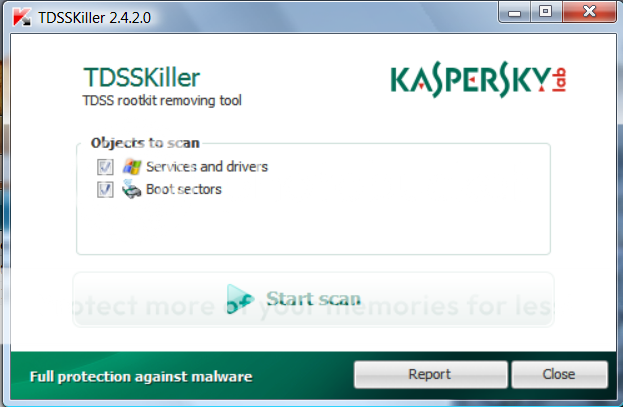
patndoris
Let's run a couple other scans to be sure it's gone, and nothing else is hiding from us.
First, I'd like you to run a full scan with your McAfee since it was the one detecting the cl.dll to start with and see if it still finds anything.
Please download Malwarebytes' Anti-Malware to your desktop.
This scan make take awhile depending on how many items are on the computer. You may want to run it at a time you won't be needing the machine. It should be run from IE and I'd recommend not doing anything else while it's running.
Go here to run an online scannner from ESET.
If it doesn't find anything there will be no log to post.
First, I'd like you to run a full scan with your McAfee since it was the one detecting the cl.dll to start with and see if it still finds anything.
Please download Malwarebytes' Anti-Malware to your desktop.
- Double-click mbam-setup.exe and follow the prompts to install the program.
- At the end, be sure a checkmark is placed next to Update Malwarebytes' Anti-Malware and Launch Malwarebytes' Anti-Malware, then click Finish.
- If an update is found, it will download and install the latest version.
- Once the program has loaded, select Perform quick scan, then click Scan.
[external image: Posted Image] - When the scan is complete, click OK, then Show Results to view the results.
- Be sure that everything is checked, and click Remove Selected .
- When completed, a log will open in Notepad. Please save it to a convenient location and post the results.
- Note: If you receive a notice that some of the items couldn't be removed, that they have been added to the delete on reboot list, please reboot.
This scan make take awhile depending on how many items are on the computer. You may want to run it at a time you won't be needing the machine. It should be run from IE and I'd recommend not doing anything else while it's running.
Go here to run an online scannner from ESET.
- Note: For browsers other than Internet Explorer, you will need to download and install esetsmartinstaller_enu.exe. Click on it and save the file to a convenient location. Double click on it to install and a new window will open.
- Turn off the real time scanner of any existing antivirus program while performing the online scan
- Tick the box next to YES, I accept the Terms of Use.
- Click Start
- When asked, allow the activex control to install
- Click Start
- Make sure that the option Remove found threats is unticked and the Scan Archives option is ticked.
- Click on Advanced Settings, ensure the options Scan for potentially unwanted applications, Scan for potentially unsafe applications, and Enable Anti-Stealth Technology are ticked.
- Click Scan
- Wait for the scan to finish
- Use notepad to open the logfile located at C:\Program Files\Eset\Eset Online Scanner\log.txt
- Copy and paste that log as a reply to this topic and also let me know how things are now.
If it doesn't find anything there will be no log to post.
Still having this problem?
This topic is from the What the Tech archive and can't take new replies. Geeks to Go is an active, free help community run by volunteers. Post your question there and a person, not a bot, will work through it with you.
Please don't run the tools or fix scripts from this topic on your computer. Malware fixes are written for one computer at one point in time and can do damage on another. Ask for help with your own computer instead.