Hello,
I am very very mad, I just can't figure out what to do! When i start the comp, it will start normally. But after a few minutes a single application will hang, then another then another. Until the whole windows hangs including the Task manger. Then after 5-10 min…everything gets normal. A little slow at first then back to normal. But these event happen again any time the windows is up. It just happened now I pressed Ctrl+alt+Del and it said can't process, restart.
The most memory is taken by Svchost.exe (LocalsystemNetworkhost) or something. I have 4 gb RAM, 44% is being taken up even though not much apps are running. Other then that no wired applications are running(Unknown or such). Can someone please help I use the comp. for Studies as well as my work!!!!
Thank you in advance.
Download Autoruns from the link in my signature below:
1: Extract the Autoruns Zip file contents to a folder.
2: Double-click the "Autoruns.exe".
3: Click on the "Everything" tab
4: Remove any entries that mention "File Not Found" by right-clicking the entry and select Delete.
5: Go to File then to Export As or Save in some versions.
6: Save AutoRuns.txt file to known location like your Desktop.
7: Attach to your next reply.
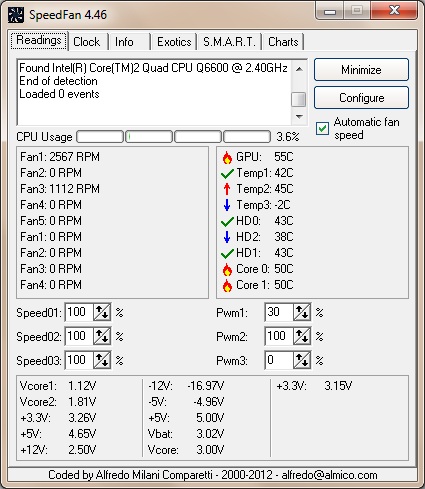
Download Speedfan (The download link is to the right), and install it. Once it's installed, run the program and post here the information it shows.
The information I want you to post is the stuff that is circled in the example picture I have attached.
To make sure we are getting all the correct information it would help us if you were to attach a screenshot like the one below of your Speedfan results.
To do a screenshot please have click on your Print Screen on your keyboard.
It is normally the key above your number pad between the F12 key and the Scroll Lock key
Now go to Start and then to All Programs
Scroll to Accessories and then click on Paint
In the Empty White Area click and hold the CTRL key and then click the V
Go to the File option at the top and click on Save as
Save as file type JPEG and save it to your Desktop
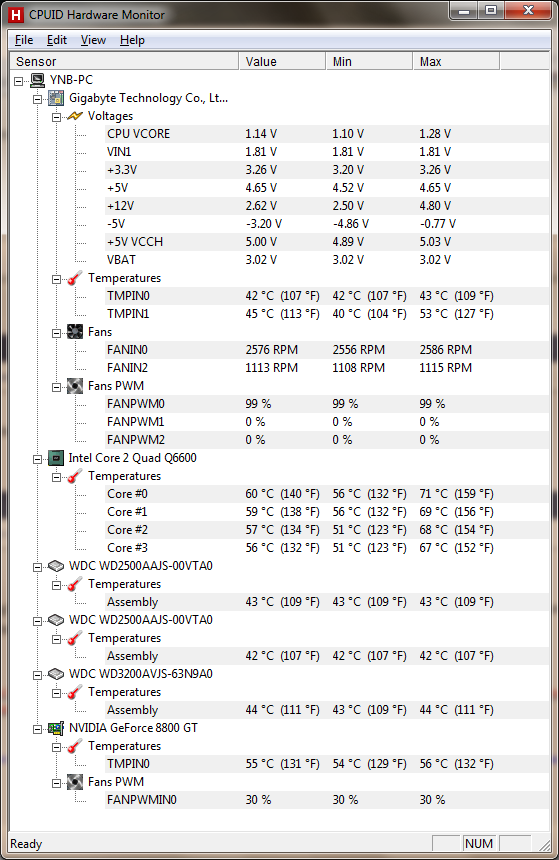
OK the next steps are crucial and you have to follow them in order. I will say I see Spybot TeaTimer in your autoruns and that one is a MUST TURN OFF entry. That program is known to slow systems down drastically. Also in your PSU wattage's the +12 volt rail is reading very low. I want to test it with another program but do the below and then the instructions for the new program will be at the end.
Open Autoruns, click on "Logon" tab, and UN-check:
Please double-click TFC.exe to run it. (Note: If you are running on Vista, right-click on the file and choose Run As Administrator).
It will close all programs when run, so make sure you have saved all your work before you begin.
Click the Start button to begin the process. Depending on how often you clean temp files, execution time should be anywhere from a few seconds to a minute or two. Let it run uninterrupted to completion.
Once it's finished it should reboot your machine. If it does not, please manually reboot the machine yourself to ensure a complete clean.
Download Auslogics Defrag from the link in my signature below. Auslogics Defrag in my opinion is better because:
It does a more comprehensive job at Defragging
It will actually show you what it is doing
At the end of working it will show you how much speed you picked up
You can view a online log of the files that Auslogics defragged Please do not run any other Auslogics programs other then this one as they may cause unwanted results.
Please download and run Hardware Monitor
Installation (setup version only)
HWMonitor is a hardware monitoring program that reads PC systems main health sensors : voltages, temperatures, fans speed.
The program handles the most common sensor chips, like ITE® IT87 series, most Winbond® ICs, and others. In addition, it can read modern CPUs on-die core thermal sensors, as well has hard drives temperature via S.M.A.R.T, and video card GPU temperature.
OK the next steps are crucial and you have to follow them in order. I will say I see Spybot TeaTimer in your autoruns and that one is a MUST TURN OFF entry. That program is known to slow systems down drastically. Also in your PSU wattage's the +12 volt rail is reading very low. I want to test it with another program but do the below and then the instructions for the new program will be at the end.
Open Autoruns, click on "Logon" tab, and UN-check:
Please double-click TFC.exe to run it. (Note: If you are running on Vista, right-click on the file and choose Run As Administrator).
It will close all programs when run, so make sure you have saved all your work before you begin.
Click the Start button to begin the process. Depending on how often you clean temp files, execution time should be anywhere from a few seconds to a minute or two. Let it run uninterrupted to completion.
Once it's finished it should reboot your machine. If it does not, please manually reboot the machine yourself to ensure a complete clean.
Download Auslogics Defrag from the link in my signature below. Auslogics Defrag in my opinion is better because:
It does a more comprehensive job at Defragging
It will actually show you what it is doing
At the end of working it will show you how much speed you picked up
You can view a online log of the files that Auslogics defragged Please do not run any other Auslogics programs other then this one as they may cause unwanted results.
Please download and run Hardware Monitor
Installation (setup version only)
HWMonitor is a hardware monitoring program that reads PC systems main health sensors : voltages, temperatures, fans speed.
The program handles the most common sensor chips, like ITE® IT87 series, most Winbond® ICs, and others. In addition, it can read modern CPUs on-die core thermal sensors, as well has hard drives temperature via S.M.A.R.T, and video card GPU temperature.
Can you explain what this means and to which device is this voltage going to?
I did the first thing you asked, I unchecked the three thing you asked! Then i ran TFC.
But i could not run Auslogics Defrag whenever i pressed the defrag/analyze button it started to not respond i tried 5-6 times, what should I do.
I also have HWmonitor installed, what should I do with it, keep it running or what?
I also have HWmonitor installed, what should I do with it, keep it running or what?
You can take a screenshot of the sensors showing and attached it to your next post.
But i could not run Auslogics Defrag whenever i pressed the defrag/analyze button it started to not respond i tried 5-6 times, what should I do.
Did you get a error message?
You can use the Windows internal defrag program by opening My Computer and then Right Click on the main drive. Go to [b[Properties and then click on the tac at the top that says Tools. You want to then click on the optimize or defrag section which should be the 2nd choice in the new list.
OK I see your problem I believe. That +12 volt rail is way below acceptable levels.
The other way to verify it is usually on the newer motherboards there is a sensor area in the bios you can check also. You might want to see if there is and let me know what the +12 volt rail shows there.
This is not, but what should I do, change the power supply or try and change the wires? How do I know which one of them is the +12v one? I have a 750 watt power supply.
BTW thanx for you support up till now.
Must be a off brand PSU because I can find no reference to it any where.
I think so? What should I say to guy i bought it from?
Exactly what we have seen. The +12 volt rail is not powering correctly and the PSU needs replacing. I would suggest a name brand like Corsair 750 with 89 plus certification. Reliable and stable.
Must be a off brand PSU because I can find no reference to it any where.
I think so? What should I say to guy i bought it from?
Exactly what we have seen. The +12 volt rail is not powering correctly and the PSU needs replacing. I would suggest a name brand like Corsair 750 with 89 plus certification. Reliable and stable.
Thanx but i don't think i will find any of them in the local market….but Gigabyte PSU is available expensive but will buy it.
Thanx buddy, but what if that is not the problem…..anyway once i buy it i will let you know.
✨ Ask AI
AI can make mistakes. Check the cited posts. Archived advice can be out-of-date
Don't include personal information. Questions and selected public posts go to OpenAI. About Ask AI