This is a read-only archive. No new posts or registrations. Privacy Page Still need help? Ask the volunteers at Geeks to Go, free.
Spyware / Malware / Virus Removal

Google Redirect Virus? Plz Help [Solved]

93 min read

This thread's last reply is from . Advice, software, and links below may be out of date — treat specific steps and download links with caution.

Oohh, Sorry about that ~! Here is my latest TDSKiller log with it cured already: 22:46:15.0518 3604 TDSS rootkit removing tool [removed] Feb 22 2012 16:54:49 22:46:15.0795 3604 ============================================================ 22:46:15.0795 3604 Current date / time: 2012/02/24 22:46:15.0795 22:46:15.0795 3604 SystemInfo: 22:46:15.0795 3604 22:46:15.0795 3604 OS Version: 6.1.7600 ServicePack: 0.0 22:46:15.0795 3604 Product type: Workstation 22:46:15.0795 3604 ComputerName: LILY-PC 22:46:15.0801 3604 UserName: Lily 22:46:15.0801 3604 Windows directory: C:\Windows 22:46:15.0801 3604 System windows directory: C:\Windows 22:46:15.0801 3604 Running under WOW64 22:46:15.0801 3604 Processor architecture: Intel x64 22:46:15.0801 3604 Number of processors: 2 22:46:15.0801 3604 Page size: 0x1000 22:46:15.0801 3604 Boot type: Normal boot 22:46:15.0801 3604 ============================================================ 22:46:16.0125 3604 Drive \Device\Harddisk0\DR0 - Size: 0x4A85D56000 (298.09 Gb), SectorSize: 0x200, Cylinders: 0x9801, SectorsPerTrack: 0x3F, TracksPerCylinder: 0xFF, Type 'K0', Flags 0x00000040 22:46:16.0129 3604 \Device\Harddisk0\DR0: 22:46:16.0130 3604 MBR used 22:46:16.0130 3604 \Device\Harddisk0\DR0\Partition0: MBR, Type 0x7, StartLBA 0x800, BlocksNum 0x63800 22:46:16.0130 3604 \Device\Harddisk0\DR0\Partition1: MBR, Type 0x7, StartLBA 0x64000, BlocksNum 0x236FA000 22:46:16.0130 3604 \Device\Harddisk0\DR0\Partition2: MBR, Type 0x7, StartLBA 0x2375E000, BlocksNum 0x1C9C800 22:46:16.0130 3604 \Device\Harddisk0\DR0\Partition3: MBR, Type 0xC, StartLBA 0x253FA800, BlocksNum 0x33AB0 22:46:16.0241 3604 Initialize success 22:46:16.0241 3604 ============================================================ 22:46:17.0488 3652 ============================================================ 22:46:17.0488 3652 Scan started 22:46:17.0488 3652 Mode: Manual; 22:46:17.0488 3652 ============================================================ 22:46:18.0241 3652 1394ohci (1b00662092f9f9568b995902f0cc40d5) C:\Windows\system32\DRIVERS\1394ohci.sys 22:46:18.0245 3652 1394ohci - ok 22:46:18.0307 3652 ACPI (6f11e88748cdefd2f76aa215f97ddfe5) C:\Windows\system32\DRIVERS\ACPI.sys 22:46:18.0311 3652 ACPI - ok 22:46:18.0375 3652 AcpiPmi (63b05a0420ce4bf0e4af6dcc7cada254) C:\Windows\system32\DRIVERS\acpipmi.sys 22:46:18.0376 3652 AcpiPmi - ok 22:46:18.0446 3652 adp94xx (2f6b34b83843f0c5118b63ac634f5bf4) C:\Windows\system32\DRIVERS\adp94xx.sys 22:46:18.0454 3652 adp94xx - ok 22:46:18.0561 3652 adpahci (597f78224ee9224ea1a13d6350ced962) C:\Windows\system32\DRIVERS\adpahci.sys 22:46:18.0565 3652 adpahci - ok 22:46:18.0632 3652 adpu320 (e109549c90f62fb570b9540c4b148e54) C:\Windows\system32\DRIVERS\adpu320.sys 22:46:18.0635 3652 adpu320 - ok 22:46:18.0712 3652 AFD (db9d6c6b2cd95a9ca414d045b627422e) C:\Windows\system32\drivers\afd.sys 22:46:18.0718 3652 AFD - ok 22:46:18.0770 3652 agp440 (608c14dba7299d8cb6ed035a68a15799) C:\Windows\system32\DRIVERS\agp440.sys 22:46:18.0772 3652 agp440 - ok 22:46:18.0822 3652 aliide (5812713a477a3ad7363c7438ca2ee038) C:\Windows\system32\DRIVERS\aliide.sys 22:46:18.0824 3652 aliide - ok 22:46:18.0843 3652 amdide (1ff8b4431c353ce385c875f194924c0c) C:\Windows\system32\DRIVERS\amdide.sys 22:46:18.0845 3652 amdide - ok 22:46:18.0879 3652 AmdK8 (7024f087cff1833a806193ef9d22cda9) C:\Windows\system32\DRIVERS\amdk8.sys 22:46:18.0880 3652 AmdK8 - ok 22:46:18.0909 3652 AmdPPM (1e56388b3fe0d031c44144eb8c4d6217) C:\Windows\system32\DRIVERS\amdppm.sys 22:46:18.0911 3652 AmdPPM - ok 22:46:18.0954 3652 amdsata (ec7ebab00a4d8448bab68d1e49b4beb9) C:\Windows\system32\drivers\amdsata.sys 22:46:18.0956 3652 amdsata - ok 22:46:18.0998 3652 amdsbs (f67f933e79241ed32ff46a4f29b5120b) C:\Windows\system32\DRIVERS\amdsbs.sys 22:46:19.0002 3652 amdsbs - ok 22:46:19.0037 3652 amdxata (db27766102c7bf7e95140a2aa81d042e) C:\Windows\system32\drivers\amdxata.sys 22:46:19.0037 3652 amdxata - ok 22:46:19.0102 3652 AppID (42fd751b27fa0e9c69bb39f39e409594) C:\Windows\system32\drivers\appid.sys 22:46:19.0106 3652 AppID - ok 22:46:19.0331 3652 arc (c484f8ceb1717c540242531db7845c4e) C:\Windows\system32\DRIVERS\arc.sys 22:46:19.0332 3652 arc - ok 22:46:19.0374 3652 arcsas (019af6924aefe7839f61c830227fe79c) C:\Windows\system32\DRIVERS\arcsas.sys 22:46:19.0377 3652 arcsas - ok 22:46:19.0405 3652 AsyncMac (769765ce2cc62867468cea93969b2242) C:\Windows\system32\DRIVERS\asyncmac.sys 22:46:19.0406 3652 AsyncMac - ok 22:46:19.0446 3652 atapi (02062c0b390b7729edc9e69c680a6f3c) C:\Windows\system32\DRIVERS\atapi.sys 22:46:19.0447 3652 atapi - ok 22:46:19.0531 3652 b06bdrv (3e5b191307609f7514148c6832bb0842) C:\Windows\system32\DRIVERS\bxvbda.sys 22:46:19.0537 3652 b06bdrv - ok 22:46:19.0588 3652 b57nd60a (b5ace6968304a3900eeb1ebfd9622df2) C:\Windows\system32\DRIVERS\b57nd60a.sys 22:46:19.0592 3652 b57nd60a - ok 22:46:19.0639 3652 Beep (16a47ce2decc9b099349a5f840654746) C:\Windows\system32\drivers\Beep.sys 22:46:19.0639 3652 Beep - ok 22:46:19.0711 3652 blbdrive (61583ee3c3a17003c4acd0475646b4d3) C:\Windows\system32\DRIVERS\blbdrive.sys 22:46:19.0712 3652 blbdrive - ok 22:46:19.0756 3652 bowser (19d20159708e152267e53b66677a4995) C:\Windows\system32\DRIVERS\bowser.sys 22:46:19.0758 3652 bowser - ok 22:46:19.0801 3652 BrFiltLo (f09eee9edc320b5e1501f749fde686c8) C:\Windows\system32\DRIVERS\BrFiltLo.sys 22:46:19.0802 3652 BrFiltLo - ok 22:46:19.0832 3652 BrFiltUp (b114d3098e9bdb8bea8b053685831be6) C:\Windows\system32\DRIVERS\BrFiltUp.sys 22:46:19.0833 3652 BrFiltUp - ok 22:46:19.0873 3652 BridgeMP (5c2f352a4e961d72518261257aae204b) C:\Windows\system32\DRIVERS\bridge.sys 22:46:19.0875 3652 BridgeMP - ok 22:46:19.0910 3652 Brserid (43bea8d483bf1870f018e2d02e06a5bd) C:\Windows\System32\Drivers\Brserid.sys 22:46:19.0914 3652 Brserid - ok 22:46:19.0932 3652 BrSerWdm (a6eca2151b08a09caceca35c07f05b42) C:\Windows\System32\Drivers\BrSerWdm.sys 22:46:19.0934 3652 BrSerWdm - ok 22:46:19.0974 3652 BrUsbMdm (b79968002c277e869cf38bd22cd61524) C:\Windows\System32\Drivers\BrUsbMdm.sys 22:46:19.0975 3652 BrUsbMdm - ok 22:46:19.0997 3652 BrUsbSer (a87528880231c54e75ea7a44943b38bf) C:\Windows\System32\Drivers\BrUsbSer.sys 22:46:19.0998 3652 BrUsbSer - ok 22:46:20.0017 3652 BTHMODEM (9da669f11d1f894ab4eb69bf546a42e8) C:\Windows\system32\DRIVERS\bthmodem.sys 22:46:20.0018 3652 BTHMODEM - ok 22:46:20.0081 3652 catchme - ok 22:46:20.0129 3652 cdfs (b8bd2bb284668c84865658c77574381a) C:\Windows\system32\DRIVERS\cdfs.sys 22:46:20.0130 3652 cdfs - ok 22:46:20.0164 3652 cdrom (83d2d75e1efb81b3450c18131443f7db) C:\Windows\system32\DRIVERS\cdrom.sys 22:46:20.0166 3652 cdrom - ok 22:46:20.0211 3652 circlass (d7cd5c4e1b71fa62050515314cfb52cf) C:\Windows\system32\DRIVERS\circlass.sys 22:46:20.0212 3652 circlass - ok 22:46:20.0269 3652 CLFS (fe1ec06f2253f691fe36217c592a0206) C:\Windows\system32\CLFS.sys 22:46:20.0274 3652 CLFS - ok 22:46:20.0365 3652 CmBatt (0840155d0bddf1190f84a663c284bd33) C:\Windows\system32\DRIVERS\CmBatt.sys 22:46:20.0366 3652 CmBatt - ok 22:46:20.0393 3652 cmdide (e19d3f095812725d88f9001985b94edd) C:\Windows\system32\DRIVERS\cmdide.sys 22:46:20.0394 3652 cmdide - ok 22:46:20.0442 3652 CNG (937beb186a735aca91d717044a49d17e) C:\Windows\system32\Drivers\cng.sys 22:46:20.0448 3652 CNG - ok 22:46:20.0496 3652 Compbatt (102de219c3f61415f964c88e9085ad14) C:\Windows\system32\DRIVERS\compbatt.sys 22:46:20.0496 3652 Compbatt - ok 22:46:20.0528 3652 CompositeBus (f26b3a86f6fa87ca360b879581ab4123) C:\Windows\system32\DRIVERS\CompositeBus.sys 22:46:20.0530 3652 CompositeBus - ok 22:46:20.0567 3652 crcdisk (1c827878a998c18847245fe1f34ee597) C:\Windows\system32\DRIVERS\crcdisk.sys 22:46:20.0568 3652 crcdisk - ok 22:46:20.0646 3652 DfsC (9c253ce7311ca60fc11c774692a13208) C:\Windows\system32\Drivers\dfsc.sys 22:46:20.0648 3652 DfsC - ok 22:46:20.0704 3652 discache (13096b05847ec78f0977f2c0f79e9ab3) C:\Windows\system32\drivers\discache.sys 22:46:20.0705 3652 discache - ok 22:46:20.0755 3652 Disk (9819eee8b5ea3784ec4af3b137a5244c) C:\Windows\system32\DRIVERS\disk.sys 22:46:20.0756 3652 Disk - ok 22:46:20.0803 3652 drmkaud (9b19f34400d24df84c858a421c205754) C:\Windows\system32\drivers\drmkaud.sys 22:46:20.0804 3652 drmkaud - ok 22:46:20.0855 3652 DXGKrnl (1633b9abf52784a1331476397a48cbef) C:\Windows\System32\drivers\dxgkrnl.sys 22:46:20.0866 3652 DXGKrnl - ok 22:46:20.0891 3652 EagleX64 - ok 22:46:20.0986 3652 ebdrv (dc5d737f51be844d8c82c695eb17372f) C:\Windows\system32\DRIVERS\evbda.sys 22:46:21.0025 3652 ebdrv - ok 22:46:21.0154 3652 elxstor (0e5da5369a0fcaea12456dd852545184) C:\Windows\system32\DRIVERS\elxstor.sys 22:46:21.0161 3652 elxstor - ok 22:46:21.0193 3652 ErrDev (34a3c54752046e79a126e15c51db409b) C:\Windows\system32\DRIVERS\errdev.sys 22:46:21.0194 3652 ErrDev - ok 22:46:21.0233 3652 exfat (a510c654ec00c1e9bdd91eeb3a59823b) C:\Windows\system32\drivers\exfat.sys 22:46:21.0236 3652 exfat - ok 22:46:21.0264 3652 fastfat (0adc83218b66a6db380c330836f3e36d) C:\Windows\system32\drivers\fastfat.sys 22:46:21.0267 3652 fastfat - ok 22:46:21.0315 3652 fdc (d765d19cd8ef61f650c384f62fac00ab) C:\Windows\system32\DRIVERS\fdc.sys 22:46:21.0316 3652 fdc - ok 22:46:21.0354 3652 FileInfo (655661be46b5f5f3fd454e2c3095b930) C:\Windows\system32\drivers\fileinfo.sys 22:46:21.0355 3652 FileInfo - ok 22:46:21.0391 3652 Filetrace (5f671ab5bc87eea04ec38a6cd5962a47) C:\Windows\system32\drivers\filetrace.sys 22:46:21.0392 3652 Filetrace - ok 22:46:21.0409 3652 flpydisk (c172a0f53008eaeb8ea33fe10e177af5) C:\Windows\system32\DRIVERS\flpydisk.sys 22:46:21.0410 3652 flpydisk - ok 22:46:21.0430 3652 FltMgr (f7866af72abbaf84b1fa5aa195378c59) C:\Windows\system32\drivers\fltmgr.sys 22:46:21.0433 3652 FltMgr - ok 22:46:21.0470 3652 FsDepends (d43703496149971890703b4b1b723eac) C:\Windows\system32\drivers\FsDepends.sys 22:46:21.0471 3652 FsDepends - ok 22:46:21.0482 3652 Fs_Rec (e95ef8547de20cf0603557c0cf7a9462) C:\Windows\system32\drivers\Fs_Rec.sys 22:46:21.0483 3652 Fs_Rec - ok 22:46:21.0533 3652 fvevol (ae87ba80d0ec3b57126ed2cdc15b24ed) C:\Windows\system32\DRIVERS\fvevol.sys 22:46:21.0536 3652 fvevol - ok 22:46:21.0588 3652 gagp30kx (8c778d335c9d272cfd3298ab02abe3b6) C:\Windows\system32\DRIVERS\gagp30kx.sys 22:46:21.0589 3652 gagp30kx - ok 22:46:21.0651 3652 GEARAspiWDM (e403aacf8c7bb11375122d2464560311) C:\Windows\system32\DRIVERS\GEARAspiWDM.sys 22:46:21.0652 3652 GEARAspiWDM - ok 22:46:21.0685 3652 hcw85cir (f2523ef6460fc42405b12248338ab2f0) C:\Windows\system32\drivers\hcw85cir.sys 22:46:21.0687 3652 hcw85cir - ok 22:46:21.0730 3652 HdAudAddService (6410f6f415b2a5a9037224c41da8bf12) C:\Windows\system32\drivers\HdAudio.sys 22:46:21.0735 3652 HdAudAddService - ok 22:46:21.0787 3652 HDAudBus (0a49913402747a0b67de940fb42cbdbb) C:\Windows\system32\DRIVERS\HDAudBus.sys 22:46:21.0789 3652 HDAudBus - ok 22:46:21.0808 3652 HidBatt (78e86380454a7b10a5eb255dc44a355f) C:\Windows\system32\DRIVERS\HidBatt.sys 22:46:21.0809 3652 HidBatt - ok 22:46:21.0831 3652 HidBth (7fd2a313f7afe5c4dab14798c48dd104) C:\Windows\system32\DRIVERS\hidbth.sys 22:46:21.0834 3652 HidBth - ok 22:46:21.0857 3652 HidIr (0a77d29f311b88cfae3b13f9c1a73825) C:\Windows\system32\DRIVERS\hidir.sys 22:46:21.0858 3652 HidIr - ok 22:46:21.0930 3652 HidUsb (b3bf6b5b50006def50b66306d99fcf6f) C:\Windows\system32\DRIVERS\hidusb.sys 22:46:21.0932 3652 HidUsb - ok 22:46:22.0017 3652 HpSAMD (0886d440058f203eba0e1825e4355914) C:\Windows\system32\DRIVERS\HpSAMD.sys 22:46:22.0018 3652 HpSAMD - ok 22:46:22.0071 3652 HTTP (cee049cac4efa7f4e1e4ad014414a5d4) C:\Windows\system32\drivers\HTTP.sys 22:46:22.0080 3652 HTTP - ok 22:46:22.0101 3652 hwpolicy (f17766a19145f111856378df337a5d79) C:\Windows\system32\drivers\hwpolicy.sys 22:46:22.0102 3652 hwpolicy - ok 22:46:22.0125 3652 i8042prt (fa55c73d4affa7ee23ac4be53b4592d3) C:\Windows\system32\DRIVERS\i8042prt.sys 22:46:22.0126 3652 i8042prt - ok 22:46:22.0181 3652 iaStor (be7d72fcf442c26975942007e0831241) C:\Windows\system32\DRIVERS\iaStor.sys 22:46:22.0184 3652 iaStor - ok 22:46:22.0246 3652 iaStorV (b75e45c564e944a2657167d197ab29da) C:\Windows\system32\drivers\iaStorV.sys 22:46:22.0252 3652 iaStorV - ok 22:46:22.0473 3652 igfx (898ab5bfed7040d7ab07af01885eb944) C:\Windows\system32\DRIVERS\igdkmd64.sys 22:46:22.0667 3652 igfx - ok 22:46:22.0768 3652 iirsp (5c18831c61933628f5bb0ea2675b9d21) C:\Windows\system32\DRIVERS\iirsp.sys 22:46:22.0769 3652 iirsp - ok 22:46:22.0856 3652 IntcAzAudAddService (a3bcbd0f710580a07d1b929d787d36ce) C:\Windows\system32\drivers\RTKVHD64.sys 22:46:22.0881 3652 IntcAzAudAddService - ok 22:46:22.0987 3652 IntcHdmiAddService (cfc68ca36a63637e8ca69669ee3693da) C:\Windows\system32\drivers\IntcHdmi.sys 22:46:22.0990 3652 IntcHdmiAddService - ok 22:46:23.0024 3652 intelide (f00f20e70c6ec3aa366910083a0518aa) C:\Windows\system32\DRIVERS\intelide.sys 22:46:23.0025 3652 intelide - ok 22:46:23.0066 3652 intelppm (ada036632c664caa754079041cf1f8c1) C:\Windows\system32\DRIVERS\intelppm.sys 22:46:23.0067 3652 intelppm - ok 22:46:23.0091 3652 IpFilterDriver (722dd294df62483cecaae6e094b4d695) C:\Windows\system32\DRIVERS\ipfltdrv.sys 22:46:23.0092 3652 IpFilterDriver - ok 22:46:23.0148 3652 IPMIDRV (e2b4a4494db7cb9b89b55ca268c337c5) C:\Windows\system32\DRIVERS\IPMIDrv.sys 22:46:23.0150 3652 IPMIDRV - ok 22:46:23.0189 3652 IPNAT (af9b39a7e7b6caa203b3862582e9f2d0) C:\Windows\system32\drivers\ipnat.sys 22:46:23.0191 3652 IPNAT - ok 22:46:23.0240 3652 IRENUM (3abf5e7213eb28966d55d58b515d5ce9) C:\Windows\system32\drivers\irenum.sys 22:46:23.0241 3652 IRENUM - ok 22:46:23.0272 3652 isapnp (2f7b28dc3e1183e5eb418df55c204f38) C:\Windows\system32\DRIVERS\isapnp.sys 22:46:23.0273 3652 isapnp - ok 22:46:23.0312 3652 iScsiPrt (fa4d2557de56d45b0a346f93564be6e1) C:\Windows\system32\DRIVERS\msiscsi.sys 22:46:23.0315 3652 iScsiPrt - ok 22:46:23.0347 3652 kbdclass (bc02336f1cba7dcc7d1213bb588a68a5) C:\Windows\system32\DRIVERS\kbdclass.sys 22:46:23.0348 3652 kbdclass - ok 22:46:23.0374 3652 kbdhid (6def98f8541e1b5dceb2c822a11f7323) C:\Windows\system32\DRIVERS\kbdhid.sys 22:46:23.0375 3652 kbdhid - ok 22:46:23.0417 3652 KSecDD (16c1b906fc5ead84769f90b736b6bf0e) C:\Windows\system32\Drivers\ksecdd.sys 22:46:23.0419 3652 KSecDD - ok 22:46:23.0443 3652 KSecPkg (0b711550c56444879d71c7daabda6c83) C:\Windows\system32\Drivers\ksecpkg.sys 22:46:23.0444 3652 KSecPkg - ok 22:46:23.0481 3652 ksthunk (6869281e78cb31a43e969f06b57347c4) C:\Windows\system32\drivers\ksthunk.sys 22:46:23.0481 3652 ksthunk - ok 22:46:23.0559 3652 lltdio (1538831cf8ad2979a04c423779465827) C:\Windows\system32\DRIVERS\lltdio.sys 22:46:23.0561 3652 lltdio - ok 22:46:23.0615 3652 LSI_FC (1a93e54eb0ece102495a51266dcdb6a6) C:\Windows\system32\DRIVERS\lsi_fc.sys 22:46:23.0617 3652 LSI_FC - ok 22:46:23.0636 3652 LSI_SAS (1047184a9fdc8bdbff857175875ee810) C:\Windows\system32\DRIVERS\lsi_sas.sys 22:46:23.0638 3652 LSI_SAS - ok 22:46:23.0656 3652 LSI_SAS2 (30f5c0de1ee8b5bc9306c1f0e4a75f93) C:\Windows\system32\DRIVERS\lsi_sas2.sys 22:46:23.0657 3652 LSI_SAS2 - ok 22:46:23.0681 3652 LSI_SCSI (0504eacaff0d3c8aed161c4b0d369d4a) C:\Windows\system32\DRIVERS\lsi_scsi.sys 22:46:23.0683 3652 LSI_SCSI - ok 22:46:23.0703 3652 luafv (43d0f98e1d56ccddb0d5254cff7b356e) C:\Windows\system32\drivers\luafv.sys 22:46:23.0704 3652 luafv - ok 22:46:23.0750 3652 megasas (a55805f747c6edb6a9080d7c633bd0f4) C:\Windows\system32\DRIVERS\megasas.sys 22:46:23.0752 3652 megasas - ok 22:46:23.0778 3652 MegaSR (baf74ce0072480c3b6b7c13b2a94d6b3) C:\Windows\system32\DRIVERS\MegaSR.sys 22:46:23.0782 3652 MegaSR - ok 22:46:23.0802 3652 Modem (800ba92f7010378b09f9ed9270f07137) C:\Windows\system32\drivers\modem.sys 22:46:23.0803 3652 Modem - ok 22:46:23.0837 3652 monitor (b03d591dc7da45ece20b3b467e6aadaa) C:\Windows\system32\DRIVERS\monitor.sys 22:46:23.0838 3652 monitor - ok 22:46:23.0871 3652 mouclass (7d27ea49f3c1f687d357e77a470aea99) C:\Windows\system32\DRIVERS\mouclass.sys 22:46:23.0873 3652 mouclass - ok 22:46:23.0902 3652 mouhid (d3bf052c40b0c4166d9fd86a4288c1e6) C:\Windows\system32\DRIVERS\mouhid.sys 22:46:23.0903 3652 mouhid - ok 22:46:23.0927 3652 mountmgr (791af66c4d0e7c90a3646066386fb571) C:\Windows\system32\drivers\mountmgr.sys 22:46:23.0929 3652 mountmgr - ok 22:46:23.0951 3652 mpio (609d1d87649ecc19796f4d76d4c15cea) C:\Windows\system32\DRIVERS\mpio.sys 22:46:23.0953 3652 mpio - ok 22:46:23.0974 3652 mpsdrv (6c38c9e45ae0ea2fa5e551f2ed5e978f) C:\Windows\system32\drivers\mpsdrv.sys 22:46:23.0976 3652 mpsdrv - ok 22:46:24.0022 3652 MRxDAV (30524261bb51d96d6fcbac20c810183c) C:\Windows\system32\drivers\mrxdav.sys 22:46:24.0025 3652 MRxDAV - ok 22:46:24.0054 3652 mrxsmb (040d62a9d8ad28922632137acdd984f2) C:\Windows\system32\DRIVERS\mrxsmb.sys 22:46:24.0056 3652 mrxsmb - ok 22:46:24.0083 3652 mrxsmb10 (f0067552f8f9b33d7c59403ab808a3cb) C:\Windows\system32\DRIVERS\mrxsmb10.sys 22:46:24.0086 3652 mrxsmb10 - ok 22:46:24.0109 3652 mrxsmb20 (3c142d31de9f2f193218a53fe2632051) C:\Windows\system32\DRIVERS\mrxsmb20.sys 22:46:24.0111 3652 mrxsmb20 - ok 22:46:24.0135 3652 msahci (5c37497276e3b3a5488b23a326a754b7) C:\Windows\system32\DRIVERS\msahci.sys 22:46:24.0136 3652 msahci - ok 22:46:24.0178 3652 msdsm (8d27b597229aed79430fb9db3bcbfbd0) C:\Windows\system32\DRIVERS\msdsm.sys 22:46:24.0180 3652 msdsm - ok 22:46:24.0230 3652 Msfs (aa3fb40e17ce1388fa1bedab50ea8f96) C:\Windows\system32\drivers\Msfs.sys 22:46:24.0230 3652 Msfs - ok 22:46:24.0261 3652 mshidkmdf (f9d215a46a8b9753f61767fa72a20326) C:\Windows\System32\drivers\mshidkmdf.sys 22:46:24.0262 3652 mshidkmdf - ok 22:46:24.0295 3652 MSHUSBVideo (bb590070d606ae6f008341fc9a7b2ad7) C:\Windows\system32\Drivers\nx6000.sys 22:46:24.0296 3652 MSHUSBVideo - ok 22:46:24.0330 3652 msisadrv (d916874bbd4f8b07bfb7fa9b3ccae29d) C:\Windows\system32\DRIVERS\msisadrv.sys 22:46:24.0331 3652 msisadrv - ok 22:46:24.0375 3652 MSKSSRV (49ccf2c4fea34ffad8b1b59d49439366) C:\Windows\system32\drivers\MSKSSRV.sys 22:46:24.0376 3652 MSKSSRV - ok 22:46:24.0395 3652 MSPCLOCK (bdd71ace35a232104ddd349ee70e1ab3) C:\Windows\system32\drivers\MSPCLOCK.sys 22:46:24.0396 3652 MSPCLOCK - ok 22:46:24.0416 3652 MSPQM (4ed981241db27c3383d72092b618a1d0) C:\Windows\system32\drivers\MSPQM.sys 22:46:24.0417 3652 MSPQM - ok 22:46:24.0446 3652 MsRPC (89cb141aa8616d8c6a4610fa26c60964) C:\Windows\system32\drivers\MsRPC.sys 22:46:24.0450 3652 MsRPC - ok 22:46:24.0471 3652 mssmbios (0eed230e37515a0eaee3c2e1bc97b288) C:\Windows\system32\DRIVERS\mssmbios.sys 22:46:24.0471 3652 mssmbios - ok 22:46:24.0491 3652 MSTEE (2e66f9ecb30b4221a318c92ac2250779) C:\Windows\system32\drivers\MSTEE.sys 22:46:24.0492 3652 MSTEE - ok 22:46:24.0513 3652 MTConfig (7ea404308934e675bffde8edf0757bcd) C:\Windows\system32\DRIVERS\MTConfig.sys 22:46:24.0515 3652 MTConfig - ok 22:46:24.0531 3652 Mup (f9a18612fd3526fe473c1bda678d61c8) C:\Windows\system32\Drivers\mup.sys 22:46:24.0532 3652 Mup - ok 22:46:24.0574 3652 NativeWifiP (1ea3749c4114db3e3161156ffffa6b33) C:\Windows\system32\DRIVERS\nwifi.sys 22:46:24.0578 3652 NativeWifiP - ok 22:46:24.0620 3652 NDIS (cad515dbd07d082bb317d9928ce8962c) C:\Windows\system32\drivers\ndis.sys 22:46:24.0631 3652 NDIS - ok 22:46:24.0675 3652 NdisCap (9f9a1f53aad7da4d6fef5bb73ab811ac) C:\Windows\system32\DRIVERS\ndiscap.sys 22:46:24.0676 3652 NdisCap - ok 22:46:24.0699 3652 NdisTapi (30639c932d9fef22b31268fe25a1b6e5) C:\Windows\system32\DRIVERS\ndistapi.sys 22:46:24.0700 3652 NdisTapi - ok 22:46:24.0738 3652 Ndisuio (f105ba1e22bf1f2ee8f005d4305e4bec) C:\Windows\system32\DRIVERS\ndisuio.sys 22:46:24.0739 3652 Ndisuio - ok 22:46:24.0754 3652 NdisWan (557dfab9ca1fcb036ac77564c010dad3) C:\Windows\system32\DRIVERS\ndiswan.sys 22:46:24.0756 3652 NdisWan - ok 22:46:24.0774 3652 NDProxy (659b74fb74b86228d6338d643cd3e3cf) C:\Windows\system32\drivers\NDProxy.sys 22:46:24.0776 3652 NDProxy - ok 22:46:24.0792 3652 NetBIOS (86743d9f5d2b1048062b14b1d84501c4) C:\Windows\system32\DRIVERS\netbios.sys 22:46:24.0793 3652 NetBIOS - ok 22:46:24.0816 3652 NetBT (9162b273a44ab9dce5b44362731d062a) C:\Windows\system32\DRIVERS\netbt.sys 22:46:24.0820 3652 NetBT - ok 22:46:24.0948 3652 netw5v64 (64428dfdaf6e88366cb51f45a79c5f69) C:\Windows\system32\DRIVERS\netw5v64.sys 22:46:25.0055 3652 netw5v64 - ok 22:46:25.0155 3652 nfrd960 (77889813be4d166cdab78ddba990da92) C:\Windows\system32\DRIVERS\nfrd960.sys 22:46:25.0156 3652 nfrd960 - ok 22:46:25.0184 3652 Npfs (1e4c4ab5c9b8dd13179bbdc75a2a01f7) C:\Windows\system32\drivers\Npfs.sys 22:46:25.0185 3652 Npfs - ok 22:46:25.0201 3652 nsiproxy (e7f5ae18af4168178a642a9247c63001) C:\Windows\system32\drivers\nsiproxy.sys 22:46:25.0202 3652 nsiproxy - ok 22:46:25.0271 3652 Ntfs (378e0e0dfea67d98ae6ea53adbbd76bc) C:\Windows\system32\drivers\Ntfs.sys 22:46:25.0290 3652 Ntfs - ok 22:46:25.0383 3652 Null (9899284589f75fa8724ff3d16aed75c1) C:\Windows\system32\drivers\Null.sys 22:46:25.0383 3652 Null - ok 22:46:25.0415 3652 nvraid (a4d9c9a608a97f59307c2f2600edc6a4) C:\Windows\system32\drivers\nvraid.sys 22:46:25.0417 3652 nvraid - ok 22:46:25.0430 3652 nvstor (6c1d5f70e7a6a3fd1c90d840edc048b9) C:\Windows\system32\drivers\nvstor.sys 22:46:25.0433 3652 nvstor - ok 22:46:25.0461 3652 nv_agp (270d7cd42d6e3979f6dd0146650f0e05) C:\Windows\system32\DRIVERS\nv_agp.sys 22:46:25.0463 3652 nv_agp - ok 22:46:25.0491 3652 ohci1394 (3589478e4b22ce21b41fa1bfc0b8b8a0) C:\Windows\system32\DRIVERS\ohci1394.sys 22:46:25.0492 3652 ohci1394 - ok 22:46:25.0529 3652 Parport (0086431c29c35be1dbc43f52cc273887) C:\Windows\system32\DRIVERS\parport.sys 22:46:25.0531 3652 Parport - ok 22:46:25.0569 3652 partmgr (7daa117143316c4a1537e074a5a9eaf0) C:\Windows\system32\drivers\partmgr.sys 22:46:25.0570 3652 partmgr - ok 22:46:25.0593 3652 pci (f36f6504009f2fb0dfd1b17a116ad74b) C:\Windows\system32\DRIVERS\pci.sys 22:46:25.0595 3652 pci - ok 22:46:25.0622 3652 pciide (b5b8b5ef2e5cb34df8dcf8831e3534fa) C:\Windows\system32\DRIVERS\pciide.sys 22:46:25.0623 3652 pciide - ok 22:46:25.0646 3652 pcmcia (b2e81d4e87ce48589f98cb8c05b01f2f) C:\Windows\system32\DRIVERS\pcmcia.sys 22:46:25.0649 3652 pcmcia - ok 22:46:25.0670 3652 pcw (d6b9c2e1a11a3a4b26a182ffef18f603) C:\Windows\system32\drivers\pcw.sys 22:46:25.0671 3652 pcw - ok 22:46:25.0705 3652 PEAUTH (68769c3356b3be5d1c732c97b9a80d6e) C:\Windows\system32\drivers\peauth.sys 22:46:25.0713 3652 PEAUTH - ok 22:46:25.0785 3652 PptpMiniport (27cc19e81ba5e3403c48302127bda717) C:\Windows\system32\DRIVERS\raspptp.sys 22:46:25.0787 3652 PptpMiniport - ok 22:46:25.0814 3652 Processor (0d922e23c041efb1c3fac2a6f943c9bf) C:\Windows\system32\DRIVERS\processr.sys 22:46:25.0816 3652 Processor - ok 22:46:25.0864 3652 Psched (ee992183bd8eaefd9973f352e587a299) C:\Windows\system32\DRIVERS\pacer.sys 22:46:25.0866 3652 Psched - ok 22:46:25.0909 3652 ql2300 (a53a15a11ebfd21077463ee2c7afeef0) C:\Windows\system32\DRIVERS\ql2300.sys 22:46:25.0927 3652 ql2300 - ok 22:46:25.0952 3652 ql40xx (4f6d12b51de1aaeff7dc58c4d75423c8) C:\Windows\system32\DRIVERS\ql40xx.sys 22:46:25.0954 3652 ql40xx - ok 22:46:25.0980 3652 QWAVEdrv (76707bb36430888d9ce9d705398adb6c) C:\Windows\system32\drivers\qwavedrv.sys 22:46:25.0982 3652 QWAVEdrv - ok 22:46:25.0997 3652 RasAcd (5a0da8ad5762fa2d91678a8a01311704) C:\Windows\system32\DRIVERS\rasacd.sys 22:46:25.0998 3652 RasAcd - ok 22:46:26.0029 3652 RasAgileVpn (7ecff9b22276b73f43a99a15a6094e90) C:\Windows\system32\DRIVERS\AgileVpn.sys 22:46:26.0030 3652 RasAgileVpn - ok 22:46:26.0053 3652 Rasl2tp (87a6e852a22991580d6d39adc4790463) C:\Windows\system32\DRIVERS\rasl2tp.sys 22:46:26.0055 3652 Rasl2tp - ok 22:46:26.0084 3652 RasPppoe (855c9b1cd4756c5e9a2aa58a15f58c25) C:\Windows\system32\DRIVERS\raspppoe.sys 22:46:26.0086 3652 RasPppoe - ok 22:46:26.0104 3652 RasSstp (e8b1e447b008d07ff47d016c2b0eeecb) C:\Windows\system32\DRIVERS\rassstp.sys 22:46:26.0106 3652 RasSstp - ok 22:46:26.0126 3652 rdbss (3bac8142102c15d59a87757c1d41dce5) C:\Windows\system32\DRIVERS\rdbss.sys 22:46:26.0130 3652 rdbss - ok 22:46:26.0156 3652 rdpbus (302da2a0539f2cf54d7c6cc30c1f2d8d) C:\Windows\system32\DRIVERS\rdpbus.sys 22:46:26.0157 3652 rdpbus - ok 22:46:26.0176 3652 RDPCDD (cea6cc257fc9b7715f1c2b4849286d24) C:\Windows\system32\DRIVERS\RDPCDD.sys 22:46:26.0177 3652 RDPCDD - ok 22:46:26.0217 3652 RDPENCDD (bb5971a4f00659529a5c44831af22365) C:\Windows\system32\drivers\rdpencdd.sys 22:46:26.0218 3652 RDPENCDD - ok 22:46:26.0233 3652 RDPREFMP (216f3fa57533d98e1f74ded70113177a) C:\Windows\system32\drivers\rdprefmp.sys 22:46:26.0233 3652 RDPREFMP - ok 22:46:26.0257 3652 RDPWD (8a3e6bea1c53ea6177fe2b6eba2c80d7) C:\Windows\system32\drivers\RDPWD.sys 22:46:26.0260 3652 RDPWD - ok 22:46:26.0298 3652 rdyboost (634b9a2181d98f15941236886164ec8b) C:\Windows\system32\drivers\rdyboost.sys 22:46:26.0301 3652 rdyboost - ok 22:46:26.0357 3652 rspndr (ddc86e4f8e7456261e637e3552e804ff) C:\Windows\system32\DRIVERS\rspndr.sys 22:46:26.0359 3652 rspndr - ok 22:46:26.0413 3652 RSUSBSTOR (483df0b58ca532e5240e59dc41f30aa2) C:\Windows\system32\Drivers\RtsUStor.sys 22:46:26.0417 3652 RSUSBSTOR - ok 22:46:26.0454 3652 RTL8167 (777fc2c418465404e3d8a290dc247d24) C:\Windows\system32\DRIVERS\Rt64win7.sys 22:46:26.0457 3652 RTL8167 - ok 22:46:26.0506 3652 rtl8192se (03e0627c26943916a7276ac5306206c7) C:\Windows\system32\DRIVERS\rtl8192se.sys 22:46:26.0519 3652 rtl8192se - ok 22:46:26.0544 3652 sbp2port (e3bbb89983daf5622c1d50cf49f28227) C:\Windows\system32\DRIVERS\sbp2port.sys 22:46:26.0546 3652 sbp2port - ok 22:46:26.0569 3652 scfilter (c94da20c7e3ba1dca269bc8460d98387) C:\Windows\system32\DRIVERS\scfilter.sys 22:46:26.0570 3652 scfilter - ok 22:46:26.0613 3652 sdbus (54e47ad086782d3ae9417c155cdceb9b) C:\Windows\system32\DRIVERS\sdbus.sys 22:46:26.0615 3652 sdbus - ok 22:46:26.0651 3652 secdrv (3ea8a16169c26afbeb544e0e48421186) C:\Windows\system32\drivers\secdrv.sys 22:46:26.0652 3652 secdrv - ok 22:46:26.0686 3652 Serenum (cb624c0035412af0debec78c41f5ca1b) C:\Windows\system32\DRIVERS\serenum.sys 22:46:26.0687 3652 Serenum - ok 22:46:26.0708 3652 Serial (c1d8e28b2c2adfaec4ba89e9fda69bd6) C:\Windows\system32\DRIVERS\serial.sys 22:46:26.0710 3652 Serial - ok 22:46:26.0748 3652 sermouse (1c545a7d0691cc4a027396535691c3e3) C:\Windows\system32\DRIVERS\sermouse.sys 22:46:26.0750 3652 sermouse - ok 22:46:26.0787 3652 sffdisk (a554811bcd09279536440c964ae35bbf) C:\Windows\system32\DRIVERS\sffdisk.sys 22:46:26.0788 3652 sffdisk - ok 22:46:26.0808 3652 sffp_mmc (ff414f0baefeba59bc6c04b3db0b87bf) C:\Windows\system32\DRIVERS\sffp_mmc.sys 22:46:26.0809 3652 sffp_mmc - ok 22:46:26.0821 3652 sffp_sd (5588b8c6193eb1522490c122eb94dffa) C:\Windows\system32\DRIVERS\sffp_sd.sys 22:46:26.0822 3652 sffp_sd - ok 22:46:26.0858 3652 sfloppy (a9d601643a1647211a1ee2ec4e433ff4) C:\Windows\system32\DRIVERS\sfloppy.sys 22:46:26.0859 3652 sfloppy - ok 22:46:26.0910 3652 SiSRaid2 (843caf1e5fde1ffd5ff768f23a51e2e1) C:\Windows\system32\DRIVERS\SiSRaid2.sys 22:46:26.0911 3652 SiSRaid2 - ok 22:46:26.0933 3652 SiSRaid4 (6a6c106d42e9ffff8b9fcb4f754f6da4) C:\Windows\system32\DRIVERS\sisraid4.sys 22:46:26.0935 3652 SiSRaid4 - ok 22:46:26.0964 3652 Smb (548260a7b8654e024dc30bf8a7c5baa4) C:\Windows\system32\DRIVERS\smb.sys 22:46:26.0966 3652 Smb - ok 22:46:27.0003 3652 spldr (b9e31e5cacdfe584f34f730a677803f9) C:\Windows\system32\drivers\spldr.sys 22:46:27.0004 3652 spldr - ok 22:46:27.0051 3652 srv (2408c0366d96bcdf63e8f1c78e4a29c5) C:\Windows\system32\DRIVERS\srv.sys 22:46:27.0056 3652 srv - ok 22:46:27.0081 3652 srv2 (76548f7b818881b47d8d1ae1be9c11f8) C:\Windows\system32\DRIVERS\srv2.sys 22:46:27.0086 3652 srv2 - ok 22:46:27.0115 3652 SrvHsfHDA (0c4540311e11664b245a263e1154cef8) C:\Windows\system32\DRIVERS\VSTAZL6.SYS 22:46:27.0119 3652 SrvHsfHDA - ok 22:46:27.0167 3652 SrvHsfV92 (02071d207a9858fbe3a48cbfd59c4a04) C:\Windows\system32\DRIVERS\VSTDPV6.SYS 22:46:27.0184 3652 SrvHsfV92 - ok 22:46:27.0216 3652 SrvHsfWinac (18e40c245dbfaf36fd0134a7ef2df396) C:\Windows\system32\DRIVERS\VSTCNXT6.SYS 22:46:27.0225 3652 SrvHsfWinac - ok 22:46:27.0265 3652 srvnet (0af6e19d39c70844c5caa8fb0183c36e) C:\Windows\system32\DRIVERS\srvnet.sys 22:46:27.0268 3652 srvnet - ok 22:46:27.0326 3652 stexstor (f3817967ed533d08327dc73bc4d5542a) C:\Windows\system32\DRIVERS\stexstor.sys 22:46:27.0327 3652 stexstor - ok 22:46:27.0379 3652 swenum (d01ec09b6711a5f8e7e6564a4d0fbc90) C:\Windows\system32\DRIVERS\swenum.sys 22:46:27.0380 3652 swenum - ok 22:46:27.0444 3652 SynTP (91853f78b68f9f036670291f5edd4eae) C:\Windows\system32\DRIVERS\SynTP.sys 22:46:27.0448 3652 SynTP - ok 22:46:27.0540 3652 Tcpip (f18f56efc0bfb9c87ba01c37b27f4da5) C:\Windows\system32\drivers\tcpip.sys 22:46:27.0562 3652 Tcpip - ok 22:46:27.0706 3652 TCPIP6 (f18f56efc0bfb9c87ba01c37b27f4da5) C:\Windows\system32\DRIVERS\tcpip.sys 22:46:27.0718 3652 TCPIP6 - ok 22:46:27.0837 3652 tcpipreg (76d078af6f587b162d50210f761eb9ed) C:\Windows\system32\drivers\tcpipreg.sys 22:46:27.0838 3652 tcpipreg - ok 22:46:27.0863 3652 TDPIPE (3371d21011695b16333a3934340c4e7c) C:\Windows\system32\drivers\tdpipe.sys 22:46:27.0864 3652 TDPIPE - ok 22:46:27.0884 3652 TDTCP (e4245bda3190a582d55ed09e137401a9) C:\Windows\system32\drivers\tdtcp.sys 22:46:27.0887 3652 TDTCP - ok 22:46:27.0908 3652 tdx (079125c4b17b01fcaeebce0bcb290c0f) C:\Windows\system32\DRIVERS\tdx.sys 22:46:27.0910 3652 tdx - ok 22:46:27.0923 3652 TermDD (c448651339196c0e869a355171875522) C:\Windows\system32\DRIVERS\termdd.sys 22:46:27.0924 3652 TermDD - ok 22:46:27.0970 3652 tssecsrv (61b96c26131e37b24e93327a0bd1fb95) C:\Windows\system32\DRIVERS\tssecsrv.sys 22:46:27.0972 3652 tssecsrv - ok 22:46:28.0005 3652 tunnel (3836171a2cdf3af8ef10856db9835a70) C:\Windows\system32\DRIVERS\tunnel.sys 22:46:28.0007 3652 tunnel - ok 22:46:28.0042 3652 uagp35 (b4dd609bd7e282bfc683cec7eaaaad67) C:\Windows\system32\DRIVERS\uagp35.sys 22:46:28.0043 3652 uagp35 - ok 22:46:28.0078 3652 udfs (c06e6f4679ceb8f430b90a51d76d8d3c) C:\Windows\system32\DRIVERS\udfs.sys 22:46:28.0083 3652 udfs - ok 22:46:28.0130 3652 uliagpkx (4bfe1bc28391222894cbf1e7d0e42320) C:\Windows\system32\DRIVERS\uliagpkx.sys 22:46:28.0132 3652 uliagpkx - ok 22:46:28.0165 3652 umbus (eab6c35e62b1b0db0d1b48b671d3a117) C:\Windows\system32\DRIVERS\umbus.sys 22:46:28.0166 3652 umbus - ok 22:46:28.0198 3652 UmPass (b2e8e8cb557b156da5493bbddcc1474d) C:\Windows\system32\DRIVERS\umpass.sys 22:46:28.0199 3652 UmPass - ok 22:46:28.0236 3652 USBAAPL64 (aa33fc47ed58c34e6e9261e4f850b7eb) C:\Windows\system32\Drivers\usbaapl64.sys 22:46:28.0237 3652 USBAAPL64 - ok 22:46:28.0268 3652 usbaudio (77b01bc848298223a95d4ec23e1785a1) C:\Windows\system32\drivers\usbaudio.sys 22:46:28.0270 3652 usbaudio - ok 22:46:28.0307 3652 usbccgp (537a4e03d7103c12d42dfd8ffdb5bdc9) C:\Windows\system32\DRIVERS\usbccgp.sys 22:46:28.0308 3652 usbccgp - ok 22:46:28.0348 3652 usbcir (af0892a803fdda7492f595368e3b68e7) C:\Windows\system32\DRIVERS\usbcir.sys 22:46:28.0350 3652 usbcir - ok 22:46:28.0386 3652 usbehci (fbb21ebe49f6d560db37ac25fbc68e66) C:\Windows\system32\DRIVERS\usbehci.sys 22:46:28.0387 3652 usbehci - ok 22:46:28.0428 3652 usbhub (6b7a8a99c4a459e73c286a6763ea24cc) C:\Windows\system32\DRIVERS\usbhub.sys 22:46:28.0432 3652 usbhub - ok 22:46:28.0458 3652 usbohci (8c88aa7617b4cbc2e4bed61d26b33a27) C:\Windows\system32\drivers\usbohci.sys 22:46:28.0460 3652 usbohci - ok 22:46:28.0486 3652 usbprint (73188f58fb384e75c4063d29413cee3d) C:\Windows\system32\DRIVERS\usbprint.sys 22:46:28.0488 3652 usbprint - ok 22:46:28.0504 3652 USBSTOR (f39983647bc1f3e6100778ddfe9dce29) C:\Windows\system32\DRIVERS\USBSTOR.SYS 22:46:28.0506 3652 USBSTOR - ok 22:46:28.0525 3652 usbuhci (0b5b3b2df3fd1709618acfa50b8392b0) C:\Windows\system32\DRIVERS\usbuhci.sys 22:46:28.0526 3652 usbuhci - ok 22:46:28.0568 3652 usbvideo (7cb8c573c6e4a2714402cc0a36eab4fe) C:\Windows\system32\Drivers\usbvideo.sys 22:46:28.0571 3652 usbvideo - ok 22:46:28.0607 3652 vdrvroot (c5c876ccfc083ff3b128f933823e87bd) C:\Windows\system32\DRIVERS\vdrvroot.sys 22:46:28.0608 3652 vdrvroot - ok 22:46:28.0636 3652 vga (da4da3f5e02943c2dc8c6ed875de68dd) C:\Windows\system32\DRIVERS\vgapnp.sys 22:46:28.0637 3652 vga - ok 22:46:28.0655 3652 VgaSave (53e92a310193cb3c03bea963de7d9cfc) C:\Windows\System32\drivers\vga.sys 22:46:28.0656 3652 VgaSave - ok 22:46:28.0689 3652 vhdmp (c82e748660f62a242b2dfac1442f22a4) C:\Windows\system32\DRIVERS\vhdmp.sys 22:46:28.0692 3652 vhdmp - ok 22:46:28.0710 3652 viaide (e5689d93ffe4e5d66c0178761240dd54) C:\Windows\system32\DRIVERS\viaide.sys 22:46:28.0711 3652 viaide - ok 22:46:28.0738 3652 volmgr (2b1a3dae2b4e70dbba822b7a03fbd4a3) C:\Windows\system32\DRIVERS\volmgr.sys 22:46:28.0739 3652 volmgr - ok 22:46:28.0761 3652 volmgrx (99b0cbb569ca79acaed8c91461d765fb) C:\Windows\system32\drivers\volmgrx.sys 22:46:28.0765 3652 volmgrx - ok 22:46:28.0783 3652 volsnap (58f82eed8ca24b461441f9c3e4f0bf5c) C:\Windows\system32\DRIVERS\volsnap.sys 22:46:28.0787 3652 volsnap - ok 22:46:28.0810 3652 vsmraid (5e2016ea6ebaca03c04feac5f330d997) C:\Windows\system32\DRIVERS\vsmraid.sys 22:46:28.0813 3652 vsmraid - ok 22:46:28.0835 3652 vwifibus (36d4720b72b5c5d9cb2b9c29e9df67a1) C:\Windows\system32\DRIVERS\vwifibus.sys 22:46:28.0836 3652 vwifibus - ok 22:46:28.0863 3652 vwififlt (6a3d66263414ff0d6fa754c646612f3f) C:\Windows\system32\DRIVERS\vwififlt.sys 22:46:28.0865 3652 vwififlt - ok 22:46:28.0907 3652 WacomPen (4e9440f4f152a7b944cb1663d3935a3e) C:\Windows\system32\DRIVERS\wacompen.sys 22:46:28.0908 3652 WacomPen - ok 22:46:28.0949 3652 WANARP (47ca49400643effd3f1c9a27e1d69324) C:\Windows\system32\DRIVERS\wanarp.sys 22:46:28.0950 3652 WANARP - ok 22:46:28.0955 3652 Wanarpv6 (47ca49400643effd3f1c9a27e1d69324) C:\Windows\system32\DRIVERS\wanarp.sys 22:46:28.0958 3652 Wanarpv6 - ok 22:46:29.0019 3652 Wd (72889e16ff12ba0f235467d6091b17dc) C:\Windows\system32\DRIVERS\wd.sys 22:46:29.0020 3652 Wd - ok 22:46:29.0052 3652 Wdf01000 (441bd2d7b4f98134c3a4f9fa570fd250) C:\Windows\system32\drivers\Wdf01000.sys 22:46:29.0060 3652 Wdf01000 - ok 22:46:29.0118 3652 WfpLwf (611b23304bf067451a9fdee01fbdd725) C:\Windows\system32\DRIVERS\wfplwf.sys 22:46:29.0119 3652 WfpLwf - ok 22:46:29.0144 3652 WIMMount (05ecaec3e4529a7153b3136ceb49f0ec) C:\Windows\system32\drivers\wimmount.sys 22:46:29.0145 3652 WIMMount - ok 22:46:29.0233 3652 WinUsb (817eaff5d38674edd7713b9dfb8e9791) C:\Windows\system32\DRIVERS\WinUsb.sys 22:46:29.0235 3652 WinUsb - ok 22:46:29.0269 3652 WmiAcpi (f6ff8944478594d0e414d3f048f0d778) C:\Windows\system32\DRIVERS\wmiacpi.sys 22:46:29.0270 3652 WmiAcpi - ok 22:46:29.0334 3652 ws2ifsl (6bcc1d7d2fd2453957c5479a32364e52) C:\Windows\system32\drivers\ws2ifsl.sys 22:46:29.0335 3652 ws2ifsl - ok 22:46:29.0396 3652 WudfPf (7cadc74271dd6461c452c271b30bd378) C:\Windows\system32\drivers\WudfPf.sys 22:46:29.0398 3652 WudfPf - ok 22:46:29.0420 3652 WUDFRd (3b197af0fff08aa66b6b2241ca538d64) C:\Windows\system32\DRIVERS\WUDFRd.sys 22:46:29.0422 3652 WUDFRd - ok 22:46:29.0523 3652 X6va005 - ok 22:46:29.0555 3652 X6va006 - ok 22:46:29.0603 3652 yukonw7 (b3eeacf62445e24fbb2cd4b0fb4db026) C:\Windows\system32\DRIVERS\yk62x64.sys 22:46:29.0610 3652 yukonw7 - ok 22:46:29.0631 3652 MBR (0x1B8) (a36c5e4f47e84449ff07ed3517b43a31) \Device\Harddisk0\DR0 22:46:29.0685 3652 \Device\Harddisk0\DR0 - ok 22:46:29.0690 3652 Boot (0x1200) (6fa0c54d892d7a6b06a2d3aeec34e565) \Device\Harddisk0\DR0\Partition0 22:46:29.0692 3652 \Device\Harddisk0\DR0\Partition0 - ok 22:46:29.0711 3652 Boot (0x1200) (adb9aa13b939be3875cbb850ef658f50) \Device\Harddisk0\DR0\Partition1 22:46:29.0712 3652 \Device\Harddisk0\DR0\Partition1 - ok 22:46:29.0743 3652 Boot (0x1200) (b7eb364ec81d7bc19fa8af0dda9c0381) \Device\Harddisk0\DR0\Partition2 22:46:29.0744 3652 \Device\Harddisk0\DR0\Partition2 - ok 22:46:29.0758 3652 Boot (0x1200) (9883137f11314e14b271ef834b6b88ce) \Device\Harddisk0\DR0\Partition3 22:46:29.0758 3652 \Device\Harddisk0\DR0\Partition3 - ok 22:46:29.0759 3652 ============================================================ 22:46:29.0759 3652 Scan finished 22:46:29.0759 3652 ============================================================ 22:46:29.0775 3468 Detected object count: 0 22:46:29.0775 3468 Actual detected object count: 0 22:46:35.0903 3732 Deinitialize success :D :thumbup:
Oh!!! OMG! I am so sorry! Why do I keep thinking of TDSKiller?! :< ! :smack:

Here is the DDS Log:

.
DDS (Ver_2011-08-26.01) - NTFSAMD64
Internet Explorer: 9.0.8112.16421 BrowserJavaVersion: 1.6.0_26
Run by [removed] at 19:40:33 on 2012-02-25
Microsoft Windows 7 Home Premium 6.1.7600.0.1252.1.1033.18.3003.1832 [GMT -5:00]
.
SP: Windows Defender *Enabled/Updated* {D68DDC3A-831F-4fae-9E44-DA132C1ACF46}
.
============== Running Processes ===============
.
C:\Windows\system32\wininit.exe
C:\Windows\system32\lsm.exe
C:\Windows\system32\svchost.exe -k DcomLaunch
C:\Windows\system32\svchost.exe -k RPCSS
C:\Windows\System32\svchost.exe -k LocalServiceNetworkRestricted
C:\Windows\System32\svchost.exe -k LocalSystemNetworkRestricted
C:\Windows\system32\svchost.exe -k netsvcs
C:\Windows\system32\svchost.exe -k LocalService
C:\Windows\system32\svchost.exe -k NetworkService
C:\Windows\System32\spoolsv.exe
C:\Windows\system32\svchost.exe -k LocalServiceNoNetwork
C:\Windows\system32\svchost.exe -k LocalServiceAndNoImpersonation
C:\Program Files\Realtek\Audio\HDA\AERTSr64.exe
C:\Program Files (x86)\Common Files\Apple\Mobile Device Support\AppleMobileDeviceService.exe
C:\Program Files\Bonjour\mDNSResponder.exe
C:\Program Files (x86)\Hewlett-Packard\Shared\HPDrvMntSvc.exe
C:\Program Files\Hewlett-Packard\HP Quick Launch\HPWMISVC.exe
C:\Program Files\Microsoft LifeCam\MSCamS64.exe
C:\Windows\system32\svchost.exe -k NetworkServiceNetworkRestricted
C:\Program Files (x86)\CyberLink\Shared files\RichVideo.exe
C:\Windows\System32\svchost.exe -k secsvcs
C:\Program Files (x86)\Hewlett-Packard\HP Support Framework\hpsa_service.exe
C:\Program Files\Windows Media Player\wmpnetwk.exe
C:\Windows\system32\SearchIndexer.exe
C:\Windows\system32\taskhost.exe
C:\Windows\system32\Dwm.exe
C:\Windows\Explorer.EXE
C:\Windows\System32\igfxtray.exe
C:\Windows\System32\igfxpers.exe
C:\Program Files\Synaptics\SynTP\SynTPEnh.exe
C:\Program Files\Realtek\Audio\HDA\RtkNGUI64.exe
C:\Program Files\Synaptics\SynTP\SynTPHelper.exe
C:\Program Files (x86)\Realtek\Audio\OSD\RtVOsd64.exe
C:\Program Files (x86)\Windows Live\Messenger\msnmsgr.exe
C:\Program Files (x86)\Hewlett-Packard\HP Wireless Assistant\HPWAMain.exe
C:\Program Files (x86)\Yuna Software\Messenger Plus!\PlusService.exe
C:\Program Files (x86)\Hewlett-Packard\Shared\hpqWmiEx.exe
C:\Windows\system32\wbem\wmiprvse.exe
C:\Windows\System32\svchost.exe -k LocalServicePeerNet
C:\Program Files (x86)\Hewlett-Packard\Shared\hpqToaster.exe
C:\Program Files (x86)\Hewlett-Packard\Shared\hpCaslNotification.exe
C:\Windows\system32\wuauclt.exe
C:\Program Files (x86)\Mozilla Firefox\firefox.exe
C:\Program Files (x86)\Mozilla Firefox\plugin-container.exe
C:\Program Files (x86)\Windows Live\Contacts\wlcomm.exe
C:\Windows\SysWOW64\cmd.exe
C:\Windows\system32\conhost.exe
C:\Windows\SysWOW64\cscript.exe
C:\Windows\system32\wbem\wmiprvse.exe
.
============== Pseudo HJT Report ===============
.
uInternet Settings,ProxyOverride = *.local
BHO: HP Print Enhancer: {0347c33e-8762-4905-bf09-768834316c61} - C:\Program Files (x86)\HP\Digital Imaging\Smart Web Printing\hpswp_printenhancer.dll
BHO: Adobe PDF Link Helper: {18df081c-e8ad-4283-a596-fa578c2ebdc3} - C:\Program Files (x86)\Common Files\Adobe\Acrobat\ActiveX\AcroIEHelperShim.dll
BHO: {5C255C8A-E604-49b4-9D64-90988571CECB} - No File
BHO: Windows Live Sign-in Helper: {9030d464-4c02-4abf-8ecc-5164760863c6} - C:\Program Files (x86)\Common Files\Microsoft Shared\Windows Live\WindowsLiveLogin.dll
BHO: Skype Browser Helper: {ae805869-2e5c-4ed4-8f7b-f1f7851a4497} - C:\Program Files (x86)\Skype\Toolbars\Internet Explorer\skypeieplugin.dll
BHO: Java™ Plug-In 2 SSV Helper: {dbc80044-a445-435b-bc74-9c25c1c588a9} - C:\Program Files (x86)\Java\jre6\bin\jp2ssv.dll
BHO: HP Smart BHO Class: {ffffffff-cf4e-4f2b-bdc2-0e72e116a856} - C:\Program Files (x86)\HP\Digital Imaging\Smart Web Printing\hpswp_BHO.dll
uRun: [msnmsgr] "C:\Program Files (x86)\Windows Live\Messenger\msnmsgr.exe" /background
mRun: [WirelessAssistant] C:\Program Files (x86)\Hewlett-Packard\HP Wireless Assistant\HPWAMain.exe
mRun: [PlusService] C:\Program Files (x86)\Yuna Software\Messenger Plus!\PlusService.exe
mRun: [LifeCam] "C:\Program Files (x86)\Microsoft LifeCam\LifeExp.exe"
mPolicies-explorer: HideSCAHealth = 1 (0x1)
mPolicies-system: ConsentPromptBehaviorAdmin = 0 (0x0)
mPolicies-system: ConsentPromptBehaviorUser = 3 (0x3)
mPolicies-system: EnableLUA = 0 (0x0)
mPolicies-system: EnableUIADesktopToggle = 0 (0x0)
mPolicies-system: PromptOnSecureDesktop = 0 (0x0)
IE: {219C3416-8CB2-491a-A3C7-D9FCDDC9D600} - {5F7B1267-94A9-47F5-98DB-E99415F33AEC} - C:\Program Files (x86)\Windows Live\Writer\WriterBrowserExtension.dll
IE: {898EA8C8-E7FF-479B-8935-AEC46303B9E5} - {898EA8C8-E7FF-479B-8935-AEC46303B9E5} - C:\Program Files (x86)\Skype\Toolbars\Internet Explorer\skypeieplugin.dll
IE: {DDE87865-83C5-48c4-8357-2F5B1AA84522} - {DDE87865-83C5-48c4-8357-2F5B1AA84522} - C:\Program Files (x86)\HP\Digital Imaging\Smart Web Printing\hpswp_BHO.dll
DPF: {8AD9C840-044E-11D1-B3E9-00805F499D93} - hxxp://java.sun.com/update/1.6.0/jinstall-1_6_0_26-windows-i586.cab
DPF: {CAFEEFAC-0016-0000-0026-ABCDEFFEDCBA} - hxxp://java.sun.com/update/1.6.0/jinstall-1_6_0_26-windows-i586.cab
DPF: {CAFEEFAC-FFFF-FFFF-FFFF-ABCDEFFEDCBA} - hxxp://java.sun.com/update/1.6.0/jinstall-1_6_0_26-windows-i586.cab
TCP: DhcpNameServer = 192.168.1.1
TCP: Interfaces\{04EB6DFB-DBFD-4450-A2BA-30E06A43B528} : DhcpNameServer = 192.168.1.1
TCP: Interfaces\{F1D0DCCB-1BC2-4BC1-9FCD-34B1DC76C3C1} : DhcpNameServer = 192.168.1.1
Handler: skype-ie-addon-data - {91774881-D725-4E58-B298-07617B9B86A8} - C:\Program Files (x86)\Skype\Toolbars\Internet Explorer\skypeieplugin.dll
BHO-X64: HP Print Enhancer: {0347C33E-8762-4905-BF09-768834316C61} - C:\Program Files (x86)\HP\Digital Imaging\Smart Web Printing\hpswp_printenhancer.dll
BHO-X64: HP Print Enhancer - No File
BHO-X64: Adobe PDF Link Helper: {18DF081C-E8AD-4283-A596-FA578C2EBDC3} - C:\Program Files (x86)\Common Files\Adobe\Acrobat\ActiveX\AcroIEHelperShim.dll
BHO-X64: AcroIEHelperStub - No File
BHO-X64: {5C255C8A-E604-49b4-9D64-90988571CECB} - No File
BHO-X64: Windows Live Sign-in Helper: {9030D464-4C02-4ABF-8ECC-5164760863C6} - C:\Program Files (x86)\Common Files\Microsoft Shared\Windows Live\WindowsLiveLogin.dll
BHO-X64: Skype Browser Helper: {AE805869-2E5C-4ED4-8F7B-F1F7851A4497} - C:\Program Files (x86)\Skype\Toolbars\Internet Explorer\skypeieplugin.dll
BHO-X64: SkypeIEPluginBHO - No File
BHO-X64: Java™ Plug-In 2 SSV Helper: {DBC80044-A445-435b-BC74-9C25C1C588A9} - C:\Program Files (x86)\Java\jre6\bin\jp2ssv.dll
BHO-X64: HP Smart BHO Class: {FFFFFFFF-CF4E-4F2B-BDC2-0E72E116A856} - C:\Program Files (x86)\HP\Digital Imaging\Smart Web Printing\hpswp_BHO.dll
BHO-X64: HP Smart BHO Class - No File
mRun-x64: [WirelessAssistant] C:\Program Files (x86)\Hewlett-Packard\HP Wireless Assistant\HPWAMain.exe
mRun-x64: [PlusService] C:\Program Files (x86)\Yuna Software\Messenger Plus!\PlusService.exe
mRun-x64: [LifeCam] "C:\Program Files (x86)\Microsoft LifeCam\LifeExp.exe"
Hosts: 216.240.133.193 www.google-analytics.com.
Hosts: 216.240.133.193 ad-emea.doubleclick.net.
Hosts: 216.240.133.193 www.statcounter.com.
Hosts: 69.72.252.254 www.google-analytics.com.
Hosts: 69.72.252.254 ad-emea.doubleclick.net.
.
Note: multiple HOSTS entries found. Please refer to Attach.txt
.
================= FIREFOX ===================
.
FF - ProfilePath - C:\Users\Lily\AppData\Roaming\Mozilla\Firefox\Profiles\jdvv19p5.default\
FF - prefs.js: browser.search.defaulturl - hxxp://search.conduit.com/ResultsExt.aspx?ctid=CT2786678&SearchSource;=3&q;={searchTerms}
FF - prefs.js: browser.search.selectedEngine -
FF - prefs.js: browser.startup.homepage - hxxp://www.google.com/
FF - prefs.js: keyword.URL - hxxp://slirsredirect.search.aol.com/redirector/sredir?sredir=2706&invocationType;=tb50-ff-aim-ab-en-us&tb;_uuid=20110821044524515&tb;_oid=21-08-2011&tb;_mrud=21-08-2011&query;=
FF - prefs.js: network.proxy.type - 0
FF - plugin: C:\Program Files (x86)\Google\Update\1.3.21.99\npGoogleUpdate3.dll
FF - plugin: C:\Program Files (x86)\Java\jre6\bin\new_plugin\npdeployJava1.dll
FF - plugin: c:\Program Files (x86)\Microsoft Silverlight\4.1.10111.0\npctrlui.dll
FF - plugin: C:\Program Files (x86)\Mozilla Firefox\plugins\npdnu.dll
FF - plugin: C:\Program Files (x86)\Mozilla Firefox\plugins\npdnupdater2.dll
FF - plugin: C:\Program Files (x86)\Pando Networks\Media Booster\npPandoWebPlugin.dll
FF - plugin: C:\Program Files (x86)\Windows Live\Photo Gallery\NPWLPG.dll
FF - plugin: C:\ProgramData\NexonUS\NGM\npNxGameUS.dll
FF - plugin: C:\Windows\SysWOW64\Adobe\Director\np32dsw.dll
FF - plugin: C:\Windows\SysWOW64\Macromed\Flash\NPSWF32.dll
.
—- FIREFOX POLICIES —-
FF - user.js: network.protocol-handler.warn-external.dnupdate - false);user_pref(network.protocol-handler.warn-external.dnupdate, false
FF - user.js: browser.sessionstore.resume_from_crash - false
.
============= SERVICES / DRIVERS ===============
.
R1 vwififlt;Virtual WiFi Filter Driver;C:\Windows\system32\DRIVERS\vwififlt.sys –> C:\Windows\system32\DRIVERS\vwififlt.sys [?]
R2 AERTFilters;Andrea RT Filters Service;C:\Program Files\Realtek\Audio\HDA\AERTSr64.exe [2010-8-31 98208]
R2 HP Support Assistant Service;HP Support Assistant Service;C:\Program Files (x86)\Hewlett-Packard\HP Support Framework\HPSA_Service.exe [2011-9-9 86072]
R2 HPDrvMntSvc.exe;HP Quick Synchronization Service;C:\Program Files (x86)\Hewlett-Packard\Shared\HPDrvMntSvc.exe [2011-3-28 94264]
R2 HPWMISVC;HPWMISVC;C:\Program Files\Hewlett-Packard\HP Quick Launch\HPWMISVC.exe [2010-1-18 20480]
R3 IntcHdmiAddService;Intel® High Definition Audio HDMI;C:\Windows\system32\drivers\IntcHdmi.sys –> C:\Windows\system32\drivers\IntcHdmi.sys [?]
R3 MSHUSBVideo;NX6000/NX3000/VX2000/VX5000/VX5500/VX7000/Cinema Filter Driver;C:\Windows\system32\Drivers\nx6000.sys –> C:\Windows\system32\Drivers\nx6000.sys [?]
R3 RTL8167;Realtek 8167 NT Driver;C:\Windows\system32\DRIVERS\Rt64win7.sys –> C:\Windows\system32\DRIVERS\Rt64win7.sys [?]
R3 rtl8192se;Realtek Wireless LAN 802.11n PCI-E NIC NT Driver;C:\Windows\system32\DRIVERS\rtl8192se.sys –> C:\Windows\system32\DRIVERS\rtl8192se.sys [?]
S2 clr_optimization_v4.0.30319_32;Microsoft .NET Framework NGEN v4.0.30319_X86;C:\Windows\Microsoft.NET\Framework\v4.0.30319\mscorsvw.exe [2010-3-18 130384]
S2 clr_optimization_v4.0.30319_64;Microsoft .NET Framework NGEN v4.0.30319_X64;C:\Windows\Microsoft.NET\Framework64\v4.0.30319\mscorsvw.exe [2010-3-18 138576]
S2 gupdate;Google Update Service (gupdate);C:\Program Files (x86)\Google\Update\GoogleUpdate.exe [2011-8-21 136176]
S3 gupdatem;Google Update Service (gupdatem);C:\Program Files (x86)\Google\Update\GoogleUpdate.exe [2011-8-21 136176]
S3 netw5v64;Intel® Wireless WiFi Link 5000 Series Adapter Driver for Windows Vista 64 Bit;C:\Windows\system32\DRIVERS\netw5v64.sys –> C:\Windows\system32\DRIVERS\netw5v64.sys [?]
S3 RSUSBSTOR;RtsUStor.Sys Realtek USB Card Reader;C:\Windows\System32\drivers\RtsUStor.sys [2010-8-31 225280]
S3 SrvHsfHDA;SrvHsfHDA;C:\Windows\system32\DRIVERS\VSTAZL6.SYS –> C:\Windows\system32\DRIVERS\VSTAZL6.SYS [?]
S3 SrvHsfV92;SrvHsfV92;C:\Windows\system32\DRIVERS\VSTDPV6.SYS –> C:\Windows\system32\DRIVERS\VSTDPV6.SYS [?]
S3 SrvHsfWinac;SrvHsfWinac;C:\Windows\system32\DRIVERS\VSTCNXT6.SYS –> C:\Windows\system32\DRIVERS\VSTCNXT6.SYS [?]
S3 USBAAPL64;Apple Mobile USB Driver;C:\Windows\system32\Drivers\usbaapl64.sys –> C:\Windows\system32\Drivers\usbaapl64.sys [?]
S3 WatAdminSvc;Windows Activation Technologies Service;C:\Windows\system32\Wat\WatAdminSvc.exe –> C:\Windows\system32\Wat\WatAdminSvc.exe [?]
S3 yukonw7;NDIS6.2 Miniport Driver for Marvell Yukon Ethernet Controller;C:\Windows\system32\DRIVERS\yk62x64.sys –> C:\Windows\system32\DRIVERS\yk62x64.sys [?]
.
=============== Created Last 30 ================
.
2012-02-25 18:33:50 69000 —-a-w- C:\ProgramData\Microsoft\Windows Defender\Definition Updates\{8D676927-57A8-4AF4-8296-7847A569CD79}\offreg.dll
2012-02-25 00:03:50 8643640 —-a-w- C:\ProgramData\Microsoft\Windows Defender\Definition Updates\{8D676927-57A8-4AF4-8296-7847A569CD79}\mpengine.dll
2012-02-24 02:57:44 ——– d—–w- C:\TDSSKiller_Quarantine
2012-02-22 23:56:43 20480 —-a-w- C:\Windows\svchost.exe
2012-02-22 01:38:32 ——– d-sh–w- C:\$RECYCLE.BIN
2012-02-14 23:45:14 509952 —-a-w- C:\Windows\System32\ntshrui.dll
2012-02-14 23:45:14 442880 —-a-w- C:\Windows\SysWow64\ntshrui.dll
2012-02-14 23:45:11 515584 —-a-w- C:\Windows\System32\timedate.cpl
2012-02-14 23:45:11 478208 —-a-w- C:\Windows\SysWow64\timedate.cpl
2012-02-14 23:45:09 3143168 —-a-w- C:\Windows\System32\win32k.sys
2012-02-14 23:45:06 499200 —-a-w- C:\Windows\System32\drivers\afd.sys
2012-02-14 23:45:04 690688 —-a-w- C:\Windows\SysWow64\msvcrt.dll
2012-02-14 23:45:04 634368 —-a-w- C:\Windows\System32\msvcrt.dll
2012-02-13 21:33:55 ——– d—–w- C:\Users\Lily\AppData\Roaming\OpenCandy
2012-02-13 04:44:59 ——– d—–w- C:\Program Files\Paint.NET
2012-02-13 04:44:38 ——– d—–w- C:\Users\Lily\AppData\Local\Paint.NET
2012-02-11 15:50:12 ——– d—–w- C:\Program Files\Microsoft LifeCam
2012-02-11 15:50:12 ——– d—–w- C:\Program Files (x86)\Microsoft LifeCam
2012-02-10 01:20:55 98816 —-a-w- C:\Windows\sed.exe
2012-02-10 01:20:55 518144 —-a-w- C:\Windows\SWREG.exe
2012-02-10 01:20:55 256000 —-a-w- C:\Windows\PEV.exe
2012-02-10 01:20:55 208896 —-a-w- C:\Windows\MBR.exe
2012-02-10 01:08:11 ——– d—–w- C:\Program Files (x86)\D7CDE
2012-02-09 00:09:35 1974616 —-a-w- C:\Windows\SysWow64\D3DCompiler_42.dll
2012-02-09 00:09:35 1892184 —-a-w- C:\Windows\SysWow64\D3DX9_42.dll
2012-01-31 21:45:00 ——– d—–w- C:\ProgramData\{A8DA1505-E615-42BB-BB77-74D5CC91FE7E}
.
==================== Find3M ====================
.
2012-01-29 10:10:42 279656 ——w- C:\Windows\System32\MpSigStub.exe
2011-12-14 07:11:03 2308096 —-a-w- C:\Windows\System32\jscript9.dll
2011-12-14 07:04:30 1390080 —-a-w- C:\Windows\System32\wininet.dll
2011-12-14 07:03:38 1493504 —-a-w- C:\Windows\System32\inetcpl.cpl
2011-12-14 06:57:28 2382848 —-a-w- C:\Windows\System32\mshtml.tlb
2011-12-14 03:04:54 1798656 —-a-w- C:\Windows\SysWow64\jscript9.dll
2011-12-14 02:57:18 1127424 —-a-w- C:\Windows\SysWow64\wininet.dll
2011-12-14 02:56:58 1427456 —-a-w- C:\Windows\SysWow64\inetcpl.cpl
2011-12-14 02:50:04 2382848 —-a-w- C:\Windows\SysWow64\mshtml.tlb
2011-12-10 20:24:08 23152 —-a-w- C:\Windows\System32\drivers\mbam.sys
.
============= FINISH: 19:42:23.43 ===============

That was embarassing… :blush:
Hi there,

No worries :lol:

Let me know if you are still experiencing redirects after resetting your host file.

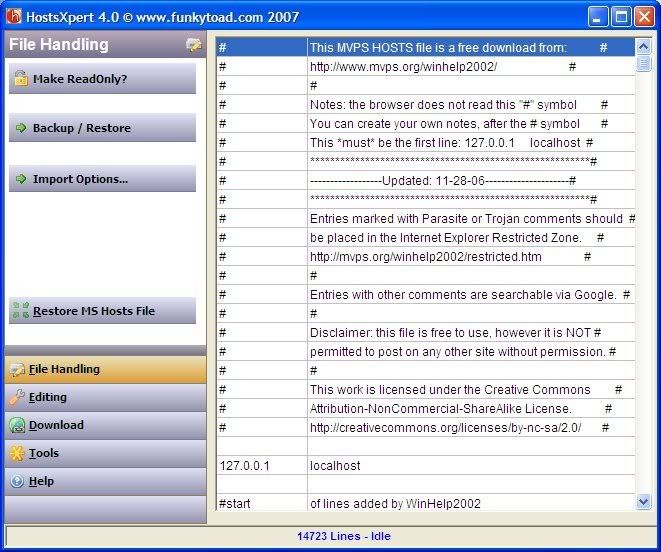
Please download HostsXpert
  • Unzip HostsXpert to it's own folder in a convenient place such as C:\HostsXpert
  • Run: HostsXpert.exe
  • Click: Restore MS Hosts File
  • Click: Replace
  • Click: OK
  • Click: Make ReadOnly
  • Close HostsXpert.

Note: If a custom Hosts file was in place, you will have to run those programs again to reset detections.
If needed Tutorial
Good Morning! :P Good News! For some reason, I don't think I have any redirecting sties anymore! :woot: Thank you sooo much for your patience and help! I really appreciate it! :D ~ YAYYYY !!! :notworthy:
We are not finish yet. We need to be sure.

Download TFC to your desktop
  • Close any open windows.
  • Double click the TFC icon to run the program
  • TFC will close all open programs itself in order to run,
  • Click the Start button to begin the process.
  • Allow TFC to run uninterrupted.
  • The program should not take long to finish it's job
  • Once its finished it should automatically reboot your machine,
  • if it doesn't, manually reboot to ensure a complete clean
===================================================

ESET Online Scanner
I'd like us to scan your machine with ESET OnlineScan

Note: If you are using Windows Vista/7, open your browser by right-clicking on its icon and select 'Run as administrator' to perform this scan.

*Note
It is recommended to disable onboard antivirus program and antispyware programs while performing scans so there are no conflicts and it will speed up scan time.
Please don't go surfing while your resident protection is disabled!
Once the scan is finished remember to re-enable your antivirus along with your antispyware programs.


  • Hold down Control and click on the following link to open ESET OnlineScan in a new window.
    ESET OnlineScan
  • Click the [external image: Posted Image] button.
  • For alternate browsers only: (Microsoft Internet Explorer users can skip these steps)
    • Click on [external image: Posted Image] to download the ESET Smart Installer. Save it to your desktop.
    • Double click on the [external image: Posted Image] icon on your desktop.
  • Check [external image: Posted Image]
  • Click the [external image: Posted Image] button.
  • Accept any security warnings from your browser.
  • Check [external image: Posted Image]
  • Make sure that the option "Remove found threats" is Unchecked
  • Push the Start button.
  • ESET will then download updates for itself, install itself, and begin
    scanning your computer. Please be patient as this can take some time.
  • When the scan completes, push [external image: Posted Image]
  • Push [external image: Posted Image], and save the file to your desktop using a unique name, such as MyEsetScan. Alternatively, look for report in C:\Program Files\ESET\ESET Online Scanner\log.txt. Include the contents of this report in your next reply.
  • Push the Back button.
  • Select Uninstall application on close check box and push [external image: Posted Image]
===================================================

Malwarebytes' Anti-Malware
Download Malwarebytes' Anti-Malware here and save to your desktop.
  • Double-click mbam-setup.exe and follow the prompts to install the program. (Note to Vista users, please right-click and select Run as Administrator.)
  • At the end, be sure a checkmark is placed next to:
    • Update Malwarebytes' Anti-Malware
    • Launch Malwarebytes' Anti-Malware
  • Then click Finish.
  • If an update is found, it will download and install the latest version.
  • Once the program has loaded, select Perform quick scan, then click Scan.
  • When the scan is complete, click OK, then Show Results to view the results.
  • Be sure that everything is checked, and click Remove Selected.
  • When completed, a log will open in Notepad. Please copy and paste the log back into your next reply
Note:
  • The log can also be found here:
    C:\Documents and Settings\Username\Application Data\Malwarebytes\Malwarebytes' Anti-Malware\Logs\mbam-log-date (time).txt
  • Or via the Logs tab when Malwarebytes' Anti-Malware is started.
Note: If MBAM encounters a file that is difficult to remove, you will be presented with 1 of 2 prompts.
Click OK to either and let MBAM proceed with the disinfection process.
If asked to restart the computer, please do so. Failure to reboot will prevent MBAM from removing all the malware.


===================================================

On your next reply please post :
ESET log
MBAM log


Please STOP and let me know if you have any problems in performing with the steps above or any questions you may have.

Good Day!
wait waittt ! ! For some reason, I found this: "Detected active malicious software Virus: MEM:Rootkit.Win32.TDSS.fa Location: System Memory" What do I do? :smack:
Okay ~ ~

Here is my EsetScan log:

C:\Users\Lily\Desktop\Desktop Stuff\Setup-MsgPlus-510.exe a variant of Win32/MessengerPlus.A application
C:\Users\Lily\Downloads\Game Booster v2.4.1.174 Full Version.rar a variant of Win32/Toolbar.Widgi application
C:\Users\Lily\Downloads\gb3-setup.exe a variant of Win32/Toolbar.Widgi application


And here is my mbam log:

Malwarebytes Anti-Malware 1.60.1.1000
www.malwarebytes.org

Database version: v2012.02.29.05

Windows 7 x64 NTFS
Internet Explorer 9.0.8112.16421
Lily :: LILY-PC [administrator]

2/29/2012 6:25:22 PM
mbam-log-2012-02-29 (18-25-22).txt

Scan type: Quick scan
Scan options enabled: Memory | Startup | Registry | File System | Heuristics/Extra | Heuristics/Shuriken | PUP | PUM
Scan options disabled: P2P
Objects scanned: 212316
Time elapsed: 3 minute(s), 49 second(s)

Memory Processes Detected: 1
C:\Windows\svchost.exe (Trojan.Agent) -> 1544 -> Delete on reboot.

Memory Modules Detected: 0
(No malicious items detected)

Registry Keys Detected: 0
(No malicious items detected)

Registry Values Detected: 0
(No malicious items detected)

Registry Data Items Detected: 0
(No malicious items detected)

Folders Detected: 0
(No malicious items detected)

Files Detected: 1
C:\Windows\svchost.exe (Trojan.Agent) -> Delete on reboot.

(end)

:)

Still having this problem?

This topic is from the What the Tech archive and can't take new replies. Geeks to Go is an active, free help community run by volunteers. Post your question there and a person, not a bot, will work through it with you.

Please don't run the tools or fix scripts from this topic on your computer. Malware fixes are written for one computer at one point in time and can do damage on another. Ask for help with your own computer instead.

Ask on Geeks to Go →