This is a read-only archive. No new posts or registrations. Privacy Page Still need help? Ask the volunteers at Geeks to Go, free.
Spyware / Malware / Virus Removal

ping.exe problem

17 min read

This thread's last reply is from . Advice, software, and links below may be out of date — treat specific steps and download links with caution.

Hi, so I believe I've recently come under the attack of malware on my laptop. It began when I received pop ups of fake "antivirus software" which I tried to remove to the best of my ability using McAfee and the best of my knowledge. Following these initial symptoms I noticed my computer began running slowly, so I opened task manager and found that PING.EXE was really using up my CPU memory so I ended the task. This remedied the problem for several minutes but then it began running again. I used the McAfee to completely block PING.EXE from making any incoming or outgoing internet connections. However, the problem still persists, and I've been trying to research to resolve this problem, ending with my current situation here on your forum. I am going to post some basic specs of my laptop and, subsequently, the DDS log copy and pasted below. I would greatly appreciate any help you could offer. Here are some basic specs for my machine: - Dell M1530 - Windows Vista (32 bit) - Intel Core Duo T9500 2.60 GHz - 4.00 GB of RAM - 256 MB NVIDIA GeForce Card . DDS (Ver_2011-08-26.01) - NTFSx86 Internet Explorer: 9.0.8112.16421 BrowserJavaVersion: 1.6.0_27 Run by [removed] at 16:15:33 on 2011-11-29 Microsoft® Windows Vista™ Home Premium 6.0.6002.2.1252.1.1033.18.3581.1825 [GMT -5:00] . AV: McAfee Anti-Virus and Anti-Spyware *Enabled/Updated* {86355677-4064-3EA7-ABB3-1B136EB04637} SP: Windows Defender *Disabled/Updated* {D68DDC3A-831F-4fae-9E44-DA132C1ACF46} SP: McAfee Anti-Virus and Anti-Spyware *Enabled/Updated* {3D54B793-665E-3129-9103-206115370C8A} FW: McAfee Firewall *Enabled* {BE0ED752-0A0B-3FFF-80EC-B2269063014C} . ============== Running Processes =============== . C:\Windows\system32\wininit.exe C:\Windows\system32\lsm.exe C:\Windows\system32\svchost.exe -k DcomLaunch C:\Windows\system32\nvvsvc.exe C:\Program Files\NVIDIA Corporation\3D Vision\nvSCPAPISvr.exe C:\Windows\system32\svchost.exe -k rpcss C:\Windows\System32\svchost.exe -k LocalServiceNetworkRestricted C:\Windows\System32\svchost.exe -k LocalSystemNetworkRestricted C:\Windows\system32\svchost.exe -k netsvcs C:\Windows\system32\svchost.exe -k GPSvcGroup C:\Windows\system32\SLsvc.exe C:\Windows\system32\svchost.exe -k LocalService C:\Windows\system32\svchost.exe -k NetworkService C:\Windows\System32\WLTRYSVC.EXE C:\Windows\system32\WLANExt.exe C:\Windows\System32\bcmwltry.exe C:\Program Files\NVIDIA Corporation\Display\nvxdsync.exe C:\Windows\system32\nvvsvc.exe C:\Windows\System32\spoolsv.exe C:\Program Files\Fingerprint Reader Suite\upeksvr.exe C:\Windows\system32\svchost.exe -k LocalServiceNoNetwork C:\Windows\system32\aestsrv.exe C:\Program Files\Belkin\Router Setup and Monitor\BelkinService.exe C:\Program Files\Common Files\Apple\Mobile Device Support\AppleMobileDeviceService.exe C:\Program Files\Bonjour\mDNSResponder.exe C:\Windows\system32\svchost.exe -k bthsvcs C:\Program Files\Intel\Intel Matrix Storage Manager\Iaantmon.exe C:\Program Files\Common Files\Mcafee\McSvcHost\McSvHost.exe C:\Windows\system32\mfevtps.exe C:\Windows\system32\PnkBstrA.exe C:\Windows\system32\rundll32.exe C:\Windows\system32\svchost.exe -k NetworkServiceNetworkRestricted C:\Program Files\Microsoft\BingBar\SeaPort.EXE C:\Windows\system32\STacSV.exe C:\Windows\system32\svchost.exe -k imgsvc C:\Windows\System32\svchost.exe -k WerSvcGroup C:\Program Files\Common Files\Microsoft Shared\Windows Live\WLIDSVC.EXE C:\Windows\system32\SearchIndexer.exe C:\Program Files\Common Files\McAfee\SystemCore\mcshield.exe C:\Program Files\Common Files\McAfee\SystemCore\mfefire.exe C:\Program Files\Common Files\Microsoft Shared\Windows Live\WLIDSvcM.exe C:\Windows\system32\taskeng.exe C:\Windows\system32\Dwm.exe C:\Windows\system32\taskeng.exe C:\Windows\Explorer.EXE C:\Program Files\DellTPad\Apoint.exe C:\Program Files\DellTPad\ApMsgFwd.exe C:\Windows\OEM02Mon.exe C:\Windows\System32\WLTRAY.EXE C:\Program Files\DellTPad\HidFind.exe C:\Program Files\Intel\Intel Matrix Storage Manager\IAAnotif.exe C:\Program Files\DellTPad\Apntex.exe C:\Program Files\Dell\MediaDirect\PCMService.exe C:\Program Files\Sigmatel\C-Major Audio\WDM\sttray.exe C:\Program Files\Citrix\ICA Client\concentr.exe C:\Program Files\NVIDIA Corporation\Display\nvtray.exe C:\Program Files\McAfee.com\Agent\mcagent.exe C:\Program Files\Hp\HP Software Update\hpwuSchd2.exe C:\Program Files\Fingerprint Reader Suite\psqltray.exe C:\Program Files\iTunes\iTunesHelper.exe C:\Program Files\DellSupport\DSAgnt.exe C:\Program Files\Citrix\ICA Client\wfcrun32.exe C:\Program Files\Dell\QuickSet\quickset.exe C:\Windows\system32\wbem\wmiprvse.exe C:\Program Files\iPod\bin\iPodService.exe C:\Windows\system32\svchost.exe -k LocalServiceAndNoImpersonation C:\Program Files\McAfee Online Backup\MOBKbackup.exe C:\Program Files\McAfee Online Backup\MOBKbackup.exe C:\Program Files\NVIDIA Corporation\NVIDIA Updatus\daemonu.exe C:\Program Files\Windows Media Player\wmpnetwk.exe C:\Program Files\DivX\DivX Update\DivXUpdate.exe c:\PROGRA~1\mcafee\msc\mcupdmgr.exe c:\PROGRA~1\mcafee.com\agent\McUpdate.exe C:\Program Files\Common Files\Apple\Apple Application Support\distnoted.exe C:\Program Files\Common Files\Apple\Mobile Device Support\SyncServer.exe C:\Program Files\Mozilla Firefox\firefox.exe C:\Program Files\Mozilla Firefox\plugin-container.exe C:\Program Files\Mozilla Firefox\plugin-container.exe C:\Program Files\Creative Live! Cam\VideoFX\StartFX.exe C:\Windows\system32\taskmgr.exe C:\Windows\system32\SearchProtocolHost.exe C:\Windows\system32\SearchFilterHost.exe C:\Windows\explorer.exe C:\Windows\system32\wbem\wmiprvse.exe . ============== Pseudo HJT Report =============== . uSearch Bar = Preserve uWindow Title = Internet Explorer provided by Dell uStart Page = hxxp://www.facebook.com/ uDefault_Page_URL = hxxp://www.dell.com mStart Page = hxxp://www.dell.com mDefault_Page_URL = hxxp://www.dell.com uInternet Settings,ProxyOverride = ;*.local BHO: Adobe PDF Link Helper: {18df081c-e8ad-4283-a596-fa578c2ebdc3} - c:\program files\common files\adobe\acrobat\activex\AcroIEHelperShim.dll BHO: DivX Plus Web Player HTML5 : {326e768d-4182-46fd-9c16-1449a49795f4} - c:\program files\divx\divx plus web player\npdivx32.dll BHO: DivX HiQ: {593ddec6-7468-4cdd-90e1-42dadaa222e9} - c:\program files\divx\divx plus web player\npdivx32.dll BHO: SSVHelper Class: {761497bb-d6f0-462c-b6eb-d4daf1d92d43} - c:\program files\java\jre6\bin\ssv.dll BHO: scriptproxy: {7db2d5a0-7241-4e79-b68d-6309f01c5231} - c:\program files\common files\mcafee\systemcore\ScriptSn.20111109235013.dll BHO: Windows Live ID Sign-in Helper: {9030d464-4c02-4abf-8ecc-5164760863c6} - c:\program files\common files\microsoft shared\windows live\WindowsLiveLogin.dll BHO: Skype Browser Helper: {ae805869-2e5c-4ed4-8f7b-f1f7851a4497} - c:\program files\skype\toolbars\internet explorer\skypeieplugin.dll BHO: McAfee SiteAdvisor BHO: {b164e929-a1b6-4a06-b104-2cd0e90a88ff} - c:\progra~1\mcafee\sitead~1\mcieplg.dll BHO: Bing Bar Helper: {d2ce3e00-f94a-4740-988e-03dc2f38c34f} - "c:\program files\microsoft\bingbar\BingExt.dll" BHO: Java™ Plug-In 2 SSV Helper: {dbc80044-a445-435b-bc74-9c25c1c588a9} - c:\program files\java\jre6\bin\jp2ssv.dll BHO: HP Smart BHO Class: {ffffffff-cf4e-4f2b-bdc2-0e72e116a856} - c:\program files\hp\digital imaging\smart web printing\hpswp_BHO.dll TB: Bing Bar: {8dcb7100-df86-4384-8842-8fa844297b3f} - "c:\program files\microsoft\bingbar\BingExt.dll" TB: McAfee SiteAdvisor Toolbar: {0ebbbe48-bad4-4b4c-8e5a-516abecae064} - c:\progra~1\mcafee\sitead~1\mcieplg.dll TB: {21FA44EF-376D-4D53-9B0F-8A89D3229068} - No File uRun: [DellSupport] "c:\program files\dellsupport\DSAgnt.exe" /startup uRun: [ctfmon.exe] c:\windows\system32\ctfmon.exe uRun: [1311663257] c:\users\joe genchi\appdata\local\tep.exe uRun: [ooVoo.exe] c:\program files\oovoo\oovoo.exe /minimized mRun: [Windows Defender] %ProgramFiles%\Windows Defender\MSASCui.exe -hide mRun: [Apoint] c:\program files\delltpad\Apoint.exe mRun: [OEM02Mon.exe] c:\windows\OEM02Mon.exe mRun: [Broadcom Wireless Manager UI] c:\windows\system32\WLTRAY.exe mRun: [PSQLLauncher] "c:\program files\fingerprint reader suite\launcher.exe" /startup mRun: [IAAnotif] "c:\program files\intel\intel matrix storage manager\Iaanotif.exe" mRun: [PCMService] "c:\program files\dell\mediadirect\PCMService.exe" mRun: [hpqSRMon] mRun: [SigmatelSysTrayApp] %ProgramFiles%\SigmaTel\C-Major Audio\WDM\sttray.exe mRun: [ConnectionCenter] "c:\program files\citrix\ica client\concentr.exe" /startup mRun: [Adobe Reader Speed Launcher] "c:\program files\adobe\reader 9.0\reader\Reader_sl.exe" mRun: [Adobe ARM] "c:\program files\common files\adobe\arm\1.0\AdobeARM.exe" mRun: [mcui_exe] "c:\program files\mcafee.com\agent\mcagent.exe" /runkey mRun: [InstaLAN] "c:\program files\belkin\router setup and monitor\BelkinRouterMonitor.exe" startup mRun: [SunJavaUpdateSched] "c:\program files\java\jre6\bin\jusched.exe" mRun: [NVHotkey] rundll32.exe c:\windows\system32\nvHotkey.dll,Start mRun: [APSDaemon] "c:\program files\common files\apple\apple application support\APSDaemon.exe" mRun: [HP Software Update] c:\program files\hp\hp software update\HPWuSchd2.exe mRun: [QuickTime Task] "c:\program files\quicktime\QTTask.exe" -atboottime mRun: [iTunesHelper] "c:\program files\itunes\iTunesHelper.exe" StartupFolder: c:\users\joegen~1\appdata\roaming\micros~1\windows\startm~1\programs\startup\quickset.lnk - c:\windows\installer\{4b6ad248-d3bf-426a-8d64-847288154f13}\NewShortcut1_53A01CC614B04512A2E710D39BF83DC4.exe uPolicies-explorer: HideSCAHealth = 1 (0x1) mPolicies-explorer: BindDirectlyToPropertySetStorage = 0 (0x0) mPolicies-system: EnableLUA = 0 (0x0) mPolicies-system: EnableUIADesktopToggle = 0 (0x0) mPolicies-system: DisableCAD = 1 (0x1) IE: {CCA281CA-C863-46ef-9331-5C8D4460577F} - c:\program files\widcomm\bluetooth software\btsendto_ie.htm IE: {08B0E5C0-4FCB-11CF-AAA5-00401C608501} - {CAFEEFAC-0016-0000-0027-ABCDEFFEDCBC} - c:\program files\java\jre6\bin\ssv.dll IE: {219C3416-8CB2-491a-A3C7-D9FCDDC9D600} - {5F7B1267-94A9-47F5-98DB-E99415F33AEC} - c:\program files\windows live\writer\WriterBrowserExtension.dll IE: {898EA8C8-E7FF-479B-8935-AEC46303B9E5} - {898EA8C8-E7FF-479B-8935-AEC46303B9E5} - c:\program files\skype\toolbars\internet explorer\skypeieplugin.dll IE: {92780B25-18CC-41C8-B9BE-3C9C571A8263} - {FF059E31-CC5A-4E2E-BF3B-96E929D65503} - c:\progra~1\micros~3\office12\REFIEBAR.DLL IE: {DDE87865-83C5-48c4-8357-2F5B1AA84522} - {DDE87865-83C5-48c4-8357-2F5B1AA84522} - c:\program files\hp\digital imaging\smart web printing\hpswp_BHO.dll LSP: mswsock.dll DPF: {39B0684F-D7BF-4743-B050-FDC3F48F7E3B} - hxxp://www.fileplanet.com/fpdlmgr/cabs/FPDC_2.3.10.115.cab DPF: {8AD9C840-044E-11D1-B3E9-00805F499D93} - hxxp://java.sun.com/update/1.6.0/jinstall-1_6_0_27-windows-i586.cab DPF: {C1F8FC10-E5DB-4112-9DBF-6C3FF728D4E3} - hxxp://support.dell.com/systemprofiler/DellSystemLite.CAB DPF: {CAFEEFAC-0016-0000-0027-ABCDEFFEDCBA} - hxxp://java.sun.com/update/1.6.0/jinstall-1_6_0_27-windows-i586.cab DPF: {CAFEEFAC-FFFF-FFFF-FFFF-ABCDEFFEDCBA} - hxxp://java.sun.com/update/1.6.0/jinstall-1_6_0_27-windows-i586.cab DPF: {E2883E8F-472F-4FB0-9522-AC9BF37916A7} - hxxp://platformdl.adobe.com/NOS/getPlusPlus/1.6/gp.cab TCP: DhcpNameServer = 172.16.193.63 172.16.193.62 172.16.193.65 10.52.50.100 TCP: Interfaces\{4F4CAD1F-114E-402E-BBFF-ABAF901A4CE7} : DhcpNameServer = [removed] [removed] TCP: Interfaces\{C59CA413-0216-4A31-8E70-AA4702589AC1} : DhcpNameServer = 172.16.193.63 172.16.193.62 172.16.193.65 10.52.50.100 Filter: application/x-ica - {CFB6322E-CC85-4d1b-82C7-893888A236BC} - c:\program files\citrix\ica client\IcaMimeFilter.dll Filter: application/x-mfe-ipt - {3EF5086B-5478-4598-A054-786C45D75692} - c:\progra~1\mcafee\msc\McSnIePl.dll Filter: ica - {CFB6322E-CC85-4d1b-82C7-893888A236BC} - c:\program files\citrix\ica client\IcaMimeFilter.dll Handler: dssrequest - {5513F07E-936B-4E52-9B00-067394E91CC5} - c:\progra~1\mcafee\sitead~1\McIEPlg.dll Handler: sacore - {5513F07E-936B-4E52-9B00-067394E91CC5} - c:\progra~1\mcafee\sitead~1\McIEPlg.dll Handler: skype-ie-addon-data - {91774881-D725-4E58-B298-07617B9B86A8} - c:\program files\skype\toolbars\internet explorer\skypeieplugin.dll Handler: wlpg - {E43EF6CD-A37A-4A9B-9E6F-83F89B8E6324} - c:\program files\windows live\photo gallery\AlbumDownloadProtocolHandler.dll Notify: psfus - c:\windows\system32\psqlpwd.dll LSA: Notification Packages = scecli psqlpwd . ================= FIREFOX =================== . FF - ProfilePath - c:\users\joe genchi\appdata\roaming\mozilla\firefox\profiles\kxtnu09s.default\ FF - prefs.js: browser.startup.homepage - hxxp://www.google.com/ FF - plugin: c:\progra~1\mcafee\msc\npMcSnFFPl.dll FF - plugin: c:\program files\adobe\reader 9.0\reader\air\nppdf32.dll FF - plugin: c:\program files\divx\divx ovs helper\npovshelper.dll FF - plugin: c:\program files\divx\divx plus web player\npdivx32.dll FF - plugin: c:\program files\download manager\npfpdlm.dll FF - plugin: c:\program files\google\google earth\plugin\npgeplugin.dll FF - plugin: c:\program files\google\update\1.2.183.39\npGoogleOneClick8.dll FF - plugin: c:\program files\java\jre6\bin\new_plugin\npdeployJava1.dll FF - plugin: c:\program files\mcafee\siteadvisor\NPMcFFPlg32.dll FF - plugin: c:\program files\microsoft silverlight\4.0.60831.0\npctrlui.dll FF - plugin: c:\program files\mozilla firefox\plugins\npdeployJava1.dll FF - plugin: c:\program files\mozilla firefox\plugins\npdnu.dll FF - plugin: c:\program files\mozilla firefox\plugins\npdnupdater2.dll FF - plugin: c:\program files\mozilla firefox\plugins\npicaN.dll FF - plugin: c:\program files\nvidia corporation\3d vision\npnv3dv.dll FF - plugin: c:\program files\nvidia corporation\3d vision\npnv3dvstreaming.dll FF - plugin: c:\program files\windows live\photo gallery\NPWLPG.dll . —- FIREFOX POLICIES —- FF - user.js: network.protocol-handler.warn-external.dnupdate - false);user_pref(network.protocol-handler.warn-external.dnupdate, false);user_pref(network.protocol-handler.warn-external.dnupdate, false ============= SERVICES / DRIVERS =============== . R0 mfehidk;McAfee Inc. mfehidk;c:\windows\system32\drivers\mfehidk.sys [2011-3-13 464176] R1 ctxusbm;Citrix USB Monitor Driver;c:\windows\system32\drivers\ctxusbm.sys [2009-10-5 65584] R1 mfenlfk;McAfee NDIS Light Filter;c:\windows\system32\drivers\mfenlfk.sys [2011-8-10 64880] R1 mfewfpk;McAfee Inc. mfewfpk;c:\windows\system32\drivers\mfewfpk.sys [2011-8-10 165680] R1 MOBKFilter;MOBKFilter;c:\windows\system32\drivers\MOBK.sys [2011-8-10 54776] R3 cfwids;McAfee Inc. cfwids;c:\windows\system32\drivers\cfwids.sys [2011-8-10 57600] R3 mfeavfk;McAfee Inc. mfeavfk;c:\windows\system32\drivers\mfeavfk.sys [2011-9-17 180816] R3 mfebopk;McAfee Inc. mfebopk;c:\windows\system32\drivers\mfebopk.sys [2011-8-10 59456] R3 mfefirek;McAfee Inc. mfefirek;c:\windows\system32\drivers\mfefirek.sys [2011-8-10 338176] S3 fssfltr;FssFltr;c:\windows\system32\drivers\fssfltr.sys [2010-10-19 39272] S3 mferkdet;McAfee Inc. mferkdet;c:\windows\system32\drivers\mferkdet.sys [2011-8-10 87656] S3 ssmirrdr;ssmirrdr;c:\windows\system32\drivers\ssmirrdr.sys [2009-12-14 10112] S4 iaNvStor;Intel® Turbo Memory Controller;c:\windows\system32\drivers\iaNvStor.sys [2008-10-6 209408] . =============== Created Last 30 ================ . 2072-07-31 21:44:42 375808 —-a-w- c:\program files\microsoft games\halo\binkw32.dll 2011-11-29 13:33:12 388096 —-a-r- c:\users\joe genchi\appdata\roaming\microsoft\installer\{45a66726-69bc-466b-a7a4-12fcba4883d7}\HiJackThis.exe 2011-11-29 13:33:10 ——– d—–w- c:\program files\Trend Micro 2011-11-28 19:11:01 ——– d—–w- c:\users\joe genchi\appdata\local\{B05486FC-D89F-4FFB-849F-EBAC1376269F} 2011-11-28 19:10:29 ——– d—–w- c:\users\joe genchi\appdata\local\{36E59787-91E3-431C-A4A3-C0CCBEDB33A5} 2011-11-24 16:23:23 ——– d—–w- c:\program files\iPod 2011-11-24 15:08:33 ——– d—–w- c:\users\joe genchi\appdata\roaming\wqjUCekIBzNx0 2011-11-24 15:08:32 ——– d—–w- c:\users\joe genchi\appdata\roaming\YF3pmG5aQ6W8R9T 2011-11-24 14:29:10 ——– d—–w- c:\users\joe genchi\appdata\roaming\TUUUVellItzPNc1 2011-11-24 14:29:09 ——– d—–w- c:\users\joe genchi\appdata\roaming\xsQQQJ7dEK8gR9Y 2011-11-24 14:28:56 ——– d—–w- c:\users\joe genchi\appdata\roaming\J0uuvvS2ibFp 2011-11-24 14:28:55 ——– d—–w- c:\users\joe genchi\appdata\roaming\OFF44pmmG5 2011-11-22 18:54:17 ——– d—–w- c:\users\joe genchi\appdata\local\{EC5AA379-8C4E-4CD0-AC5F-8E27C69C36CF} 2011-11-09 02:31:01 2409784 —-a-w- c:\program files\windows mail\OESpamFilter.dat 2011-11-09 02:30:56 905088 —-a-w- c:\windows\system32\drivers\tcpip.sys 2011-11-09 02:30:54 707584 —-a-w- c:\program files\common files\system\wab32.dll 2011-11-03 05:39:20 729088 —-a-w- c:\windows\system32\hpowiax7.dll 2011-11-03 05:39:20 581632 —-a-w- c:\windows\system32\hpotscl6.dll 2011-11-03 05:39:20 372736 —-a-w- c:\windows\system32\hppldcoi.dll 2011-11-03 05:39:20 309760 —-a-w- c:\windows\system32\difxapi.dll 2011-11-03 05:39:20 303104 —-a-w- c:\windows\system32\hpovst15.dll 2011-11-03 04:11:12 ——– d—–w- c:\windows\Hewlett-Packard 2011-11-03 02:22:58 ——– d—–w- c:\program files\Hp 2011-11-02 04:31:49 ——– d—–w- c:\users\joe genchi\appdata\roaming\NVIDIA 2011-11-02 01:33:00 ——– d—–w- c:\program files\Facade . ==================== Find3M ==================== . 2011-11-15 14:19:34 414368 —-a-w- c:\windows\system32\FlashPlayerCPLApp.cpl 2011-10-24 18:29:02 94208 —-a-w- c:\windows\system32\QuickTimeVR.qtx 2011-10-24 18:29:02 69632 —-a-w- c:\windows\system32\QuickTime.qts 2011-10-18 19:32:30 150856 —-a-w- c:\windows\system32\mfevtps.exe 2011-10-15 18:16:16 9608 —-a-w- c:\windows\system32\drivers\mfeclnk.sys 2011-10-15 18:16:16 87656 —-a-w- c:\windows\system32\drivers\mferkdet.sys 2011-10-15 18:16:16 64880 —-a-w- c:\windows\system32\drivers\mfenlfk.sys 2011-10-15 18:16:16 59456 —-a-w- c:\windows\system32\drivers\mfebopk.sys 2011-10-15 18:16:16 57600 —-a-w- c:\windows\system32\drivers\cfwids.sys 2011-10-15 18:16:16 464176 —-a-w- c:\windows\system32\drivers\mfehidk.sys 2011-10-15 18:16:16 338176 —-a-w- c:\windows\system32\drivers\mfefirek.sys 2011-10-15 18:16:16 180816 —-a-w- c:\windows\system32\drivers\mfeavfk.sys 2011-10-15 18:16:16 165680 —-a-w- c:\windows\system32\drivers\mfewfpk.sys 2011-10-15 18:16:16 121256 —-a-w- c:\windows\system32\drivers\mfeapfk.sys 2011-09-27 16:44:55 472808 —-a-w- c:\windows\system32\deployJava1.dll 2011-09-08 17:21:09 138520 —-a-w- c:\windows\system32\drivers\PnkBstrK.sys 2011-09-08 17:20:55 234536 —-a-w- c:\windows\system32\PnkBstrB.xtr 2011-09-08 17:20:55 234536 —-a-w- c:\windows\system32\PnkBstrB.exe 2011-09-08 17:17:16 189472 —-a-w- c:\windows\system32\PnkBstrB.ex0 2011-09-08 17:00:54 138056 —-a-w- c:\users\joe genchi\appdata\roaming\PnkBstrK.sys 2011-09-08 17:00:24 75136 —-a-w- c:\windows\system32\PnkBstrA.exe 2011-09-08 16:59:48 837192 —-a-w- c:\windows\system32\pbsvc.exe 2011-09-06 13:30:12 2043392 —-a-w- c:\windows\system32\win32k.sys 2011-09-01 02:35:59 1798144 —-a-w- c:\windows\system32\jscript9.dll 2011-09-01 02:28:15 1126912 —-a-w- c:\windows\system32\wininet.dll 2011-09-01 02:22:54 2382848 —-a-w- c:\windows\system32\mshtml.tlb . ============= FINISH: 16:17:48.26 =============== Thanks again for any help you can provide.

Hello and Posted Image

My name is patndoris. I will be glad to take a look at your log and help you with solving any malware problems. It will be very helpful if you follow these guidelines:
  • Malware logs are often lengthy and can take a lot of time to research and interpret. Please be patient while I review your logs.
  • Please note that there is no "Quick Fix" to modern malware infections and we may need to use several different approaches to get your system clean.
  • Please make sure to carefully read any instruction that I give you. If you're not sure, or if something unexpected happens, do NOT continue! Stop and ask!
  • Please follow my instructions carefully and in the order they are posted. You may also find it helpful to print out the instructions you receive.
  • Please do not run any scans or install/uninstall any applications or delete anything without being directed to do so.
  • Remember, absence of symptoms does not mean the infection is all gone. Please stick with me till you're given the "all clear".
  • Please do not use the Attachment feature for any log file. Do a Copy/Paste of the entire contents of the log file and submit it inside your post.
  • Please reply within 3 days. If I do not hear back from you in that time frame, I will post a reminder for you. Topics with no reply in 4 days are closed!


DDS should have also created an attach.txt file on your desktop. Can you please post the contents of that as well?


I can see evidence of a particular kind of infection on your machine that can be a bit challenging to remove. The problem is that it does not affect any two machines quite the same, so it can take many steps to fully remove. I need to get one more log so that I have all the information I need to attack this problem.


Please read carefully and follow these steps. There is a difference between what you see in one of the images below and what I need you to do.
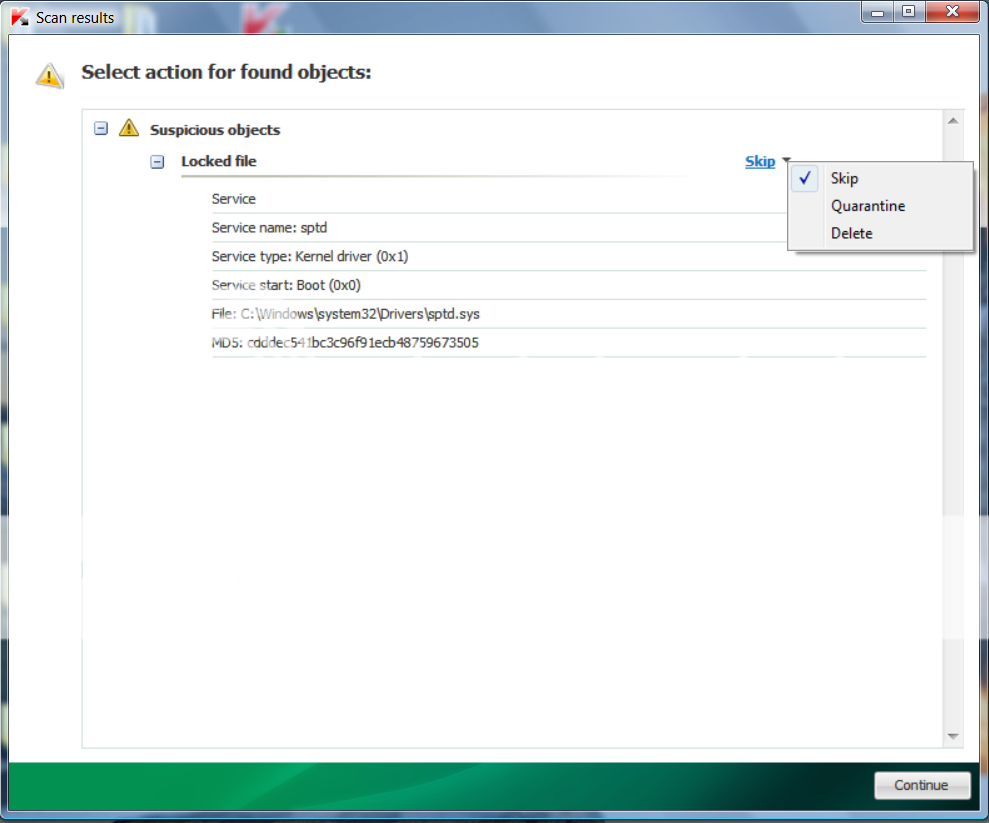
We are only creating a log - I do NOT want you to "cure" or try to fix anything in this step. It is very important that you don't choose Cure when presented with that option.

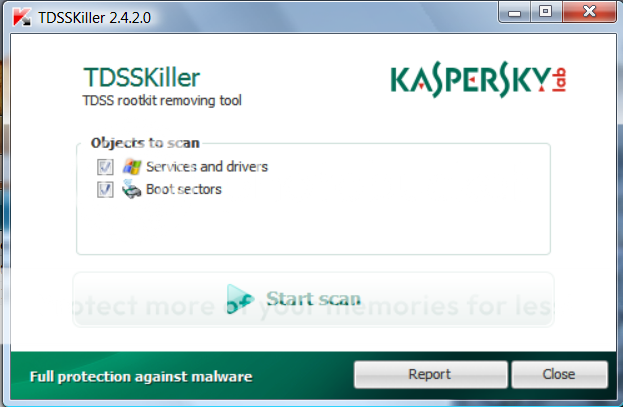
  • Download TDSSKiller and save it to your Desktop.
  • Extract its contents to your desktop.
  • Once extracted, open the TDSSKiller folder and doubleclick on TDSSKiller.exe to run the application, then on Start Scan.


    🖼Click to load external image (Posted Image)

  • If an infected file is detected, the default action will be Cure but I want you to choose SKIP instead , click on Continue.


    🖼Click to load external image (Posted Image)

  • If a suspicious file is detected, the default action will be Skip, click on Continue.


    🖼Click to load external image (Posted Image)

  • It may ask you to reboot the computer to complete the process. Click on Reboot Now.


    🖼Click to load external image (Posted Image)

  • If no reboot is require, click on Report. A log file should appear. Please copy and paste the contents of that file here.
  • If a reboot is required, the report can also be found in your root directory, (usually C:\ folder) in the form of "TDSSKiller.[Version]_[Date]_[Time]_log.txt". Please copy and paste the contents of that file here.
Hi patndoris! I appreciate the quick reply! Ok so in your instructions you stated that you wanted the log file from DDS as well as TDSSKiller. However the attach.txt log file says that if it is requested, I zip it and attach it to the post. So I have done just that. If that is a problem, I can copy and paste into a post also, just let me know. I have also posted the log from TDSSKiller below. 19:26:39.0407 3140 TDSS rootkit removing tool 2.6.21.0 Nov 24 2011 12:32:44 19:26:40.0261 3140 ============================================================ 19:26:40.0261 3140 Current date / time: 2011/11/30 19:26:40.0261 19:26:40.0261 3140 SystemInfo: 19:26:40.0261 3140 19:26:40.0261 3140 OS Version: 6.0.6002 ServicePack: 2.0 19:26:40.0261 3140 Product type: Workstation 19:26:40.0262 3140 ComputerName: JOEGENCHI-PC 19:26:40.0269 3140 UserName: Joe Genchi 19:26:40.0269 3140 Windows directory: C:\Windows 19:26:40.0269 3140 System windows directory: C:\Windows 19:26:40.0269 3140 Processor architecture: Intel x86 19:26:40.0269 3140 Number of processors: 2 19:26:40.0269 3140 Page size: 0x1000 19:26:40.0269 3140 Boot type: Normal boot 19:26:40.0269 3140 ============================================================ 19:26:40.0992 3140 Initialize success 19:31:36.0391 2880 ============================================================ 19:31:36.0392 2880 Scan started 19:31:36.0392 2880 Mode: Manual; 19:31:36.0392 2880 ============================================================ 19:31:36.0850 2880 ACPI (82b296ae1892fe3dbee00c9cf92f8ac7) C:\Windows\system32\drivers\acpi.sys 19:31:36.0851 2880 ACPI - ok 19:31:36.0904 2880 adp94xx (04f0fcac69c7c71a3ac4eb97fafc8303) C:\Windows\system32\drivers\adp94xx.sys 19:31:36.0911 2880 adp94xx - ok 19:31:36.0949 2880 adpahci (60505e0041f7751bdbb80f88bf45c2ce) C:\Windows\system32\drivers\adpahci.sys 19:31:36.0954 2880 adpahci - ok 19:31:36.0988 2880 adpu160m (8a42779b02aec986eab64ecfc98f8bd7) C:\Windows\system32\drivers\adpu160m.sys 19:31:36.0992 2880 adpu160m - ok 19:31:37.0016 2880 adpu320 (241c9e37f8ce45ef51c3de27515ca4e5) C:\Windows\system32\drivers\adpu320.sys 19:31:37.0021 2880 adpu320 - ok 19:31:37.0076 2880 AFD (3911b972b55fea0478476b2e777b29fa) C:\Windows\system32\drivers\afd.sys 19:31:37.0192 2880 AFD - ok 19:31:37.0301 2880 agp440 (13f9e33747e6b41a3ff305c37db0d360) C:\Windows\system32\drivers\agp440.sys 19:31:37.0305 2880 agp440 - ok 19:31:37.0339 2880 aic78xx (ae1fdf7bf7bb6c6a70f67699d880592a) C:\Windows\system32\drivers\djsvs.sys 19:31:37.0343 2880 aic78xx - ok 19:31:37.0383 2880 aliide (9eaef5fc9b8e351afa7e78a6fae91f91) C:\Windows\system32\drivers\aliide.sys 19:31:37.0388 2880 aliide - ok 19:31:37.0413 2880 amdagp (c47344bc706e5f0b9dce369516661578) C:\Windows\system32\drivers\amdagp.sys 19:31:37.0416 2880 amdagp - ok 19:31:37.0426 2880 amdide (9b78a39a4c173fdbc1321e0dd659b34c) C:\Windows\system32\drivers\amdide.sys 19:31:37.0433 2880 amdide - ok 19:31:37.0459 2880 AmdK7 (18f29b49ad23ecee3d2a826c725c8d48) C:\Windows\system32\drivers\amdk7.sys 19:31:37.0461 2880 AmdK7 - ok 19:31:37.0478 2880 AmdK8 (93ae7f7dd54ab986a6f1a1b37be7442d) C:\Windows\system32\drivers\amdk8.sys 19:31:37.0481 2880 AmdK8 - ok 19:31:37.0513 2880 ApfiltrService (350f19eb5fe4ec37a2414df56cde1aa8) C:\Windows\system32\DRIVERS\Apfiltr.sys 19:31:37.0554 2880 ApfiltrService - ok 19:31:37.0641 2880 arc (5d2888182fb46632511acee92fdad522) C:\Windows\system32\drivers\arc.sys 19:31:37.0644 2880 arc - ok 19:31:37.0662 2880 arcsas (5e2a321bd7c8b3624e41fdec3e244945) C:\Windows\system32\drivers\arcsas.sys 19:31:37.0667 2880 arcsas - ok 19:31:37.0701 2880 AsyncMac (53b202abee6455406254444303e87be1) C:\Windows\system32\DRIVERS\asyncmac.sys 19:31:37.0702 2880 AsyncMac - ok 19:31:37.0738 2880 atapi (1f05b78ab91c9075565a9d8a4b880bc4) C:\Windows\system32\drivers\atapi.sys 19:31:37.0741 2880 atapi - ok 19:31:37.0777 2880 BCM42RLY (7bd70aeed0d975285a1b20bd012ebf4e) C:\Windows\system32\drivers\BCM42RLY.sys 19:31:37.0854 2880 BCM42RLY - ok 19:31:37.0911 2880 BCM43XX (fa6707a346cd122407f3b0bad1c47639) C:\Windows\system32\DRIVERS\bcmwl6.sys 19:31:37.0917 2880 BCM43XX - ok 19:31:37.0956 2880 Beep (67e506b75bd5326a3ec7b70bd014dfb6) C:\Windows\system32\drivers\Beep.sys 19:31:37.0957 2880 Beep - ok 19:31:38.0043 2880 blbdrive (d4df28447741fd3d953526e33a617397) C:\Windows\system32\drivers\blbdrive.sys 19:31:38.0046 2880 blbdrive - ok 19:31:38.0116 2880 bowser (35f376253f687bde63976ccb3f2108ca) C:\Windows\system32\DRIVERS\bowser.sys 19:31:38.0167 2880 bowser - ok 19:31:38.0215 2880 BrFiltLo (9f9acc7f7ccde8a15c282d3f88b43309) C:\Windows\system32\drivers\brfiltlo.sys 19:31:38.0220 2880 BrFiltLo - ok 19:31:38.0258 2880 BrFiltUp (56801ad62213a41f6497f96dee83755a) C:\Windows\system32\drivers\brfiltup.sys 19:31:38.0264 2880 BrFiltUp - ok 19:31:38.0310 2880 Bridge (b1564976d98e91fc764d5dc28a0297da) C:\Windows\system32\DRIVERS\bridge.sys 19:31:38.0315 2880 Bridge - ok 19:31:38.0326 2880 BridgeMP (b1564976d98e91fc764d5dc28a0297da) C:\Windows\system32\DRIVERS\bridge.sys 19:31:38.0331 2880 BridgeMP - ok 19:31:38.0375 2880 Brserid (b304e75cff293029eddf094246747113) C:\Windows\system32\drivers\brserid.sys 19:31:38.0383 2880 Brserid - ok 19:31:38.0427 2880 BrSerWdm (203f0b1e73adadbbb7b7b1fabd901f6b) C:\Windows\system32\drivers\brserwdm.sys 19:31:38.0433 2880 BrSerWdm - ok 19:31:38.0491 2880 BrUsbMdm (bd456606156ba17e60a04e18016ae54b) C:\Windows\system32\drivers\brusbmdm.sys 19:31:38.0494 2880 BrUsbMdm - ok 19:31:38.0521 2880 BrUsbSer (af72ed54503f717a43268b3cc5faec2e) C:\Windows\system32\drivers\brusbser.sys 19:31:38.0528 2880 BrUsbSer - ok 19:31:38.0580 2880 BthEnum (6d39c954799b63ba866910234cf7d726) C:\Windows\system32\DRIVERS\BthEnum.sys 19:31:38.0584 2880 BthEnum - ok 19:31:38.0633 2880 BTHMODEM (ad07c1ec6665b8b35741ab91200c6b68) C:\Windows\system32\drivers\bthmodem.sys 19:31:38.0638 2880 BTHMODEM - ok 19:31:38.0677 2880 BthPan (5904efa25f829bf84ea6fb045134a1d8) C:\Windows\system32\DRIVERS\bthpan.sys 19:31:38.0683 2880 BthPan - ok 19:31:38.0741 2880 BTHPORT (611ff3f2f095c8d4a6d4cfd9dcc09793) C:\Windows\system32\Drivers\BTHport.sys 19:31:38.0869 2880 BTHPORT - ok 19:31:38.0937 2880 BTHUSB (d330803eab2a15caec7f011f1d4cb30e) C:\Windows\system32\Drivers\BTHUSB.sys 19:31:39.0032 2880 BTHUSB - ok 19:31:39.0109 2880 btwaudio (4a28e7bd365377d0512b7ef8c7596d2c) C:\Windows\system32\drivers\btwaudio.sys 19:31:39.0148 2880 btwaudio - ok 19:31:39.0176 2880 btwavdt (5ffde57253d665067b0886612817eb11) C:\Windows\system32\drivers\btwavdt.sys 19:31:39.0255 2880 btwavdt - ok 19:31:39.0294 2880 btwrchid (ab07dc8b05c31a4f95fc73019be9db15) C:\Windows\system32\DRIVERS\btwrchid.sys 19:31:39.0388 2880 btwrchid - ok 19:31:39.0441 2880 cdfs (7add03e75beb9e6dd102c3081d29840a) C:\Windows\system32\DRIVERS\cdfs.sys 19:31:39.0441 2880 cdfs - ok 19:31:39.0491 2880 cdrom (32a4dab183624a6d0a2f17bd304afbf4) C:\Windows\system32\DRIVERS\cdrom.sys 19:31:39.0591 2880 cdrom ( Rootkit.Win32.ZAccess.k ) - infected 19:31:39.0592 2880 cdrom - detected Rootkit.Win32.ZAccess.k (0) 19:31:39.0676 2880 cfwids (1dcb5209601a70e36c70fe8d197d62cb) C:\Windows\system32\drivers\cfwids.sys 19:31:39.0677 2880 cfwids - ok 19:31:39.0734 2880 circlass (e5d4133f37219dbcfe102bc61072589d) C:\Windows\system32\drivers\circlass.sys 19:31:39.0740 2880 circlass - ok 19:31:39.0776 2880 CLFS (d7659d3b5b92c31e84e53c1431f35132) C:\Windows\system32\CLFS.sys 19:31:39.0783 2880 CLFS - ok 19:31:39.0867 2880 CmBatt (99afc3795b58cc478fbbbcdc658fcb56) C:\Windows\system32\DRIVERS\CmBatt.sys 19:31:39.0869 2880 CmBatt - ok 19:31:39.0894 2880 cmdide (0ca25e686a4928484e9fdabd168ab629) C:\Windows\system32\drivers\cmdide.sys 19:31:39.0898 2880 cmdide - ok 19:31:39.0930 2880 Compbatt (6afef0b60fa25de07c0968983ee4f60a) C:\Windows\system32\DRIVERS\compbatt.sys 19:31:39.0933 2880 Compbatt - ok 19:31:39.0992 2880 crcdisk (741e9dff4f42d2d8477d0fc1dc0df871) C:\Windows\system32\drivers\crcdisk.sys 19:31:39.0997 2880 crcdisk - ok 19:31:40.0019 2880 Crusoe (1f07becdca750766a96cda811ba86410) C:\Windows\system32\drivers\crusoe.sys 19:31:40.0024 2880 Crusoe - ok 19:31:40.0083 2880 ctxusbm (cb6ff7012bb5d59d7c12350db795ce1f) C:\Windows\system32\DRIVERS\ctxusbm.sys 19:31:40.0150 2880 ctxusbm - ok 19:31:40.0206 2880 DfsC (622c41a07ca7e6dd91770f50d532cb6c) C:\Windows\system32\Drivers\dfsc.sys 19:31:40.0242 2880 DfsC - ok 19:31:40.0302 2880 disk (5d4aefc3386920236a548271f8f1af6a) C:\Windows\system32\drivers\disk.sys 19:31:40.0305 2880 disk - ok 19:31:40.0395 2880 Dot4 (4f59c172c094e1a1d46463a8dc061cbd) C:\Windows\system32\DRIVERS\Dot4.sys 19:31:40.0401 2880 Dot4 - ok 19:31:40.0438 2880 Dot4Print (80bf3ba09f6f2523c8f6b7cc6dbf7bd5) C:\Windows\system32\DRIVERS\Dot4Prt.sys 19:31:40.0441 2880 Dot4Print - ok 19:31:40.0474 2880 dot4usb (c55004ca6b419b6695970dfe849b122f) C:\Windows\system32\DRIVERS\dot4usb.sys 19:31:40.0478 2880 dot4usb - ok 19:31:40.0524 2880 drmkaud (97fef831ab90bee128c9af390e243f80) C:\Windows\system32\drivers\drmkaud.sys 19:31:40.0530 2880 drmkaud - ok 19:31:40.0615 2880 DSproct (413f2d5f9d802688242c23b38f767ecb) C:\Program Files\DellSupport\GTAction\triggers\DSproct.sys 19:31:40.0654 2880 DSproct - ok 19:31:40.0713 2880 dsunidrv (dfeabb7cfffadea4a912ab95bdc3177a) C:\Windows\system32\DRIVERS\dsunidrv.sys 19:31:40.0719 2880 dsunidrv - ok 19:31:40.0763 2880 DXGKrnl (c68ac676b0ef30cfbb1080adce49eb1f) C:\Windows\System32\drivers\dxgkrnl.sys 19:31:40.0766 2880 DXGKrnl - ok 19:31:40.0807 2880 e1express (908ed85b7806e8af3af5e9b74f7809d4) C:\Windows\system32\DRIVERS\e1e6032.sys 19:31:40.0814 2880 e1express - ok 19:31:40.0838 2880 E1G60 (5425f74ac0c1dbd96a1e04f17d63f94c) C:\Windows\system32\DRIVERS\E1G60I32.sys 19:31:40.0843 2880 E1G60 - ok 19:31:40.0888 2880 Ecache (7f64ea048dcfac7acf8b4d7b4e6fe371) C:\Windows\system32\drivers\ecache.sys 19:31:40.0896 2880 Ecache - ok 19:31:40.0937 2880 elxstor (23b62471681a124889978f6295b3f4c6) C:\Windows\system32\drivers\elxstor.sys 19:31:40.0945 2880 elxstor - ok 19:31:40.0969 2880 ErrDev (3db974f3935483555d7148663f726c61) C:\Windows\system32\drivers\errdev.sys 19:31:40.0971 2880 ErrDev - ok 19:31:41.0017 2880 exfat (22b408651f9123527bcee54b4f6c5cae) C:\Windows\system32\drivers\exfat.sys 19:31:41.0021 2880 exfat - ok 19:31:41.0097 2880 fastfat (1e9b9a70d332103c52995e957dc09ef8) C:\Windows\system32\drivers\fastfat.sys 19:31:41.0104 2880 fastfat - ok 19:31:41.0122 2880 fdc (afe1e8b9782a0dd7fb46bbd88e43f89a) C:\Windows\system32\DRIVERS\fdc.sys 19:31:41.0127 2880 fdc - ok 19:31:41.0159 2880 FileInfo (a8c0139a884861e3aae9cfe73b208a9f) C:\Windows\system32\drivers\fileinfo.sys 19:31:41.0162 2880 FileInfo - ok 19:31:41.0187 2880 Filetrace (0ae429a696aecbc5970e3cf2c62635ae) C:\Windows\system32\drivers\filetrace.sys 19:31:41.0190 2880 Filetrace - ok 19:31:41.0209 2880 flpydisk (85b7cf99d532820495d68d747fda9ebd) C:\Windows\system32\DRIVERS\flpydisk.sys 19:31:41.0213 2880 flpydisk - ok 19:31:41.0233 2880 FltMgr (01334f9ea68e6877c4ef05d3ea8abb05) C:\Windows\system32\drivers\fltmgr.sys 19:31:41.0238 2880 FltMgr - ok 19:31:41.0288 2880 fssfltr (d909075fa72c090f27aa926c32cb4612) C:\Windows\system32\DRIVERS\fssfltr.sys 19:31:41.0406 2880 fssfltr - ok 19:31:41.0453 2880 Fs_Rec (65ea8b77b5851854f0c55c43fa51a198) C:\Windows\system32\drivers\Fs_Rec.sys 19:31:41.0461 2880 Fs_Rec - ok 19:31:41.0480 2880 gagp30kx (34582a6e6573d54a07ece5fe24a126b5) C:\Windows\system32\drivers\gagp30kx.sys 19:31:41.0487 2880 gagp30kx - ok 19:31:41.0568 2880 GEARAspiWDM (8182ff89c65e4d38b2de4bb0fb18564e) C:\Windows\system32\DRIVERS\GEARAspiWDM.sys 19:31:41.0672 2880 GEARAspiWDM - ok 19:31:41.0747 2880 HDAudBus (062452b7ffd68c8c042a6261fe8dff4a) C:\Windows\system32\DRIVERS\HDAudBus.sys 19:31:41.0750 2880 HDAudBus - ok 19:31:41.0767 2880 HidBth (1338520e78d90154ed6be8f84de5fceb) C:\Windows\system32\drivers\hidbth.sys 19:31:41.0771 2880 HidBth - ok 19:31:41.0787 2880 HidIr (ff3160c3a2445128c5a6d9b076da519e) C:\Windows\system32\drivers\hidir.sys 19:31:41.0792 2880 HidIr - ok 19:31:41.0812 2880 HidUsb (cca4b519b17e23a00b826c55716809cc) C:\Windows\system32\DRIVERS\hidusb.sys 19:31:41.0816 2880 HidUsb - ok 19:31:41.0836 2880 HpCISSs (16ee7b23a009e00d835cdb79574a91a6) C:\Windows\system32\drivers\hpcisss.sys 19:31:41.0841 2880 HpCISSs - ok 19:31:41.0888 2880 HTTP (f870aa3e254628ebeafe754108d664de) C:\Windows\system32\drivers\HTTP.sys 19:31:41.0899 2880 HTTP - ok 19:31:41.0929 2880 i2omp (c6b032d69650985468160fc9937cf5b4) C:\Windows\system32\drivers\i2omp.sys 19:31:41.0933 2880 i2omp - ok 19:31:42.0000 2880 i8042prt (22d56c8184586b7a1f6fa60be5f5a2bd) C:\Windows\system32\DRIVERS\i8042prt.sys 19:31:42.0004 2880 i8042prt - ok 19:31:42.0039 2880 iaNvStor (92b37e0a61cd710a0c66dc3567a8bf3c) C:\Windows\system32\drivers\ianvstor.sys 19:31:42.0076 2880 iaNvStor - ok 19:31:42.0104 2880 iaStor (997e8f5939f2d12cd9f2e6b395724c16) C:\Windows\system32\drivers\iastor.sys 19:31:42.0144 2880 iaStor - ok 19:31:42.0155 2880 iaStorV (54155ea1b0df185878e0fc9ec3ac3a14) C:\Windows\system32\drivers\iastorv.sys 19:31:42.0170 2880 iaStorV - ok 19:31:42.0192 2880 iirsp (2d077bf86e843f901d8db709c95b49a5) C:\Windows\system32\drivers\iirsp.sys 19:31:42.0197 2880 iirsp - ok 19:31:42.0239 2880 intelide (83aa759f3189e6370c30de5dc5590718) C:\Windows\system32\DRIVERS\intelide.sys 19:31:42.0243 2880 intelide - ok 19:31:42.0262 2880 intelppm (224191001e78c89dfa78924c3ea595ff) C:\Windows\system32\DRIVERS\intelppm.sys 19:31:42.0263 2880 intelppm - ok 19:31:42.0279 2880 IpFilterDriver (62c265c38769b864cb25b4bcf62df6c3) C:\Windows\system32\DRIVERS\ipfltdrv.sys 19:31:42.0282 2880 IpFilterDriver - ok 19:31:42.0301 2880 IpInIp - ok 19:31:42.0326 2880 IPMIDRV (b25aaf203552b7b3491139d582b39ad1) C:\Windows\system32\drivers\ipmidrv.sys 19:31:42.0330 2880 IPMIDRV - ok 19:31:42.0363 2880 IPNAT (8793643a67b42cec66490b2a0cf92d68) C:\Windows\system32\DRIVERS\ipnat.sys 19:31:42.0367 2880 IPNAT - ok 19:31:42.0434 2880 IRENUM (109c0dfb82c3632fbd11949b73aeeac9) C:\Windows\system32\drivers\irenum.sys 19:31:42.0440 2880 IRENUM - ok 19:31:42.0456 2880 isapnp (6c70698a3e5c4376c6ab5c7c17fb0614) C:\Windows\system32\drivers\isapnp.sys 19:31:42.0460 2880 isapnp - ok 19:31:42.0497 2880 iScsiPrt (232fa340531d940aac623b121a595034) C:\Windows\system32\DRIVERS\msiscsi.sys 19:31:42.0498 2880 iScsiPrt - ok 19:31:42.0516 2880 iteatapi (bced60d16156e428f8df8cf27b0df150) C:\Windows\system32\drivers\iteatapi.sys 19:31:42.0521 2880 iteatapi - ok 19:31:42.0536 2880 iteraid (06fa654504a498c30adca8bec4e87e7e) C:\Windows\system32\drivers\iteraid.sys 19:31:42.0541 2880 iteraid - ok 19:31:42.0563 2880 kbdclass (37605e0a8cf00cbba538e753e4344c6e) C:\Windows\system32\DRIVERS\kbdclass.sys 19:31:42.0567 2880 kbdclass - ok 19:31:42.0601 2880 kbdhid (ede59ec70e25c24581add1fbec7325f7) C:\Windows\system32\DRIVERS\kbdhid.sys 19:31:42.0606 2880 kbdhid - ok 19:31:42.0647 2880 KSecDD (86165728af9bf72d6442a894fdfb4f8b) C:\Windows\system32\Drivers\ksecdd.sys 19:31:42.0670 2880 KSecDD - ok 19:31:42.0698 2880 lltdio (d1c5883087a0c3f1344d9d55a44901f6) C:\Windows\system32\DRIVERS\lltdio.sys 19:31:42.0703 2880 lltdio - ok 19:31:42.0727 2880 LSI_FC (c7e15e82879bf3235b559563d4185365) C:\Windows\system32\drivers\lsi_fc.sys 19:31:42.0733 2880 LSI_FC - ok 19:31:42.0757 2880 LSI_SAS (ee01ebae8c9bf0fa072e0ff68718920a) C:\Windows\system32\drivers\lsi_sas.sys 19:31:42.0762 2880 LSI_SAS - ok 19:31:42.0837 2880 LSI_SCSI (912a04696e9ca30146a62afa1463dd5c) C:\Windows\system32\drivers\lsi_scsi.sys 19:31:42.0843 2880 LSI_SCSI - ok 19:31:42.0876 2880 luafv (8f5c7426567798e62a3b3614965d62cc) C:\Windows\system32\drivers\luafv.sys 19:31:42.0880 2880 luafv - ok 19:31:42.0966 2880 megasas (0001ce609d66632fa17b84705f658879) C:\Windows\system32\drivers\megasas.sys 19:31:42.0976 2880 megasas - ok 19:31:43.0039 2880 MegaSR (c252f32cd9a49dbfc25ecf26ebd51a99) C:\Windows\system32\drivers\megasr.sys 19:31:43.0044 2880 MegaSR - ok 19:31:43.0095 2880 mfeapfk (36b47b1e9c537f8f2b4481084b8f7d22) C:\Windows\system32\drivers\mfeapfk.sys 19:31:43.0104 2880 mfeapfk - ok 19:31:43.0180 2880 mfeavfk (cde41293db871a75cd99eb0ce781356b) C:\Windows\system32\drivers\mfeavfk.sys 19:31:43.0225 2880 mfeavfk - ok 19:31:43.0253 2880 mfeavfk01 - ok 19:31:43.0307 2880 mfebopk (e22385f64bdf0ad81157479496e33c4a) C:\Windows\system32\drivers\mfebopk.sys 19:31:43.0320 2880 mfebopk - ok 19:31:43.0360 2880 mfefirek (215666a8a85023ef019b510cbb67f678) C:\Windows\system32\drivers\mfefirek.sys 19:31:43.0415 2880 mfefirek - ok 19:31:43.0520 2880 mfehidk (56d330981866a72f061dd16cc5004513) C:\Windows\system32\drivers\mfehidk.sys 19:31:43.0665 2880 mfehidk - ok 19:31:43.0909 2880 mfenlfk (b41bacc049cdb916a52b1448bf30d6ab) C:\Windows\system32\DRIVERS\mfenlfk.sys 19:31:43.0950 2880 mfenlfk - ok 19:31:44.0030 2880 mferkdet (89b564d63c53fc0c6782ab07eea63acf) C:\Windows\system32\drivers\mferkdet.sys 19:31:44.0031 2880 mferkdet - ok 19:31:44.0093 2880 mfewfpk (c2ff7473a60c0fb2df145ab686889653) C:\Windows\system32\drivers\mfewfpk.sys 19:31:44.0137 2880 mfewfpk - ok 19:31:44.0284 2880 MOBKFilter (e896775837a8bce436348df460522394) C:\Windows\system32\DRIVERS\MOBK.sys 19:31:44.0380 2880 MOBKFilter - ok 19:31:44.0605 2880 Modem (e13b5ea0f51ba5b1512ec671393d09ba) C:\Windows\system32\drivers\modem.sys 19:31:44.0612 2880 Modem - ok 19:31:44.0716 2880 monitor (0a9bb33b56e294f686abb7c1e4e2d8a8) C:\Windows\system32\DRIVERS\monitor.sys 19:31:44.0717 2880 monitor - ok 19:31:44.0781 2880 motmodem (fe80c18ba448ddd76b7bead9eb203d37) C:\Windows\system32\DRIVERS\motmodem.sys 19:31:44.0840 2880 motmodem - ok 19:31:44.0894 2880 mouclass (5bf6a1326a335c5298477754a506d263) C:\Windows\system32\DRIVERS\mouclass.sys 19:31:44.0907 2880 mouclass - ok 19:31:44.0937 2880 mouhid (93b8d4869e12cfbe663915502900876f) C:\Windows\system32\DRIVERS\mouhid.sys 19:31:44.0943 2880 mouhid - ok 19:31:44.0976 2880 MountMgr (bdafc88aa6b92f7842416ea6a48e1600) C:\Windows\system32\drivers\mountmgr.sys 19:31:44.0979 2880 MountMgr - ok 19:31:45.0033 2880 mpio (511d011289755dd9f9a7579fb0b064e6) C:\Windows\system32\drivers\mpio.sys 19:31:45.0040 2880 mpio - ok 19:31:45.0087 2880 mpsdrv (22241feba9b2defa669c8cb0a8dd7d2e) C:\Windows\system32\drivers\mpsdrv.sys 19:31:45.0094 2880 mpsdrv - ok 19:31:45.0145 2880 Mraid35x (4fbbb70d30fd20ec51f80061703b001e) C:\Windows\system32\drivers\mraid35x.sys 19:31:45.0152 2880 Mraid35x - ok 19:31:45.0206 2880 MRxDAV (82cea0395524aacfeb58ba1448e8325c) C:\Windows\system32\drivers\mrxdav.sys 19:31:45.0214 2880 MRxDAV - ok 19:31:45.0273 2880 mrxsmb (1e94971c4b446ab2290deb71d01cf0c2) C:\Windows\system32\DRIVERS\mrxsmb.sys 19:31:45.0454 2880 mrxsmb - ok 19:31:45.0525 2880 mrxsmb10 (4fccb34d793b116423209c0f8b7a3b03) C:\Windows\system32\DRIVERS\mrxsmb10.sys 19:31:45.0679 2880 mrxsmb10 - ok 19:31:45.0714 2880 mrxsmb20 (c3cb1b40ad4a0124d617a1199b0b9d7c) C:\Windows\system32\DRIVERS\mrxsmb20.sys 19:31:45.0787 2880 mrxsmb20 - ok 19:31:45.0836 2880 msahci (f70590424eefbf5c27a40c67afdb8383) C:\Windows\system32\drivers\msahci.sys 19:31:45.0914 2880 msahci - ok 19:31:45.0960 2880 msdsm (4468b0f385a86ecddaf8d3ca662ec0e7) C:\Windows\system32\drivers\msdsm.sys 19:31:45.0964 2880 msdsm - ok 19:31:46.0009 2880 Msfs (a9927f4a46b816c92f461acb90cf8515) C:\Windows\system32\drivers\Msfs.sys 19:31:46.0013 2880 Msfs - ok 19:31:46.0049 2880 msisadrv (0f400e306f385c56317357d6dea56f62) C:\Windows\system32\drivers\msisadrv.sys 19:31:46.0051 2880 msisadrv - ok 19:31:46.0099 2880 MSKSSRV (d8c63d34d9c9e56c059e24ec7185cc07) C:\Windows\system32\drivers\MSKSSRV.sys 19:31:46.0104 2880 MSKSSRV - ok 19:31:46.0152 2880 MSPCLOCK (1d373c90d62ddb641d50e55b9e78d65e) C:\Windows\system32\drivers\MSPCLOCK.sys 19:31:46.0153 2880 MSPCLOCK - ok 19:31:46.0191 2880 MSPQM (b572da05bf4e098d4bba3a4734fb505b) C:\Windows\system32\drivers\MSPQM.sys 19:31:46.0194 2880 MSPQM - ok 19:31:46.0255 2880 MsRPC (b49456d70555de905c311bcda6ec6adb) C:\Windows\system32\drivers\MsRPC.sys 19:31:46.0261 2880 MsRPC - ok 19:31:46.0289 2880 mssmbios (e384487cb84be41d09711c30ca79646c) C:\Windows\system32\DRIVERS\mssmbios.sys 19:31:46.0289 2880 mssmbios - ok 19:31:46.0334 2880 MSTEE (7199c1eec1e4993caf96b8c0a26bd58a) C:\Windows\system32\drivers\MSTEE.sys 19:31:46.0338 2880 MSTEE - ok 19:31:46.0379 2880 Mup (6a57b5733d4cb702c8ea4542e836b96c) C:\Windows\system32\Drivers\mup.sys 19:31:46.0407 2880 Mup - ok 19:31:46.0489 2880 NativeWifiP (85c44fdff9cf7e72a40dcb7ec06a4416) C:\Windows\system32\DRIVERS\nwifi.sys 19:31:46.0496 2880 NativeWifiP - ok 19:31:46.0541 2880 NDIS (1357274d1883f68300aeadd15d7bbb42) C:\Windows\system32\drivers\ndis.sys 19:31:46.0545 2880 NDIS - ok 19:31:46.0570 2880 NdisTapi (0e186e90404980569fb449ba7519ae61) C:\Windows\system32\DRIVERS\ndistapi.sys 19:31:46.0587 2880 NdisTapi - ok 19:31:46.0632 2880 Ndisuio (d6973aa34c4d5d76c0430b181c3cd389) C:\Windows\system32\DRIVERS\ndisuio.sys 19:31:46.0638 2880 Ndisuio - ok 19:31:46.0686 2880 NdisWan (818f648618ae34f729fdb47ec68345c3) C:\Windows\system32\DRIVERS\ndiswan.sys 19:31:46.0693 2880 NdisWan - ok 19:31:46.0736 2880 NDProxy (71dab552b41936358f3b541ae5997fb3) C:\Windows\system32\drivers\NDProxy.sys 19:31:46.0740 2880 NDProxy - ok 19:31:46.0780 2880 NetBIOS (bcd093a5a6777cf626434568dc7dba78) C:\Windows\system32\DRIVERS\netbios.sys 19:31:46.0787 2880 NetBIOS - ok 19:31:46.0832 2880 netbt (ecd64230a59cbd93c85f1cd1cab9f3f6) C:\Windows\system32\DRIVERS\netbt.sys 19:31:46.0837 2880 netbt - ok 19:31:46.0872 2880 nfrd960 (2e7fb731d4790a1bc6270accefacb36e) C:\Windows\system32\drivers\nfrd960.sys 19:31:46.0880 2880 nfrd960 - ok 19:31:46.0924 2880 Npfs (d36f239d7cce1931598e8fb90a0dbc26) C:\Windows\system32\drivers\Npfs.sys 19:31:46.0928 2880 Npfs - ok 19:31:46.0966 2880 nsiproxy (609773e344a97410ce4ebf74a8914fcf) C:\Windows\system32\drivers\nsiproxy.sys 19:31:46.0968 2880 nsiproxy - ok 19:31:47.0048 2880 Ntfs (6a4a98cee84cf9e99564510dda4baa47) C:\Windows\system32\drivers\Ntfs.sys 19:31:47.0089 2880 Ntfs - ok 19:31:47.0141 2880 ntrigdigi (e875c093aec0c978a90f30c9e0dfbb72) C:\Windows\system32\drivers\ntrigdigi.sys 19:31:47.0150 2880 ntrigdigi - ok 19:31:47.0190 2880 Null (c5dbbcda07d780bda9b685df333bb41e) C:\Windows\system32\drivers\Null.sys 19:31:47.0194 2880 Null - ok 19:31:47.0468 2880 nvlddmkm (4152708c0c24e30dae7fa87d5afe1d7b) C:\Windows\system32\DRIVERS\nvlddmkm.sys 19:31:47.0707 2880 nvlddmkm - ok 19:31:47.0759 2880 nvraid (2edf9e7751554b42cbb60116de727101) C:\Windows\system32\drivers\nvraid.sys 19:31:47.0764 2880 nvraid - ok 19:31:47.0816 2880 nvstor (abed0c09758d1d97db0042dbb2688177) C:\Windows\system32\drivers\nvstor.sys 19:31:47.0819 2880 nvstor - ok 19:31:47.0891 2880 nv_agp (18bbdf913916b71bd54575bdb6eeac0b) C:\Windows\system32\drivers\nv_agp.sys 19:31:47.0898 2880 nv_agp - ok 19:31:47.0920 2880 NwlnkFlt - ok 19:31:47.0945 2880 NwlnkFwd - ok 19:31:48.0006 2880 OEM02Dev (19cac780b858822055f46c58a111723c) C:\Windows\system32\DRIVERS\OEM02Dev.sys 19:31:48.0058 2880 OEM02Dev - ok 19:31:48.0105 2880 OEM02Vfx (86326062a90494bdd79ce383511d7d69) C:\Windows\system32\DRIVERS\OEM02Vfx.sys 19:31:48.0153 2880 OEM02Vfx - ok 19:31:48.0236 2880 ohci1394 (6f310e890d46e246e0e261a63d9b36b4) C:\Windows\system32\DRIVERS\ohci1394.sys 19:31:48.0237 2880 ohci1394 - ok 19:31:48.0301 2880 Parport (0fa9b5055484649d63c303fe404e5f4d) C:\Windows\system32\drivers\parport.sys 19:31:48.0306 2880 Parport - ok 19:31:48.0350 2880 partmgr (57389fa59a36d96b3eb09d0cb91e9cdc) C:\Windows\system32\drivers\partmgr.sys 19:31:48.0355 2880 partmgr - ok 19:31:48.0387 2880 Parvdm (4f9a6a8a31413180d0fcb279ad5d8112) C:\Windows\system32\drivers\parvdm.sys 19:31:48.0392 2880 Parvdm - ok 19:31:48.0452 2880 pci (941dc1d19e7e8620f40bbc206981efdb) C:\Windows\system32\drivers\pci.sys 19:31:48.0457 2880 pci - ok 19:31:48.0487 2880 pciide (1636d43f10416aeb483bc6001097b26c) C:\Windows\system32\drivers\pciide.sys 19:31:48.0494 2880 pciide - ok 19:31:48.0524 2880 pcmcia (e6f3fb1b86aa519e7698ad05e58b04e5) C:\Windows\system32\drivers\pcmcia.sys 19:31:48.0532 2880 pcmcia - ok 19:31:48.0603 2880 PEAUTH (6349f6ed9c623b44b52ea3c63c831a92) C:\Windows\system32\drivers\peauth.sys 19:31:48.0638 2880 PEAUTH - ok 19:31:48.0744 2880 PptpMiniport (ecfffaec0c1ecd8dbc77f39070ea1db1) C:\Windows\system32\DRIVERS\raspptp.sys 19:31:48.0749 2880 PptpMiniport - ok 19:31:48.0781 2880 Processor (2027293619dd0f047c584cf2e7df4ffd) C:\Windows\system32\drivers\processr.sys 19:31:48.0784 2880 Processor - ok 19:31:48.0833 2880 PSched (99514faa8df93d34b5589187db3aa0ba) C:\Windows\system32\DRIVERS\pacer.sys 19:31:48.0837 2880 PSched - ok 19:31:48.0883 2880 PxHelp20 (e42e3433dbb4cffe8fdd91eab29aea8e) C:\Windows\system32\Drivers\PxHelp20.sys 19:31:48.0925 2880 PxHelp20 - ok 19:31:48.0987 2880 ql2300 (0a6db55afb7820c99aa1f3a1d270f4f6) C:\Windows\system32\drivers\ql2300.sys 19:31:49.0022 2880 ql2300 - ok 19:31:49.0066 2880 ql40xx (81a7e5c076e59995d54bc1ed3a16e60b) C:\Windows\system32\drivers\ql40xx.sys 19:31:49.0069 2880 ql40xx - ok 19:31:49.0102 2880 QWAVEdrv (9f5e0e1926014d17486901c88eca2db7) C:\Windows\system32\drivers\qwavedrv.sys 19:31:49.0104 2880 QWAVEdrv - ok 19:31:49.0220 2880 R300 (e642b131fb74caf4bb8a014f31113142) C:\Windows\system32\DRIVERS\atikmdag.sys 19:31:49.0264 2880 R300 - ok 19:31:49.0297 2880 RasAcd (147d7f9c556d259924351feb0de606c3) C:\Windows\system32\DRIVERS\rasacd.sys 19:31:49.0301 2880 RasAcd - ok 19:31:49.0333 2880 Rasl2tp (a214adbaf4cb47dd2728859ef31f26b0) C:\Windows\system32\DRIVERS\rasl2tp.sys 19:31:49.0339 2880 Rasl2tp - ok 19:31:49.0379 2880 RasPppoe (509a98dd18af4375e1fc40bc175f1def) C:\Windows\system32\DRIVERS\raspppoe.sys 19:31:49.0383 2880 RasPppoe - ok 19:31:49.0408 2880 RasSstp (2005f4a1e05fa09389ac85840f0a9e4d) C:\Windows\system32\DRIVERS\rassstp.sys 19:31:49.0414 2880 RasSstp - ok 19:31:49.0447 2880 rdbss (b14c9d5b9add2f84f70570bbbfaa7935) C:\Windows\system32\DRIVERS\rdbss.sys 19:31:49.0456 2880 rdbss - ok 19:31:49.0473 2880 RDPCDD (89e59be9a564262a3fb6c4f4f1cd9899) C:\Windows\system32\DRIVERS\RDPCDD.sys 19:31:49.0475 2880 RDPCDD - ok 19:31:49.0519 2880 rdpdr (fbc0bacd9c3d7f6956853f64a66e252d) C:\Windows\system32\drivers\rdpdr.sys 19:31:49.0526 2880 rdpdr - ok 19:31:49.0537 2880 RDPENCDD (9d91fe5286f748862ecffa05f8a0710c) C:\Windows\system32\drivers\rdpencdd.sys 19:31:49.0543 2880 RDPENCDD - ok 19:31:49.0592 2880 RDPWD (30bfbdfb7f95559ede971f9ddb9a00ba) C:\Windows\system32\drivers\RDPWD.sys 19:31:49.0598 2880 RDPWD - ok 19:31:49.0670 2880 RFCOMM (6482707f9f4da0ecbab43b2e0398a101) C:\Windows\system32\DRIVERS\rfcomm.sys 19:31:49.0679 2880 RFCOMM - ok 19:31:49.0717 2880 rimmptsk (355aac141b214bef1dbc1483afd9bd50) C:\Windows\system32\DRIVERS\rimmptsk.sys 19:31:49.0776 2880 rimmptsk - ok 19:31:49.0797 2880 rimsptsk (a4216c71dd4f60b26418ccfd99cd0815) C:\Windows\system32\DRIVERS\rimsptsk.sys 19:31:49.0856 2880 rimsptsk - ok 19:31:49.0921 2880 rismxdp (d231b577024aa324af13a42f3a807d10) C:\Windows\system32\DRIVERS\rixdptsk.sys 19:31:49.0931 2880 rismxdp - ok 19:31:49.0977 2880 rspndr (9c508f4074a39e8b4b31d27198146fad) C:\Windows\system32\DRIVERS\rspndr.sys 19:31:49.0984 2880 rspndr - ok 19:31:50.0037 2880 SASDIFSV - ok 19:31:50.0061 2880 SASKUTIL - ok 19:31:50.0113 2880 sbp2port (3ce8f073a557e172b330109436984e30) C:\Windows\system32\drivers\sbp2port.sys 19:31:50.0123 2880 sbp2port - ok 19:31:50.0171 2880 sdbus (8f36b54688c31eed4580129040c6a3d3) C:\Windows\system32\DRIVERS\sdbus.sys 19:31:50.0183 2880 sdbus - ok 19:31:50.0243 2880 secdrv (90a3935d05b494a5a39d37e71f09a677) C:\Windows\system32\drivers\secdrv.sys 19:31:50.0248 2880 secdrv - ok 19:31:50.0292 2880 Serenum (68e44e331d46f0fb38f0863a84cd1a31) C:\Windows\system32\drivers\serenum.sys 19:31:50.0296 2880 Serenum - ok 19:31:50.0332 2880 Serial (c70d69a918b178d3c3b06339b40c2e1b) C:\Windows\system32\drivers\serial.sys 19:31:50.0338 2880 Serial - ok 19:31:50.0383 2880 sermouse (8af3d28a879bf75db53a0ee7a4289624) C:\Windows\system32\drivers\sermouse.sys 19:31:50.0385 2880 sermouse - ok 19:31:50.0422 2880 sffdisk (3efa810bdca87f6ecc24f9832243fe86) C:\Windows\system32\DRIVERS\sffdisk.sys 19:31:50.0424 2880 sffdisk - ok 19:31:50.0452 2880 sffp_mmc (e95d451f7ea3e583aec75f3b3ee42dc5) C:\Windows\system32\drivers\sffp_mmc.sys 19:31:50.0455 2880 sffp_mmc - ok 19:31:50.0507 2880 sffp_sd (9f66a46c55d6f1ccabc79bb7afccc545) C:\Windows\system32\DRIVERS\sffp_sd.sys 19:31:50.0512 2880 sffp_sd - ok 19:31:50.0546 2880 sfloppy (46ed8e91793b2e6f848015445a0ac188) C:\Windows\system32\drivers\sfloppy.sys 19:31:50.0550 2880 sfloppy - ok 19:31:50.0614 2880 sisagp (1d76624a09a054f682d746b924e2dbc3) C:\Windows\system32\drivers\sisagp.sys 19:31:50.0617 2880 sisagp - ok 19:31:50.0657 2880 SiSRaid2 (43cb7aa756c7db280d01da9b676cfde2) C:\Windows\system32\drivers\sisraid2.sys 19:31:50.0662 2880 SiSRaid2 - ok 19:31:50.0705 2880 SiSRaid4 (a99c6c8b0baa970d8aa59ddc50b57f94) C:\Windows\system32\drivers\sisraid4.sys 19:31:50.0708 2880 SiSRaid4 - ok 19:31:50.0765 2880 Smb (7b75299a4d201d6a6533603d6914ab04) C:\Windows\system32\DRIVERS\smb.sys 19:31:50.0769 2880 Smb - ok 19:31:50.0794 2880 spldr (7aebdeef071fe28b0eef2cdd69102bff) C:\Windows\system32\drivers\spldr.sys 19:31:50.0798 2880 spldr - ok 19:31:50.0857 2880 srv (41987f9fc0e61adf54f581e15029ad91) C:\Windows\system32\DRIVERS\srv.sys 19:31:50.0941 2880 srv - ok 19:31:50.0994 2880 srv2 (ff33aff99564b1aa534f58868cbe41ef) C:\Windows\system32\DRIVERS\srv2.sys 19:31:51.0073 2880 srv2 - ok 19:31:51.0234 2880 srvnet (7605c0e1d01a08f3ecd743f38b834a44) C:\Windows\system32\DRIVERS\srvnet.sys 19:31:51.0275 2880 srvnet - ok 19:31:51.0331 2880 ssmirrdr (f843301bdadb2728822c83413ef5f132) C:\Windows\system32\DRIVERS\ssmirrdr.sys 19:31:51.0420 2880 ssmirrdr - ok 19:31:51.0496 2880 STHDA (6a2a5e809c2c0178326d92b19ee4aad3) C:\Windows\system32\drivers\stwrt.sys 19:31:51.0575 2880 STHDA - ok 19:31:51.0637 2880 swenum (7ba58ecf0c0a9a69d44b3dca62becf56) C:\Windows\system32\DRIVERS\swenum.sys 19:31:51.0640 2880 swenum - ok 19:31:51.0677 2880 Symc8xx (192aa3ac01df071b541094f251deed10) C:\Windows\system32\drivers\symc8xx.sys 19:31:51.0681 2880 Symc8xx - ok 19:31:51.0718 2880 Sym_hi (8c8eb8c76736ebaf3b13b633b2e64125) C:\Windows\system32\drivers\sym_hi.sys 19:31:51.0722 2880 Sym_hi - ok 19:31:51.0764 2880 Sym_u3 (8072af52b5fd103bbba387a1e49f62cb) C:\Windows\system32\drivers\sym_u3.sys 19:31:51.0767 2880 Sym_u3 - ok 19:31:51.0844 2880 Tcpip (814a1c66fbd4e1b310a517221f1456bf) C:\Windows\system32\drivers\tcpip.sys 19:31:51.0909 2880 Tcpip - ok 19:31:51.0961 2880 Tcpip6 (814a1c66fbd4e1b310a517221f1456bf) C:\Windows\system32\DRIVERS\tcpip.sys 19:31:52.0025 2880 Tcpip6 - ok 19:31:52.0076 2880 tcpipreg (608c345a255d82a6289c2d468eb41fd7) C:\Windows\system32\drivers\tcpipreg.sys 19:31:52.0082 2880 tcpipreg - ok 19:31:52.0146 2880 TcUsb (5ca437a08509fb7ecf843480fc1232e2) C:\Windows\system32\Drivers\tcusb.sys 19:31:52.0152 2880 TcUsb - ok 19:31:52.0190 2880 TDPIPE (5dcf5e267be67a1ae926f2df77fbcc56) C:\Windows\system32\drivers\tdpipe.sys 19:31:52.0194 2880 TDPIPE - ok 19:31:52.0236 2880 TDTCP (389c63e32b3cefed425b61ed92d3f021) C:\Windows\system32\drivers\tdtcp.sys 19:31:52.0240 2880 TDTCP - ok 19:31:52.0289 2880 tdx (76b06eb8a01fc8624d699e7045303e54) C:\Windows\system32\DRIVERS\tdx.sys 19:31:52.0293 2880 tdx - ok 19:31:52.0356 2880 TermDD (3cad38910468eab9a6479e2f01db43c7) C:\Windows\system32\DRIVERS\termdd.sys 19:31:52.0360 2880 TermDD - ok 19:31:52.0396 2880 tssecsrv (dcf0f056a2e4f52287264f5ab29cf206) C:\Windows\system32\DRIVERS\tssecsrv.sys 19:31:52.0401 2880 tssecsrv - ok 19:31:52.0441 2880 tunmp (caecc0120ac49e3d2f758b9169872d38) C:\Windows\system32\DRIVERS\tunmp.sys 19:31:52.0444 2880 tunmp - ok 19:31:52.0489 2880 tunnel (119b8184e106baedc83fce5ddf3950da) C:\Windows\system32\DRIVERS\tunnel.sys 19:31:52.0492 2880 tunnel - ok 19:31:52.0527 2880 uagp35 (7d33c4db2ce363c8518d2dfcf533941f) C:\Windows\system32\drivers\uagp35.sys 19:31:52.0531 2880 uagp35 - ok 19:31:52.0587 2880 udfs (d9728af68c4c7693cb100b8441cbdec6) C:\Windows\system32\DRIVERS\udfs.sys 19:31:52.0593 2880 udfs - ok 19:31:52.0652 2880 uliagpkx (b0acfdc9e4af279e9116c03e014b2b27) C:\Windows\system32\drivers\uliagpkx.sys 19:31:52.0655 2880 uliagpkx - ok 19:31:52.0705 2880 uliahci (9224bb254f591de4ca8d572a5f0d635c) C:\Windows\system32\drivers\uliahci.sys 19:31:52.0712 2880 uliahci - ok 19:31:52.0751 2880 UlSata (8514d0e5cd0534467c5fc61be94a569f) C:\Windows\system32\drivers\ulsata.sys 19:31:52.0756 2880 UlSata - ok 19:31:52.0791 2880 ulsata2 (38c3c6e62b157a6bc46594fada45c62b) C:\Windows\system32\drivers\ulsata2.sys 19:31:52.0797 2880 ulsata2 - ok 19:31:52.0828 2880 umbus (32cff9f809ae9aed85464492bf3e32d2) C:\Windows\system32\DRIVERS\umbus.sys 19:31:52.0833 2880 umbus - ok 19:31:52.0868 2880 USBAAPL (83cafcb53201bbac04d822f32438e244) C:\Windows\system32\Drivers\usbaapl.sys 19:31:52.0966 2880 USBAAPL - ok 19:31:53.0019 2880 usbaudio (32db9517628ff0d070682aab61e688f0) C:\Windows\system32\drivers\usbaudio.sys 19:31:53.0022 2880 usbaudio - ok 19:31:53.0068 2880 usbccgp (caf811ae4c147ffcd5b51750c7f09142) C:\Windows\system32\DRIVERS\usbccgp.sys 19:31:53.0074 2880 usbccgp - ok 19:31:53.0119 2880 usbcir (e9476e6c486e76bc4898074768fb7131) C:\Windows\system32\drivers\usbcir.sys 19:31:53.0124 2880 usbcir - ok 19:31:53.0186 2880 usbehci (79e96c23a97ce7b8f14d310da2db0c9b) C:\Windows\system32\DRIVERS\usbehci.sys 19:31:53.0189 2880 usbehci - ok 19:31:53.0255 2880 usbhub (4673bbcb006af60e7abddbe7a130ba42) C:\Windows\system32\DRIVERS\usbhub.sys 19:31:53.0258 2880 usbhub - ok 19:31:53.0294 2880 usbohci (38dbc7dd6cc5a72011f187425384388b) C:\Windows\system32\drivers\usbohci.sys 19:31:53.0296 2880 usbohci - ok 19:31:53.0335 2880 usbprint (e75c4b5269091d15a2e7dc0b6d35f2f5) C:\Windows\system32\DRIVERS\usbprint.sys 19:31:53.0341 2880 usbprint - ok 19:31:53.0386 2880 usbscan (a508c9bd8724980512136b039bba65e9) C:\Windows\system32\DRIVERS\usbscan.sys 19:31:53.0390 2880 usbscan - ok 19:31:53.0442 2880 USBSTOR (be3da31c191bc222d9ad503c5224f2ad) C:\Windows\system32\DRIVERS\USBSTOR.SYS 19:31:53.0445 2880 USBSTOR - ok 19:31:53.0486 2880 usbuhci (814d653efc4d48be3b04a307eceff56f) C:\Windows\system32\DRIVERS\usbuhci.sys 19:31:53.0489 2880 usbuhci - ok 19:31:53.0532 2880 vga (87b06e1f30b749a114f74622d013f8d4) C:\Windows\system32\DRIVERS\vgapnp.sys 19:31:53.0535 2880 vga - ok 19:31:53.0573 2880 VgaSave (2e93ac0a1d8c79d019db6c51f036636c) C:\Windows\System32\drivers\vga.sys 19:31:53.0578 2880 VgaSave - ok 19:31:53.0608 2880 viaagp (5d7159def58a800d5781ba3a879627bc) C:\Windows\system32\drivers\viaagp.sys 19:31:53.0612 2880 viaagp - ok 19:31:53.0645 2880 ViaC7 (c4f3a691b5bad343e6249bd8c2d45dee) C:\Windows\system32\drivers\viac7.sys 19:31:53.0649 2880 ViaC7 - ok 19:31:53.0689 2880 viaide (aadf5587a4063f52c2c3fed7887426fc) C:\Windows\system32\drivers\viaide.sys 19:31:53.0693 2880 viaide - ok 19:31:53.0733 2880 volmgr (69503668ac66c77c6cd7af86fbdf8c43) C:\Windows\system32\drivers\volmgr.sys 19:31:53.0738 2880 volmgr - ok 19:31:53.0777 2880 volmgrx (23e41b834759917bfd6b9a0d625d0c28) C:\Windows\system32\drivers\volmgrx.sys 19:31:53.0784 2880 volmgrx - ok 19:31:53.0840 2880 volsnap (147281c01fcb1df9252de2a10d5e7093) C:\Windows\system32\drivers\volsnap.sys 19:31:53.0846 2880 volsnap - ok 19:31:53.0904 2880 vsmraid (587253e09325e6bf226b299774b728a9) C:\Windows\system32\drivers\vsmraid.sys 19:31:53.0909 2880 vsmraid - ok 19:31:53.0959 2880 WacomPen (48dfee8f1af7c8235d4e626f0c4fe031) C:\Windows\system32\drivers\wacompen.sys 19:31:53.0961 2880 WacomPen - ok 19:31:53.0997 2880 Wanarp (55201897378cca7af8b5efd874374a26) C:\Windows\system32\DRIVERS\wanarp.sys 19:31:54.0004 2880 Wanarp - ok 19:31:54.0023 2880 Wanarpv6 (55201897378cca7af8b5efd874374a26) C:\Windows\system32\DRIVERS\wanarp.sys 19:31:54.0030 2880 Wanarpv6 - ok 19:31:54.0076 2880 Wd (78fe9542363f297b18c027b2d7e7c07f) C:\Windows\system32\drivers\wd.sys 19:31:54.0079 2880 Wd - ok 19:31:54.0137 2880 Wdf01000 (b6f0a7ad6d4bd325fbcd8bac96cd8d96) C:\Windows\system32\drivers\Wdf01000.sys 19:31:54.0163 2880 Wdf01000 - ok 19:31:54.0231 2880 WmiAcpi (2e7255d172df0b8283cdfb7b433b864e) C:\Windows\system32\DRIVERS\wmiacpi.sys 19:31:54.0233 2880 WmiAcpi - ok 19:31:54.0316 2880 WpdUsb (de9d36f91a4df3d911626643debf11ea) C:\Windows\system32\DRIVERS\wpdusb.sys 19:31:54.0322 2880 WpdUsb - ok 19:31:54.0393 2880 ws2ifsl (e3a3cb253c0ec2494d4a61f5e43a389c) C:\Windows\system32\drivers\ws2ifsl.sys 19:31:54.0398 2880 ws2ifsl - ok 19:31:54.0448 2880 WUDFRd (ac13cb789d93412106b0fb6c7eb2bcb6) C:\Windows\system32\DRIVERS\WUDFRd.sys 19:31:54.0457 2880 WUDFRd - ok 19:31:54.0511 2880 xusb21 (09e5340bd9b2cb730bf4dc6be7721291) C:\Windows\system32\DRIVERS\xusb21.sys 19:31:54.0595 2880 xusb21 - ok 19:31:54.0655 2880 yukonwlh (04e268adfc81964c49dc0c082d520f7e) C:\Windows\system32\DRIVERS\yk60x86.sys 19:31:54.0658 2880 yukonwlh - ok 19:31:54.0683 2880 MBR (0x1B8) (5c616939100b85e558da92b899a0fc36) \Device\Harddisk0\DR0 19:31:54.0703 2880 \Device\Harddisk0\DR0 - ok 19:31:54.0713 2880 Boot (0x1200) (78ecc7f4303b927f1c03caedd3c16e24) \Device\Harddisk0\DR0\Partition0 19:31:54.0714 2880 \Device\Harddisk0\DR0\Partition0 - ok 19:31:54.0717 2880 Boot (0x1200) (afb046b9fbcac50f60ab6b2c821c97c8) \Device\Harddisk0\DR0\Partition1 19:31:54.0720 2880 \Device\Harddisk0\DR0\Partition1 - ok 19:31:54.0720 2880 ============================================================ 19:31:54.0720 2880 Scan finished 19:31:54.0720 2880 ============================================================ 19:31:54.0734 4924 Detected object count: 1 19:31:54.0734 4924 Actual detected object count: 1 19:32:11.0210 4924 cdrom ( Rootkit.Win32.ZAccess.k ) - skipped by user 19:32:11.0210 4924 cdrom ( Rootkit.Win32.ZAccess.k ) - User select action: Skip Again, I am truly thankful for getting back to me quickly and I look forward to working with you to resolve my problem. Thank you.

Attachments:

The logs are just fine the way you did them. Now I have a clearer idea of what we are dealing with. One of the nasty things about this infection is that it will infect and patch random system files. In your case, I suspect your CD player is not functioning properly at the moment.

This infection can be very stubborn. If we are lucky, we'll be able to knock it out quickly. But be prepared that we may use a tool and then need to run the same scans you may think you've already run. It's critical that we see what the infection has done after each step of the way. Please be patient and we will work through this.


P2P - I see you have P2P software ( Limewire ) installed on your machine. We are not here to pass judgment on file-sharing as a concept. However, we will warn you that engaging in this activity and having this kind of software installed on your machine will always make you more susceptible to re-infections. It likely contributed to your current situation. This page will give you further information.
Please note: Even if you are using a "safe" P2P program, it is only the program that is safe. You will be sharing files from uncertified sources, and these are often infected. The bad guys use P2P filesharing as a major conduit to spread their wares.
Please see this topic for more information:
Perils of P2P File Sharing.
I would strongly recommend that you uninstall these now. You can do so via Control Panel >> Programs and Features.

If you choose to leave them on the machine, please refrain from using them while we are cleaning the machine to prevent further infection.


Download and Install Combofix

Download ComboFix from one of the following locations:
Link 1
Link 2

VERY IMPORTANT !!! Save ComboFix.exe to your Desktop

* IMPORTANT - Disable your AntiVirus and AntiSpyware applications, usually via a right click on the System Tray icon. They may otherwise interfere with our tools. If you have difficulty properly disabling your protective programs, refer to this link here
  • Double click on ComboFix.exe & follow the prompts.

When finished, it shall produce a log for you. Please include the C:\ComboFix.txt in your next reply.
Notes:
1. Do not mouse-click Combofix's window while it is running. That may cause it to stall.
2. Do not "re-run" Combofix. If you have a problem, reply back for further instructions.

Please make sure you include the combo fix log in your next reply as well as describe how your computer is running now
Hi patndoris, Thanks for the fast response as usual. And as far as limewire goes, I haven't used it in several years and I even believe it was officially shut down a year or two ago. However, I uninstalled it just to be sure. Aside from that, I disabled my McAfee antivirus software and ran TDSSkiller and have had it running for several hours, however it has not changed from the current message which reads, "scanning for infected files…This typically doesn't take more than 10 minutes. However, scan times for badly infected machines may easily double." I have not actually ended the TDSSkiller program, but your instructions state that I should consult you if this step did not work.
Patndoris, Oh by the way, my CD/DVD player has stopped working as you predicted, however this occured about 2-3 weeks ago, and was long before any of the other symptoms occurred. The primary symptoms, such as the PING.EXE image name in task manager, had only been noticed about several days ago.
Were you posting from the same machine you were running Combofix on? You can't do anything else while it runs. Even mouse clicking on the screen can cause it to stall. Please cancel it if you left it running overnight and restart it.

Let me know how it goes.
I did not actually post from the same machine, however I was clicking other things while combofix was running, which I thought was OK since your instructions made it seem as if I couldn't click inside the combofix window. My apologies. I have rebooted my computer and am about to run combofix, however there is a message that popped up on the screen that reads, "The Recycle Bin on C:\ is corrupted. Do you want to empty the Recycle Bin for this drive?" The choices are yes and no. I have not clicked anything yet and am going to wait until your response to run combofix.
By doing a quick search it appears it could be an error caused by Citrix. Since I see Citrix on your machine - that could possibly be the cause. For the moment I would not empty the recycle bin and see if the problem persists as we continue cleaning. If it does, we will get you to the Windows forum when we are done. I don't believe it to be related to malware - but it is hard to tell at this point.
Ok no problem, however now I am having trouble disabling my McAfee Antivirus Software and when I restart my computer, I get an option to launch startup repair or launch windows normally. When I choose to launch windows normally however, everything appears to work fine, with the exception of a message indicating that the Dell WLAN Network Card has stopped working, or something along those lines. I am currently trying to disable McAfee.
Patndoris,

OK, so I had to completely uninstall McAfee to allow ComboFix to run without a problem. I have copy and pasted the ComboFix log file below. As for the current state of my machine, there is apparently a problem with windows start up because, when i restart my computer, I am still receiving that message to launch start up repair or start windows normally. However when I start windows normally, everything appears to be normal with the exception of the message I am still receiving that reads, "Dell Wireless WLAN Card Wireless Network Controller stopped working and was closed." Furthermore I am continuing to leave the WiFi switch to off.


ComboFix 11-11-30.03 - Joe Genchi 12/01/2011 14:16:39.2.2 - x86
Microsoft® Windows Vista™ Home Premium 6.0.6002.2.1252.1.1033.18.3581.2578 [GMT -5:00]
Running from: c:\users\[removed]\Desktop\ComboFix.exe
SP: Windows Defender *Disabled/Updated* {D68DDC3A-831F-4fae-9E44-DA132C1ACF46}
* Created a new restore point
.
.
((((((((((((((((((((((((((((((((((((((( Other Deletions )))))))))))))))))))))))))))))))))))))))))))))))))
.
.
c:\users\Joe Genchi\AppData\Roaming\Install.dat
c:\users\Joe Genchi\AppData\Roaming\TUUUVellItzPNc1
c:\users\Joe Genchi\AppData\Roaming\TUUUVellItzPNc1\Cloud AV 2012.ico
c:\users\Joe Genchi\AppData\Roaming\wqjUCekIBzNx0
c:\users\Joe Genchi\AppData\Roaming\wqjUCekIBzNx0\Cloud AV 2012.ico
c:\windows\system32\drivers\etc\lmhosts
c:\windows\Twunk_16.dll
c:\windows\Twunk_32.dll
.
Infected copy of c:\windows\system32\drivers\cdrom.sys was found and disinfected
Restored copy from - c:\windows\System32\DriverStore\FileRepository\cdrom.inf_c949a5b6\cdrom.sys
.
.
((((((((((((((((((((((((( Files Created from 2011-11-01 to 2011-12-01 )))))))))))))))))))))))))))))))
.
.
2072-07-31 21:44 . 2004-08-24 18:27 375808 —-a-w- c:\program files\Microsoft Games\Halo\binkw32.dll
2011-12-01 19:31 . 2011-12-01 19:35 ——– d—–w- c:\users\Joe Genchi\AppData\Local\temp
2011-12-01 19:31 . 2011-12-01 19:31 ——– d—–w- c:\users\UpdatusUser\AppData\Local\temp
2011-12-01 19:31 . 2011-12-01 19:31 ——– d—–w- c:\users\Default\AppData\Local\temp
2011-11-29 13:33 . 2011-11-29 13:33 388096 —-a-r- c:\users\Joe Genchi\AppData\Roaming\Microsoft\Installer\{45A66726-69BC-466B-A7A4-12FCBA4883D7}\HiJackThis.exe
2011-11-29 13:33 . 2011-11-29 13:33 ——– d—–w- c:\program files\Trend Micro
2011-11-24 16:23 . 2011-11-24 16:23 ——– d—–w- c:\program files\iPod
2011-11-24 15:08 . 2011-11-24 15:08 ——– d—–w- c:\users\Joe Genchi\AppData\Roaming\YF3pmG5aQ6W8R9T
2011-11-24 14:29 . 2011-11-24 14:29 ——– d—–w- c:\users\Joe Genchi\AppData\Roaming\xsQQQJ7dEK8gR9Y
2011-11-24 14:28 . 2011-11-24 14:28 ——– d—–w- c:\users\Joe Genchi\AppData\Roaming\J0uuvvS2ibFp
2011-11-24 14:28 . 2011-11-24 14:28 ——– d—–w- c:\users\Joe Genchi\AppData\Roaming\OFF44pmmG5
2011-11-09 02:31 . 2011-10-17 11:41 2409784 —-a-w- c:\program files\Windows Mail\OESpamFilter.dat
2011-11-09 02:30 . 2011-09-20 21:02 905088 —-a-w- c:\windows\system32\drivers\tcpip.sys
2011-11-09 02:30 . 2011-09-30 15:57 707584 —-a-w- c:\program files\Common Files\System\wab32.dll
2011-11-03 05:42 . 2011-11-03 05:42 ——– d—–w- c:\program files\Hewlett-Packard
2011-11-03 05:39 . 2007-10-30 09:25 372736 —-a-w- c:\windows\system32\hppldcoi.dll
2011-11-03 05:39 . 2007-10-30 09:25 309760 —-a-w- c:\windows\system32\difxapi.dll
2011-11-03 05:39 . 2007-10-21 16:45 729088 —-a-w- c:\windows\system32\hpowiax7.dll
2011-11-03 05:39 . 2007-10-21 16:45 581632 —-a-w- c:\windows\system32\hpotscl6.dll
2011-11-03 05:39 . 2007-10-21 16:45 303104 —-a-w- c:\windows\system32\hpovst15.dll
2011-11-03 04:11 . 2011-11-03 04:11 ——– d—–w- c:\windows\Hewlett-Packard
2011-11-03 02:22 . 2011-11-03 02:36 ——– d—–w- c:\program files\Hp
2011-11-02 04:31 . 2011-11-02 04:31 ——– d—–w- c:\users\Joe Genchi\AppData\Roaming\NVIDIA
2011-11-02 01:33 . 2011-11-22 18:59 ——– d—–w- c:\program files\Facade
.
.
.
(((((((((((((((((((((((((((((((((((((((( Find3M Report ))))))))))))))))))))))))))))))))))))))))))))))))))))
.
2011-11-15 14:19 . 2011-06-13 21:50 414368 —-a-w- c:\windows\system32\FlashPlayerCPLApp.cpl
2011-10-24 18:29 . 2011-10-24 18:29 94208 —-a-w- c:\windows\system32\QuickTimeVR.qtx
2011-10-24 18:29 . 2011-10-24 18:29 69632 —-a-w- c:\windows\system32\QuickTime.qts
2011-09-27 16:44 . 2011-09-27 16:45 472808 —-a-w- c:\windows\system32\deployJava1.dll
2011-09-08 17:21 . 2010-09-11 23:28 138520 —-a-w- c:\windows\system32\drivers\PnkBstrK.sys
2011-09-08 17:20 . 2011-09-08 17:17 234536 —-a-w- c:\windows\system32\PnkBstrB.xtr
2011-09-08 17:20 . 2010-09-11 23:28 234536 —-a-w- c:\windows\system32\PnkBstrB.exe
2011-09-08 17:17 . 2010-09-11 23:28 189472 —-a-w- c:\windows\system32\PnkBstrB.ex0
2011-09-08 17:00 . 2010-09-11 23:28 138056 —-a-w- c:\users\Joe Genchi\AppData\Roaming\PnkBstrK.sys
2011-09-08 17:00 . 2010-09-11 23:28 75136 —-a-w- c:\windows\system32\PnkBstrA.exe
2011-09-08 16:59 . 2010-09-11 23:28 837192 —-a-w- c:\windows\system32\pbsvc.exe
2011-09-06 13:30 . 2011-10-13 12:30 2043392 —-a-w- c:\windows\system32\win32k.sys
2010-03-11 05:01 . 2010-03-11 05:01 124272 —-a-w- c:\program files\mozilla firefox\plugins\CCMSDK.dll
2010-03-11 05:40 . 2010-03-11 05:40 13168 —-a-w- c:\program files\mozilla firefox\plugins\cgpcfg.dll
2010-03-11 05:02 . 2010-03-11 05:02 70512 —-a-w- c:\program files\mozilla firefox\plugins\CgpCore.dll
2010-03-11 05:01 . 2010-03-11 05:01 91504 —-a-w- c:\program files\mozilla firefox\plugins\confmgr.dll
2010-03-11 05:01 . 2010-03-11 05:01 22384 —-a-w- c:\program files\mozilla firefox\plugins\ctxlogging.dll
2010-03-11 05:00 . 2010-03-11 05:00 255344 —-a-w- c:\program files\mozilla firefox\plugins\ctxmui.dll
2010-03-11 05:01 . 2010-03-11 05:01 31088 —-a-w- c:\program files\mozilla firefox\plugins\icafile.dll
2010-03-11 05:01 . 2010-03-11 05:01 40304 —-a-w- c:\program files\mozilla firefox\plugins\icalogon.dll
2009-10-05 18:49 . 2009-10-05 18:49 652640 —-a-w- c:\program files\mozilla firefox\plugins\sslsdk_b.dll
2010-03-11 05:02 . 2010-03-11 05:02 23920 —-a-w- c:\program files\mozilla firefox\plugins\TcpPServ.dll
2011-11-11 20:36 . 2011-05-09 05:36 134104 —-a-w- c:\program files\mozilla firefox\components\browsercomps.dll
.
.
((((((((((((((((((((((((((((((((((((( Reg Loading Points ))))))))))))))))))))))))))))))))))))))))))))))))))
.
.
*Note* empty entries & legit default entries are not shown
REGEDIT4
.
[HKEY_LOCAL_MACHINE\software\microsoft\windows\currentversion\explorer\shelliconoverlayidentifiers\MOBK]
@="{3c3f3c1a-9153-7c05-f938-622e7003894d}"
[HKEY_CLASSES_ROOT\CLSID\{3c3f3c1a-9153-7c05-f938-622e7003894d}]
2010-04-14 00:11 2872120 —-a-w- c:\program files\McAfee Online Backup\MOBKshell.dll
.
[HKEY_LOCAL_MACHINE\software\microsoft\windows\currentversion\explorer\shelliconoverlayidentifiers\MOBK2]
@="{e6ea1d7d-144e-b977-98c4-84c53c1a69d0}"
[HKEY_CLASSES_ROOT\CLSID\{e6ea1d7d-144e-b977-98c4-84c53c1a69d0}]
2010-04-14 00:11 2872120 —-a-w- c:\program files\McAfee Online Backup\MOBKshell.dll
.
[HKEY_LOCAL_MACHINE\software\microsoft\windows\currentversion\explorer\shelliconoverlayidentifiers\MOBK3]
@="{b4caf489-1eec-c617-49ad-8d7088598c06}"
[HKEY_CLASSES_ROOT\CLSID\{b4caf489-1eec-c617-49ad-8d7088598c06}]
2010-04-14 00:11 2872120 —-a-w- c:\program files\McAfee Online Backup\MOBKshell.dll
.
[HKEY_LOCAL_MACHINE\software\microsoft\windows\currentversion\explorer\shelliconoverlayidentifiers\UEAFOverlay]
@="{F2F31467-B1AC-4df0-AE79-FD5FA085E22B}"
[HKEY_CLASSES_ROOT\CLSID\{F2F31467-B1AC-4df0-AE79-FD5FA085E22B}]
2007-04-17 04:13 721408 —-a-w- c:\program files\Fingerprint Reader Suite\farchns.dll
.
[HKEY_LOCAL_MACHINE\software\microsoft\windows\currentversion\explorer\shelliconoverlayidentifiers\UEAFOverlayOpen]
@="{A3E208F7-0E3A-4182-A7A6-B169D5D691AA}"
[HKEY_CLASSES_ROOT\CLSID\{A3E208F7-0E3A-4182-A7A6-B169D5D691AA}]
2007-04-17 04:13 721408 —-a-w- c:\program files\Fingerprint Reader Suite\farchns.dll
.
[HKEY_CURRENT_USER\SOFTWARE\Microsoft\Windows\CurrentVersion\Run]
"DellSupport"="c:\program files\DellSupport\DSAgnt.exe" [2007-03-15 460784]
.
[HKEY_LOCAL_MACHINE\SOFTWARE\Microsoft\Windows\CurrentVersion\Run]
"Apoint"="c:\program files\DellTPad\Apoint.exe" [2007-09-07 159744]
"OEM02Mon.exe"="c:\windows\OEM02Mon.exe" [2007-08-28 36864]
"Broadcom Wireless Manager UI"="c:\windows\system32\WLTRAY.exe" [2008-07-03 3563520]
"PSQLLauncher"="c:\program files\Fingerprint Reader Suite\launcher.exe" [2007-04-17 49168]
"IAAnotif"="c:\program files\Intel\Intel Matrix Storage Manager\Iaanotif.exe" [2007-03-21 174872]
"PCMService"="c:\program files\Dell\MediaDirect\PCMService.exe" [2007-12-21 184320]
"SigmatelSysTrayApp"="c:\program files\SigmaTel\C-Major Audio\WDM\sttray.exe" [2007-12-03 405504]
"ConnectionCenter"="c:\program files\Citrix\ICA Client\concentr.exe" [2010-03-11 300400]
"Adobe Reader Speed Launcher"="c:\program files\Adobe\Reader 9.0\Reader\Reader_sl.exe" [2011-09-07 37296]
"Adobe ARM"="c:\program files\Common Files\Adobe\ARM\1.0\AdobeARM.exe" [2011-03-30 937920]
"InstaLAN"="c:\program files\Belkin\Router Setup and Monitor\BelkinRouterMonitor.exe" [2010-07-28 1485208]
"NVHotkey"="c:\windows\system32\nvHotkey.dll" [2011-08-03 309352]
"APSDaemon"="c:\program files\Common Files\Apple\Apple Application Support\APSDaemon.exe" [2011-09-27 59240]
"HP Software Update"="c:\program files\HP\HP Software Update\HPWuSchd2.exe" [2007-10-15 49152]
"QuickTime Task"="c:\program files\QuickTime\QTTask.exe" [2011-10-24 421888]
"iTunesHelper"="c:\program files\iTunes\iTunesHelper.exe" [2011-11-13 421736]
.
c:\users\Joe Genchi\AppData\Roaming\Microsoft\Windows\Start Menu\Programs\Startup\
QuickSet.lnk - c:\windows\Installer\{4B6AD248-D3BF-426A-8D64-847288154F13}\NewShortcut1_53A01CC614B04512A2E710D39BF83DC4.exe [2008-10-11 45056]
.
[HKEY_LOCAL_MACHINE\software\microsoft\windows\currentversion\policies\system]
"EnableLUA"= 0 (0x0)
"EnableUIADesktopToggle"= 0 (0x0)
"DisableCAD"= 1 (0x1)
.
[HKEY_LOCAL_MACHINE\software\microsoft\windows nt\currentversion\winlogon\notify\psfus]
2007-04-17 04:04 86528 —-a-w- c:\windows\System32\psqlpwd.dll
.
[HKEY_LOCAL_MACHINE\system\currentcontrolset\control\lsa]
Notification Packages REG_MULTI_SZ scecli psqlpwd
.
[HKEY_LOCAL_MACHINE\SYSTEM\CurrentControlSet\Control\SafeBoot\Minimal\MCODS]
@=""
.
[HKEY_LOCAL_MACHINE\SYSTEM\CurrentControlSet\Control\SafeBoot\Minimal\Wdf01000.sys]
@="Driver"
.
[HKEY_LOCAL_MACHINE\software\microsoft\shared tools\msconfig\startupreg\DivXUpdate]
2011-03-21 21:10 1230704 —-a-w- c:\program files\DivX\DivX Update\DivXUpdate.exe
.
2;2 nvUpdatusService;NVIDIA Update Service Daemon;c:\program files\NVIDIA Corporation\NVIDIA Updatus\daemonu.exe [x]
R2 0224571322766403mcinstcleanup;McAfee Application Installer Cleanup (0224571322766403);c:\users\JOEGEN~1\AppData\Local\Temp\022457~1.EXE [x]
R2 clr_optimization_v4.0.30319_32;Microsoft .NET Framework NGEN v4.0.30319_X86;c:\windows\Microsoft.NET\Framework\v4.0.30319\mscorsvw.exe [2010-03-18 130384]
R3 BBSvc;Bing Bar Update Service;c:\program files\Microsoft\BingBar\BBSvc.EXE [2011-02-28 183560]
R3 ssmirrdr;ssmirrdr;c:\windows\system32\DRIVERS\ssmirrdr.sys [2009-12-14 10112]
R3 WPFFontCache_v0400;Windows Presentation Foundation Font Cache 4.0.0.0;c:\windows\Microsoft.NET\Framework\v4.0.30319\WPF\WPFFontCache_v0400.exe [2010-03-18 753504]
R4 gupdate;Google Update Service (gupdate);c:\program files\Google\Update\GoogleUpdate.exe [2010-09-11 136176]
R4 iaNvStor;Intel® Turbo Memory Controller;c:\windows\system32\drivers\ianvstor.sys [2007-09-07 209408]
R4 SASDIFSV;SASDIFSV;c:\users\JOEGEN~1\AppData\Local\Temp\SAS_SelfExtract\SASDIFSV.SYS [x]
R4 SASKUTIL;SASKUTIL;c:\users\JOEGEN~1\AppData\Local\Temp\SAS_SelfExtract\SASKUTIL.SYS [x]
S1 ctxusbm;Citrix USB Monitor Driver;c:\windows\system32\DRIVERS\ctxusbm.sys [2009-10-05 65584]
S1 MOBKFilter;MOBKFilter;c:\windows\system32\DRIVERS\MOBK.sys [2010-04-14 54776]
S2 AESTFilters;Andrea ST Filters Service;c:\windows\system32\aestsrv.exe [2007-12-03 73728]
S2 MOBKbackup;McAfee Online Backup;c:\program files\McAfee Online Backup\MOBKbackup.exe [2010-04-14 229688]
S2 Stereo Service;NVIDIA Stereoscopic 3D Driver Service;c:\program files\NVIDIA Corporation\3D Vision\nvSCPAPISvr.exe [2011-08-03 379496]
.
.
[HKEY_LOCAL_MACHINE\software\microsoft\windows nt\currentversion\svchost]
bthsvcs REG_MULTI_SZ BthServ
HPZ12 REG_MULTI_SZ Pml Driver HPZ12 Net Driver HPZ12
hpdevmgmt REG_MULTI_SZ hpqcxs08 hpqddsvc
LocalServiceAndNoImpersonation REG_MULTI_SZ FontCache
.
Contents of the 'Scheduled Tasks' folder
.
2011-02-05 c:\windows\Tasks\GoogleUpdateTaskMachineCore.job
- c:\program files\Google\Update\GoogleUpdate.exe [2010-09-11 19:57]
.
2011-02-05 c:\windows\Tasks\GoogleUpdateTaskMachineUA.job
- c:\program files\Google\Update\GoogleUpdate.exe [2010-09-11 19:57]
.
.
——- Supplementary Scan ——-
.
uStart Page = hxxp://www.facebook.com/
mStart Page = hxxp://www.dell.com
uInternet Settings,ProxyOverride = ;*.local
TCP: DhcpNameServer = [removed] [removed]
FF - ProfilePath - c:\users\Joe Genchi\AppData\Roaming\Mozilla\Firefox\Profiles\kxtnu09s.default\
FF - prefs.js: browser.startup.homepage - hxxp://www.google.com/
FF - user.js: network.protocol-handler.warn-external.dnupdate - false);user_pref(network.protocol-handler.warn-external.dnupdate, false);user_pref(network.protocol-handler.warn-external.dnupdate, false
.
- - - - ORPHANS REMOVED - - - -
.
Toolbar-Locked - (no file)
HKLM-Run-hpqSRMon - (no file)
HKLM-Run-SunJavaUpdateSched - c:\program files\Java\jre6\bin\jusched.exe
Notify-klartew - c:\windows\system32\config\systemprofile\AppData\Local\klartew.dll
MSConfigStartUp-Privacy Protection - c:\programdata\privacy.exe
MSConfigStartUp-RRLL99gTXqj - c:\users\Joe Genchi\AppData\Roaming\dwme.exe
MSConfigStartUp-X222obbF3pmGaQ68234A - c:\windows\system32\Cloud AV 2012v121.exe
AddRemove-BattlEye A2 Free - c:\program files\steam\steamapps\common\arma 2 freeBattlEye\UnInstallBE.exe
AddRemove-Shop for HP Supplies - c:\program files\HP\Digital Imaging\HPSSupply\hpzscr01.exe
.
.
.
**************************************************************************
.
catchme 0.3.1398 W2K/XP/Vista - rootkit/stealth malware detector by Gmer, http://www.gmer.net
Rootkit scan 2011-12-01 14:35
Windows 6.0.6002 Service Pack 2 NTFS
.
scanning hidden processes …
.
scanning hidden autostart entries …
.
scanning hidden files …
.
scan completed successfully
hidden files: 0
.
**************************************************************************
.
——————— LOCKED REGISTRY KEYS ———————
.
[HKEY_USERS\S-1-5-21-3375954847-442249981-2417771598-1000\Software\SecuROM\License information*]
"datasecu"=hex:4c,12,7b,07,73,e5,73,35,c6,e9,de,86,fc,ef,33,3d,96,a6,40,b0,7e,
05,51,a8,15,ec,a7,85,b4,e2,ba,1b,5c,5c,90,38,0d,ae,5f,e3,57,79,9c,59,55,fa,\
"rkeysecu"=hex:8d,82,5c,90,d9,c0,7a,ea,ec,60,47,ba,1c,36,d8,0e
.
[HKEY_LOCAL_MACHINE\system\ControlSet001\Control\Class\{4D36E96D-E325-11CE-BFC1-08002BE10318}\0000\AllUserSettings]
@Denied: (A) (Users)
@Denied: (A) (Everyone)
@Allowed: (B 1 2 3 4 5) (S-1-5-20)
"BlindDial"=dword:00000000
.
——————— DLLs Loaded Under Running Processes ———————
.
- - - - - - - > 'lsass.exe'(688)
c:\windows\system32\psqlpwd.dll
c:\program files\Fingerprint Reader Suite\homefus2.dll
c:\program files\Fingerprint Reader Suite\infra.dll
c:\windows\System32\BCMLogon.dll
.
- - - - - - - > 'Explorer.exe'(3532)
c:\program files\McAfee Online Backup\MOBKshell.dll
c:\program files\Fingerprint Reader Suite\farchns.dll
c:\program files\Fingerprint Reader Suite\infra.dll
c:\windows\system32\btncopy.dll
.
———————— Other Running Processes ————————
.
c:\windows\system32\nvvsvc.exe
c:\program files\NVIDIA Corporation\Display\nvxdsync.exe
c:\windows\system32\nvvsvc.exe
c:\windows\System32\WLTRYSVC.EXE
c:\program files\Fingerprint Reader Suite\upeksvr.exe
c:\windows\system32\WLANExt.exe
c:\program files\Belkin\Router Setup and Monitor\BelkinService.exe
c:\program files\Common Files\Apple\Mobile Device Support\AppleMobileDeviceService.exe
c:\program files\Bonjour\mDNSResponder.exe
c:\program files\Intel\Intel Matrix Storage Manager\Iaantmon.exe
c:\windows\system32\PnkBstrA.exe
c:\program files\Microsoft\BingBar\SeaPort.EXE
c:\windows\system32\STacSV.exe
c:\program files\Dell\QuickSet\quickset.exe
c:\program files\Fingerprint Reader Suite\psqltray.exe
c:\program files\DellTPad\ApMsgFwd.exe
c:\program files\Citrix\ICA Client\wfcrun32.exe
c:\program files\DellTPad\HidFind.exe
c:\program files\DellTPad\Apntex.exe
c:\program files\iPod\bin\iPodService.exe
c:\windows\system32\wermgr.exe
c:\windows\system32\vssvc.exe
c:\\?\c:\windows\system32\wbem\WMIADAP.EXE
c:\program files\Windows Media Player\wmpnetwk.exe
c:\windows\System32\bcmwltry.exe
c:\windows\system32\WerFault.exe
.
**************************************************************************
.
Completion time: 2011-12-01 14:41:23 - machine was rebooted
ComboFix-quarantined-files.txt 2011-12-01 19:41
.
Pre-Run: 54,458,036,224 bytes free
Post-Run: 53,610,307,584 bytes free
.
- - End Of File - - A4EE0036027D32DD116A1EF4DFB78BF3
I'm not seeing any evidence in the TDSSKiller log that there were any files beyond the CD affected (oh, and by the way that should be working again now - please give it a try.) This could be a driver issue, a hardware issue, or still the result of malware.

In order to do a startup repair, you either have to have a recovery partition installed on your machine (which I don't see in your logs), or you need a Vista installation disc. Can you please tell me if you have the install disc or not? We can decide how to proceed on this error based on that information.

For the moment, let's go ahead with an online scan. Since different tools look in different areas, we like to do this scan to be sure we haven't missed anything. And just to be sure no other system files have been affected, let's run another TDSSKiller with SKIP to be on the safe side.


Please read carefully and follow these steps. There is a difference between what you see in one of the images below and what I need you to do.
We are only creating a log - I do NOT want you to "cure" or try to fix anything in this step. It is very important that you don't choose Cure when presented with that option.


This scan make take awhile depending on how many items are on the computer. You may want to run it at a time you won't be needing the machine. It should be run from IE and I'd recommend not doing anything else while it's running.

Please go to here to run the online scannner from ESET.
  • Turn off the real time scanner of any existing antivirus program while performing the online scan
  • Tick the box next to YES, I accept the Terms of Use.
  • Click Start
  • When asked, allow the activex control to install
  • Click Start
  • Make sure that the option Remove found threats is unticked, and the option Scan unwanted applications is checked
  • Click on Advanced Settings and ensure these options are ticked:
    • Scan for potentially unwanted applications
    • Scan for potentially unsafe applications
    • Enable Anti-Stealth Technology
  • Click Scan
  • Wait for the scan to finish
  • If any threats were found, click the 'List of found threats' , then click Export to text file….
  • Save it to your desktop, then please copy and paste that log as a reply to this topic.


I'm not sure how you feel about McAfee, I personally feel it bogs down computers too much. After we finish you can certainly reinstall it, or you may want to consider Microsoft Security Essentials which is much lighter weight and does not slow systems down. It is, of course, free. That choice is your, but obviously we don't want the machine unprotected any longer than necessary.
Patndoris, Ok so first of all, the CD player is working again! And I'm pretty sure I have a restore point set up on this computer, but regardless I have the Vista installation disks (both the operating system disk and the drivers disk) if they are needed. And as far as McAfee goes, I don't truly have a problem with McAfee taking up too much memory, other than when it is running a full scan (which I usually do when the machine isn't being used), and it's probably less of a problem because I have 4 GB of RAM. However, I will consider your advice for alternatives after I resolve this whole issue. Oh and to clarify the current standing of the machine, I still receive that message to either launch startup repair or start windows normally when I restart my computer. Furthermore, if I click on any of the windows shortcuts in the start menu (such as windows update, windows defender, windows photo gallery, etc.), there is no visual icon and nothing happens. Also, I still receive the message stating that the "Dell Wireless WLAN Card Wireless Network Controller stopped working and was closed" and, in addition, when I restart the machine, I am not automatically connected to my home network. I have posted the log files from TDSSKiller and ESET below. Here is the TDSSKiller log: 18:17:45.0477 0812 TDSS rootkit removing tool 2.6.21.0 Nov 24 2011 12:32:44 18:17:45.0487 0812 ============================================================ 18:17:45.0487 0812 Current date / time: 2011/12/01 18:17:45.0487 18:17:45.0487 0812 SystemInfo: 18:17:45.0487 0812 18:17:45.0487 0812 OS Version: 6.0.6002 ServicePack: 2.0 18:17:45.0487 0812 Product type: Workstation 18:17:45.0487 0812 ComputerName: JOEGENCHI-PC 18:17:45.0487 0812 UserName: Joe Genchi 18:17:45.0487 0812 Windows directory: C:\Windows 18:17:45.0487 0812 System windows directory: C:\Windows 18:17:45.0487 0812 Processor architecture: Intel x86 18:17:45.0487 0812 Number of processors: 2 18:17:45.0487 0812 Page size: 0x1000 18:17:45.0487 0812 Boot type: Normal boot 18:17:45.0487 0812 ============================================================ 18:17:46.0112 0812 Initialize success 18:18:50.0062 2672 ============================================================ 18:18:50.0062 2672 Scan started 18:18:50.0062 2672 Mode: Manual; 18:18:50.0062 2672 ============================================================ 18:18:52.0421 2672 ACPI (82b296ae1892fe3dbee00c9cf92f8ac7) C:\Windows\system32\drivers\acpi.sys 18:18:52.0423 2672 ACPI - ok 18:18:52.0508 2672 adp94xx (04f0fcac69c7c71a3ac4eb97fafc8303) C:\Windows\system32\drivers\adp94xx.sys 18:18:52.0513 2672 adp94xx - ok 18:18:52.0553 2672 adpahci (60505e0041f7751bdbb80f88bf45c2ce) C:\Windows\system32\drivers\adpahci.sys 18:18:52.0557 2672 adpahci - ok 18:18:52.0593 2672 adpu160m (8a42779b02aec986eab64ecfc98f8bd7) C:\Windows\system32\drivers\adpu160m.sys 18:18:52.0603 2672 adpu160m - ok 18:18:52.0628 2672 adpu320 (241c9e37f8ce45ef51c3de27515ca4e5) C:\Windows\system32\drivers\adpu320.sys 18:18:52.0631 2672 adpu320 - ok 18:18:52.0747 2672 AFD (3911b972b55fea0478476b2e777b29fa) C:\Windows\system32\drivers\afd.sys 18:18:52.0751 2672 AFD - ok 18:18:52.0822 2672 agp440 (13f9e33747e6b41a3ff305c37db0d360) C:\Windows\system32\drivers\agp440.sys 18:18:52.0833 2672 agp440 - ok 18:18:52.0869 2672 aic78xx (ae1fdf7bf7bb6c6a70f67699d880592a) C:\Windows\system32\drivers\djsvs.sys 18:18:52.0877 2672 aic78xx - ok 18:18:52.0922 2672 aliide (9eaef5fc9b8e351afa7e78a6fae91f91) C:\Windows\system32\drivers\aliide.sys 18:18:52.0931 2672 aliide - ok 18:18:52.0968 2672 amdagp (c47344bc706e5f0b9dce369516661578) C:\Windows\system32\drivers\amdagp.sys 18:18:52.0969 2672 amdagp - ok 18:18:53.0001 2672 amdide (9b78a39a4c173fdbc1321e0dd659b34c) C:\Windows\system32\drivers\amdide.sys 18:18:53.0002 2672 amdide - ok 18:18:53.0056 2672 AmdK7 (18f29b49ad23ecee3d2a826c725c8d48) C:\Windows\system32\drivers\amdk7.sys 18:18:53.0065 2672 AmdK7 - ok 18:18:53.0092 2672 AmdK8 (93ae7f7dd54ab986a6f1a1b37be7442d) C:\Windows\system32\drivers\amdk8.sys 18:18:53.0093 2672 AmdK8 - ok 18:18:53.0141 2672 ApfiltrService (350f19eb5fe4ec37a2414df56cde1aa8) C:\Windows\system32\DRIVERS\Apfiltr.sys 18:18:53.0152 2672 ApfiltrService - ok 18:18:53.0222 2672 arc (5d2888182fb46632511acee92fdad522) C:\Windows\system32\drivers\arc.sys 18:18:53.0234 2672 arc - ok 18:18:53.0276 2672 arcsas (5e2a321bd7c8b3624e41fdec3e244945) C:\Windows\system32\drivers\arcsas.sys 18:18:53.0277 2672 arcsas - ok 18:18:53.0323 2672 AsyncMac (53b202abee6455406254444303e87be1) C:\Windows\system32\DRIVERS\asyncmac.sys 18:18:53.0324 2672 AsyncMac - ok 18:18:53.0427 2672 atapi (1f05b78ab91c9075565a9d8a4b880bc4) C:\Windows\system32\drivers\atapi.sys 18:18:53.0427 2672 atapi - ok 18:18:53.0507 2672 BCM42RLY (7bd70aeed0d975285a1b20bd012ebf4e) C:\Windows\system32\drivers\BCM42RLY.sys 18:18:53.0508 2672 BCM42RLY - ok 18:18:53.0584 2672 BCM43XX (fa6707a346cd122407f3b0bad1c47639) C:\Windows\system32\DRIVERS\bcmwl6.sys 18:18:53.0590 2672 BCM43XX - ok 18:18:53.0636 2672 Beep (67e506b75bd5326a3ec7b70bd014dfb6) C:\Windows\system32\drivers\Beep.sys 18:18:53.0637 2672 Beep - ok 18:18:53.0699 2672 blbdrive (d4df28447741fd3d953526e33a617397) C:\Windows\system32\drivers\blbdrive.sys 18:18:53.0699 2672 blbdrive - ok 18:18:53.0747 2672 bowser (35f376253f687bde63976ccb3f2108ca) C:\Windows\system32\DRIVERS\bowser.sys 18:18:53.0748 2672 bowser - ok 18:18:53.0778 2672 BrFiltLo (9f9acc7f7ccde8a15c282d3f88b43309) C:\Windows\system32\drivers\brfiltlo.sys 18:18:53.0779 2672 BrFiltLo - ok 18:18:53.0814 2672 BrFiltUp (56801ad62213a41f6497f96dee83755a) C:\Windows\system32\drivers\brfiltup.sys 18:18:53.0814 2672 BrFiltUp - ok 18:18:53.0865 2672 Bridge (b1564976d98e91fc764d5dc28a0297da) C:\Windows\system32\DRIVERS\bridge.sys 18:18:53.0867 2672 Bridge - ok 18:18:53.0872 2672 BridgeMP (b1564976d98e91fc764d5dc28a0297da) C:\Windows\system32\DRIVERS\bridge.sys 18:18:53.0872 2672 BridgeMP - ok 18:18:53.0914 2672 Brserid (b304e75cff293029eddf094246747113) C:\Windows\system32\drivers\brserid.sys 18:18:53.0916 2672 Brserid - ok 18:18:53.0982 2672 BrSerWdm (203f0b1e73adadbbb7b7b1fabd901f6b) C:\Windows\system32\drivers\brserwdm.sys 18:18:53.0983 2672 BrSerWdm - ok 18:18:54.0004 2672 BrUsbMdm (bd456606156ba17e60a04e18016ae54b) C:\Windows\system32\drivers\brusbmdm.sys 18:18:54.0005 2672 BrUsbMdm - ok 18:18:54.0014 2672 BrUsbSer (af72ed54503f717a43268b3cc5faec2e) C:\Windows\system32\drivers\brusbser.sys 18:18:54.0015 2672 BrUsbSer - ok 18:18:54.0069 2672 BthEnum (6d39c954799b63ba866910234cf7d726) C:\Windows\system32\DRIVERS\BthEnum.sys 18:18:54.0069 2672 BthEnum - ok 18:18:54.0105 2672 BTHMODEM (ad07c1ec6665b8b35741ab91200c6b68) C:\Windows\system32\drivers\bthmodem.sys 18:18:54.0106 2672 BTHMODEM - ok 18:18:54.0140 2672 BthPan (5904efa25f829bf84ea6fb045134a1d8) C:\Windows\system32\DRIVERS\bthpan.sys 18:18:54.0142 2672 BthPan - ok 18:18:54.0202 2672 BTHPORT (611ff3f2f095c8d4a6d4cfd9dcc09793) C:\Windows\system32\Drivers\BTHport.sys 18:18:54.0209 2672 BTHPORT - ok 18:18:54.0267 2672 BTHUSB (d330803eab2a15caec7f011f1d4cb30e) C:\Windows\system32\Drivers\BTHUSB.sys 18:18:54.0268 2672 BTHUSB - ok 18:18:54.0323 2672 btwaudio (4a28e7bd365377d0512b7ef8c7596d2c) C:\Windows\system32\drivers\btwaudio.sys 18:18:54.0325 2672 btwaudio - ok 18:18:54.0357 2672 btwavdt (5ffde57253d665067b0886612817eb11) C:\Windows\system32\drivers\btwavdt.sys 18:18:54.0359 2672 btwavdt - ok 18:18:54.0384 2672 btwrchid (ab07dc8b05c31a4f95fc73019be9db15) C:\Windows\system32\DRIVERS\btwrchid.sys 18:18:54.0384 2672 btwrchid - ok 18:18:54.0474 2672 catchme - ok 18:18:54.0521 2672 cdfs (7add03e75beb9e6dd102c3081d29840a) C:\Windows\system32\DRIVERS\cdfs.sys 18:18:54.0523 2672 cdfs - ok 18:18:54.0618 2672 cdrom (6b4bffb9becd728097024276430db314) C:\Windows\system32\DRIVERS\cdrom.sys 18:18:54.0620 2672 cdrom - ok 18:18:54.0666 2672 circlass (e5d4133f37219dbcfe102bc61072589d) C:\Windows\system32\drivers\circlass.sys 18:18:54.0667 2672 circlass - ok 18:18:54.0716 2672 CLFS (d7659d3b5b92c31e84e53c1431f35132) C:\Windows\system32\CLFS.sys 18:18:54.0720 2672 CLFS - ok 18:18:54.0798 2672 CmBatt (99afc3795b58cc478fbbbcdc658fcb56) C:\Windows\system32\DRIVERS\CmBatt.sys 18:18:54.0799 2672 CmBatt - ok 18:18:54.0833 2672 cmdide (0ca25e686a4928484e9fdabd168ab629) C:\Windows\system32\drivers\cmdide.sys 18:18:54.0834 2672 cmdide - ok 18:18:54.0878 2672 Compbatt (6afef0b60fa25de07c0968983ee4f60a) C:\Windows\system32\DRIVERS\compbatt.sys 18:18:54.0878 2672 Compbatt - ok 18:18:54.0907 2672 crcdisk (741e9dff4f42d2d8477d0fc1dc0df871) C:\Windows\system32\drivers\crcdisk.sys 18:18:54.0907 2672 crcdisk - ok 18:18:54.0958 2672 Crusoe (1f07becdca750766a96cda811ba86410) C:\Windows\system32\drivers\crusoe.sys 18:18:54.0960 2672 Crusoe - ok 18:18:55.0031 2672 ctxusbm (cb6ff7012bb5d59d7c12350db795ce1f) C:\Windows\system32\DRIVERS\ctxusbm.sys 18:18:55.0032 2672 ctxusbm - ok 18:18:55.0079 2672 DfsC (622c41a07ca7e6dd91770f50d532cb6c) C:\Windows\system32\Drivers\dfsc.sys 18:18:55.0080 2672 DfsC - ok 18:18:55.0158 2672 disk (5d4aefc3386920236a548271f8f1af6a) C:\Windows\system32\drivers\disk.sys 18:18:55.0159 2672 disk - ok 18:18:55.0243 2672 Dot4 (4f59c172c094e1a1d46463a8dc061cbd) C:\Windows\system32\DRIVERS\Dot4.sys 18:18:55.0245 2672 Dot4 - ok 18:18:55.0311 2672 Dot4Print (80bf3ba09f6f2523c8f6b7cc6dbf7bd5) C:\Windows\system32\DRIVERS\Dot4Prt.sys 18:18:55.0312 2672 Dot4Print - ok 18:18:55.0364 2672 dot4usb (c55004ca6b419b6695970dfe849b122f) C:\Windows\system32\DRIVERS\dot4usb.sys 18:18:55.0364 2672 dot4usb - ok 18:18:55.0431 2672 drmkaud (97fef831ab90bee128c9af390e243f80) C:\Windows\system32\drivers\drmkaud.sys 18:18:55.0432 2672 drmkaud - ok 18:18:55.0497 2672 DSproct (413f2d5f9d802688242c23b38f767ecb) C:\Program Files\DellSupport\GTAction\triggers\DSproct.sys 18:18:55.0497 2672 DSproct - ok 18:18:55.0553 2672 dsunidrv (dfeabb7cfffadea4a912ab95bdc3177a) C:\Windows\system32\DRIVERS\dsunidrv.sys 18:18:55.0554 2672 dsunidrv - ok 18:18:55.0611 2672 DXGKrnl (c68ac676b0ef30cfbb1080adce49eb1f) C:\Windows\System32\drivers\dxgkrnl.sys 18:18:55.0616 2672 DXGKrnl - ok 18:18:55.0655 2672 e1express (908ed85b7806e8af3af5e9b74f7809d4) C:\Windows\system32\DRIVERS\e1e6032.sys 18:18:55.0658 2672 e1express - ok 18:18:55.0703 2672 E1G60 (5425f74ac0c1dbd96a1e04f17d63f94c) C:\Windows\system32\DRIVERS\E1G60I32.sys 18:18:55.0705 2672 E1G60 - ok 18:18:55.0785 2672 Ecache (7f64ea048dcfac7acf8b4d7b4e6fe371) C:\Windows\system32\drivers\ecache.sys 18:18:55.0787 2672 Ecache - ok 18:18:55.0852 2672 elxstor (23b62471681a124889978f6295b3f4c6) C:\Windows\system32\drivers\elxstor.sys 18:18:55.0856 2672 elxstor - ok 18:18:55.0875 2672 ErrDev (3db974f3935483555d7148663f726c61) C:\Windows\system32\drivers\errdev.sys 18:18:55.0876 2672 ErrDev - ok 18:18:55.0923 2672 exfat (22b408651f9123527bcee54b4f6c5cae) C:\Windows\system32\drivers\exfat.sys 18:18:55.0925 2672 exfat - ok 18:18:55.0953 2672 fastfat (1e9b9a70d332103c52995e957dc09ef8) C:\Windows\system32\drivers\fastfat.sys 18:18:55.0955 2672 fastfat - ok 18:18:55.0978 2672 fdc (afe1e8b9782a0dd7fb46bbd88e43f89a) C:\Windows\system32\DRIVERS\fdc.sys 18:18:55.0979 2672 fdc - ok 18:18:56.0032 2672 FileInfo (a8c0139a884861e3aae9cfe73b208a9f) C:\Windows\system32\drivers\fileinfo.sys 18:18:56.0033 2672 FileInfo - ok 18:18:56.0085 2672 Filetrace (0ae429a696aecbc5970e3cf2c62635ae) C:\Windows\system32\drivers\filetrace.sys 18:18:56.0085 2672 Filetrace - ok 18:18:56.0099 2672 flpydisk (85b7cf99d532820495d68d747fda9ebd) C:\Windows\system32\DRIVERS\flpydisk.sys 18:18:56.0099 2672 flpydisk - ok 18:18:56.0131 2672 FltMgr (01334f9ea68e6877c4ef05d3ea8abb05) C:\Windows\system32\drivers\fltmgr.sys 18:18:56.0134 2672 FltMgr - ok 18:18:56.0194 2672 fssfltr (d909075fa72c090f27aa926c32cb4612) C:\Windows\system32\DRIVERS\fssfltr.sys 18:18:56.0195 2672 fssfltr - ok 18:18:56.0226 2672 Fs_Rec (65ea8b77b5851854f0c55c43fa51a198) C:\Windows\system32\drivers\Fs_Rec.sys 18:18:56.0227 2672 Fs_Rec - ok 18:18:56.0269 2672 gagp30kx (34582a6e6573d54a07ece5fe24a126b5) C:\Windows\system32\drivers\gagp30kx.sys 18:18:56.0271 2672 gagp30kx - ok 18:18:56.0358 2672 GEARAspiWDM (8182ff89c65e4d38b2de4bb0fb18564e) C:\Windows\system32\DRIVERS\GEARAspiWDM.sys 18:18:56.0358 2672 GEARAspiWDM - ok 18:18:56.0423 2672 HDAudBus (062452b7ffd68c8c042a6261fe8dff4a) C:\Windows\system32\DRIVERS\HDAudBus.sys 18:18:56.0449 2672 HDAudBus - ok 18:18:56.0507 2672 HidBth (1338520e78d90154ed6be8f84de5fceb) C:\Windows\system32\drivers\hidbth.sys 18:18:56.0510 2672 HidBth - ok 18:18:56.0577 2672 HidIr (ff3160c3a2445128c5a6d9b076da519e) C:\Windows\system32\drivers\hidir.sys 18:18:56.0578 2672 HidIr - ok 18:18:56.0642 2672 HidUsb (cca4b519b17e23a00b826c55716809cc) C:\Windows\system32\DRIVERS\hidusb.sys 18:18:56.0643 2672 HidUsb - ok 18:18:56.0726 2672 HpCISSs (16ee7b23a009e00d835cdb79574a91a6) C:\Windows\system32\drivers\hpcisss.sys 18:18:56.0727 2672 HpCISSs - ok 18:18:56.0812 2672 HTTP (f870aa3e254628ebeafe754108d664de) C:\Windows\system32\drivers\HTTP.sys 18:18:56.0845 2672 HTTP - ok 18:18:56.0985 2672 i2omp (c6b032d69650985468160fc9937cf5b4) C:\Windows\system32\drivers\i2omp.sys 18:18:56.0986 2672 i2omp - ok 18:18:57.0098 2672 i8042prt (22d56c8184586b7a1f6fa60be5f5a2bd) C:\Windows\system32\DRIVERS\i8042prt.sys 18:18:57.0099 2672 i8042prt - ok 18:18:57.0154 2672 iaNvStor (92b37e0a61cd710a0c66dc3567a8bf3c) C:\Windows\system32\drivers\ianvstor.sys 18:18:57.0157 2672 iaNvStor - ok 18:18:57.0227 2672 iaStor (997e8f5939f2d12cd9f2e6b395724c16) C:\Windows\system32\drivers\iastor.sys 18:18:57.0228 2672 iaStor - ok 18:18:57.0262 2672 iaStorV (54155ea1b0df185878e0fc9ec3ac3a14) C:\Windows\system32\drivers\iastorv.sys 18:18:57.0267 2672 iaStorV - ok 18:18:57.0340 2672 iirsp (2d077bf86e843f901d8db709c95b49a5) C:\Windows\system32\drivers\iirsp.sys 18:18:57.0343 2672 iirsp - ok 18:18:57.0421 2672 intelide (83aa759f3189e6370c30de5dc5590718) C:\Windows\system32\DRIVERS\intelide.sys 18:18:57.0423 2672 intelide - ok 18:18:57.0582 2672 intelppm (224191001e78c89dfa78924c3ea595ff) C:\Windows\system32\DRIVERS\intelppm.sys 18:18:57.0582 2672 intelppm - ok 18:18:57.0927 2672 IpFilterDriver (62c265c38769b864cb25b4bcf62df6c3) C:\Windows\system32\DRIVERS\ipfltdrv.sys 18:18:57.0929 2672 IpFilterDriver - ok 18:18:57.0949 2672 IpInIp - ok 18:18:57.0966 2672 IPMIDRV (b25aaf203552b7b3491139d582b39ad1) C:\Windows\system32\drivers\ipmidrv.sys 18:18:57.0967 2672 IPMIDRV - ok 18:18:57.0986 2672 IPNAT (8793643a67b42cec66490b2a0cf92d68) C:\Windows\system32\DRIVERS\ipnat.sys 18:18:57.0988 2672 IPNAT - ok 18:18:58.0024 2672 IRENUM (109c0dfb82c3632fbd11949b73aeeac9) C:\Windows\system32\drivers\irenum.sys 18:18:58.0025 2672 IRENUM - ok 18:18:58.0062 2672 isapnp (6c70698a3e5c4376c6ab5c7c17fb0614) C:\Windows\system32\drivers\isapnp.sys 18:18:58.0063 2672 isapnp - ok 18:18:58.0153 2672 iScsiPrt (232fa340531d940aac623b121a595034) C:\Windows\system32\DRIVERS\msiscsi.sys 18:18:58.0154 2672 iScsiPrt - ok 18:18:58.0281 2672 iteatapi (bced60d16156e428f8df8cf27b0df150) C:\Windows\system32\drivers\iteatapi.sys 18:18:58.0293 2672 iteatapi - ok 18:18:58.0359 2672 iteraid (06fa654504a498c30adca8bec4e87e7e) C:\Windows\system32\drivers\iteraid.sys 18:18:58.0364 2672 iteraid - ok 18:18:58.0395 2672 kbdclass (37605e0a8cf00cbba538e753e4344c6e) C:\Windows\system32\DRIVERS\kbdclass.sys 18:18:58.0395 2672 kbdclass - ok 18:18:58.0424 2672 kbdhid (ede59ec70e25c24581add1fbec7325f7) C:\Windows\system32\DRIVERS\kbdhid.sys 18:18:58.0424 2672 kbdhid - ok 18:18:58.0478 2672 KSecDD (86165728af9bf72d6442a894fdfb4f8b) C:\Windows\system32\Drivers\ksecdd.sys 18:18:58.0484 2672 KSecDD - ok 18:18:58.0555 2672 lltdio (d1c5883087a0c3f1344d9d55a44901f6) C:\Windows\system32\DRIVERS\lltdio.sys 18:18:58.0556 2672 lltdio - ok 18:18:58.0584 2672 LSI_FC (c7e15e82879bf3235b559563d4185365) C:\Windows\system32\drivers\lsi_fc.sys 18:18:58.0585 2672 LSI_FC - ok 18:18:58.0605 2672 LSI_SAS (ee01ebae8c9bf0fa072e0ff68718920a) C:\Windows\system32\drivers\lsi_sas.sys 18:18:58.0606 2672 LSI_SAS - ok 18:18:58.0644 2672 LSI_SCSI (912a04696e9ca30146a62afa1463dd5c) C:\Windows\system32\drivers\lsi_scsi.sys 18:18:58.0645 2672 LSI_SCSI - ok 18:18:58.0716 2672 luafv (8f5c7426567798e62a3b3614965d62cc) C:\Windows\system32\drivers\luafv.sys 18:18:58.0717 2672 luafv - ok 18:18:58.0747 2672 megasas (0001ce609d66632fa17b84705f658879) C:\Windows\system32\drivers\megasas.sys 18:18:58.0748 2672 megasas - ok 18:18:58.0796 2672 MegaSR (c252f32cd9a49dbfc25ecf26ebd51a99) C:\Windows\system32\drivers\megasr.sys 18:18:58.0800 2672 MegaSR - ok 18:18:58.0849 2672 MOBKFilter (e896775837a8bce436348df460522394) C:\Windows\system32\DRIVERS\MOBK.sys 18:18:58.0850 2672 MOBKFilter - ok 18:18:58.0928 2672 Modem (e13b5ea0f51ba5b1512ec671393d09ba) C:\Windows\system32\drivers\modem.sys 18:18:58.0929 2672 Modem - ok 18:18:58.0947 2672 monitor (0a9bb33b56e294f686abb7c1e4e2d8a8) C:\Windows\system32\DRIVERS\monitor.sys 18:18:58.0947 2672 monitor - ok 18:18:58.0988 2672 motmodem (fe80c18ba448ddd76b7bead9eb203d37) C:\Windows\system32\DRIVERS\motmodem.sys 18:18:58.0988 2672 motmodem - ok 18:18:59.0008 2672 mouclass (5bf6a1326a335c5298477754a506d263) C:\Windows\system32\DRIVERS\mouclass.sys 18:18:59.0009 2672 mouclass - ok 18:18:59.0027 2672 mouhid (93b8d4869e12cfbe663915502900876f) C:\Windows\system32\DRIVERS\mouhid.sys 18:18:59.0027 2672 mouhid - ok 18:18:59.0098 2672 MountMgr (bdafc88aa6b92f7842416ea6a48e1600) C:\Windows\system32\drivers\mountmgr.sys 18:18:59.0099 2672 MountMgr - ok 18:18:59.0131 2672 mpio (511d011289755dd9f9a7579fb0b064e6) C:\Windows\system32\drivers\mpio.sys 18:18:59.0132 2672 mpio - ok 18:18:59.0152 2672 mpsdrv (22241feba9b2defa669c8cb0a8dd7d2e) C:\Windows\system32\drivers\mpsdrv.sys 18:18:59.0153 2672 mpsdrv - ok 18:18:59.0184 2672 Mraid35x (4fbbb70d30fd20ec51f80061703b001e) C:\Windows\system32\drivers\mraid35x.sys 18:18:59.0185 2672 Mraid35x - ok 18:18:59.0254 2672 MRxDAV (82cea0395524aacfeb58ba1448e8325c) C:\Windows\system32\drivers\mrxdav.sys 18:18:59.0255 2672 MRxDAV - ok 18:18:59.0303 2672 mrxsmb (1e94971c4b446ab2290deb71d01cf0c2) C:\Windows\system32\DRIVERS\mrxsmb.sys 18:18:59.0305 2672 mrxsmb - ok 18:18:59.0339 2672 mrxsmb10 (4fccb34d793b116423209c0f8b7a3b03) C:\Windows\system32\DRIVERS\mrxsmb10.sys 18:18:59.0342 2672 mrxsmb10 - ok 18:18:59.0362 2672 mrxsmb20 (c3cb1b40ad4a0124d617a1199b0b9d7c) C:\Windows\system32\DRIVERS\mrxsmb20.sys 18:18:59.0363 2672 mrxsmb20 - ok 18:18:59.0425 2672 msahci (f70590424eefbf5c27a40c67afdb8383) C:\Windows\system32\drivers\msahci.sys 18:18:59.0426 2672 msahci - ok 18:18:59.0466 2672 msdsm (4468b0f385a86ecddaf8d3ca662ec0e7) C:\Windows\system32\drivers\msdsm.sys 18:18:59.0467 2672 msdsm - ok 18:18:59.0506 2672 Msfs (a9927f4a46b816c92f461acb90cf8515) C:\Windows\system32\drivers\Msfs.sys 18:18:59.0507 2672 Msfs - ok 18:18:59.0527 2672 msisadrv (0f400e306f385c56317357d6dea56f62) C:\Windows\system32\drivers\msisadrv.sys 18:18:59.0528 2672 msisadrv - ok 18:18:59.0605 2672 MSKSSRV (d8c63d34d9c9e56c059e24ec7185cc07) C:\Windows\system32\drivers\MSKSSRV.sys 18:18:59.0606 2672 MSKSSRV - ok 18:18:59.0658 2672 MSPCLOCK (1d373c90d62ddb641d50e55b9e78d65e) C:\Windows\system32\drivers\MSPCLOCK.sys 18:18:59.0658 2672 MSPCLOCK - ok 18:18:59.0697 2672 MSPQM (b572da05bf4e098d4bba3a4734fb505b) C:\Windows\system32\drivers\MSPQM.sys 18:18:59.0698 2672 MSPQM - ok 18:18:59.0744 2672 MsRPC (b49456d70555de905c311bcda6ec6adb) C:\Windows\system32\drivers\MsRPC.sys 18:18:59.0746 2672 MsRPC - ok 18:18:59.0786 2672 mssmbios (e384487cb84be41d09711c30ca79646c) C:\Windows\system32\DRIVERS\mssmbios.sys 18:18:59.0787 2672 mssmbios - ok 18:18:59.0873 2672 MSTEE (7199c1eec1e4993caf96b8c0a26bd58a) C:\Windows\system32\drivers\MSTEE.sys 18:18:59.0875 2672 MSTEE - ok 18:18:59.0918 2672 Mup (6a57b5733d4cb702c8ea4542e836b96c) C:\Windows\system32\Drivers\mup.sys 18:18:59.0919 2672 Mup - ok 18:18:59.0990 2672 NativeWifiP (85c44fdff9cf7e72a40dcb7ec06a4416) C:\Windows\system32\DRIVERS\nwifi.sys 18:18:59.0992 2672 NativeWifiP - ok 18:19:00.0116 2672 NDIS (1357274d1883f68300aeadd15d7bbb42) C:\Windows\system32\drivers\ndis.sys 18:19:00.0129 2672 NDIS - ok 18:19:00.0160 2672 NdisTapi (0e186e90404980569fb449ba7519ae61) C:\Windows\system32\DRIVERS\ndistapi.sys 18:19:00.0160 2672 NdisTapi - ok 18:19:00.0180 2672 Ndisuio (d6973aa34c4d5d76c0430b181c3cd389) C:\Windows\system32\DRIVERS\ndisuio.sys 18:19:00.0181 2672 Ndisuio - ok 18:19:00.0259 2672 NdisWan (818f648618ae34f729fdb47ec68345c3) C:\Windows\system32\DRIVERS\ndiswan.sys 18:19:00.0260 2672 NdisWan - ok 18:19:00.0275 2672 NDProxy (71dab552b41936358f3b541ae5997fb3) C:\Windows\system32\drivers\NDProxy.sys 18:19:00.0276 2672 NDProxy - ok 18:19:00.0294 2672 NetBIOS (bcd093a5a6777cf626434568dc7dba78) C:\Windows\system32\DRIVERS\netbios.sys 18:19:00.0295 2672 NetBIOS - ok 18:19:00.0329 2672 netbt (ecd64230a59cbd93c85f1cd1cab9f3f6) C:\Windows\system32\DRIVERS\netbt.sys 18:19:00.0332 2672 netbt - ok 18:19:00.0386 2672 nfrd960 (2e7fb731d4790a1bc6270accefacb36e) C:\Windows\system32\drivers\nfrd960.sys 18:19:00.0387 2672 nfrd960 - ok 18:19:00.0469 2672 Npfs (d36f239d7cce1931598e8fb90a0dbc26) C:\Windows\system32\drivers\Npfs.sys 18:19:00.0475 2672 Npfs - ok 18:19:00.0497 2672 nsiproxy (609773e344a97410ce4ebf74a8914fcf) C:\Windows\system32\drivers\nsiproxy.sys 18:19:00.0498 2672 nsiproxy - ok 18:19:00.0560 2672 Ntfs (6a4a98cee84cf9e99564510dda4baa47) C:\Windows\system32\drivers\Ntfs.sys 18:19:00.0585 2672 Ntfs - ok 18:19:00.0614 2672 ntrigdigi (e875c093aec0c978a90f30c9e0dfbb72) C:\Windows\system32\drivers\ntrigdigi.sys 18:19:00.0615 2672 ntrigdigi - ok 18:19:00.0663 2672 Null (c5dbbcda07d780bda9b685df333bb41e) C:\Windows\system32\drivers\Null.sys 18:19:00.0663 2672 Null - ok 18:19:01.0443 2672 nvlddmkm (4152708c0c24e30dae7fa87d5afe1d7b) C:\Windows\system32\DRIVERS\nvlddmkm.sys 18:19:01.0491 2672 nvlddmkm - ok 18:19:01.0616 2672 nvraid (2edf9e7751554b42cbb60116de727101) C:\Windows\system32\drivers\nvraid.sys 18:19:01.0618 2672 nvraid - ok 18:19:01.0640 2672 nvstor (abed0c09758d1d97db0042dbb2688177) C:\Windows\system32\drivers\nvstor.sys 18:19:01.0641 2672 nvstor - ok 18:19:01.0788 2672 nv_agp (18bbdf913916b71bd54575bdb6eeac0b) C:\Windows\system32\drivers\nv_agp.sys 18:19:01.0789 2672 nv_agp - ok 18:19:01.0811 2672 NwlnkFlt - ok 18:19:01.0829 2672 NwlnkFwd - ok 18:19:01.0938 2672 OEM02Dev (19cac780b858822055f46c58a111723c) C:\Windows\system32\DRIVERS\OEM02Dev.sys 18:19:01.0941 2672 OEM02Dev - ok 18:19:01.0987 2672 OEM02Vfx (86326062a90494bdd79ce383511d7d69) C:\Windows\system32\DRIVERS\OEM02Vfx.sys 18:19:01.0988 2672 OEM02Vfx - ok 18:19:02.0084 2672 ohci1394 (6f310e890d46e246e0e261a63d9b36b4) C:\Windows\system32\DRIVERS\ohci1394.sys 18:19:02.0085 2672 ohci1394 - ok 18:19:02.0141 2672 Parport (0fa9b5055484649d63c303fe404e5f4d) C:\Windows\system32\drivers\parport.sys 18:19:02.0143 2672 Parport - ok 18:19:02.0224 2672 partmgr (57389fa59a36d96b3eb09d0cb91e9cdc) C:\Windows\system32\drivers\partmgr.sys 18:19:02.0225 2672 partmgr - ok 18:19:02.0244 2672 Parvdm (4f9a6a8a31413180d0fcb279ad5d8112) C:\Windows\system32\drivers\parvdm.sys 18:19:02.0245 2672 Parvdm - ok 18:19:02.0284 2672 pci (941dc1d19e7e8620f40bbc206981efdb) C:\Windows\system32\drivers\pci.sys 18:19:02.0286 2672 pci - ok 18:19:02.0352 2672 pciide (1636d43f10416aeb483bc6001097b26c) C:\Windows\system32\drivers\pciide.sys 18:19:02.0353 2672 pciide - ok 18:19:02.0406 2672 pcmcia (e6f3fb1b86aa519e7698ad05e58b04e5) C:\Windows\system32\drivers\pcmcia.sys 18:19:02.0409 2672 pcmcia - ok 18:19:02.0482 2672 PEAUTH (6349f6ed9c623b44b52ea3c63c831a92) C:\Windows\system32\drivers\peauth.sys 18:19:02.0508 2672 PEAUTH - ok 18:19:02.0718 2672 PptpMiniport (ecfffaec0c1ecd8dbc77f39070ea1db1) C:\Windows\system32\DRIVERS\raspptp.sys 18:19:02.0719 2672 PptpMiniport - ok 18:19:02.0813 2672 Processor (2027293619dd0f047c584cf2e7df4ffd) C:\Windows\system32\drivers\processr.sys 18:19:02.0814 2672 Processor - ok 18:19:02.0899 2672 PSched (99514faa8df93d34b5589187db3aa0ba) C:\Windows\system32\DRIVERS\pacer.sys 18:19:02.0900 2672 PSched - ok 18:19:02.0982 2672 PxHelp20 (e42e3433dbb4cffe8fdd91eab29aea8e) C:\Windows\system32\Drivers\PxHelp20.sys 18:19:02.0983 2672 PxHelp20 - ok 18:19:03.0094 2672 ql2300 (0a6db55afb7820c99aa1f3a1d270f4f6) C:\Windows\system32\drivers\ql2300.sys 18:19:03.0119 2672 ql2300 - ok 18:19:03.0198 2672 ql40xx (81a7e5c076e59995d54bc1ed3a16e60b) C:\Windows\system32\drivers\ql40xx.sys 18:19:03.0200 2672 ql40xx - ok 18:19:03.0275 2672 QWAVEdrv (9f5e0e1926014d17486901c88eca2db7) C:\Windows\system32\drivers\qwavedrv.sys 18:19:03.0276 2672 QWAVEdrv - ok 18:19:03.0590 2672 R300 (e642b131fb74caf4bb8a014f31113142) C:\Windows\system32\DRIVERS\atikmdag.sys 18:19:03.0888 2672 R300 - ok 18:19:04.0067 2672 RasAcd (147d7f9c556d259924351feb0de606c3) C:\Windows\system32\DRIVERS\rasacd.sys 18:19:04.0068 2672 RasAcd - ok 18:19:04.0374 2672 Rasl2tp (a214adbaf4cb47dd2728859ef31f26b0) C:\Windows\system32\DRIVERS\rasl2tp.sys 18:19:04.0397 2672 Rasl2tp - ok 18:19:04.0654 2672 RasPppoe (509a98dd18af4375e1fc40bc175f1def) C:\Windows\system32\DRIVERS\raspppoe.sys 18:19:04.0656 2672 RasPppoe - ok 18:19:04.0889 2672 RasSstp (2005f4a1e05fa09389ac85840f0a9e4d) C:\Windows\system32\DRIVERS\rassstp.sys 18:19:04.0891 2672 RasSstp - ok 18:19:05.0003 2672 rdbss (b14c9d5b9add2f84f70570bbbfaa7935) C:\Windows\system32\DRIVERS\rdbss.sys 18:19:05.0020 2672 rdbss - ok 18:19:05.0113 2672 RDPCDD (89e59be9a564262a3fb6c4f4f1cd9899) C:\Windows\system32\DRIVERS\RDPCDD.sys 18:19:05.0114 2672 RDPCDD - ok 18:19:05.0159 2672 rdpdr (fbc0bacd9c3d7f6956853f64a66e252d) C:\Windows\system32\drivers\rdpdr.sys 18:19:05.0162 2672 rdpdr - ok 18:19:05.0299 2672 RDPENCDD (9d91fe5286f748862ecffa05f8a0710c) C:\Windows\system32\drivers\rdpencdd.sys 18:19:05.0299 2672 RDPENCDD - ok 18:19:05.0347 2672 RDPWD (30bfbdfb7f95559ede971f9ddb9a00ba) C:\Windows\system32\drivers\RDPWD.sys 18:19:05.0351 2672 RDPWD - ok 18:19:05.0466 2672 RFCOMM (6482707f9f4da0ecbab43b2e0398a101) C:\Windows\system32\DRIVERS\rfcomm.sys 18:19:05.0471 2672 RFCOMM - ok 18:19:05.0524 2672 rimmptsk (355aac141b214bef1dbc1483afd9bd50) C:\Windows\system32\DRIVERS\rimmptsk.sys 18:19:05.0526 2672 rimmptsk - ok 18:19:05.0628 2672 rimsptsk (a4216c71dd4f60b26418ccfd99cd0815) C:\Windows\system32\DRIVERS\rimsptsk.sys 18:19:05.0629 2672 rimsptsk - ok 18:19:05.0661 2672 rismxdp (d231b577024aa324af13a42f3a807d10) C:\Windows\system32\DRIVERS\rixdptsk.sys 18:19:05.0669 2672 rismxdp - ok 18:19:05.0899 2672 rspndr (9c508f4074a39e8b4b31d27198146fad) C:\Windows\system32\DRIVERS\rspndr.sys 18:19:05.0900 2672 rspndr - ok 18:19:05.0945 2672 SASDIFSV - ok 18:19:05.0950 2672 SASKUTIL - ok 18:19:06.0026 2672 sbp2port (3ce8f073a557e172b330109436984e30) C:\Windows\system32\drivers\sbp2port.sys 18:19:06.0028 2672 sbp2port - ok 18:19:06.0068 2672 sdbus (8f36b54688c31eed4580129040c6a3d3) C:\Windows\system32\DRIVERS\sdbus.sys 18:19:06.0069 2672 sdbus - ok 18:19:06.0132 2672 secdrv (90a3935d05b494a5a39d37e71f09a677) C:\Windows\system32\drivers\secdrv.sys 18:19:06.0133 2672 secdrv - ok 18:19:06.0156 2672 Serenum (68e44e331d46f0fb38f0863a84cd1a31) C:\Windows\system32\drivers\serenum.sys 18:19:06.0157 2672 Serenum - ok 18:19:06.0188 2672 Serial (c70d69a918b178d3c3b06339b40c2e1b) C:\Windows\system32\drivers\serial.sys 18:19:06.0189 2672 Serial - ok 18:19:06.0280 2672 sermouse (8af3d28a879bf75db53a0ee7a4289624) C:\Windows\system32\drivers\sermouse.sys 18:19:06.0282 2672 sermouse - ok 18:19:06.0336 2672 sffdisk (3efa810bdca87f6ecc24f9832243fe86) C:\Windows\system32\DRIVERS\sffdisk.sys 18:19:06.0337 2672 sffdisk - ok 18:19:06.0391 2672 sffp_mmc (e95d451f7ea3e583aec75f3b3ee42dc5) C:\Windows\system32\drivers\sffp_mmc.sys 18:19:06.0392 2672 sffp_mmc - ok 18:19:06.0421 2672 sffp_sd (9f66a46c55d6f1ccabc79bb7afccc545) C:\Windows\system32\DRIVERS\sffp_sd.sys 18:19:06.0422 2672 sffp_sd - ok 18:19:06.0443 2672 sfloppy (46ed8e91793b2e6f848015445a0ac188) C:\Windows\system32\drivers\sfloppy.sys 18:19:06.0444 2672 sfloppy - ok 18:19:06.0478 2672 sisagp (1d76624a09a054f682d746b924e2dbc3) C:\Windows\system32\drivers\sisagp.sys 18:19:06.0479 2672 sisagp - ok 18:19:06.0537 2672 SiSRaid2 (43cb7aa756c7db280d01da9b676cfde2) C:\Windows\system32\drivers\sisraid2.sys 18:19:06.0538 2672 SiSRaid2 - ok 18:19:06.0586 2672 SiSRaid4 (a99c6c8b0baa970d8aa59ddc50b57f94) C:\Windows\system32\drivers\sisraid4.sys 18:19:06.0587 2672 SiSRaid4 - ok 18:19:06.0663 2672 Smb (7b75299a4d201d6a6533603d6914ab04) C:\Windows\system32\DRIVERS\smb.sys 18:19:06.0664 2672 Smb - ok 18:19:06.0724 2672 spldr (7aebdeef071fe28b0eef2cdd69102bff) C:\Windows\system32\drivers\spldr.sys 18:19:06.0725 2672 spldr - ok 18:19:06.0986 2672 srv (41987f9fc0e61adf54f581e15029ad91) C:\Windows\system32\DRIVERS\srv.sys 18:19:07.0005 2672 srv - ok 18:19:07.0152 2672 srv2 (ff33aff99564b1aa534f58868cbe41ef) C:\Windows\system32\DRIVERS\srv2.sys 18:19:07.0158 2672 srv2 - ok 18:19:07.0265 2672 srvnet (7605c0e1d01a08f3ecd743f38b834a44) C:\Windows\system32\DRIVERS\srvnet.sys 18:19:07.0275 2672 srvnet - ok 18:19:07.0445 2672 ssmirrdr (f843301bdadb2728822c83413ef5f132) C:\Windows\system32\DRIVERS\ssmirrdr.sys 18:19:07.0448 2672 ssmirrdr - ok 18:19:07.0761 2672 STHDA (6a2a5e809c2c0178326d92b19ee4aad3) C:\Windows\system32\drivers\stwrt.sys 18:19:07.0769 2672 STHDA - ok 18:19:07.0851 2672 swenum (7ba58ecf0c0a9a69d44b3dca62becf56) C:\Windows\system32\DRIVERS\swenum.sys 18:19:07.0851 2672 swenum - ok 18:19:08.0007 2672 Symc8xx (192aa3ac01df071b541094f251deed10) C:\Windows\system32\drivers\symc8xx.sys 18:19:08.0023 2672 Symc8xx - ok 18:19:08.0099 2672 Sym_hi (8c8eb8c76736ebaf3b13b633b2e64125) C:\Windows\system32\drivers\sym_hi.sys 18:19:08.0100 2672 Sym_hi - ok 18:19:08.0120 2672 Sym_u3 (8072af52b5fd103bbba387a1e49f62cb) C:\Windows\system32\drivers\sym_u3.sys 18:19:08.0121 2672 Sym_u3 - ok 18:19:08.0182 2672 Tcpip (814a1c66fbd4e1b310a517221f1456bf) C:\Windows\system32\drivers\tcpip.sys 18:19:08.0207 2672 Tcpip - ok 18:19:08.0258 2672 Tcpip6 (814a1c66fbd4e1b310a517221f1456bf) C:\Windows\system32\DRIVERS\tcpip.sys 18:19:08.0262 2672 Tcpip6 - ok 18:19:08.0332 2672 tcpipreg (608c345a255d82a6289c2d468eb41fd7) C:\Windows\system32\drivers\tcpipreg.sys 18:19:08.0335 2672 tcpipreg - ok 18:19:08.0451 2672 TcUsb (5ca437a08509fb7ecf843480fc1232e2) C:\Windows\system32\Drivers\tcusb.sys 18:19:08.0452 2672 TcUsb - ok 18:19:08.0495 2672 TDPIPE (5dcf5e267be67a1ae926f2df77fbcc56) C:\Windows\system32\drivers\tdpipe.sys 18:19:08.0496 2672 TDPIPE - ok 18:19:08.0533 2672 TDTCP (389c63e32b3cefed425b61ed92d3f021) C:\Windows\system32\drivers\tdtcp.sys 18:19:08.0535 2672 TDTCP - ok 18:19:08.0570 2672 tdx (76b06eb8a01fc8624d699e7045303e54) C:\Windows\system32\DRIVERS\tdx.sys 18:19:08.0571 2672 tdx - ok 18:19:08.0620 2672 TermDD (3cad38910468eab9a6479e2f01db43c7) C:\Windows\system32\DRIVERS\termdd.sys 18:19:08.0620 2672 TermDD - ok 18:19:08.0686 2672 tssecsrv (dcf0f056a2e4f52287264f5ab29cf206) C:\Windows\system32\DRIVERS\tssecsrv.sys 18:19:08.0687 2672 tssecsrv - ok 18:19:08.0722 2672 tunmp (caecc0120ac49e3d2f758b9169872d38) C:\Windows\system32\DRIVERS\tunmp.sys 18:19:08.0722 2672 tunmp - ok 18:19:08.0754 2672 tunnel (119b8184e106baedc83fce5ddf3950da) C:\Windows\system32\DRIVERS\tunnel.sys 18:19:08.0755 2672 tunnel - ok 18:19:08.0799 2672 uagp35 (7d33c4db2ce363c8518d2dfcf533941f) C:\Windows\system32\drivers\uagp35.sys 18:19:08.0800 2672 uagp35 - ok 18:19:08.0876 2672 udfs (d9728af68c4c7693cb100b8441cbdec6) C:\Windows\system32\DRIVERS\udfs.sys 18:19:08.0879 2672 udfs - ok 18:19:08.0931 2672 uliagpkx (b0acfdc9e4af279e9116c03e014b2b27) C:\Windows\system32\drivers\uliagpkx.sys 18:19:08.0933 2672 uliagpkx - ok 18:19:08.0994 2672 uliahci (9224bb254f591de4ca8d572a5f0d635c) C:\Windows\system32\drivers\uliahci.sys 18:19:08.0997 2672 uliahci - ok 18:19:09.0039 2672 UlSata (8514d0e5cd0534467c5fc61be94a569f) C:\Windows\system32\drivers\ulsata.sys 18:19:09.0040 2672 UlSata - ok 18:19:09.0079 2672 ulsata2 (38c3c6e62b157a6bc46594fada45c62b) C:\Windows\system32\drivers\ulsata2.sys 18:19:09.0082 2672 ulsata2 - ok 18:19:09.0108 2672 umbus (32cff9f809ae9aed85464492bf3e32d2) C:\Windows\system32\DRIVERS\umbus.sys 18:19:09.0109 2672 umbus - ok 18:19:09.0156 2672 USBAAPL (83cafcb53201bbac04d822f32438e244) C:\Windows\system32\Drivers\usbaapl.sys 18:19:09.0157 2672 USBAAPL - ok 18:19:09.0240 2672 usbaudio (32db9517628ff0d070682aab61e688f0) C:\Windows\system32\drivers\usbaudio.sys 18:19:09.0241 2672 usbaudio - ok 18:19:09.0306 2672 usbccgp (caf811ae4c147ffcd5b51750c7f09142) C:\Windows\system32\DRIVERS\usbccgp.sys 18:19:09.0309 2672 usbccgp - ok 18:19:09.0765 2672 usbcir (e9476e6c486e76bc4898074768fb7131) C:\Windows\system32\drivers\usbcir.sys 18:19:09.0844 2672 usbcir - ok 18:19:10.0049 2672 usbehci (79e96c23a97ce7b8f14d310da2db0c9b) C:\Windows\system32\DRIVERS\usbehci.sys 18:19:10.0050 2672 usbehci - ok 18:19:10.0151 2672 usbhub (4673bbcb006af60e7abddbe7a130ba42) C:\Windows\system32\DRIVERS\usbhub.sys 18:19:10.0155 2672 usbhub - ok 18:19:10.0232 2672 usbohci (38dbc7dd6cc5a72011f187425384388b) C:\Windows\system32\drivers\usbohci.sys 18:19:10.0233 2672 usbohci - ok 18:19:10.0308 2672 usbprint (e75c4b5269091d15a2e7dc0b6d35f2f5) C:\Windows\system32\DRIVERS\usbprint.sys 18:19:10.0309 2672 usbprint - ok 18:19:10.0383 2672 usbscan (a508c9bd8724980512136b039bba65e9) C:\Windows\system32\DRIVERS\usbscan.sys 18:19:10.0384 2672 usbscan - ok 18:19:10.0631 2672 USBSTOR (be3da31c191bc222d9ad503c5224f2ad) C:\Windows\system32\DRIVERS\USBSTOR.SYS 18:19:10.0633 2672 USBSTOR - ok 18:19:10.0874 2672 usbuhci (814d653efc4d48be3b04a307eceff56f) C:\Windows\system32\DRIVERS\usbuhci.sys 18:19:10.0875 2672 usbuhci - ok 18:19:11.0112 2672 vga (87b06e1f30b749a114f74622d013f8d4) C:\Windows\system32\DRIVERS\vgapnp.sys 18:19:11.0113 2672 vga - ok 18:19:11.0411 2672 VgaSave (2e93ac0a1d8c79d019db6c51f036636c) C:\Windows\System32\drivers\vga.sys 18:19:11.0412 2672 VgaSave - ok 18:19:11.0680 2672 viaagp (5d7159def58a800d5781ba3a879627bc) C:\Windows\system32\drivers\viaagp.sys 18:19:11.0682 2672 viaagp - ok 18:19:11.0934 2672 ViaC7 (c4f3a691b5bad343e6249bd8c2d45dee) C:\Windows\system32\drivers\viac7.sys 18:19:11.0946 2672 ViaC7 - ok 18:19:12.0128 2672 viaide (aadf5587a4063f52c2c3fed7887426fc) C:\Windows\system32\drivers\viaide.sys 18:19:12.0130 2672 viaide - ok 18:19:12.0496 2672 volmgr (69503668ac66c77c6cd7af86fbdf8c43) C:\Windows\system32\drivers\volmgr.sys 18:19:12.0498 2672 volmgr - ok 18:19:12.0824 2672 volmgrx (23e41b834759917bfd6b9a0d625d0c28) C:\Windows\system32\drivers\volmgrx.sys 18:19:12.0851 2672 volmgrx - ok 18:19:13.0021 2672 volsnap (147281c01fcb1df9252de2a10d5e7093) C:\Windows\system32\drivers\volsnap.sys 18:19:13.0026 2672 volsnap - ok 18:19:13.0334 2672 vsmraid (587253e09325e6bf226b299774b728a9) C:\Windows\system32\drivers\vsmraid.sys 18:19:13.0336 2672 vsmraid - ok 18:19:13.0698 2672 WacomPen (48dfee8f1af7c8235d4e626f0c4fe031) C:\Windows\system32\drivers\wacompen.sys 18:19:13.0715 2672 WacomPen - ok 18:19:14.0044 2672 Wanarp (55201897378cca7af8b5efd874374a26) C:\Windows\system32\DRIVERS\wanarp.sys 18:19:14.0046 2672 Wanarp - ok 18:19:14.0132 2672 Wanarpv6 (55201897378cca7af8b5efd874374a26) C:\Windows\system32\DRIVERS\wanarp.sys 18:19:14.0133 2672 Wanarpv6 - ok 18:19:14.0332 2672 Wd (78fe9542363f297b18c027b2d7e7c07f) C:\Windows\system32\drivers\wd.sys 18:19:14.0333 2672 Wd - ok 18:19:14.0459 2672 Wdf01000 (b6f0a7ad6d4bd325fbcd8bac96cd8d96) C:\Windows\system32\drivers\Wdf01000.sys 18:19:14.0616 2672 Wdf01000 - ok 18:19:14.0945 2672 WmiAcpi (2e7255d172df0b8283cdfb7b433b864e) C:\Windows\system32\DRIVERS\wmiacpi.sys 18:19:14.0946 2672 WmiAcpi - ok 18:19:15.0196 2672 WpdUsb (de9d36f91a4df3d911626643debf11ea) C:\Windows\system32\DRIVERS\wpdusb.sys 18:19:15.0197 2672 WpdUsb - ok 18:19:15.0391 2672 ws2ifsl (e3a3cb253c0ec2494d4a61f5e43a389c) C:\Windows\system32\drivers\ws2ifsl.sys 18:19:15.0404 2672 ws2ifsl - ok 18:19:15.0521 2672 WUDFRd (ac13cb789d93412106b0fb6c7eb2bcb6) C:\Windows\system32\DRIVERS\WUDFRd.sys 18:19:15.0522 2672 WUDFRd - ok 18:19:15.0575 2672 xusb21 (09e5340bd9b2cb730bf4dc6be7721291) C:\Windows\system32\DRIVERS\xusb21.sys 18:19:15.0576 2672 xusb21 - ok 18:19:15.0659 2672 yukonwlh (04e268adfc81964c49dc0c082d520f7e) C:\Windows\system32\DRIVERS\yk60x86.sys 18:19:15.0663 2672 yukonwlh - ok 18:19:15.0681 2672 MBR (0x1B8) (5c616939100b85e558da92b899a0fc36) \Device\Harddisk0\DR0 18:19:15.0692 2672 \Device\Harddisk0\DR0 - ok 18:19:15.0702 2672 Boot (0x1200) (78ecc7f4303b927f1c03caedd3c16e24) \Device\Harddisk0\DR0\Partition0 18:19:15.0703 2672 \Device\Harddisk0\DR0\Partition0 - ok 18:19:15.0704 2672 Boot (0x1200) (afb046b9fbcac50f60ab6b2c821c97c8) \Device\Harddisk0\DR0\Partition1 18:19:15.0705 2672 \Device\Harddisk0\DR0\Partition1 - ok 18:19:15.0706 2672 ============================================================ 18:19:15.0706 2672 Scan finished 18:19:15.0706 2672 ============================================================ 18:19:15.0711 1952 Detected object count: 0 18:19:15.0711 1952 Actual detected object count: 0 And here is the ESET log: C:\Qoobox\Quarantine\C\Windows\System32\drivers\cdrom.sys.vir a variant of Win32/Rootkit.Kryptik.FJ trojan C:\Users\Joe Genchi\AppData\LocalLow\Sun\Java\Deployment\cache\6.0\49\25ceb71-76f42dfb a variant of Win32/Kryptik.WDX trojan C:\Users\Joe Genchi\Downloads\videora-ipod-600-setup.exe Win32/OpenCandy application
Before we remove what ESET found, let's go ahead and do the system repair because it seems like Windows has some corrupted files. You can read how to perform the repair here. You'll likely need the Vista disks to do the repair.

After you have completed this let me know how things are running, and then we'll finish what we need to.
Hi patndoris, Well I've been pretty unsuccessful with the window repair options; system restore has not been much help as the 3 restore points have been unsuccessful, startup repair wouldn't fix anything, the memory diagnostic found no problems through a standard test, and I truly have no idea how to use the command prompt effectively in my situation. Now, the only option I have left to try is the complete factory restoreof windows vista. I imagine that a factory restore in itself would eradicate any malware problems on my machine, so I'm kind of hoping that my last hope is to just continue with the removal of malware using your methods. What is your advice?

Still having this problem?

This topic is from the What the Tech archive and can't take new replies. Geeks to Go is an active, free help community run by volunteers. Post your question there and a person, not a bot, will work through it with you.

Please don't run the tools or fix scripts from this topic on your computer. Malware fixes are written for one computer at one point in time and can do damage on another. Ask for help with your own computer instead.

Ask on Geeks to Go →