This is a read-only archive. No new posts or registrations. Privacy Page Still need help? Ask the volunteers at Geeks to Go, free.
Spyware / Malware / Virus Removal

Desktop very very slow

6 min read

This thread's last reply is from . Advice, software, and links below may be out of date — treat specific steps and download links with caution.

Hello,
I recently added more memory to my desktop to try to improve the performance but it continues to run very very slow. Wondered if you could help me see if there are hidden malware, spyware or other virus/infections causing the problems.
Any help you could provide to clean up my desktop would be awesome!!

Logfile of Trend Micro HijackThis v2.0.4
Scan saved at 6:32:56 PM, on 10/31/2011
Platform: Windows XP SP3 (WinNT 5.01.2600)
MSIE: Internet Explorer v7.00 (7.00.6000.17095)
Boot mode: Normal

Running processes:
C:\WINDOWS\System32\smss.exe
C:\PROGRA~1\AVG\AVG10\avgchsvx.exe
C:\WINDOWS\system32\winlogon.exe
C:\WINDOWS\system32\services.exe
C:\WINDOWS\system32\lsass.exe
C:\WINDOWS\system32\svchost.exe
C:\WINDOWS\System32\svchost.exe
C:\WINDOWS\system32\spoolsv.exe
C:\PROGRA~1\COMMON~1\AOL\ACS\acsd.exe
C:\Program Files\Common Files\Apple\Mobile Device Support\bin\AppleMobileDeviceService.exe
C:\Program Files\AVG\AVG10\avgfws.exe
C:\Program Files\AVG\AVG10\avgwdsvc.exe
C:\Program Files\Bonjour\mDNSResponder.exe
C:\Program Files\Juniper Networks\Common Files\dsNcService.exe
C:\Program Files\Java\jre6\bin\jqs.exe
C:\Program Files\Microsoft\Search Enhancement Pack\SeaPort\SeaPort.exe
C:\Program Files\Dell Support Center\bin\sprtsvc.exe
C:\WINDOWS\System32\svchost.exe
C:\Program Files\AVG\AVG10\Identity Protection\Agent\Bin\AVGIDSAgent.exe
C:\Program Files\AVG\AVG10\avgam.exe
C:\Program Files\AVG\AVG10\avgnsx.exe
C:\Program Files\Canon\CAL\CALMAIN.exe
C:\WINDOWS\Explorer.EXE
C:\WINDOWS\system32\hkcmd.exe
C:\WINDOWS\BCMSMMSG.exe
C:\Program Files\Common Files\Microsoft Shared\Works Shared\WkUFind.exe
C:\Program Files\HP\hpcoretech\hpcmpmgr.exe
C:\Program Files\Dell Support Center\bin\sprtcmd.exe
C:\Program Files\AVG\AVG10\avgtray.exe
C:\Program Files\Citrix\ICA Client\concentr.exe
C:\WINDOWS\system32\ctfmon.exe
C:\Program Files\Citrix\ICA Client\wfcrun32.exe
C:\Program Files\AVG\AVG10\avgcsrvx.exe
C:\Program Files\AVG\AVG10\Identity Protection\agent\bin\avgidsmonitor.exe
C:\WINDOWS\system32\wuauclt.exe
C:\PROGRA~1\AVG\AVG10\avgrsx.exe
C:\Program Files\AVG\AVG10\avgcsrvx.exe
C:\Program Files\internet explorer\iexplore.exe
C:\Program Files\Common Files\Adobe\ARM\1.0\AdobeARM.exe
C:\Program Files\AVG\AVG10\avgui.exe
C:\Program Files\AVG\AVG10\avgscanx.exe
C:\Program Files\AVG\AVG10\avgcsrvx.exe
C:\Documents and Settings\Tami\Desktop\HiJackThis.exe

R1 - HKLM\Software\Microsoft\Internet Explorer\Main,Default_Page_URL = http://go.microsoft.com/fwlink/?LinkId=69157
R1 - HKLM\Software\Microsoft\Internet Explorer\Main,Default_Search_URL = http://go.microsoft.com/fwlink/?LinkId=54896
R1 - HKLM\Software\Microsoft\Internet Explorer\Main,Search Page = http://go.microsoft.com/fwlink/?LinkId=54896
R0 - HKLM\Software\Microsoft\Internet Explorer\Main,Start Page = http://go.microsoft.com/fwlink/?LinkId=69157
R1 - HKCU\Software\Microsoft\Windows\CurrentVersion\Internet Settings,ProxyOverride = *.local
O2 - BHO: AcroIEHelperStub - {18DF081C-E8AD-4283-A596-FA578C2EBDC3} - C:\Program Files\Common Files\Adobe\Acrobat\ActiveX\AcroIEHelperShim.dll
O2 - BHO: WormRadar.com IESiteBlocker.NavFilter - {3CA2F312-6F6E-4B53-A66E-4E65E497C8C0} - C:\Program Files\AVG\AVG10\avgssie.dll
O2 - BHO: DriveLetterAccess - {5CA3D70E-1895-11CF-8E15-001234567890} - C:\WINDOWS\system32\dla\tfswshx.dll
O2 - BHO: Search Helper - {6EBF7485-159F-4bff-A14F-B9E3AAC4465B} - C:\Program Files\Microsoft\Search Enhancement Pack\Search Helper\SEPsearchhelperie.dll
O2 - BHO: MSN Toolbar Helper - {d2ce3e00-f94a-4740-988e-03dc2f38c34f} - C:\Program Files\MSN\Toolbar\3.0.1125.0\msneshellx.dll
O2 - BHO: Java™ Plug-In 2 SSV Helper - {DBC80044-A445-435b-BC74-9C25C1C588A9} - C:\Program Files\Java\jre6\bin\jp2ssv.dll
O2 - BHO: JQSIEStartDetectorImpl - {E7E6F031-17CE-4C07-BC86-EABFE594F69C} - C:\Program Files\Java\jre6\lib\deploy\jqs\ie\jqs_plugin.dll
O3 - Toolbar: MSN Toolbar - {1E61ED7C-7CB8-49d6-B9E9-AB4C880C8414} - C:\Program Files\MSN\Toolbar\3.0.1125.0\msneshellx.dll
O4 - HKLM\..\Run: [HotKeysCmds] C:\WINDOWS\system32\hkcmd.exe
O4 - HKLM\..\Run: [BCMSMMSG] BCMSMMSG.exe
O4 - HKLM\..\Run: [Microsoft Works Update Detection] C:\Program Files\Common Files\Microsoft Shared\Works Shared\WkUFind.exe
O4 - HKLM\..\Run: [dscactivate] "C:\Program Files\Dell Support Center\gs_agent\custom\dsca.exe"
O4 - HKLM\..\Run: [Microsoft Default Manager] "C:\Program Files\Microsoft\Search Enhancement Pack\Default Manager\DefMgr.exe" -resume
O4 - HKLM\..\Run: [HP Component Manager] "C:\Program Files\HP\hpcoretech\hpcmpmgr.exe"
O4 - HKLM\..\Run: [DellSupportCenter] "C:\Program Files\Dell Support Center\bin\sprtcmd.exe" /P DellSupportCenter
O4 - HKLM\..\Run: [AVG_TRAY] C:\Program Files\AVG\AVG10\avgtray.exe
O4 - HKLM\..\Run: [ConnectionCenter] "C:\Program Files\Citrix\ICA Client\concentr.exe" /startup
O4 - HKLM\..\Run: [QuickTime Task] "C:\Program Files\QuickTime\qttask.exe" -atboottime
O4 - HKCU\..\Run: [ctfmon.exe] C:\WINDOWS\system32\ctfmon.exe
O4 - HKCU\..\RunOnce: [FlashPlayerUpdate] C:\WINDOWS\system32\Macromed\Flash\FlashUtil10q_ActiveX.exe -update activex
O4 - HKUS\S-1-5-18\..\RunOnce: [RunNarrator] Narrator.exe (User 'SYSTEM')
O4 - HKUS\.DEFAULT\..\RunOnce: [RunNarrator] Narrator.exe (User 'Default user')
O8 - Extra context menu item: E&xport to Microsoft Excel - res://C:\PROGRA~1\MI1933~1\OFFICE11\EXCEL.EXE/3000
O9 - Extra button: Research - {92780B25-18CC-41C8-B9BE-3C9C571A8263} - C:\PROGRA~1\MI1933~1\OFFICE11\REFIEBAR.DLL
O9 - Extra button: Real.com - {CD67F990-D8E9-11d2-98FE-00C0F0318AFE} - C:\WINDOWS\System32\Shdocvw.dll
O9 - Extra button: (no name) - {e2e2dd38-d088-4134-82b7-f2ba38496583} - C:\WINDOWS\Network Diagnostic\xpnetdiag.exe
O9 - Extra 'Tools' menuitem: @xpsp3res.dll,-20001 - {e2e2dd38-d088-4134-82b7-f2ba38496583} - C:\WINDOWS\Network Diagnostic\xpnetdiag.exe
O9 - Extra button: Messenger - {FB5F1910-F110-11d2-BB9E-00C04F795683} - C:\Program Files\Messenger\msmsgs.exe
O9 - Extra 'Tools' menuitem: Windows Messenger - {FB5F1910-F110-11d2-BB9E-00C04F795683} - C:\Program Files\Messenger\msmsgs.exe
O16 - DPF: {05CA9FB0-3E3E-4B36-BF41-0E3A5CAA8CD8} (Office Genuine Advantage Validation Tool) - http://go.microsoft.com/fwlink/?linkid=58813
O16 - DPF: {0CCA191D-13A6-4E29-B746-314DEE697D83} (Facebook Photo Uploader 5 Control) - http://upload.facebook.com/controls/2008.1…toUploader5.cab
O16 - DPF: {11260943-421B-11D0-8EAC-0000C07D88CF} (iPIX ActiveX Control) - http://www.ipix.com/download/ipixx.cab
O16 - DPF: {193C772A-87BE-4B19-A7BB-445B226FE9A1} (ewidoOnlineScan Control) - http://downloads.ewido.net/ewidoOnlineScan.cab
O16 - DPF: {406B5949-7190-4245-91A9-30A17DE16AD0} (Snapfish Activia) - http://photos.walmart.com/WalmartActivia.cab
O16 - DPF: {4ED9DDF0-7479-4BBE-9335-5A1EDB1D8A21} - http://download.mcafee.com/molbin/shared/m…01/mcinsctl.cab
O16 - DPF: {5ED80217-570B-4DA9-BF44-BE107C0EC166} (Windows Live Safety Center Base Module) - http://cdn.scan.onecare.live.com/resource/…lscbase8300.cab
O16 - DPF: {6E32070A-766D-4EE6-879C-DC1FA91D2FC3} (MUWebControl Class) - http://www.update.microsoft.com/microsoftu…b?1205676849640
O16 - DPF: {8100D56A-5661-482C-BEE8-AFECE305D968} (Facebook Photo Uploader 5 Control) - http://upload.facebook.com/controls/2009.0…oUploader55.cab
O16 - DPF: {BCC0FF27-31D9-4614-A68E-C18E1ADA4389} - http://download.mcafee.com/molbin/shared/m…,26/mcgdmgr.cab
O16 - DPF: {BDBDE413-7B1C-4C68-A8FF-C5B2B4090876} (F-Secure Online Scanner 3.3) - http://support.f-secure.com/ols/fscax.cab
O16 - DPF: {E2883E8F-472F-4FB0-9522-AC9BF37916A7} - http://platformdl.adobe.com/NOS/getPlusPlus/1.6/gp.cab
O16 - DPF: {E5F5D008-DD2C-4D32-977D-1A0ADF03058B} (JuniperSetupSP1 Control) - https://ive.ihs.org/dana-cached/setup/JuniperSetupSP1.cab
O18 - Protocol: linkscanner - {F274614C-63F8-47D5-A4D1-FBDDE494F8D1} - C:\Program Files\AVG\AVG10\avgpp.dll
O18 - Filter: application/x-ica - {CFB6322E-CC85-4d1b-82C7-893888A236BC} - C:\Program Files\Citrix\ICA Client\IcaMimeFilter.dll
O18 - Filter hijack: ica - {CFB6322E-CC85-4d1b-82C7-893888A236BC} - C:\Program Files\Citrix\ICA Client\IcaMimeFilter.dll
O20 - Winlogon Notify: GoToAssist - C:\Program Files\Citrix\GoToAssist\514\G2AWinLogon.dll
O22 - SharedTaskScheduler: Browseui preloader - {438755C2-A8BA-11D1-B96B-00A0C90312E1} - C:\WINDOWS\System32\browseui.dll
O22 - SharedTaskScheduler: Component Categories cache daemon - {8C7461EF-2B13-11d2-BE35-3078302C2030} - C:\WINDOWS\System32\browseui.dll
O23 - Service: AOL Connectivity Service (AOL ACS) - America Online, Inc. - C:\PROGRA~1\COMMON~1\AOL\ACS\acsd.exe
O23 - Service: Apple Mobile Device - Apple, Inc. - C:\Program Files\Common Files\Apple\Mobile Device Support\bin\AppleMobileDeviceService.exe
O23 - Service: AVG Firewall (avgfws) - AVG Technologies CZ, s.r.o. - C:\Program Files\AVG\AVG10\avgfws.exe
O23 - Service: AVGIDSAgent - AVG Technologies CZ, s.r.o. - C:\Program Files\AVG\AVG10\Identity Protection\Agent\Bin\AVGIDSAgent.exe
O23 - Service: AVG WatchDog (avgwd) - AVG Technologies CZ, s.r.o. - C:\Program Files\AVG\AVG10\avgwdsvc.exe
O23 - Service: Bonjour Service - Apple Inc. - C:\Program Files\Bonjour\mDNSResponder.exe
O23 - Service: Canon Camera Access Library 8 (CCALib8) - Canon Inc. - C:\Program Files\Canon\CAL\CALMAIN.exe
O23 - Service: DSBrokerService - Unknown owner - C:\Program Files\DellSupport\brkrsvc.exe
O23 - Service: Juniper Network Connect Service (dsNcService) - Juniper Networks - C:\Program Files\Juniper Networks\Common Files\dsNcService.exe
O23 - Service: GoToAssist - Citrix Online, a division of Citrix Systems, Inc. - C:\Program Files\Citrix\GoToAssist\514\g2aservice.exe
O23 - Service: iPod Service - Apple Inc. - C:\Program Files\iPod\bin\iPodService.exe
O23 - Service: Java Quick Starter (JavaQuickStarterService) - Sun Microsystems, Inc. - C:\Program Files\Java\jre6\bin\jqs.exe
O23 - Service: Pml Driver HPZ12 - HP - C:\WINDOWS\System32\HPZipm12.exe
O23 - Service: SupportSoft Sprocket Service (dellsupportcenter) (sprtsvc_dellsupportcenter) - SupportSoft, Inc. - C:\Program Files\Dell Support Center\bin\sprtsvc.exe

–
End of file - 10001 bytes

Thanks.

Hi thoran,

Let's get to work. Please follow these steps:

Step 1 | Download DDS from any of the links below:

Link 1
Link 2
Link 2

——————————————————————–
  • Save it to your desktop.
  • Please disable any anti-malware program that will block scripts from running before running DDS.
  • Double-Click on dds and a command window will appear. This is normal.
  • Shortly after two logs will appear:
    • DDS.txt
    • Attach.txt
  • A window will open instructing you save & post the logs.
  • Save the logs to a convenient place such as your desktop.
  • Post the contents of the DDS.txt report in your next reply.
  • Attach the Attach.txt report to your post by scroling down to the Attachments area and then clicking Browse. Browse to where you saved the file, and click Open and then click UPLOAD.

Step 2 | Please download GMER from one of the following locations and save it to your desktop:

Main Mirror - This version will download a randomly named file (Recommended)
Zipped Mirror - This version will download a zip file you will need to extract first. If you use this mirror, please extract the zip file to your desktop.

——————————————————————–

  • Disconnect from the Internet and close all running programs.
  • Temporarily disable any real-time active protection so your security programs will not conflict with gmer's driver.
  • Double-click on the randomly named GMER file (i.e. n7gmo46c.exe) and allow the gmer.sys driver to load if asked.

Note: If you downloaded the zipped version, extract the file to its own folder such as C:\gmer and then double-click on gmer.exe.

[external image: Posted Image]

  • GMER will open to the Rootkit/Malware tab and perform an automatic quick scan when first run. (do not use the computer while the scan is in progress)
  • If you receive a WARNING!!! about rootkit activity and are asked to fully scan your system…click NO.
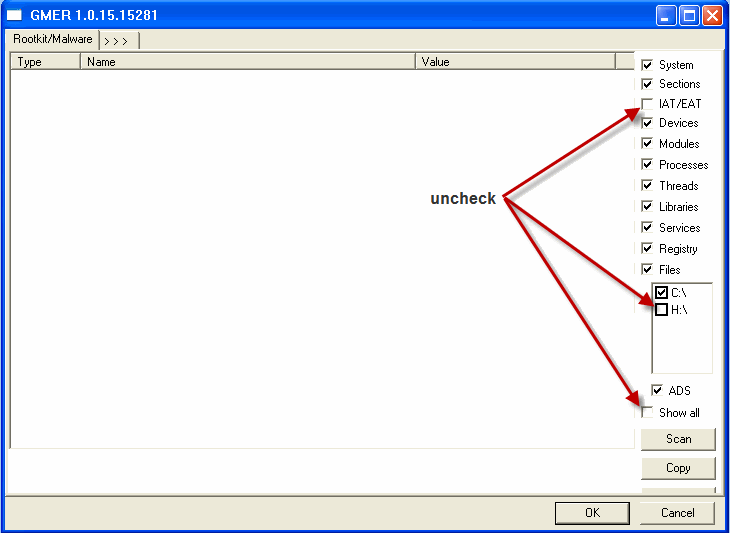
  • Make sure all options are checked except:
  • IAT/EAT
  • Drives/Partition other than Systemdrive, which is typically C:\
  • Show All (This is important, so do not miss it.)

[external image: Posted Image]
Click the image to enlarge it

  • Now click the Scan button. If you see a rootkit warning window, click OK.
  • When the scan is finished, click the Save… button to save the scan results to your Desktop. Save the file as gmer.log.
  • Click the Copy button and paste the results into your next reply.
  • Exit GMER and re-enable all active protection when done.
– If you encounter any problems, try running GMER in Safe Mode.
Here are the logs and attachments. Thanks.

.
DDS (Ver_2011-08-26.01) - NTFSx86
Internet Explorer: 7.0.5730.13
Run by [removed] at 9:29:19 on 2011-11-01
Microsoft Windows XP Home Edition 5.1.2600.3.1252.1.1033.18.1278.672 [GMT -5:00]
.
AV: AVG Internet Security 2011 *Disabled/Updated* {17DDD097-36FF-435F-9E1B-52D74245D6BF}
AV: Kaspersky Anti-Virus *Disabled/Outdated* {2C4D4BC6-0793-4956-A9F9-E252435469C0}
FW: AVG Firewall *Enabled*
.
============== Running Processes ===============
.
C:\WINDOWS\system32\svchost -k DcomLaunch
svchost.exe
C:\WINDOWS\System32\svchost.exe -k netsvcs
svchost.exe
svchost.exe
C:\WINDOWS\system32\spoolsv.exe
svchost.exe
C:\PROGRA~1\COMMON~1\AOL\ACS\acsd.exe
C:\Program Files\Common Files\Apple\Mobile Device Support\bin\AppleMobileDeviceService.exe
C:\Program Files\AVG\AVG10\avgfws.exe
C:\Program Files\AVG\AVG10\avgwdsvc.exe
C:\Program Files\Bonjour\mDNSResponder.exe
C:\Program Files\Juniper Networks\Common Files\dsNcService.exe
C:\Program Files\Java\jre6\bin\jqs.exe
C:\Program Files\Microsoft\Search Enhancement Pack\SeaPort\SeaPort.exe
C:\Program Files\Dell Support Center\bin\sprtsvc.exe
C:\WINDOWS\System32\svchost.exe -k imgsvc
C:\Program Files\Canon\CAL\CALMAIN.exe
C:\WINDOWS\Explorer.EXE
C:\WINDOWS\system32\hkcmd.exe
C:\WINDOWS\BCMSMMSG.exe
C:\Program Files\Common Files\Microsoft Shared\Works Shared\WkUFind.exe
C:\Program Files\HP\hpcoretech\hpcmpmgr.exe
C:\Program Files\Dell Support Center\bin\sprtcmd.exe
C:\Program Files\AVG\AVG10\avgtray.exe
C:\WINDOWS\system32\wuauclt.exe
C:\Program Files\Citrix\ICA Client\concentr.exe
C:\WINDOWS\system32\ctfmon.exe
C:\Program Files\Citrix\ICA Client\wfcrun32.exe
C:\Program Files\AVG\AVG10\Identity Protection\agent\bin\avgidsmonitor.exe
C:\Program Files\internet explorer\iexplore.exe
C:\WINDOWS\system32\wscntfy.exe
.
============== Pseudo HJT Report ===============
.
uStart Page = hxxp://www.msn.com
uInternet Connection Wizard,ShellNext = iexplore
uInternet Settings,ProxyOverride = *.local
BHO: Adobe PDF Link Helper: {18df081c-e8ad-4283-a596-fa578c2ebdc3} - c:\program files\common files\adobe\acrobat\activex\AcroIEHelperShim.dll
BHO: AVG Safe Search: {3ca2f312-6f6e-4b53-a66e-4e65e497c8c0} - c:\program files\avg\avg10\avgssie.dll
BHO: DriveLetterAccess: {5ca3d70e-1895-11cf-8e15-001234567890} - c:\windows\system32\dla\tfswshx.dll
BHO: Search Helper: {6ebf7485-159f-4bff-a14f-b9e3aac4465b} - c:\program files\microsoft\search enhancement pack\search helper\SEPsearchhelperie.dll
BHO: MSN Toolbar Helper: {d2ce3e00-f94a-4740-988e-03dc2f38c34f} - c:\program files\msn\toolbar\3.0.1125.0\msneshellx.dll
BHO: Java™ Plug-In 2 SSV Helper: {dbc80044-a445-435b-bc74-9c25c1c588a9} - c:\program files\java\jre6\bin\jp2ssv.dll
BHO: JQSIEStartDetectorImpl Class: {e7e6f031-17ce-4c07-bc86-eabfe594f69c} - c:\program files\java\jre6\lib\deploy\jqs\ie\jqs_plugin.dll
TB: MSN Toolbar: {1e61ed7c-7cb8-49d6-b9e9-ab4c880c8414} - c:\program files\msn\toolbar\3.0.1125.0\msneshellx.dll
uRun: [ctfmon.exe] c:\windows\system32\ctfmon.exe
mRun: [HotKeysCmds] c:\windows\system32\hkcmd.exe
mRun: [BCMSMMSG] BCMSMMSG.exe
mRun: [Microsoft Works Update Detection] c:\program files\common files\microsoft shared\works shared\WkUFind.exe
mRun: [dscactivate] "c:\program files\dell support center\gs_agent\custom\dsca.exe"
mRun: [Microsoft Default Manager] "c:\program files\microsoft\search enhancement pack\default manager\DefMgr.exe" -resume
mRun: [HP Component Manager] "c:\program files\hp\hpcoretech\hpcmpmgr.exe"
mRun: [DellSupportCenter] "c:\program files\dell support center\bin\sprtcmd.exe" /P DellSupportCenter
mRun: [AVG_TRAY] c:\program files\avg\avg10\avgtray.exe
mRun: [ConnectionCenter] "c:\program files\citrix\ica client\concentr.exe" /startup
mRun: [QuickTime Task] "c:\program files\quicktime\qttask.exe" -atboottime
dRunOnce: [RunNarrator] Narrator.exe
IE: E&xport to Microsoft Excel - c:\progra~1\mi1933~1\office11\EXCEL.EXE/3000
IE: {e2e2dd38-d088-4134-82b7-f2ba38496583} - %windir%\Network Diagnostic\xpnetdiag.exe
IE: {FB5F1910-F110-11d2-BB9E-00C04F795683} - c:\program files\messenger\msmsgs.exe
IE: {92780B25-18CC-41C8-B9BE-3C9C571A8263} - {FF059E31-CC5A-4E2E-BF3B-96E929D65503} - c:\progra~1\mi1933~1\office11\REFIEBAR.DLL
IE: {CD67F990-D8E9-11d2-98FE-00C0F0318AFE} - {FE54FA40-D68C-11d2-98FA-00C0F0318AFE} - c:\windows\system32\Shdocvw.dll
DPF: {05CA9FB0-3E3E-4B36-BF41-0E3A5CAA8CD8} - hxxp://go.microsoft.com/fwlink/?linkid=58813
DPF: {0CCA191D-13A6-4E29-B746-314DEE697D83} - hxxp://upload.facebook.com/controls/2008.10.10_v5.5.8/FacebookPhotoUploader5.cab
DPF: {11260943-421B-11D0-8EAC-0000C07D88CF} - hxxp://www.ipix.com/download/ipixx.cab
DPF: {193C772A-87BE-4B19-A7BB-445B226FE9A1} - hxxp://downloads.ewido.net/ewidoOnlineScan.cab
DPF: {33564D57-0000-0010-8000-00AA00389B71} - hxxp://download.microsoft.com/download/F/6/E/F6E491A6-77E1-4E20-9F5F-94901338C922/wmv9VCM.CAB
DPF: {33564D57-9980-0010-8000-00AA00389B71} - hxxp://download.microsoft.com/download/D/0/D/D0DD87DA-994F-4334-8B55-AF2E4D98ED0C/wmv9dmo.cab
DPF: {406B5949-7190-4245-91A9-30A17DE16AD0} - hxxp://photos.walmart.com/WalmartActivia.cab
DPF: {4ED9DDF0-7479-4BBE-9335-5A1EDB1D8A21} - hxxp://download.mcafee.com/molbin/shared/mcinsctl/4,0,0,101/mcinsctl.cab
DPF: {5ED80217-570B-4DA9-BF44-BE107C0EC166} - hxxp://cdn.scan.onecare.live.com/resource/download/scanner/wlscbase8300.cab
DPF: {6E32070A-766D-4EE6-879C-DC1FA91D2FC3} - hxxp://www.update.microsoft.com/microsoftupdate/v6/V5Controls/en/x86/client/muweb_site.cab?1205676849640
DPF: {8100D56A-5661-482C-BEE8-AFECE305D968} - hxxp://upload.facebook.com/controls/2009.07.28_v5.5.8.1/FacebookPhotoUploader55.cab
DPF: {8AD9C840-044E-11D1-B3E9-00805F499D93} - hxxp://java.sun.com/update/1.6.0/jinstall-1_6_0_21-windows-i586.cab
DPF: {8FFBE65D-2C9C-4669-84BD-5829DC0B603C} - hxxp://fpdownload.macromedia.com/get/flashplayer/current/ultrashim.cab
DPF: {BCC0FF27-31D9-4614-A68E-C18E1ADA4389} - hxxp://download.mcafee.com/molbin/shared/mcgdmgr/1,0,0,26/mcgdmgr.cab
DPF: {BDBDE413-7B1C-4C68-A8FF-C5B2B4090876} - hxxp://support.f-secure.com/ols/fscax.cab
DPF: {CAFEEFAC-0014-0000-0000-ABCDEFFEDCBA} - hxxp://java.sun.com/update/1.4.0/jinstall-1_4_0-windows-i586.cab
DPF: {CAFEEFAC-0016-0000-0021-ABCDEFFEDCBA} - hxxp://java.sun.com/update/1.6.0/jinstall-1_6_0_21-windows-i586.cab
DPF: {CAFEEFAC-FFFF-FFFF-FFFF-ABCDEFFEDCBA} - hxxp://java.sun.com/update/1.6.0/jinstall-1_6_0_21-windows-i586.cab
DPF: {D27CDB6E-AE6D-11CF-96B8-444553540000} - hxxp://download.macromedia.com/pub/shockwave/cabs/flash/swflash.cab
DPF: {E2883E8F-472F-4FB0-9522-AC9BF37916A7} - hxxp://platformdl.adobe.com/NOS/getPlusPlus/1.6/gp.cab
DPF: {E5F5D008-DD2C-4D32-977D-1A0ADF03058B} - hxxps://ive.ihs.org/dana-cached/setup/JuniperSetupSP1.cab
TCP: DhcpNameServer = 192.168.1.1
TCP: Interfaces\{5155A664-149F-4E87-9161-F15C61E94888} : DhcpNameServer = 192.168.1.1
Filter: application/x-ica - {CFB6322E-CC85-4d1b-82C7-893888A236BC} - c:\program files\citrix\ica client\IcaMimeFilter.dll
Filter: ica - {CFB6322E-CC85-4d1b-82C7-893888A236BC} - c:\program files\citrix\ica client\IcaMimeFilter.dll
Handler: cetihpz - {CF184AD3-CDCB-4168-A3F7-8E447D129300} - c:\program files\hp\hpcoretech\comp\hpuiprot.dll
Handler: linkscanner - {F274614C-63F8-47D5-A4D1-FBDDE494F8D1} - c:\program files\avg\avg10\avgpp.dll
Notify: GoToAssist - c:\program files\citrix\gotoassist\514\G2AWinLogon.dll
Notify: igfxcui - igfxsrvc.dll
.
============= SERVICES / DRIVERS ===============
.
R0 AVGIDSEH;AVGIDSEH;c:\windows\system32\drivers\AVGIDSEH.sys [2010-9-13 22992]
R0 Avgrkx86;AVG Anti-Rootkit Driver;c:\windows\system32\drivers\avgrkx86.sys [2010-9-7 32592]
R1 Avgldx86;AVG AVI Loader Driver;c:\windows\system32\drivers\avgldx86.sys [2010-12-8 248656]
R1 Avgmfx86;AVG Mini-Filter Resident Anti-Virus Shield;c:\windows\system32\drivers\avgmfx86.sys [2010-9-7 34896]
R1 Avgtdix;AVG TDI Driver;c:\windows\system32\drivers\avgtdix.sys [2010-11-12 297168]
R1 ctxusbm;Citrix USB Monitor Driver;c:\windows\system32\drivers\ctxusbm.sys [2009-10-5 65584]
R2 avgfws;AVG Firewall;c:\program files\avg\avg10\avgfws.exe [2011-3-9 2708024]
R2 avgwd;AVG WatchDog;c:\program files\avg\avg10\avgwdsvc.exe [2011-2-8 269520]
R3 Avgfwdx;Avgfwdx;c:\windows\system32\drivers\avgfwdx.sys [2010-7-12 30432]
R3 AVGIDSDriver;AVGIDSDriver;c:\windows\system32\drivers\AVGIDSDriver.sys [2010-8-3 134480]
R3 AVGIDSFilter;AVGIDSFilter;c:\windows\system32\drivers\AVGIDSFilter.sys [2010-8-3 24144]
R3 AVGIDSShim;AVGIDSShim;c:\windows\system32\drivers\AVGIDSShim.sys [2010-8-3 27216]
S2 AVGIDSAgent;AVGIDSAgent;c:\program files\avg\avg10\identity protection\agent\bin\AVGIDSAgent.exe [2011-8-18 7390560]
S3 Avgfwfd;AVG network filter service;c:\windows\system32\drivers\avgfwdx.sys [2010-7-12 30432]
.
=============== Created Last 30 ================
.
2011-10-31 22:54:12 ——– d–h–w- C:\$AVG
2011-10-31 21:39:33 ——– d—–w- c:\documents and settings\all users\application data\iolo
.
==================== Find3M ====================
.
.
============= FINISH: 9:29:36.95 ===============


GMER 1.0.15.15641 - http://www.gmer.net
Rootkit scan 2011-11-01 14:19:33
Windows 5.1.2600 Service Pack 3 Harddisk0\DR0 -> \Device\Ide\IdeDeviceP0T0L0-3 Maxtor_6E040L0 rev.NAR61590
Running: gmer.exe; Driver: C:\DOCUME~1\Tami\LOCALS~1\Temp\kgtyapog.sys


—- System - GMER 1.0.15 —-

SSDT \SystemRoot\system32\DRIVERS\AVGIDSShim.Sys (IDS Application Activity Monitor Loader Driver./AVG Technologies CZ, s.r.o. ) ZwOpenProcess [0xB8BF6738]
SSDT \SystemRoot\system32\DRIVERS\AVGIDSShim.Sys (IDS Application Activity Monitor Loader Driver./AVG Technologies CZ, s.r.o. ) ZwTerminateProcess [0xB8BF67DC]
SSDT \SystemRoot\system32\DRIVERS\AVGIDSShim.Sys (IDS Application Activity Monitor Loader Driver./AVG Technologies CZ, s.r.o. ) ZwTerminateThread [0xB8BF6878]
SSDT \SystemRoot\system32\DRIVERS\AVGIDSShim.Sys (IDS Application Activity Monitor Loader Driver./AVG Technologies CZ, s.r.o. ) ZwWriteVirtualMemory [0xB8BF6914]

—- Kernel code sections - GMER 1.0.15 —-

? C:\DOCUME~1\Tami\LOCALS~1\Temp\mbr.sys The system cannot find the file specified. !

—- Devices - GMER 1.0.15 —-

AttachedDevice \FileSystem\Ntfs \Ntfs AVGIDSFilter.Sys (IDS Application Activity Monitor Filter Driver./AVG Technologies CZ, s.r.o. )
AttachedDevice \Driver\Tcpip \Device\Ip avgtdix.sys (AVG Network connection watcher/AVG Technologies CZ, s.r.o.)
AttachedDevice \Driver\Tcpip \Device\Tcp avgtdix.sys (AVG Network connection watcher/AVG Technologies CZ, s.r.o.)

Device atapi.sys (IDE/ATAPI Port Driver/Microsoft Corporation)

AttachedDevice \Driver\Tcpip \Device\Udp avgtdix.sys (AVG Network connection watcher/AVG Technologies CZ, s.r.o.)
AttachedDevice \Driver\Tcpip \Device\RawIp avgtdix.sys (AVG Network connection watcher/AVG Technologies CZ, s.r.o.)
AttachedDevice \FileSystem\Fastfat \Fat fltmgr.sys (Microsoft Filesystem Filter Manager/Microsoft Corporation)
AttachedDevice \FileSystem\Fastfat \Fat AVGIDSFilter.Sys (IDS Application Activity Monitor Filter Driver./AVG Technologies CZ, s.r.o. )

Device \FileSystem\Fs_Rec \FileSystem\UdfsCdRomRecognizer tfsnifs.sys (Drive Letter Access Component/Sonic Solutions)
Device \FileSystem\Fs_Rec \FileSystem\FatCdRomRecognizer tfsnifs.sys (Drive Letter Access Component/Sonic Solutions)
Device \FileSystem\Fs_Rec \FileSystem\CdfsRecognizer tfsnifs.sys (Drive Letter Access Component/Sonic Solutions)
Device \FileSystem\Fs_Rec \FileSystem\FatDiskRecognizer tfsnifs.sys (Drive Letter Access Component/Sonic Solutions)
Device \FileSystem\Fs_Rec \FileSystem\UdfsDiskRecognizer tfsnifs.sys (Drive Letter Access Component/Sonic Solutions)
Device \FileSystem\Cdfs \Cdfs tfsnifs.sys (Drive Letter Access Component/Sonic Solutions)

—- Files - GMER 1.0.15 —-

File C:\Documents and Settings\Tami\Local Settings\Temporary Internet Files\Content.IE5\D9PM39QT\navcancl[1] 2713 bytes

—- EOF - GMER 1.0.15 —-

Attachments:

Thanks for the logs. I can't find any infection so far.

You are behind a router, right?

Let's perform an ESET Online Scan

Note: You can use either Internet Explorer or Mozilla FireFox for this scan. You will however need to disable your current installed Anti-Virus, how to do so can be read here.

  • Please go here then click on: [external image: Posted Image]
    Note: If using Mozilla Firefox you will need to download esetsmartinstaller_enu.exe when prompted then double click on it to install.
    All of the below instructions are compatible with either Internet Explorer or Mozilla FireFox.
  • Select the option YES, I accept the Terms of Use then click on: [external image: Posted Image]
  • When prompted allow the Add-On/Active X to install.
  • Make sure that the option Remove found threats is NOT checked, and the option Scan archives is checked.
  • Now click on Advanced Settings and select the following:
    • Scan for potentially unwanted applications
    • Scan for potentially unsafe applications
    • Enable Anti-Stealth Technology
  • Now click on: [external image: Posted Image]
  • The virus signature database… will begin to download. Be patient this make take some time depending on the speed of your Internet Connection.
  • When completed the Online Scan will begin automatically.
  • Do not touch either the Mouse or keyboard during the scan otherwise it may stall.
  • When completed make sure you first copy the logfile located at C:\Program Files\ESET\EsetOnlineScanner\log.txt
  • Copy and paste that log as a reply to this topic.
  • Now click on: [external image: Posted Image] (Selecting Uninstall application on close if you so wish)
The scan stalled on the first attempt so I had to stop the scan and start over…… Here's the log: ESETSmartInstaller@High as CAB hook log: OnlineScanner.ocx - registred OK # version=7 # iexplore.exe=7.00.6000.17095 (vista_gdr.101217-1830) # OnlineScanner.ocx=1.0.0.6583 # api_version=3.0.2 # EOSSerial=cdc9a490216fcb48a79b4ed4f3e48f6c # end=stopped # remove_checked=false # archives_checked=true # unwanted_checked=true # unsafe_checked=true # antistealth_checked=true # utc_time=2011-11-04 12:02:12 # local_time=2011-11-03 07:02:12 (-0600, Central Daylight Time) # country="United States" # lang=1033 # osver=5.1.2600 NT Service Pack 3 # compatibility_mode=512 16777215 100 0 0 0 0 0 # compatibility_mode=1032 16777189 100 98 0 62581539 0 0 # compatibility_mode=1280 16777195 100 0 0 0 0 0 # compatibility_mode=1536 16777215 100 0 0 0 0 0 # compatibility_mode=8192 67108863 100 0 0 0 0 0 # scanned=3472 # found=0 # cleaned=0 # scan_time=782 esets_scanner_update returned -1 esets_gle=53251 # version=7 # iexplore.exe=7.00.6000.17095 (vista_gdr.101217-1830) # OnlineScanner.ocx=1.0.0.6583 # api_version=3.0.2 # EOSSerial=cdc9a490216fcb48a79b4ed4f3e48f6c # end=finished # remove_checked=false # archives_checked=true # unwanted_checked=true # unsafe_checked=true # antistealth_checked=true # utc_time=2011-11-04 01:28:11 # local_time=2011-11-03 08:28:11 (-0600, Central Daylight Time) # country="United States" # lang=1033 # osver=5.1.2600 NT Service Pack 3 # compatibility_mode=512 16777215 100 0 0 0 0 0 # compatibility_mode=1032 16777189 100 98 0 62582410 0 0 # compatibility_mode=1280 16777195 100 0 0 0 0 0 # compatibility_mode=1536 16777215 100 0 0 0 0 0 # compatibility_mode=8192 67108863 100 0 0 0 0 0 # scanned=93869 # found=0 # cleaned=0 # scan_time=5072
Hi thoran,

Apparently your machine is not infected. I will give you some tasks in order to faster your machine:

Step 1 | Please download CCleaner (freeware)

  • Run the installer.
  • Once installed, run CCleaner click the Windows
  • The following should be selected by default, if not, please select:

    [external image: Posted Image]

  • Next: click Options (in the left panel) and click the Advanced button.
  • Uncheck: "Only delete files in Windows Temp folders older than 24 hours."
  • Go back to Cleaner (in the left panel) and click the Run Cleaner button (bottom right). Then exit CCleaner.

Step 2 | It's also a good idea to defragment your hard drive once a month or so to improve your PC functioning. This operation may take several hours, so it would be a good idea to start it just before going to work, school, bed, etc.

  • Click Start > All Programs > Accessories > System Tools > Disk Defragmenter
  • Click on the Analyze button.
  • Let the analyzer run, it takes 5-10 mins or so, sometimes longer, depending on your disk size.
  • When finished it will pop up a window telling you whether you need to defrag or not.
  • If you need to defrag click the Defragment button. As I said before, this process may take several hours, depending on your hard drive.
I did the CCleaner and defragmented, however it hasn't seemed to help with response time. It is still slow to respond and frequently webpages will freeze and I get the message that the page is "not responding". Is it because I am using a router? Is there anything else I can do or do I need to buy a new computer with faster processor etc to get better performance or do I need to do something different/buy a new router? Thanks.
Hi thoran,

This doesn not seem to be a hardware problem, so there's no need to buy a new computer. In the worst scenario, a disk format and an operative system reinstall will suffice, although I don't think such a drastic measure is going to be of need for this problem.

As this doesn't seem to be a malware problem, we are done. Now I suggest you to open a new thread at the Microsoft Windows subforum, where a member of the Tech Team will help you with this problem. If I were you, I would give it a try before buying a new machine, they know their stuff.

Still having this problem?

This topic is from the What the Tech archive and can't take new replies. Geeks to Go is an active, free help community run by volunteers. Post your question there and a person, not a bot, will work through it with you.

Please don't run the tools or fix scripts from this topic on your computer. Malware fixes are written for one computer at one point in time and can do damage on another. Ask for help with your own computer instead.

Ask on Geeks to Go →