This is a read-only archive. No new posts or registrations. Privacy Page Still need help? Ask the volunteers at Geeks to Go, free.
Hardware

BSOD - nv4_disp - crashing PC

19 min read

This thread's last reply is from . Advice, software, and links below may be out of date — treat specific steps and download links with caution.

Think i've done something really stupid. After changing which drive the PC was to boot from and restarting with the Windows XP disc in the drive, I pressed R. The next screen I saw gave me 2 options: one being the partition containing data, the other the free space. Choosing the first one lead me to a restore option. To cut a long story short, I have now reinstalled Windows XP and fear I have wiped everything on the hard drive. Is there a way to reverse this?
No. it is gone :smack: You have not installed a fresh XP install (impossible with the disk Rich recommended you create as it has no install files on it). Your PC should have had a hidden partition on it containing the original factory XP setup. I think you have restored it over your XP and data. Check to see if XP now has the original factory software. However… If you had created an extra partition at some stage on you HD, large enough to contain your XP OS, the factory reinstall image might have installed on that, leaving your data on the other partition intact. If that has happed your lucky indeed. Cheers, Lee
Where before i had only one hard disk listed on the PC (C Drive), i now have 2: RECOVERY © with 4.38GB total size & Windows (D) with 228GB total size. On C now is my new profile, which is the only one on there and which obviously has no files attached etc. D runs like my previous C Drive with access to all 4 profiles. All bar mine can be accessed where all docs and photos etc are there. On clicking my file (and i was the administrator) i am told access is denied Does this mean my data can be recovered or that i can put the computer back to before i made this mistake?

Think i've done something really stupid.
After changing which drive the PC was to boot from and restarting with the Windows XP disc in the drive, I pressed R. The next screen I saw gave me 2 options: one being the partition containing data, the other the free space. Choosing the first one lead me to a restore option.
To cut a long story short, I have now reinstalled Windows XP and fear I have wiped everything on the hard drive.
Is there a way to reverse this?

short answer i'm sorry to say is no.

you might be able to recover some of your old data, with special data recovery programs, but that's the best you can hope for.

before messing around with formatting and installing anything, you really need to learn more about partitioning and hard drives in general so you can understand exactly which hard drive/partition your going to make any changes too.

:popcorn:

sorry been a couple of posts since i first read this topic and started making my reply.

D runs like my previous C Drive with access to all 4 profiles. All bar mine can be accessed where all docs and photos etc are there.
On clicking my file (and i was the administrator) i am told access is denied
Does this mean my data can be recovered or that i can put the computer back to before i made this mistake?


if all your data is there then yes you can put the machine back to how it was before you started.
i'd just copy all my data onto a separate hard drive then reinstall everything, i can't give you steps on how to get the pc back to how it was, the way it is now, because i have no idea exactly what you did when you say you reinstalled xp. it sounds like you have 2 working copies of xp installed 1 on a 4gb partition and 1 on the rest of drive, which sounds very odd to me because like lee mentioned earlier partitions that small usually contain the hidden restore files to set your machine back to factory state. :popcorn:

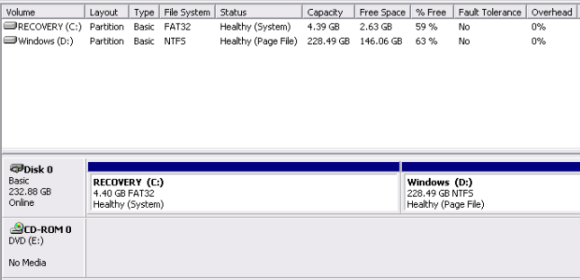
Where before i had only one hard disk listed on the PC (C Drive), i now have 2: RECOVERY © with 4.38GB total size & Windows (D) with 228GB total size.
On C now is my new profile, which is the only one on there and which obviously has no files attached etc.
D runs like my previous C Drive with access to all 4 profiles. All bar mine can be accessed where all docs and photos etc are there.
On clicking my file (and i was the administrator) i am told access is denied
Does this mean my data can be recovered or that i can put the computer back to before i made this mistake?


As Terry said, that info is a little confusing as to what your PC situation is. Lets clarify so we know exactly what's happening and hopefully give you instruction to recover your data.

This image clearly shows the partition reality of my two hard drives.
[attachment removed]

Go to Start / Right-click My Computer / manage / disk management and you will see similar to above.

Take a screen shot
http://windows.microsoft.com/en-US/windows…e-a-screen-shot

In your next post (not "quick reply")
1) Click on "Choose" and then click on the image you have stored in my pictures (or wherever) and click "Open"
2) Click on "UPLOAD"
3) Click on the small black down arrow above that "Manage Current Attachments"
4) You will see three images, click on the far left image
5) Scroll your page down and click on "Preview Post"
6) You should see the image you have uploaded. If so, you can now post it by clicking "Add Reply".

We will then know what the situation is with your Hard Drive partitions.

Cheers,
Lee
Recovery (C:) Fat32 System 4.39GB (2.63GB free space) Page file (D) NTFS Page File 228.49GB (146.06GB free space) Wow, I don't get it. Your D: partition has turned into a page file? Obviously it still has a large volume of data on it, but I guess you tried to access the data you want to save from there ? Cheers, Lee
You don't get it?! i haven't a clue what's going on!! Yeah like i said, i can access all the data there except my particular files - which is where the bulk of the data is, and the important stuff.
Let's see if this refers to your situation.

Problem: Access denied to data on another drive or previous installation of Windows XP.
Solution: Take ownership of the directory and files.

NOTE: You must be logged on to the computer using an account that has administrative privileges. If you are running Windows XP Home Edition, in order to have access to the Security tab, you must first start in Safe Mode and log on with an account that has Administrative rights.

How to take ownership of a file or a folder in Windows XP

Hopefully you now have access to your data.

Cheers,
Lee
Thanks Lee, i now have access to everything Seeing as though every file is still on the computer, is it possible to get it back to exactly how it was before? As it is, it boots into C Drive where the computer runs like it did when new: i'm being requested to activate windows, i have no internet, sound etc. D drive just seems to act as a file cheers Dave

Seeing as though every file is still on the computer, is it possible to get it back to exactly how it was before?

Don't try to do that.

The very first thing to do is to rescue your personal data. Save it to CD, DVD, USB flash drive or USB Hard Drive, but save it now.

Once you have saved your data, let me know and we can then tackle this problem:

Recovery (C:) Fat32 System 4.39GB (2.63GB free space)
Page file (D) NTFS Page File 228.49GB (146.06GB free space)

What you don't want is XP on such a small drive space so we can alter the size of that to say 25GB without affecting XP.

Rather than try to get things back to the way you originally had it (not possible as far as I know), we can work with how things are.

When all your data is saved (don't worry about any programs that might be on D: as they cannot be saved), we can delete the large D: partition and then expand C: where your XP is to 25GB. After that we can format D: and make it your Data partition.

Cheers,
Lee
What I originally had in mind…

When all your data is saved (don't worry about any programs that might be on D: as they cannot be saved), we can delete the large D: partition and then expand C: where your XP is to 25GB. After that we can format D: and make it your Data partition.

Which was only the first part of it, we are not going to go there as one Tech. put it when I discussed it "Lee your course of action may be "possible", but there is too much "smoke and mirrors" for me.This could be similar to diving down the rabbit hole with Alice".

In other words "quite difficult".

1A) The fist thing to do is recover your Microsoft Product Key just in case everything goes pair shaped.
Download this small app. to your desktop SIW 2011 (build 0707) - Freeware Version
Double click the installer exe. to install. Do not choose to install the "Driver Scan" optional add-on. (It will cost you money).

1) Run the program and a window will open.
2) Under "Software" in the left column, click "Licenses" and write down your Product Key when it displays in the right window
3) Save this key very carefully were you will never lose it. You use this key to "activate windows".

2A) Go to Start / Right-click My Computer / manage / disk management
1) right click your large D: drive and click "format". This window will open
[attachment removed]
2) Next to "Volume Label" type in "XP Home" and tick "Perform a quick format". File type should be as shown NTFS.
3) Unit size should be left as "default"
4) Click OK and let it finish the format. It will say "healthy' on the D volume when it's done and you can close Disk Management.

3A) Now you need to reboot to that Manufacturer's Recovery Disc like you did once before and choose the D; partition to restore too. I'm not sure what happened last time, but hopefully this will work as D: is the only partion Volume it can restore too.

Make sure you have no USB Flash drive or USB hard drive connected to your USB outlets. Keep them clear of any hardware at all.

See how you go.

Cheers,
Lee

Still having this problem?

This topic is from the What the Tech archive and can't take new replies. Geeks to Go is an active, free help community run by volunteers. Post your question there and a person, not a bot, will work through it with you.

Ask on Geeks to Go →