Right click on the file and select Compress to zip (or something like that). If it's not available, download and install 7-Zip then right click on the file, click on 7-Zip then chose the last option, Compress to xxxxx.zip.
Rich
Thansk for responding. I tried to download 7zip because There were no indiators that said zip or condense or such. 7zip site said it would be over 1MB file. Gigaget, a file downloader automatically downloaded it for me. The file was not on Gigaget's screen or the desktop or in my download file. I did a search and it onlyfound one file, which was a 33KB file. I tried to open it but the message said it did not have a file association. I clicked on browse and it took me to the net. I have never been able to find a file when it takes me to the net. Anyway, how would you suggest I get this file?
Thanks
GB
Sorry to hear your having so much trouble gbsk,
How To Make a Zip File (Windows XP)?
To compress a file or folder
1. Locate the file or folder that you want to compress.
2. Right-click the file or folder, point to Send To, and then click Compressed (zipped) Folder.
A new compressed folder is created. To rename it, right-click the folder, click Rename, and then type the new name.
Cheers,
Lee
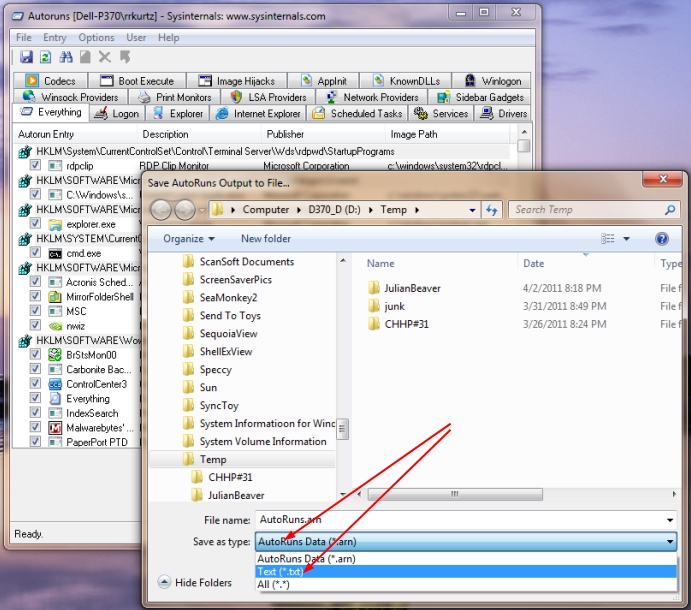
That is not the autoruns output txt file, it's the autoruns.exe (application) itself. You need to click on File then Save in the Autoruns window, then change the type to txt instead of arn. It will then be called autoruns.txt. Mine was 325K unzipped and 36k zipped.
Rich
I don't know what I am doing wrong but this is not working. I can save this as an arn file. I then trie dto rename it as a txt. it would not let me. I also tried to do it like you said. When I clicked on save, it came out as"AutoRuns" I added ".txt" behind it and saved it. However, when I looked on the desktop, I could not find it. I also did a search for AutoRuns.txt and all that came up was AutoRuns,(without the ..txt) which was a 4 MB file, I presume it was the original Auto Run file. I have 2 AutoRuns on my desktop and as far as I know I sent both to you. I will compress it and send it anyway.
GB
I don't know what I am doing wrong but this is not working. I can save this as an arn file. I then trie dto rename it as a txt. it would not let me.
Hi gbsk,
Sorry, No, that wasn't the right file……Xp has a default setting that hides file extensions, most technicians automatically alter this on machines they have on the workbench for fixing, so file extentions are shown, so its worthwhile making sure that file extensions are being shown on your machine.
This can get confusing if you dont have file extensions being shown…as you will see this sort of layout: (the following is just an example)
autoruns
when if you have file extensions shown you will have:
autoruns.txt
Here's how to show the file extensions on XP (you can alter it back to how it was originally if you want, by reversing the instructions when you have finished the work and all is working OK)
1 Click on My Computer
2 Click on Tools
3 Click on Folder Options
4 Click on View (it's a tab across the top)
5 Click on the radio button (so that the tick or checkmark box is cleared) next to Hide Extensions for known file types
6 Click on Ok
This should make things a bit easier and enable you to send the correct file, and then one of the helpers here will be able to get back to you
Regards
paws
Actually, the .arn file you renamed to .txt and zipped works pretty well. I can now open Autoruns then do a File / Open on it and see exactly what you see. Much easier to see what data goes where.
Paws, try it, I think you'll also like it better.
Doesn't look to bad to me. There are some thing still running that I would get rid of though, at least temporarily to see if they are a problem.
From Add or Remove Programs, uninstall
Gigaget dowload manager (as a test)
Google anything
SandBoxie (as a test)
Panda anything (Services shows Panda Boot Driver running)
Sunbelt (Anti-rootkit)
Paws
Thanks for responding. I did everything you suggested like unhiding the extentions. I then did a search for the file. I HAD FOUR INSTANCES OF AutomRuns.txt. One was a 4 MB one that is too big to send. I have 2 zipped versions of the same file. I know it is the same file because one was in the Recycle Bin because I put it there after sending it in and someone at Whatthetech said it was the wrong one. The other was the same size and on the desktop because I copied another one. The last one was a shortcut. The only time I found it was when it was a .arn file. What next?
Thanks
GB
✨ Ask AI
AI can make mistakes. Check the cited posts. Archived advice can be out-of-date
Don't include personal information. Questions and selected public posts go to OpenAI. About Ask AI