Spyware / Malware / Virus Removal
Infected computer: really slow, IE opens random windows
34 min read
oxomania
Dear oldman960,
unfortunately, both IE and firefox stopped working after the second time through combofix. Both browsers load a page and then crash. I am using a different computer and can't paste the output into this post, but the two output files contain the same quarantined files:
AddRemove-ComcastHSI.reg.dat
Notify-geopy.reg.dat
WebBrowser-{lots of characters}.reg.dat
tcpip.reg
catchme.log
chrome\content\overlay.xul.vir
chrome\content\_cfg.js.vir
chrome\content\install.rdf.vir
Also, during the second combofix scan, I recieved a message about rootkit TDL3 detected.
Thanks for your help!
oxomania
oldman960
Hi
Is there the possibilty of downloading a tool to a clean computer and transfering it to the infected computer?
You can use a blank CD or a USB storage device such as a jumpdrive. A CD is safer so if you need to use a USB device run this program on the clean computer first.
If you are going to use a CD skip this part.
Download Flash_Disinfector.exe by sUBs and save it to your desktop.
Download this program and save it to either the CD or USB device.
Please read carefully and follow these steps.
See if you can access the internet. If not transfer the log to the CD or USB device and post it from your other computer.
Thanks
Is there the possibilty of downloading a tool to a clean computer and transfering it to the infected computer?
You can use a blank CD or a USB storage device such as a jumpdrive. A CD is safer so if you need to use a USB device run this program on the clean computer first.
If you are going to use a CD skip this part.
Download Flash_Disinfector.exe by sUBs and save it to your desktop.
- Attach the USB storage device to the computer while holding down the shift key
- Double-click Flash_Disinfector.exe to run it and follow any prompts that may appear.
- The utility may ask you to insert your flash drive and/or other removable drives including your mobile phone. Please do so and allow the utility to clean up those drives as well.
- Wait until it has finished scanning and then exit the program.
Download this program and save it to either the CD or USB device.
Please read carefully and follow these steps.
- Transfer the downloade file directly to the infected computer's Desktop
- Extract its contents to the desktop.
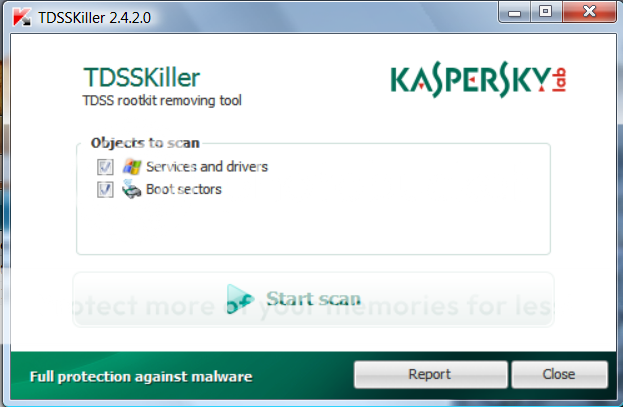
- Once extracted, open the TDSSKiller folder and doubleclick on TDSSKiller.exe to run the application, then on Start Scan.
Click to load external image (Posted Image)
- If an infected file is detected, the default action will be Cure, click on Continue.
Click to load external image (Posted Image)
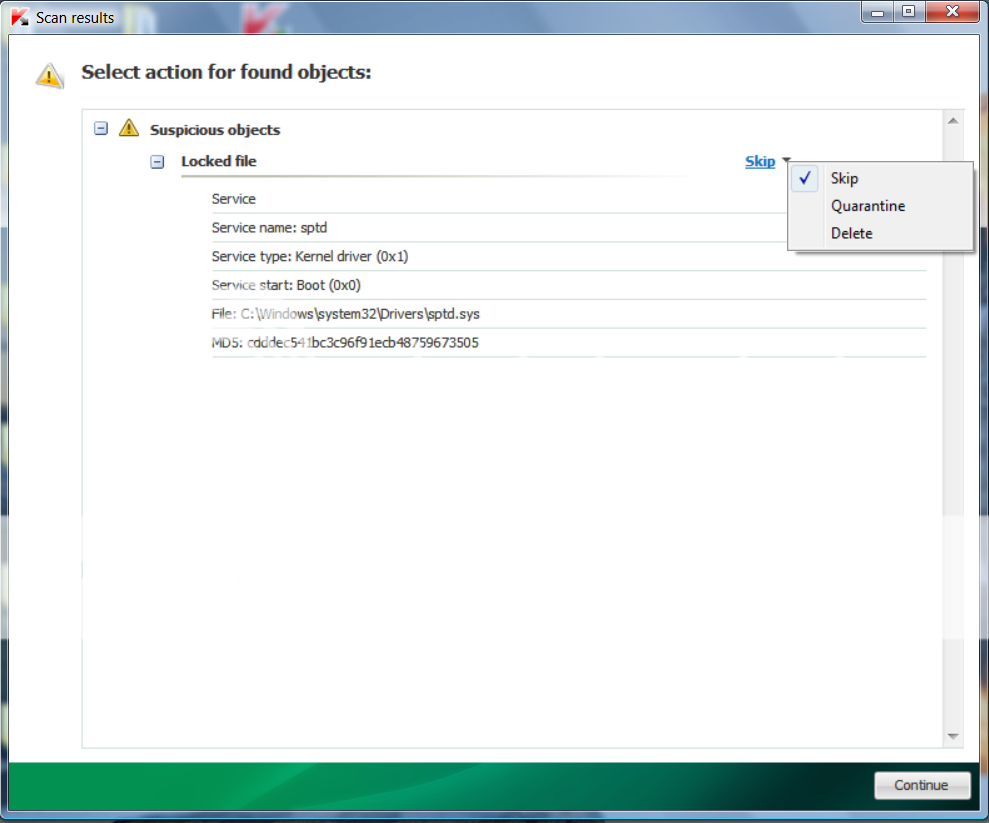
- If a suspicious file is detected, the default action will be Skip, click on Continue.
Click to load external image (Posted Image)
- It may ask you to reboot the computer to complete the process. Click on Reboot Now.
Click to load external image (Posted Image)
- If no reboot is require, click on Report. A log file should appear. Please copy and paste the contents of that file here.
- If a reboot is required, the report can also be found in your root directory, (usually C:\ folder) in the form of "TDSSKiller.[Version]_[Date]_[Time]_log.txt". Please copy and paste the contents of that file here.
See if you can access the internet. If not transfer the log to the CD or USB device and post it from your other computer.
Thanks
oxomania
Hi oldman960,
I don't see a link to download TDSSkiller.exe, can you please provide it again?
Thanks,
oxomania
oldman960
oxomania
Dear oldman960,
Able to access TDSSkiller using computer. Ran program. computer rebooted, and log attached.
Thanks
2010/12/31 12:59:11.0046 TDSS rootkit removing tool 2.4.12.0 Dec 16 2010 09:46:46
2010/12/31 12:59:11.0046 ================================================================================
2010/12/31 12:59:11.0046 SystemInfo:
2010/12/31 12:59:11.0046
2010/12/31 12:59:11.0046 OS Version: 5.1.2600 ServicePack: 3.0
2010/12/31 12:59:11.0046 Product type: Workstation
2010/12/31 12:59:11.0046 ComputerName: DELL
2010/12/31 12:59:11.0046 UserName: Bob
2010/12/31 12:59:11.0046 Windows directory: C:\WINDOWS
2010/12/31 12:59:11.0046 System windows directory: C:\WINDOWS
2010/12/31 12:59:11.0046 Processor architecture: Intel x86
2010/12/31 12:59:11.0046 Number of processors: 2
2010/12/31 12:59:11.0046 Page size: 0x1000
2010/12/31 12:59:11.0046 Boot type: Normal boot
2010/12/31 12:59:11.0046 ================================================================================
2010/12/31 12:59:11.0531 Initialize success
2010/12/31 12:59:44.0343 ================================================================================
2010/12/31 12:59:44.0343 Scan started
2010/12/31 12:59:44.0343 Mode: Manual;
2010/12/31 12:59:44.0343 ================================================================================
2010/12/31 12:59:45.0468 abp480n5 (6abb91494fe6c59089b9336452ab2ea3) C:\WINDOWS\system32\DRIVERS\ABP480N5.SYS
2010/12/31 12:59:45.0546 ACPI (8fd99680a539792a30e97944fdaecf17) C:\WINDOWS\system32\DRIVERS\ACPI.sys
2010/12/31 12:59:45.0625 ACPIEC (9859c0f6936e723e4892d7141b1327d5) C:\WINDOWS\system32\drivers\ACPIEC.sys
2010/12/31 12:59:45.0734 adpu160m (9a11864873da202c996558b2106b0bbc) C:\WINDOWS\system32\DRIVERS\adpu160m.sys
2010/12/31 12:59:45.0828 aec (8bed39e3c35d6a489438b8141717a557) C:\WINDOWS\system32\drivers\aec.sys
2010/12/31 12:59:45.0906 AFD (7e775010ef291da96ad17ca4b17137d7) C:\WINDOWS\System32\drivers\afd.sys
2010/12/31 12:59:46.0015 agp440 (08fd04aa961bdc77fb983f328334e3d7) C:\WINDOWS\system32\DRIVERS\agp440.sys
2010/12/31 12:59:46.0093 agpCPQ (03a7e0922acfe1b07d5db2eeb0773063) C:\WINDOWS\system32\DRIVERS\agpCPQ.sys
2010/12/31 12:59:46.0171 Aha154x (c23ea9b5f46c7f7910db3eab648ff013) C:\WINDOWS\system32\DRIVERS\aha154x.sys
2010/12/31 12:59:46.0218 aic78u2 (19dd0fb48b0c18892f70e2e7d61a1529) C:\WINDOWS\system32\DRIVERS\aic78u2.sys
2010/12/31 12:59:46.0390 aic78xx (b7fe594a7468aa0132deb03fb8e34326) C:\WINDOWS\system32\DRIVERS\aic78xx.sys
2010/12/31 12:59:46.0437 AliIde (1140ab9938809700b46bb88e46d72a96) C:\WINDOWS\system32\DRIVERS\aliide.sys
2010/12/31 12:59:46.0500 alim1541 (cb08aed0de2dd889a8a820cd8082d83c) C:\WINDOWS\system32\DRIVERS\alim1541.sys
2010/12/31 12:59:46.0578 amdagp (95b4fb835e28aa1336ceeb07fd5b9398) C:\WINDOWS\system32\DRIVERS\amdagp.sys
2010/12/31 12:59:46.0656 amsint (79f5add8d24bd6893f2903a3e2f3fad6) C:\WINDOWS\system32\DRIVERS\amsint.sys
2010/12/31 12:59:46.0750 asc (62d318e9a0c8fc9b780008e724283707) C:\WINDOWS\system32\DRIVERS\asc.sys
2010/12/31 12:59:46.0796 asc3350p (69eb0cc7714b32896ccbfd5edcbea447) C:\WINDOWS\system32\DRIVERS\asc3350p.sys
2010/12/31 12:59:46.0843 asc3550 (5d8de112aa0254b907861e9e9c31d597) C:\WINDOWS\system32\DRIVERS\asc3550.sys
2010/12/31 12:59:46.0921 ASCTRM (d880831279ed91f9a4190a2db9539ea9) C:\WINDOWS\system32\drivers\ASCTRM.sys
2010/12/31 12:59:47.0031 AsyncMac (b153affac761e7f5fcfa822b9c4e97bc) C:\WINDOWS\system32\DRIVERS\asyncmac.sys
2010/12/31 12:59:47.0125 atapi (9f3a2f5aa6875c72bf062c712cfa2674) C:\WINDOWS\system32\DRIVERS\atapi.sys
2010/12/31 12:59:47.0281 Atmarpc (9916c1225104ba14794209cfa8012159) C:\WINDOWS\system32\DRIVERS\atmarpc.sys
2010/12/31 12:59:47.0390 audstub (d9f724aa26c010a217c97606b160ed68) C:\WINDOWS\system32\DRIVERS\audstub.sys
2010/12/31 12:59:47.0468 Beep (da1f27d85e0d1525f6621372e7b685e9) C:\WINDOWS\system32\drivers\Beep.sys
2010/12/31 12:59:47.0750 cbidf (90a673fc8e12a79afbed2576f6a7aaf9) C:\WINDOWS\system32\DRIVERS\cbidf2k.sys
2010/12/31 12:59:47.0812 cbidf2k (90a673fc8e12a79afbed2576f6a7aaf9) C:\WINDOWS\system32\drivers\cbidf2k.sys
2010/12/31 12:59:47.0875 CCDECODE (0be5aef125be881c4f854c554f2b025c) C:\WINDOWS\system32\DRIVERS\CCDECODE.sys
2010/12/31 12:59:47.0953 cd20xrnt (f3ec03299634490e97bbce94cd2954c7) C:\WINDOWS\system32\DRIVERS\cd20xrnt.sys
2010/12/31 12:59:48.0015 Cdaudio (c1b486a7658353d33a10cc15211a873b) C:\WINDOWS\system32\drivers\Cdaudio.sys
2010/12/31 12:59:48.0109 Cdfs (c885b02847f5d2fd45a24e219ed93b32) C:\WINDOWS\system32\drivers\Cdfs.sys
2010/12/31 12:59:48.0187 Cdrom (1f4260cc5b42272d71f79e570a27a4fe) C:\WINDOWS\system32\DRIVERS\cdrom.sys
2010/12/31 12:59:48.0328 CmdIde (e5dcb56c533014ecbc556a8357c929d5) C:\WINDOWS\system32\DRIVERS\cmdide.sys
2010/12/31 12:59:48.0421 Cpqarray (3ee529119eed34cd212a215e8c40d4b6) C:\WINDOWS\system32\DRIVERS\cpqarray.sys
2010/12/31 12:59:48.0484 dac2w2k (e550e7418984b65a78299d248f0a7f36) C:\WINDOWS\system32\DRIVERS\dac2w2k.sys
2010/12/31 12:59:48.0562 dac960nt (683789caa3864eb46125ae86ff677d34) C:\WINDOWS\system32\DRIVERS\dac960nt.sys
2010/12/31 12:59:48.0640 Disk (044452051f3e02e7963599fc8f4f3e25) C:\WINDOWS\system32\DRIVERS\disk.sys
2010/12/31 12:59:48.0734 dmboot (d992fe1274bde0f84ad826acae022a41) C:\WINDOWS\system32\drivers\dmboot.sys
2010/12/31 12:59:48.0843 dmio (7c824cf7bbde77d95c08005717a95f6f) C:\WINDOWS\system32\drivers\dmio.sys
2010/12/31 12:59:48.0921 dmload (e9317282a63ca4d188c0df5e09c6ac5f) C:\WINDOWS\system32\drivers\dmload.sys
2010/12/31 12:59:49.0015 DMusic (8a208dfcf89792a484e76c40e5f50b45) C:\WINDOWS\system32\drivers\DMusic.sys
2010/12/31 12:59:49.0078 dpti2o (40f3b93b4e5b0126f2f5c0a7a5e22660) C:\WINDOWS\system32\DRIVERS\dpti2o.sys
2010/12/31 12:59:49.0140 drmkaud (8f5fcff8e8848afac920905fbd9d33c8) C:\WINDOWS\system32\drivers\drmkaud.sys
2010/12/31 12:59:49.0218 drvmcdb (e814854e6b246ccf498874839ab64d77) C:\WINDOWS\system32\drivers\drvmcdb.sys
2010/12/31 12:59:49.0312 drvnddm (ee83a4ebae70bc93cf14879d062f548b) C:\WINDOWS\system32\drivers\drvnddm.sys
2010/12/31 12:59:49.0390 E100B (7d91dc6342248369f94d6eba0cf42e99) C:\WINDOWS\system32\DRIVERS\e100b325.sys
2010/12/31 12:59:49.0515 eeCtrl (089296aedb9b72b4916ac959752bdc89) C:\Program Files\Common Files\Symantec Shared\EENGINE\eeCtrl.sys
2010/12/31 12:59:49.0593 EraserUtilRebootDrv (850259334652d392e33ee3412562e583) C:\Program Files\Common Files\Symantec Shared\EENGINE\EraserUtilRebootDrv.sys
2010/12/31 12:59:49.0734 Fastfat (38d332a6d56af32635675f132548343e) C:\WINDOWS\system32\drivers\Fastfat.sys
2010/12/31 12:59:49.0828 Fdc (92cdd60b6730b9f50f6a1a0c1f8cdc81) C:\WINDOWS\system32\DRIVERS\fdc.sys
2010/12/31 12:59:49.0906 Fips (d45926117eb9fa946a6af572fbe1caa3) C:\WINDOWS\system32\drivers\Fips.sys
2010/12/31 12:59:49.0953 Flpydisk (9d27e7b80bfcdf1cdd9b555862d5e7f0) C:\WINDOWS\system32\DRIVERS\flpydisk.sys
2010/12/31 12:59:50.0046 FltMgr (b2cf4b0786f8212cb92ed2b50c6db6b0) C:\WINDOWS\system32\drivers\fltmgr.sys
2010/12/31 12:59:50.0093 Fs_Rec (3e1e2bd4f39b0e2b7dc4f4d2bcc2779a) C:\WINDOWS\system32\drivers\Fs_Rec.sys
2010/12/31 12:59:50.0140 Ftdisk (6ac26732762483366c3969c9e4d2259d) C:\WINDOWS\system32\DRIVERS\ftdisk.sys
2010/12/31 12:59:50.0203 GEARAspiWDM (4ac51459805264affd5f6fdfb9d9235f) C:\WINDOWS\system32\Drivers\GEARAspiWDM.sys
2010/12/31 12:59:50.0296 Gpc (0a02c63c8b144bd8c86b103dee7c86a2) C:\WINDOWS\system32\DRIVERS\msgpc.sys
2010/12/31 12:59:50.0453 hpn (b028377dea0546a5fcfba928a8aefae0) C:\WINDOWS\system32\DRIVERS\hpn.sys
2010/12/31 12:59:50.0515 HPZid412 (287a63bd8509bd78e7978823b38afa81) C:\WINDOWS\system32\DRIVERS\HPZid412.sys
2010/12/31 12:59:50.0609 HPZipr12 (0b4fda2657c3e0315eaa57f9c6d4fd1f) C:\WINDOWS\system32\DRIVERS\HPZipr12.sys
2010/12/31 12:59:50.0734 HPZius12 (29559db25258b60510a60c4e470fce32) C:\WINDOWS\system32\DRIVERS\HPZius12.sys
2010/12/31 12:59:50.0875 HTTP (f80a415ef82cd06ffaf0d971528ead38) C:\WINDOWS\system32\Drivers\HTTP.sys
2010/12/31 12:59:50.0937 i2omgmt (9368670bd426ebea5e8b18a62416ec28) C:\WINDOWS\system32\drivers\i2omgmt.sys
2010/12/31 12:59:51.0031 i2omp (f10863bf1ccc290babd1a09188ae49e0) C:\WINDOWS\system32\DRIVERS\i2omp.sys
2010/12/31 12:59:51.0125 i8042prt (4a0b06aa8943c1e332520f7440c0aa30) C:\WINDOWS\system32\DRIVERS\i8042prt.sys
2010/12/31 12:59:51.0234 ialm (5a8e05f1d5c36abd58cffa111eb325ea) C:\WINDOWS\system32\DRIVERS\ialmnt5.sys
2010/12/31 12:59:51.0468 Imapi (083a052659f5310dd8b6a6cb05edcf8e) C:\WINDOWS\system32\DRIVERS\imapi.sys
2010/12/31 12:59:51.0578 ini910u (4a40e045faee58631fd8d91afc620719) C:\WINDOWS\system32\DRIVERS\ini910u.sys
2010/12/31 12:59:51.0671 IntelC51 (7509c548400f4c9e0211e3f6e66abbe6) C:\WINDOWS\system32\DRIVERS\IntelC51.sys
2010/12/31 12:59:51.0906 IntelC52 (9584ffdd41d37f2c239681d0dac2513e) C:\WINDOWS\system32\DRIVERS\IntelC52.sys
2010/12/31 12:59:51.0984 IntelC53 (cf0b937710cec6ef39416edecd803cbb) C:\WINDOWS\system32\DRIVERS\IntelC53.sys
2010/12/31 12:59:52.0046 IntelIde (b5466a9250342a7aa0cd1fba13420678) C:\WINDOWS\system32\DRIVERS\intelide.sys
2010/12/31 12:59:52.0093 intelppm (8c953733d8f36eb2133f5bb58808b66b) C:\WINDOWS\system32\DRIVERS\intelppm.sys
2010/12/31 12:59:52.0187 Ip6Fw (3bb22519a194418d5fec05d800a19ad0) C:\WINDOWS\system32\drivers\ip6fw.sys
2010/12/31 12:59:52.0296 IpFilterDriver (731f22ba402ee4b62748adaf6363c182) C:\WINDOWS\system32\DRIVERS\ipfltdrv.sys
2010/12/31 12:59:52.0390 IpInIp (b87ab476dcf76e72010632b5550955f5) C:\WINDOWS\system32\DRIVERS\ipinip.sys
2010/12/31 12:59:52.0468 IpNat (cc748ea12c6effde940ee98098bf96bb) C:\WINDOWS\system32\DRIVERS\ipnat.sys
2010/12/31 12:59:52.0546 IPSec (23c74d75e36e7158768dd63d92789a91) C:\WINDOWS\system32\DRIVERS\ipsec.sys
2010/12/31 12:59:52.0609 IRENUM (c93c9ff7b04d772627a3646d89f7bf89) C:\WINDOWS\system32\DRIVERS\irenum.sys
2010/12/31 12:59:52.0671 isapnp (05a299ec56e52649b1cf2fc52d20f2d7) C:\WINDOWS\system32\DRIVERS\isapnp.sys
2010/12/31 12:59:52.0718 Kbdclass (463c1ec80cd17420a542b7f36a36f128) C:\WINDOWS\system32\DRIVERS\kbdclass.sys
2010/12/31 12:59:52.0796 kmixer (692bcf44383d056aed41b045a323d378) C:\WINDOWS\system32\drivers\kmixer.sys
2010/12/31 12:59:52.0843 KSecDD (b467646c54cc746128904e1654c750c1) C:\WINDOWS\system32\drivers\KSecDD.sys
2010/12/31 12:59:52.0968 Lavasoft Kernexplorer (0bd6d3f477df86420de942a741dabe37) C:\Program Files\Lavasoft\Ad-Aware\KernExplorer.sys
2010/12/31 12:59:53.0046 Lbd (b7c19ec8b0dd7efa58ad41ffeb8b8cda) C:\WINDOWS\system32\DRIVERS\Lbd.sys
2010/12/31 12:59:53.0156 LVUSBSta (c5efbd05a5195402121711a6ebbb271f) C:\WINDOWS\system32\drivers\lvusbsta.sys
2010/12/31 12:59:53.0218 mnmdd (4ae068242760a1fb6e1a44bf4e16afa6) C:\WINDOWS\system32\drivers\mnmdd.sys
2010/12/31 12:59:53.0406 Modem (dfcbad3cec1c5f964962ae10e0bcc8e1) C:\WINDOWS\system32\drivers\Modem.sys
2010/12/31 12:59:53.0531 MODEMCSA (1992e0d143b09653ab0f9c5e04b0fd65) C:\WINDOWS\system32\drivers\MODEMCSA.sys
2010/12/31 12:59:53.0656 mohfilt (59b8b11ff70728eec60e72131c58b716) C:\WINDOWS\system32\DRIVERS\mohfilt.sys
2010/12/31 12:59:53.0781 Mouclass (35c9e97194c8cfb8430125f8dbc34d04) C:\WINDOWS\system32\DRIVERS\mouclass.sys
2010/12/31 12:59:53.0921 MountMgr (a80b9a0bad1b73637dbcbba7df72d3fd) C:\WINDOWS\system32\drivers\MountMgr.sys
2010/12/31 12:59:54.0000 mraid35x (3f4bb95e5a44f3be34824e8e7caf0737) C:\WINDOWS\system32\DRIVERS\mraid35x.sys
2010/12/31 12:59:54.0250 MRxDAV (11d42bb6206f33fbb3ba0288d3ef81bd) C:\WINDOWS\system32\DRIVERS\mrxdav.sys
2010/12/31 12:59:54.0421 MRxSmb (f3aefb11abc521122b67095044169e98) C:\WINDOWS\system32\DRIVERS\mrxsmb.sys
2010/12/31 12:59:54.0531 Msfs (c941ea2454ba8350021d774daf0f1027) C:\WINDOWS\system32\drivers\Msfs.sys
2010/12/31 12:59:54.0593 MSKSSRV (d1575e71568f4d9e14ca56b7b0453bf1) C:\WINDOWS\system32\drivers\MSKSSRV.sys
2010/12/31 12:59:54.0640 MSPCLOCK (325bb26842fc7ccc1fcce2c457317f3e) C:\WINDOWS\system32\drivers\MSPCLOCK.sys
2010/12/31 12:59:54.0687 MSPQM (bad59648ba099da4a17680b39730cb3d) C:\WINDOWS\system32\drivers\MSPQM.sys
2010/12/31 12:59:54.0734 mssmbios (af5f4f3f14a8ea2c26de30f7a1e17136) C:\WINDOWS\system32\DRIVERS\mssmbios.sys
2010/12/31 12:59:54.0796 MSTEE (e53736a9e30c45fa9e7b5eac55056d1d) C:\WINDOWS\system32\drivers\MSTEE.sys
2010/12/31 12:59:54.0828 Mup (2f625d11385b1a94360bfc70aaefdee1) C:\WINDOWS\system32\drivers\Mup.sys
2010/12/31 12:59:54.0875 NABTSFEC (5b50f1b2a2ed47d560577b221da734db) C:\WINDOWS\system32\DRIVERS\NABTSFEC.sys
2010/12/31 12:59:55.0015 NAVENG (c8ef74e4d8105b1d02d58ea4734cf616) C:\PROGRA~1\COMMON~1\SYMANT~1\VIRUSD~1\20101224.004\naveng.sys
2010/12/31 12:59:55.0109 NAVEX15 (94b3164055d821a62944d9fe84036470) C:\PROGRA~1\COMMON~1\SYMANT~1\VIRUSD~1\20101224.004\navex15.sys
2010/12/31 12:59:55.0421 NDIS (1df7f42665c94b825322fae71721130d) C:\WINDOWS\system32\drivers\NDIS.sys
2010/12/31 12:59:55.0546 NdisIP (7ff1f1fd8609c149aa432f95a8163d97) C:\WINDOWS\system32\DRIVERS\NdisIP.sys
2010/12/31 12:59:55.0625 NdisTapi (1ab3d00c991ab086e69db84b6c0ed78f) C:\WINDOWS\system32\DRIVERS\ndistapi.sys
2010/12/31 12:59:55.0687 Ndisuio (f927a4434c5028758a842943ef1a3849) C:\WINDOWS\system32\DRIVERS\ndisuio.sys
2010/12/31 12:59:55.0734 NdisWan (edc1531a49c80614b2cfda43ca8659ab) C:\WINDOWS\system32\DRIVERS\ndiswan.sys
2010/12/31 12:59:55.0843 NDProxy (6215023940cfd3702b46abc304e1d45a) C:\WINDOWS\system32\drivers\NDProxy.sys
2010/12/31 12:59:55.0906 NetBIOS (5d81cf9a2f1a3a756b66cf684911cdf0) C:\WINDOWS\system32\DRIVERS\netbios.sys
2010/12/31 12:59:55.0968 NetBT (74b2b2f5bea5e9a3dc021d685551bd3d) C:\WINDOWS\system32\DRIVERS\netbt.sys
2010/12/31 12:59:56.0046 Npfs (3182d64ae053d6fb034f44b6def8034a) C:\WINDOWS\system32\drivers\Npfs.sys
2010/12/31 12:59:56.0125 Ntfs (78a08dd6a8d65e697c18e1db01c5cdca) C:\WINDOWS\system32\drivers\Ntfs.sys
2010/12/31 12:59:56.0203 Null (73c1e1f395918bc2c6dd67af7591a3ad) C:\WINDOWS\system32\drivers\Null.sys
2010/12/31 12:59:56.0375 nv (2b298519edbfcf451d43e0f1e8f1006d) C:\WINDOWS\system32\DRIVERS\nv4_mini.sys
2010/12/31 12:59:56.0640 NwlnkFlt (b305f3fad35083837ef46a0bbce2fc57) C:\WINDOWS\system32\DRIVERS\nwlnkflt.sys
2010/12/31 12:59:56.0703 NwlnkFwd (c99b3415198d1aab7227f2c88fd664b9) C:\WINDOWS\system32\DRIVERS\nwlnkfwd.sys
2010/12/31 12:59:56.0781 omci (53d5f1278d9edb21689bbbcecc09108d) C:\WINDOWS\system32\DRIVERS\omci.sys
2010/12/31 12:59:56.0906 Parport (5575faf8f97ce5e713d108c2a58d7c7c) C:\WINDOWS\system32\DRIVERS\parport.sys
2010/12/31 12:59:56.0984 PartMgr (beb3ba25197665d82ec7065b724171c6) C:\WINDOWS\system32\drivers\PartMgr.sys
2010/12/31 12:59:57.0125 ParVdm (70e98b3fd8e963a6a46a2e6247e0bea1) C:\WINDOWS\system32\drivers\ParVdm.sys
2010/12/31 12:59:57.0187 PCI (a219903ccf74233761d92bef471a07b1) C:\WINDOWS\system32\DRIVERS\pci.sys
2010/12/31 12:59:57.0359 PCIIde (ccf5f451bb1a5a2a522a76e670000ff0) C:\WINDOWS\system32\DRIVERS\pciide.sys
2010/12/31 12:59:57.0437 Pcmcia (9e89ef60e9ee05e3f2eef2da7397f1c1) C:\WINDOWS\system32\drivers\Pcmcia.sys
2010/12/31 12:59:57.0734 pepifilter (2a3efd6c3f116675d149da5e36a010a4) C:\WINDOWS\system32\DRIVERS\lv302af.sys
2010/12/31 12:59:57.0781 perc2 (6c14b9c19ba84f73d3a86dba11133101) C:\WINDOWS\system32\DRIVERS\perc2.sys
2010/12/31 12:59:57.0890 perc2hib (f50f7c27f131afe7beba13e14a3b9416) C:\WINDOWS\system32\DRIVERS\perc2hib.sys
2010/12/31 12:59:58.0031 PID_08A0 (cebefeae6156f4fee41f56be89ea9c96) C:\WINDOWS\system32\DRIVERS\LV302AV.SYS
2010/12/31 12:59:58.0218 PptpMiniport (efeec01b1d3cf84f16ddd24d9d9d8f99) C:\WINDOWS\system32\DRIVERS\raspptp.sys
2010/12/31 12:59:58.0281 PSched (09298ec810b07e5d582cb3a3f9255424) C:\WINDOWS\system32\DRIVERS\psched.sys
2010/12/31 12:59:58.0359 Ptilink (80d317bd1c3dbc5d4fe7b1678c60cadd) C:\WINDOWS\system32\DRIVERS\ptilink.sys
2010/12/31 12:59:58.0437 PxHelp20 (d86b4a68565e444d76457f14172c875a) C:\WINDOWS\system32\Drivers\PxHelp20.sys
2010/12/31 12:59:58.0515 ql1080 (0a63fb54039eb5662433caba3b26dba7) C:\WINDOWS\system32\DRIVERS\ql1080.sys
2010/12/31 12:59:58.0625 Ql10wnt (6503449e1d43a0ff0201ad5cb1b8c706) C:\WINDOWS\system32\DRIVERS\ql10wnt.sys
2010/12/31 12:59:58.0687 ql12160 (156ed0ef20c15114ca097a34a30d8a01) C:\WINDOWS\system32\DRIVERS\ql12160.sys
2010/12/31 12:59:58.0734 ql1240 (70f016bebde6d29e864c1230a07cc5e6) C:\WINDOWS\system32\DRIVERS\ql1240.sys
2010/12/31 12:59:58.0781 ql1280 (907f0aeea6bc451011611e732bd31fcf) C:\WINDOWS\system32\DRIVERS\ql1280.sys
2010/12/31 12:59:58.0843 RasAcd (fe0d99d6f31e4fad8159f690d68ded9c) C:\WINDOWS\system32\DRIVERS\rasacd.sys
2010/12/31 12:59:58.0921 Rasl2tp (11b4a627bc9614b885c4969bfa5ff8a6) C:\WINDOWS\system32\DRIVERS\rasl2tp.sys
2010/12/31 12:59:59.0000 RasPppoe (5bc962f2654137c9909c3d4603587dee) C:\WINDOWS\system32\DRIVERS\raspppoe.sys
2010/12/31 12:59:59.0046 Raspti (fdbb1d60066fcfbb7452fd8f9829b242) C:\WINDOWS\system32\DRIVERS\raspti.sys
2010/12/31 12:59:59.0093 Rdbss (7ad224ad1a1437fe28d89cf22b17780a) C:\WINDOWS\system32\DRIVERS\rdbss.sys
2010/12/31 12:59:59.0140 RDPCDD (4912d5b403614ce99c28420f75353332) C:\WINDOWS\system32\DRIVERS\RDPCDD.sys
2010/12/31 12:59:59.0234 rdpdr (15cabd0f7c00c47c70124907916af3f1) C:\WINDOWS\system32\DRIVERS\rdpdr.sys
2010/12/31 12:59:59.0312 RDPWD (6728e45b66f93c08f11de2e316fc70dd) C:\WINDOWS\system32\drivers\RDPWD.sys
2010/12/31 12:59:59.0406 redbook (f828dd7e1419b6653894a8f97a0094c5) C:\WINDOWS\system32\DRIVERS\redbook.sys
2010/12/31 12:59:59.0609 SAVRT (cdb565c093b0105086cc630b32f9e6e6) C:\Program Files\Symantec AntiVirus\savrt.sys
2010/12/31 12:59:59.0687 SAVRTPEL (1042cb5a003f9aed8d6cec56a0fc6c49) C:\Program Files\Symantec AntiVirus\Savrtpel.sys
2010/12/31 12:59:59.0812 Secdrv (90a3935d05b494a5a39d37e71f09a677) C:\WINDOWS\system32\DRIVERS\secdrv.sys
2010/12/31 12:59:59.0906 senfilt (b9c7617c1e8ab6fdff75d3c8dafcb4c8) C:\WINDOWS\system32\drivers\senfilt.sys
2010/12/31 12:59:59.0968 serenum (0f29512ccd6bead730039fb4bd2c85ce) C:\WINDOWS\system32\DRIVERS\serenum.sys
2010/12/31 13:00:00.0046 Serial (cca207a8896d4c6a0c9ce29a4ae411a7) C:\WINDOWS\system32\DRIVERS\serial.sys
2010/12/31 13:00:00.0093 Sfloppy (8e6b8c671615d126fdc553d1e2de5562) C:\WINDOWS\system32\drivers\Sfloppy.sys
2010/12/31 13:00:00.0218 sisagp (6b33d0ebd30db32e27d1d78fe946a754) C:\WINDOWS\system32\DRIVERS\sisagp.sys
2010/12/31 13:00:00.0281 SLIP (866d538ebe33709a5c9f5c62b73b7d14) C:\WINDOWS\system32\DRIVERS\SLIP.sys
2010/12/31 13:00:00.0375 smwdm (c6d9959e493682f872a639b6ec1b4a08) C:\WINDOWS\system32\drivers\smwdm.sys
2010/12/31 13:00:00.0437 Sparrow (83c0f71f86d3bdaf915685f3d568b20e) C:\WINDOWS\system32\DRIVERS\sparrow.sys
2010/12/31 13:00:00.0578 SPBBCDrv (677b10906838d3bfb1c07ac9087e4bf7) C:\Program Files\Common Files\Symantec Shared\SPBBC\SPBBCDrv.sys
2010/12/31 13:00:00.0687 splitter (ab8b92451ecb048a4d1de7c3ffcb4a9f) C:\WINDOWS\system32\drivers\splitter.sys
2010/12/31 13:00:00.0750 sr (76bb022c2fb6902fd5bdd4f78fc13a5d) C:\WINDOWS\system32\DRIVERS\sr.sys
2010/12/31 13:00:00.0796 Srv (0f6aefad3641a657e18081f52d0c15af) C:\WINDOWS\system32\DRIVERS\srv.sys
2010/12/31 13:00:00.0843 sscdbhk5 (d7968049be0adbb6a57cee3960320911) C:\WINDOWS\system32\drivers\sscdbhk5.sys
2010/12/31 13:00:00.0890 ssrtln (c3ffd65abfb6441e7606cf74f1155273) C:\WINDOWS\system32\drivers\ssrtln.sys
2010/12/31 13:00:00.0953 streamip (77813007ba6265c4b6098187e6ed79d2) C:\WINDOWS\system32\DRIVERS\StreamIP.sys
2010/12/31 13:00:01.0031 swenum (3941d127aef12e93addf6fe6ee027e0f) C:\WINDOWS\system32\DRIVERS\swenum.sys
2010/12/31 13:00:01.0093 swmidi (8ce882bcc6cf8a62f2b2323d95cb3d01) C:\WINDOWS\system32\drivers\swmidi.sys
2010/12/31 13:00:01.0187 symc810 (1ff3217614018630d0a6758630fc698c) C:\WINDOWS\system32\DRIVERS\symc810.sys
2010/12/31 13:00:01.0234 symc8xx (070e001d95cf725186ef8b20335f933c) C:\WINDOWS\system32\DRIVERS\symc8xx.sys
2010/12/31 13:00:01.0375 SymEvent (3c6790d26d03fe5163e2bec490e51a7e) C:\Program Files\Symantec\SYMEVENT.SYS
2010/12/31 13:00:01.0453 SYMREDRV (48ce213d177aec27e80033104235bc51) C:\WINDOWS\System32\Drivers\SYMREDRV.SYS
2010/12/31 13:00:01.0515 SYMTDI (ff3daa9d78239c4099f742b5ba07dafa) C:\WINDOWS\System32\Drivers\SYMTDI.SYS
2010/12/31 13:00:01.0640 sym_hi (80ac1c4abbe2df3b738bf15517a51f2c) C:\WINDOWS\system32\DRIVERS\sym_hi.sys
2010/12/31 13:00:01.0687 sym_u3 (bf4fab949a382a8e105f46ebb4937058) C:\WINDOWS\system32\DRIVERS\sym_u3.sys
2010/12/31 13:00:01.0750 sysaudio (8b83f3ed0f1688b4958f77cd6d2bf290) C:\WINDOWS\system32\drivers\sysaudio.sys
2010/12/31 13:00:01.0812 Tcpip (9aefa14bd6b182d61e3119fa5f436d3d) C:\WINDOWS\system32\DRIVERS\tcpip.sys
2010/12/31 13:00:01.0953 TDPIPE (6471a66807f5e104e4885f5b67349397) C:\WINDOWS\system32\drivers\TDPIPE.sys
2010/12/31 13:00:02.0062 TDTCP (c56b6d0402371cf3700eb322ef3aaf61) C:\WINDOWS\system32\drivers\TDTCP.sys
2010/12/31 13:00:02.0156 TermDD (88155247177638048422893737429d9e) C:\WINDOWS\system32\DRIVERS\termdd.sys
2010/12/31 13:00:02.0265 tfsnboio (30698355067d07da5f9eb81132c9fdd6) C:\WINDOWS\system32\dla\tfsnboio.sys
2010/12/31 13:00:02.0312 tfsncofs (fb9d825bb4a2abdf24600f7505050e2b) C:\WINDOWS\system32\dla\tfsncofs.sys
2010/12/31 13:00:02.0359 tfsndrct (cafd8cca11aa1e8b6d2ea1ba8f70ec33) C:\WINDOWS\system32\dla\tfsndrct.sys
2010/12/31 13:00:02.0421 tfsndres (8db1e78fbf7c426d8ec3d8f1a33d6485) C:\WINDOWS\system32\dla\tfsndres.sys
2010/12/31 13:00:02.0453 tfsnifs (b92f67a71cc8176f331b8aa8d9f555ad) C:\WINDOWS\system32\dla\tfsnifs.sys
2010/12/31 13:00:02.0484 tfsnopio (85985faa9a71e2358fcc2edefc2a3c5c) C:\WINDOWS\system32\dla\tfsnopio.sys
2010/12/31 13:00:02.0593 tfsnpool (bba22094f0f7c210567efdaf11f64495) C:\WINDOWS\system32\dla\tfsnpool.sys
2010/12/31 13:00:02.0671 tfsnudf (81340bef80b9811e98ce64611e67e3ff) C:\WINDOWS\system32\dla\tfsnudf.sys
2010/12/31 13:00:02.0703 tfsnudfa (c035fd116224ccc8325f384776b6a8bb) C:\WINDOWS\system32\dla\tfsnudfa.sys
2010/12/31 13:00:02.0781 TosIde (f2790f6af01321b172aa62f8e1e187d9) C:\WINDOWS\system32\DRIVERS\toside.sys
2010/12/31 13:00:02.0859 Udfs (5787b80c2e3c5e2f56c2a233d91fa2c9) C:\WINDOWS\system32\drivers\Udfs.sys
2010/12/31 13:00:02.0890 ultra (1b698a51cd528d8da4ffaed66dfc51b9) C:\WINDOWS\system32\DRIVERS\ultra.sys
2010/12/31 13:00:02.0968 Update (402ddc88356b1bac0ee3dd1580c76a31) C:\WINDOWS\system32\DRIVERS\update.sys
2010/12/31 13:00:03.0078 usbaudio (e919708db44ed8543a7c017953148330) C:\WINDOWS\system32\drivers\usbaudio.sys
2010/12/31 13:00:03.0140 usbccgp (173f317ce0db8e21322e71b7e60a27e8) C:\WINDOWS\system32\DRIVERS\usbccgp.sys
2010/12/31 13:00:03.0187 usbehci (65dcf09d0e37d4c6b11b5b0b76d470a7) C:\WINDOWS\system32\DRIVERS\usbehci.sys
2010/12/31 13:00:03.0250 usbhub (1ab3cdde553b6e064d2e754efe20285c) C:\WINDOWS\system32\DRIVERS\usbhub.sys
2010/12/31 13:00:03.0328 usbprint (a717c8721046828520c9edf31288fc00) C:\WINDOWS\system32\DRIVERS\usbprint.sys
2010/12/31 13:00:03.0421 usbscan (a0b8cf9deb1184fbdd20784a58fa75d4) C:\WINDOWS\system32\DRIVERS\usbscan.sys
2010/12/31 13:00:03.0468 USBSTOR (a32426d9b14a089eaa1d922e0c5801a9) C:\WINDOWS\system32\DRIVERS\USBSTOR.SYS
2010/12/31 13:00:03.0515 usbuhci (26496f9dee2d787fc3e61ad54821ffe6) C:\WINDOWS\system32\DRIVERS\usbuhci.sys
2010/12/31 13:00:03.0578 VgaSave (0d3a8fafceacd8b7625cd549757a7df1) C:\WINDOWS\System32\drivers\vga.sys
2010/12/31 13:00:03.0640 viaagp (754292ce5848b3738281b4f3607eaef4) C:\WINDOWS\system32\DRIVERS\viaagp.sys
2010/12/31 13:00:03.0687 ViaIde (3b3efcda263b8ac14fdf9cbdd0791b2e) C:\WINDOWS\system32\DRIVERS\viaide.sys
2010/12/31 13:00:03.0750 VolSnap (4c8fcb5cc53aab716d810740fe59d025) C:\WINDOWS\system32\drivers\VolSnap.sys
2010/12/31 13:00:03.0812 Wanarp (e20b95baedb550f32dd489265c1da1f6) C:\WINDOWS\system32\DRIVERS\wanarp.sys
2010/12/31 13:00:03.0875 wanatw (0a716c08cb13c3a8f4f51e882dbf7416) C:\WINDOWS\system32\DRIVERS\wanatw4.sys
2010/12/31 13:00:03.0968 wdmaud (6768acf64b18196494413695f0c3a00f) C:\WINDOWS\system32\drivers\wdmaud.sys
2010/12/31 13:00:04.0046 WpdUsb (c1b3d9d75c3fb735f5fa3a5806aded57) C:\WINDOWS\system32\Drivers\wpdusb.sys
2010/12/31 13:00:04.0125 WSTCODEC (c98b39829c2bbd34e454150633c62c78) C:\WINDOWS\system32\DRIVERS\WSTCODEC.SYS
2010/12/31 13:00:04.0171 \HardDisk0 - detected Rootkit.Win32.TDSS.tdl4 (0)
2010/12/31 13:00:04.0187 ================================================================================
2010/12/31 13:00:04.0187 Scan finished
2010/12/31 13:00:04.0187 ================================================================================
2010/12/31 13:00:04.0203 Detected object count: 1
2010/12/31 13:00:14.0343 \HardDisk0 - will be cured after reboot
2010/12/31 13:00:14.0343 Rootkit.Win32.TDSS.tdl4(\HardDisk0) - User select action: Cure
2010/12/31 13:00:43.0640 Deinitialize success
oldman960
Hi oxomania,
How's the computer?
Please look in C:\ for a file named combofix.txt. If you find it please post the contents.
Thanks
oxomania
Hi oldman960,
I wish I could say the computer was running better. It is still slow and a lot appears to be happening in the background. I got a notice that the Symantec Anti-virus was either disabled or out of date when I started up this morning. When I shut down yesterday, there was a notice that Windows had 11 updates to install. I let the installation occur, but was afraid we were losing whatever progress had been made. I found the log you requested and it is attached. Is this hopeless?
Thanks again for your help.
ComboFix 10-12-29.03 - Bob 12/30/2010 17:45:28.2.2 - x86
Microsoft Windows XP Home Edition 5.1.2600.3.1252.1.1033.18.502.99 [GMT -6:00]
Running from: c:\documents and settings\[removed]\Desktop\ComboFix.exe
AV: Lavasoft Ad-Watch Live! Anti-Virus *Disabled/Updated* {A1C4F2E0-7FDE-4917-AFAE-013EFC3EDE33}
AV: Symantec AntiVirus Corporate Edition *Disabled/Updated* {FB06448E-52B8-493A-90F3-E43226D3305C}
.
((((((((((((((((((((((((( Files Created from 2010-11-28 to 2010-12-31 )))))))))))))))))))))))))))))))
.
2010-12-30 23:23 . 2010-12-30 23:23 βββ dββw- c:\windows\system32\LogFiles
2010-12-28 16:11 . 2010-12-28 16:11 βββ dββw- C:\_OTL
2010-12-28 01:26 . 2010-12-28 01:28 βββ dββw- c:\documents and settings\Administrator
2010-12-27 03:57 . 2010-12-27 03:57 βββ dββw- c:\documents and settings\Bob\Application Data\Malwarebytes
2010-12-27 03:57 . 2010-12-27 03:57 βββ dββw- c:\documents and settings\Bob\Local Settings\Application Data\Symantec
2010-12-25 22:06 . 2010-12-25 22:21 βββ dββw- c:\documents and settings\All Users\Application Data\MFAData
2010-12-25 21:45 . 2010-12-03 09:05 15880 β-a-w- c:\windows\system32\lsdelete.exe
2010-12-25 15:47 . 2010-12-03 09:05 64288 β-a-w- c:\windows\system32\drivers\Lbd.sys
2010-12-25 15:44 . 2010-12-25 15:44 βββ dββw- c:\documents and settings\David\Local Settings\Application Data\Sunbelt Software
2010-12-25 15:42 . 2010-12-25 15:43 βββ dc-hβw- c:\documents and settings\All Users\Application Data\{2162CCC0-3A5F-4887-B51F-CE5F195B3620}
2010-12-25 02:26 . 2010-12-25 02:26 βββ dββw- c:\documents and settings\David\Local Settings\Application Data\Mozilla
2010-12-24 23:26 . 2010-12-24 23:26 βββ dββw- c:\documents and settings\David\Application Data\Malwarebytes
2010-12-24 23:22 . 2010-12-24 23:22 βββ dββw- c:\documents and settings\David\Local Settings\Application Data\Symantec
2010-12-24 23:06 . 2010-12-24 23:06 βββ dββw- c:\documents and settings\Jeff\Local Settings\Application Data\Mozilla
2010-12-21 05:05 . 2010-12-21 05:05 βββ dββw- c:\documents and settings\Jeff\Local Settings\Application Data\Symantec
2010-12-21 05:04 . 2006-05-05 22:19 87808 β-a-w- c:\windows\system32\S32EVNT1.DLL
2010-12-21 05:04 . 2006-05-05 22:19 107696 β-a-w- c:\windows\system32\drivers\SYMEVENT.SYS
2010-12-21 05:00 . 2010-12-21 05:04 βββ dββw- c:\program files\Symantec
2010-12-21 05:00 . 2010-12-30 23:53 βββ dββw- c:\program files\Symantec AntiVirus
2010-12-21 05:00 . 2010-12-21 05:05 βββ dββw- c:\program files\Common Files\Symantec Shared
2010-12-21 05:00 . 2010-12-21 05:00 βββ dββw- c:\documents and settings\All Users\Application Data\Symantec
2010-12-21 02:33 . 2010-12-21 02:33 βββ d-shβw- c:\documents and settings\Jeff\IECompatCache
2010-12-21 00:22 . 2010-12-21 00:22 βββ dββw- c:\documents and settings\Jeff\Application Data\Malwarebytes
2010-12-21 00:21 . 2010-11-29 23:42 38224 β-a-w- c:\windows\system32\drivers\mbamswissarmy.sys
2010-12-21 00:21 . 2010-12-21 00:21 βββ dββw- c:\documents and settings\All Users\Application Data\Malwarebytes
2010-12-21 00:21 . 2010-12-21 00:21 βββ dββw- c:\program files\Malwarebytes' Anti-Malware
2010-12-21 00:21 . 2010-11-29 23:42 20952 β-a-w- c:\windows\system32\drivers\mbam.sys
2010-12-18 01:46 . 2010-12-18 01:46 1409 β-a-w- c:\windows\QTFont.for
2010-12-13 05:46 . 2010-12-13 05:46 βββ dββw- c:\documents and settings\LocalService\Local Settings\Application Data\Adobe
2010-12-06 05:24 . 2010-12-06 05:24 βββ dββw- c:\program files\Microsoft CAPICOM 2.1.0.2
2010-12-06 00:39 . 2010-12-06 00:40 βββ dββw- c:\documents and settings\Lindsay\Local Settings\Application Data\AskToolbar
2010-12-05 23:31 . 2010-12-05 23:31 βββ dββw- c:\documents and settings\Bob\Local Settings\Application Data\Apple
2010-12-05 16:28 . 2010-12-05 16:28 βββ dββw- c:\documents and settings\Jeff\Local Settings\Application Data\{F6281DB6-3A98-4B14-AFD4-0F1137FFD21A}
2010-12-04 01:27 . 2009-08-07 01:23 215920 β-a-w- c:\windows\system32\muweb.dll
2010-12-04 01:27 . 2009-08-07 01:23 274288 β-a-w- c:\windows\system32\mucltui.dll
2010-12-03 01:51 . 2010-12-05 16:27 βββ dββw- c:\program files\Microsoft Silverlight
2010-12-03 00:37 . 2010-12-03 00:37 βββ dββw- c:\windows\system32\wbem\Repository
.
(((((((((((((((((((((((((((((((((((((((( Find3M Report ))))))))))))))))))))))))))))))))))))))))))))))))))))
.
2010-12-25 15:50 . 2004-08-10 17:51 26112 β-a-w- c:\windows\system32\userinit.exe
2010-12-25 15:47 . 2010-04-03 04:47 98392 β-a-w- c:\windows\system32\drivers\SBREDrv.sys
2010-10-22 22:44 . 2010-10-22 22:45 73728 β-a-w- c:\windows\system32\javacpl.cpl
2010-10-22 22:44 . 2010-10-22 22:45 411368 β-a-w- c:\windows\system32\deploytk.dll
.
((((((((((((((((((((((((((((( SnapShot@2010-12-30_17.55.06 )))))))))))))))))))))))))))))))))))))))))
.
+ 2010-12-30 23:34 . 2010-12-30 23:34 16384 c:\windows\Temp\Perflib_Perfdata_1ac.dat
.
((((((((((((((((((((((((((((((((((((( Reg Loading Points ))))))))))))))))))))))))))))))))))))))))))))))))))
.
.
*Note* empty entries & legit default entries are not shown
REGEDIT4
[HKEY_LOCAL_MACHINE\SOFTWARE\Microsoft\Windows\CurrentVersion\Run]
"SoundMAXPnP"="c:\program files\Analog Devices\Core\smax4pnp.exe" [2004-10-15 1404928]
"IntelMeM"="c:\program files\Intel\Modem Event Monitor\IntelMEM.exe" [2003-09-04 221184]
"dla"="c:\windows\system32\dla\tfswctrl.exe" [2004-12-06 127035]
"ISUSPM Startup"="c:\progra~1\COMMON~1\INSTAL~1\UPDATE~1\ISUSPM.exe" [2004-07-27 221184]
"ISUSScheduler"="c:\program files\Common Files\InstallShield\UpdateService\issch.exe" [2004-07-27 81920]
"igfxtray"="c:\windows\system32\igfxtray.exe" [2005-10-14 94208]
"igfxhkcmd"="c:\windows\system32\hkcmd.exe" [2005-10-14 77824]
"igfxpers"="c:\windows\system32\igfxpers.exe" [2005-10-14 114688]
"HP Software Update"="c:\program files\HP\HP Software Update\HPWuSchd.exe" [2003-08-04 49152]
"HP Component Manager"="c:\program files\HP\hpcoretech\hpcmpmgr.exe" [2004-05-12 241664]
"QuickTime Task"="c:\program files\QuickTime\qttask.exe" [2007-06-29 286720]
"SunJavaUpdateSched"="c:\program files\Common Files\Java\Java Update\jusched.exe" [2010-01-11 246504]
"ccApp"="c:\program files\Common Files\Symantec Shared\ccApp.exe" [2006-07-20 52896]
"vptray"="c:\progra~1\SYMANT~1\VPTray.exe" [2006-08-03 124656]
[HKEY_LOCAL_MACHINE\SOFTWARE\Microsoft\Windows\CurrentVersion\RunOnce]
"AvgUninstallURL"="start http:" [X]
c:\documents and settings\All Users\Start Menu\Programs\Startup\
HP Digital Imaging Monitor.lnk - c:\program files\HP\Digital Imaging\bin\hpqtra08.exe [2003-9-16 237568]
Monitor.lnk - c:\program files\SanDisk\SanDisk TransferMate\SD Monitor.exe [2006-8-15 110592]
QuickBooks Update Agent.lnk - c:\program files\Common Files\Intuit\QuickBooks\QBUpdate\qbupdate.exe [2004-11-11 806912]
c:\documents and settings\All Users\Start Menu\Programs\Startup\AutorunsDisabled
Logitech Desktop Messenger.lnk - c:\program files\Logitech\Desktop Messenger\8876480\Program\LogitechDesktopMessenger.exe [2007-7-5 67128]
[HKEY_LOCAL_MACHINE\SYSTEM\CurrentControlSet\Control\SafeBoot\Minimal\Lavasoft Ad-Aware Service]
@="Service"
[HKEY_LOCAL_MACHINE\software\microsoft\security center\Monitoring\SymantecAntiVirus]
"DisableMonitoring"=dword:00000001
[HKLM\~\services\sharedaccess\parameters\firewallpolicy\standardprofile]
"EnableFirewall"= 0 (0x0)
[HKLM\~\services\sharedaccess\parameters\firewallpolicy\standardprofile\AuthorizedApplications\List]
"%windir%\\system32\\sessmgr.exe"=
"c:\\Program Files\\America Online 9.0\\waol.exe"=
"c:\\Program Files\\Common Files\\AOL\\ACS\\AOLDial.exe"=
"c:\\Program Files\\Common Files\\AOL\\ACS\\AOLAcsd.exe"=
"%windir%\\Network Diagnostic\\xpnetdiag.exe"=
"c:\\Program Files\\Common Files\\AOL\\Loader\\aolload.exe"=
"c:\\Program Files\\Common Files\\AOL\\1172199279\\EE\\AOLServiceHost.exe"=
"c:\\Program Files\\Common Files\\AOL\\System Information\\sinf.exe"=
"c:\\Program Files\\Common Files\\AOL\\1172199279\\EE\\aolsoftware.exe"=
"c:\\Program Files\\Logitech\\Desktop Messenger\\8876480\\Program\\LogitechDesktopMessenger.exe"=
"c:\\Program Files\\iTunes\\iTunes.exe"=
R0 Lbd;Lbd;c:\windows\system32\drivers\Lbd.sys [12/25/2010 9:47 AM 64288]
R2 Viewpoint Manager Service;Viewpoint Manager Service;c:\program files\Viewpoint\Common\ViewpointService.exe [11/24/2008 1:59 PM 24652]
R3 EraserUtilRebootDrv;EraserUtilRebootDrv;c:\program files\Common Files\Symantec Shared\eengine\EraserUtilRebootDrv.sys [12/20/2010 11:37 PM 102448]
S2 gupdate;Google Update Service (gupdate);c:\program files\Google\Update\GoogleUpdate.exe [3/7/2010 11:08 AM 135664]
S3 Lavasoft Ad-Aware Service;Lavasoft Ad-Aware Service;c:\program files\Lavasoft\Ad-Aware\AAWService.exe [12/3/2010 3:05 AM 1389400]
S3 Lavasoft Kernexplorer;Lavasoft helper driver;c:\program files\Lavasoft\Ad-Aware\kernexplorer.sys [12/3/2010 3:05 AM 15264]
S3 SavRoam;SAVRoam;c:\program files\Symantec AntiVirus\SavRoam.exe [8/3/2006 10:48 AM 115952]
.
Contents of the 'Scheduled Tasks' folder
2010-12-30 c:\windows\Tasks\Ad-Aware Update (Weekly).job
- c:\program files\Lavasoft\Ad-Aware\Ad-AwareAdmin.exe [2010-12-03 09:05]
2010-10-07 c:\windows\Tasks\AppleSoftwareUpdate.job
- c:\program files\Apple Software Update\SoftwareUpdate.exe [2007-07-25 18:15]
2010-12-30 c:\windows\Tasks\GoogleUpdateTaskMachineCore.job
- c:\program files\Google\Update\GoogleUpdate.exe [2010-03-07 17:08]
2010-12-30 c:\windows\Tasks\GoogleUpdateTaskMachineUA.job
- c:\program files\Google\Update\GoogleUpdate.exe [2010-03-07 17:08]
.
.
ββ- Supplementary Scan ββ-
.
uStart Page = hxxp://www.yahoo.com/
mWindow Title = Windows Internet Explorer provided by Comcast
mSearch Bar = hxxp://us.rd.yahoo.com/customize/ie/defaults/sb/msgr9/*http://www.yahoo.com/ext/search/search.html
uInternet Settings,ProxyOverride = localhost
IE: E&xport to Microsoft Excel - c:\progra~1\MI1933~1\OFFICE11\EXCEL.EXE/3000
IE: Google Sidewiki⦠- c:\program files\Google\Google Toolbar\Component\GoogleToolbarDynamic_mui_en_96D6FF0C6D236BF8.dll/cmsidewiki.html
Handler: bwfile-8876480 - {9462A756-7B47-47BC-8C80-C34B9B80B32B} - c:\program files\Logitech\Desktop Messenger\8876480\Program\GAPlugProtocol-8876480.dll
DPF: {0C92900E-4D5A-4F04-ACC9-729E1767BBAE} - hxxp://www.ritzpix.com/net/Uploader/LPUploader45.cab
FF - ProfilePath - c:\documents and settings\Bob\Application Data\Mozilla\Firefox\Profiles\wfi801px.default\
FF - Ext: Default: {972ce4c6-7e08-4474-a285-3208198ce6fd} - c:\program files\Mozilla Firefox\extensions\{972ce4c6-7e08-4474-a285-3208198ce6fd}
FF - Ext: Java Console: {CAFEEFAC-0016-0000-0018-ABCDEFFEDCBA} - c:\program files\Mozilla Firefox\extensions\{CAFEEFAC-0016-0000-0018-ABCDEFFEDCBA}
FF - Ext: Java Quick Starter: [removed] - c:\program files\Java\jre6\lib\deploy\jqs\ff
.
**************************************************************************
catchme 0.3.1398 W2K/XP/Vista - rootkit/stealth malware detector by Gmer, http://www.gmer.net
Rootkit scan 2010-12-30 18:07
Windows 5.1.2600 Service Pack 3 NTFS
scanning hidden processes β¦
scanning hidden autostart entries β¦
scanning hidden files β¦
scan completed successfully
hidden files: 0
**************************************************************************
Stealth MBR rootkit/Mebroot/Sinowal/TDL4 detector 0.4.2 by Gmer, http://www.gmer.net
Windows 5.1.2600 Disk: Maxtor_6Y080M0 rev.YAR51HW0 -> Harddisk0\DR0 -> \Device\Ide\IdePort1 P1T0L0-17
device: opened successfully
user: MBR read successfully
Disk trace:
called modules: ntkrnlpa.exe catchme.sys CLASSPNP.SYS disk.sys >>UNKNOWN [0x82D51555]<<
c:\docume~1\Bob\LOCALS~1\Temp\catchme.sys
_asm { PUSH EBP; MOV EBP, ESP; PUSH ECX; MOV EAX, [EBP+0x8]; CMP EAX, [0x82d577b0]; MOV EAX, [0x82d5782c]; PUSH EBX; PUSH ESI; MOV ESI, [EBP+0xc]; MOV EBX, [ESI+0x60]; PUSH EDI; JNZ 0x20; MOV [EBP+0x8], EAX; }
1 ntkrnlpa!IofCallDriver[0x804EF1A6] -> \Device\Harddisk0\DR0[0x82DA0820]
3 CLASSPNP[0xF8575FD7] -> ntkrnlpa!IofCallDriver[0x804EF1A6] -> [0x82D6B588]
\Driver\atapi[0x82D8CF38] -> IRP_MJ_CREATE -> 0x82D51555
kernel: MBR read successfully
_asm { CLI ; MOV AX, 0x0; MOV SS, AX; MOV SP, 0x7c00; STI ; MOV DS, AX; CLD ; MOV CX, 0x80; MOV SI, SP; MOV DI, 0x600; MOV ES, AX; REP MOVSD ; JMP FAR 0x0:0x62f; }
detected disk devices:
\Device\Ide\IdeDeviceP1T0L0-17 -> \??\IDE#DiskMaxtor_6Y080M0__________________________YAR51HW0#325942374e52433220
2020202020202020202020#{53f56307-b6bf-11d0-94f2-00a0c91efb8b} device not found
detected hooks:
\Driver\atapi DriverStartIo -> 0x82D5139B
user & kernel MBR OK
Warning: possible TDL3 rootkit infection !
**************************************************************************
.
βββββββ LOCKED REGISTRY KEYS βββββββ
[HKEY_LOCAL_MACHINE\software\Classes\CLSID\{A483C63A-CDBC-426E-BF93-872502E8144E}]
@Denied: (A 2) (Everyone)
@="FlashBroker"
"LocalizedString"="@c:\\WINDOWS\\system32\\Macromed\\Flash\\FlashUtil10l_ActiveX.exe,-101"
[HKEY_LOCAL_MACHINE\software\Classes\CLSID\{A483C63A-CDBC-426E-BF93-872502E8144E}\Elevation]
"Enabled"=dword:00000001
[HKEY_LOCAL_MACHINE\software\Classes\CLSID\{A483C63A-CDBC-426E-BF93-872502E8144E}\LocalServer32]
@="c:\\WINDOWS\\system32\\Macromed\\Flash\\FlashUtil10l_ActiveX.exe"
[HKEY_LOCAL_MACHINE\software\Classes\CLSID\{A483C63A-CDBC-426E-BF93-872502E8144E}\TypeLib]
@="{FAB3E735-69C7-453B-A446-B6823C6DF1C9}"
[HKEY_LOCAL_MACHINE\software\Classes\Interface\{E3F2C3CB-5EB8-4A04-B22C-7E3B4B6AF30F}]
@Denied: (A 2) (Everyone)
@="IFlashBroker4"
[HKEY_LOCAL_MACHINE\software\Classes\Interface\{E3F2C3CB-5EB8-4A04-B22C-7E3B4B6AF30F}\ProxyStubClsid32]
@="{00020424-0000-0000-C000-000000000046}"
[HKEY_LOCAL_MACHINE\software\Classes\Interface\{E3F2C3CB-5EB8-4A04-B22C-7E3B4B6AF30F}\TypeLib]
@="{FAB3E735-69C7-453B-A446-B6823C6DF1C9}"
"Version"="1.0"
.
βββββββ DLLs Loaded Under Running Processes βββββββ
- - - - - - - > 'winlogon.exe'(720)
c:\windows\system32\WININET.dll
- - - - - - - > 'lsass.exe'(780)
c:\windows\system32\WININET.dll
.
Completion time: 2010-12-30 18:13:22
ComboFix-quarantined-files.txt 2010-12-31 00:13
ComboFix2.txt 2010-12-30 18:01
Pre-Run: 46,754,033,664 bytes free
Post-Run: 46,749,732,864 bytes free
- - End Of File - - 06F5D644A864E4BC9063CBA6641B89F1

I wish I could say the computer was running better. It is still slow and a lot appears to be happening in the background. I got a notice that the Symantec Anti-virus was either disabled or out of date when I started up this morning. When I shut down yesterday, there was a notice that Windows had 11 updates to install. I let the installation occur, but was afraid we were losing whatever progress had been made. I found the log you requested and it is attached. Is this hopeless?
Thanks again for your help.
ComboFix 10-12-29.03 - Bob 12/30/2010 17:45:28.2.2 - x86
Microsoft Windows XP Home Edition 5.1.2600.3.1252.1.1033.18.502.99 [GMT -6:00]
Running from: c:\documents and settings\[removed]\Desktop\ComboFix.exe
AV: Lavasoft Ad-Watch Live! Anti-Virus *Disabled/Updated* {A1C4F2E0-7FDE-4917-AFAE-013EFC3EDE33}
AV: Symantec AntiVirus Corporate Edition *Disabled/Updated* {FB06448E-52B8-493A-90F3-E43226D3305C}
.
((((((((((((((((((((((((( Files Created from 2010-11-28 to 2010-12-31 )))))))))))))))))))))))))))))))
.
2010-12-30 23:23 . 2010-12-30 23:23 βββ dββw- c:\windows\system32\LogFiles
2010-12-28 16:11 . 2010-12-28 16:11 βββ dββw- C:\_OTL
2010-12-28 01:26 . 2010-12-28 01:28 βββ dββw- c:\documents and settings\Administrator
2010-12-27 03:57 . 2010-12-27 03:57 βββ dββw- c:\documents and settings\Bob\Application Data\Malwarebytes
2010-12-27 03:57 . 2010-12-27 03:57 βββ dββw- c:\documents and settings\Bob\Local Settings\Application Data\Symantec
2010-12-25 22:06 . 2010-12-25 22:21 βββ dββw- c:\documents and settings\All Users\Application Data\MFAData
2010-12-25 21:45 . 2010-12-03 09:05 15880 β-a-w- c:\windows\system32\lsdelete.exe
2010-12-25 15:47 . 2010-12-03 09:05 64288 β-a-w- c:\windows\system32\drivers\Lbd.sys
2010-12-25 15:44 . 2010-12-25 15:44 βββ dββw- c:\documents and settings\David\Local Settings\Application Data\Sunbelt Software
2010-12-25 15:42 . 2010-12-25 15:43 βββ dc-hβw- c:\documents and settings\All Users\Application Data\{2162CCC0-3A5F-4887-B51F-CE5F195B3620}
2010-12-25 02:26 . 2010-12-25 02:26 βββ dββw- c:\documents and settings\David\Local Settings\Application Data\Mozilla
2010-12-24 23:26 . 2010-12-24 23:26 βββ dββw- c:\documents and settings\David\Application Data\Malwarebytes
2010-12-24 23:22 . 2010-12-24 23:22 βββ dββw- c:\documents and settings\David\Local Settings\Application Data\Symantec
2010-12-24 23:06 . 2010-12-24 23:06 βββ dββw- c:\documents and settings\Jeff\Local Settings\Application Data\Mozilla
2010-12-21 05:05 . 2010-12-21 05:05 βββ dββw- c:\documents and settings\Jeff\Local Settings\Application Data\Symantec
2010-12-21 05:04 . 2006-05-05 22:19 87808 β-a-w- c:\windows\system32\S32EVNT1.DLL
2010-12-21 05:04 . 2006-05-05 22:19 107696 β-a-w- c:\windows\system32\drivers\SYMEVENT.SYS
2010-12-21 05:00 . 2010-12-21 05:04 βββ dββw- c:\program files\Symantec
2010-12-21 05:00 . 2010-12-30 23:53 βββ dββw- c:\program files\Symantec AntiVirus
2010-12-21 05:00 . 2010-12-21 05:05 βββ dββw- c:\program files\Common Files\Symantec Shared
2010-12-21 05:00 . 2010-12-21 05:00 βββ dββw- c:\documents and settings\All Users\Application Data\Symantec
2010-12-21 02:33 . 2010-12-21 02:33 βββ d-shβw- c:\documents and settings\Jeff\IECompatCache
2010-12-21 00:22 . 2010-12-21 00:22 βββ dββw- c:\documents and settings\Jeff\Application Data\Malwarebytes
2010-12-21 00:21 . 2010-11-29 23:42 38224 β-a-w- c:\windows\system32\drivers\mbamswissarmy.sys
2010-12-21 00:21 . 2010-12-21 00:21 βββ dββw- c:\documents and settings\All Users\Application Data\Malwarebytes
2010-12-21 00:21 . 2010-12-21 00:21 βββ dββw- c:\program files\Malwarebytes' Anti-Malware
2010-12-21 00:21 . 2010-11-29 23:42 20952 β-a-w- c:\windows\system32\drivers\mbam.sys
2010-12-18 01:46 . 2010-12-18 01:46 1409 β-a-w- c:\windows\QTFont.for
2010-12-13 05:46 . 2010-12-13 05:46 βββ dββw- c:\documents and settings\LocalService\Local Settings\Application Data\Adobe
2010-12-06 05:24 . 2010-12-06 05:24 βββ dββw- c:\program files\Microsoft CAPICOM 2.1.0.2
2010-12-06 00:39 . 2010-12-06 00:40 βββ dββw- c:\documents and settings\Lindsay\Local Settings\Application Data\AskToolbar
2010-12-05 23:31 . 2010-12-05 23:31 βββ dββw- c:\documents and settings\Bob\Local Settings\Application Data\Apple
2010-12-05 16:28 . 2010-12-05 16:28 βββ dββw- c:\documents and settings\Jeff\Local Settings\Application Data\{F6281DB6-3A98-4B14-AFD4-0F1137FFD21A}
2010-12-04 01:27 . 2009-08-07 01:23 215920 β-a-w- c:\windows\system32\muweb.dll
2010-12-04 01:27 . 2009-08-07 01:23 274288 β-a-w- c:\windows\system32\mucltui.dll
2010-12-03 01:51 . 2010-12-05 16:27 βββ dββw- c:\program files\Microsoft Silverlight
2010-12-03 00:37 . 2010-12-03 00:37 βββ dββw- c:\windows\system32\wbem\Repository
.
(((((((((((((((((((((((((((((((((((((((( Find3M Report ))))))))))))))))))))))))))))))))))))))))))))))))))))
.
2010-12-25 15:50 . 2004-08-10 17:51 26112 β-a-w- c:\windows\system32\userinit.exe
2010-12-25 15:47 . 2010-04-03 04:47 98392 β-a-w- c:\windows\system32\drivers\SBREDrv.sys
2010-10-22 22:44 . 2010-10-22 22:45 73728 β-a-w- c:\windows\system32\javacpl.cpl
2010-10-22 22:44 . 2010-10-22 22:45 411368 β-a-w- c:\windows\system32\deploytk.dll
.
((((((((((((((((((((((((((((( SnapShot@2010-12-30_17.55.06 )))))))))))))))))))))))))))))))))))))))))
.
+ 2010-12-30 23:34 . 2010-12-30 23:34 16384 c:\windows\Temp\Perflib_Perfdata_1ac.dat
.
((((((((((((((((((((((((((((((((((((( Reg Loading Points ))))))))))))))))))))))))))))))))))))))))))))))))))
.
.
*Note* empty entries & legit default entries are not shown
REGEDIT4
[HKEY_LOCAL_MACHINE\SOFTWARE\Microsoft\Windows\CurrentVersion\Run]
"SoundMAXPnP"="c:\program files\Analog Devices\Core\smax4pnp.exe" [2004-10-15 1404928]
"IntelMeM"="c:\program files\Intel\Modem Event Monitor\IntelMEM.exe" [2003-09-04 221184]
"dla"="c:\windows\system32\dla\tfswctrl.exe" [2004-12-06 127035]
"ISUSPM Startup"="c:\progra~1\COMMON~1\INSTAL~1\UPDATE~1\ISUSPM.exe" [2004-07-27 221184]
"ISUSScheduler"="c:\program files\Common Files\InstallShield\UpdateService\issch.exe" [2004-07-27 81920]
"igfxtray"="c:\windows\system32\igfxtray.exe" [2005-10-14 94208]
"igfxhkcmd"="c:\windows\system32\hkcmd.exe" [2005-10-14 77824]
"igfxpers"="c:\windows\system32\igfxpers.exe" [2005-10-14 114688]
"HP Software Update"="c:\program files\HP\HP Software Update\HPWuSchd.exe" [2003-08-04 49152]
"HP Component Manager"="c:\program files\HP\hpcoretech\hpcmpmgr.exe" [2004-05-12 241664]
"QuickTime Task"="c:\program files\QuickTime\qttask.exe" [2007-06-29 286720]
"SunJavaUpdateSched"="c:\program files\Common Files\Java\Java Update\jusched.exe" [2010-01-11 246504]
"ccApp"="c:\program files\Common Files\Symantec Shared\ccApp.exe" [2006-07-20 52896]
"vptray"="c:\progra~1\SYMANT~1\VPTray.exe" [2006-08-03 124656]
[HKEY_LOCAL_MACHINE\SOFTWARE\Microsoft\Windows\CurrentVersion\RunOnce]
"AvgUninstallURL"="start http:" [X]
c:\documents and settings\All Users\Start Menu\Programs\Startup\
HP Digital Imaging Monitor.lnk - c:\program files\HP\Digital Imaging\bin\hpqtra08.exe [2003-9-16 237568]
Monitor.lnk - c:\program files\SanDisk\SanDisk TransferMate\SD Monitor.exe [2006-8-15 110592]
QuickBooks Update Agent.lnk - c:\program files\Common Files\Intuit\QuickBooks\QBUpdate\qbupdate.exe [2004-11-11 806912]
c:\documents and settings\All Users\Start Menu\Programs\Startup\AutorunsDisabled
Logitech Desktop Messenger.lnk - c:\program files\Logitech\Desktop Messenger\8876480\Program\LogitechDesktopMessenger.exe [2007-7-5 67128]
[HKEY_LOCAL_MACHINE\SYSTEM\CurrentControlSet\Control\SafeBoot\Minimal\Lavasoft Ad-Aware Service]
@="Service"
[HKEY_LOCAL_MACHINE\software\microsoft\security center\Monitoring\SymantecAntiVirus]
"DisableMonitoring"=dword:00000001
[HKLM\~\services\sharedaccess\parameters\firewallpolicy\standardprofile]
"EnableFirewall"= 0 (0x0)
[HKLM\~\services\sharedaccess\parameters\firewallpolicy\standardprofile\AuthorizedApplications\List]
"%windir%\\system32\\sessmgr.exe"=
"c:\\Program Files\\America Online 9.0\\waol.exe"=
"c:\\Program Files\\Common Files\\AOL\\ACS\\AOLDial.exe"=
"c:\\Program Files\\Common Files\\AOL\\ACS\\AOLAcsd.exe"=
"%windir%\\Network Diagnostic\\xpnetdiag.exe"=
"c:\\Program Files\\Common Files\\AOL\\Loader\\aolload.exe"=
"c:\\Program Files\\Common Files\\AOL\\1172199279\\EE\\AOLServiceHost.exe"=
"c:\\Program Files\\Common Files\\AOL\\System Information\\sinf.exe"=
"c:\\Program Files\\Common Files\\AOL\\1172199279\\EE\\aolsoftware.exe"=
"c:\\Program Files\\Logitech\\Desktop Messenger\\8876480\\Program\\LogitechDesktopMessenger.exe"=
"c:\\Program Files\\iTunes\\iTunes.exe"=
R0 Lbd;Lbd;c:\windows\system32\drivers\Lbd.sys [12/25/2010 9:47 AM 64288]
R2 Viewpoint Manager Service;Viewpoint Manager Service;c:\program files\Viewpoint\Common\ViewpointService.exe [11/24/2008 1:59 PM 24652]
R3 EraserUtilRebootDrv;EraserUtilRebootDrv;c:\program files\Common Files\Symantec Shared\eengine\EraserUtilRebootDrv.sys [12/20/2010 11:37 PM 102448]
S2 gupdate;Google Update Service (gupdate);c:\program files\Google\Update\GoogleUpdate.exe [3/7/2010 11:08 AM 135664]
S3 Lavasoft Ad-Aware Service;Lavasoft Ad-Aware Service;c:\program files\Lavasoft\Ad-Aware\AAWService.exe [12/3/2010 3:05 AM 1389400]
S3 Lavasoft Kernexplorer;Lavasoft helper driver;c:\program files\Lavasoft\Ad-Aware\kernexplorer.sys [12/3/2010 3:05 AM 15264]
S3 SavRoam;SAVRoam;c:\program files\Symantec AntiVirus\SavRoam.exe [8/3/2006 10:48 AM 115952]
.
Contents of the 'Scheduled Tasks' folder
2010-12-30 c:\windows\Tasks\Ad-Aware Update (Weekly).job
- c:\program files\Lavasoft\Ad-Aware\Ad-AwareAdmin.exe [2010-12-03 09:05]
2010-10-07 c:\windows\Tasks\AppleSoftwareUpdate.job
- c:\program files\Apple Software Update\SoftwareUpdate.exe [2007-07-25 18:15]
2010-12-30 c:\windows\Tasks\GoogleUpdateTaskMachineCore.job
- c:\program files\Google\Update\GoogleUpdate.exe [2010-03-07 17:08]
2010-12-30 c:\windows\Tasks\GoogleUpdateTaskMachineUA.job
- c:\program files\Google\Update\GoogleUpdate.exe [2010-03-07 17:08]
.
.
ββ- Supplementary Scan ββ-
.
uStart Page = hxxp://www.yahoo.com/
mWindow Title = Windows Internet Explorer provided by Comcast
mSearch Bar = hxxp://us.rd.yahoo.com/customize/ie/defaults/sb/msgr9/*http://www.yahoo.com/ext/search/search.html
uInternet Settings,ProxyOverride = localhost
IE: E&xport to Microsoft Excel - c:\progra~1\MI1933~1\OFFICE11\EXCEL.EXE/3000
IE: Google Sidewiki⦠- c:\program files\Google\Google Toolbar\Component\GoogleToolbarDynamic_mui_en_96D6FF0C6D236BF8.dll/cmsidewiki.html
Handler: bwfile-8876480 - {9462A756-7B47-47BC-8C80-C34B9B80B32B} - c:\program files\Logitech\Desktop Messenger\8876480\Program\GAPlugProtocol-8876480.dll
DPF: {0C92900E-4D5A-4F04-ACC9-729E1767BBAE} - hxxp://www.ritzpix.com/net/Uploader/LPUploader45.cab
FF - ProfilePath - c:\documents and settings\Bob\Application Data\Mozilla\Firefox\Profiles\wfi801px.default\
FF - Ext: Default: {972ce4c6-7e08-4474-a285-3208198ce6fd} - c:\program files\Mozilla Firefox\extensions\{972ce4c6-7e08-4474-a285-3208198ce6fd}
FF - Ext: Java Console: {CAFEEFAC-0016-0000-0018-ABCDEFFEDCBA} - c:\program files\Mozilla Firefox\extensions\{CAFEEFAC-0016-0000-0018-ABCDEFFEDCBA}
FF - Ext: Java Quick Starter: [removed] - c:\program files\Java\jre6\lib\deploy\jqs\ff
.
**************************************************************************
catchme 0.3.1398 W2K/XP/Vista - rootkit/stealth malware detector by Gmer, http://www.gmer.net
Rootkit scan 2010-12-30 18:07
Windows 5.1.2600 Service Pack 3 NTFS
scanning hidden processes β¦
scanning hidden autostart entries β¦
scanning hidden files β¦
scan completed successfully
hidden files: 0
**************************************************************************
Stealth MBR rootkit/Mebroot/Sinowal/TDL4 detector 0.4.2 by Gmer, http://www.gmer.net
Windows 5.1.2600 Disk: Maxtor_6Y080M0 rev.YAR51HW0 -> Harddisk0\DR0 -> \Device\Ide\IdePort1 P1T0L0-17
device: opened successfully
user: MBR read successfully
Disk trace:
called modules: ntkrnlpa.exe catchme.sys CLASSPNP.SYS disk.sys >>UNKNOWN [0x82D51555]<<
c:\docume~1\Bob\LOCALS~1\Temp\catchme.sys
_asm { PUSH EBP; MOV EBP, ESP; PUSH ECX; MOV EAX, [EBP+0x8]; CMP EAX, [0x82d577b0]; MOV EAX, [0x82d5782c]; PUSH EBX; PUSH ESI; MOV ESI, [EBP+0xc]; MOV EBX, [ESI+0x60]; PUSH EDI; JNZ 0x20; MOV [EBP+0x8], EAX; }
1 ntkrnlpa!IofCallDriver[0x804EF1A6] -> \Device\Harddisk0\DR0[0x82DA0820]
3 CLASSPNP[0xF8575FD7] -> ntkrnlpa!IofCallDriver[0x804EF1A6] -> [0x82D6B588]
\Driver\atapi[0x82D8CF38] -> IRP_MJ_CREATE -> 0x82D51555
kernel: MBR read successfully
_asm { CLI ; MOV AX, 0x0; MOV SS, AX; MOV SP, 0x7c00; STI ; MOV DS, AX; CLD ; MOV CX, 0x80; MOV SI, SP; MOV DI, 0x600; MOV ES, AX; REP MOVSD ; JMP FAR 0x0:0x62f; }
detected disk devices:
\Device\Ide\IdeDeviceP1T0L0-17 -> \??\IDE#DiskMaxtor_6Y080M0__________________________YAR51HW0#325942374e52433220
2020202020202020202020#{53f56307-b6bf-11d0-94f2-00a0c91efb8b} device not found
detected hooks:
\Driver\atapi DriverStartIo -> 0x82D5139B
user & kernel MBR OK
Warning: possible TDL3 rootkit infection !
**************************************************************************
.
βββββββ LOCKED REGISTRY KEYS βββββββ
[HKEY_LOCAL_MACHINE\software\Classes\CLSID\{A483C63A-CDBC-426E-BF93-872502E8144E}]
@Denied: (A 2) (Everyone)
@="FlashBroker"
"LocalizedString"="@c:\\WINDOWS\\system32\\Macromed\\Flash\\FlashUtil10l_ActiveX.exe,-101"
[HKEY_LOCAL_MACHINE\software\Classes\CLSID\{A483C63A-CDBC-426E-BF93-872502E8144E}\Elevation]
"Enabled"=dword:00000001
[HKEY_LOCAL_MACHINE\software\Classes\CLSID\{A483C63A-CDBC-426E-BF93-872502E8144E}\LocalServer32]
@="c:\\WINDOWS\\system32\\Macromed\\Flash\\FlashUtil10l_ActiveX.exe"
[HKEY_LOCAL_MACHINE\software\Classes\CLSID\{A483C63A-CDBC-426E-BF93-872502E8144E}\TypeLib]
@="{FAB3E735-69C7-453B-A446-B6823C6DF1C9}"
[HKEY_LOCAL_MACHINE\software\Classes\Interface\{E3F2C3CB-5EB8-4A04-B22C-7E3B4B6AF30F}]
@Denied: (A 2) (Everyone)
@="IFlashBroker4"
[HKEY_LOCAL_MACHINE\software\Classes\Interface\{E3F2C3CB-5EB8-4A04-B22C-7E3B4B6AF30F}\ProxyStubClsid32]
@="{00020424-0000-0000-C000-000000000046}"
[HKEY_LOCAL_MACHINE\software\Classes\Interface\{E3F2C3CB-5EB8-4A04-B22C-7E3B4B6AF30F}\TypeLib]
@="{FAB3E735-69C7-453B-A446-B6823C6DF1C9}"
"Version"="1.0"
.
βββββββ DLLs Loaded Under Running Processes βββββββ
- - - - - - - > 'winlogon.exe'(720)
c:\windows\system32\WININET.dll
- - - - - - - > 'lsass.exe'(780)
c:\windows\system32\WININET.dll
.
Completion time: 2010-12-30 18:13:22
ComboFix-quarantined-files.txt 2010-12-31 00:13
ComboFix2.txt 2010-12-30 18:01
Pre-Run: 46,754,033,664 bytes free
Post-Run: 46,749,732,864 bytes free
- - End Of File - - 06F5D644A864E4BC9063CBA6641B89F1
oldman960
Hi oxomania,
I don't think it's as hopeless as it seems.
Let's see what happens when you uninstall Ad-Aware. We can always get you another resident antispyware program that won't cause conflicts.
Go to Add/Remove programs and uninstall
Ad-Aware
Java 2 Runtime Environment, SE v1.4.2_03
Reboot after the uninstalls.
Any better?
I don't think it's as hopeless as it seems.
This indicates you have 2 antivirus programs running. They will conflict and cause problems like you are experiencing.AV: Lavasoft Ad-Watch Live! Anti-Virus *Disabled/Updated* {A1C4F2E0-7FDE-4917-AFAE-013EFC3EDE33}
AV: Symantec AntiVirus Corporate Edition *Disabled/Updated* {FB06448E-52B8-493A-90F3-E43226D3305C}
Let's see what happens when you uninstall Ad-Aware. We can always get you another resident antispyware program that won't cause conflicts.
Go to Add/Remove programs and uninstall
Ad-Aware
Java 2 Runtime Environment, SE v1.4.2_03
Reboot after the uninstalls.
Any better?
oxomania
Hi oldman960,
Sunday, I uninstalled Ad-Aware and rebooted. I ran Symantec and was surprised to see that it found eight infected files. A Malwarebytes scan found no malware. Symantec scans today found no new infected files. Could this mean the computer is clean? Do you feel Symantec gives adequate protection against possible future infections or do you suggest other software? The computer is running better.
Thanks for all your help.
oldman960
Hi oxomania,
Symantec is as good as any other but it can't do it all. A layered security system is best regardless of which antivirus program you use. I'll give you some links and tips as part of the tools cleanup and All Clean speech.
Before we clean up the tools do you have a log from the Symantec scan?
oxomania
Hi oldman960,
The risk log from the Symantec scans is attached. It was in a spreadsheet, but I couldn't attach it. It was so long the text wrapped a few times when pasted to the email, so I copied it in 4 parts. Hope you can piece it back together. Let me know if there is a better way to send it.
Thanks
Part 1
No. Risk Action Count Filename
1 Trojan.Malcol Cleaned by deletion 1 jar_cache4768554581251772741.tmp
2 Trojan.Malcol Cleaned by deletion 2 jar_cache6289578545967996837.tmp
3 Packed.Generic.309 Cleaned by deletion 2 3.821637352759527E8.exe
4 ?????? Left alone 1 135633ee-67ffc1a3
5 Trojan.ByteVerify Cleaned by deletion 1 bpac/a.class
6 ?????? Left alone 1 3337ef80-4f81a15e
7 Downloader Cleaned by deletion 1 h6l4.class
8 SecurityEssentialFraud Quarantined 2 A0314751.exe
9 Trojan Horse Quarantined 2 A0356589.exe
10 Backdoor.Tidserv Cleaned by deletion 1 A0354228.exe
11 Trojan.Gen Quarantined 2 A0333073.exe
12 Trojan Horse Quarantined 1 acslang.exe
13 Trojan.Ducky.B Cleaned by deletion 2 javadocbase[1].pl
14 WinFixer Quarantined 1 WinAntiVirusPro2006FreeInstall[2].cab
15 Bloodhound.Exploit.196 Quarantined 1 2[1].pdf
16 ?????? Quarantined 1 72a437bb-495c446c
17 Trojan Horse Quarantined 1 payload.ser
18 Trojan Horse Quarantined 1 Payloader.class
19 Trojan Horse Quarantined 1 PayloadClassLoader.class
20 Trojan Horse Quarantined 1 PayloadCreater.class
21 Trojan Horse Quarantined 1 Exploit.class
22 Trojan Horse Quarantined 1 Exploit$2.class
23 Trojan Horse Quarantined 1 Exploit$1.class
24 Trojan Horse Quarantined 1 Exploit$1$1.class
Part 2
No. Risk Type Original Location
1 File C:\WINDOWS\Temp\
2 File C:\WINDOWS\Temp\
3 File C:\WINDOWS\Temp\
4 Compressed file C:\Documents and Settings\Jeff\Application Data\Sun\Java\Deployment\cache\6.0\46\
5 File; Compressed file C:\Documents and Settings\Jeff\Application Data\Sun\Java\Deployment\cache\6.0\46\135633ee-67ffc1a3
6 Compressed file C:\Documents and Settings\Jeff\Application Data\Sun\Java\Deployment\cache\6.0\0\
7 File; Compressed file C:\Documents and Settings\Jeff\Application Data\Sun\Java\Deployment\cache\6.0\0\3337ef80-4f81a15e
8 Security Risk (On) C:\System Volume Information\_restore{202550A8-7A33-4BCA-9586-051D24DDBF8F}\RP1059\
9 File C:\System Volume Information\_restore{202550A8-7A33-4BCA-9586-051D24DDBF8F}\RP1070\
10 File C:\System Volume Information\_restore{202550A8-7A33-4BCA-9586-051D24DDBF8F}\RP1066\
11 File C:\System Volume Information\_restore{202550A8-7A33-4BCA-9586-051D24DDBF8F}\RP1063\
12 File C:\Program Files\Common Files\AOL\Backup\ACS\Rollback\
13 File C:\Documents and Settings\NetworkService\Local Settings\Temporary Internet Files\Content.IE5\5CVTF3GB\
14 File; Security Risk (On) C:\Documents and Settings\Lindsay\Local Settings\Temporary Internet Files\Content.IE5\L33F70E0\
15 Heuristics C:\Documents and Settings\Jeff\Local Settings\Temporary Internet Files\Content.IE5\HE98804W\
16 Compressed file C:\Documents and Settings\NetworkService\Application Data\Sun\Java\Deployment\cache\6.0\59\
17 File; Compressed file C:\Documents and Settings\NetworkService\Application Data\Sun\Java\Deployment\cache\6.0\59\72a437bb-495c446c
18 File; Compressed file C:\Documents and Settings\NetworkService\Application Data\Sun\Java\Deployment\cache\6.0\59\72a437bb-495c446c
19 File; Compressed file C:\Documents and Settings\NetworkService\Application Data\Sun\Java\Deployment\cache\6.0\59\72a437bb-495c446c
20 File; Compressed file C:\Documents and Settings\NetworkService\Application Data\Sun\Java\Deployment\cache\6.0\59\72a437bb-495c446c
21 File; Compressed file C:\Documents and Settings\NetworkService\Application Data\Sun\Java\Deployment\cache\6.0\59\72a437bb-495c446c
22 File; Compressed file C:\Documents and Settings\NetworkService\Application Data\Sun\Java\Deployment\cache\6.0\59\72a437bb-495c446c
23 File; Compressed file C:\Documents and Settings\NetworkService\Application Data\Sun\Java\Deployment\cache\6.0\59\72a437bb-495c446c
24 File; Compressed file C:\Documents and Settings\NetworkService\Application Data\Sun\Java\Deployment\cache\6.0\59\72a437bb-495c446c
Part 3
No. Computer User Status Current Location
1 DELL DELL\SYSTEM Infected C:\WINDOWS\Temp\
2 DELL DELL\SYSTEM Infected C:\WINDOWS\Temp\
3 DELL DELL\SYSTEM Infected C:\WINDOWS\Temp\
4 DELL DELL\Bob No infected items C:\Documents and Settings\Jeff\Application Data\Sun\Java\Deployment\cache\6.0\46\
5 DELL DELL\Bob Infected C:\Documents and Settings\Jeff\Application Data\Sun\Java\Deployment\cache\6.0\46\135633ee-67ffc1a3
6 DELL DELL\Bob No infected items C:\Documents and Settings\Jeff\Application Data\Sun\Java\Deployment\cache\6.0\0\
7 DELL DELL\Bob Infected C:\Documents and Settings\Jeff\Application Data\Sun\Java\Deployment\cache\6.0\0\3337ef80-4f81a15e
8 DELL DELL\SYSTEM Infected Quarantine
9 DELL DELL\SYSTEM Infected Quarantine
10 DELL DELL\SYSTEM Infected C:\System Volume Information\_restore{202550A8-7A33-4BCA-9586-051D24DDBF8F}\RP1066\
11 DELL DELL\SYSTEM Infected Quarantine
12 DELL Jeff Infected Quarantine
13 DELL Jeff Infected C:\Documents and Settings\NetworkService\Local Settings\Temporary Internet Files\Content.IE5\5CVTF3GB\
14 DELL Jeff Infected Quarantine
15 DELL Jeff Infected Quarantine
16 DELL DELL\Bob Still contains 8 infected items Quarantine
17 DELL DELL\Bob Infected Quarantine
18 DELL DELL\Bob Infected Quarantine
19 DELL DELL\Bob Infected Quarantine
20 DELL DELL\Bob Infected Quarantine
21 DELL DELL\Bob Infected Quarantine
22 DELL DELL\Bob Infected Quarantine
23 DELL DELL\Bob Infected Quarantine
24 DELL DELL\Bob Infected Quarantine
Part 4
No. Primary Action Secondary Action Logged By Action Description Date
1 Clean security risk Quarantine Auto-Protect scan 12/29/2010 19:20
2 Clean security risk Quarantine Auto-Protect scan 12/29/2010 19:19
3 Clean security risk Quarantine Auto-Protect scan 12/29/2010 19:18
4 Leave alone (log only) Leave alone (log only) Manual scan The file was left unchanged. 12/26/2010 23:36
5 Clean security risk Quarantine Manual scan 12/26/2010 23:36
6 Leave alone (log only) Leave alone (log only) Manual scan The file was left unchanged. 12/26/2010 23:36
7 Clean security risk Quarantine Manual scan 12/26/2010 23:36
8 Quarantine Leave alone (log only) Auto-Protect scan The file was quarantined successfully. 12/25/2010 15:06
9 Clean security risk Quarantine Auto-Protect scan The file was quarantined successfully. 12/25/2010 10:26
10 Clean security risk Quarantine Auto-Protect scan 12/24/2010 19:25
11 Clean security risk Quarantine Auto-Protect scan The file was quarantined successfully. 12/24/2010 18:27
12 Clean security risk Quarantine Manual scan The file was quarantined successfully. 12/21/2010 0:35
13 Clean security risk Quarantine Manual scan 12/21/2010 0:22
14 Quarantine Leave alone (log only) Manual scan The file was quarantined successfully. 12/21/2010 0:14
15 Clean security risk Quarantine Manual scan The file was quarantined successfully. 12/21/2010 0:09
16 Quarantine Leave alone (log only) Manual scan The file was quarantined successfully. 1/2/2011 17:36
17 Clean security risk Quarantine Manual scan The file was quarantined successfully. 1/2/2011 17:36
18 Clean security risk Quarantine Manual scan The file was quarantined successfully. 1/2/2011 17:36
19 Clean security risk Quarantine Manual scan The file was quarantined successfully. 1/2/2011 17:36
20 Clean security risk Quarantine Manual scan The file was quarantined successfully. 1/2/2011 17:36
21 Clean security risk Quarantine Manual scan The file was quarantined successfully. 1/2/2011 17:36
22 Clean security risk Quarantine Manual scan The file was quarantined successfully. 1/2/2011 17:36
23 Clean security risk Quarantine Manual scan The file was quarantined successfully. 1/2/2011 17:36
24 Clean security risk Quarantine Manual scan The file was quarantined successfully. 1/2/2011 17:36
oldman960
Hi oxomania,
Peicing this back together would indicate that most of the detection were java exploits and old System Restore points.
Let's take care of any remaining old java and the rest of the temporary files. The old Restore Points will be taken care of when we remove the tools.
Your java is out of date. Click your start button, open Control panel.
After the java is updated, reboot your computer if not prompted to.
Next, Double click on OTL.exe
Then click the Run Fix button at the top
Thanks
Peicing this back together would indicate that most of the detection were java exploits and old System Restore points.
Let's take care of any remaining old java and the rest of the temporary files. The old Restore Points will be taken care of when we remove the tools.
Your java is out of date. Click your start button, open Control panel.
- Locate the Java icon (it looks like a coffee cup)
- double click it to open it
- click the Update tab
- Click update now
After the java is updated, reboot your computer if not prompted to.
Next, Double click on OTL.exe
- Under the Custom Scans/Fixes box at the bottom, paste in the following
- Do Not copy the word CODE
- please note the fix starts with the :
:Services :Commands [createrestorepoint] [emptytemp] [Reboot]
Then click the Run Fix button at the top
- Let the program run unhindered
- Please save the resulting log to be posted in your next reply.
Thanks
oxomania
Hi oldman960,
Java was updated. At the end, it advised to remove old versions. I didn't yet, but assume I should. OTL was also run and the log is attached.
Thanks.
All processes killed
========== SERVICES/DRIVERS ==========
========== COMMANDS ==========
Restore point Set: OTL Restore Point (0)
[EMPTYTEMP]
User: Administrator
->Temp folder emptied: 0 bytes
->Temporary Internet Files folder emptied: 67 bytes
->FireFox cache emptied: 9987495 bytes
User: All Users
User: Bob
->Temp folder emptied: 67849052 bytes
->Temporary Internet Files folder emptied: 6096149 bytes
->Java cache emptied: 2915453 bytes
->FireFox cache emptied: 43038098 bytes
->Flash cache emptied: 64002 bytes
User: David
->Temp folder emptied: 0 bytes
->Temporary Internet Files folder emptied: 78991 bytes
->Java cache emptied: 0 bytes
->FireFox cache emptied: 44731332 bytes
->Flash cache emptied: 2986 bytes
User: Default User
->Temp folder emptied: 0 bytes
->Temporary Internet Files folder emptied: 32768 bytes
User: Diana
->Temp folder emptied: 0 bytes
->Temporary Internet Files folder emptied: 78991 bytes
->Flash cache emptied: 564 bytes
User: Jeff
->Temp folder emptied: 313842 bytes
->Temporary Internet Files folder emptied: 4478522 bytes
->Java cache emptied: 11046027 bytes
->FireFox cache emptied: 95369702 bytes
->Flash cache emptied: 2138072 bytes
User: Lindsay
->Temp folder emptied: 0 bytes
->Temporary Internet Files folder emptied: 14360489 bytes
->Java cache emptied: 6854172 bytes
->Flash cache emptied: 108658 bytes
User: LocalService
->Temp folder emptied: 0 bytes
->Temporary Internet Files folder emptied: 6977618 bytes
->Flash cache emptied: 69014 bytes
User: NetworkService
->Temp folder emptied: 0 bytes
->Temporary Internet Files folder emptied: 5619846 bytes
->Java cache emptied: 7693 bytes
->Flash cache emptied: 37636 bytes
%systemdrive% .tmp files removed: 0 bytes
%systemroot% .tmp files removed: 19569 bytes
%systemroot%\System32 .tmp files removed: 2577 bytes
%systemroot%\System32\dllcache .tmp files removed: 0 bytes
%systemroot%\System32\drivers .tmp files removed: 0 bytes
Windows Temp folder emptied: 664 bytes
%systemroot%\system32\config\systemprofile\Local Settings\Temp folder emptied: 0 bytes
%systemroot%\system32\config\systemprofile\Local Settings\Temporary Internet Files folder emptied: 34318 bytes
RecycleBin emptied: 0 bytes
Total Files Cleaned = 307.00 mb
OTL by OldTimer - Version 3.2.20.1 log created on 01052011_200652
Files\Folders moved on Rebootβ¦
C:\Documents and Settings\Bob\Local Settings\Temporary Internet Files\Content.IE5\XNU7NJDW\ads[3].htm moved successfully.
C:\Documents and Settings\Bob\Local Settings\Temporary Internet Files\Content.IE5\XNU7NJDW\iframe[1].htm moved successfully.
C:\Documents and Settings\Bob\Local Settings\Temporary Internet Files\Content.IE5\XNU7NJDW\like[1].htm moved successfully.
C:\Documents and Settings\Bob\Local Settings\Temporary Internet Files\Content.IE5\PX9L9KW1\ads[4].htm moved successfully.
C:\Documents and Settings\Bob\Local Settings\Temporary Internet Files\Content.IE5\PX9L9KW1\iframes_api_loader[1].html moved successfully.
C:\Documents and Settings\Bob\Local Settings\Temporary Internet Files\Content.IE5\G7U76IOE\ads[3].htm moved successfully.
C:\Documents and Settings\Bob\Local Settings\Temporary Internet Files\Content.IE5\G7U76IOE\index[3].htm moved successfully.
C:\Documents and Settings\Bob\Local Settings\Temporary Internet Files\Content.IE5\G7U76IOE\OTL[1].exe moved successfully.
C:\Documents and Settings\Bob\Local Settings\Temporary Internet Files\Content.IE5\0RQO1F6I\iframescript[1].htm moved successfully.
C:\Documents and Settings\Bob\Local Settings\Temporary Internet Files\AntiPhishing\2CEDBFBC-DBA8-43AA-B1FD-CC8E6316E3E2.dat moved successfully.
Registry entries deleted on Rebootβ¦
oldman960
Hi oxomania,
The java update should have removed the older versions. I only saw Javaβ’ 6 Update 18 and Java 2 Runtime Environment, SE v1.4.2_03 in the uninstall list. I had you uninstall Java 2 Runtime Environment, SE v1.4.2_03 a few posts ago. The update should have removed Javaβ’ 6 Update 18.
Have a look in Add/Remove programs an see if there are any old versions there. If there are please uninstall them. The only version that should be there is Javaβ’ 6 Update 23. This is the current one so don't uninstall it.
You have this program installed, Malwarebytes' Anti-Malware (MBAM). Please update it and run a scan.
Open MBAM
If MBAM encounters a file that is difficult to remove,you will be presented with 1 of 2 prompts,click OK to either and let MBAM proceed with the disinfection process,if asked to restart the computer,please do so immediatly.
Please post the MBAM log.
How is the computer?
Thanks
The java update should have removed the older versions. I only saw Javaβ’ 6 Update 18 and Java 2 Runtime Environment, SE v1.4.2_03 in the uninstall list. I had you uninstall Java 2 Runtime Environment, SE v1.4.2_03 a few posts ago. The update should have removed Javaβ’ 6 Update 18.
Have a look in Add/Remove programs an see if there are any old versions there. If there are please uninstall them. The only version that should be there is Javaβ’ 6 Update 23. This is the current one so don't uninstall it.
You have this program installed, Malwarebytes' Anti-Malware (MBAM). Please update it and run a scan.
Open MBAM
- Click the Update tab
- Click Check for Updates
- If an update is found, it will download and install the latest version.
- The program will close to update and reopen.
- Once the program has loaded, select "Perform Quick Scan", then click Scan.
- The scan may take some time to finish,so please be patient.
- When the scan is complete, click OK, then Show Results to view the results.
- Make sure that everything is checked, and click Remove Selected.
- When disinfection is completed, a log will open in Notepad and you may be prompted to Restart.(See Extra Note)
- The log is automatically saved by MBAM and can be viewed by clicking the Logs tab in MBAM.
- Copy&Paste the entire report in your next reply.
If MBAM encounters a file that is difficult to remove,you will be presented with 1 of 2 prompts,click OK to either and let MBAM proceed with the disinfection process,if asked to restart the computer,please do so immediatly.
Please post the MBAM log.
How is the computer?
Thanks
oxomania
Hi oldman960,
I checked and Java 2β¦.was still installed. I uninstalled it again and it was gone when the computer was restarted. How is the computer running is a kind of hard question. The computer is still slow to load programs, but seems to run better once it is up and running. I have to admit I am not using it for much more than interacting with you these days though. I have gotten notices that the anti-virus is disabled from the Windows Security Center on start-up and the anti-virus button is off. Symantec seems to be running when I check and then the button says the anti-virus is on, but this doesn't seem right. User Jeff reports the computer still freezes when he uses the Internet Explorer. He does not have problems using Mozilla Firefox to access the Internet, however. I haven't had similar problems and do not notice the problems with multiple programs opening that occurred before we started.
I ran the Malwarebytes' and nothing was found. I was disappointed and ran a full scan too, but the results and the log, except for the time, were the same. The log is attached.
Thanks again for sticking with us.
Malwarebytes' Anti-Malware 1.50.1.1100
www.malwarebytes.org
Database version: 5474
Windows 5.1.2600 Service Pack 3
Internet Explorer 8.0.6001.18702
1/6/2011 9:05:57 PM
mbam-log-2011-01-06 (21-05-57).txt
Scan type: Quick scan
Objects scanned: 203270
Time elapsed: 6 minute(s), 55 second(s)
Memory Processes Infected: 0
Memory Modules Infected: 0
Registry Keys Infected: 0
Registry Values Infected: 0
Registry Data Items Infected: 0
Folders Infected: 0
Files Infected: 0
Memory Processes Infected:
(No malicious items detected)
Memory Modules Infected:
(No malicious items detected)
Registry Keys Infected:
(No malicious items detected)
Registry Values Infected:
(No malicious items detected)
Registry Data Items Infected:
(No malicious items detected)
Folders Infected:
(No malicious items detected)
Files Infected:
(No malicious items detected)
Still having this problem?
This topic is from the What the Tech archive and can't take new replies. Geeks to Go is an active, free help community run by volunteers. Post your question there and a person, not a bot, will work through it with you.
Please don't run the tools or fix scripts from this topic on your computer. Malware fixes are written for one computer at one point in time and can do damage on another. Ask for help with your own computer instead.