Perhaps you could send me a download link to that particular screensaver fakestree1?
I could then try it out on my PC and also have a bit of a technical look at it.
Cheers,
Lee
Is the screensaver you are talking about the Aurora screensaver that came with Vista? or are you talking about some screensaver you downloaded and installed.
But I view that as I would the messy room situation: if a kid tries to clean his room by shoving his junk into the closet, the mess still exists. It's just out of sight.
So for me the fact that the problem would still be on my comp would bother me.
I also just want 7. lol
Thanks for explaining how to do restore points and their purpose. Done!
Jumping in for a second … You can clear all restore points by doing the following:
Right click Computer, choose properties. On the left side pane, click "System Protection". Click on the the 'configure button'.
Now check "Turn off system protection" Restart your computer
Now follow the above instructions, but uncheck "Turn off System Protection"
Press OK. Choose Create a Restore Point then click Next. Name it (something you'll remember) and click Create, when the confirmation screen shows the restore point has been created click Close.
Remove all previous Restore Points
Click Start Menu > Run > copy and paste
cleanmgr
You may be asked to choose drive. Choose C: At top, click on More Options tab. Click Clean up… button in the System Restore box. Click on Yes button. When finished, click on Cancel button to exit.
Personally I prefer this method because you are never without a restore point. By turning system restore off and on… you are without a restore point for that one single reboot. I know the risk isn't great… but I've learned to be paranoid.
Is the screensaver you are talking about the Aurora screensaver that came with Vista? or are you talking about some screensaver you downloaded and installed.
This is the crux of the (other) problem that is bothering fakestree1 after fixing the 'What is useing up so much of my HDD'.
If it is a downloaded Screensaver fakestree1, just return to the original site where you downloaded the Screensaver. Once you are viewing the Screensaver on that site, left-click your mouse pointer anywhere inside your Browser Address Bar which will then turn blue. Now right-click anywhere on that address link and select 'copy'.
You can now add it to a reply here by right-clicking inside a 'Reply' window and selecting 'Paste'. That will create an address link I can go to by clicking onto it. I can then download the screensaver.
Yes, the screen saver is the Vista pre-installed Aurora one, Tomk. I didn't know one could even download screen savers. I never have.
Jacee, the first half of that reply of mine referred to the screen saver. The last sentence was just me thanking Lee for a separate thing. All my replies bounced off previous replies, so I can see how my words could be misinterpreted if someone wasn't reading the whole thread. Sorry for the confusion.
Lee, now that you know my ss isn't downloaded, my questions in my last reply still stand.
You can use ANY photo as a screen-saver. Either from your own personal photo files or from any photo off the net (some have to be copied and re-sized, but many just fit fine, especially if presented as 'screen-savers').
Here is my XP screen-saver (no icons on my desktop as I can't stand them). I just right-clicked the photo from the Morris Yacht's website and clicked on 'save as desktop background' . Easy peasy
[attachment removed]
I downloaded the Aurora screen-saver that comes with Vista. Tried it out on both my XP and W7 OS's. It looked like green slime sliding down a window to me and I had problems with it on both XP and W7. Not freezing, but just kept blinking off and had to be re-set.
Now that you KNOW you are not limited to screen-savers that come with VISTA, you will understand my early comment about not bothering with that particular Aurora screen-saver you were having trouble with, as you have literally millions of potential screen-savers to choose from. If I'd known you didn't realize that, my comment about 'not bothering with it' would not have been made, as under the circumstances it sounded dismissive. so I'm sorry about that.
PS Edit:
Well I thought I should download a couple of photos from those links first and see if they are 'safe' but no, don't use them. The first is NOT a 'free' download of Northern Lights Photos at all, but a 'Program' that must be installed that runs Alaska Air or something link adverts. and the other leads to $$$ please.
Here is an example of a few sites I use to look for subject matter suitable for screen-savers:
Australian birds, mammals, Dragonflies, Butterflies etc. http://dl.id.au/
Being an avid 'Birdy' person, this is my (current) W7 Desktop photo from that site:
[attachment removed]
Another 'safe' site that can be used to copy Screen-savers from, especially good ART from the masters is "All Posters": http://www.allposters.com.au/
There is plenty there to give you the general idea and examples of potential great screen-saver sites. Try to avoid any site advertising 'free' screen-savers. They usually aren't and often contain Malware. In fact, try to avoid the word 'screen-savers' in all subject searches if possible, as you'll note in my above examples none of them mention that word on their sites.
It's a relief knowing the screen saver itself is wonky. Thanks for taking time to test it.
I wasn't looking for a screen saver. As my reply on page 1 said, I was testing mine to see how they affected my computer.
I appreciate your providing examples, although they're not what I consider screen savers. Those seem like desktop backgrounds, or wallpapers, to me, and I already knew about/how to change those.
Screen savers, to me, are images that come on screen when the computer is idle. Some are still images, but most (my Vista pre-installed ones anyway) are movable images.
I guess most people just use the word Screen Saver synonymously with Desktop Background. I treat them as separate, distinct things.
Screen savers, to me, are images that come on screen when the computer is idle. Some are still images, but most (my Vista pre-installed ones anyway) are movable images.
I guess most people just use the word Screen Saver synonymously with Desktop Background. I treat them as separate, distinct things.
Thinking "Synonymously" is something I often do
Technically you are quite correct and it is a common practice to link the two separate entities with the name 'Screensaver' (often incorrectly joining the two words), just as the System Tray and Task Bar are often simply referred to as the 'Task Bar'.
The Screensaver is something that was long ago disabled from within my first PC to the one I use now, so it's never in my PC consciousness as to what it really is unless it's pointed out.
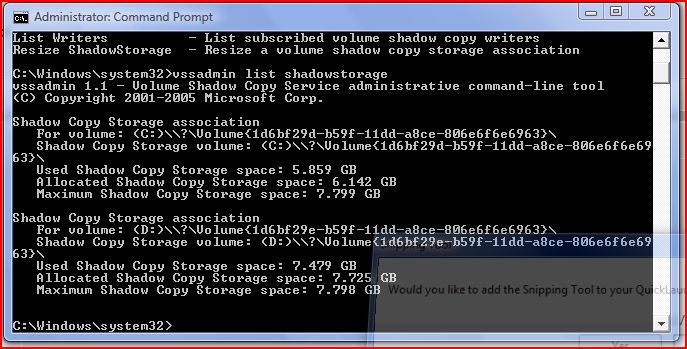
Hello Lee. Could I just hijack this post a little. I am having trouble with System Restore not working. Windows will save a Restore Point for a few days. When I have needed to use S.R recently, it goes through the whole process and at the end states, 'an error occured and Windows cannot restore to that date, try another date'. I have been following this Post and have had a look in the command prompt you suggested. I appear to have volume on both C: & D: drives. Is this right? I have attached (hopefully) a pic of the command prompt. Where would I enter the suggested string to alter the max storage amount?📎Capture.JPG
To change Max. Restore Volume storage space, these are my directions from Page 1 of this thread.
Don't include the brackets in the command prompts.
1. Make sure you have Admin. rights and then go to 'Run'. Type in ( cmd ) without the brackets and press Enter.
2. Type in the following command prompt ( vssadmin list shadowstorage ) and press Enter.
Look for "Used Shadow Copy Storage space" (System restore) which will tell you how much space in GB it is using.
3. You now want to change the max. allowed space. Type in exactly as shown and note spaces or lack of them:
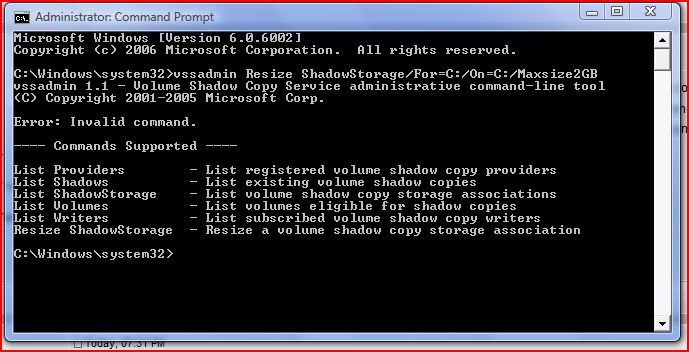
( vssadmin Resize ShadowStorage /For=C: /On=C: /Maxsize=2GB ) and press Enter.
4. Reboot and run 'WinDirStat' again and check out the 'winsxs' file size now
Hi ronecc,
you have the syntax in your command incorrect….( incorrect spacing)
copy and paste the following from a command prompt with elevated priviliges:
vssadmin Resize ShadowStorage /For=C: /On=C: /Maxsize=2GB
and press the enter key.
Note the spacing…its vital you get this right otherwise the commend will fail!
Regards
paws
✨ Ask AI
AI can make mistakes. Check the cited posts. Archived advice can be out-of-date
Don't include personal information. Questions and selected public posts go to OpenAI. About Ask AI