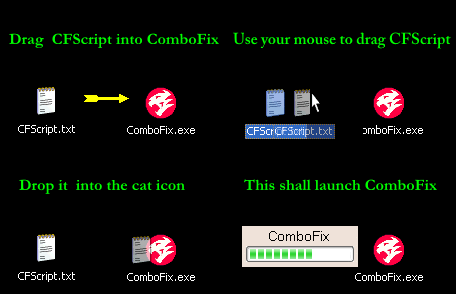
Alright here is the ComboFix log:
ComboFix 10-09-08.01 - owner 09/08/2010 22:16:56.2.2 - x86
Microsoft® Windows Vista™ Home Premium 6.0.6000.0.1252.1.1033.18.1014.341 [GMT -4:00]
Running from: c:\users\[removed]\Desktop\Oqlun7rs.exe
Command switches used :: c:\users\owner\Desktop\CFScript.txt
AV: Spy Sweeper with AntiVirus *On-access scanning disabled* (Updated) {B3891867-7230-459B-9987-E7CCFA7A7D1D}
SP: Spy Sweeper *disabled* (Updated) {68A41C74-A1E9-48F8-B2E5-D8232211AB6D}
SP: Windows Defender *enabled* (Updated) {D68DDC3A-831F-4FAE-9E44-DA132C1ACF46}
.
((((((((((((((((((((((((( Files Created from 2010-08-09 to 2010-09-09 )))))))))))))))))))))))))))))))
.
2010-09-09 02:29 . 2010-09-09 02:32 ——– d—–w- c:\users\owner\AppData\Local\temp
2010-09-09 02:29 . 2010-09-09 02:29 ——– d—–w- c:\users\Public\AppData\Local\temp
2010-09-09 02:29 . 2010-09-09 02:29 ——– d—–w- c:\users\Default\AppData\Local\temp
2010-09-09 02:11 . 2010-09-09 02:11 ——– d—–w- C:\32788R22FWJFW
2010-09-04 14:17 . 2010-09-04 14:17 ——– d—–w- c:\users\owner\AppData\Roaming\Malwarebytes
2010-09-04 14:16 . 2010-04-29 19:39 38224 —-a-w- c:\windows\system32\drivers\mbamswissarmy.sys
2010-09-04 14:16 . 2010-09-04 14:16 ——– d—–w- c:\programdata\Malwarebytes
2010-09-04 14:16 . 2010-04-29 19:39 20952 —-a-w- c:\windows\system32\drivers\mbam.sys
2010-09-04 14:16 . 2010-09-04 14:16 ——– d—–w- c:\program files\Malwarebytes' Anti-Malware
2010-09-01 01:04 . 2010-09-01 01:27 ——– d—–w- C:\Oqlun7rs
2010-08-30 06:31 . 2010-08-30 06:31 ——– d—–w- C:\_OTL
2010-08-26 05:32 . 2010-08-26 05:32 ——– d—–w- c:\users\owner\AppData\Local\Mozilla
.
(((((((((((((((((((((((((((((((((((((((( Find3M Report ))))))))))))))))))))))))))))))))))))))))))))))))))))
.
2010-08-30 05:25 . 2007-01-05 23:06 ——– d—–w- c:\programdata\McAfee
2010-08-24 01:20 . 2007-01-05 23:24 ——– d—–w- c:\program files\Google
2010-08-23 02:14 . 2009-04-27 03:06 ——– d—–w- c:\program files\Crawler
2010-08-23 02:12 . 2007-01-05 23:15 ——– d—–w- c:\program files\Yahoo!
2010-08-23 02:11 . 2007-12-09 17:14 ——– d—–w- c:\users\owner\AppData\Roaming\Yahoo!
2010-08-23 02:11 . 2007-09-04 03:02 ——– d—–w- c:\programdata\Yahoo!
.
((((((((((((((((((((((((((((((((((((( Reg Loading Points ))))))))))))))))))))))))))))))))))))))))))))))))))
.
.
*Note* empty entries & legit default entries are not shown
REGEDIT4
[HKEY_LOCAL_MACHINE\~\Browser Helper Objects\{DB35C569-5624-4CFC-8043-E5139F55A073}]
2009-03-04 12:48 796672 —-a-w- c:\progra~1\Crawler\Shared\CShared.dll
[HKEY_CURRENT_USER\SOFTWARE\Microsoft\Windows\CurrentVersion\Run]
"TOSCDSPD"="c:\program files\TOSHIBA\TOSCDSPD\TOSCDSPD.exe" [2006-11-10 417792]
"Windows Sidebar"="c:\program files\Windows Sidebar\Sidebar.exe" [2008-01-10 1232896]
"RunSpySweeperScheduleAtStartup"="c:\windows\system32\msfeedssync.exe" [2006-11-02 12288]
"Yahoo! Pager"="c:\program files\Yahoo!\Messenger\YahooMessenger.exe" [2007-12-17 3810544]
"CSmileys"="c:\progra~1\Crawler\Smileys\CSmileysIM.exe" [2009-03-13 337408]
[HKEY_LOCAL_MACHINE\SOFTWARE\Microsoft\Windows\CurrentVersion\Run]
"SynTPEnh"="c:\program files\Synaptics\SynTP\SynTPEnh.exe" [2006-10-27 815104]
"Windows Defender"="c:\program files\Windows Defender\MSASCui.exe" [2007-08-07 1006264]
"RtHDVCpl"="RtHDVCpl.exe" [2006-11-09 3784704]
"TPwrMain"="c:\program files\TOSHIBA\Power Saver\TPwrMain.EXE" [2006-12-20 411768]
"HSON"="c:\program files\TOSHIBA\TBS\HSON.exe" [2006-12-08 55416]
"SmoothView"="c:\program files\Toshiba\SmoothView\SmoothView.exe" [2006-12-12 448632]
"00TCrdMain"="c:\program files\TOSHIBA\FlashCards\TCrdMain.exe" [2006-12-15 530552]
"HWSetup"="c:\program files\TOSHIBA\Utilities\HWSetup.exe" [2006-11-01 413696]
"SVPWUTIL"="c:\program files\TOSHIBA\Utilities\SVPWUTIL.exe" [2006-01-19 421888]
"Trend Micro AntiVirus 2007"="c:\program files\Trend Micro\AntiVirus 2007\tavui.exe" [2007-07-06 4609288]
"QuickTime Task"="c:\program files\QuickTime\QTTask.exe" [2007-06-29 286720]
"iTunesHelper"="c:\program files\iTunes\iTunesHelper.exe" [2007-09-26 267064]
"CSmileys"="c:\program files\Crawler\Smileys\CSmileysIM.exe" [2009-03-13 337408]
"Adobe Reader Speed Launcher"="c:\program files\Adobe\Reader 9.0\Reader\Reader_sl.exe" [2010-06-20 35760]
"Adobe ARM"="c:\program files\Common Files\Adobe\ARM\1.0\AdobeARM.exe" [2010-06-09 976832]
"SpySweeper"="c:\program files\Webroot\Spy Sweeper\SpySweeperUI.exe" [2007-07-20 5361464]
c:\users\owner\AppData\Roaming\Microsoft\Windows\Start Menu\Programs\Startup\
OneNote 2007 Screen Clipper and Launcher.lnk - c:\program files\Microsoft Office\Office12\ONENOTEM.EXE [2006-10-27 98632]
c:\programdata\Microsoft\Windows\Start Menu\Programs\Startup\
HotSync Manager.lnk - c:\program files\Palm\Hotsync.exe [2008-1-3 1392640]
[HKEY_LOCAL_MACHINE\software\microsoft\windows nt\currentversion\drivers32]
"aux"=wdmaud.drv
[HKEY_LOCAL_MACHINE\SYSTEM\CurrentControlSet\Control\SafeBoot\Minimal\WebrootSpySweeperService]
@="Service"
[HKEY_LOCAL_MACHINE\SYSTEM\CurrentControlSet\Control\SafeBoot\Minimal\WinDefend]
@="Service"
[HKEY_LOCAL_MACHINE\software\microsoft\shared tools\msconfig\startupreg\HotKeysCmds]
2006-11-29 03:17 106496 —-a-w- c:\windows\System32\hkcmd.exe
[HKEY_LOCAL_MACHINE\software\microsoft\shared tools\msconfig\startupreg\IgfxTray]
2006-11-29 03:14 98304 —-a-w- c:\windows\System32\igfxtray.exe
[HKEY_LOCAL_MACHINE\software\microsoft\shared tools\msconfig\startupreg\KeNotify]
2006-11-07 01:14 34352 —-a-w- c:\program files\Toshiba\Utilities\KeNotify.exe
[HKEY_LOCAL_MACHINE\software\microsoft\shared tools\msconfig\startupreg\LtMoh]
2005-12-16 10:41 188416 —-a-w- c:\program files\ltmoh\ltmoh.exe
[HKEY_LOCAL_MACHINE\software\microsoft\shared tools\msconfig\startupreg\Persistence]
2006-11-29 03:13 81920 —-a-w- c:\windows\System32\igfxpers.exe
[HKEY_LOCAL_MACHINE\software\microsoft\security center\Monitoring\McAfeeAntiSpyware]
"DisableMonitoring"=dword:00000001
[HKEY_LOCAL_MACHINE\software\microsoft\security center\Monitoring\McAfeeAntiVirus]
"DisableMonitoring"=dword:00000001
[HKEY_LOCAL_MACHINE\software\microsoft\security center\Monitoring\McAfeeFirewall]
"DisableMonitoring"=dword:00000001
S0 SSFS0BB8;Spy Sweeper File System Filer Driver: 0BB8;c:\windows\SYSTEM32\Drivers\SSFS0BB8.SYS [2007-07-20 20280]
S2 tmpreflt;tmpreflt;c:\windows\system32\DRIVERS\tmpreflt.sys [2007-06-12 36112]
S2 tmproxy;Trend Micro Proxy Service;c:\program files\Trend Micro\AntiVirus 2007\Components\tmproxy.exe [2007-01-11 566872]
.
Contents of the 'Scheduled Tasks' folder
2010-09-09 c:\windows\Tasks\User_Feed_Synchronization-{7B6FFF41-30F1-4E63-8231-8468CC14C6DD}.job
- c:\windows\system32\msfeedssync.exe [2006-11-02 09:45]
.
.
——- Supplementary Scan ——-
.
uStart Page = hxxp://www.yahoo.com
uSearch Bar = hxxp://toolbar.inbox.com/search/dispatcher.aspx?tp=aus&qkw=%s&tbid=%tb_id
mStart Page = hxxp://www.yahoo.com
mDefault_Page_URL = hxxp://www.yahoo.com
uInternet Settings,ProxyOverride =
IE: E&xport to Microsoft Excel - c:\progra~1\MICROS~4\OFFICE11\EXCEL.EXE/3000
IE: Google Sidewiki… - c:\program files\Google\Google Toolbar\Component\GoogleToolbarDynamic_mui_en_89D8574934B26AC4.dll/cmsidewiki.html
IE: {{CDAFD956-97BE-443D-8EF7-F4F094EB5766} - c:\program files\Crawler\SSaver\CSSaver.exe
LSP: %SYSTEMROOT%\system32\tmlsp.dll
FF - ProfilePath - c:\users\owner\AppData\Roaming\Mozilla\Firefox\Profiles\9r8u31wc.default\
FF - prefs.js: browser.startup.homepage - www.google.com
FF - plugin: c:\progra~1\Palm\PACKAG~1\NPInstal.dll
FF - plugin: c:\program files\Java\jre1.6.0\bin\npjpi160.dll
FF - HiddenExtension: Microsoft .NET Framework Assistant: {20a82645-c095-46ed-80e3-08825760534b} - c:\windows\Microsoft.NET\Framework\v3.5\Windows Presentation Foundation\DotNetAssistantExtension\
—- FIREFOX POLICIES —-
c:\program files\Mozilla Firefox\greprefs\all.js - pref("network.IDN.whitelist.xn–mgbaam7a8h", true);
c:\program files\Mozilla Firefox\greprefs\all.js - pref("network.IDN.whitelist.xn–mgberp4a5d4ar", true);
c:\program files\Mozilla Firefox\defaults\pref\firefox.js - pref("dom.ipc.plugins.enabled", false);
.
**************************************************************************
catchme 0.3.1398 W2K/XP/Vista - rootkit/stealth malware detector by Gmer,
http://www.gmer.net
Rootkit scan 2010-09-08 22:34
Windows 6.0.6000 NTFS
scanning hidden processes …
scanning hidden autostart entries …
scanning hidden files …
scan completed successfully
hidden files: 0
**************************************************************************
.
——————— LOCKED REGISTRY KEYS ———————
[HKEY_LOCAL_MACHINE\SYSTEM\ControlSet001\Control\Class\{4D36E96D-E325-11CE-BFC1-08002BE10318}\0000\AllUserSettings]
@Denied: (A) (Users)
@Denied: (A) (Everyone)
@Allowed: (B 1 2 3 4 5) (S-1-5-20)
"BlindDial"=dword:00000000
"MSCurrentCountry"=dword:000000b5
.
———————— Other Running Processes ————————
.
c:\windows\system32\agrsmsvc.exe
c:\program files\Common Files\Apple\Mobile Device Support\bin\AppleMobileDeviceService.exe
c:\program files\TOSHIBA\ConfigFree\CFSvcs.exe
c:\toshiba\IVP\swupdate\swupdtmr.exe
c:\program files\Trend Micro\AntiVirus 2007\tavsvc.exe
c:\windows\system32\TODDSrv.exe
c:\program files\Toshiba\Power Saver\TosCoSrv.exe
c:\program files\Toshiba\Bluetooth Toshiba Stack\TosBtSrv.exe
c:\program files\Common Files\Ulead Systems\DVD\ULCDRSvr.exe
c:\program files\Webroot\Spy Sweeper\SpySweeper.exe
c:\windows\RtHDVCpl.exe
c:\windows\system32\wbem\unsecapp.exe
c:\program files\iPod\bin\iPodService.exe
c:\windows\Microsoft.Net\Framework\v3.0\WPF\PresentationFontCache.exe
c:\windows\servicing\TrustedInstaller.exe
c:\windows\system32\lpremove.exe
c:\windows\system32\lpksetup.exe
.
**************************************************************************
.
Completion time: 2010-09-08 22:47:11 - machine was rebooted
ComboFix-quarantined-files.txt 2010-09-09 02:46
ComboFix2.txt 2010-09-01 01:27
Pre-Run: 76,697,833,472 bytes free
Post-Run: 76,668,350,464 bytes free
- - End Of File - - EE482EE39D7322397FF4EB88CB8A93AF
Here is the OTL log:
All processes killed
========== OTL ==========
========== FILES ==========
C:\Users\owner\AppData\Local\Microsoft\Windows\Temporary Internet Files\Low\Content.IE5\P7R73YRP\count[1].htm moved successfully.
C:\Users\owner\AppData\Local\Microsoft\Windows\Temporary Internet Files\Low\Content.IE5\SPB036WI\count[1].htm moved successfully.
========== COMMANDS ==========
[EMPTYFLASH]
User: All Users
User: Default
->Flash cache emptied: 0 bytes
User: Default User
->Flash cache emptied: 0 bytes
User: owner
->Flash cache emptied: 2378 bytes
User: Public
Total Flash Files Cleaned = 0.00 mb
[EMPTYTEMP]
User: All Users
User: Default
->Temp folder emptied: 0 bytes
->Temporary Internet Files folder emptied: 0 bytes
->Flash cache emptied: 0 bytes
User: Default User
->Temp folder emptied: 0 bytes
->Temporary Internet Files folder emptied: 0 bytes
->Flash cache emptied: 0 bytes
User: owner
->Temp folder emptied: 32629 bytes
->Temporary Internet Files folder emptied: 298242844 bytes
->Java cache emptied: 4865252 bytes
->FireFox cache emptied: 46061742 bytes
->Flash cache emptied: 0 bytes
User: Public
->Temp folder emptied: 0 bytes
%systemdrive% .tmp files removed: 0 bytes
%systemroot% .tmp files removed: 0 bytes
%systemroot%\System32 .tmp files removed: 0 bytes
%systemroot%\System32\drivers .tmp files removed: 0 bytes
Windows Temp folder emptied: 66944 bytes
RecycleBin emptied: 0 bytes
Total Files Cleaned = 333.00 mb
OTL by OldTimer - Version 3.2.10.0 log created on 09082010_230417
Files\Folders moved on Reboot…
File\Folder C:\Windows\temp\5302e3a1.$$$ not found!
Registry entries deleted on Reboot…
The computer is running a bit improved. Speed has increased a little bit and the occurrences of programs randomly freezing for a minute or two have decreased, but not gone away entirely. It just has this feeling of sluggishness about it. Things, both internetrelated and non-internet related, take longer to open, whereas my other laptop I have uses the same wireless internet seems to act just fine in terms of time it takes to respond to various programs opening. Also I should note that with this computer it doesn't get turned off really ever…just rebooted. But the crucial issues of freezing and dramatic sluggishness have decreased to a reasonable extent.

 The two threats shown have the following file names:
Top threat: C:\Users\owner\AppData\Local\Microsoft\Windows\Temporary Internet Files\Low\Content.IE5\P7R73YRP\count[1].htm
Bottomw Threat: C:\Users\owner\AppData\Local\Microsoft\Windows\Temporary Internet Files\Low\Content.IE5\SPB036WI\count[1].htm
Beside both under the "Threat" column it reads: Exploit.JS.pdf
Under threats count, it says "1" for both.
Should I continue with the new ComboFix script or are the threats something I should get rid of first?