Blindside
Topic Starter
Hello,
I have multiple iexplorer.exe's running in my Task Manager, every time I try to close the program it opens itself back up. My volume gets muted, and I check my Volume and the Wave bar is all the way down so I just turn it up to get my sound back, but turns down a few minutes later.
I have random mouse clicks in the background and eventually Ad's pop up. I turned my Firewall and Anti virus on max if it helps any. My PC runs very slow also.
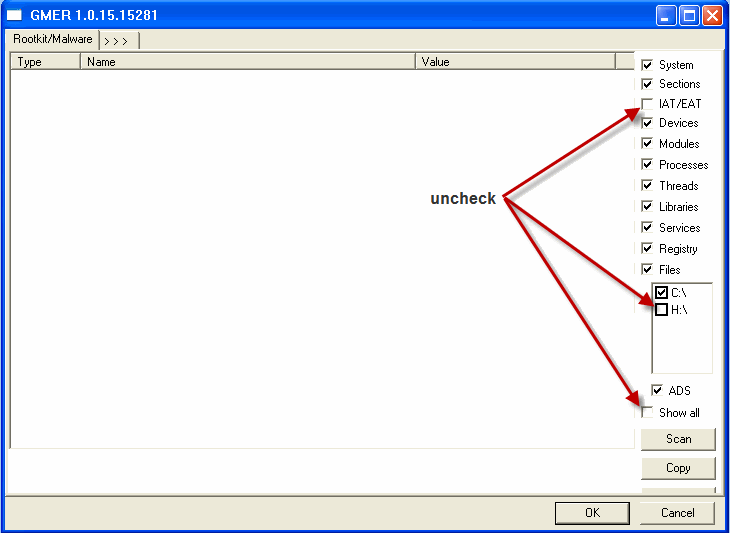
I have pictures here to show you guys, if there is any other info you need please tell me
[external image: Posted Image]
[external image: Posted Image]
Here is the log I had in HiJackThis.
Logfile of Trend Micro HijackThis v2.0.4
Scan saved at 4:55:53 PM, on 7/8/2010
Platform: Windows XP SP3 (WinNT 5.01.2600)
MSIE: Internet Explorer v8.00 (8.00.6001.18702)
Boot mode: Normal
Running processes:
C:\WINDOWS\System32\smss.exe
C:\WINDOWS\system32\winlogon.exe
C:\WINDOWS\system32\services.exe
C:\WINDOWS\system32\lsass.exe
C:\WINDOWS\system32\svchost.exe
C:\WINDOWS\system32\nvsvc32.exe
C:\WINDOWS\system32\svchost.exe
C:\WINDOWS\system32\svchost.exe
C:\Program Files\Common Files\Defender Pro\Defender Pro Update Service\livesrv.exe
C:\Program Files\Defender Pro\Defender Pro\vsserv.exe
C:\WINDOWS\System32\svchost.exe
C:\WINDOWS\Explorer.EXE
C:\WINDOWS\system32\spoolsv.exe
C:\Program Files\TortoiseSVN\bin\TSVNCache.exe
C:\Program Files\Analog Devices\Core\smax4pnp.exe
C:\WINDOWS\system32\RUNDLL32.EXE
C:\Program Files\Common Files\Java\Java Update\jusched.exe
C:\Program Files\Defender Pro\Defender Pro\bdagent.exe
C:\Program Files\Microsoft Xbox 360 Accessories\XboxStat.exe
C:\WINDOWS\system32\ctfmon.exe
C:\Program Files\Skype\Phone\Skype.exe
C:\Program Files\W3i\InstallIQUpdater\InstallIQUpdater.exe
C:\Program Files\LimeWire\LimeWire.exe
C:\Program Files\Microsoft Office\Office12\ONENOTEM.EXE
C:\WINDOWS\System32\svchost.exe
C:\Program Files\Common Files\Autodesk Shared\Service\AdskScSrv.exe
C:\Program Files\Java\jre6\bin\jqs.exe
C:\Program Files\Defender Pro\Defender Pro\seccenter.exe
C:\WINDOWS\system32\svchost.exe
C:\Program Files\Yahoo!\SoftwareUpdate\YahooAUService.exe
C:\Program Files\Skype\Plugin Manager\skypePM.exe
C:\Program Files\Common Files\Apple\Mobile Device Support\AppleMobileDeviceService.exe
C:\Program Files\iPod\bin\iPodService.exe
C:\WINDOWS\system32\SNDVOL32.EXE
C:\Program Files\Steam\Steam.exe
C:\Program Files\Mozilla Firefox\firefox.exe
C:\Program Files\Mozilla Firefox\plugin-container.exe
C:\Program Files\Google\GoogleToolbarNotifier\GoogleToolbarNotifier.exe
C:\Program Files\Internet Explorer\IEXPLORE.EXE
C:\Documents and Settings\Owner\My Documents\Downloads\HiJackThis.exe
R1 - HKLM\Software\Microsoft\Internet Explorer\Main,Default_Page_URL = http://go.microsoft.com/fwlink/?LinkId=69157
R1 - HKLM\Software\Microsoft\Internet Explorer\Main,Default_Search_URL = http://go.microsoft.com/fwlink/?LinkId=54896
R1 - HKLM\Software\Microsoft\Internet Explorer\Main,Search Page = http://go.microsoft.com/fwlink/?LinkId=54896
R0 - HKLM\Software\Microsoft\Internet Explorer\Main,Start Page = http://go.microsoft.com/fwlink/?LinkId=69157
R1 - HKCU\Software\Microsoft\Windows\CurrentVersion\Internet Settings,ProxyOverride = *.local
R3 - URLSearchHook: UrlSearchHook Class - {00000000-6E41-4FD3-8538-502F5495E5FC} - C:\Program Files\Ask.com\GenericAskToolbar.dll
O2 - BHO: &Yahoo! Toolbar Helper - {02478D38-C3F9-4efb-9B51-7695ECA05670} - C:\Program Files\Yahoo!\Companion\Installs\cpn0\yt.dll
O2 - BHO: AcroIEHelperStub - {18DF081C-E8AD-4283-A596-FA578C2EBDC3} - C:\Program Files\Common Files\Adobe\Acrobat\ActiveX\AcroIEHelperShim.dll
O2 - BHO: PriceGong - {4D3F3F3A-0E4B-4085-9032-7D072072319A} - C:\Program Files\PriceGong\2.0.0\PriceLoadIE.dll
O2 - BHO: Google Toolbar Helper - {AA58ED58-01DD-4d91-8333-CF10577473F7} - C:\Program Files\Google\Google Toolbar\GoogleToolbar_32.dll
O2 - BHO: SkypeIEPluginBHO - {AE805869-2E5C-4ED4-8F7B-F1F7851A4497} - C:\Program Files\Skype\Toolbars\Internet Explorer\skypeieplugin.dll
O2 - BHO: Google Toolbar Notifier BHO - {AF69DE43-7D58-4638-B6FA-CE66B5AD205D} - C:\Program Files\Google\GoogleToolbarNotifier\5.5.5126.1836\swg.dll
O2 - BHO: Updater For My.Freeze.com Toolbar - {C26CD490-5F01-41E3-B150-EB29F19DA056} - (no file)
O2 - BHO: (no name) - {CC3C8D60-29D6-4880-B9D8-443C4CBA2BEC} - (no file)
O2 - BHO: Ask Toolbar BHO - {D4027C7F-154A-4066-A1AD-4243D8127440} - C:\Program Files\Ask.com\GenericAskToolbar.dll
O2 - BHO: Java™ Plug-In 2 SSV Helper - {DBC80044-A445-435b-BC74-9C25C1C588A9} - C:\Program Files\Java\jre6\bin\jp2ssv.dll
O2 - BHO: JQSIEStartDetectorImpl - {E7E6F031-17CE-4C07-BC86-EABFE594F69C} - C:\Program Files\Java\jre6\lib\deploy\jqs\ie\jqs_plugin.dll
O2 - BHO: SingleInstance Class - {FDAD4DA1-61A2-4FD8-9C17-86F7AC245081} - C:\Program Files\Yahoo!\Companion\Installs\cpn0\YTSingleInstance.dll
O3 - Toolbar: Yahoo! Toolbar - {EF99BD32-C1FB-11D2-892F-0090271D4F88} - C:\Program Files\Yahoo!\Companion\Installs\cpn0\yt.dll
O3 - Toolbar: LimeWire Toolbar - {D4027C7F-154A-4066-A1AD-4243D8127440} - C:\Program Files\Ask.com\GenericAskToolbar.dll
O3 - Toolbar: Defender Pro Toolbar - {381FFDE8-2394-4f90-B10D-FC6124A40F8C} - C:\Program Files\Defender Pro\Defender Pro\IEToolbar.dll
O3 - Toolbar: Google Toolbar - {2318C2B1-4965-11d4-9B18-009027A5CD4F} - C:\Program Files\Google\Google Toolbar\GoogleToolbar_32.dll
O4 - HKLM\..\Run: [SoundMAXPnP] C:\Program Files\Analog Devices\Core\smax4pnp.exe
O4 - HKLM\..\Run: [nwiz] nwiz.exe /installquiet
O4 - HKLM\..\Run: [NvMediaCenter] RUNDLL32.EXE C:\WINDOWS\system32\NvMcTray.dll,NvTaskbarInit
O4 - HKLM\..\Run: [NvCplDaemon] RUNDLL32.EXE C:\WINDOWS\system32\NvCpl.dll,NvStartup
O4 - HKLM\..\Run: [SunJavaUpdateSched] "C:\Program Files\Common Files\Java\Java Update\jusched.exe"
O4 - HKLM\..\Run: [Adobe Reader Speed Launcher] "C:\Program Files\Adobe\Reader 9.0\Reader\Reader_sl.exe"
O4 - HKLM\..\Run: [Adobe ARM] "C:\Program Files\Common Files\Adobe\ARM\1.0\AdobeARM.exe"
O4 - HKLM\..\Run: [DPAgent] "C:\Program Files\Defender Pro\Defender Pro\bdagent.exe"
O4 - HKLM\..\Run: [Defender Pro Antiphishing Helper] "C:\Program Files\Defender Pro\Defender Pro\IEShow.exe"
O4 - HKLM\..\Run: [QuickTime Task] "C:\Program Files\QuickTime\qttask.exe" -atboottime
O4 - HKLM\..\Run: [KernelFaultCheck] %systemroot%\system32\dumprep 0 -k
O4 - HKLM\..\Run: [XboxStat] "c:\Program Files\Microsoft Xbox 360 Accessories\XboxStat.exe" silentrun
O4 - HKLM\..\Run: [iTunesHelper] "C:\Program Files\iTunes\iTunesHelper.exe"
O4 - HKCU\..\Run: [ctfmon.exe] C:\WINDOWS\system32\ctfmon.exe
O4 - HKCU\..\Run: [Skype] "C:\Program Files\Skype\Phone\Skype.exe" /nosplash /minimized
O4 - HKCU\..\Run: [swg] "C:\Program Files\Google\GoogleToolbarNotifier\GoogleToolbarNotifier.exe"
O4 - HKCU\..\Run: [Steam] "c:\program files\steam\steam.exe" -silent
O4 - HKCU\..\Run: [cdloader] "C:\Documents and Settings\Owner\Application Data\mjusbsp\cdloader2.exe" MAGICJACK
O4 - HKCU\..\Run: [InstallIQUpdater] "C:\Program Files\W3i\InstallIQUpdater\InstallIQUpdater.exe" /silent /autorun
O4 - HKCU\..\Run: [Weather] C:\Program Files\AWS\WeatherBug\Weather.exe 1
O4 - S-1-5-18 Startup: LimeWire On Startup.lnk = C:\Program Files\LimeWire\LimeWire.exe (User 'SYSTEM')
O4 - S-1-5-18 Startup: OneNote 2007 Screen Clipper and Launcher.lnk = C:\Program Files\Microsoft Office\Office12\ONENOTEM.EXE (User 'SYSTEM')
O4 - .DEFAULT Startup: LimeWire On Startup.lnk = C:\Program Files\LimeWire\LimeWire.exe (User 'Default user')
O4 - .DEFAULT Startup: OneNote 2007 Screen Clipper and Launcher.lnk = C:\Program Files\Microsoft Office\Office12\ONENOTEM.EXE (User 'Default user')
O4 - Startup: LimeWire On Startup.lnk = C:\Program Files\LimeWire\LimeWire.exe
O4 - Startup: OneNote 2007 Screen Clipper and Launcher.lnk = C:\Program Files\Microsoft Office\Office12\ONENOTEM.EXE
O8 - Extra context menu item: E&xport to Microsoft Excel - res://C:\PROGRA~1\MI1933~1\Office12\EXCEL.EXE/3000
O8 - Extra context menu item: Google Sidewiki… - res://C:\Program Files\Google\Google Toolbar\Component\GoogleToolbarDynamic_mui_en_89D8574934B26AC4.dll/cmsidewiki.html
O9 - Extra button: Send to OneNote - {2670000A-7350-4f3c-8081-5663EE0C6C49} - C:\PROGRA~1\MI1933~1\Office12\ONBttnIE.dll
O9 - Extra 'Tools' menuitem: S&end to OneNote - {2670000A-7350-4f3c-8081-5663EE0C6C49} - C:\PROGRA~1\MI1933~1\Office12\ONBttnIE.dll
O9 - Extra button: Skype add-on for Internet Explorer - {898EA8C8-E7FF-479B-8935-AEC46303B9E5} - C:\Program Files\Skype\Toolbars\Internet Explorer\skypeieplugin.dll
O9 - Extra 'Tools' menuitem: Skype add-on for Internet Explorer - {898EA8C8-E7FF-479B-8935-AEC46303B9E5} - C:\Program Files\Skype\Toolbars\Internet Explorer\skypeieplugin.dll
O9 - Extra button: Research - {92780B25-18CC-41C8-B9BE-3C9C571A8263} - C:\PROGRA~1\MI1933~1\Office12\REFIEBAR.DLL
O9 - Extra button: (no name) - {e2e2dd38-d088-4134-82b7-f2ba38496583} - C:\WINDOWS\Network Diagnostic\xpnetdiag.exe
O9 - Extra 'Tools' menuitem: @xpsp3res.dll,-20001 - {e2e2dd38-d088-4134-82b7-f2ba38496583} - C:\WINDOWS\Network Diagnostic\xpnetdiag.exe
O9 - Extra button: Messenger - {FB5F1910-F110-11d2-BB9E-00C04F795683} - C:\Program Files\Messenger\msmsgs.exe
O9 - Extra 'Tools' menuitem: Windows Messenger - {FB5F1910-F110-11d2-BB9E-00C04F795683} - C:\Program Files\Messenger\msmsgs.exe
O16 - DPF: {1E54D648-B804-468d-BC78-4AFFED8E262F} (System Requirements Lab) - http://www.nvidia.com/content/DriverDownlo…sreqlab_nvd.cab
O16 - DPF: {E2883E8F-472F-4FB0-9522-AC9BF37916A7} - http://platformdl.adobe.com/NOS/getPlusPlus/1.6/gp.cab
O18 - Protocol: skype-ie-addon-data - {91774881-D725-4E58-B298-07617B9B86A8} - C:\Program Files\Skype\Toolbars\Internet Explorer\skypeieplugin.dll
O18 - Protocol: skype4com - {FFC8B962-9B40-4DFF-9458-1830C7DD7F5D} - C:\PROGRA~1\COMMON~1\Skype\SKYPE4~1.DLL
O22 - SharedTaskScheduler: Browseui preloader - {438755C2-A8BA-11D1-B96B-00A0C90312E1} - C:\WINDOWS\system32\browseui.dll
O22 - SharedTaskScheduler: Component Categories cache daemon - {8C7461EF-2B13-11d2-BE35-3078302C2030} - C:\WINDOWS\system32\browseui.dll
O23 - Service: Apple Mobile Device - Apple Inc. - C:\Program Files\Common Files\Apple\Mobile Device Support\AppleMobileDeviceService.exe
O23 - Service: Defender Pro Arrakis Server (Arrakis3) - BitDefender S.R.L. http://www.bitdefender.com - C:\Program Files\Common Files\Defender Pro\Defender Pro Arrakis Server\bin\arrakis3.exe
O23 - Service: Autodesk Licensing Service - Autodesk - C:\Program Files\Common Files\Autodesk Shared\Service\AdskScSrv.exe
O23 - Service: BarQuery Service - Unknown owner - C:\Documents and Settings\All Users\Application Data\BarQuery\barquery145.exe
O23 - Service: Bonjour Service - Apple Inc. - C:\Program Files\Bonjour\mDNSResponder.exe
O23 - Service: FLEXnet Licensing Service - Macrovision Europe Ltd. - C:\Program Files\Common Files\Macrovision Shared\FLEXnet Publisher\FNPLicensingService.exe
O23 - Service: Google Update Service (gupdate) (gupdate) - Google Inc. - C:\Program Files\Google\Update\GoogleUpdate.exe
O23 - Service: Google Software Updater (gusvc) - Google - C:\Program Files\Google\Common\Google Updater\GoogleUpdaterService.exe
O23 - Service: iPod Service - Apple Inc. - C:\Program Files\iPod\bin\iPodService.exe
O23 - Service: Java Quick Starter (JavaQuickStarterService) - Sun Microsystems, Inc. - C:\Program Files\Java\jre6\bin\jqs.exe
O23 - Service: Defender Pro Update Service (LIVESRV) - Defender Pro - C:\Program Files\Common Files\Defender Pro\Defender Pro Update Service\livesrv.exe
O23 - Service: mental ray 3.7 Satellite for Autodesk 3ds Max 2010 32-bit 32-bit (mi-raysat_3dsmax2010_32) - Unknown owner - C:\Program Files\Autodesk\3ds Max 2010\mentalray\satellite\raysat_3dsmax2010_32server.exe
O23 - Service: mental ray 3.5 Satellite (32-bit) (mi-raysat_3dsmax9_32) - Unknown owner - C:\Program Files\Autodesk\3ds Max 9\mentalray\satellite\raysat_3dsmax9_32server.exe
O23 - Service: NVIDIA Display Driver Service (nvsvc) - NVIDIA Corporation - C:\WINDOWS\system32\nvsvc32.exe
O23 - Service: PinnacleUpdate Service (PinnacleUpdateSvc) - PowerUp Software, LLC - C:\Program Files\PowerUp Software\Pinnacle Game Profiler\pinnacle_updater.exe
O23 - Service: Defender Pro Virus Shield (VSSERV) - Defender Pro - C:\Program Files\Defender Pro\Defender Pro\vsserv.exe
O23 - Service: Yahoo! Updater (YahooAUService) - Yahoo! Inc. - C:\Program Files\Yahoo!\SoftwareUpdate\YahooAUService.exe
–
End of file - 11946 bytes