This is a read-only archive. No new posts or registrations. Privacy Page
Spyware / Malware / Virus Removal

Microsoft did not Fix

40 min read

This thread's last reply is from . Advice, software, and links below may be out of date — treat specific steps and download links with caution.

Looking for the outcome? Ask AI

Old man, I have not tried this popup blocker. It only has 2 and 1/2 stars is that means anything. I have used Google popup blocker before and now and that worked before but not so much since I got the infection. The popups I recognize are from zedo. I'll keep a lookout for the others. Thanks] GB
Hi gbsk,

Let's try this with the Google Popup blocker if you still have it. I don't have Opera so I'm not sure if the instruction are the same as IE. In IE it's click the tools button, highlight Pop-up Blocker and click Pop-up Blocker Settings .

Use the dropdown menu at the bottom to set it to High.

Which version of Opera are you using? It would seem that 7.5 includes a popup blocker. However by default it is set to allow all. Rather old but it may still be relevant
http://jobs.surrey.ac.uk/PopUpBlock.html#opera75

We can try a custom Hosts file also.

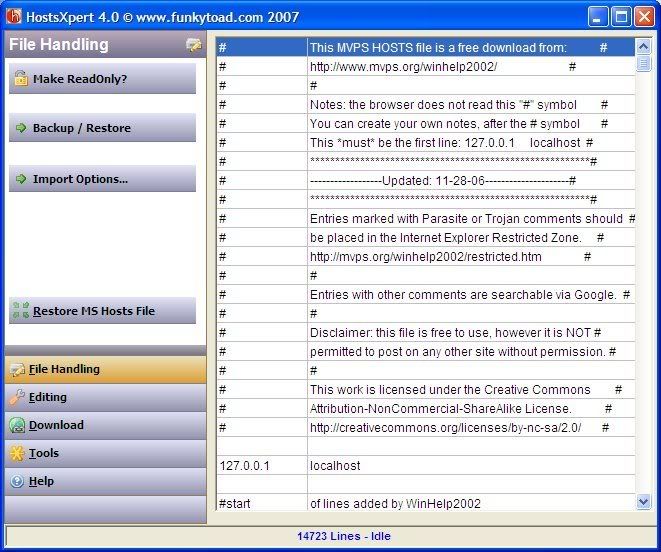
Please download HostsXpert
  • Unzip HostsXpert to it's own folder in a convenient place such as C:\HostsXpert
  • Run: HostsXpert.exe
  • Click: Restore MS Hosts File
  • Click: Replace
  • Click: OK
  • Click: Make ReadOnly
  • Close HostsXpert.


If needed Tutorial

I do not believe the java issues are malware related. That can be looked at in another part of our forum when we are done.
Old man I downloaded the Host file. I did the directions as far as "Replace". I did not see"replace" so I stopped. As far as the popup blocker, i GUESS THE SETTING WAS WRIONG LIKE YOU SAID. iT HAD 4 SETtings. It was on allowing popups in the background. I put it on blocking popups I don't want. It also had blocking all popups but it seems like I need some when I click on links. Whne I get this fixed I was thinking of downloading a virtual sandbox program so I can just close the browser and it will dump all the memory including any malware. I had a real bad infection around Christmas time. I think it even took out my back external drive as it does not work since the infection. I had to reinstall XP on the computer. Is it possible to clean and resurrect the external drive? Thanks a lot for helping. GB
Hi gbsk, Hold off on the Hosts file for now and let's see if the settings you now have in the popup blocker help. A link to a custom Host File will be provided when we are finished. It may be possible to clean the external drive depending on what it was infected with. If it was Virut or a similar file infector then no it's not possible. Do you recall the infection? Since it is an external drive there may be an autorun infection involved. Don't attach the drive yet. Just answer the questions for now so we can see how best to proceed. Thanks
Old man I just spoke to my wife. She said she has not been able to open [removed] any mail in hot mail. She also said she cannot log into Criagslist on our computer. She can do it at the library computer or my son's laptop though. Thanks GB
Old Man This has been going on for a long time - at least 2 months. I will ask her if she tried another browser. I do know she can access Yahoo and gmail okay though. GB
Hi gbsk,

It also had blocking all popups but it seems like I need some when I click on links.

Most popup blockers let you add sites from which you want to allow popups.

Let me know how you make out using different browser. The remaining issues othe than the external drive do not appear to be malware related so we will clean up the tools when you post back.
Old Man My wife tried Chrome as a browser and she could access both Hotmail and Craigslist so I guess it is just Opera that will not work properly. I also tried for the umpteenth time to download the flashplayer for NBC sports but I could not play the page. I don't know why. Thanks GB
Hi gbsk,

Yes it would seem to be a problem with Opera. For help with this you can ask HERE

For the java and FlashPlayer post HERE

Let me know about the external drive.

We'll clean up our tools.

From your desktop, please delete, if present
  • any notepads/logs that we created
  • GMER.zip
  • GMER.exe
  • SystemLook.exe
  • Rkill

Next

Click the Start button, click Run. Copy and paste the following line into the run box and click OK

Combofix /uninstall


Open OTL then click the Clean Up button. You may get prompted by your firewall that OTL wants to contact the internet - allow this. A cleanup.txt will be downloaded, a message dialog will ask you if you want to proceed with the cleanup process, click Yes. This will do some clean up tasks and delete some of the tools you have downloaded plus itself.


I suggest you keep MBAM. Keep MBAM updated and use it regularly.


The Eset Online can can be removed hy going to add/remove programs and uninstlling ESET Online Scanner v3


Some Recommendations and prevention tips

Basic security consists of 1 antivirus program, 1 resident antispyware program, 1 on demand antispyware program and a firewall.

For resident antispyware I suggest either

Windows Defender
OR
Winpatrol

* If you are behind a router Windows firewall should be fine. Otherwise a 3rd party firewall with outbound monitoring is recommended.

Click FIREWALL for tips, reviews and links to good, free and paid for firewalls. (Note: Zone Alarm is becoming bloatware,IMO)


You should also use Spyware Blaster to help immunize your computer.

- SpywareBlaster will add a large list of programs and sites into your Internet Explorer
settings that will protect you from running and downloading known malicious programs.

OR

A guide to understanding and using the hosts file.

Learn how your Hosts file can protect you and how you can protect it.
Besides the Hosts file information, there are links to a very good updated hosts file, a host file manager. and some programs that can protect your hosts file.
HOSTS

Please read the info on disabling the DNS Client before installing a custom hosts file.


-Secure your Internet Explorer

From within Internet Explorer click on the Tools menu and then click on Options.
  • Click once on the Security tab
  • Click once on the Internet icon so it becomes highlighted.
  • Click once on the Custom Level button.
  • Change the Download signed ActiveX controls to Prompt
  • Change the Download unsigned ActiveX controls to Disable
  • Change the Initialize and script ActiveX controls not marked as safe to Disable
  • Change the Installation of desktop items to Prompt
  • Change the Launching programs and files in an IFRAME to Prompt
  • Change the Navigate sub-frames across different domains to Prompt
  • When all these settings have been made, click on the OK button.
  • If it prompts you as to whether or not you want to save the settings, press the Yes button.
Next press the Apply button and then the OK to exit the Internet Properties page.


- Keeping your Windows up-to-date is crucial to your computer's security. Please go to the Windows Update Site (using Internet Explorer) and download and install all critical updates on a regular basis


- Ensure that Automatic Update is turned on so you get all the latest patches.
Click start, control panel, click Security Center.


- Keep your antivirus program updated, as well as any other security programs you have.


-More tips and programs can be found HERE


- You may also want to read this article By Tony Klein
http://www.freedomlist.com/forum/viewtopic.php?t=22879

Old Man I got rid of everything you told me. I was just curious why you had me get rid of some of them. They were useful before. I had Windows Defender before but I think someone told me to get rid of it so I did. I installed WinPatrol. I also installed Spyware Blaster. I had that before also. I changed the settings for IE. However, i don't like IE and rarely use it. I usually use Opera. Firefox seems to use more memory and Chrome seems to use even more memory although I like them both. I am not sure if I should change any Opera settings. I just looked and saw that Java was not enabled. I wonder if that has to do with my wife not being able to log into Hotmail and Craigslist. One thing I did not do was make Windows updates automatic. A lot of those I do not need like for network computing, etc. Is there another way to just get what I need instead of blotware? Thanks a lot for helping, GB
I've had 3 bad drive by infections since mid December including this one. This one was the least intrusive as I did not have to reinstall XP this time. As I remember, all 3 were from what I thought were innocuous sites. I got this one from Yahoo's main page. I got another from doing research for a Toastmaster speech. I was not sure about the first one but I was not on any porn sites or any site that should have given me red flags. Thanks GB
Old Man Right now my settings do not seem to work well. I clicked a link for "submit" on a site and it did not go thnrough. The only way I can get any links to open is to right click and then click open in another tab. If I just click a link on it will not open. \ Thanks GB
Hi gbsk, This doesn't seem to be malware related. I see you are making progress in your other thread resolving your opera issues.

Ask AI

AI can make mistakes. Check the cited posts. Archived advice can be out-of-date

Don't include personal information. Questions and selected public posts go to OpenAI. About Ask AI