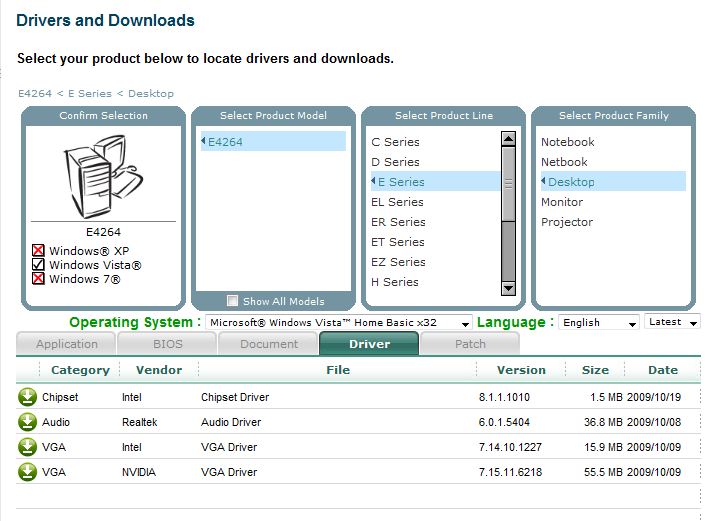
Another way to get to Device Manager is to right click on My Computer, click on the Hardware tab then click on the Device Manager button. Too many clicks for me so I usual post what I think is a quicker way to get there. Works pretty well when I get the command entered correctly.
Again, sorry.
everything that is yellow says that the driver is not installed, i dont know which one is the modem.
in the choices to install the driver should i use the recovery cd or if it was there would it have installed?
Can you post a picture of your Device Manager Window? Expand each area that is marked with yellow then capture the image. Instructions for doing so follow:
Also, what is your E-machine model number again? I looked back but can't find it right now. I'm sure we can find the drivers you need on the E-machines web site. Not sure why the PC
There are no XP drivers for that system. Are you running XP or Vista (did I already ask you that? This is getting to be along thread and I'm getting confused, can you tell?) http://emachines.com/support/drivers.html
Where did you get the Recovery CD? It doesn't look like it's for this computer. There are ways to try to figure out what drivers you need and we may be able to find them but it will take a lot more work.
BMP images are very large and you end up using up tour alloted space here very quickly. Saving the pics as .jpg makes them quite a bit smaller. You can also you a program like the free IrfanView to resize them to 640x480, that also will help reduce the size.
lol! thats ok..i'm running xp home but its a t6426, your screenshot is of an E4264.
the recovery cd came with the pc when i bought it. i have used it a few times in the past when i formatted and never experienced this problem. the only difference is that this is a different hard drive.
Told you I'm getting confused! I can't even right read moreany!
Looks like Audio and Video drivers are available for the T6426. Try downloading and installing them, that should clear up a few of the yellow marked devices.
For the PCI and PCI communications device, from Device Manager, double click on it then select the Details page. Post the PCI/VEN_xxxx&DEV_xxxx info here and we can see about finding a driver for it.
thank you i didnt realize jpeg was smaller.
PCI
PCI\VEN_11C1&DEV_0620&SUBSYS_062111C1&REV_00\4&B17F62E
PCI communications
PCI\VEN_10DE&DEV_026C&SUBSYS_10EC0880&REV_A2\3&267A616
i downloaded those 2 things from the site and i'm going to resave the screenshots and post them
hmmm..i saved thoswe 2 downloads to my usb and i cant seem to get the nvideo to work. it starts to copy the files then stops saying it cant locate something or the path is invalid. i'm going to have to examine the files more closely (although i did read the ""read me" file)
To verify, open the computer case with power off and cord unplugged. Remove the Modem card from it's PCI slot then look at it carefully for make and model number. It should also have a FCC ID number.
The 2nd one is the Realtek Audio, so the download should fix it. Both downloads are zip files so you need to extract the data in them first. I use 7-Zip for this though I'm sure Windows 7 has it's own built in zip file handler. I prefer the 7-Zip interface. If you want to use, just download and install it, then right click on a .zip file, select 7-Zip then Extract here.
Then read the various readme files included before proceeding. They should install okay. Since they are zip files and not exe, they are not automatically extracted to C:\Cabs\D00448-001-001 so you can't run setup.exe from there. Instead, run it from wherever you extract the file.
Still having this problem?
This topic is from the What the Tech archive and can't take new replies. Geeks to Go is an active, free help community run by volunteers. Post your question there and a person, not a bot, will work through it with you.

 Again, sorry.