Hello, I recently bought a computer system with windows vista (custom built), 4GB ram,intel 2 Duo core.
*Is there any tools that can show me if all my hardware is running OK?
*Also what would be some recommendations?
*Should I be running a 64-bit vista?
*What level could I overclock my computer to?(Tell me if you need more info)
Thanks(as you could've noticed, I have little exp. in hardware)
Greetings,
Sorry for the delayed response.
If you have no obvious problems then your hardware is probably running OK.
What specific types of recommendations are you looking for?
There is no reason to go to 64 bit if you currently run 32. Even if you have both options 32 is still the most user friendly unless you run a server or for some other reason want to run more than 4GB RAM.
Overclocking depends on the motherboard mostly. What is the make and model of the motherboard?
Again sorry for the delay in replying.
Ok my motherboard is a GIGABYTE Ultra Durable 3 GA-EP45-UD3L®
I recently discovered a problem with my graphics card (ATI Radeon HD 4670) while playing Titan Quest made by THQ. Here is the problem report:
Description
A problem with your video hardware caused Windows to stop working correctly.
Problem signature
Problem Event Name: LiveKernelEvent
OS Version: 6.0.6001.2.1.0.768.3
Locale ID: 5129
Files that help describe the problem
WD-20090427-1710.dmp
sysdata.xml
Version.txt
View a temporary copy of these files
Warning: If a virus or other security threat caused the problem, opening a copy of the files could harm your computer.
Extra information about the problem
BCCode: 117
BCP1: 8637D510
BCP2: 8EA16A14
BCP3: 00000000
BCP4: 00000000
OS Version: 6_0_6001
Service Pack: 1_0
Product: 768_1
Also the recommended solution:
Check for ATI Graphics Driver updates
This problem was caused by ATI Graphics Driver, which was created by ATI Technologies, Inc.. There is no solution for this problem at this time.
Troubleshooting
——————————————————————————–
A driver update, if available, might prevent this problem from recurring.
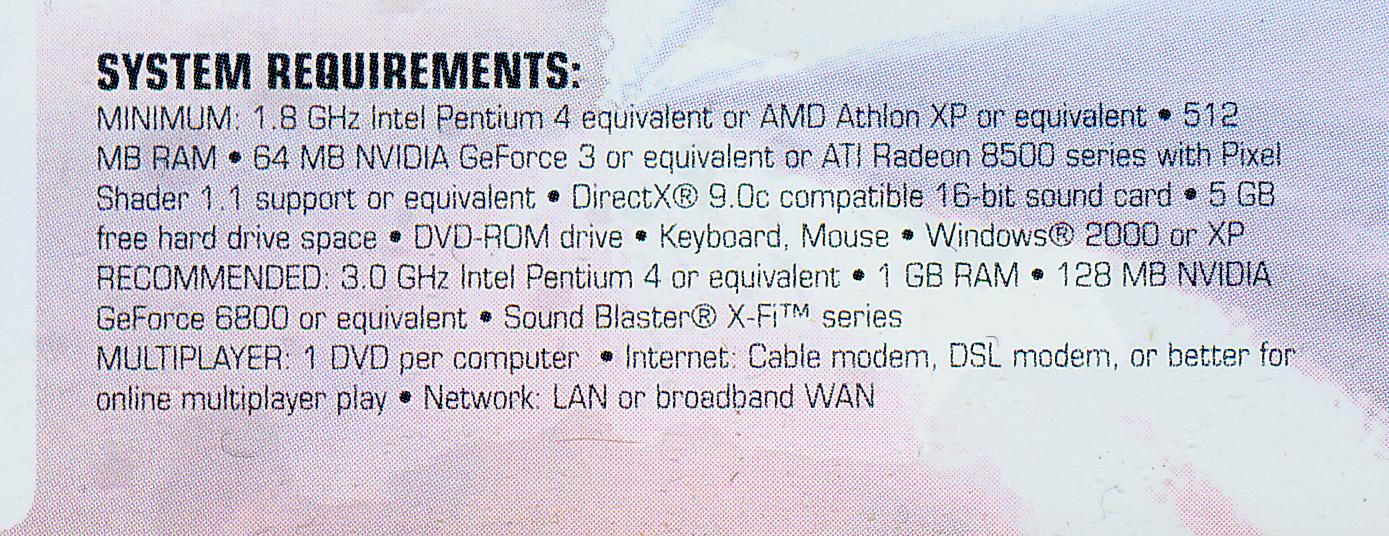
I have already tried updating my drivers and it didn't work. All the other games are fine - no errors, just this one. It occurs 15-20 min after i start the game. Attached is the game requirements.
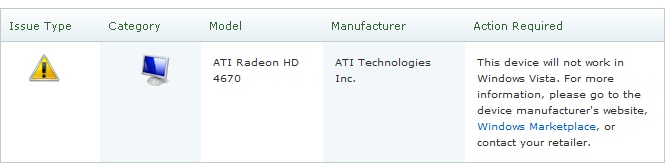
Note: Windows Vista Upgrade Adviser says graphics card is not compatible(also uploaded).
When changing graphics drivers one should always uninstall the old driver before installing the new.
Uninstall via > control panel > add or remove programs.
After the new install you will need to reset your screen resolution.
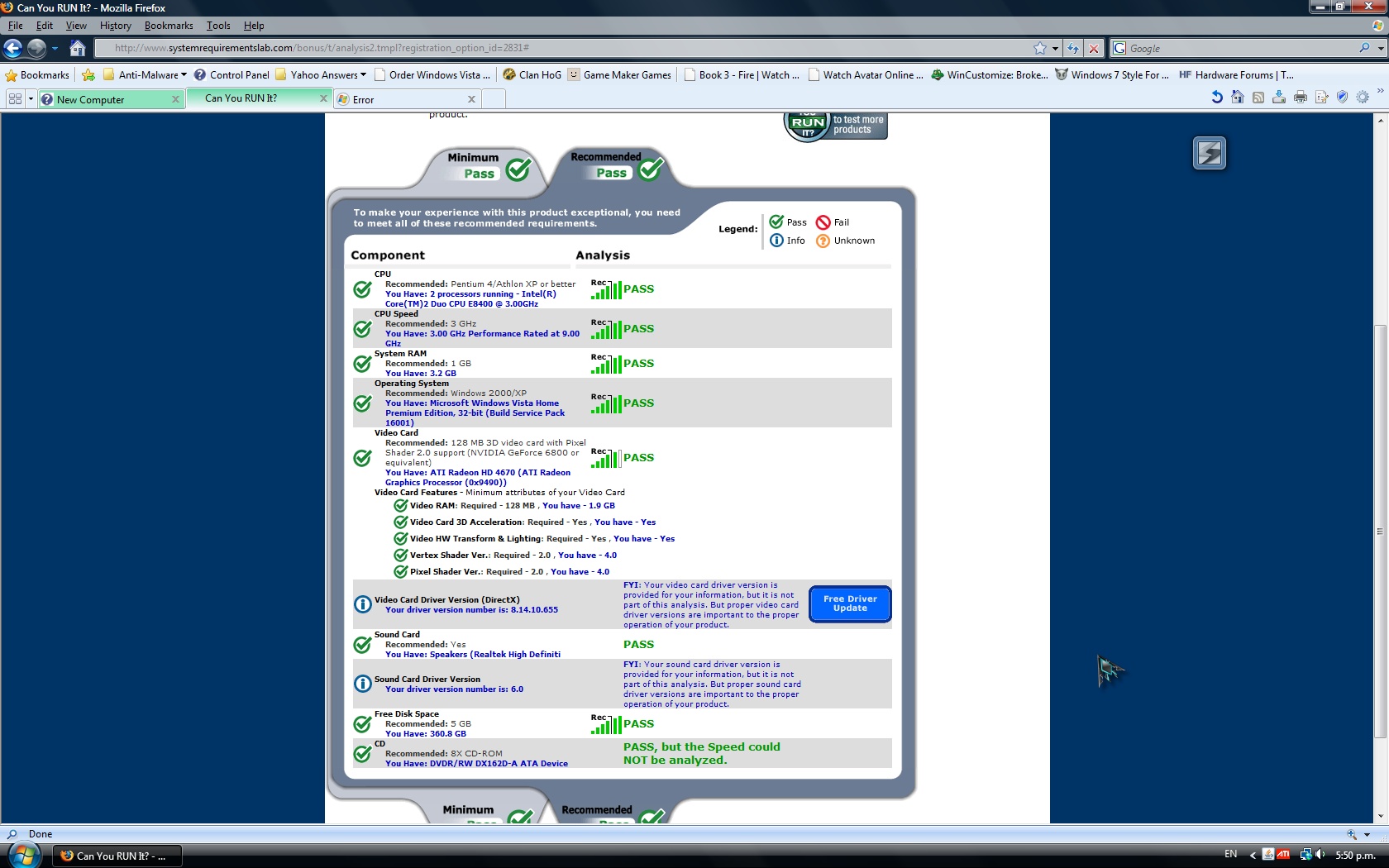
As to 0x9490 I am not sure. Where do you see that?
If i uninstall the driver my monitor will go blank, how many seconds does it take to get it back again?(normally)
As for the number - if you zoom in on the attachment video card section you should be able to see it
When you unistall your driver the system should revert to a VGA state with a very low screen resolution 800 x 600 upon reboot.
Uninstalling the driver should prompt you to reboot.
If you have tried to uninstall the ATI graphics driver via Add or Remove Programs and the behavior is different please let us know.
In a worst case scenario boot up Safe Mode options and do a System Restore.
Ok, test successful but there was 2 refreshes. When i quit titan quest, there is a little popup message in the taskbar saying - 'Graphics card has stopped responding but has successfully recovered' . I think the refreshes when it stopped responding.
Ok thanks for your help! , sadly I tried titan quest again and this time it didn't recover so its 'go back to shop' time… (maybe the A.I. helped a bit last time)
Also my other computer has a problem (don't know why, started when I moved my DVD writer to my new computer)
After booting up, when it is on Windows XP logon screen, my monitor suddenly goes blank and it still doesn't work when i turn it off then on again. I had to force shutdown of my computer. When I turn it on again it is fine…
Second time it happened when I opened hotmail(same story as the first time).
It might be because of Graphics card(unlikely), The monitor or windows XP(most likely as it always did that after booting up).
Should I start a new topic for this?
My first reaction is anytime that you have been working inside the case is verify that all your connections are proper. The best way to do this is unconnect and reconnect all major connectors and hardware / cards etc.
If the issue persists visit your Event Viewer for starters:
Check your Event Viewer via Administrative Tools.
Open the System as well as Application tabs and look for red X errors that coincide with your problem. Details here:
How to view and manage event logs in Event Viewer in Windows XP
There were no errors but there are LOTS of cdrom in the warning section. Also there are other errors
Also, I need to wait until weekends to open my computer up(don't have time now)
✨ Ask AI
AI can make mistakes. Check the cited posts. Archived advice can be out-of-date
Don't include personal information. Questions and selected public posts go to OpenAI. About Ask AI


 , sadly I tried titan quest again and this time it didn't recover so its 'go back to shop' time… (maybe the A.I. helped a bit last time)
Also my other computer has a problem (don't know why, started when I moved my DVD writer to my new computer)
After booting up, when it is on Windows XP logon screen, my monitor suddenly goes blank and it still doesn't work when i turn it off then on again. I had to force shutdown of my computer. When I turn it on again it is fine…
Second time it happened when I opened hotmail(same story as the first time).
It might be because of Graphics card(unlikely), The monitor or windows XP(most likely as it always did that after booting up).
Should I start a new topic for this?
, sadly I tried titan quest again and this time it didn't recover so its 'go back to shop' time… (maybe the A.I. helped a bit last time)
Also my other computer has a problem (don't know why, started when I moved my DVD writer to my new computer)
After booting up, when it is on Windows XP logon screen, my monitor suddenly goes blank and it still doesn't work when i turn it off then on again. I had to force shutdown of my computer. When I turn it on again it is fine…
Second time it happened when I opened hotmail(same story as the first time).
It might be because of Graphics card(unlikely), The monitor or windows XP(most likely as it always did that after booting up).
Should I start a new topic for this?