This is a read-only archive. No new posts or registrations. Privacy Page
Spyware / Malware / Virus Removal

[Resolved] QHFW.EXE 100% CPU Usage

8 min read

This thread's last reply is from . Advice, software, and links below may be out of date — treat specific steps and download links with caution.

Looking for the outcome? Ask AI

Hello,
I do not have much knowlege about PC but I have figured out that my Firewall (Quick Heal- QHFW.exe) is freezing my PC since Last night, There are two programs running Same name (QHFW.EXE). I had Downloaded MSN messenger and two Movie torrent(from verifeid source- been downloading from them since 4-5 months) When suddenly my pc started to freeze, started taking time to respond even to refresh. I tried to end process through Task Manager but it wont let me, then I tried to restart PC with Disabling Firewall on StartUp using MSCONFIG. I managed to turn Firewall off and my pc is working perfectly as it should be.
But I need solution to this problem so that my Firewall start to work as it is supposed be.

Here is the Log.

Logfile of Trend Micro HijackThis v2.0.2
Scan saved at 1:16:56 PM, on 3/7/2009
Platform: Windows XP SP2 (WinNT 5.01.2600)
MSIE: Internet Explorer v6.00 SP2 (6.00.2900.2180)
Boot mode: Normal

Running processes:
C:\WINDOWS\System32\smss.exe
C:\WINDOWS\system32\winlogon.exe
C:\WINDOWS\system32\services.exe
C:\WINDOWS\system32\lsass.exe
C:\WINDOWS\system32\svchost.exe
C:\WINDOWS\System32\svchost.exe
C:\WINDOWS\system32\spoolsv.exe
C:\Program Files\Automatic Update\AutoUpdate.exe
C:\APACHE\Apache.exe
C:\Program Files\Java\jre6\bin\jqs.exe
C:\APACHE\Apache.exe
C:\WINDOWS\Explorer.EXE
C:\PROGRA~1\QUICKH~1\QUICKH~1\opssvc.exe
C:\WINDOWS\system32\HPZipm12.exe
C:\Program Files\Quick Heal\Quick Heal Total Security\EMLPROXY.EXE
C:\PROGRA~1\QUICKH~1\QUICKH~1\quhlpsvc.exe
C:\Program Files\Quick Heal\Quick Heal Total Security\scanwscs.exe
C:\WINDOWS\System32\TUProgSt.exe
C:\PROGRA~1\QUICKH~1\QUICKH~1\EMLPROUI.EXE
C:\PROGRA~1\QUICKH~1\QUICKH~1\UPSCHD.EXE
C:\PROGRA~1\QUICKH~1\QUICKH~1\SCANMSG.EXE
C:\PROGRA~1\QUICKH~1\QUICKH~1\OnlineNT.EXE
C:\Program Files\Java\jre6\bin\jusched.exe
C:\WINDOWS\system32\igfxtray.exe
C:\WINDOWS\system32\hkcmd.exe
C:\Program Files\Automatic Update\AutoUpdateGUI.exe
C:\Program Files\Common Files\Real\Update_OB\realsched.exe
C:\WINDOWS\System32\svchost.exe
C:\Program Files\Mozilla Firefox\firefox.exe
C:\Program Files\Trend Micro\HijackThis\HijackThis.exe

R1 - HKCU\Software\Microsoft\Internet Explorer\Main,Search Page = http://in.rd.yahoo.com/customize/ie/defaul…earch.yahoo.com
R0 - HKCU\Software\Microsoft\Internet Explorer\Main,Start Page = about:blank
R1 - HKLM\Software\Microsoft\Internet Explorer\Main,Default_Page_URL = http://in.yahoo.com
R1 - HKLM\Software\Microsoft\Internet Explorer\Main,Default_Search_URL = http://in.rd.yahoo.com/customize/ie/defaul…earch.yahoo.com
R1 - HKLM\Software\Microsoft\Internet Explorer\Main,Search Page = http://in.rd.yahoo.com/customize/ie/defaul…earch.yahoo.com
R0 - HKLM\Software\Microsoft\Internet Explorer\Main,Start Page = http://in.yahoo.com
R1 - HKCU\Software\Microsoft\Internet Explorer\SearchURL,(Default) = http://in.rd.yahoo.com/customize/ie/defaul…earch.yahoo.com
R3 - URLSearchHook: Yahoo! Toolbar - {EF99BD32-C1FB-11D2-892F-0090271D4F88} - C:\PROGRA~1\Yahoo!\Companion\Installs\cpn\yt.dll
O1 - Hosts: 61.129.115.198 www.xldd.com
O1 - Hosts: 61.129.115.198 www.ojiang.com
O1 - Hosts: 61.129.115.198 www.shuixian.net
O1 - Hosts: 61.129.115.198 www.xlarea.com
O2 - BHO: &Yahoo! Toolbar Helper - {02478D38-C3F9-4efb-9B51-7695ECA05670} - C:\PROGRA~1\Yahoo!\Companion\Installs\cpn\yt.dll
O2 - BHO: AcroIEHlprObj Class - {06849E9F-C8D7-4D59-B87D-784B7D6BE0B3} - C:\Program Files\Adobe\Acrobat 5.0\Reader\ActiveX\AcroIEHelper.ocx
O2 - BHO: RealPlayer Download and Record Plugin for Internet Explorer - {3049C3E9-B461-4BC5-8870-4C09146192CA} - C:\Program Files\Real\RealPlayer\rpbrowserrecordplugin.dll
O2 - BHO: Java™ Plug-In 2 SSV Helper - {DBC80044-A445-435b-BC74-9C25C1C588A9} - C:\Program Files\Java\jre6\bin\jp2ssv.dll
O2 - BHO: JQSIEStartDetectorImpl - {E7E6F031-17CE-4C07-BC86-EABFE594F69C} - C:\Program Files\Java\jre6\lib\deploy\jqs\ie\jqs_plugin.dll
O2 - BHO: Anti Popup - {EFCA9D4B-F2E8-487d-8505-E4D0E459ABFE} - C:\PROGRA~1\QUICKH~1\QUICKH~1\apop.dll
O3 - Toolbar: Yahoo! Toolbar - {EF99BD32-C1FB-11D2-892F-0090271D4F88} - C:\PROGRA~1\Yahoo!\Companion\Installs\cpn\yt.dll
O4 - HKLM\..\Run: [BluetoothAuthenticationAgent] rundll32.exe bthprops.cpl,,BluetoothAuthenticationAgent
O4 - HKLM\..\Run: [Email Protection] C:\PROGRA~1\QUICKH~1\QUICKH~1\EMLPROUI.EXE
O4 - HKLM\..\Run: [Update Scheduler] C:\PROGRA~1\QUICKH~1\QUICKH~1\UPSCHD.EXE /CHECK
O4 - HKLM\..\Run: [On-Line Protection] C:\PROGRA~1\QUICKH~1\QUICKH~1\CATEYE.EXE
O4 - HKLM\..\Run: [Messenger] C:\PROGRA~1\QUICKH~1\QUICKH~1\SCANMSG.EXE
O4 - HKLM\..\Run: [Startup Scan] C:\PROGRA~1\QUICKH~1\QUICKH~1\sensor.exe /loadrun
O4 - HKLM\..\Run: [ResumeQuickupDownload] C:\PROGRA~1\QUICKH~1\QUICKH~1\acappaa.exe
O4 - HKLM\..\Run: [SunJavaUpdateSched] "C:\Program Files\Java\jre6\bin\jusched.exe"
O4 - HKLM\..\Run: [IgfxTray] C:\WINDOWS\system32\igfxtray.exe
O4 - HKLM\..\Run: [HotKeysCmds] C:\WINDOWS\system32\hkcmd.exe
O4 - HKLM\..\Run: [TkBellExe] "C:\Program Files\Common Files\Real\Update_OB\realsched.exe" -osboot
O4 - HKLM\..\RunOnce: [Startup Scan] C:\PROGRA~1\QUICKH~1\QUICKH~1\sensor.exe /check
O8 - Extra context menu item: E&xport to Microsoft Excel - res://C:\PROGRA~1\MICROS~2\OFFICE11\EXCEL.EXE/3000
O9 - Extra button: Research - {92780B25-18CC-41C8-B9BE-3C9C571A8263} - C:\PROGRA~1\MICROS~2\OFFICE11\REFIEBAR.DLL
O9 - Extra button: Messenger - {FB5F1910-F110-11d2-BB9E-00C04F795683} - C:\Program Files\Messenger\msmsgs.exe
O9 - Extra 'Tools' menuitem: Windows Messenger - {FB5F1910-F110-11d2-BB9E-00C04F795683} - C:\Program Files\Messenger\msmsgs.exe
O12 - Plugin for .spop: C:\Program Files\Internet Explorer\Plugins\NPDocBox.dll
O15 - Trusted Zone: http://*.amadeusproweb.com
O15 - Trusted Zone: http://*.amadeusvista.com
O15 - Trusted Zone: http://*.amadeusproweb.com (HKLM)
O15 - Trusted Zone: http://*.amadeusvista.com (HKLM)
O16 - DPF: {051FE707-9706-11D5-A836-000102A7C938} (Amadeus Automatic Update) - http://pilot.certificates.amadeusvista.com…teATL26P221.CAB
O16 - DPF: {30528230-99f7-4bb4-88d8-fa1d4f56a2ab} (YInstStarter Class) - C:\Program Files\Yahoo!\Common\yinsthelper.dll
O17 - HKLM\System\CCS\Services\Tcpip\..\{A765636A-B25A-4D84-A67A-C0CACD83FCDE}: NameServer = 59.179.243.70,203.94.243.70
O17 - HKLM\System\CCS\Services\Tcpip\..\{CDF1DDBF-873B-4EC2-AD88-DFC0EE784307}: NameServer = 202.159.219.229,202.159.217.198
O20 - AppInit_DLLs: C:\PROGRA~1\CATCOM~1\QUICKH~1\wl_hook.dll
O23 - Service: Amadeus Automatic Update - Amadeus - C:\Program Files\Automatic Update\AutoUpdate.exe
O23 - Service: Apache - Unknown owner - C:\APACHE\Apache.exe
O23 - Service: Java Quick Starter (JavaQuickStarterService) - Sun Microsystems, Inc. - C:\Program Files\Java\jre6\bin\jqs.exe
O23 - Service: Online Protection System - Quick Heal Technologies (P) Ltd. - C:\PROGRA~1\QUICKH~1\QUICKH~1\opssvc.exe
O23 - Service: Pml Driver HPZ12 - HP - C:\WINDOWS\system32\HPZipm12.exe
O23 - Service: Quick Heal Total Security Mail Protection - Quick Heal Technologies (P) Ltd. - C:\Program Files\Quick Heal\Quick Heal Total Security\EMLPROXY.EXE
O23 - Service: Quick Update Service - Quick Heal Technologies (P) Ltd. - C:\PROGRA~1\QUICKH~1\QUICKH~1\quhlpsvc.exe
O23 - Service: SiSoftware Deployment Agent Service (SandraAgentSrv) - SiSoftware - C:\Program Files\SiSoftware\SiSoftware Sandra Lite 2009.SP2\RpcAgentSrv.exe
O23 - Service: Total Security Helper Service WSC (ScanWscS) - Quick Heal Technologies (P) Ltd. - C:\Program Files\Quick Heal\Quick Heal Total Security\scanwscs.exe
O23 - Service: Quick Heal Total Security Startup Handler (Startup Handler) - Quick Heal Technologies (P) Ltd. - C:\PROGRA~1\QUICKH~1\QUICKH~1\strtsvc.exe
O23 - Service: TuneUp Drive Defrag Service (TuneUp.Defrag) - TuneUp Software - C:\WINDOWS\System32\TuneUpDefragService.exe
O23 - Service: TuneUp Program Statistics Service (TuneUp.ProgramStatisticsSvc) - TuneUp Software - C:\WINDOWS\System32\TUProgSt.exe

–
End of file - 7388 bytes
–
Thanks
I hope this get sorted out ASAP
Waiting for replies. :unsure:

Hi Karan_gr8,

:welcome:

My name is Tomk. I would be glad to take a look at your log and help you with solving any malware problems. HijackThis logs can take a while to research, so please be patient and I'd be grateful if you would note the following:

  • I will be working on your Malware issues, this may or may not, solve other issues you have with your machine.
  • The fixes are specific to your problem and should only be used for the issues on this machine.
  • Please continue to review my answers until I tell you your machine appears to be clear. Absence of symptoms does not mean that everything is clear.
  • It's often worth reading through these instructions and printing them for ease of reference.
  • If you don't know or understand something, please don't hesitate to say or ask!! It's better to be sure and safe than sorry.
  • Please reply to this thread. Do not start a new topic.

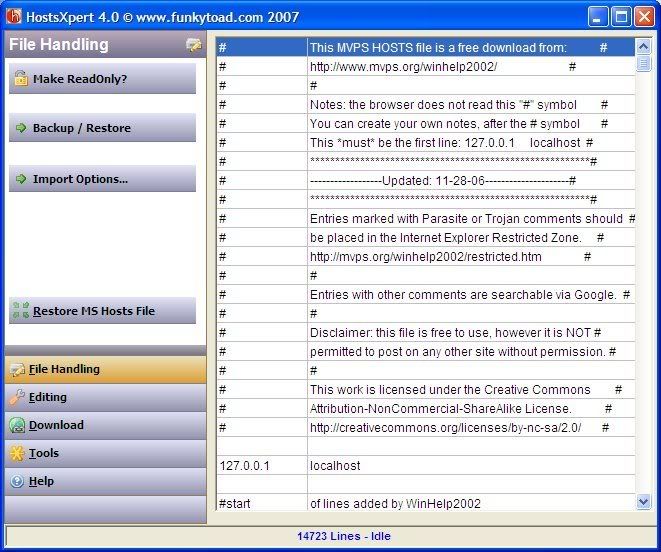
Please download HostsXpert

* Unzip HostsXpert to it's own folder a convenient place such as C:\HostsXpert
* Run HostsXpert.exe
* Click: Make Writable? in the upper left corner.
* Click: Restore MVPs Hosts
* Click: Replace
* Click: OK
* Click: Make ReadOnly
* Close HostsXpert.

Note: If a custom Hosts file was in place, you will have to run those programs again to reset detections.
If needed Tutorial

Please download ATF Cleaner by Atribune.
Download - ATF Cleaner
Double-click ATF-Cleaner.exe to run the program.
Under Main choose: Select All
Click the Empty Selected button.

(If you use FireFox or the Opera browser
To keep saved passwords, click No at the prompt.)

It's normal after running ATF cleaner that the PC will be slower to boot the first time or two.

Then

Please download Malwarebytes' Anti-Malware to your desktop.

  • Double-click mbam-setup.exe and follow the prompts to install the program.
  • At the end, be sure a checkmark is placed next to Update Malwarebytes' Anti-Malware and Launch Malwarebytes' Anti-Malware, then click Finish.
  • If an update is found, it will download and install the latest version.
  • Once the program has loaded, select Perform quick scan, then click Scan.
  • When the scan is complete, click OK, then Show Results to view the results.
  • Be sure that everything is checked, and click Remove Selected.
  • When completed, a log will open in Notepad. Please save it to a convenient location and post the results.
  • Note: If you receive a notice that some of the items couldn't be removed, that they have been added to the delete on reboot list, please reboot (shut down your computer then restart it).
Also "copy/paste" a new HijackThis log file into this thread.

Also please describe how your computer behaves at the moment.
Thank you very much for paying your attention, I am following the Instruction you have mentioned above. I am not sure how to complete this task. * Unzip HostsXpert to it's own folder a convenient place such as C:\HostsXpert (Done) * Run HostsXpert.exe (Done) * Click: Make Writable? in the upper left corner. (I see Make Readonly?) * Click: Restore MVPs Hosts. (I cant find this option. Instead there is Restore MS host File) * Click: Replace (Cant Find this option either) * Click: OK (Cant Find) * Click: Make ReadOnly. Please Help :scratch: * Close HostsXpert.
I think i've Followed the instructions as it is except for HostsXpert.

Here are the logs

1. Malwarebytes' Anti-Malware

Malwarebytes' Anti-Malware 1.34
Database version: 1826
Windows 5.1.2600 Service Pack 2

3/8/2009 10:17:22 AM
mbam-log-2009-03-08 (10-17-22).txt

Scan type: Quick Scan
Objects scanned: 66818
Time elapsed: 2 minute(s), 33 second(s)

Memory Processes Infected: 0
Memory Modules Infected: 0
Registry Keys Infected: 0
Registry Values Infected: 0
Registry Data Items Infected: 0
Folders Infected: 0
Files Infected: 0

Memory Processes Infected:
(No malicious items detected)

Memory Modules Infected:
(No malicious items detected)

Registry Keys Infected:
(No malicious items detected)

Registry Values Infected:
(No malicious items detected)

Registry Data Items Infected:
(No malicious items detected)

Folders Infected:
(No malicious items detected)

Files Infected:
(No malicious items detected)


2. Hijackthis Log


Logfile of Trend Micro HijackThis v2.0.2
Scan saved at 10:22:03 AM, on 3/8/2009
Platform: Windows XP SP2 (WinNT 5.01.2600)
MSIE: Internet Explorer v6.00 SP2 (6.00.2900.2180)
Boot mode: Normal

Running processes:
C:\WINDOWS\System32\smss.exe
C:\WINDOWS\system32\winlogon.exe
C:\WINDOWS\system32\services.exe
C:\WINDOWS\system32\lsass.exe
C:\WINDOWS\system32\svchost.exe
C:\WINDOWS\System32\svchost.exe
C:\WINDOWS\system32\spoolsv.exe
C:\WINDOWS\Explorer.EXE
C:\Program Files\Automatic Update\AutoUpdate.exe
C:\APACHE\Apache.exe
C:\PROGRA~1\QUICKH~1\QUICKH~1\opssvc.exe
C:\APACHE\Apache.exe
C:\WINDOWS\system32\HPZipm12.exe
C:\Program Files\Quick Heal\Quick Heal Total Security\EMLPROXY.EXE
C:\PROGRA~1\QUICKH~1\QUICKH~1\quhlpsvc.exe
C:\Program Files\Quick Heal\Quick Heal Total Security\scanwscs.exe
C:\Program Files\Automatic Update\AutoUpdateGUI.exe
C:\WINDOWS\System32\TUProgSt.exe
C:\WINDOWS\system32\rundll32.exe
C:\PROGRA~1\QUICKH~1\QUICKH~1\EMLPROUI.EXE
C:\PROGRA~1\QUICKH~1\QUICKH~1\UPSCHD.EXE
C:\PROGRA~1\QUICKH~1\QUICKH~1\SCANMSG.EXE
C:\WINDOWS\system32\igfxtray.exe
C:\WINDOWS\system32\hkcmd.exe
C:\PROGRA~1\QUICKH~1\QUICKH~1\OnlineNT.EXE
C:\Program Files\Common Files\Real\Update_OB\realsched.exe
C:\Program Files\Spybot - Search & Destroy\TeaTimer.exe
C:\WINDOWS\System32\svchost.exe
C:\WINDOWS\system32\wuauclt.exe
C:\Program Files\Trend Micro\HijackThis\HijackThis.exe

R1 - HKCU\Software\Microsoft\Internet Explorer\Main,Search Page = http://in.rd.yahoo.com/customize/ie/defaul…earch.yahoo.com
R0 - HKCU\Software\Microsoft\Internet Explorer\Main,Start Page = about:blank
R1 - HKLM\Software\Microsoft\Internet Explorer\Main,Default_Page_URL = http://in.yahoo.com
R1 - HKLM\Software\Microsoft\Internet Explorer\Main,Default_Search_URL = http://in.rd.yahoo.com/customize/ie/defaul…earch.yahoo.com
R1 - HKLM\Software\Microsoft\Internet Explorer\Main,Search Page = http://in.rd.yahoo.com/customize/ie/defaul…earch.yahoo.com
R0 - HKLM\Software\Microsoft\Internet Explorer\Main,Start Page = http://in.yahoo.com
R1 - HKCU\Software\Microsoft\Internet Explorer\SearchURL,(Default) = http://in.rd.yahoo.com/customize/ie/defaul…earch.yahoo.com
R3 - URLSearchHook: Yahoo! Toolbar - {EF99BD32-C1FB-11D2-892F-0090271D4F88} - C:\PROGRA~1\Yahoo!\Companion\Installs\cpn\yt.dll
O2 - BHO: &Yahoo! Toolbar Helper - {02478D38-C3F9-4efb-9B51-7695ECA05670} - C:\PROGRA~1\Yahoo!\Companion\Installs\cpn\yt.dll
O2 - BHO: AcroIEHlprObj Class - {06849E9F-C8D7-4D59-B87D-784B7D6BE0B3} - C:\Program Files\Adobe\Acrobat 5.0\Reader\ActiveX\AcroIEHelper.ocx
O2 - BHO: RealPlayer Download and Record Plugin for Internet Explorer - {3049C3E9-B461-4BC5-8870-4C09146192CA} - C:\Program Files\Real\RealPlayer\rpbrowserrecordplugin.dll
O2 - BHO: Spybot-S&D IE Protection - {53707962-6F74-2D53-2644-206D7942484F} - C:\PROGRA~1\SPYBOT~1\SDHelper.dll
O2 - BHO: Java™ Plug-In 2 SSV Helper - {DBC80044-A445-435b-BC74-9C25C1C588A9} - C:\Program Files\Java\jre6\bin\jp2ssv.dll (file missing)
O2 - BHO: Anti Popup - {EFCA9D4B-F2E8-487d-8505-E4D0E459ABFE} - C:\PROGRA~1\QUICKH~1\QUICKH~1\apop.dll
O3 - Toolbar: Yahoo! Toolbar - {EF99BD32-C1FB-11D2-892F-0090271D4F88} - C:\PROGRA~1\Yahoo!\Companion\Installs\cpn\yt.dll
O4 - HKLM\..\Run: [BluetoothAuthenticationAgent] rundll32.exe bthprops.cpl,,BluetoothAuthenticationAgent
O4 - HKLM\..\Run: [Email Protection] C:\PROGRA~1\QUICKH~1\QUICKH~1\EMLPROUI.EXE
O4 - HKLM\..\Run: [Update Scheduler] C:\PROGRA~1\QUICKH~1\QUICKH~1\UPSCHD.EXE /CHECK
O4 - HKLM\..\Run: [On-Line Protection] C:\PROGRA~1\QUICKH~1\QUICKH~1\CATEYE.EXE
O4 - HKLM\..\Run: [Messenger] C:\PROGRA~1\QUICKH~1\QUICKH~1\SCANMSG.EXE
O4 - HKLM\..\Run: [Startup Scan] C:\PROGRA~1\QUICKH~1\QUICKH~1\sensor.exe /loadrun
O4 - HKLM\..\Run: [ResumeQuickupDownload] C:\PROGRA~1\QUICKH~1\QUICKH~1\acappaa.exe
O4 - HKLM\..\Run: [IgfxTray] C:\WINDOWS\system32\igfxtray.exe
O4 - HKLM\..\Run: [HotKeysCmds] C:\WINDOWS\system32\hkcmd.exe
O4 - HKLM\..\Run: [TkBellExe] "C:\Program Files\Common Files\Real\Update_OB\realsched.exe" -osboot
O4 - HKLM\..\RunOnce: [Startup Scan] C:\PROGRA~1\QUICKH~1\QUICKH~1\sensor.exe /check
O4 - HKCU\..\Run: [SpybotSD TeaTimer] C:\Program Files\Spybot - Search & Destroy\TeaTimer.exe
O8 - Extra context menu item: E&xport to Microsoft Excel - res://C:\PROGRA~1\MICROS~2\OFFICE11\EXCEL.EXE/3000
O9 - Extra button: Research - {92780B25-18CC-41C8-B9BE-3C9C571A8263} - C:\PROGRA~1\MICROS~2\OFFICE11\REFIEBAR.DLL
O9 - Extra button: (no name) - {DFB852A3-47F8-48C4-A200-58CAB36FD2A2} - C:\PROGRA~1\SPYBOT~1\SDHelper.dll
O9 - Extra 'Tools' menuitem: Spybot - Search & Destroy Configuration - {DFB852A3-47F8-48C4-A200-58CAB36FD2A2} - C:\PROGRA~1\SPYBOT~1\SDHelper.dll
O9 - Extra button: Messenger - {FB5F1910-F110-11d2-BB9E-00C04F795683} - C:\Program Files\Messenger\msmsgs.exe
O9 - Extra 'Tools' menuitem: Windows Messenger - {FB5F1910-F110-11d2-BB9E-00C04F795683} - C:\Program Files\Messenger\msmsgs.exe
O12 - Plugin for .spop: C:\Program Files\Internet Explorer\Plugins\NPDocBox.dll
O15 - Trusted Zone: http://*.amadeusproweb.com
O15 - Trusted Zone: http://*.amadeusvista.com
O15 - Trusted Zone: http://*.amadeusproweb.com (HKLM)
O15 - Trusted Zone: http://*.amadeusvista.com (HKLM)
O16 - DPF: {051FE707-9706-11D5-A836-000102A7C938} (Amadeus Automatic Update) - http://pilot.certificates.amadeusvista.com…teATL26P221.CAB
O16 - DPF: {30528230-99f7-4bb4-88d8-fa1d4f56a2ab} (YInstStarter Class) - C:\Program Files\Yahoo!\Common\yinsthelper.dll
O17 - HKLM\System\CCS\Services\Tcpip\..\{A765636A-B25A-4D84-A67A-C0CACD83FCDE}: NameServer = 59.179.243.70,203.94.243.70
O17 - HKLM\System\CCS\Services\Tcpip\..\{CDF1DDBF-873B-4EC2-AD88-DFC0EE784307}: NameServer = 202.159.219.229,202.159.217.198
O20 - AppInit_DLLs: C:\PROGRA~1\CATCOM~1\QUICKH~1\wl_hook.dll
O23 - Service: Amadeus Automatic Update - Amadeus - C:\Program Files\Automatic Update\AutoUpdate.exe
O23 - Service: Apache - Unknown owner - C:\APACHE\Apache.exe
O23 - Service: Online Protection System - Quick Heal Technologies (P) Ltd. - C:\PROGRA~1\QUICKH~1\QUICKH~1\opssvc.exe
O23 - Service: Pml Driver HPZ12 - HP - C:\WINDOWS\system32\HPZipm12.exe
O23 - Service: Quick Heal Total Security Mail Protection - Quick Heal Technologies (P) Ltd. - C:\Program Files\Quick Heal\Quick Heal Total Security\EMLPROXY.EXE
O23 - Service: Quick Update Service - Quick Heal Technologies (P) Ltd. - C:\PROGRA~1\QUICKH~1\QUICKH~1\quhlpsvc.exe
O23 - Service: SiSoftware Deployment Agent Service (SandraAgentSrv) - SiSoftware - C:\Program Files\SiSoftware\SiSoftware Sandra Lite 2009.SP2\RpcAgentSrv.exe
O23 - Service: Total Security Helper Service WSC (ScanWscS) - Quick Heal Technologies (P) Ltd. - C:\Program Files\Quick Heal\Quick Heal Total Security\scanwscs.exe
O23 - Service: Quick Heal Total Security Startup Handler (Startup Handler) - Quick Heal Technologies (P) Ltd. - C:\PROGRA~1\QUICKH~1\QUICKH~1\strtsvc.exe
O23 - Service: TuneUp Drive Defrag Service (TuneUp.Defrag) - TuneUp Software - C:\WINDOWS\System32\TuneUpDefragService.exe
O23 - Service: TuneUp Program Statistics Service (TuneUp.ProgramStatisticsSvc) - TuneUp Software - C:\WINDOWS\System32\TUProgSt.exe

–
End of file - 7339 bytes

I am about to run my firewall again, I don't want it to stop me from using internet, thats why I am posting Logsd first
Karan_gr8,

Sorry about that. :blush: I've corrected my instructions.

Looks like you may have reset the hosts file as desired anyway. Lets run a different scan that will check it.

Disable resident protections (Antivirus…); you'll re-enable them after the scan

Download Lop S&D < here

Double-click Lop S&D.exe
Choose the language, then choose Option 1 (Search)
Wait till the end of the scan
Post the log which is created: (%SystemDrive%\lopR.txt)
Thanks a lot for quick response, I am downloading the other software, in the mean time I need to verify what is the program, I am posting the snapshots of MSCONFIG. Please let me know what is this.
Here are the Log for Lop S&D.


——————–\\ Lop S&D 4.2.5-0 XP/Vista

Microsoft Windows XP Professional ( v5.1.2600 ) Service Pack 2
X86-based PC ( Uniprocessor Free : Intel® Pentium® 4 CPU 2.93GHz )
BIOS : Phoenix FirstBios™ Desktop Pro Version 2.0 for ThinkCentre.
USER : Svision ( Administrator )
BOOT : Normal boot
Antivirus : Total Security 10.00 10.00 (Not Activated)
Firewall : Quick Heal Firewall Pro 3.5 (Activated) (WOW ITS RUNNING IN BACKGROUND NOW, I CAT SEE IT IN QUICKLAUNCH BAR,.)
A:\ (USB)
C:\ (Local Disk) - NTFS - Total:9 Go (Free:2 Go)
D:\ (Local Disk) - NTFS - Total:19 Go (Free:0 Go)
E:\ (Local Disk) - NTFS - Total:45 Go (Free:2 Go)
F:\ (CD or DVD)
G:\ (Local Disk) - NTFS - Total:232 Go (Free:180 Go)
H:\ (Local Disk) - NTFS - Total:232 Go (Free:226 Go)
I:\ (USB) - FAT32 - Total:3816 Mo (Free:2 Go)

"C:\Lop SD" ( MAJ : 19-12-2008|23:40 )
Option : [1] ( Sun 03/08/2009|11:14 )

——————–\\ Listing folders in APPLIC~1

[01/31/2009|11:58] C:\DOCUME~1\ALLUSE~1\APPLIC~1\ {55A29068-F2CE-456C-9148-C869879E2357}
[03/03/2009|06:55] C:\DOCUME~1\ALLUSE~1\APPLIC~1\ Adobe
[05/06/2008|03:02] C:\DOCUME~1\ALLUSE~1\APPLIC~1\ Amadeus
[02/28/2009|08:41] C:\DOCUME~1\ALLUSE~1\APPLIC~1\ Installations
[11/11/2008|11:32] C:\DOCUME~1\ALLUSE~1\APPLIC~1\ InterVideo
[03/08/2009|10:13] C:\DOCUME~1\ALLUSE~1\APPLIC~1\ Malwarebytes
[03/07/2009|11:29] C:\DOCUME~1\ALLUSE~1\APPLIC~1\ Microsoft
[02/28/2009|08:43] C:\DOCUME~1\ALLUSE~1\APPLIC~1\ Nokia
[02/28/2009|08:11] C:\DOCUME~1\ALLUSE~1\APPLIC~1\ PC Suite
[02/21/2009|09:08] C:\DOCUME~1\ALLUSE~1\APPLIC~1\ PCDr
[03/08/2009|10:33] C:\DOCUME~1\ALLUSE~1\APPLIC~1\ Spybot - Search & Destroy
[01/31/2009|11:59] C:\DOCUME~1\ALLUSE~1\APPLIC~1\ TuneUp Software
[07/01/2008|01:36] C:\DOCUME~1\ALLUSE~1\APPLIC~1\ Yahoo!
[07/01/2008|01:38] C:\DOCUME~1\ALLUSE~1\APPLIC~1\ Yahoo! Companion

[01/23/2009|09:57] C:\DOCUME~1\ASBRIG~1\APPLIC~1\ Adobe
[01/19/2009|09:17] C:\DOCUME~1\ASBRIG~1\APPLIC~1\ Amadeus
[01/19/2009|09:17] C:\DOCUME~1\ASBRIG~1\APPLIC~1\ Identities
[01/23/2009|09:58] C:\DOCUME~1\ASBRIG~1\APPLIC~1\ Macromedia
[03/04/2009|01:29] C:\DOCUME~1\ASBRIG~1\APPLIC~1\ Microsoft
[03/04/2009|01:28] C:\DOCUME~1\ASBRIG~1\APPLIC~1\ PC Suite
[01/28/2009|10:19] C:\DOCUME~1\ASBRIG~1\APPLIC~1\ vlc
[01/23/2009|09:57] C:\DOCUME~1\ASBRIG~1\APPLIC~1\ Yahoo!

[05/04/2008|04:57] C:\DOCUME~1\DEFAUL~1\APPLIC~1\ Microsoft

[05/04/2008|05:01] C:\DOCUME~1\LOCALS~1\APPLIC~1\ Microsoft

[05/04/2008|05:00] C:\DOCUME~1\NETWOR~1\APPLIC~1\ Microsoft

[02/16/2009|04:40] C:\DOCUME~1\Svision\APPLIC~1\ Adobe
[09/15/2008|02:01] C:\DOCUME~1\Svision\APPLIC~1\ Amadeus
[02/28/2009|03:26] C:\DOCUME~1\Svision\APPLIC~1\ Apple Computer
[05/07/2008|02:58] C:\DOCUME~1\Svision\APPLIC~1\ Corel
[02/02/2009|10:06] C:\DOCUME~1\Svision\APPLIC~1\ Desktop Sidebar
[02/06/2009|09:06] C:\DOCUME~1\Svision\APPLIC~1\ dvdcss
[10/27/2008|01:46] C:\DOCUME~1\Svision\APPLIC~1\ Help
[05/04/2008|05:01] C:\DOCUME~1\Svision\APPLIC~1\ Identities
[05/04/2008|05:29] C:\DOCUME~1\Svision\APPLIC~1\ InterTrust
[05/07/2008|10:05] C:\DOCUME~1\Svision\APPLIC~1\ Macromedia
[03/08/2009|10:14] C:\DOCUME~1\Svision\APPLIC~1\ Malwarebytes
[03/06/2009|06:27] C:\DOCUME~1\Svision\APPLIC~1\ Microsoft
[01/09/2009|06:25] C:\DOCUME~1\Svision\APPLIC~1\ Mozilla
[03/07/2009|11:53] C:\DOCUME~1\Svision\APPLIC~1\ Nokia
[02/28/2009|08:13] C:\DOCUME~1\Svision\APPLIC~1\ PC Suite
[02/10/2009|12:23] C:\DOCUME~1\Svision\APPLIC~1\ Real
[02/16/2009|02:26] C:\DOCUME~1\Svision\APPLIC~1\ Sun
[01/31/2009|12:00] C:\DOCUME~1\Svision\APPLIC~1\ TuneUp Software
[12/14/2008|11:04] C:\DOCUME~1\Svision\APPLIC~1\ U3
[03/07/2009|12:14] C:\DOCUME~1\Svision\APPLIC~1\ uTorrent
[01/16/2009|08:19] C:\DOCUME~1\Svision\APPLIC~1\ vlc
[08/21/2008|04:22] C:\DOCUME~1\Svision\APPLIC~1\ Yahoo!

——————–\\ Scheduled Tasks located in C:\WINDOWS\Tasks

[03/08/2009 11:04 AM][–a——] C:\WINDOWS\tasks\1-Click Maintenance.job
[03/08/2009 11:04 AM][–ah—–] C:\WINDOWS\tasks\SA.DAT
[08/07/2004 05:47 AM][-r-h—–] C:\WINDOWS\tasks\desktop.ini

——————–\\ Listing Folders in C:\Program Files

[03/03/2009|06:55] C:\Program Files\ Adobe
[05/06/2008|03:04] C:\Program Files\ Amadeus
[03/07/2009|11:53] C:\Program Files\ Apple Software Update
[01/10/2009|09:29] C:\Program Files\ Automatic Update
[05/06/2008|10:07] C:\Program Files\ Cat Computer
[03/07/2009|12:22] C:\Program Files\ Common Files
[03/03/2009|05:58] C:\Program Files\ ComPlus Applications
[05/07/2008|01:51] C:\Program Files\ Corel
[05/07/2008|10:10] C:\Program Files\ Hewlett-Packard
[02/13/2009|06:46] C:\Program Files\ InstallShield Installation Information
[02/21/2009|06:40] C:\Program Files\ Intel
[03/07/2009|11:54] C:\Program Files\ Internet Explorer
[11/12/2008|12:06] C:\Program Files\ InterVideo
[02/16/2009|02:30] C:\Program Files\ Java
[03/08/2009|10:13] C:\Program Files\ Malwarebytes' Anti-Malware
[05/04/2008|04:54] C:\Program Files\ Messenger
[05/04/2008|05:16] C:\Program Files\ Microsoft ActiveSync
[05/04/2008|04:57] C:\Program Files\ microsoft frontpage
[05/07/2008|01:53] C:\Program Files\ Microsoft Office
[03/07/2009|11:53] C:\Program Files\ Microsoft Visual Studio(2)
[05/04/2008|05:17] C:\Program Files\ Microsoft.NET
[05/04/2008|04:55] C:\Program Files\ Movie Maker
[03/08/2009|11:09] C:\Program Files\ Mozilla Firefox
[05/04/2008|04:53] C:\Program Files\ MSN
[05/04/2008|04:54] C:\Program Files\ MSN Gaming Zone
[05/04/2008|05:20] C:\Program Files\ MSXML 4.0
[02/18/2009|07:44] C:\Program Files\ MSXML 6.0
[05/04/2008|05:09] C:\Program Files\ NETGEAR
[05/04/2008|04:55] C:\Program Files\ NetMeeting
[03/07/2009|11:53] C:\Program Files\ Nokia
[05/04/2008|04:56] C:\Program Files\ Online Services
[05/04/2008|04:55] C:\Program Files\ Outlook Express
[03/07/2009|11:53] C:\Program Files\ PC Connectivity Solution
[05/06/2008|09:45] C:\Program Files\ Quick Heal
[03/07/2009|11:53] C:\Program Files\ QuickTime
[02/10/2009|12:19] C:\Program Files\ Real
[02/18/2009|07:50] C:\Program Files\ Seagate
[02/13/2009|12:05] C:\Program Files\ SiSoftware
[03/07/2009|01:16] C:\Program Files\ Trend Micro
[03/07/2009|11:53] C:\Program Files\ TuneUp Utilities 2009
[05/04/2008|05:01] C:\Program Files\ Uninstall Information
[11/11/2008|11:38] C:\Program Files\ uTorrent
[03/07/2009|11:52] C:\Program Files\ Web Publish
[05/04/2008|04:57] C:\Program Files\ Windows Media Player
[05/04/2008|04:54] C:\Program Files\ Windows NT
[05/04/2008|04:56] C:\Program Files\ WindowsUpdate
[05/04/2008|05:30] C:\Program Files\ WinRAR
[12/23/2008|10:06] C:\Program Files\ WinZip
[05/04/2008|04:57] C:\Program Files\ xerox
[07/01/2008|01:37] C:\Program Files\ Yahoo!

——————–\\ Listing Folders in C:\Program Files\Common Files

[03/03/2009|06:55] C:\Program Files\Common Files\ Adobe
[03/03/2009|06:55] C:\Program Files\Common Files\ Adobe AIR
[05/07/2008|01:52] C:\Program Files\Common Files\ Corel
[03/03/2009|05:51] C:\Program Files\Common Files\ DESIGNER
[11/11/2008|11:30] C:\Program Files\Common Files\ InstallShield
[11/11/2008|11:31] C:\Program Files\Common Files\ InterVideo
[03/07/2009|12:50] C:\Program Files\Common Files\ Microsoft Shared
[05/04/2008|04:55] C:\Program Files\Common Files\ MSSoap
[03/07/2009|11:53] C:\Program Files\Common Files\ Nokia
[05/04/2008|10:19] C:\Program Files\Common Files\ ODBC
[02/11/2009|06:30] C:\Program Files\Common Files\ Real
[05/04/2008|04:55] C:\Program Files\Common Files\ Services
[05/04/2008|10:19] C:\Program Files\Common Files\ SpeechEngines
[05/07/2008|10:05] C:\Program Files\Common Files\ SWF Studio
[05/04/2008|05:16] C:\Program Files\Common Files\ System
[02/11/2009|06:30] C:\Program Files\Common Files\ xing shared

——————–\\ Process

( 33 Processes )

… OK !

——————–\\ Searching with S_Lop

No Lop folder found !

——————–\\ Searching for Lop Files - Folders

No Lop folder found !

——————–\\ Searching within the Registry

….. OK !

——————–\\ Checking the Hosts file

Hosts file CLEAN


——————–\\ Searching for hidden files with Catchme

catchme 0.3.1353 W2K/XP/Vista - rootkit/stealth malware detector by Gmer, http://www.gmer.net
Rootkit scan 2009-03-08 11:15:10
Windows 5.1.2600 Service Pack 2 NTFS
scanning hidden processes …
scanning hidden files …
scan completed successfully
hidden processes: 0
hidden files: 0

——————–\\ Searching for other infections


No other infections found !

[F:43][D:14]-> C:\DOCUME~1\Svision\LOCALS~1\Temp
[F:1][D:0]-> C:\DOCUME~1\Svision\Cookies
[F:8][D:4]-> C:\DOCUME~1\Svision\LOCALS~1\TEMPOR~1\content.IE5

1 - "C:\Lop SD\LopR_1.txt" - Sun 03/08/2009|11:15 - Option : [1]

——————–\\ Scan completed at 11:15:41
Karan_gr8,

I can't tell what that is. Let's do yet another scan so I can get another look at that area of your computer.

Please download DDS and save it to your desktop.
  • Disable any script blocking protection
  • Double click dds.scr to run the tool.
  • When done, DDS.txt will open.
  • Click Yes at the next prompt for Optional Scan.
  • Save both reports to your desktop.
—————————————————
  • Post the contents of the DDS.txt report in your next reply
  • Attach the Attach.txt report to your post by scroling down to the Attachments area and then clicking Browse. Browse to where you saved the file, and click Open and the click UPLOAD.
Here is the Log from DDS.


DDS (Ver_09-02-01.01) - NTFSx86
Run by [removed] at 11:34:16.25 on Sun 03/08/2009
Internet Explorer: 6.0.2900.2180
Microsoft Windows XP Professional 5.1.2600.2.1252.1.1033.18.1270.716 [GMT 5.5:30]

AV: Total Security 10.00 *On-access scanning enabled* (Updated)
FW: Quick Heal Firewall Pro *enabled*

============== Running Processes ===============

C:\WINDOWS\system32\svchost -k DcomLaunch
svchost.exe
C:\WINDOWS\System32\svchost.exe -k netsvcs
svchost.exe
svchost.exe
C:\WINDOWS\system32\spoolsv.exe
C:\Program Files\Automatic Update\AutoUpdate.exe
C:\APACHE\Apache.exe
C:\PROGRA~1\QUICKH~1\QUICKH~1\opssvc.exe
C:\WINDOWS\system32\HPZipm12.exe
C:\APACHE\Apache.exe
C:\Program Files\Quick Heal\Quick Heal Total Security\EMLPROXY.EXE
C:\WINDOWS\Explorer.EXE
C:\Program Files\Automatic Update\AutoUpdateGUI.exe
C:\PROGRA~1\QUICKH~1\QUICKH~1\quhlpsvc.exe
C:\Program Files\Quick Heal\Quick Heal Total Security\scanwscs.exe
C:\WINDOWS\System32\TUProgSt.exe
C:\PROGRA~1\QUICKH~1\QUICKH~1\EMLPROUI.EXE
C:\PROGRA~1\QUICKH~1\QUICKH~1\UPSCHD.EXE
C:\PROGRA~1\QUICKH~1\QUICKH~1\SCANMSG.EXE
C:\WINDOWS\system32\igfxtray.exe
C:\PROGRA~1\QUICKH~1\QUICKH~1\OnlineNT.EXE
C:\Program Files\Common Files\Real\Update_OB\realsched.exe
C:\Program Files\Cat Computer\Quick Heal Firewall Pro\qhfw.exe
C:\WINDOWS\System32\svchost.exe -k HTTPFilter
C:\Program Files\Mozilla Firefox\firefox.exe
C:\WINDOWS\system32\NOTEPAD.EXE
G:\Softwares\New Folder\dds.scr

============== Pseudo HJT Report ===============

uStart Page = about:blank
uSearch Page = hxxp://in.rd.yahoo.com/customize/ie/defaults/sp/msgr8/*http://in.search.yahoo.com
mDefault_Page_URL = hxxp://in.yahoo.com
mDefault_Search_URL = hxxp://in.rd.yahoo.com/customize/ie/defaults/su/msgr8/*http://in.search.yahoo.com
mSearch Page = hxxp://in.rd.yahoo.com/customize/ie/defaults/sp/msgr8/*http://in.search.yahoo.com
mStart Page = hxxp://in.yahoo.com
uInternet Connection Wizard,ShellNext = iexplore
uSearchURL,(Default) = hxxp://in.rd.yahoo.com/customize/ie/defaults/su/msgr8/*http://in.search.yahoo.com
uURLSearchHooks: Yahoo! Toolbar: {ef99bd32-c1fb-11d2-892f-0090271d4f88} - c:\progra~1\yahoo!\companion\installs\cpn\yt.dll
BHO: &Yahoo! Toolbar Helper: {02478d38-c3f9-4efb-9b51-7695eca05670} - c:\progra~1\yahoo!\companion\installs\cpn\yt.dll
BHO: NoExplorer - No File
BHO: AcroIEHlprObj Class: {06849e9f-c8d7-4d59-b87d-784b7d6be0b3} - c:\program files\adobe\acrobat 5.0\reader\activex\AcroIEHelper.ocx
BHO: RealPlayer Download and Record Plugin for Internet Explorer: {3049c3e9-b461-4bc5-8870-4c09146192ca} - c:\program files\real\realplayer\rpbrowserrecordplugin.dll
BHO: Java™ Plug-In 2 SSV Helper: {dbc80044-a445-435b-bc74-9c25c1c588a9} - c:\program files\java\jre6\bin\jp2ssv.dll
BHO: APop Class: {efca9d4b-f2e8-487d-8505-e4d0e459abfe} - c:\progra~1\quickh~1\quickh~1\apop.dll
TB: Yahoo! Toolbar: {ef99bd32-c1fb-11d2-892f-0090271d4f88} - c:\progra~1\yahoo!\companion\installs\cpn\yt.dll
EB: &Research: {ff059e31-cc5a-4e2e-bf3b-96e929d65503} - c:\progra~1\micros~2\office11\REFIEBAR.DLL
mRun: [BluetoothAuthenticationAgent] rundll32.exe bthprops.cpl,,BluetoothAuthenticationAgent
mRun: [Email Protection] c:\progra~1\quickh~1\quickh~1\EMLPROUI.EXE
mRun: [Update Scheduler] c:\progra~1\quickh~1\quickh~1\UPSCHD.EXE /CHECK
mRun: [On-Line Protection] c:\progra~1\quickh~1\quickh~1\CATEYE.EXE
mRun: [Messenger] c:\progra~1\quickh~1\quickh~1\SCANMSG.EXE
mRun: [Startup Scan] c:\progra~1\quickh~1\quickh~1\sensor.exe /loadrun
mRun: [ResumeQuickupDownload] c:\progra~1\quickh~1\quickh~1\acappaa.exe
mRun: [IgfxTray] c:\windows\system32\igfxtray.exe
mRun: [HotKeysCmds] c:\windows\system32\hkcmd.exe
mRun: [TkBellExe] "c:\program files\common files\real\update_ob\realsched.exe" -osboot
mRun: [Quick Heal Firewall Pro] "c:\program files\cat computer\quick heal firewall pro\qhfw.exe" /waitservice
mRunOnce: [Startup Scan] c:\progra~1\quickh~1\quickh~1\sensor.exe /check
IE: E&xport to Microsoft Excel - c:\progra~1\micros~2\office11\EXCEL.EXE/3000
IE: {FB5F1910-F110-11d2-BB9E-00C04F795683} - c:\program files\messenger\msmsgs.exe
IE: {92780B25-18CC-41C8-B9BE-3C9C571A8263} - {FF059E31-CC5A-4E2E-BF3B-96E929D65503} - c:\progra~1\micros~2\office11\REFIEBAR.DLL
Trusted Zone: amadeus.com\*.wedconfig
Trusted Zone: amadeusproweb.com
Trusted Zone: amadeusvista.com
Trusted Zone: amadeusproweb.com
Trusted Zone: amadeusvista.com
DPF: {051FE707-9706-11D5-A836-000102A7C938} - hxxp://pilot.certificates.amadeusvista.com/sgwadmin/common/AutoUpdateATL26P221.CAB
DPF: {166B1BCA-3F9C-11CF-8075-444553540000} - hxxp://download.macromedia.com/pub/shockwave/cabs/director/sw.cab
DPF: {30528230-99f7-4bb4-88d8-fa1d4f56a2ab} - c:\program files\yahoo!\common\yinsthelper.dll
TCP: {A765636A-B25A-4D84-A67A-C0CACD83FCDE} = 59.179.243.70,203.94.243.70
TCP: {CDF1DDBF-873B-4EC2-AD88-DFC0EE784307} = 202.159.219.229,202.159.217.198
Notify: igfxcui - igfxdev.dll
AppInit_DLLs: c:\progra~1\catcom~1\quickh~1\wl_hook.dll

================= FIREFOX ===================

FF - ProfilePath - c:\docume~1\svision\applic~1\mozilla\firefox\profiles\a45f0nxt.default\
FF - prefs.js: browser.search.defaulturl - hxxp://search.conduit.com/ResultsExt.aspx?ctid=CT1094856&SearchSource=3&q=
FF - component: c:\program files\real\realplayer\browserrecord\components\nprpbrowserrecordplugin.dll

—- FIREFOX POLICIES —-
FF - user.js: network.http.max-connections-per-server - 6
FF - user.js: network.http.max-persistent-connections-per-server - 3
FF - user.js: nglayout.initialpaint.delay - 750
FF - user.js: content.notify.interval - 750000
FF - user.js: content.max.tokenizing.time - 2250000
FF - user.js: yahoo.homepage.dontask - true
============= SERVICES / DRIVERS ===============

R1 VFILT;Quick Heal Kernel Driver;c:\program files\cat computer\quick heal firewall pro\kernel\filtnt.sys [2008-5-6 125248]
R2 catflt;catflt;c:\windows\system32\drivers\catflt.sys [2009-1-31 65024]
R2 EMLSS;EMLSS;c:\windows\system32\drivers\EMLTDI.SYS [2009-1-31 28664]
R2 Online Protection System;Online Protection System;c:\progra~1\quickh~1\quickh~1\opssvc.exe [2009-1-31 17280]
R2 Quick Heal Total Security Mail Protection;Quick Heal Total Security Mail Protection;c:\program files\quick heal\quick heal total security\EMLPROXY.EXE [2009-1-31 50560]
R2 Quick Update Service;Quick Update Service;c:\progra~1\quickh~1\quickh~1\quhlpsvc.exe [2009-1-31 58752]
R2 TDDI;TDDI;c:\windows\system32\drivers\tddi.sys [2009-2-13 24488]
R2 TuneUp.ProgramStatisticsSvc;TuneUp Program Statistics Service;c:\windows\system32\TUProgSt.exe [2009-1-31 603904]
R3 SDDrv;SDDrv;c:\windows\system32\drivers\SDDrv.sys [2009-2-13 39424]
R3 slnt;Realtek Rtl-8139d PCI Fast Ethernet Adapter;c:\windows\system32\drivers\slnt.sys [2008-11-11 18004]
S2 Startup Handler;Quick Heal Total Security Startup Handler;c:\progra~1\quickh~1\quickh~1\strtsvc.exe [2009-1-31 54656]
S3 ADBLOCK.DLL;Quick Heal PlugIn (ADBLOCK.DLL);c:\program files\cat computer\quick heal firewall pro\kernel\adblock.dll [2008-5-6 33600]
S3 ARP.DLL;Quick Heal PlugIn (ARP.DLL);c:\program files\cat computer\quick heal firewall pro\kernel\arp.dll [2008-5-6 17440]
S3 BCM42XX;Broadcom iLine10™ Network Adapter Driver;c:\windows\system32\drivers\bcm42xx5.sys [2008-11-11 54271]
S3 BCM44X2;BCM 10/100 Ethernet Network Adapter Driver;c:\windows\system32\drivers\BCM4E5.SYS [2008-11-11 26568]
S3 CONTENT.DLL;Quick Heal PlugIn (CONTENT.DLL);c:\program files\cat computer\quick heal firewall pro\kernel\content.dll [2008-5-6 4896]
S3 DNSCACHE.DLL;Quick Heal PlugIn (DNSCACHE.DLL);c:\program files\cat computer\quick heal firewall pro\kernel\dnscache.dll [2008-5-6 14304]
S3 FTPFILT.DLL;Quick Heal PlugIn (FTPFILT.DLL);c:\program files\cat computer\quick heal firewall pro\kernel\ftpfilt.dll [2008-5-6 9024]
S3 HTMLFILT.DLL;Quick Heal PlugIn (HTMLFILT.DLL);c:\program files\cat computer\quick heal firewall pro\kernel\htmlfilt.dll [2008-5-6 11552]
S3 HTTPFILT.DLL;Quick Heal PlugIn (HTTPFILT.DLL);c:\program files\cat computer\quick heal firewall pro\kernel\httpfilt.dll [2008-5-6 13248]
S3 IMAPFILT.DLL;Quick Heal PlugIn (IMAPFILT.DLL);c:\program files\cat computer\quick heal firewall pro\kernel\imapfilt.dll [2008-5-6 7200]
S3 MAILFILT.DLL;Quick Heal PlugIn (MAILFILT.DLL);c:\program files\cat computer\quick heal firewall pro\kernel\mailfilt.dll [2008-5-6 14912]
S3 NNTPFILT.DLL;Quick Heal PlugIn (NNTPFILT.DLL);c:\program files\cat computer\quick heal firewall pro\kernel\nntpfilt.dll [2008-5-6 6752]
S3 PhTVTune;TV Capture Card WDM TV Tuner;c:\windows\system32\drivers\PhTVTune.sys [2008-11-13 19616]
S3 POP3FILT.DLL;Quick Heal PlugIn (POP3FILT.DLL);c:\program files\cat computer\quick heal firewall pro\kernel\pop3filt.dll [2008-5-6 9984]
S3 PROTECT.DLL;Quick Heal PlugIn (PROTECT.DLL);c:\program files\cat computer\quick heal firewall pro\kernel\protect.dll [2008-5-6 16960]
S3 SandraAgentSrv;SiSoftware Deployment Agent Service;c:\program files\sisoftware\sisoftware sandra lite 2009.sp2\RpcAgentSrv.exe [2009-2-13 98488]
S3 SECRET.DLL;Quick Heal PlugIn (SECRET.DLL);c:\program files\cat computer\quick heal firewall pro\kernel\secret.dll [2008-5-6 9696]

=============== Created Last 30 ================

2009-03-08 11:13 –d—– C:\Lop SD
2009-03-08 10:14 –d—– c:\docume~1\svision\applic~1\Malwarebytes
2009-03-08 10:13 15,504 a——- c:\windows\system32\drivers\mbam.sys
2009-03-08 10:13 38,496 a——- c:\windows\system32\drivers\mbamswissarmy.sys
2009-03-08 10:13 –d—– c:\docume~1\alluse~1\applic~1\Malwarebytes
2009-03-08 10:13 –d—– c:\program files\Malwarebytes' Anti-Malware
2009-03-08 10:01 –d—– C:\Hostsxpert
2009-03-07 23:12 –d—– c:\docume~1\alluse~1\applic~1\Spybot - Search & Destroy
2009-03-07 13:16 –d—– c:\program files\Trend Micro
2009-03-07 12:22 –d—– c:\windows\system32\appmgmt
2009-03-07 12:05 8,192 a——- c:\windows\system32\edb.chk
2009-03-07 12:05 1,056,768 a——- c:\windows\system32\tmp.edb
2009-03-07 11:44 –d—– c:\windows\pss
2009-03-03 17:51 –d—– c:\program files\Web Publish
2009-03-03 17:45 –d—– c:\program files\Microsoft Visual Studio(2)
2009-02-28 08:43 –d—– c:\docume~1\alluse~1\applic~1\Nokia
2009-02-28 08:12 0 a—h— c:\windows\system32\drivers\Msft_Kernel_ccdcmb_01007.Wdf
2009-02-28 08:12 0 a—h— c:\windows\system32\drivers\MsftWdf_Kernel_01007_Coinstaller_Critical.Wdf
2009-02-28 08:11 –d—– c:\program files\common files\Nokia
2009-02-28 08:10 –d—– c:\program files\PC Connectivity Solution
2009-02-28 08:10 –d—– c:\program files\Nokia
2009-02-26 07:16 –d—– c:\windows\system32\GroupPolicy
2009-02-21 09:08 –d—– c:\docume~1\alluse~1\applic~1\PCDr
2009-02-21 06:56 172,032 a——- c:\windows\system32\igfxres.dll
2009-02-21 06:40 –d—– c:\windows\system32\ReinstallBackups
2009-02-21 06:40 53,248 a——- c:\windows\system32\CSVer.dll
2009-02-21 06:39 –d—– C:\Intel
2009-02-20 19:04 7,552 ac—— c:\windows\system32\dllcache\sonypvu1.sys
2009-02-20 19:04 7,552 a——- c:\windows\system32\drivers\SONYPVU1.SYS
2009-02-18 07:50 –d—– c:\program files\Seagate
2009-02-18 07:46 14,048 ——– c:\windows\system32\spmsg2.dll
2009-02-18 07:44 –d—– c:\program files\MSXML 6.0
2009-02-17 17:43 25 a——- c:\windows\cdplayer.ini
2009-02-16 02:30 410,984 a——- c:\windows\system32\deploytk.dll
2009-02-13 18:52 28 a——- c:\windows\DPassword.ini
2009-02-13 18:50 –d—– C:\Apache
2009-02-13 18:49 11 a——- C:\dnFormat.ini
2009-02-13 18:49 –d—– C:\Data
2009-02-13 18:46 24,488 a——- c:\windows\system32\drivers\tddi.sys
2009-02-13 18:46 8,192 a——- c:\windows\system32\PORTTDI.DLL
2009-02-13 18:46 5,120 a——- c:\windows\system32\PORTIO.DLL
2009-02-13 18:46 –d—– C:\IntelliUpSite
2009-02-13 18:46 –d—– C:\DvrNet
2009-02-13 18:44 39,424 a—-r– c:\windows\system32\drivers\SDDrv.sys
2009-02-13 12:05 –d-h— c:\windows\msdownld.tmp
2009-02-13 12:05 –d—– c:\windows\Logs
2009-02-13 12:05 –d—– c:\program files\SiSoftware
2009-02-11 06:30 –d—– c:\program files\common files\xing shared
2009-02-11 06:30 499,712 a——- c:\windows\system32\msvcp71.dll
2009-02-11 06:30 348,160 a——- c:\windows\system32\msvcr71.dll
2009-02-10 12:19 –d—– c:\program files\common files\Real

==================== Find3M ====================

2009-02-11 23:25 2,678 a——- c:\windows\java\packages\data\VF5JVJX7.DAT
2009-02-11 23:25 2,678 a——- c:\windows\java\packages\data\UVPRPRNH.DAT
2009-02-11 23:25 2,678 a——- c:\windows\java\packages\data\HBRN3XBL.DAT
2009-02-11 23:25 2,678 a——- c:\windows\java\packages\data\GBV7XVBL.DAT
2009-02-11 23:25 2,678 a——- c:\windows\java\packages\data\1ZZV5NZH.DAT
2009-02-01 07:37 2,320,640 a——- c:\windows\system32\TUKernel.exe
2009-01-31 12:07 603,904 a——- c:\windows\system32\TUProgSt.exe
2009-01-31 12:07 360,192 a——- c:\windows\system32\TuneUpDefragService.exe
2009-01-31 06:28 6,223 a——- c:\windows\Regact.dat
2009-01-31 06:26 28,664 a——- c:\windows\system32\drivers\EMLTDI.SYS
2009-01-31 06:26 65,024 a——- c:\windows\system32\drivers\catflt.sys
2008-12-11 18:01 27,904 a——- c:\windows\system32\uxtuneup.dll

============= FINISH: 11:34:32.10 ===============

Attachments:

Karan_gr8,

Unfortunately I still don't know what those entries are. You are going to have to do a little experiment.
Download Autoruns from http://technet.microsoft.com/en-us/sysinte…s/bb963902.aspx
  • Unzip the zip file.
  • Double-click autoruns.exe.
Disable those entrys and if doing so does not affect anything after some time, use Autoruns to delete them.

Your Java is "mostly" uninstalled.

Your Java is out of date. Older versions have vulnerabilities that malicious sites can use to exploit and infect your system. Please follow these steps to remove older version Java components and update:
  • Download the latest version of Java Runtime Environment (JRE) Version 6 and save it to your desktop.
  • Scroll down to where it says "Java Runtime Environment (JRE) 6 Update 12…allows end-users to run Java applications".
  • Click the "Download" button to the right.
  • Select your Platform: "Windows".
  • Select your Language: "Multi-language".
  • Read the License Agreement, and then check the box that says: "Accept License Agreement".
  • Click Continue and the page will refresh.
  • Click on the link to download Windows Offline Installation and save the file to your desktop.
  • Close any programs you may have running - especially your web browser.
  • Go to Start > Settings > Control Panel, double-click on Add/Remove Programs and remove all older versions of Java.
  • Check (highlight) any item with Java Runtime Environment (JRE or J2SE) in the name.
  • Click the Remove or Change/Remove button and follow the onscreen instructions for the Java uninstaller.
  • Repeat as many times as necessary to remove each Java versions.
  • Reboot your computer once all Java components are removed.
  • Then from your desktop double-click on jre-6u12-windows-i586-p.exe to install the newest version.


Please go to Kaspersky website and perform an online antivirus scan.

  • Read through the requirements and privacy statement and click on Accept button.
  • It will start downloading and installing the scanner and virus definitions. You will be prompted to install an application from Kaspersky. Click Run.
  • When the downloads have finished, click on Settings.
  • Make sure these boxes are checked (ticked). If they are not, please tick them and click on the Save button:
    • Spyware, Adware, Dialers, and other potentially dangerous programs
      Archives
      Mail databases
  • Click on My Computer under Scan.
  • Once the scan is complete, it will display the results. Click on View Scan Report.
  • You will see a list of infected items there. Click on Save Report As….
  • Save this report to a convenient place. Change the Files of type to Text file (.txt) before clicking on the Save button.
  • Please post this log in your next reply.
I am sorry for delay in reply, I have reinstalled Java and Kaspersky scan is completed here is log, ——————————————————————————– KASPERSKY ONLINE SCANNER 7 REPORT Monday, March 9, 2009 Operating System: Microsoft Windows XP Professional Service Pack 2 (build 2600) Kaspersky Online Scanner 7 version: 7.0.25.0 Program database last update: Monday, March 09, 2009 04:06:37 Records in database: 1881723 ——————————————————————————– Scan settings: Scan using the following database: extended Scan archives: yes Scan mail databases: yes Scan area - My Computer: A:\ C:\ D:\ E:\ F:\ G:\ H:\ Scan statistics: Files scanned: 60410 Threat name: 0 Infected objects: 0 Suspicious objects: 0 Duration of the scan: 00:53:09 No malware has been detected. The scan area is clean. The selected area was scanned. —————————-
Running perfectly, I would like to know what exactly was the trouble maker? I have not disable or removed those two wierd entries becouse I was not able to locate them in autorun program, PC just started to run smoothly suddenly.
Karan_gr8,

The infection you had is called Trojan.Agent.JDS also called QHosts-77.

Log looks good :D


You need to create a new Clean restore point.
Click Start Menu > Run > copy and paste

%SystemRoot%\System32\restore\rstrui.exe

Press OK. Choose Create a Restore Point then click Next. Name it (something you'll remember) and click Create, when the confirmation screen shows the restore point has been created click Close.

Remove all previous Restore Points
Click Start Menu > Run > copy and paste

cleanmgr

At top, click on More Options tab. Click Clean up… button in the System Restore box. Click on Yes button. When finished, click on Cancel button to exit.

Double-click My Computer.
Click the Tools menu, and then click Folder Options.
Click the View tab.
Check "Hide file extensions for known file types."
Under the "Hidden files" folder, Uncheck "Show hidden files and folders."
Check "Hide protected operating system files."
Click Apply, and then click OK.

Please delete LOP S&D and DDS.


The following is my standard advice for the future. Use what you can and pat yourself on the back for what you're already doing.

Please take time to read Preventing Malware - Tools and Practices for Safe Computing. Very important information for your consideration is contained therein.

I would also suggest you read this:
So how did I get infected in the first place?
by Tony Klein


Also: "How to prevent malware"
by miekiemoes

Please respond back that you understand the above and let me know if you have any questions. Otherwise, this thread will be closed Resolved. :thumbup:
Since this issue appears to be resolved … this Topic has been closed. Glad we could be of assistance. If you're the topic starter, and need this topic reopened, please contact a staff member with the address of the thread. Everyone else please begin a New Topic.

Ask AI

AI can make mistakes. Check the cited posts. Archived advice can be out-of-date

Don't include personal information. Questions and selected public posts go to OpenAI. About Ask AI